heating MITSUBISHI OUTLANDER PHEV 2017 Owner's Manual (in English)
[x] Cancel search | Manufacturer: MITSUBISHI, Model Year: 2017, Model line: OUTLANDER PHEV, Model: MITSUBISHI OUTLANDER PHEV 2017Pages: 548, PDF Size: 25.5 MB
Page 29 of 548
NOTElDepending on the usage of the vehicle, the
engine may not start for a long period of
time and unused fuel will remain in the fuel tank. Fuel can deteriorate over time, which
can adversely affect the engine and/or the
fuel system.
If the vehicle is not refueled with more than
15 litres at least once every 3 months, the engine will automatically start, while the ready indicator is illuminated, to help pre-vent deterioration of the fuel. At that time,
charging of the drive battery will start and the battery charge mode display will appear
on the information screen in the multi infor-
mation display. The charging will stop, how-
ever, before the drive battery is fully charg- ed.
The engine may also start even while the EV drive mode is selected or the vehicle is sta-
tionary.
To stop the engine from starting automati-
cally when the vehicle is operated on the drive battery power only for a long time,start the engine and drive the vehicle enough
to reduce the fuel level to approximately half
tank. Refill the fuel tank with at least 15 li- tres of unleaded petrol.Refueling (gasoline)
E00203800060
CAUTIONl If the warning display appears, refuel imme-
diately.
If the vehicle runs out of fuel, the engine will not start even in a situation need to be
generated electricity, the following condi- tions will occur.
• The driving performance falls (since only
the electrical power stored in the drive battery can be used for the driving).
• The heating performance is not available
(except vehicles with electric heater).
• The effectiveness of the heater is insuffi-
cient (vehicles with electric heater).
• The catalytic converter may be damaged
due to excessive high temperature.
Refer to “Filling the fuel tank” on page
2-15.
Refer to “Fuel remaining display screen” on page 6-10.CAUTIONl The fuel in the fuel tank may not be con-
sumed and it may stagnate for a long time
depending on the use situation of the vehi- cle, the quality of fuel may change, and it
may have a bad influence on the engine or the parts of a fuel system.
Observe the following instructions for pre-
vention.
• Press the battery charge mode switch to
start the engine within 3 months at once.
Refer to “Battery charge mode switch” on page 7-28.
• Refill the fuel more than 15 litres at once
within 3 months. If the fuel remaining dis-
play will be below half, you can refill the
fuel more than 15 litres certainly.
Refer to “Fuel remaining display screen” on page 6-10.Drive battery
E00205000066WARNINGlA sealed lithium ion high voltage battery
(drive battery) is adopted for OUTLAND-
ER PHEV . If the drive battery is disposed
of improperly, there is a risk of severe burns and electrical shock that may resultin serious injury or death and there is also
a risk of environmental damage.
l Never attempt to use the drive battery for
any other purpose.
Drive battery
2-04OGGE17E1General information2
Page 31 of 548
lSince the air conditioning (cooling or
heating) consumes power of the drive battery, its operation results in a shorterEV cruising range. Maintain an appro-
priate temperature.
l Put the selector lever to “B” (BRAKE)
position according to the road condition. To charge the drive battery with appro-priate use of the regenerative brake, it
can be increased the EV cruising range.Acoustic Vehicle Alerting
System (AVAS) E00205200042
The Acoustic Vehicle Alerting System(AVAS) is a device that uses sound to alert
pedestrians of the presence of the vehicle. The system operates when the vehicle speed
is about 35 km/h (22 mph) or less and the en-
gine is not running.
Refer to “Acoustic Vehicle Alerting System
(AVAS)” on page 7-29.
WARNINGl Even if the Acoustic Vehicle Alerting Sys-
tem (AVAS) sounds, pay special attention
to pedestrians.
Pedestrians may not notice the oncoming vehicle, which may cause an accident re-
sulting in serious personal injury or death.Operating sound under
charging or Remote ClimateControl E00205700050
Even if the operation mode of the powerswitch is OFF, you may hear an operating
sound such as the cooling fan for cooling the drive battery during charging, the air condi-
tioning compressor and for remote climate control (if so equipped).
This is not a malfunction.
Refer to “MITSUBISHI Remote control: Re-
mote Climate Control” on page 3-24.
In case of a collision
E00205300030
A crash or impact significant enough to re-
quire an emergency response for convention- al vehicles would also require the same re-sponse for Outlander PHEV.
Also follow the instructions described below
to avoid severe burns and electrical shock
that may result in serious injury or death.WARNINGl If your vehicle is drivable, pull your vehi-
cle off the road to a safe, nearby location
and remain on the scene.
Also, if possible, do the following opera- tions and stay out of the way of any on- coming traffic while awaiting the arrival
of emergency responders.
• Apply chocks to the wheels.
• Put the select position in “P” (PARK)
position.
• Apply the parking brake.
• Open the windows, doors and tailgate.
• Put the operation mode in OFF.
• Turn on the hazard warning flashers.
• Move the key away from the vehicle to
prevent unintended start-up of the sys- tem by inadvertent contact with a switch or impact from the crash.
l Never touch high-voltage wiring, connec-
tors, and other high-voltage parts, such as
the inverter unit and drive battery. An electric shock may occur if exposed elec-
tric wires are visible when viewed from inside or outside of your vehicle. For their locations, see “High-voltage components”
on page 2-08.
Acoustic Vehicle Alerting System (AVAS)
2-06OGGE17E1General information2
Page 52 of 548
WARNINGlIf the POWER or CHARGING indicator does not illuminates or the FAULT indicator blinks or illuminates during normal charging, please contact
a MITSUBISHI MOTORS Authorized Service Point.
l Do not charge when the EV charging cable is coiled up.
The cable may be heated and resulting in fire.
l Do not alter or disassemble the EV charging cable. Doing so could cause fire, an electric shock or injury.
l Be sure to install the cap to the normal charge connector and store the EV charging cable in a place where the cable is not exposed to water or dust.
Entry of foreign matter such as water or dust in the metal terminal of the normal charge connector or charging cable plug may cause a fire or malfunction.
l Never force the connection if the EV charging cable or connector shows damage or is not easily connected due to foreign material entering the
connector or the outlet. And never use an outlet that is worn, damaged, or will not hold the plug firmly. Doing so could cause fire, an electric shock,
or short circuit.
l Pay attention to the following for handling the EV charging cable.
Damage to the cable could cause fire, an electric shock, or short circuit.
• Do not drop the cable or do not give strong impact to it.
• Do not pull or bend with undue force.
• Do not twist.
• Do not drag.
• Do not put an object on top.
• Do not put the cable close to a heating unit including heater.CAUTIONl Do not connect the normal charge cable to an outlet that has a lower rating than the current value described on the control box.NOTElAll indicators are illuminated momentarily for confirming operation when the charging cable plug is inserted into an outlet. After that the POWER indicator
and the CHARGING indicator is continuously illuminated.
l The CHARGING indicator will start to blink when the charging is completed. The POWER indicator is continuously illuminated while the charging cable
plug is inserted into an outlet.
EV charging cable
3-09OGGE17E1Charging3
Page 113 of 548
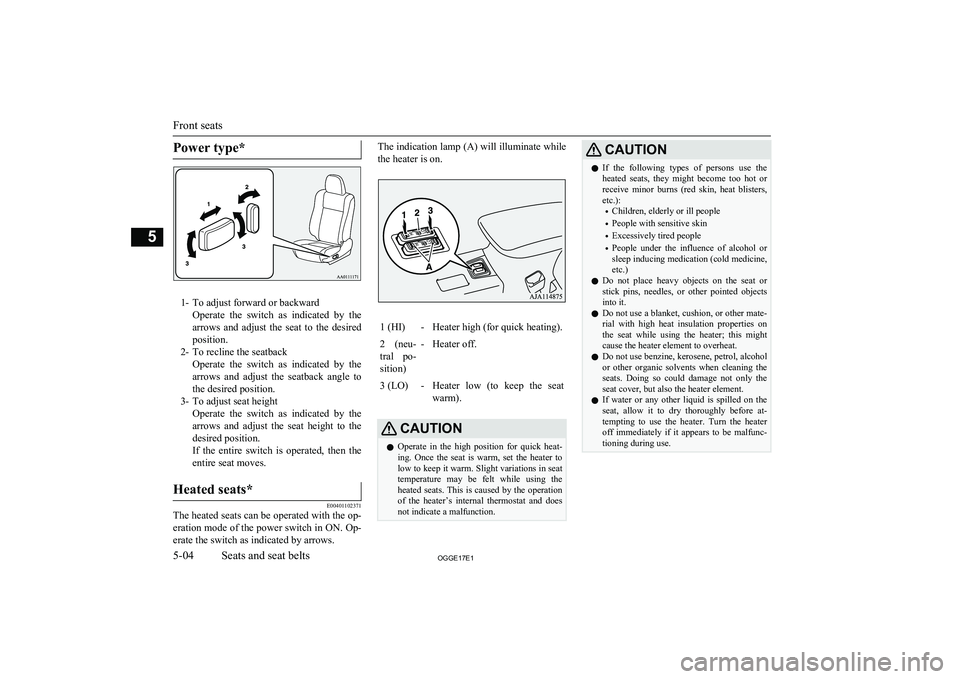
Power type*
1- To adjust forward or backwardOperate the switch as indicated by thearrows and adjust the seat to the desired
position.
2- To recline the seatback Operate the switch as indicated by thearrows and adjust the seatback angle to
the desired position.
3- To adjust seat height Operate the switch as indicated by thearrows and adjust the seat height to the
desired position.
If the entire switch is operated, then the entire seat moves.
Heated seats*
E00401102371
The heated seats can be operated with the op-
eration mode of the power switch in ON. Op-
erate the switch as indicated by arrows.
The indication lamp (A) will illuminate while
the heater is on.1 (HI)-Heater high (for quick heating).2 (neu-
tral po- sition)-Heater off.3 (LO)-Heater low (to keep the seat warm).CAUTIONl Operate in the high position for quick heat-
ing. Once the seat is warm, set the heater to low to keep it warm. Slight variations in seat
temperature may be felt while using the heated seats. This is caused by the operation
of the heater’s internal thermostat and does not indicate a malfunction.CAUTIONl If the following types of persons use the
heated seats, they might become too hot or receive minor burns (red skin, heat blisters,
etc.):
• Children, elderly or ill people
• People with sensitive skin
• Excessively tired people
• People under the influence of alcohol or
sleep inducing medication (cold medicine, etc.)
l Do not place heavy objects on the seat or
stick pins, needles, or other pointed objects into it.
l Do not use a blanket, cushion, or other mate-
rial with high heat insulation properties on the seat while using the heater; this might
cause the heater element to overheat.
l Do not use benzine, kerosene, petrol, alcohol
or other organic solvents when cleaning the seats. Doing so could damage not only the seat cover, but also the heater element.
l If water or any other liquid is spilled on the
seat, allow it to dry thoroughly before at-tempting to use the heater. Turn the heater
off immediately if it appears to be malfunc-
tioning during use.
Front seats
5-04OGGE17E1Seats and seat belts5
Page 158 of 548
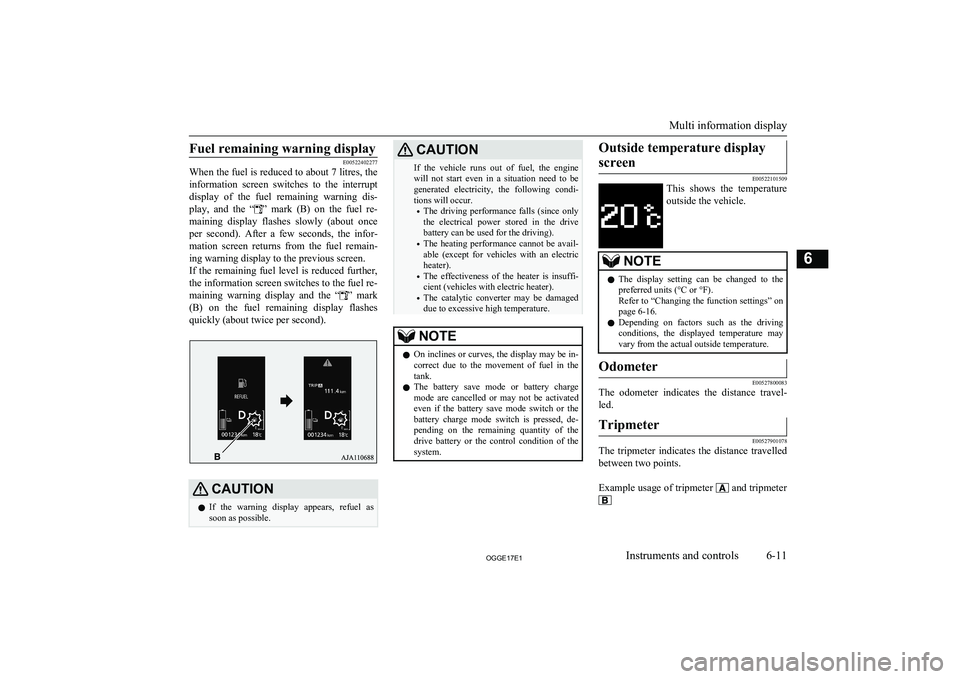
Fuel remaining warning display
E00522402277
When the fuel is reduced to about 7 litres, the
information screen switches to the interruptdisplay of the fuel remaining warning dis-
play, and the “
” mark (B) on the fuel re-
maining display flashes slowly (about once
per second). After a few seconds, the infor- mation screen returns from the fuel remain-
ing warning display to the previous screen.
If the remaining fuel level is reduced further, the information screen switches to the fuel re-
maining warning display and the “
” mark
(B) on the fuel remaining display flashes
quickly (about twice per second).
CAUTIONl If the warning display appears, refuel as
soon as possible.CAUTIONIf the vehicle runs out of fuel, the enginewill not start even in a situation need to be generated electricity, the following condi-
tions will occur.
• The driving performance falls (since only
the electrical power stored in the drive
battery can be used for the driving).
• The heating performance cannot be avail-
able (except for vehicles with an electric
heater).
• The effectiveness of the heater is insuffi-
cient (vehicles with electric heater).
• The catalytic converter may be damaged
due to excessive high temperature.NOTEl On inclines or curves, the display may be in-
correct due to the movement of fuel in the
tank.
l The battery save mode or battery charge
mode are cancelled or may not be activated
even if the battery save mode switch or the battery charge mode switch is pressed, de-
pending on the remaining quantity of the drive battery or the control condition of the
system.Outside temperature display
screen
E00522101509
This shows the temperature
outside the vehicle.
NOTEl The display setting can be changed to the
preferred units (°C or °F).
Refer to “Changing the function settings” on page 6-16.
l Depending on factors such as the driving
conditions, the displayed temperature may vary from the actual outside temperature.Odometer
E00527800083
The odometer indicates the distance travel-
led.
Tripmeter
E00527901078
The tripmeter indicates the distance travelled between two points.
Example usage of tripmeter
and tripmeter
Multi information display
6-11OGGE17E1Instruments and controls6
Page 178 of 548
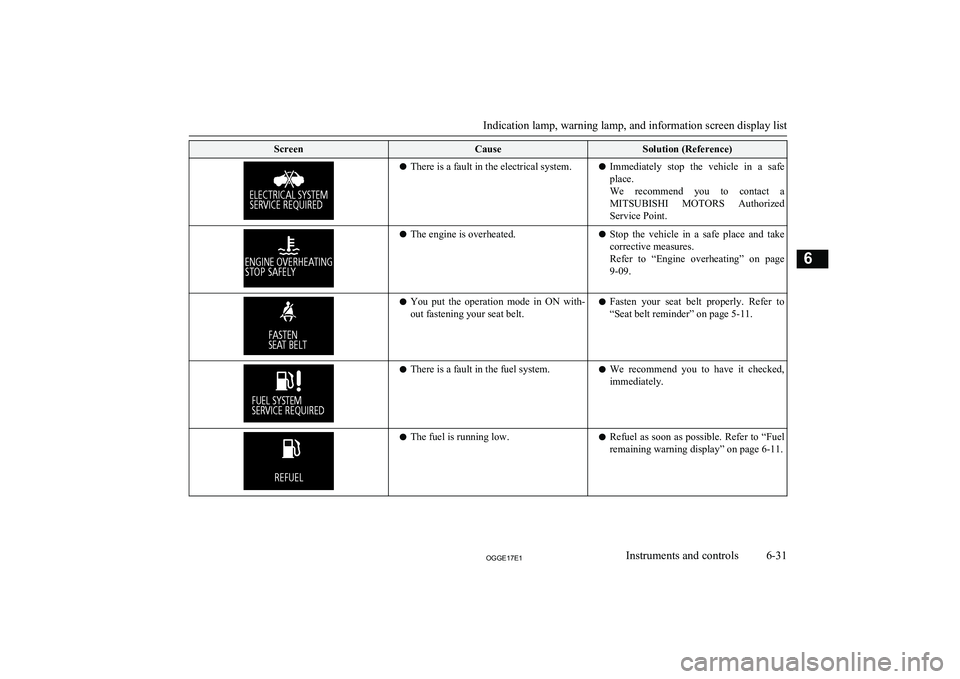
ScreenCauseSolution (Reference)lThere is a fault in the electrical system.l Immediately stop the vehicle in a safe
place.
We recommend you to contact a MITSUBISHI MOTORS Authorized
Service Point.l The engine is overheated.lStop the vehicle in a safe place and take
corrective measures.
Refer to “Engine overheating” on page 9-09.l You put the operation mode in ON with-
out fastening your seat belt.l Fasten your seat belt properly. Refer to
“Seat belt reminder” on page 5-11.l There is a fault in the fuel system.l We recommend you to have it checked,
immediately.l The fuel is running low.lRefuel as soon as possible. Refer to
“Fuel
remaining warning display” on page 6-11.
Indication lamp, warning lamp, and information screen display list
6-31OGGE17E1Instruments and controls6
Page 215 of 548

NOTElThe rear window wiper will automatically
perform several continuous operations if theselector lever is put in the “R” position while
the windscreen wipers or the rear window wiper is operating. (automatic operation
mode)
After the automatic operation, the rear win- dow wiper will stop operating if the knob is
in the “OFF” position. If the knob is in the “INT” position, the rear window wiper will
return to the intermittent operation.
It is possible to set the rear window wiper to perform the automatic operation only if theselector lever is put in the “R” position while
the rear window wiper is operating with the
knob in the “INT” position.
For further information, we recommend you
to consult a MITSUBISHI MOTORS Au-
thorized Service Point.
On vehicles equipped with the Smartphone
Link Display Audio or the MITSUBISHI
Multi-Communication System (MMCS), screen operations can be used to make theadjustment.
Refer to the separate owner’s manual for de-
tails.
l If the knob is in the “OFF” position, turn the
knob to the “INT” position twice quickly to
operate the rear window wiper continuously. (continuous operation mode)
Turn the knob to the “OFF” position to stop
the rear window wiper continuous operation.NOTEl The interval for intermittent operation can be
adjusted.
For further information, we recommend you to consult a MITSUBISHI MOTORS Au-
thorized Service Point.
On vehicles equipped with the Smartphone Link Display Audio or the MITSUBISHI
Multi-Communication System (MMCS), screen operations can be used to make theadjustment. Refer to the separate owner’s
manual for details.Headlamp washer switch
E00510101658
The headlamp washer can be operated with
the operation mode in ON or ACC and the lamp switch at the “
” position.
Push the button once and the washer fluid will be sprayed on to the headlamps.
NOTEl If the operation mode is in ON or ACC and
the headlamps are on, the headlamp washer operates together with the windscreen wash-
er the first time the windscreen washer lever is pulled.Precautions to observe when
using wipers and washers
E00507601327
l If the moving wipers become blocked
partway through a sweep by ice or other deposits on the glass, the wipers maytemporarily stop operating to prevent the
motor from overheating. In this case,
park the vehicle in a safe place, put the operation mode in OFF, and then re-
move the ice or other deposits.
The wipers will start operating again af- ter the wiper motor cools down, so
check that the wipers operate before us- ing them.
l Do not use the wipers when the glass is
dry.
They may scratch the glass surface and the blades wear out prematurely.
l Before using the wipers in cold weather,
check that the wiper blades are not fro-
zen onto the glass. The motor may burn out if the wipers are used with the blades
frozen onto the glass.
Wiper and washer switch
6-68OGGE17E1Instruments and controls6
Page 218 of 548
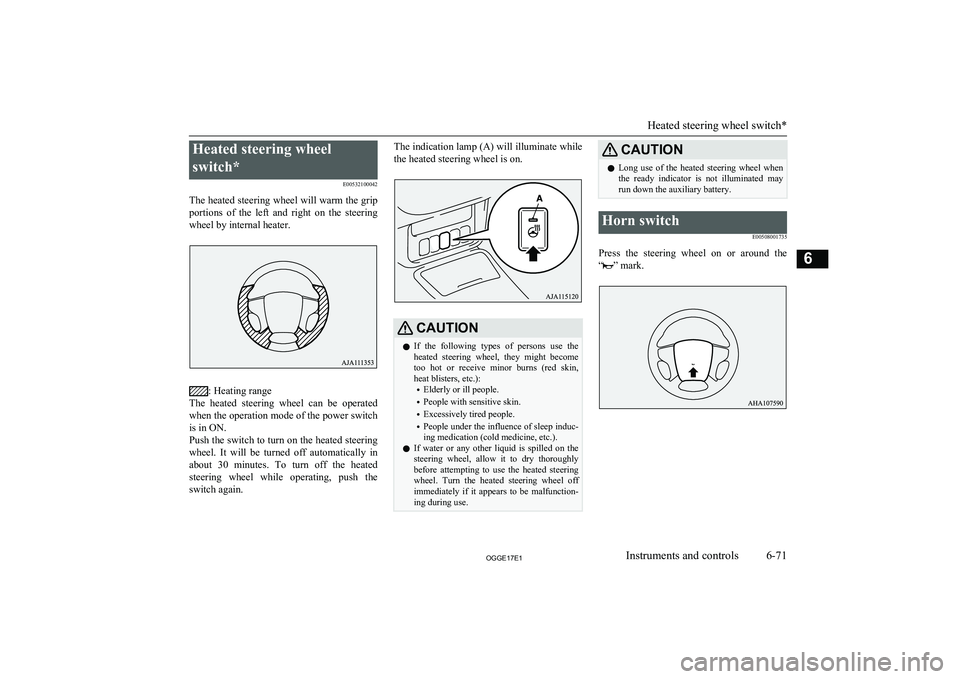
Heated steering wheel
switch* E00532100042
The heated steering wheel will warm the grip portions of the left and right on the steering
wheel by internal heater.
: Heating range
The heated steering wheel can be operated
when the operation mode of the power switch
is in ON.
Push the switch to turn on the heated steering
wheel. It will be turned off automatically in about 30 minutes. To turn off the heated
steering wheel while operating, push the
switch again.
The indication lamp (A) will illuminate while
the heated steering wheel is on.CAUTIONl If the following types of persons use the
heated steering wheel, they might become too hot or receive minor burns (red skin,
heat blisters, etc.):
• Elderly or ill people.
• People with sensitive skin.
• Excessively tired people.
• People under the influence of sleep induc-
ing medication (cold medicine, etc.).
l If water or any other liquid is spilled on the
steering wheel, allow it to dry thoroughly
before attempting to use the heated steering
wheel. Turn the heated steering wheel off
immediately if it appears to be malfunction- ing during use.CAUTIONl Long use of the heated steering wheel when
the ready indicator is not illuminated may run down the auxiliary battery.Horn switch
E00508001735
Press the steering wheel on or around the
“
” mark.
Heated steering wheel switch*
6-71OGGE17E1Instruments and controls6
Page 221 of 548
Economical drivingE00600102422
For economical driving, there are some tech- nical requirements that have to be met. Theprerequisite for low fuel consumption is a
properly adjusted engine. In order to achieve longer life of the vehicle and the most eco- nomical operation, we recommend you tohave the vehicle checked at regular intervals in accordance with the service standards.
Fuel economy and generation of exhaust gas
and noise are highly influenced by personal
driving habits as well as the particular operat- ing conditions. The following points shouldbe observed in order to minimize wear of
brakes, tyres and engine as well as to reduce
environmental pollution.
Starting and acceleration
Avoid driving when the accelerator pedal ispressed way down, such as for unnecessarily sudden starts, acceleration and deceleration.
Smoothly depress the accelerator pedal.
Observe the speed limit and keep the speed
as constant as possible while driving.
Idling
Parking for a long period with the ready indi-
cator illuminated will shorten the cruising
range.
Speed
The higher the vehicle speed, the more drive
battery is consumed. Avoid driving at full speed. Even a slight release of the accelerator
pedal will save a significant amount of drive battery.
Tyre inflation pressure
Check the tyre inflation pressures at regular intervals. Low tyre inflation pressure increa-ses road resistance and fuel consumption. In addition, low tyre pressures adversely affect
tyre wear and driving stability.
Cargo loads
Do not drive with unnecessary articles in the
luggage compartment. Especially during city
driving where frequent starting and stopping is necessary, the increased weight of the ve-
hicle will greatly affect fuel consumption. Al- so avoid driving with unnecessary luggage or carriers, etc., on the roof; the increased air re- sistance will increase fuel consumption.
Air conditioning
Too much cooling/heating can affect the cruising range, so maintain an appropriatetemperature to extend the cruising range.
Driving, alcohol and drugs
E00600200070
Driving after drinking alcohol is one of the
most frequent causes of accidents.
Your driving ability can be seriously im- paired even with blood alcohol levels far be-
low the legal minimum. If you have been drinking, don’t drive. Ride with a designated non-drinking driver, call a cab or a friend, or
use public transportation. Drinking coffee or
taking a cold shower will not make you so- ber.
Similarly, prescription and nonprescription
drugs affect your alertness, perception and re- action time. Consult with your doctor or
pharmacist before driving while under the in- fluence of any of these medications.WARNINGl NEVER DRINK AND DRIVE.
Your perceptions are less accurate, your
reflexes are slower and your judgment is impaired.Safe driving techniques
E00600301775
Driving safety and protection against injury
cannot be fully ensured. However, we recom- mend that you pay extra attention to the fol-
lowing:
Economical driving
7-02OGGE17E1Starting and driving7
Page 223 of 548
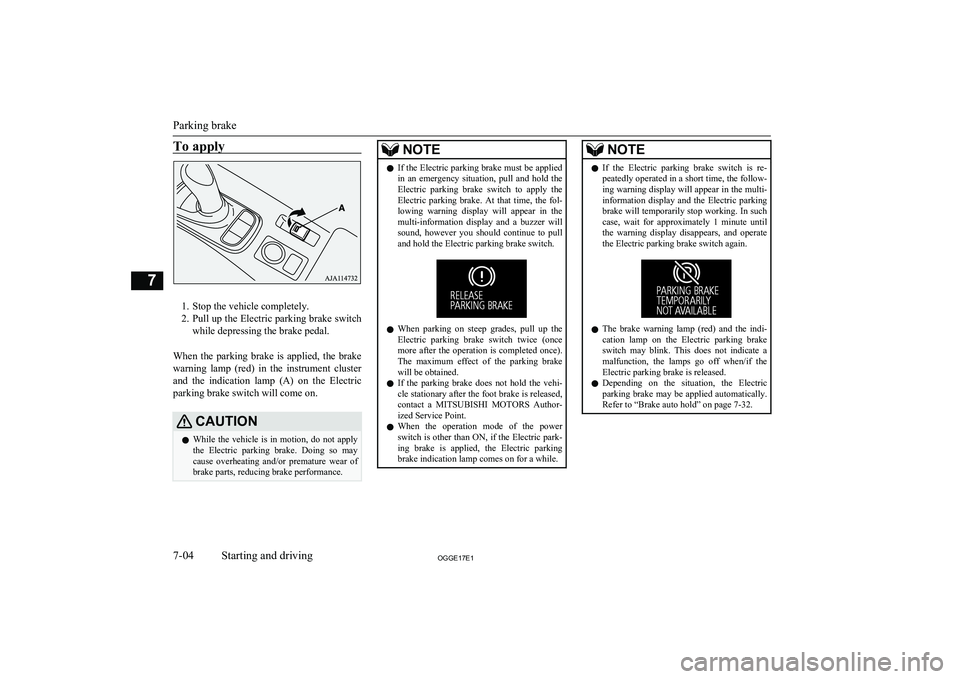
To apply
1. Stop the vehicle completely.
2. Pull up the Electric parking brake switch
while depressing the brake pedal.
When the parking brake is applied, the brake
warning lamp (red) in the instrument cluster and the indication lamp (A) on the Electric
parking brake switch will come on.
CAUTIONl While the vehicle is in motion, do not apply
the Electric parking brake. Doing so may cause overheating and/or premature wear of
brake parts, reducing brake performance.NOTEl If the Electric parking brake must be applied
in an emergency situation, pull and hold the
Electric parking brake switch to apply the
Electric parking brake. At that time, the fol- lowing warning display will appear in the
multi-information display and a buzzer will
sound, however you should continue to pull and hold the Electric parking brake switch.
l When parking on steep grades, pull up the
Electric parking brake switch twice (once
more after the operation is completed once).
The maximum effect of the parking brake will be obtained.
l If the parking brake does not hold the vehi-
cle stationary after the foot brake is released,
contact a MITSUBISHI MOTORS Author-
ized Service Point.
l When the operation mode of the power
switch is other than ON, if the Electric park- ing brake is applied, the Electric parking
brake indication lamp comes on for a while.
NOTEl If the Electric parking brake switch is re-
peatedly operated in a short time, the follow-
ing warning display will appear in the multi- information display and the Electric parkingbrake will temporarily stop working. In such
case, wait for approximately 1 minute until
the warning display disappears, and operate the Electric parking brake switch again.
l The brake warning lamp (red) and the indi-
cation lamp on the Electric parking brakeswitch may blink. This does not indicate a malfunction, the lamps go off when/if theElectric parking brake is released.
l Depending on the situation, the Electric
parking brake may be applied automatically.
Refer to “Brake auto hold” on page 7-32.
Parking brake
7-04OGGE17E1Starting and driving7