length MITSUBISHI OUTLANDER PHEV 2017 Owner's Manual (in English)
[x] Cancel search | Manufacturer: MITSUBISHI, Model Year: 2017, Model line: OUTLANDER PHEV, Model: MITSUBISHI OUTLANDER PHEV 2017Pages: 548, PDF Size: 25.5 MB
Page 43 of 548
Modification/alterations tothe electrical or fuel systems E00200400368
MITSUBISHI MOTORS CORPORATION
has always manufactured safe, high quality vehicles. In order to maintain this safety and
quality, it is important that any accessory that is to be fitted, or any modifications carried
out which involve the electrical or fuel sys- tems, should be carried out in accordancewith MITSUBISHI guidelines.CAUTIONl If the wires interfere with the vehicle body
or improper installation methods are used(protective fuses not included, etc.), elec-
tronic devices may be adversely affected, re-
sulting in a fire or other accident.Genuine parts
E00200500499
MITSUBISHI MOTORS has gone to great
lengths to bring you a superbly crafted auto-
mobile offering the highest quality and de- pendability.
Use MITSUBISHI MOTORS GENUINE
Parts, designed and manufactured to maintain your MITSUBISHI MOTORS automobile at
top performance. MITSUBISHI MOTORS
GENUINE Parts are identified by this mark and are available at all MITSUBISHI
MOTORS Authorized Service Points.Safety and disposal
information for used engine
oil E00200601383WARNINGlProlonged and repeated contact may
cause serious skin disorders, including
dermatitis and cancer.
l Avoid contact with the skin as far as pos-
sible and wash thoroughly after any con- tact.
l Keep used engine oils out of reach of chil-
dren.Protect the environment
It is illegal to pollute drains, water courses
and soil. Use authorized waste collection fa-cilities, including civic amenity sites and ga- rages providing facilities for disposal of used
oil and used oil filters. If in doubt, contact your local authority for advice on disposal.
Disposal information for
used batteries E00201301055
Your vehicle contains batter-ies and/or accumulators.
Do not mix with general
household waste.
For proper treatment, recov-
ery and recycling of used
batteries, please take them to applicable col-
lection points, in accordance with your na- tional legislation and the Directives 2006/66/EC.
By disposing of these batteries correctly, you
will help to save valuable resources and pre-
vent any potential negative effects on human
health and the environment which could oth- erwise arise from inappropriate waste han- dling.
Modification/alterations to the electrical or fuel systems
2-18OGGE17E1General information2
Page 119 of 548
WARNINGlSeat belts should always be worn by every
adult who drives or rides in this vehicle,
and by all children who are tall enough to wear seat belts properly.
Other children should always use proper child restraint systems.
l Always place the shoulder belt over your
shoulder and across your chest. Never put
it behind you or under your arm.
l One seat belt should be used by only one
person. Doing otherwise can be danger-
ous.
l The seat belt will provide its wearer with
maximum protection if the recliner seat-
back is placed in fully upright position.
When the seatback is reclined, there is greater risk that the passenger will slide
under the belt, especially in a forward im-
pact accident, and may be injured by the
belt or by striking the instrument panel or seatbacks.
l Remove any twists when using the belt.
l No modifications or additions should be
made by the user which will either pre- vent the seat belt adjusting devices fromoperating to remove slack, or prevent the
seat belt assembly from being adjusted to
remove slack.
l Never hold a child in your arms or on
your lap when riding in this vehicle, even
if you are wearing your seat belt. To do so risks severe or fatal injury to the child in
a collision or sudden stop.WARNINGl Always adjust the belt to a snug fit.
l Always wear the lap portion of the belt
over your hips.3-point type seat belt (with
emergency locking mechanism)
E00404902918
This type of belt requires no length adjust- ment. Once worn, the belt adjusts itself to the
movement of the wearer, but in the event of a sudden or strong shock, the belt automatical-
ly locks to hold the wearer’s body.
NOTEl You can check if the belt locks by pulling it
forward quickly.
l If the seat belt buckles in the rear seating po-
sition are not found, you will find them un-
der the rear seat cushion. Refer to “Making a
luggage area” on page 5-07 for how to put
the seat belt buckles at the proper position.
To fasten
1. Pull the seat belt out slowly while hold-
ing the latch plate.
NOTEl When the seat belts cannot be pulled out in a
locked condition, pull the belts once force-
fully and then return them. After that, pull
the belts out slowly once again.
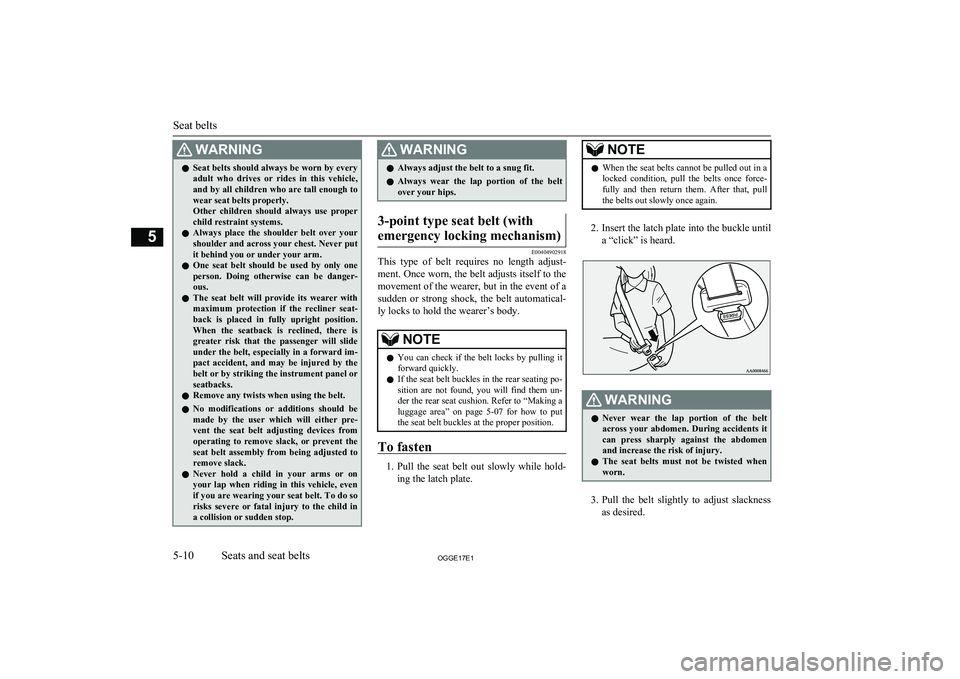
2. Insert the latch plate into the buckle until
a “click” is heard.
WARNINGl Never wear the lap portion of the belt
across your abdomen. During accidents it
can press sharply against the abdomen and increase the risk of injury.
l The seat belts must not be twisted when
worn.
3. Pull the belt slightly to adjust slackness
as desired.
Seat belts
5-10OGGE17E1Seats and seat belts5
Page 135 of 548
NOTElIf it is difficult to latch the tether strap hook
in the rear seat, turn the hook sideways.
6. Push and pull the child restraint system in
all directions to be sure it is secure.
To remove
Remove the child restraint system in accord-ance with the instructions provided by the
child restraint system’s manufacturer.
Installing a child restraint sys-
tem to a 3-point type seat belt (with emergency locking mech-anism)
E00408701816
Installation:
1. Put a child restraint system on the seat in
which you wish to install it, and remove
the head restraint from the seat.
Refer to “Head restraints” on page 5-05.
2. When installing a child restraint system
in the front passenger seat, adjust seat slide to its most rearward position and
adjust the front seatback angle to 2 steps
rearward from the first locking position.
3. Route the belt through the child restraint
according to the child restraint system manufacturer’s instructions, then insert
the latch plate into the buckle.
4. Remove all slack of a lap belt by pulling
the webbing through the belt’s adjust-
ment feature.
3-point type seat belt requires no length adjustment, remove all slack by usingthe locking clip.
5. If your child restraint system has a sup-
port leg, make sure that there is a sup-
port leg at the stable position on the
floor.
6. Before putting the child in the restraint,
push and pull the restraint in all direc- tions to be sure it is secure. Do this be-
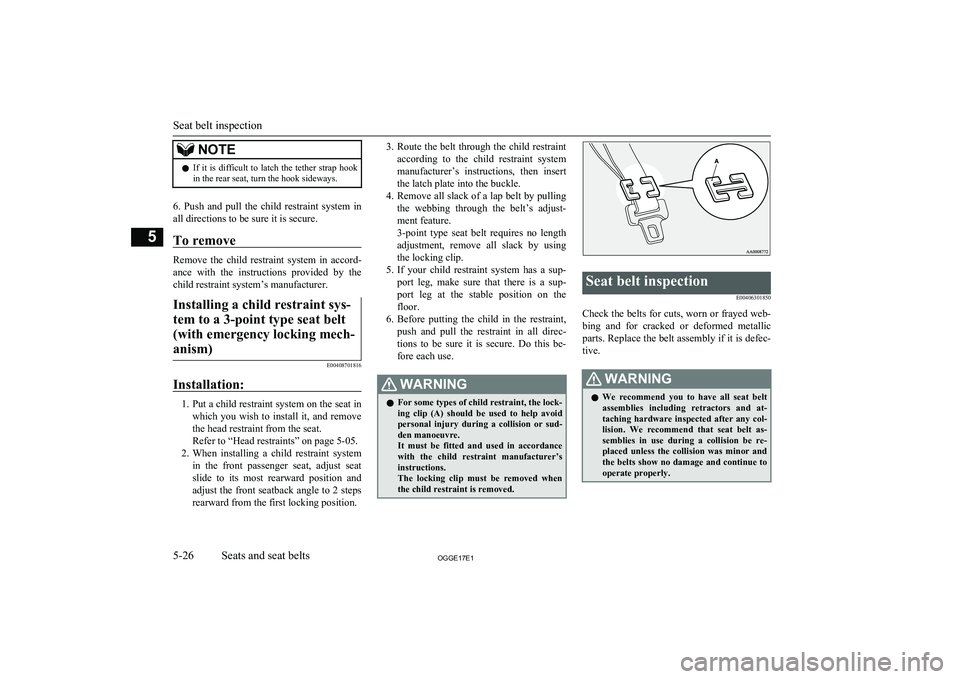
fore each use.WARNINGl For some types of child restraint, the lock-
ing clip (A) should be used to help avoid
personal injury during a collision or sud- den manoeuvre.
It must be fitted and used in accordance with the child restraint manufacturer’s
instructions.
The locking clip must be removed when the child restraint is removed.Seat belt inspection
E00406301850
Check the belts for cuts, worn or frayed web-bing and for cracked or deformed metallic
parts. Replace the belt assembly if it is defec-
tive.
WARNINGl We recommend you to have all seat belt
assemblies including retractors and at-
taching hardware inspected after any col- lision. We recommend that seat belt as-
semblies in use during a collision be re- placed unless the collision was minor and
the belts show no damage and continue to operate properly.
Seat belt inspection
5-26OGGE17E1Seats and seat belts5
Page 291 of 548
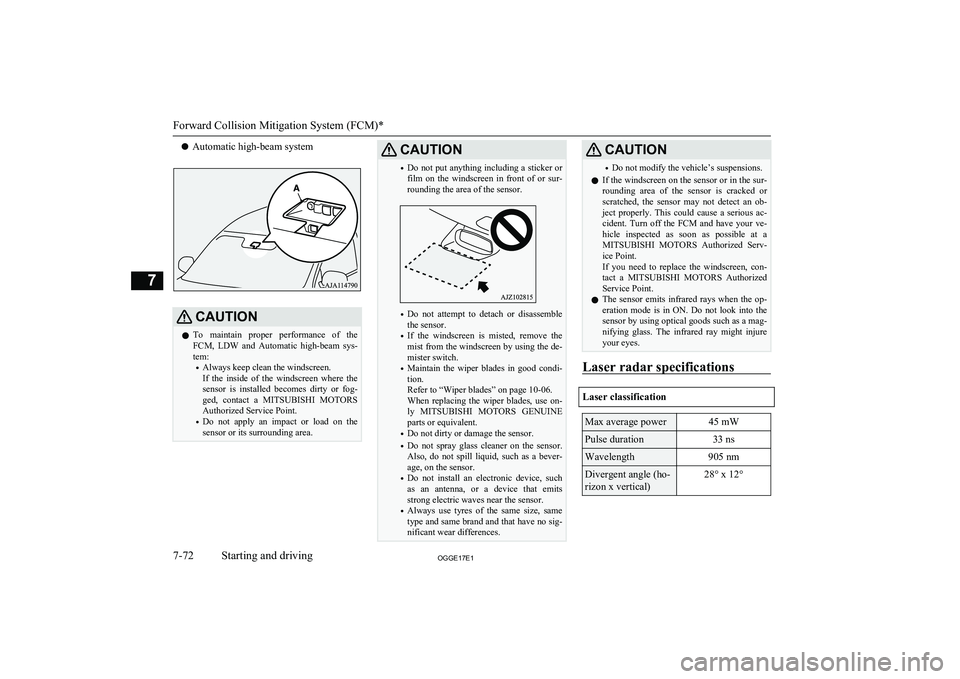
lAutomatic high-beam systemCAUTIONl To maintain proper performance of the
FCM, LDW and Automatic high-beam sys-tem:
• Always keep clean the windscreen.
If the inside of the windscreen where the
sensor is installed becomes dirty or fog- ged, contact a MITSUBISHI MOTORS
Authorized Service Point.
• Do not apply an impact or load on the
sensor or its surrounding area.CAUTION• Do not put anything including a sticker or
film on the windscreen in front of or sur- rounding the area of the sensor.
• Do not attempt to detach or disassemble
the sensor.
• If the windscreen is misted, remove the
mist from the windscreen by using the de-
mister switch.
• Maintain the wiper blades in good condi-
tion.
Refer to “Wiper blades” on page 10-06.
When replacing the wiper blades, use on-
ly MITSUBISHI MOTORS GENUINE
parts or equivalent.
• Do not dirty or damage the sensor.
• Do not spray glass cleaner on the sensor.
Also, do not spill liquid, such as a bever-
age, on the sensor.
• Do not install an electronic device, such
as an antenna, or a device that emits
strong electric waves near the sensor.
• Always use tyres of the same size, same
type and same brand and that have no sig-
nificant wear differences.
CAUTION• Do not modify the vehicle’s suspensions.
l If the windscreen on the sensor or in the sur-
rounding area of the sensor is cracked or scratched, the sensor may not detect an ob-ject properly. This could cause a serious ac-cident. Turn off the FCM and have your ve-
hicle inspected as soon as possible at a
MITSUBISHI MOTORS Authorized Serv-
ice Point.
If you need to replace the windscreen, con-
tact a MITSUBISHI MOTORS Authorized
Service Point.
l The sensor emits infrared rays when the op-
eration mode is in ON. Do not look into the
sensor by using optical goods such as a mag-
nifying glass. The infrared ray might injure your eyes.
Laser radar specifications
Laser classification
Max average power45 mWPulse duration33 nsWavelength905 nmDivergent angle (ho-
rizon x vertical)28° x 12°
Forward Collision Mitigation System (FCM)*
7-72OGGE17E1Starting and driving7
Page 399 of 548
NOTElThe hands-free calls might not be operated
correctly when it makes calling or receiving
by operating the cellular phone directly.To make a call
E00761200148
You can make a call in the following 3 ways
using the Bluetooth ®
2.0 interface:
Making a call by saying a telephone number,
making a call using the Bluetooth ®
2.0 inter-
face’s phone book, and making a call by re-
dialing.
Making a call by using the telephone num-
ber
You can make a call by saying the telephone number. 1. Press the SPEECH button.
2. Say “Dial.”
3. After the voice guide says “Number
please,” say the telephone number.
4. The voice guide will say “Dialing
The Bluetooth ®
2.0 interface will then
make the call.
When the confirmation function is on, the system will confirm again the tele- phone number. To continue with that
number, answer “Yes.”
To change the telephone number, answer
“No.” The system will say “Number please” then say the telephone number
again.NOTEl In the case of English, the system will recog-
nise both “zero” and “oh” (Letter “o”) for the number “0.”
l The Bluetooth ®
2.0 interface supports num-
bers (0 to 9) and characters (+, # and*).
l The maximum supported telephone number
length is as follows:
• International telephone number: + and tel-
ephone numbers (to 18 digits).
• Except for international telephone num-
ber: telephone numbers (to 19 digits).
Making a call using a phone book
You can make calls using the vehicle phone
book or mobile phone book of the Blue-
tooth ®
2.0 interface.
For details on the phone books, refer to
“Phone book function” on page 8-64. 1. Press the SPEECH button.
2. Say “Call.”
NOTEl If you say “Call” when the vehicle phone
book and the mobile phone book are empty, the voice guide will say “The vehicle phone book is empty. Would you like to add a new
entry now?”
Answer “Yes,” and the voice guide will say “Entering the phone book - new entry
menu.” You can now create data in the vehi- cle phone book.
Answer “No,” to return to the main menu.
3. After the voice guide says “Name
please,” say the name you want to call, from those registered in the phone book.
4. If there is only one match, the system
proceeds to Step 5.
If there are two or more matches, the
voice guide will say “More than one match was found, would you like to call
one you want to call, answer “Yes.”
Answer “No,” and the name of the next matching person will be uttered by the
voice guide.
NOTEl If you say “No” to all names read by the sys-
tem, the voice guide will say “Name not found, returning to main menu” and the sys-
tem will return to the main menu.
Bluetooth ®
2.0 interface*
8-62OGGE17E1For pleasant driving8
Page 402 of 548
6.The voice guide will say “Number
please.” Say the telephone number to register it.NOTEl In the case of English, the system will recog-
nise both “zero” and “oh” (Letter “o”) for the number “0.”
7. The voice guide will repeat the tele-
phone number you have just read, and
then register the number.
When the telephone number has been registered, the voice guide will say
“Number saved. Would you like to add
another number for this entry?”
To add another telephone number for a
new location for the current entry, an-
swer “Yes.” The system will return to location selection in Step 5.
Answer “No” to end the registration process and return to the main menu.
NOTEl When the confirmation function is on, after
repeating the telephone number you have
read, the voice guide will ask “Is this cor- rect?” Answer “Yes.”
Answer “No” to return to telephone number registration in step 6.To select and transfer one phone book en-
try from the phone book of the cellular
phone
You can select 1 phone book entry from the phone book of the cellular phone and register
it in the vehicle phone book.
NOTEl Transfer is not permitted unless the vehicle
is parked. Before transferring, make sure
that the vehicle is parked in a safe location.
l All or part of data may not be transferred,
even when the cellular phone supports Blue-
tooth ®
, depending on the compatibility of
the device.
l The maximum supported telephone number
length is 19 digits. Any telephone number of
20 digits or more will be truncated to the
first 19 digits.
l If telephone numbers contain characters oth-
er than 0 to 9, *, # or +, these characters are deleted before the transfer.
l For the connection settings on the cellular
phone side, refer to the instructions for the
cellular phone.
1. Press the SPEECH button.
2. Say “Phone book.”
3. The voice guide will say “Select one of
the following: new entry, edit number, edit name, list names, delete, erase all, or
import contact.” Say “Import contact.”
4. The voice guide will say “Would you
like to import a single entry or all con-
tacts?” Say “Single entry.”
The Bluetooth ®
2.0 interface will be-
come ready to receive transferred phone book data.NOTEl If the maximum number of entries are al-
ready registered, the voice guide will say“The phone book is full. Would you like to
delete a name?” Say “Yes” if you want to
delete a registered name.
Say “No,” to return to the main menu.
5. After the voice guide says “Ready to re-
ceive a contact from the phone. Only a home, a work, and a mobile number can
be imported,” the Bluetooth ®
2.0 inter-
face will receive the phone book data
from the Bluetooth ®
compatible cellular
phone.
6. Operate the Bluetooth ®
compatible cel-
lular phone to set it up so that the phone
book entry you want to register in the
vehicle phone book can be transferred to
the Bluetooth ®
2.0 interface.
Bluetooth ®
2.0 interface*
8-65OGGE17E1For pleasant driving8
Page 406 of 548
Up to 7 mobile phone books, each containing
up to 1,000 names, can be registered.
The Bluetooth ®
2.0 interface automatically
converts from text to voice the names regis- tered in the transferred phone book entries,
and creates names.NOTEl Only the mobile phone book transferred
from the connected cellular phone can be
used with that cellular phone.
l You cannot change the names and telephone
numbers in the phone book entries registered
in the mobile phone book. You cannot select and delete specific phone book entries, ei- ther. To change or delete any of the above,
change the applicable information in the source phone book of the cellular phone and
then transfer the phone book again.
To import a devices phone book
Follow the steps below to transfer to the mo-
bile phone book the phone book stored in the
cellular phone.
NOTEl Transfer should be completed while the ve-
hicle is parked. Before transferring, makesure that the vehicle is parked in a safe loca-
tion.NOTEl The already stored phone book in the mobile
phone book is overwritten by the storedphone book in the cellular phone.
l All or part of data may not be transferred,
even when the cellular phone supports Blue-
tooth ®
, depending on the compatibility of
the device.
l Only a home, a work, and a mobile number
can be imported.
l The maximum supported telephone number
length is 19 digits. Any telephone number of
20 digits or more will be truncated to the first 19 digits.
l If telephone numbers contain characters oth-
er than 0 to 9, *, # or +, these characters aredeleted before the transfer.
l For the connection settings on the cellular
phone side, refer to the instructions for the
cellular phone.
1. Press the SPEECH button.
2. Say “Phone book.”
3. The voice guide will say “Select one of
the following: new entry, edit number, edit name, list names, delete, erase all, or
import contact.” Say “Import contact.”
4. The voice guide will say “Would you
like to import a single entry or all con-
tacts?” Say “All contacts.”
5. The voice guide will say “Importing the
contact list from the mobile phone book. This may take several minutes to com-
plete. Would you like to continue?” An-
swer “Yes,” transferring to the mobile
phone book the phone book stored in the cellular phone will start.
Answer “No,” to return to the main menu.NOTEl The transfer may take some time to com-
plete depending on the number of contacts.
l If the Bluetooth ®
2.0 interface could not be
connected to the Bluetooth ®
compatible cel-
lular phone, the voice guide will say “Un- able to transfer contact list from phone” and
then the system will return to the main menu.
l If you press the
HANG-UP button or press
and hold the SPEECH button during the data
transfer, the transfer will be cancelled and
the system will return to the main menu.
l If an error occurs during the data transfer, all
transfer will be cancelled and the voice
guide will say “Unable to complete the phone book import” and then the system willreturn to the main menu.
l If there are no contacts in the phone book,
the voice guide will say “There are no con- tacts on the connected phone.”
6. When the transfer is complete, the voice
guide will say “Import complete” and then the system will return to the main
menu.
Bluetooth ®
2.0 interface*
8-69OGGE17E1For pleasant driving8
Page 438 of 548
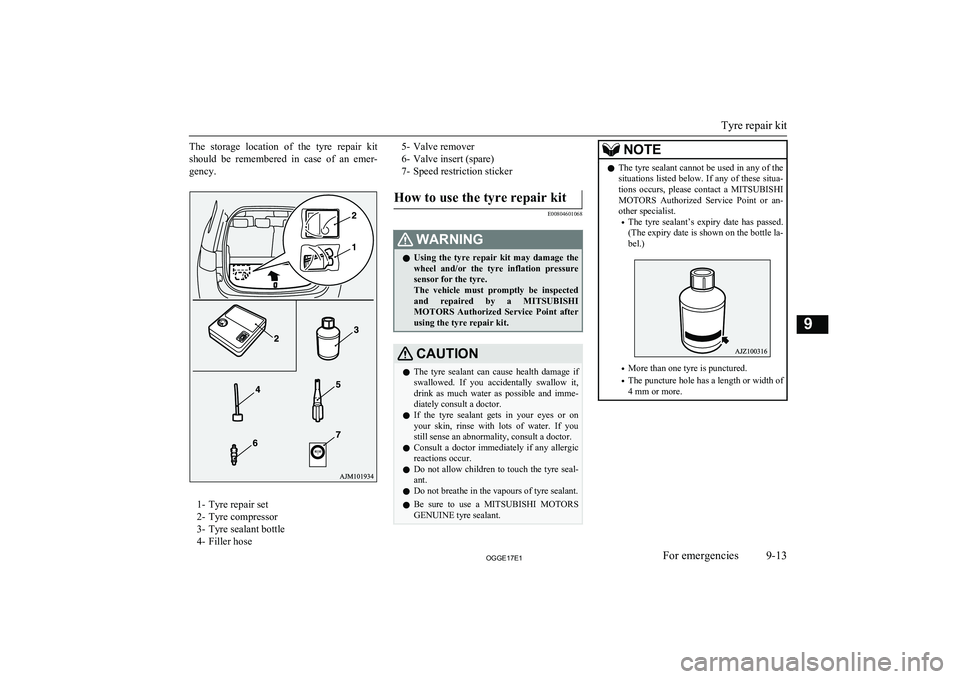
The storage location of the tyre repair kit
should be remembered in case of an emer- gency.
1- Tyre repair set
2- Tyre compressor
3- Tyre sealant bottle
4- Filler hose
5- Valve remover
6- Valve insert (spare)
7- Speed restriction stickerHow to use the tyre repair kit
E00804601068
WARNINGl Using the tyre repair kit may damage the
wheel and/or the tyre inflation pressure
sensor for the tyre.
The vehicle must promptly be inspected and repaired by a MITSUBISHI
MOTORS Authorized Service Point after
using the tyre repair kit.CAUTIONl The tyre sealant can cause health damage if
swallowed. If you accidentally swallow it,
drink as much water as possible and imme-
diately consult a doctor.
l If the tyre sealant gets in your eyes or on
your skin, rinse with lots of water. If you still sense an abnormality, consult a doctor.
l Consult a doctor immediately if any allergic
reactions occur.
l Do not allow children to touch the tyre seal-
ant.
l Do not breathe in the vapours of tyre sealant.
l Be sure to use a
MITSUBISHI MOTORS
GENUINE tyre sealant.NOTEl The tyre sealant cannot be used in any of the
situations listed below. If any of these situa-
tions occurs, please contact a MITSUBISHI
MOTORS Authorized Service Point or an-
other specialist.
• The tyre sealant’s expiry date has passed.
(The expiry date is shown on the bottle la- bel.)
• More than one tyre is punctured.
• The puncture hole has a length or width of
4 mm or more.
Tyre repair kit
9-13OGGE17E1For emergencies9
Page 467 of 548
The concentration should be checked beforethe start of cold weather and anti-freeze add-
ed to the system if necessary.Washer fluid
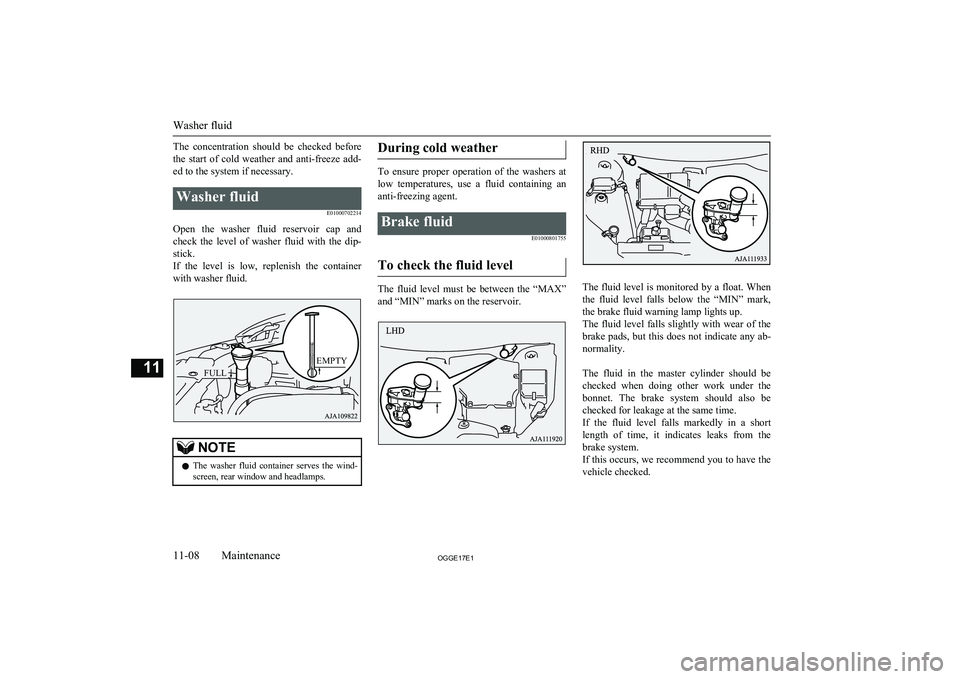
E01000702214
Open the washer fluid reservoir cap andcheck the level of washer fluid with the dip- stick.
If the level is low, replenish the container with washer fluid.
NOTEl The washer fluid container serves the wind-
screen, rear window and headlamps.During cold weather
To ensure proper operation of the washers at
low temperatures, use a fluid containing ananti-freezing agent.
Brake fluid
E01000801755
To check the fluid level
The fluid level must be between the “MAX”
and “MIN” marks on the reservoir.The fluid level is monitored by a float. When
the fluid level falls below the “MIN” mark, the brake fluid warning lamp lights up.The fluid level falls slightly with wear of the brake pads, but this does not indicate any ab-
normality.
The fluid in the master cylinder should be checked when doing other work under thebonnet. The brake system should also be checked for leakage at the same time.
If the fluid level falls markedly in a short length of time, it indicates leaks from the
brake system.
If this occurs, we recommend you to have the
vehicle checked.
Washer fluid
11-08OGGE17E1Maintenance11FULL
EMPTY
Page 495 of 548
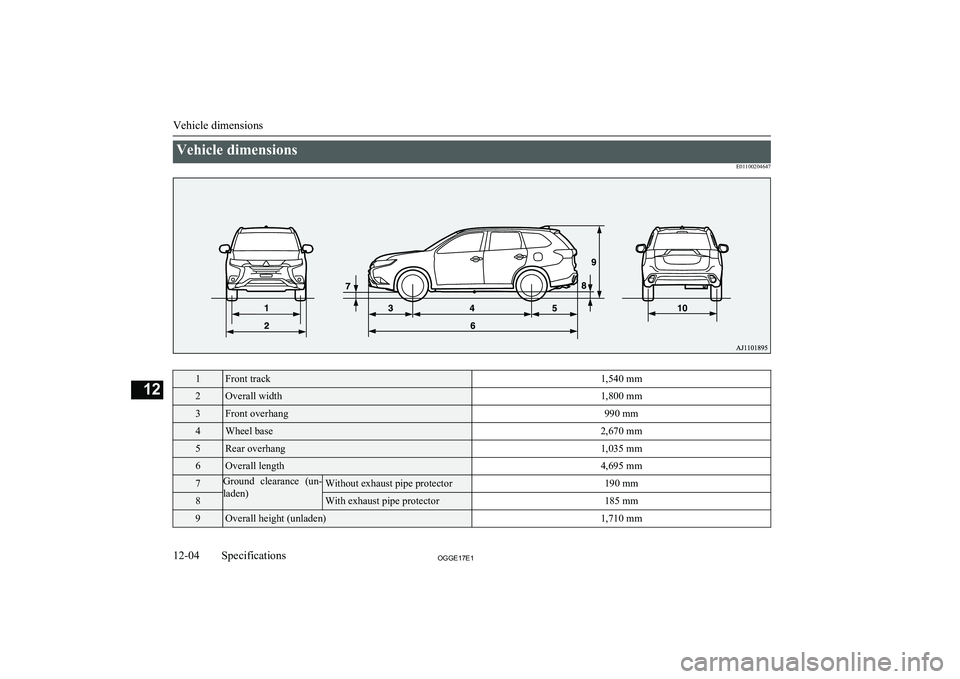
Vehicle dimensionsE011002046471Front track1,540 mm2Overall width1,800 mm3Front overhang990 mm4Wheel base2,670 mm5Rear overhang1,035 mm6Overall length4,695 mm7Ground clearance (un-
laden)Without exhaust pipe protector190 mm8With exhaust pipe protector185 mm9Overall height (unladen)1,710 mm
Vehicle dimensions
12-04OGGE17E1Specifications12