ECO mode MITSUBISHI OUTLANDER PHEV 2018 (in English) Owner's Guide
[x] Cancel search | Manufacturer: MITSUBISHI, Model Year: 2018, Model line: OUTLANDER PHEV, Model: MITSUBISHI OUTLANDER PHEV 2018Pages: 538, PDF Size: 25.01 MB
Page 145 of 538
Instruments.......................................................................................... 6-02
Multi information display................................................................... 6-02
Indication lamp, warning lamp, and information screen display list....................................................................................... 6-21
Indication lamps.................................................................................. 6-47
Warning lamps.................................................................................... 6-48
Information screen display.................................................................. 6-51
Combination headlamps and dipper switch........................................ 6-52
Headlamp levelling............................................................................. 6-59
Turn-signal lever................................................................................. 6-60
Hazard warning flasher switch............................................................6-60 ECO mode switch............................................................................... 6-61
Fog lamp switch.................................................................................. 6-61
Wiper and washer switch.................................................................... 6-62
Wiper de-icer switch*......................................................................... 6-67
Rear window demister switch............................................................. 6-67
Heated windscreen switch*.................................................................6-68 Heated steering wheel switch*............................................................6-69Horn switch......................................................................................... 6-70Instruments and controls
OGGE18E16
Page 146 of 538
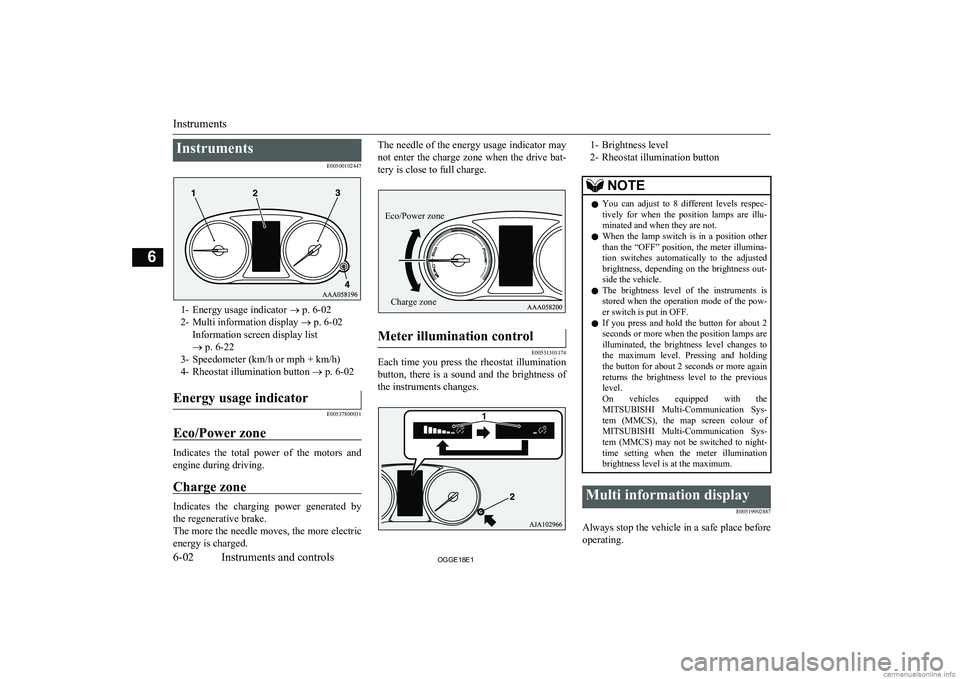
InstrumentsE00500102447
1- Energy usage indicator ® p. 6-02
2- Multi information display ® p. 6-02
Information screen display list
® p. 6-22
3- Speedometer (km/h or mph + km/h)
4- Rheostat illumination button ® p. 6-02
Energy usage indicator
E00537800031
Eco/Power zone
Indicates the total power of the motors and
engine during driving.
Charge zone
Indicates the charging power generated by the regenerative brake.
The more the needle moves, the more electric
energy is charged.
The needle of the energy usage indicator may
not enter the charge zone when the drive bat-tery is close to full charge.Meter illumination control
E00531301174
Each time you press the rheostat illumination
button, there is a sound and the brightness of the instruments changes.
1- Brightness level
2- Rheostat illumination buttonNOTEl You can adjust to 8 different levels respec-
tively for when the position lamps are illu- minated and when they are not.
l When the lamp switch is in a position other
than the “OFF” position, the meter illumina-
tion switches automatically to the adjusted brightness, depending on the brightness out- side the vehicle.
l The brightness level of the instruments is
stored when the operation mode of the pow- er switch is put in OFF.
l If you press and hold the button for about 2
seconds or more when the position lamps are illuminated, the brightness level changes to
the maximum level. Pressing and holding the button for about 2 seconds or more again
returns the brightness level to the previous
level.
On vehicles equipped with the MITSUBISHI Multi-Communication Sys-
tem (MMCS), the map screen colour of MITSUBISHI Multi-Communication Sys-
tem (MMCS) may not be switched to night-
time setting when the meter illumination brightness level is at the maximum.Multi information display
E00519902887
Always stop the vehicle in a safe place beforeoperating.
Instruments
6-02OGGE18E1Instruments and controls6 Eco/Power zoneCharge zone
Page 148 of 538
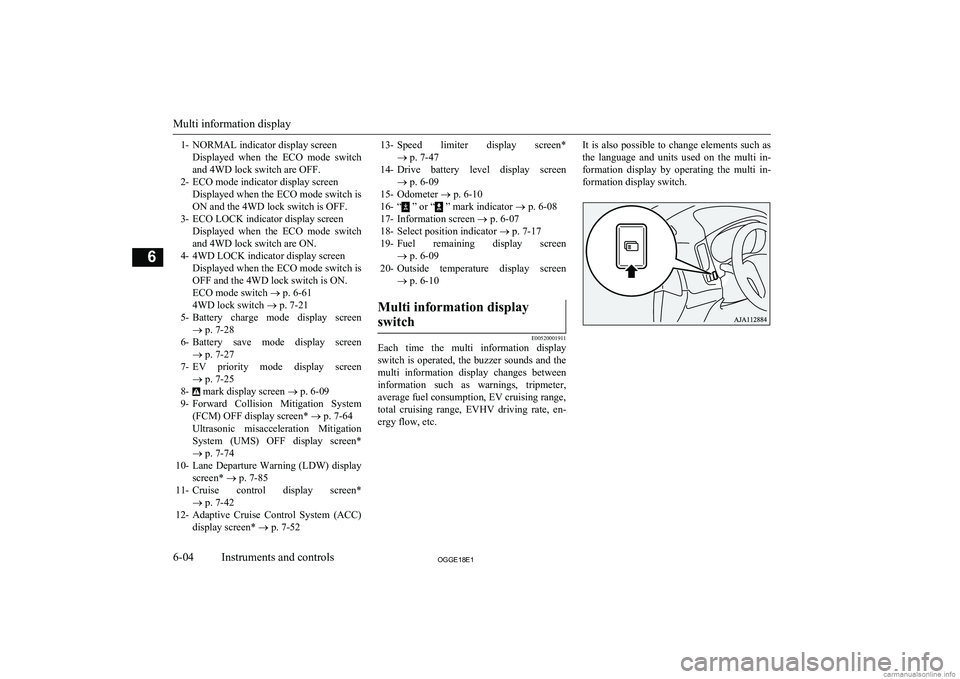
1- NORMAL indicator display screenDisplayed when the ECO mode switchand 4WD lock switch are OFF.
2- ECO mode indicator display screen Displayed when the ECO mode switch isON and the 4WD lock switch is OFF.
3- ECO LOCK indicator display screen Displayed when the ECO mode switchand 4WD lock switch are ON.
4- 4WD LOCK indicator display screen Displayed when the ECO mode switch isOFF and the 4WD lock switch is ON.ECO mode switch ® p. 6-61
4WD lock switch ® p. 7-21
5- Battery charge mode display screen
® p. 7-28
6- Battery save mode display screen
® p. 7-27
7- EV priority mode display screen
® p. 7-25
8-
mark display screen ® p. 6-09
9- Forward Collision Mitigation System
(FCM) OFF display screen* ® p. 7-64
Ultrasonic misacceleration Mitigation System (UMS) OFF display screen*
® p. 7-74
10- Lane Departure Warning (LDW) display
screen* ® p. 7-85
11- Cruise control display screen*
® p. 7-42
12- Adaptive Cruise Control System (ACC)
display screen* ® p. 7-52
13- Speed limiter display screen*
® p. 7-47
14- Drive battery level display screen
® p. 6-09
15- Odometer ® p. 6-10
16- “
” or “ ” mark indicator ® p. 6-08
17- Information screen ® p. 6-07
18- Select position indicator ® p. 7-17
19- Fuel remaining display screen
® p. 6-09
20- Outside temperature display screen
® p. 6-10
Multi information display
switch
E00520001911
Each time the multi information display
switch is operated, the buzzer sounds and the multi information display changes betweeninformation such as warnings, tripmeter,
average fuel consumption, EV cruising range,
total cruising range, EVHV driving rate, en- ergy flow, etc.
It is also possible to change elements such as
the language and units used on the multi in- formation display by operating the multi in- formation display switch.
Multi information display
6-04OGGE18E1Instruments and controls6
Page 149 of 538
Information screen (when the operation mode is OFF)
E00520201968
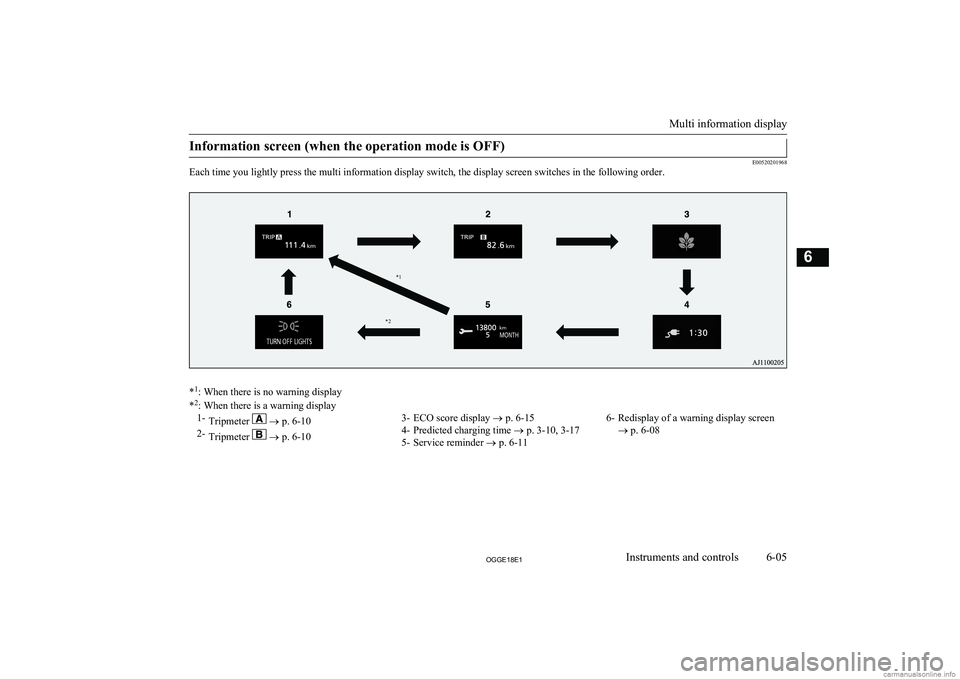
Each time you lightly press the multi information display switch, the display screen switches in the following order.
* 1
: When there is no warning display
* 2
: When there is a warning display
1- Tripmeter ® p. 6-10
2- Tripmeter
® p. 6-10
3- ECO score display ® p. 6-15
4- Predicted charging time ® p. 3-10, 3-17
5- Service reminder ® p. 6-116- Redisplay of a warning display screen
® p. 6-08
Multi information display
6-05OGGE18E1Instruments and controls6* 2*1
Page 151 of 538
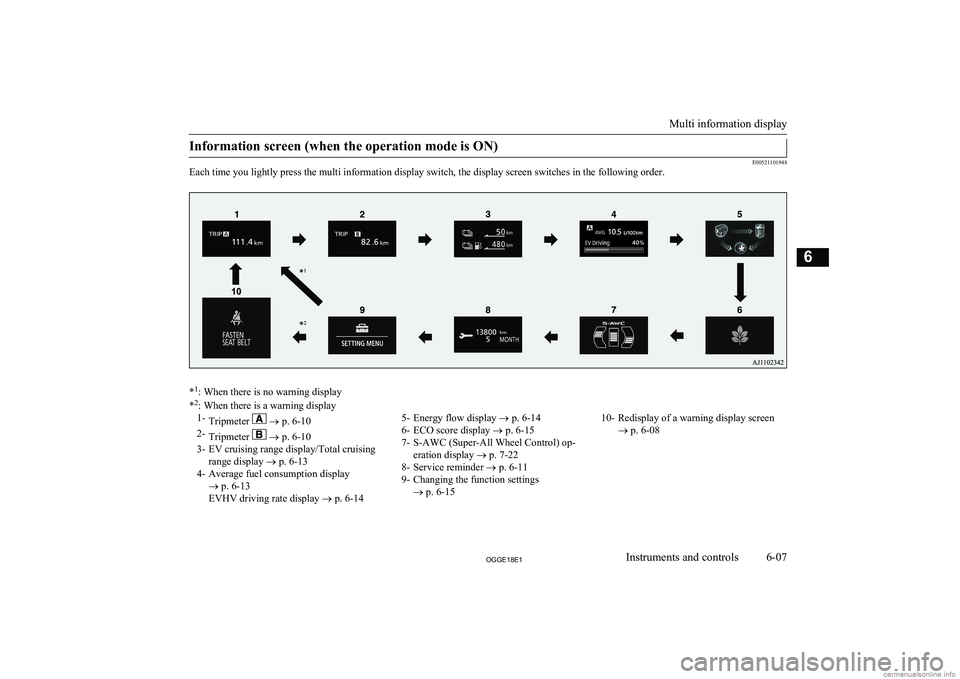
Information screen (when the operation mode is ON)
E00521101948
Each time you lightly press the multi information display switch, the display screen switches in the following order.
* 1
: When there is no warning display
* 2
: When there is a warning display
1- Tripmeter ® p. 6-10
2- Tripmeter
® p. 6-10
3- EV cruising range display/Total cruising range display ® p. 6-13
4- Average fuel consumption display ® p. 6-13
EVHV driving rate display ® p. 6-14
5- Energy flow display ® p. 6-14
6- ECO score display ® p. 6-15
7- S-AWC (Super-All Wheel Control) op- eration display ® p. 7-22
8- Service reminder ® p. 6-11
9- Changing the function settings ® p. 6-1510- Redisplay of a warning display screen
® p. 6-08
Multi information display
6-07OGGE18E1Instruments and controls6
Page 153 of 538
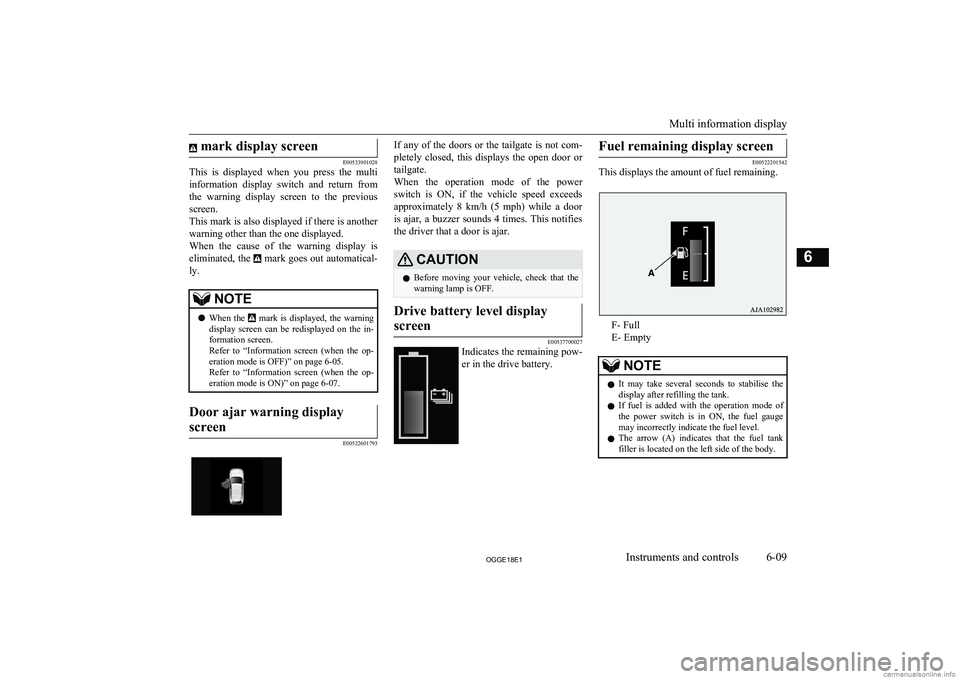
mark display screen
E00533901028
This is displayed when you press the multi
information display switch and return from the warning display screen to the previous
screen.
This mark is also displayed if there is another
warning other than the one displayed. When the cause of the warning display is eliminated, the
mark goes out automatical-
ly.
NOTEl When the mark is displayed, the warning
display screen can be redisplayed on the in- formation screen.
Refer to “Information screen (when the op-
eration mode is OFF)” on page 6-05.
Refer to “Information screen (when the op-
eration mode is ON)” on page 6-07.Door ajar warning display
screen
E00522601793
If any of the doors or the tailgate is not com-
pletely closed, this displays the open door or
tailgate.
When the operation mode of the power switch is ON, if the vehicle speed exceeds
approximately 8 km/h (5 mph) while a door is ajar, a buzzer sounds 4 times. This notifies
the driver that a door is ajar.CAUTIONl Before moving your vehicle, check that the
warning lamp is OFF.Drive battery level display
screen
E00537700027
Indicates the remaining pow- er in the drive battery.
Fuel remaining display screen
E00522201542
This displays the amount of fuel remaining.
F- Full
E- Empty
NOTEl It may take several seconds to stabilise the
display after refilling the tank.
l If fuel is added with the operation mode of
the power switch is in ON, the fuel gauge may incorrectly indicate the fuel level.
l The arrow (A) indicates that the fuel tank
filler is located on the left side of the body.
Multi information display
6-09OGGE18E1Instruments and controls6
Page 154 of 538
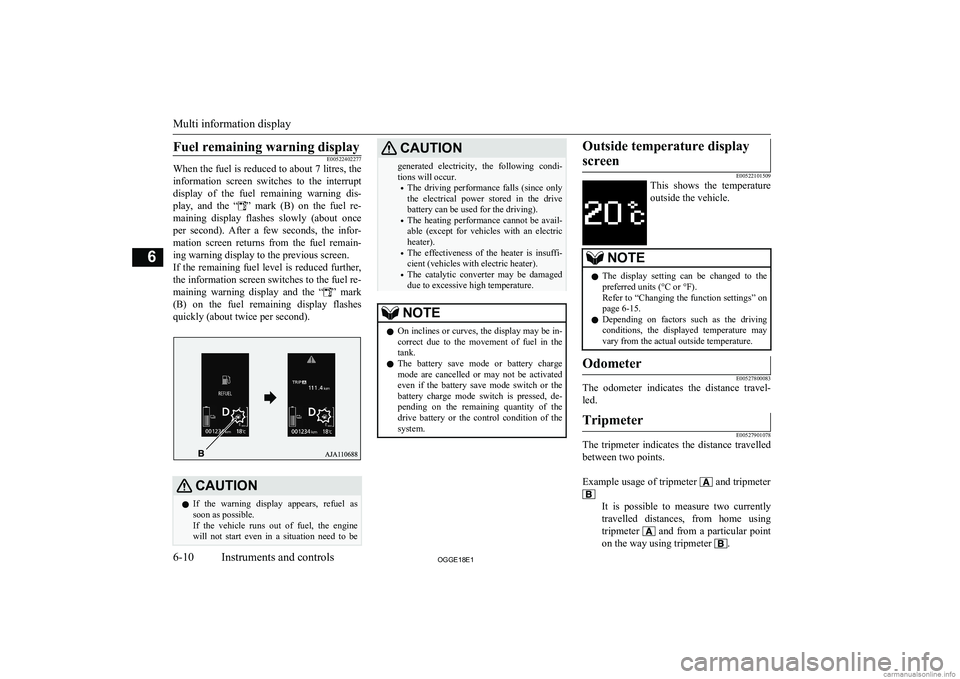
Fuel remaining warning displayE00522402277
When the fuel is reduced to about 7 litres, the
information screen switches to the interruptdisplay of the fuel remaining warning dis-
play, and the “
” mark (B) on the fuel re-
maining display flashes slowly (about once
per second). After a few seconds, the infor- mation screen returns from the fuel remain-
ing warning display to the previous screen.
If the remaining fuel level is reduced further,
the information screen switches to the fuel re-
maining warning display and the “
” mark
(B) on the fuel remaining display flashes
quickly (about twice per second).
CAUTIONl If the warning display appears, refuel as
soon as possible.
If the vehicle runs out of fuel, the engine will not start even in a situation need to beCAUTIONgenerated electricity, the following condi-tions will occur.
• The driving performance falls (since only
the electrical power stored in the drive
battery can be used for the driving).
• The heating performance cannot be avail-
able (except for vehicles with an electric heater).
• The effectiveness of the heater is insuffi-
cient (vehicles with electric heater).
• The catalytic converter may be damaged
due to excessive high temperature.NOTEl On inclines or curves, the display may be in-
correct due to the movement of fuel in the
tank.
l The battery save mode or battery charge
mode are cancelled or may not be activated
even if the battery save mode switch or the battery charge mode switch is pressed, de-
pending on the remaining quantity of the drive battery or the control condition of the
system.Outside temperature display
screen
E00522101509
This shows the temperature
outside the vehicle.
NOTEl The display setting can be changed to the
preferred units (°C or °F).
Refer to “Changing the function settings” on page 6-15.
l Depending on factors such as the driving
conditions, the displayed temperature may vary from the actual outside temperature.Odometer
E00527800083
The odometer indicates the distance travel-
led.
Tripmeter
E00527901078
The tripmeter indicates the distance travelled between two points.
Example usage of tripmeter
and tripmeter
It is possible to measure two currently
travelled distances, from home using
tripmeter
and from a particular point
on the way using tripmeter
.
Multi information display
6-10OGGE18E1Instruments and controls6
Page 155 of 538
To reset the tripmeter
To return the display to 0, hold down themulti-information display switch for about 2
seconds or more. Only the currently dis-
played value will be reset.
Example
If tripmeter
is displayed, only tripmeter
will be reset.
NOTEl When disconnecting the auxiliary battery
terminal, the memory of tripmeter and
are cleared, and the display returns to
“0”.
Service reminder
E00522502021
Displays the approximate time until the next
periodic inspection recommended by MITSUBISHI MOTORS . “---” is displayed
when the inspection time has arrived.
NOTEl Depending on the vehicle specifications, the
displayed time may differ from the next pe-
riodic inspection time recommended by
MITSUBISHI MOTORS.
In addition, the display settings for the next periodic inspection time can be modified.
To modify the display settings, have it adjus-
ted at a MITSUBISHI MOTORS Authorized Service Point.
For more details, consult a MITSUBISHI
MOTORS Authorized Service Point.
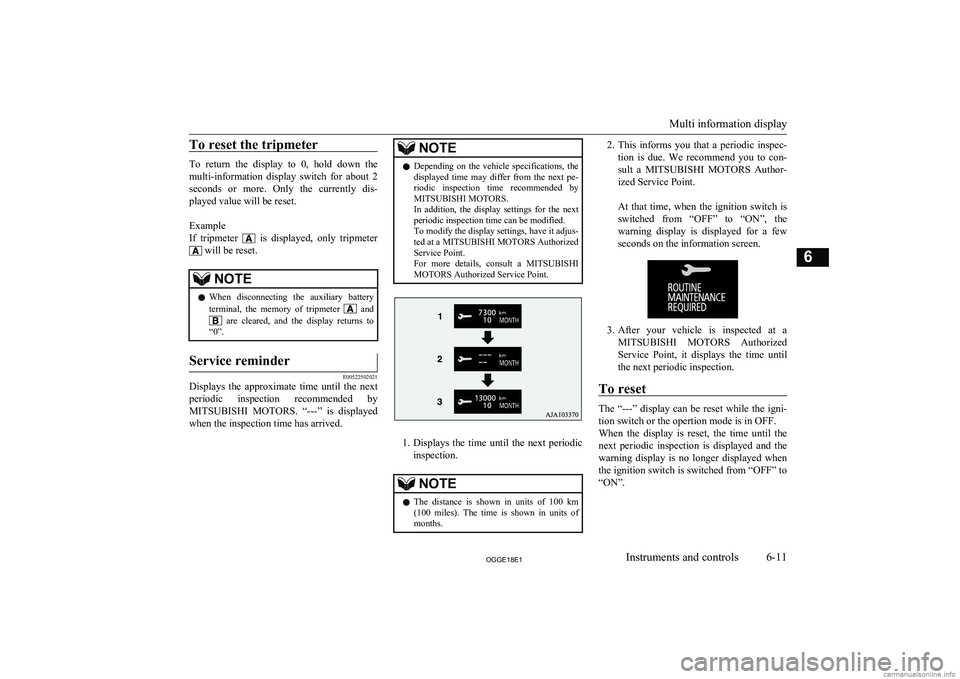
1. Displays the time until the next periodic
inspection.
NOTEl The distance is shown in units of 100 km
(100 miles). The time is shown in units of months.2. This informs you that a periodic inspec-
tion is due. We recommend you to con-
sult a MITSUBISHI MOTORS Author-
ized Service Point.
At that time, when the ignition switch is switched from “OFF” to “ON”, the
warning display is displayed for a few seconds on the information screen.
3. After your vehicle is inspected at a
MITSUBISHI MOTORS Authorized
Service Point, it displays the time until
the next periodic inspection.
To reset
The “---” display can be reset while the igni-
tion switch or the opertion mode is in OFF.
When the display is reset, the time until the
next periodic inspection is displayed and the warning display is no longer displayed when
the ignition switch is switched from “OFF” to
“ON”.
Multi information display
6-11OGGE18E1Instruments and controls6
Page 156 of 538
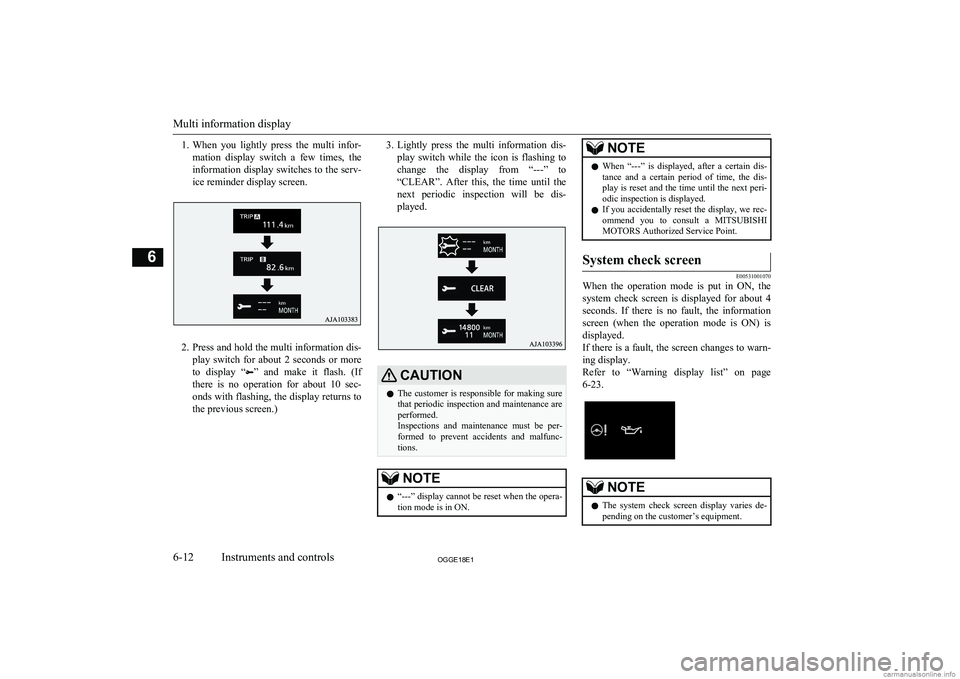
1.When you lightly press the multi infor-
mation display switch a few times, the information display switches to the serv-
ice reminder display screen.
2. Press and hold the multi information dis-
play switch for about 2 seconds or more to display “
” and make it flash. (If
there is no operation for about 10 sec- onds with flashing, the display returns tothe previous screen.)
3. Lightly press the multi information dis-
play switch while the icon is flashing to
change the display from “---” to
“CLEAR”. After this, the time until the
next periodic inspection will be dis- played.CAUTIONl The customer is responsible for making sure
that periodic inspection and maintenance are
performed.
Inspections and maintenance must be per- formed to prevent accidents and malfunc- tions.NOTEl “---” display cannot be reset when the opera-
tion mode is in ON.NOTEl When “---” is displayed, after a certain dis-
tance and a certain period of time, the dis-
play is reset and the time until the next peri- odic inspection is displayed.
l If you accidentally reset the display, we rec-
ommend you to consult a MITSUBISHI
MOTORS Authorized Service Point.System check screen
E00531001070
When the operation mode is put in ON, the
system check screen is displayed for about 4
seconds. If there is no fault, the information
screen (when the operation mode is ON) is displayed.
If there is a fault, the screen changes to warn-
ing display.
Refer to “Warning display list” on page
6-23.
NOTEl The system check screen display varies de-
pending on the customer’s equipment.
Multi information display
6-12OGGE18E1Instruments and controls6
Page 159 of 538
When charging the drive battery
When there is no energy flow
ECO Score
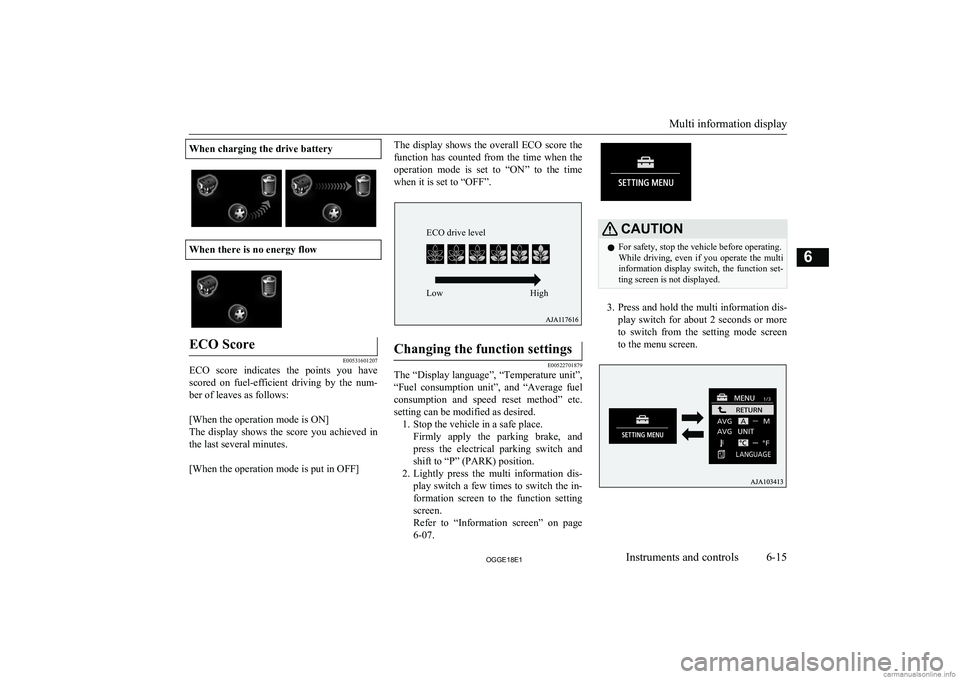
E00531601207
ECO score indicates the points you havescored on fuel-efficient driving by the num-
ber of leaves as follows:
[When the operation mode is ON]
The display shows the score you achieved in the last several minutes.
[When the operation mode is put in OFF]
The display shows the overall ECO score the
function has counted from the time when the operation mode is set to “ON” to the time when it is set to “OFF”.Changing the function settings
E00522701879
The “Display language”, “Temperature unit”,
“Fuel consumption unit”, and “Average fuel
consumption and speed reset method” etc. setting can be modified as desired. 1. Stop the vehicle in a safe place.
Firmly apply the parking brake, andpress the electrical parking switch andshift to “P” (PARK) position.
2. Lightly press the multi information dis-
play switch a few times to switch the in-
formation screen to the function setting screen.
Refer to “Information screen” on page
6-07.
CAUTIONl For safety, stop the vehicle before operating.
While driving, even if you operate the multi information display switch, the function set- ting screen is not displayed.
3. Press and hold the multi information dis-
play switch for about 2 seconds or more to switch from the setting mode screen
to the menu screen.
Multi information display
6-15OGGE18E1Instruments and controls6 ECO drive level
Low High