high beam MITSUBISHI OUTLANDER PHEV 2018 Owner's Manual (in English)
[x] Cancel search | Manufacturer: MITSUBISHI, Model Year: 2018, Model line: OUTLANDER PHEV, Model: MITSUBISHI OUTLANDER PHEV 2018Pages: 538, PDF Size: 25.01 MB
Page 4 of 538
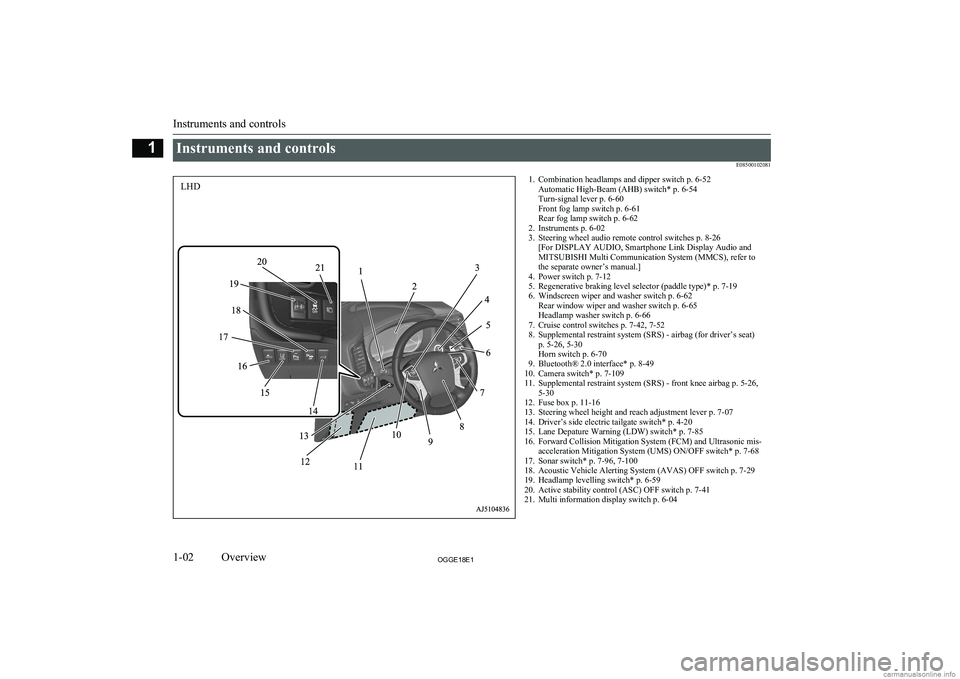
Instruments and controlsE085001020811. Combination headlamps and dipper switch p. 6-52Automatic High-Beam (AHB) switch* p. 6-54
Turn-signal lever p. 6-60
Front fog lamp switch p. 6-61
Rear fog lamp switch p. 6-62
2. Instruments p. 6-02
3. Steering wheel audio remote control switches p. 8-26 [For DISPLAY AUDIO, Smartphone Link Display Audio and
MITSUBISHI Multi Communication System (MMCS), refer to
the separate owner’s manual.]
4. Power switch p. 7-12
5. Regenerative braking level selector (paddle type)* p. 7-19
6. Windscreen wiper and washer switch p. 6-62 Rear window wiper and washer switch p. 6-65
Headlamp washer switch p. 6-66
7. Cruise control switches p. 7-42, 7-52
8. Supplemental restraint system (SRS) - airbag (for driver’s seat) p. 5-26, 5-30
Horn switch p. 6-70
9. Bluetooth® 2.0 interface* p. 8-49
10. Camera switch* p. 7-109
11. Supplemental restraint system (SRS) - front knee airbag p. 5-26, 5-30
12. Fuse box p. 11-16
13. Steering wheel height and reach adjustment lever p. 7-07
14. Driver’s side electric tailgate switch* p. 4-20
15. Lane Depature Warning (LDW) switch* p. 7-85
16. Forward Collision Mitigation System (FCM) and Ultrasonic mis- acceleration Mitigation System (UMS) ON/OFF switch* p. 7-68
17. Sonar switch* p. 7-96, 7-100
18. Acoustic Vehicle Alerting System (AVAS) OFF switch p. 7-29
19. Headlamp levelling switch* p. 6-59
20. Active stability control (ASC) OFF switch p. 7-41
21. Multi information display switch p. 6-04
Instruments and controls
1-02OGGE18E1Overview1LHD
Page 5 of 538
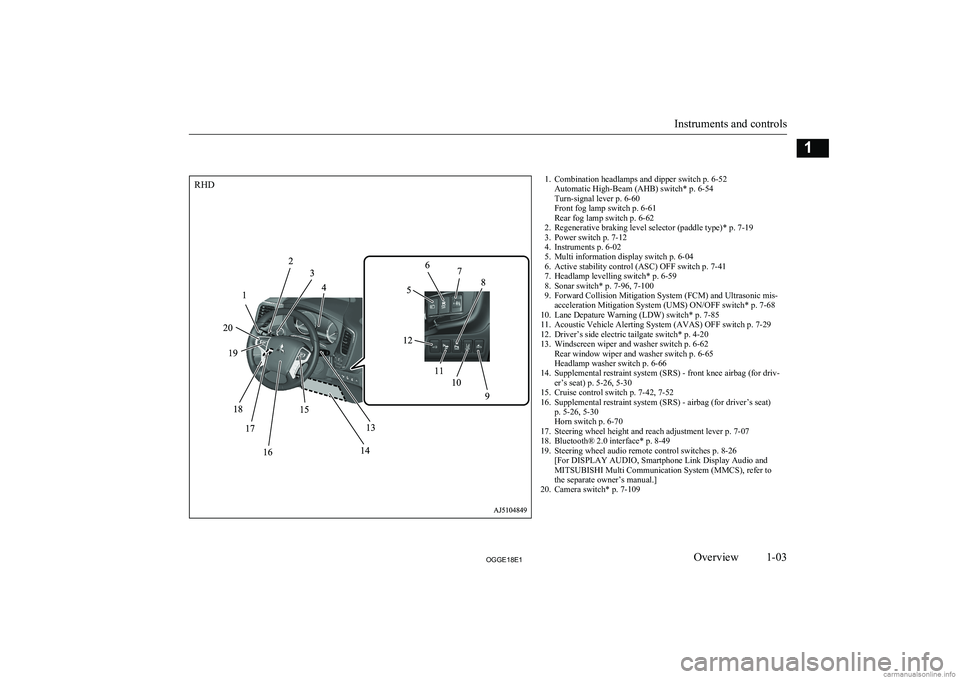
1. Combination headlamps and dipper switch p. 6-52Automatic High-Beam (AHB) switch* p. 6-54
Turn-signal lever p. 6-60
Front fog lamp switch p. 6-61
Rear fog lamp switch p. 6-62
2. Regenerative braking level selector (paddle type)* p. 7-19
3. Power switch p. 7-12
4. Instruments p. 6-02
5. Multi information display switch p. 6-04
6. Active stability control (ASC) OFF switch p. 7-41
7. Headlamp levelling switch* p. 6-59
8. Sonar switch* p. 7-96, 7-100
9. Forward Collision Mitigation System (FCM) and Ultrasonic mis- acceleration Mitigation System (UMS) ON/OFF switch* p. 7-68
10. Lane Depature Warning (LDW) switch* p. 7-85
11. Acoustic Vehicle Alerting System (AVAS) OFF switch p. 7-29
12. Driver’s side electric tailgate switch* p. 4-20
13. Windscreen wiper and washer switch p. 6-62 Rear window wiper and washer switch p. 6-65
Headlamp washer switch p. 6-66
14. Supplemental restraint system (SRS) - front knee airbag (for driv- er’s seat) p. 5-26, 5-30
15. Cruise control switch p. 7-42, 7-52
16. Supplemental restraint system (SRS) - airbag (for driver’s seat) p. 5-26, 5-30
Horn switch p. 6-70
17. Steering wheel height and reach adjustment lever p. 7-07
18. Bluetooth® 2.0 interface* p. 8-49
19. Steering wheel audio remote control switches p. 8-26 [For DISPLAY AUDIO, Smartphone Link Display Audio and
MITSUBISHI Multi Communication System (MMCS), refer to
the separate owner’s manual.]
20. Camera switch* p. 7-109
Instruments and controls
1-03OGGE18E1Overview1RHD
Page 15 of 538
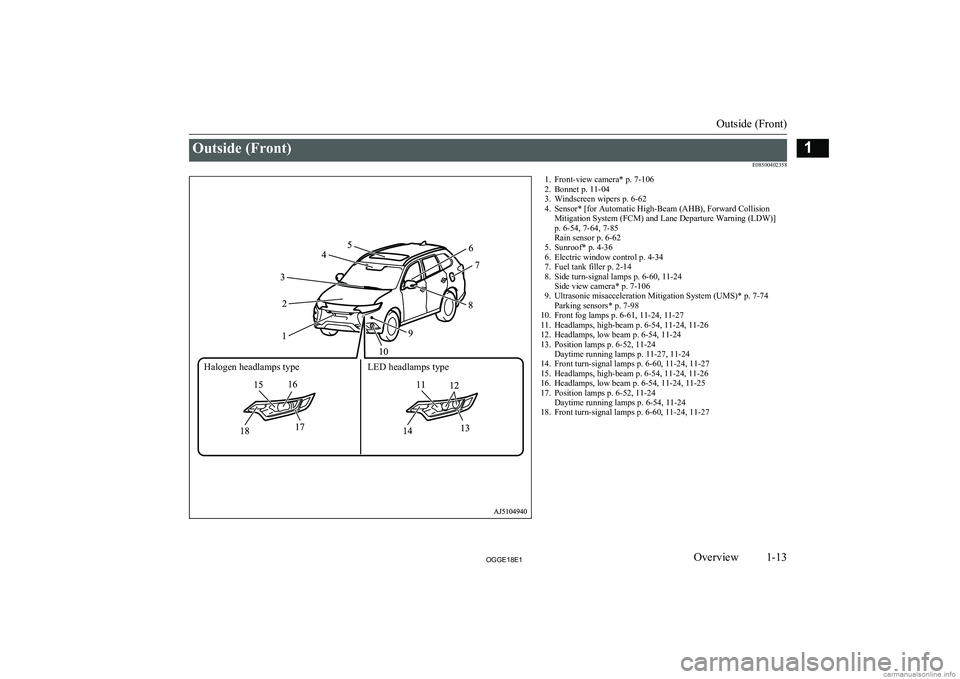
Outside (Front)E085004023581. Front-view camera* p. 7-1062. Bonnet p. 11-04
3. Windscreen wipers p. 6-62
4. Sensor* [for Automatic High-Beam (AHB), Forward Collision Mitigation System (FCM) and Lane Departure Warning (LDW)]
p. 6-54, 7-64, 7-85
Rain sensor p. 6-62
5. Sunroof* p. 4-36
6. Electric window control p. 4-34
7. Fuel tank filler p. 2-14
8. Side turn-signal lamps p. 6-60, 11-24 Side view camera* p. 7-106
9. Ultrasonic misacceleration Mitigation System (UMS)* p. 7-74 Parking sensors* p. 7-98
10. Front fog lamps p. 6-61, 11-24, 11-27
11. Headlamps, high-beam p. 6-54, 11-24, 11-26
12. Headlamps, low beam p. 6-54, 11-24
13. Position lamps p. 6-52, 11-24 Daytime running lamps p. 11-27, 11-24
14. Front turn-signal lamps p. 6-60, 11-24, 11-27
15. Headlamps, high-beam p. 6-54, 11-24, 11-26
16. Headlamps, low beam p. 6-54, 11-24, 11-25
17. Position lamps p. 6-52, 11-24 Daytime running lamps p. 6-54, 11-24
18. Front turn-signal lamps p. 6-60, 11-24, 11-27
Outside (Front)
1-13OGGE18E1Overview1Halogen headlamps type LED headlamps type
Page 165 of 538
Indication lamp, warning lamp, and information screen display listE00523701267
Indication and warning lamp list
E00523802539
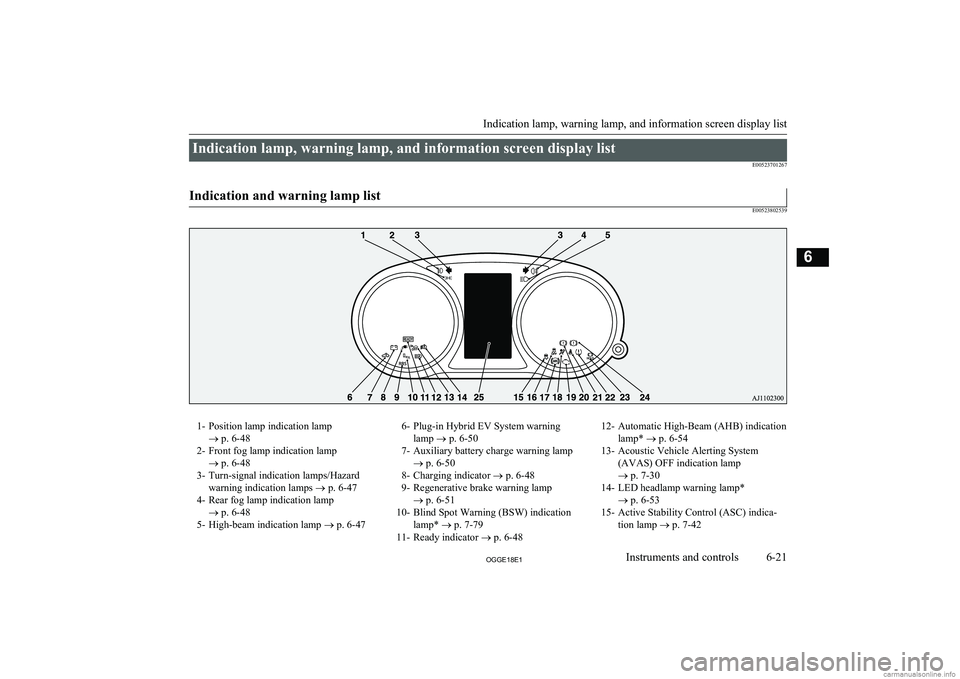
1- Position lamp indication lamp ® p. 6-48
2- Front fog lamp indication lamp ® p. 6-48
3- Turn-signal indication lamps/Hazard warning indication lamps ® p. 6-47
4- Rear fog lamp indication lamp ® p. 6-48
5- High-beam indication lamp ® p. 6-476- Plug-in Hybrid EV System warning
lamp ® p. 6-50
7- Auxiliary battery charge warning lamp ® p. 6-50
8- Charging indicator ® p. 6-48
9- Regenerative brake warning lamp ® p. 6-51
10- Blind Spot Warning (BSW) indication lamp* ® p. 7-79
11- Ready indicator ® p. 6-4812- Automatic High-Beam (AHB) indication
lamp* ® p. 6-54
13- Acoustic Vehicle Alerting System (AVAS) OFF indication lamp
® p. 7-30
14- LED headlamp warning lamp* ® p. 6-53
15- Active Stability Control (ASC) indica- tion lamp ® p. 7-42
Indication lamp, warning lamp, and information screen display list
6-21OGGE18E1Instruments and controls6
Page 183 of 538
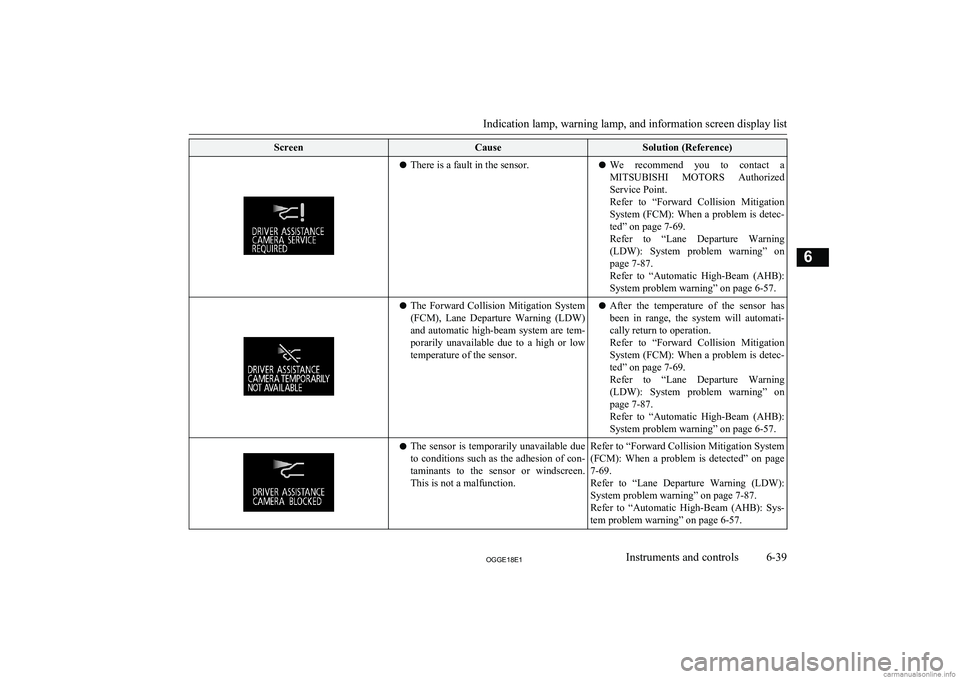
ScreenCauseSolution (Reference)lThere is a fault in the sensor.l We recommend you to contact a
MITSUBISHI MOTORS Authorized
Service Point.
Refer to “Forward Collision Mitigation
System (FCM): When a problem is detec- ted” on page 7-69.
Refer to “Lane Departure Warning
(LDW): System problem warning” on page 7-87.
Refer to “Automatic High-Beam (AHB):
System problem warning” on page 6-57.l The Forward Collision Mitigation System
(FCM), Lane Departure Warning (LDW)
and automatic high-beam system are tem-
porarily unavailable due to a high or low temperature of the sensor.l After the temperature of the sensor has
been in range, the system will automati-
cally return to operation.
Refer to “Forward Collision Mitigation System (FCM): When a problem is detec-
ted” on page 7-69.
Refer to “Lane Departure Warning
(LDW): System problem warning” on page 7-87.
Refer to “Automatic High-Beam (AHB): System problem warning” on page 6-57.l The sensor is temporarily unavailable due
to conditions such as the adhesion of con- taminants to the sensor or windscreen.This is not a malfunction.Refer to “Forward Collision Mitigation System
(FCM): When a problem is detected” on page
7-69.
Refer to “Lane Departure Warning (LDW):
System problem warning” on page 7-87.
Refer to “Automatic High-Beam (AHB): Sys-
tem problem warning” on page 6-57.
Indication lamp, warning lamp, and information screen display list
6-39OGGE18E1Instruments and controls6
Page 184 of 538
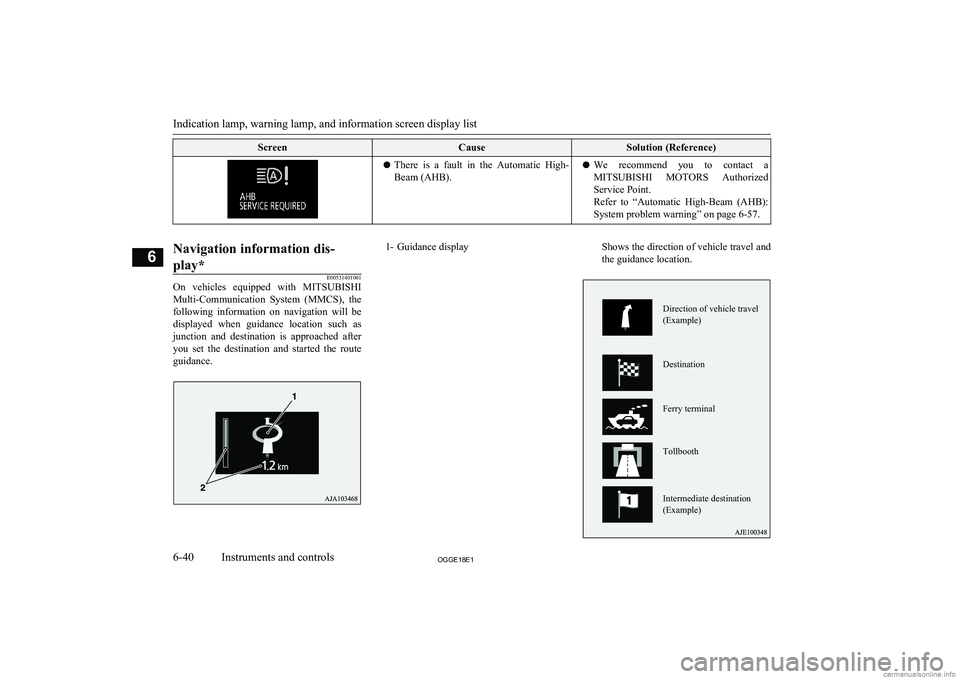
ScreenCauseSolution (Reference)lThere is a fault in the Automatic High-
Beam (AHB).l We recommend you to contact a
MITSUBISHI MOTORS Authorized
Service Point.
Refer to “Automatic High-Beam (AHB): System problem warning” on page 6-57.
Navigation information dis-
play*
E00531401061
On vehicles equipped with MITSUBISHI
Multi-Communication System (MMCS), the following information on navigation will be
displayed when guidance location such as junction and destination is approached afteryou set the destination and started the route
guidance.
1- Guidance displayShows the direction of vehicle travel and the guidance location.
Indication lamp, warning lamp, and information screen display list
6-40OGGE18E1Instruments and controls6 Direction of vehicle travel (Example) Destination Ferry terminal Tollbooth Intermediate destination (Example)
Page 191 of 538
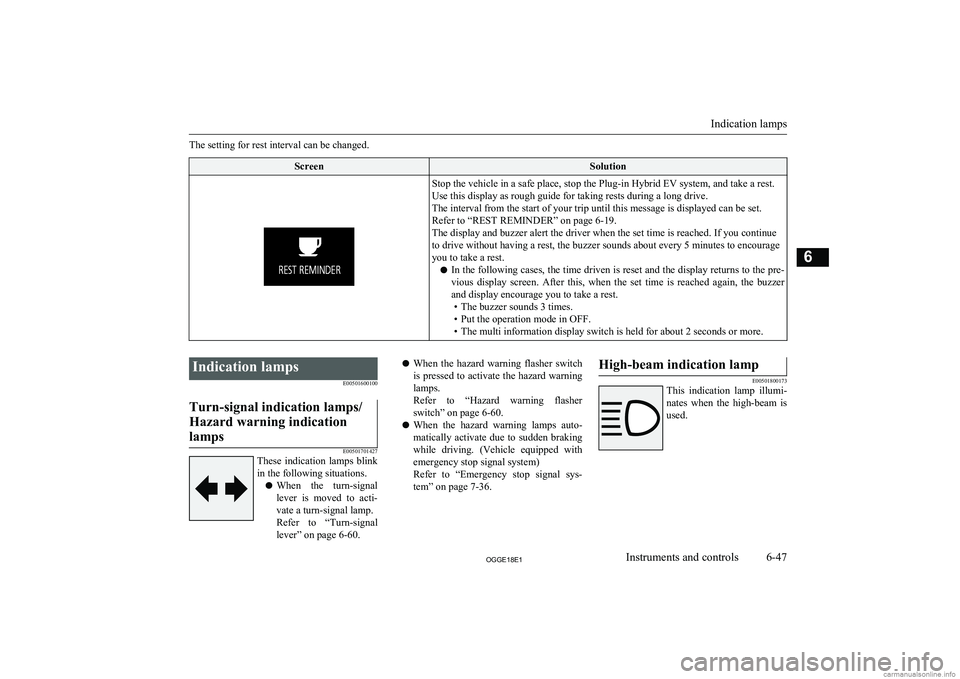
The setting for rest interval can be changed.ScreenSolutionStop the vehicle in a safe place, stop the Plug-in Hybrid EV system, and take a rest.
Use this display as rough guide for taking rests during a long drive.
The interval from the start of your trip until this message is displayed can be set. Refer to “REST REMINDER” on page 6-19.
The display and buzzer alert the driver when the set time is reached. If you continue
to drive without having a rest, the buzzer sounds about every 5 minutes to encourage
you to take a rest.
l In the following cases, the time driven is reset and the display returns to the pre-
vious display screen. After this, when the set time is reached again, the buzzer
and display encourage you to take a rest. • The buzzer sounds 3 times.
• Put the operation mode in OFF.
• The multi information display switch is held for about 2 seconds or more.
Indication lamps
E00501600100Turn-signal indication lamps/
Hazard warning indication lamps
E00501701427
These indication lamps blink
in the following situations.
l When the turn-signal
lever is moved to acti-
vate a turn-signal lamp.
Refer to “Turn-signal
lever” on page 6-60.
l When the hazard warning flasher switch
is pressed to activate the hazard warning
lamps.
Refer to “Hazard warning flasher switch” on page 6-60.
l When the hazard warning lamps auto-
matically activate due to sudden braking
while driving. (Vehicle equipped with emergency stop signal system)
Refer to “Emergency stop signal sys-
tem” on page 7-36.High-beam indication lamp
E00501800173
This indication lamp illumi-
nates when the high-beam is used.
Indication lamps
6-47OGGE18E1Instruments and controls6
Page 198 of 538
NOTElIf the warning lamp illuminates, there may
be a fault on the unit. Have the vehicle
checked at a MITSUBISHI MOTORS Au-
thorized Service Point.Lamp monitor buzzer
E00506101631
If the driver’s door is opened when the opera-
tion mode of the power switch is put in ACCor OFF with the lamps illuminated, a buzzer
will sound to remind the driver to turn off the
lamps.
The buzzer will automatically stop if the au- to-cutoff function is activated, the lamp switch is turned off, or the door is closed.
Daytime running lamps
E00530601226
The daytime running lamps come on when
the operation mode is ON and the lamp switch is in the “OFF” or “AUTO” position
and the tail lamps are off.
NOTEl If the lamp switch is in the “ ” or “
”
position, or if the tail lamps are on when the
lamp switch is in the “AUTO” position, the daytime running lamps come on as positionlamps.Dipper (High/Low beam
change)
E00506201557
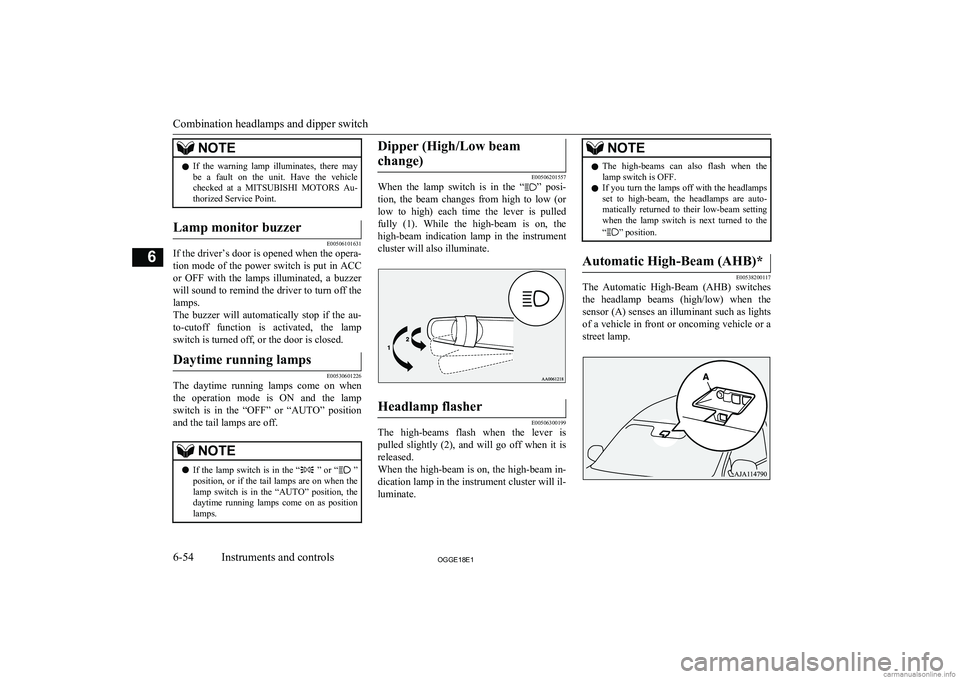
When the lamp switch is in the “” posi-
tion, the beam changes from high to low (or
low to high) each time the lever is pulled fully (1). While the high-beam is on, the
high-beam indication lamp in the instrument
cluster will also illuminate.
Headlamp flasher
E00506300199
The high-beams flash when the lever is pulled slightly (2), and will go off when it is
released.
When the high-beam is on, the high-beam in- dication lamp in the instrument cluster will il-
luminate.
NOTEl The high-beams can also flash when the
lamp switch is OFF.
l If you turn the lamps off with the headlamps
set to high-beam, the headlamps are auto- matically returned to their low-beam setting
when the lamp switch is next turned to the
“
” position.
Automatic High-Beam (AHB)*
E00538200117
The Automatic High-Beam (AHB) switches
the headlamp beams (high/low) when the
sensor (A) senses an illuminant such as lights of a vehicle in front or oncoming vehicle or a
street lamp.
Combination headlamps and dipper switch
6-54OGGE18E1Instruments and controls6
Page 199 of 538
WARNINGlThe headlamp beams (high/low) may not
be switched automatically under certain
circumstances. Do not overestimate the system. It is the responsibility of the driv-
er to switch the headlamp beams (high/
low) manually to suit each driving condi- tion.
Refer to “Dipper (High/Low beam
change)” on page 6-54How to use the AHB
E00551500087
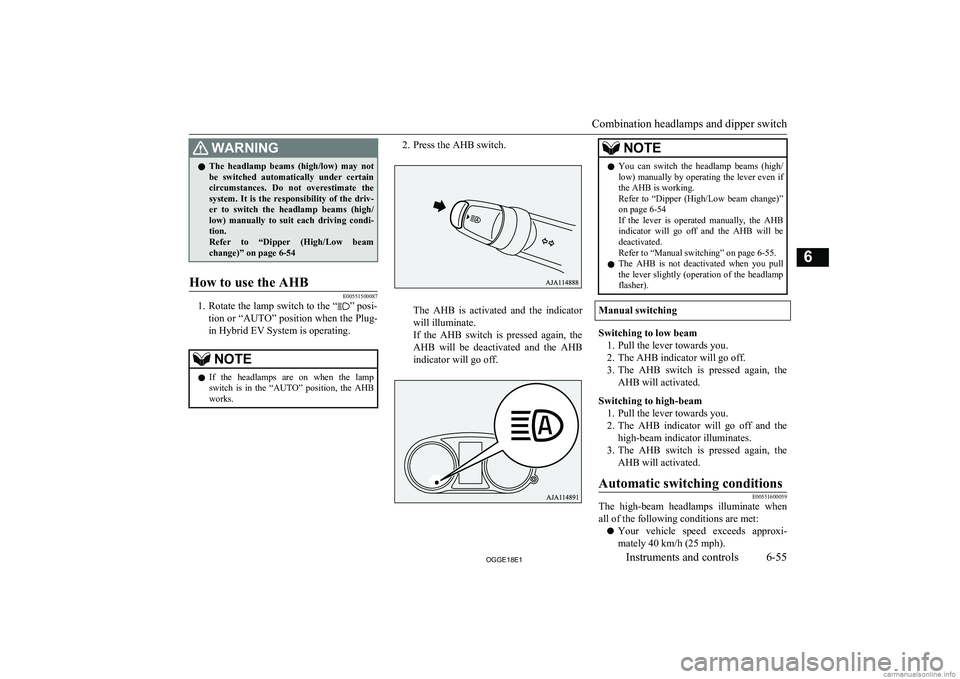
1. Rotate the lamp switch to the “” posi-
tion or “AUTO” position when the Plug-
in Hybrid EV System is operating.
NOTEl If the headlamps are on when the lamp
switch is in the “AUTO” position, the AHB works.2. Press the AHB switch.
The AHB is activated and the indicator
will illuminate.
If the AHB switch is pressed again, the AHB will be deactivated and the AHB
indicator will go off.
NOTEl You can switch the headlamp beams (high/
low) manually by operating the lever even if the AHB is working.
Refer to “Dipper (High/Low beam change)”
on page 6-54
If the lever is operated manually, the AHB indicator will go off and the AHB will be
deactivated.
Refer to “Manual switching” on page 6-55.
l The AHB is not deactivated when you pull
the lever slightly (operation of the headlamp flasher).
Manual switching
Switching to low beam
1. Pull the lever towards you.
2. The AHB indicator will go off.
3. The AHB switch is pressed again, the
AHB will activated.
Switching to high-beam 1. Pull the lever towards you.
2. The AHB indicator will go off and the
high-beam indicator illuminates.
3. The AHB switch is pressed again, the
AHB will activated.
Automatic switching conditionsE00551600059
The high-beam headlamps illuminate whenall of the following conditions are met:
l Your vehicle speed exceeds approxi-
mately 40 km/h (25 mph).
Combination headlamps and dipper switch
6-55OGGE18E1Instruments and controls6
Page 200 of 538
lIt is dark ahead of your vehicle.
l There are no vehicles in front or oncom-
ing vehicles, or none of their exterior
lamps are illuminated.
The low beam headlamps illuminate when any of the following conditions occur:
l Your vehicle speed does not exceed ap-
proximately 30 km/h (19 mph).
l It is bright ahead of your vehicle.
l An exterior lamp of a vehicle in front or
oncoming vehicle is illuminating.NOTEl The headlamps may not be switched from
high-beam to low beam under the following circumstances.
• A vehicle in front or oncoming vehicle is
hindered by any object such as continuous
bends, elevated median/island, traffic
signs, roadside trees.
• Your vehicle passes an oncoming vehicle
suddenly on a bend with poor visibility.
• Another vehicle crosses ahead of your ve-
hicle.
l The headlamps may remain at low beam (or
be switched from high-beam to low beam)
when a reflective object (e.g. street lamp,
traffic signal, noticeboard and signboard) re- flects light.
l Any of the following factors may influence
the headlamp beam switching timing:NOTE• How brightly the exterior lamps of a vehi-
cle in front or oncoming vehicle illumi-
nate.
• Movement or direction of a vehicle in
front or oncoming vehicle.
• Only right or left exterior lamp of a vehi-
cle in front or oncoming vehicle is illumi-
nating.
• A vehicle in front or oncoming vehicle is
a motorcycle.
• Road conditions (gradient, bends and road
surface).
• The number of occupants and luggage
load.
l The AHB recognises environmental condi-
tions by sensing a light source ahead of your
vehicle. Therefore, you may feel like some- thing is not quite right when the headlamp
beams are switched automatically.
l The system may not detect a light vehicle
such as a bicycle.
l The system may not detect an ambient
brightness precisely. This causes the traffic to be dazzled by high-beam or the low beam to be maintained. In such cases, you should
switch the headlamp beams manually.
• In bad weather (heavy rain, fog, snow or
sandstorm).
• The windscreen is dirty or fogged up.
• The windscreen is cracked or broken.
• The sensor is deformed or dirty.
• A light that is similar to the headlamps or
tail lamps is shining around your vehicle.NOTE• A vehicle in front or oncoming vehicle is
driven without lights, the exterior lamps are dirty or discoloured, or the direction
of the headlamp beams is adjusted im- properly.
• It becomes dark and bright suddenly and
continuously around your vehicle.
• Your vehicle is driven on uneven surfa-
ces.
• Your vehicle is driven on a winding road.
• A reflective object such as a noticeboard
or a mirror reflects a light ahead of your vehicle.
• When lamps of the vehicle in front or
headlamps of an oncoming vehicle blend into the other lamps.
• The rear end of a vehicle in front (such as
a container truck) reflect a strong light.
• Your vehicle’s headlamp is broken or
dirty.
• Your vehicle is inclined due to a flat tyre
or towing.
• The warning display appears.
(Refer to “System problem warning” on
page 6-57.)
l Observe the precautions below to maintain
good usage conditions:
• Do not attempt to disassemble the sensor.
• Do not affix a sticker or label on the
windscreen near the sensor.
• Avoid overload.
• Do not modify your vehicle.
Combination headlamps and dipper switch
6-56OGGE18E1Instruments and controls6