ESP MITSUBISHI OUTLANDER SPORT 2015 3.G Owner's Guide
[x] Cancel search | Manufacturer: MITSUBISHI, Model Year: 2015, Model line: OUTLANDER SPORT, Model: MITSUBISHI OUTLANDER SPORT 2015 3.GPages: 384, PDF Size: 61.37 MB
Page 209 of 384
Bluetooth® 2.0 interface (if so equipped) 5-146 Features and controls
5
N00565301040
You can change the device tag of a paired cel- lular phone or music player. Follow the steps below to change a device tag. 1. Press the SPEECH button (except for vehicles with Mitsubishi Multi-Commu- nication System) or PICK-UP button (for vehicles with Mitsubishi Multi-Commu-nication System). 2. Say “Setup.” 3. Say “Pairing Options.”4. The voice guide will say “Select one of the following: pair, edit, delete, or list.” Say “Edit.”
5. The voice guide will say “Please say,” and read out the numbers of the Bluetooth
®
devices and device tags of corresponding devices in order, starting with the Blue- tooth
® that has been most recently con-
nected. After all paired device tags have beenread, the voice guide will say “Which device, please?” Say the number of the device tag you want to change. 6. The voice guide will say “New name, please.” Say the name you want to regis- ter as a new device tag.When the confirmation function is on, the voice guide will say “
N00565401067
For the operation of a music player connected via Bluetooth
®, refer to “Listen to Bluetooth
Audio” on page 7-49.
N00565500087
You can make or receive hands-free calls using a Bluetooth
® compatible cellular phone
connected to the Bluetooth
® 2.0 interface.
You can also use the phonebooks in the Blue- tooth
® 2.0 interface to make calls without
dialing telephone numbers. To make a call P.5-147 Send function P.5-148 Receiving calls P.5-149 Mute function P.5-149Switching between hands-free mode and pri- vate mode P.5-149
You can change the music player to be con- nected by pressing and releasing the SPEECH button and then saying “Select music player” while the list is being read.
Changing a device tag
NOTE
NOTE
You can press and release the SPEECH but- ton while the list is being read, and immedi- ately say the number of the device tag you want to change.
Operating a music player con- nected via Bluetooth
®
How to make or receive hands- free calls
NOTE
Hands-free calls may not operate correctly when you place or receive the call directly from your cellular phone, instead of using the Bluetooth
® 2.0 interface.
BK0206700US.book
146 ページ 2014年3月25日 火曜日 午後4時42分
Page 212 of 384
Bluetooth® 2.0 interface (if so equipped)
Features and controls 5-149
5
“
N00565801058
If an incoming phone call is received whilethe ignition switch is in the “ACC” or “ON”position, the audio system will be automati- cally turned on and switched to the incoming call, even when the audio system was origi-nally off. The voice guide announcement for the incoming call will be emitted from the frontpassenger’s seat speaker. If the CD player or radio was playing when the incoming call was received, the audio sys-tem will mute the sound from the CD player or radio and emit only the incoming call. To receive the call, press the PICK-UP buttonon the steering wheel control switch. When the call is over,
the audio system will
return to its previous state.
N00565900010
At any time during a call, you can mute thevehicle microphone. Pressing the SPEECH button and then saying “Mute” during a call will turn ON the mute function and mute the microphone.Saying “Mute off” in the same way will turn off the mute function and cancel the mute on the microphone.
N00566600014
The Bluetooth
® 2.0 interface can switch
between hands-free mode (hands-free calls) and private mode (calls using cellular phone). If you press the SPEECH button and say“Transfer call” during a hands-free call, you can stop the hands-free mode and talk in pri- vate mode. To return to hands-free mode, press the SPEECH button again and say “Transfer call.”
N00566000018
The Bluetooth
® 2.0 interface has 2 types of
unique phonebooks that are different from thephonebook stored in the cellular phone. They
are the vehicle phonebook and the mobile phonebook. These phonebooks are used to register tele- phone numbers and make calls to desirednumbers via voice recognition function.
N00566101146
This phonebook is us
ed when making calls
with the voice recognition function. Up to 32 names can be registered in the vehi- cle phonebook per language.Also, each entry has 4 locations associated with: home, work, mobile and other. You can register one telephone number for each loca-tion. You can register a desired name as a name for any phonebook entry registered in the vehicle phonebook.Names and telephone numbers can be changed later on. The vehicle phonebook can be used with all paired cellular phones.
Receiving calls
Mute function Switching between hands-free mode and private mode Phonebook function
NOTE
Disconnecting the battery cable will not delete information registered in the phone- book.
Vehicle phonebook
BK0206700US.book
149 ページ 2014年3月25日 火曜日 午後4時42分
Page 238 of 384
Driving during cold weather
Driving safety 6-5
6
Before changing lanes, check your mir- rors and use your turn-signal light. While driving, watch the behavior of other drivers, bicyclists, and pedestrians. Always obey applicable laws and regula- tions. Be a polite and alert driver. Always leave room for unexpected events, such assudden braking. If you plan to drive in another country, obey their vehicle registration laws andmake sure you will be able to get the rightfuel.
N00629400461
Check the battery. At the same time, check the terminals and wiring. Duringextremely cold weather, the battery will not be as strong. Also, the battery power level may drop because more power isused for cold starting and driving. Before driving the vehicle, check to see if the engine runs at the proper speed and ifthe headlights are as bright as normally.Charge or replace the battery if necessary. During extreme cold weather, it is possi- ble that a very low battery could freeze. Warm the engine sufficiently. After start- ing the engine, allow a short warm-up time to distribute oil to all cylinders. Then drive your vehicle slowly. Stay at low speeds at first so that the transaxle, transfer case and rear axle oil have time to spread to all the lubricationpoints.
Manual transaxle can be harder to shift in cold weather conditions. This is normal and shifting will get easier as the transaxle warms up. Check the engine antifreeze. If there is not enough coolant because of a leak or from engine overheating, addMitsubishi Motors Genuine Super Long Life Coolant Premium or equivalent. Please read this section in conjunctionwith the “Engine coolant” on page 9-7.
N00629500491
All the parts of the brake system are criticalto safety. Have the vehicle serviced by anauthorized Mitsubishi Motors dealer or a repair facility of your choice at regular inter- vals according to the “WARRANTY ANDMAINTENANCE MANUAL”. Check the brake system while driving at a low speed immediately after starting, espe-
Driving during cold weather
WA R N I N G The battery gives off explosive hydrogen gas. Any spark or flame can cause the bat-tery to explode, which could cause serious injury or death. Always wear protective clothes and a facemask when working with your battery, or let a skilled mechanic do it.
WA R N I N G Never open the radiator cap when the radiator is hot. You could be seriouslyburned.
Braking When brakes are wet
BK0206700US.bo
ok 5 ページ 2014年3月25日 火曜日 午後4時42分
Page 273 of 384
AM/FM radio/CD player (if so equipped) 7-26 Comfort controls
7
N00734302115
The audio system can only be used when the ignition switch or the operation mode is in ON or ACC.
N00715000021
This product supports audio playback from iPod/iPhone devices, however dif- fering versions mean that playback cannot be guaranteed.
Please be aware that depending on the iPod/iPhone model or version, operation may differ.
N00715200023
If the product becomes dirty, wipe with a soft cloth. If very dirty, use a soft cloth dipped in neutral detergent diluted in water, andthen wrung out. Do not use benzene, thin- ners, or other chemical wipes. This may harm the surface.
N00715300040
Product names and other proper names are the trademarks or registered trade-marks of their respective owners.
AM/FM radio/CD player
(if
so equipped)
NOTE
To listen to the audio system while the engine is not running, turn the ignition switch to the “ACC” position or put the oper- ation mode in ACC.If the ignition switch or the operation mode is left in ACC, the accessory power will automatically turn off after a certain periodof time and you will no longer be able to use the audio system. The accessory power comes on again if the ignition switch or theengine switch is operated with it in the “ACC” position. Refer to “ACC power auto- cutout function” on page 5-17 and 5-45. If a cellular phone is used inside the vehicle, it may create noise in the audio equipment.This does not mean that anything is wrong with your audio equipment. In such a case, use the cellular phone at a place as far away as possible from the audio equipment.
If foreign objects or water get into the audio equipment, or if sm
oke or a strange odor
comes from it, immediately turn off the audio system and have it checked at an authorized Mitsubishi Motors dealer or arepair facility of your choice. Never try to repair it yourself. Avoid using the audio sys- tem until it is inspected by a qualified per-son. If the audio system is damaged by foreign objects, water, or fire, have the system checked by a qualified Mitsubishi Motors technician. The audio amplifier (if so equipped) is located under the front right seat.Do not subject the amplifier to a strong impact. It could damage the amplifier or malfunc-tioning could result.
Important Points on Usage
iPod/iPhone Playback Function
(if
so equipped)
NOTE
How to Clean
Trademarks
BK0206700US.bo
ok 26 ページ 2014年3月25日 火曜日 午後4時42分
Page 274 of 384
AM/FM radio/CD player (if so equipped)
Comfort controls 7-27
7
Furthermore, even if there is no specific denotation of trademarks or registered trademarks, these are to be observed in their entirety. “Made for iPod”, “Made for iPhone” mean that an electronic accessory has been designed to connect specifically toiPod or iPhone, respectively, and has been certified by the developer to meet Apple performance standards.iPhone, iPod, iPod classic, iPod nano, and iPod touch are trademarks of Apple Inc., registered in the U.S. and other countries.Apple is not responsib
le for the operation
of this device or its compliance with safety and regulatory standards.NOTE
iPod and iTunes licensing allows individual users to privately reproduce and play backnon- copyrighted material as well as material that may be legally copied and reproduced. Infringement of copyright is prohibited. Please refer to your vehicle’s user manual regarding the iPod/iPhone that can be used with vehicles equipped with a Bluetooth
®
2.0 interface.
BK0206700US.bo
ok 27 ページ 2014年3月25日 火曜日 午後4時42分
Page 304 of 384
Troubleshooting
Comfort controls 7-57
7
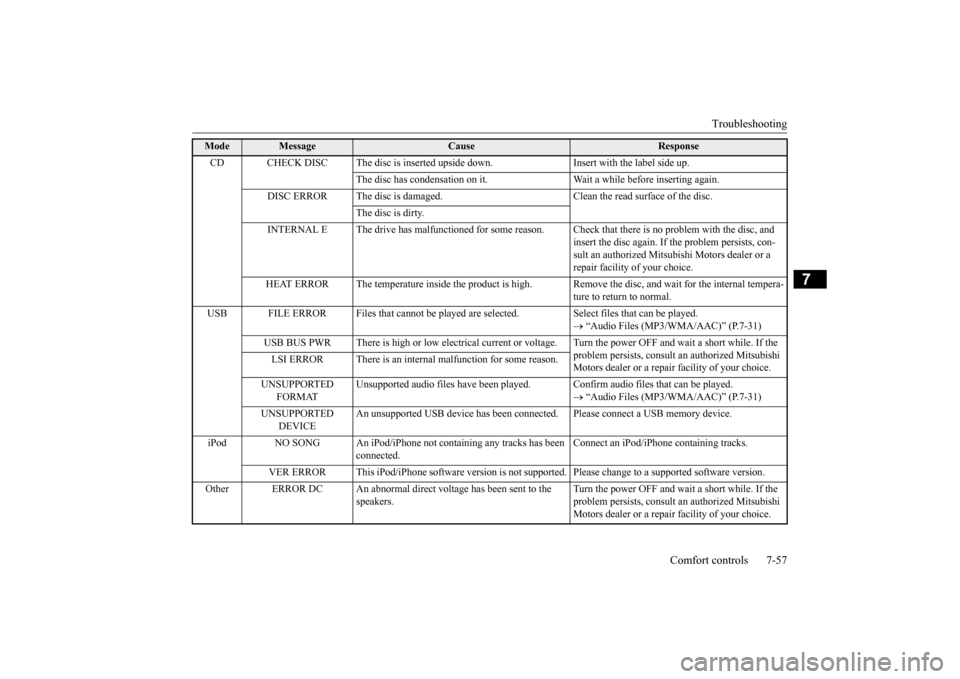
Mode
Message
Cause
Response
CD CHECK DISC The disc is inserted upsi
de down. Insert with the label side up.
The disc has condensation on it. Wait a while before inserting again.
DISC ERROR The disc is damaged. Clean the read surface of the disc.
The disc is dirty.
INTERNAL E The drive has malfunctioned for some reason. Check that there is no problem with the disc, and
insert the disc again. If the problem persists, con-sult an authorized Mitsubishi Motors dealer or a repair facility of your choice.
HEAT ERROR The temperature inside the product is high.
Remove the disc, and wait for the internal tempera- ture to return to normal.
USB FILE ERROR Files that cannot be played are
selected. Select files that can be played.
“Audio Files (MP3/WMA/AAC)” (P.7-31)
USB BUS PWR There is high or low electrical current or
voltage. Turn the power OFF and wait a short while. If the
problem persists, consult an authorized Mitsubishi Motors dealer or a repair facility of your choice.
LSI ERROR There is an internal malfunction for some reason. UNSUPPORTED
FORMAT
Unsupported audio files have been played
. Confirm audio files that can be played.
“Audio Files (MP3/WMA/AAC)” (P.7-31)
UNSUPPORTED
DEVICE
An unsupported USB device has been connect
ed. Please connect a USB memory device.
iPod NO SONG An iPod/iPhone not containing any tracks has been
connected.
Connect an iPod/iPhone containing tracks.
VER ERROR This iPod/iPhone software version is not supported. Please change to a supported software version.
Other ERROR DC An abnormal direct voltage has been sent to the
speakers.
Turn the power OFF and wait a short while. If the problem persists, consult an authorized Mitsubishi Motors dealer or a repair facility of your choice.
BK0206700US.bo
ok 57 ページ 2014年3月25日 火曜日 午後4時42分
Page 305 of 384
Antenna 7-58 Comfort controls
7
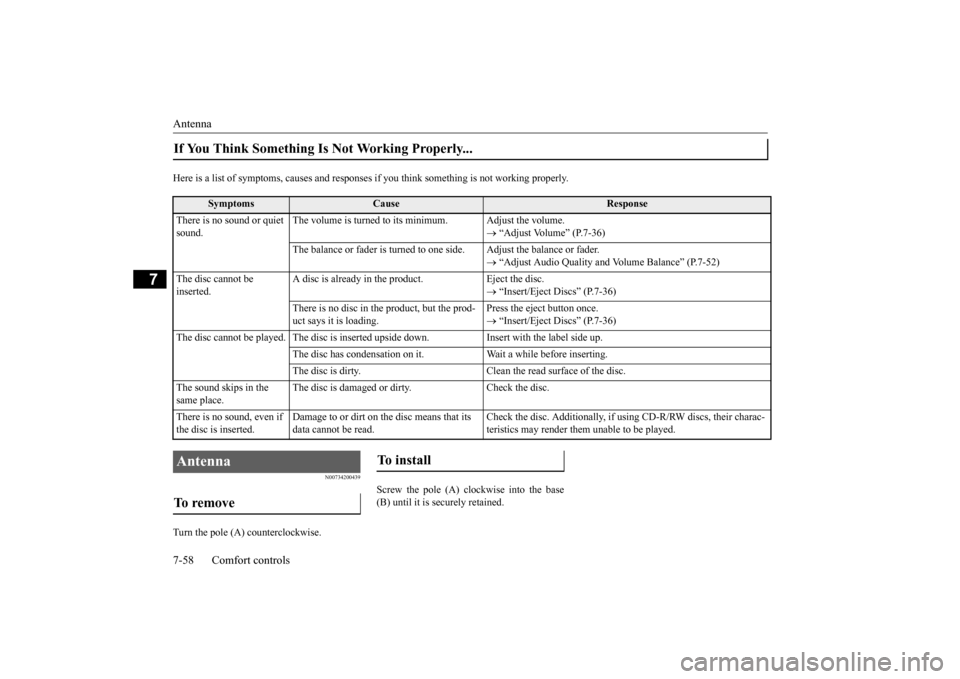
Here is a list of symptoms, causes and responses
if you think something is not working properly.
N00734200439
Turn the pole (A) counterclockwise.
Screw the pole (A) clockwise into the base (B) until it is securely retained.
If You Think Something Is Not Working Properly...
Symptoms
Cause
Response
There is no sound or quiet sound.
The volume is turned to its minimum. Adjust the volume.
“Adjust Volume” (P.7-36)
The balance or fader is turned to one side. Adjust the balance or fader.
“Adjust Audio Quality and Volume Balance” (P.7-52)
The disc cannot be inserted.
A disc is already in the product. Eject the disc.
“Insert/Eject Discs” (P.7-36)
There is no disc in the product, but the prod- uct says it is loading.
Press the eject button once. “Insert/Eject Discs” (P.7-36)
The disc cannot be played. The disc is inserted upside down. Insert with the label side up.
The disc has condensation on it. W
ait a while before inserting.
The disc is dirty. Clean the read surface of the disc.
The sound skips in the same place.
The disc is damaged or dirty. Check the disc.
There is no sound, even if the disc is inserted.
Damage to or dirt on the disc means that its data cannot be read.
Check the disc. Additionally, if using CD-R/RW discs, their charac- teristics may render them unable to be played.
Antenna To remove
To install
BK0206700US.bo
ok 58 ページ 2014年3月25日 火曜日 午後4時42分
Page 307 of 384
General information about your radio 7-60 Comfort controls
7
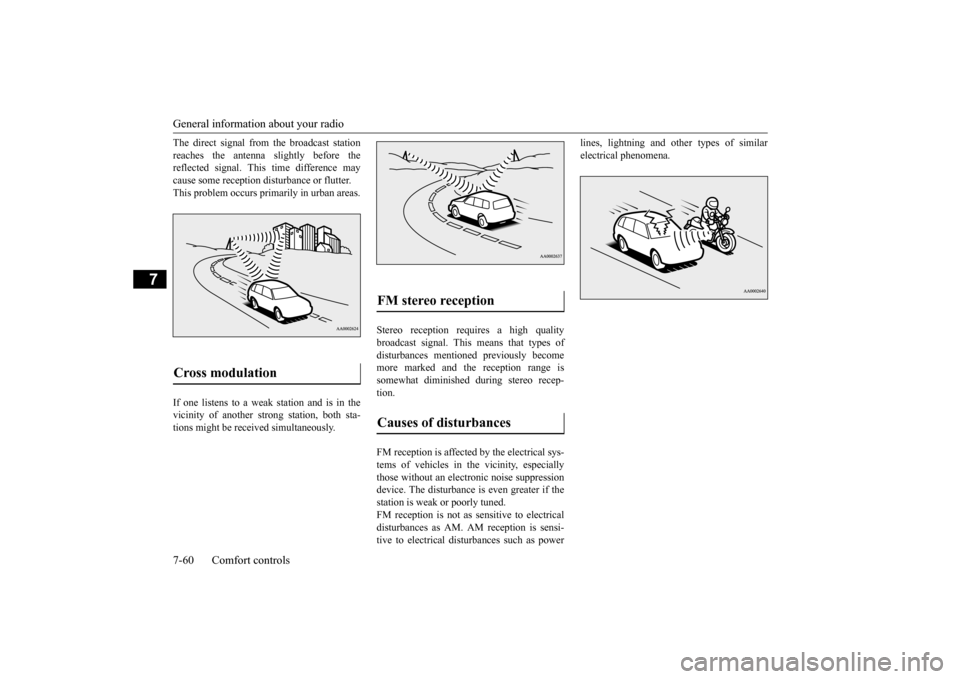
The direct signal from the broadcast station reaches the antenna slightly before the reflected signal. This time difference may cause some reception disturbance or flutter.This problem occurs primarily in urban areas. If one listens to a weak station and is in the vicinity of another strong station, both sta-tions might be received simultaneously.
Stereo reception requires a high quality broadcast signal. This means that types ofdisturbances mentioned previously become more marked and the reception range is somewhat diminished during stereo recep-tion. FM reception is affected by the electrical sys- tems of vehicles in the vicinity, especiallythose without an electro
nic noise suppression
device. The disturbance is even greater if the station is weak or poorly tuned.FM reception is not as sensitive to electrical disturbances as AM. AM reception is sensi- tive to electrical disturbances such as power
lines, lightning and other types of similar electrical phenomena.
Cross modulation
FM stereo reception Causes of disturbances
BK0206700US.bo
ok 60 ページ 2014年3月25日 火曜日 午後4時42分
Page 321 of 384
Operation under adverse driving conditions 8-14 For emergencies
8
When driving on a road covered with snow or ice, use snow tires. Tire chains cannot be used on your vehicle. Theremay be state or local regulations about using snow tires. Always check the regu- lations in your local area before usingthem. Refer to “Snow tires” on page 9-20 and “Tire chains” on page 9-20. Drive slowly. Do not make sudden starts or stops, sharp turns, or slam on thebrakes. Allow extra distance between your vehi- cle and the vehicle in front of you, andavoid sudden braking. If a skid occurs when the accelerator pedal is depressed, take your foot off thepedal. Steer gently in the direction of the skid. Your vehicle is equipped with an anti-lock braking system (ABS). Hold the brake pedal down firmly and keep it depressed. Do not pump the brake pedal which willresult in reduced braking performance.
After parking on snowy or icy road, it may be difficult to move your vehicle due to freeze-up of the brake. Depress the accelerator pedal little by little to movethe vehicle after confirming safety of the vehicle. Drive as slow as possible when driving on bumpy, rutted roads or over potholes.
WA R N I N G When trying to rock your vehicle out of a stuck position, make sure that there are no people nearby. The rocking motion can make your vehicle suddenly lurch forward or backward, and injure any bystanders.
On wet roads
CAUTION Avoid flooded roads. Water is often deeper than it looks, and you could be seriously hurt by driving into flood water. When driving in rain, on water-covered roads, or through a car wash, water could getinto the brake discs and make them fail tem- porarily. In such cases, lightly press the brake pedal to see if they are working prop-erly. If they are not, press the pedal lightly several times while driving to dry the brake pads or linings, then check them again. When driving in rain, a layer of water may form between the tires and the road surface(hydroplaning). This loosens your tires’ grip on the road, making it difficult to steer or brake properly. When driving on a wet road:• Drive your vehicle at a safe speed.• Do not drive on worn tires.• Always keep the tires at the correct infla- tion pressures.
On snowy or icy roads
CAUTION Do not depress the accelerator pedal rapidly. The vehicle could start moving when it breaks free from the ice, possibly resulting inan accident.
On a bumpy or rutted road
CAUTION Driving on bumpy, rutted roads or over pot- holes can damage the tires and wheels.Wheels with low-profiles tires or under- inflated tires are especially at risk for dam- age.
BK0206700US.bo
ok 14 ページ 2014年3月25日 火曜日 午後4時42分
Page 325 of 384
Service precautions 9-2 Vehicle care and maintenance
9
N00937301401
Taking regular care of your vehicle will pre- serve its value and appearance as long as pos-sible. You can do some of the maintenance work yourself, and the rest should only be per- formed by an authorized Mitsubishi Motorsdealer or a repair facility of your choice.If you discover a malfunction or other prob- lem, have it corrected by an authorized Mitsubishi Motors dealer or a repair facilityof your choice. This section describes the maintenance inspections that you can do yourself, if you sodesire. Follow the instructions and precau- tions for each procedure.
Have you purchased the Mitsubishi Motors Diamond Care Protection Plan? The Plan supplements your new vehicle warranties. See your authorized Mitsubishi Motors dealerfor details.
N00937400447
The catalytic converter requires you to useunleaded fuel only. Leaded gasoline will destroy the emission-control effectiveness of the converter. Normally, the catalytic converter does not require maintenance. However, it is important to keep the engine properly tuned for the con- verter to continue to work properly.
Service precautions
WA R N I N G When checking or servicing the inside of the engine compartment, be sure theengine is stopped and has had a chance to cool down. If you need to work in the engine compart- ment with the engine running, be espe-cially careful that your clothing, hair, etc. does not get caught in
the fan, drive belts,
or other moving parts.
The fan can turn on automatically even if the engine is not running. Turn the igni- tion switch to the “OFF” position or put the operation mode in OFF to be safe while you work in the engine compart-ment. Do not smoke or allow open flames around fuel or the battery. The fumes are flamma- ble. Be extremely careful when working around the battery. It contains poisonous and corrosive sulfuric acid. Do not get under your vehicle while it is on a jack.Always use properly rated automotive jack stands. Handling your vehicle’s parts and materi- als in the wrong way can injure you. Ask an authorized Mitsubishi Motors dealeror a repair facility of your choice if you have questions.WA R N I N G
Catalytic converter
BK0206700US.bo
ok 2 ページ 2014年3月25日 火曜日 午後4時42分