service MITSUBISHI OUTLANDER SPORT 2017 3.G User Guide
[x] Cancel search | Manufacturer: MITSUBISHI, Model Year: 2017, Model line: OUTLANDER SPORT, Model: MITSUBISHI OUTLANDER SPORT 2017 3.GPages: 399, PDF Size: 14.61 MB
Page 125 of 399
4-wheel drive operation 5-62 Features and controls
5
Set the drive mode-selector to “4WD LOCK” and then gradually depress the accelerator pedal for a smooth start. Keep the pressure on the accelerator pedal as constant as possible,and drive at low speed.
Your vehicle may not provide sufficient hill climbing ability and engine braking on steepslope. Avoid driving on steep slopes even
though the vehicle is an 4-wheel drive vehi- cle.
N00537800098
If the electrical circuits become wet, furtheroperation of the vehicle will be impossible; therefore, avoid driving through water unless absolutely necessary. If driving through wateris unavoidable, use the following procedure: Check the depth of the water and the terrain before attempting to drive through it. Drive slowly to avoid creating excessive water splashing.
Driving on sandy or muddy roads
CAUTION Do not force the vehicle or drive recklessly on sandy surfaces. In comparison with nor- mal road surfaces, the engine and otherdrive-system components are put under excessive strain when driving on such a sur- face. This could lead to accidents. If any of the following conditions occur while the vehicle is being driven, immedi-ately park your vehicle in a safe place and follow these procedures:• If the engine coolant temperature display
flashes on the information screen in the multi-information display or the engine power drops suddenly. Refer to “Engine overheating” on page 8-4.• If the “ ” warning display and “SLOW DOWN” or the “ ” warning display and “SERVICE REQUIRED” appear on the information screen in the multi-information display.Refer to “Warning display” on page 5-54.
WA R N I N G When attempting to rock your vehicle out of a stuck position, be sure that the area around the vehicle is clear of people and physical objects. The rocking motion may cause the vehicle to
suddenly launch for-
ward/backward, causing injury or dam- age to nearby people or objects.NOTE
Avoid sudden braking, sudden acceleration and sharp turning; such operations could result in the vehicle becoming stuck. If the vehicle becomes stuck in sandy or muddy roads, it can often be moved with a rocking motion. Move the gearshift leveralternately between the 1st and “R” (Reverse) positions (M/T), the “D” (DRIVE) and “R” (REVERSE) positions (CVT), whilepressing lightly on the accelerator pedal. Driving on rough road can cause rust on the vehicle; wash the vehicle thoroughly as soon as possible after such use.
Climbing/descending sharp grades
Driving through water
CAUTION Never drive through water that is deep enough to cover wheel hubs, axles or exhaust pipe. Do not change the gearshift lever posi-tion (M/T) or the selector lever position (CVT) while driving through water. Frequent driving through water canadversely affect the life span of the vehicle; consult an authorized Mitsubishi Motors dealer or a repair facility of your choice and take the necessary measures to prepare, inspect, and repair the vehicle.
BK0239500US.bo
ok 62 ページ 2016年5月13日 金曜日 午前8時53分
Page 127 of 399
Service brake 5-64 Features and controls
5
N00517500275
Overuse of the brake can cause weakening, resulting in poor brake response and prema- ture wear of the brake pads.When driving down a long or steep hill, use engine braking by downshifting.
N00517600436
Your vehicle is equipped with power brakes for more braking force with less brake pedaleffort. Your brakes are designed to operate at full capacity, even if the power
assist is not being
used. If the power assist is not being used, the effort needed to press the brake pedal is greater.If you should lose the power assist for some reason, the brakes will still work. If the power brake unit or either of the twobrake hydraulic systems stops working prop- erly, the rest of the br
ake system will still
work, but the vehicle will not slow down asquickly. You will know this has happened if you find you need to press the brake down farther, orharder when slowing down or stopping, or if the brake warning light and the warning dis- play in the multi-information display comeon. Have the brake system repaired at an
To w i n g
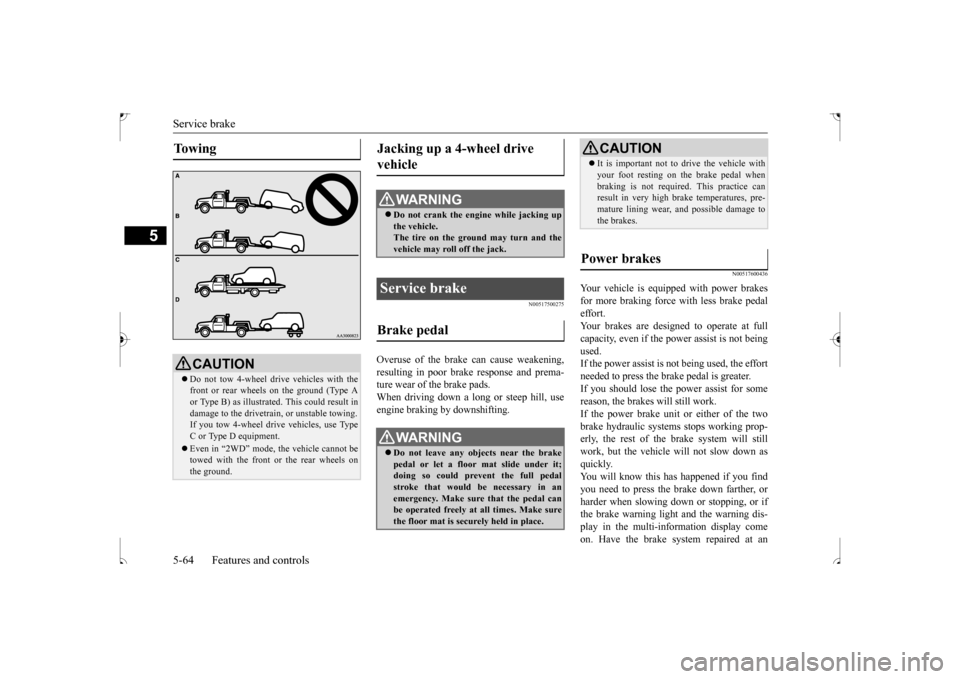
CAUTION Do not tow 4-wheel drive vehicles with the front or rear wheels on the ground (Type Aor Type B) as illustrated. This could result in damage to the drivetrain, or unstable towing. If you tow 4-wheel drive vehicles, use Type C or Type D equipment. Even in “2WD” mode, the vehicle cannot be towed with the front or the rear wheels on the ground.
Jacking up a 4-wheel drive vehicle
WA R N I N G Do not crank the engine while jacking up the vehicle.The tire on the ground may turn and the vehicle may roll off the jack.
Service brake Brake pedal
WA R N I N G Do not leave any objects near the brake pedal or let a floor mat slide under it; doing so could prevent the full pedal stroke that would be necessary in anemergency. Make sure that the pedal can be operated freely at all times. Make sure the floor mat is securely held in place.
CAUTION It is important not to drive the vehicle with your foot resting on the brake pedal when braking is not required. This practice can result in very high brake temperatures, pre- mature lining wear, and possible damage tothe brakes.
Power brakes
BK0239500US.bo
ok 64 ページ 2016年5月13日 金曜日 午前8時53分
Page 128 of 399
Hill start assist
Features and controls 5-65
5
authorized Mitsubishi Motors dealer or a repair facility of your choice immediately.
N00550700124
The disc brakes have an alarm that makes ametallic squeal when the brake pads have worn down enough to need service. If you hear this sound, have the brake padsreplaced at an authorized Mitsubishi Motors dealer or a repair facility of your choice.
N00562600074
The hill start assist makes it easy to start off on a steep uphill slope by preventing thevehicle from moving back
wards. It keeps the
braking force for about 2 second when you move your foot from the brake pedal to theaccelerator pedal.
N00562700059
1. Stop the vehicle completely using thebrake pedal. 2. On vehicles equipped with manual trans- axle, place the gearshift lever into the 1stpositon. On vehicles equipped with a continuously variable transmission (CVT), place theselector lever into the “D” position. 3. Release the brake pedal and the hill start assist will maintain the braking force applied while stopping for approximately2 seconds.
WA R N I N G Never coast downhill with the engine OFF. Keep the engine running whenever your vehicle is in motion. If you turn off theengine while driving, the power brake booster will stop working and your brakes will not work as well. If the power assist is
lost or if either brake
hydraulic system stops working properly,take your vehicle to an authorized Mitsubishi Motors dealer or a repair facil- ity of your choice immediately.
Brake pad wear alarm
WA R N I N G Driving with worn brake pads will make it harder to stop, and can cause an accident.
Hill start assist
CAUTION Do not overly rely on the hill start assist to prevent backwards movement of the vehicle. Under certain circumstances, even when hillstart assist is activated, the vehicle may move backwards if the brake pedal is not suf- ficiently depressed, if the vehicle is heavilyloaded, or if the road is very steep or slip- pery. The hill start assist is not designed to keep the vehicle stopped in place on uphill slopes for more than 2 seconds. When facing uphill, do
not rely on using the
hill start assist to maintain a stopped positionas an alternative to depressing the brake pedal. Doing so could cause an accident.
Do not perform the following operation while the hill start assist is operating. [Except for vehicles equipped with the F. A . S . T. - k e y ] Turn the ignition switch to the “OFF” or“ACC” position. [Vehicles equipped with the F.A.S.T.-key] Put the operation mode in OFF or ACC. Thehill start assist could stop operating, which could result in an accident.
To operate
NOTE
When reversing on an uphill slope, place the gearshift lever or the selector lever into the“R” position.CAUTION
BK0239500US.bo
ok 65 ページ 2016年5月13日 金曜日 午前8時53分
Page 148 of 399
Multi-information display
Features and controls 5-85
5
N00555000265
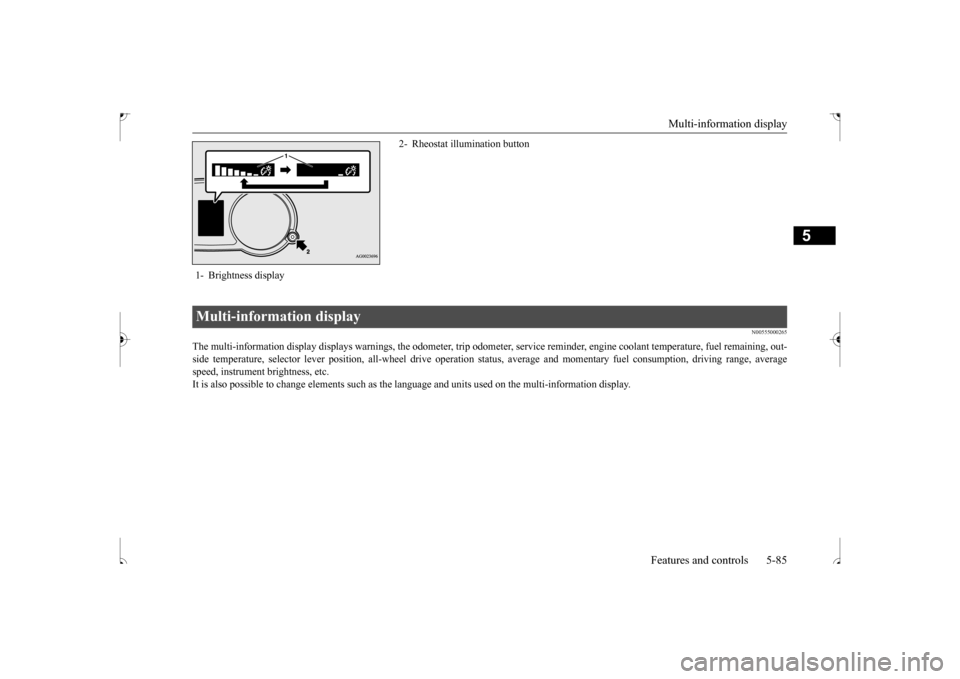
The multi-information display displays warnings, the odometer, tr
ip odometer, service reminder, engine coolant temperature, fue
l remaining, out-
side temperature, selector lever position, all-wheel drive opera
tion status, average and momentar
y fuel consumption, driving ra
nge, average
speed, instrument brightness, etc.It is also possible to change elements such as the
language and units used on the multi-information display.
1- Brightness display
2- Rheostat illumination button
Multi-information display
BK0239500US.bo
ok 85 ページ 2016年5月13日 金曜日 午前8時53分
Page 150 of 399
Multi-information display
Features and controls 5-87
5
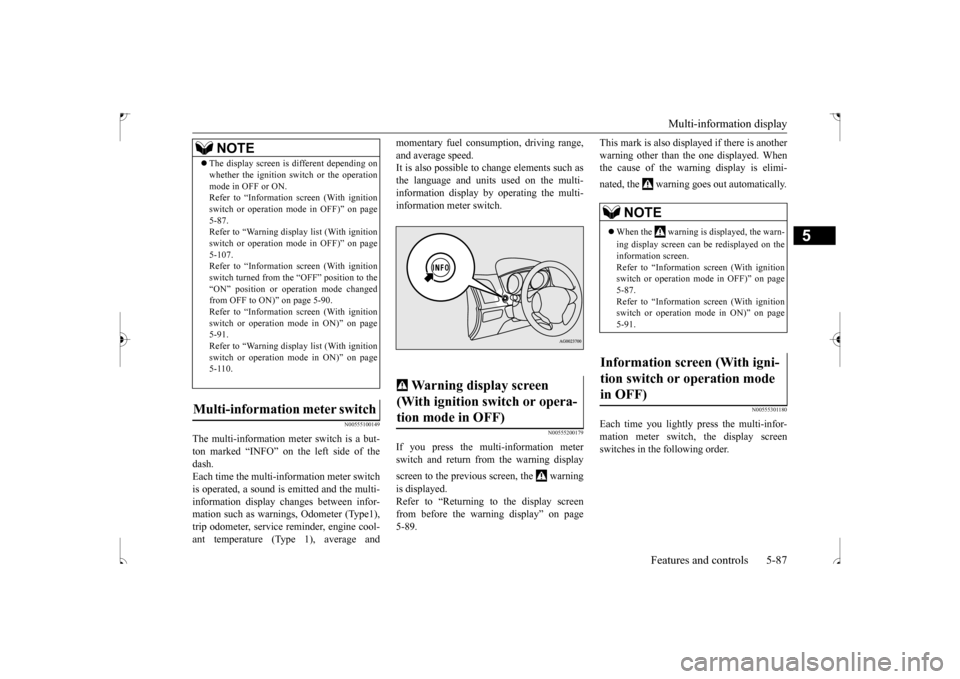
N00555100149
The multi-information meter switch is a but- ton marked “INFO” on the left side of thedash. Each time the multi-information meter switch is operated, a sound is emitted and the multi-information display changes between infor- mation such as warnings, Odometer (Type1), trip odometer, service reminder, engine cool-ant temperature (Type 1), average and
momentary fuel consumption, driving range, and average speed. It is also possible to change elements such as the language and units used on the multi-information display by operating the multi- information meter switch.
N00555200179
If you press the multi-information meter switch and return from the warning display screen to the previous screen, the warning is displayed. Refer to “Returning to the display screenfrom before the warning display” on page5-89.
This mark is also displayed if there is another warning other than the one displayed. When the cause of the warning display is elimi- nated, the warning goes out automatically.
N00555301180
Each time you lightly press the multi-infor- mation meter switch, the display screenswitches in the following order.
The display screen is different depending on whether the ignition switch or the operation mode in OFF or ON. Refer to “Information screen (With ignition switch or operation mode in OFF)” on page5-87. Refer to “Warning displa
y list (With ignition
switch or operation mode in OFF)” on page5-107. Refer to “Information screen (With ignition switch turned from the “OFF” position to the“ON” position or operation mode changed from OFF to ON)” on page 5-90. Refer to “Information screen (With ignitionswitch or operation mode in ON)” on page 5-91. Refer to “Warning displa
y list (With ignition
switch or operation mode in ON)” on page 5-110.
Multi-information meter switch
NOTE
Warning display screen (With ignition switch or opera- tion mode in OFF)
NOTE
When the warning is displayed, the warn- ing display screen can be redisplayed on the information screen.Refer to “Information screen (With ignition switch or operation mode in OFF)” on page 5-87.Refer to “Information screen (With ignition switch or operation mode in ON)” on page 5-91.
Information screen (With igni- tion switch or operation mode in OFF)
BK0239500US.bo
ok 87 ページ 2016年5月13日 金曜日 午前8時53分
Page 151 of 399
Multi-information display 5-88 Features and controls
5
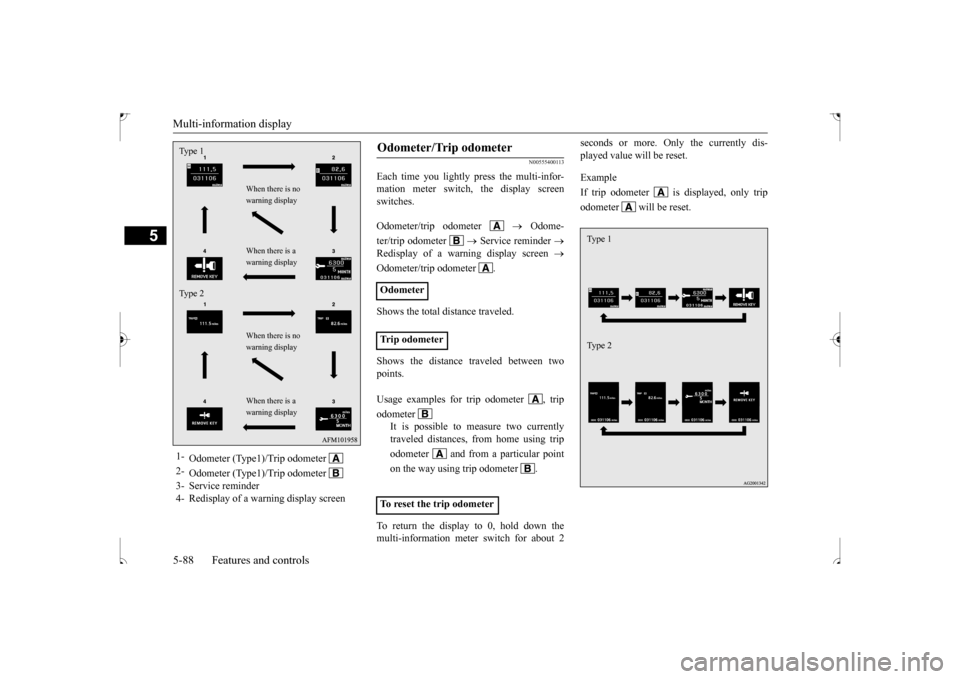
N00555400113
Each time you lightly press the multi-infor- mation meter switch, the display screenswitches. Odometer/trip odometer
Odome-
ter/trip odometer
Service reminder
Redisplay of a warning display screen
Odometer/trip odometer . Shows the total distance traveled. Shows the distance traveled between two points. To return the display to 0, hold down the multi-information meter switch for about 2
seconds or more. Only the currently dis- played value will be reset. Example If trip odometer is displayed, only tripodometer will be reset.
1-
Odometer (Type1)/Trip odometer
2-
Odometer (Type1)/Trip odometer
3- Service reminder4- Redisplay of a warning display screenType 1 Type 2
When there is no warning display When there is a warning display When there is no warning display When there is a warning display
Odometer/Trip odometer Odometer Trip odometer Usage examples for trip odometer , trip odometer
It is possible to measure two currently traveled distances, from home using trip odometer and from a particular pointon the way using trip odometer . To reset the trip odometer
Ty p e 1 Ty p e 2
BK0239500US.bo
ok 88 ページ 2016年5月13日 金曜日 午前8時53分
Page 152 of 399
Multi-information display
Features and controls 5-89
5
N00555500042
Shows the distance and number of months until the next periodic inspection. Refer to “Service reminder” on page 5-97.
N00559600201
When there is information to be announced, such as a key reminder, the buzzer sounds andswitches to the warning display screen. Refer
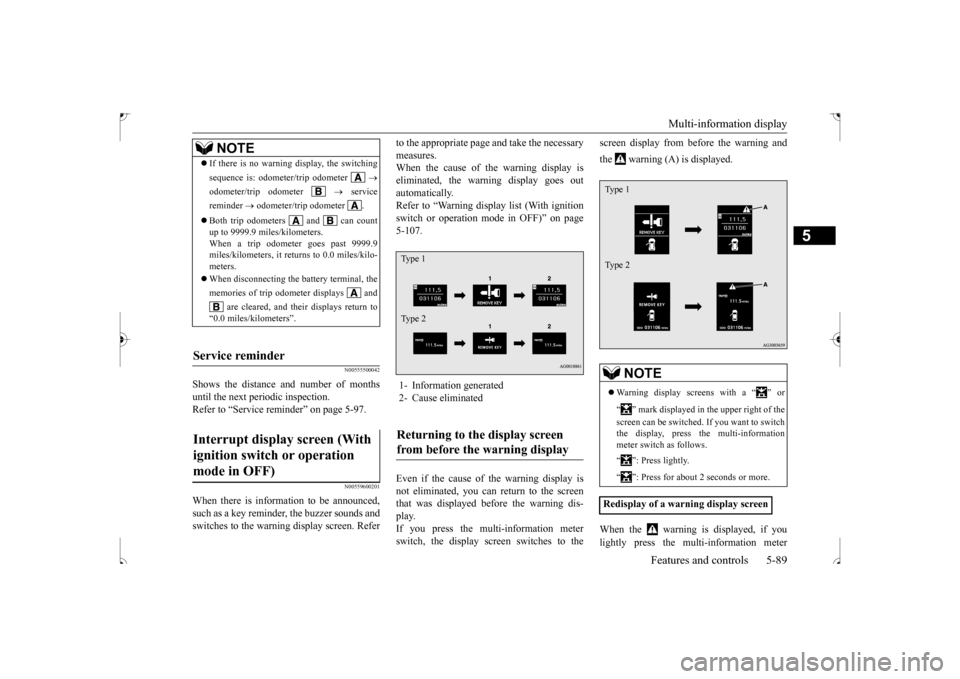
to the appropriate page and take the necessary measures. When the cause of the warning display is eliminated, the warning display goes outautomatically. Refer to “Warning display list (With ignition switch or operation mode in OFF)” on page5-107. Even if the cause of the warning display is not eliminated, you can return to the screen that was displayed before the warning dis- play.If you press the multi-information meter switch, the display screen switches to the
screen display from before the warning and the warning (A) is displayed. When the warning is displayed, if you lightly press the multi-information meter
NOTE
If there is no warning display, the switching sequence is: odometer/trip odometer
odometer/trip odometer
service
reminder
odometer/trip odometer .
Both trip odometers and can count up to 9999.9 miles/kilometers. When a trip odometer goes past 9999.9 miles/kilometers, it returns to 0.0 miles/kilo-meters. When disconnecting the battery terminal, the memories of trip odometer displays and
are cleared, and their displays return to
“0.0 miles/kilometers”.
Service reminder Interrupt display screen (With ignition switch or operation mode in OFF)
1- Information generated 2- Cause eliminatedReturning to the display screen from before the warning display Ty p e 1 Ty p e 2
NOTE
Warning display screens with a “ ” or “ ” mark displayed in the upper right of the screen can be switched. If you want to switch the display, press the multi-information meter switch as follows. “ ”: Press lightly. “ ”: Press for about 2 seconds or more.
Redisplay of a warning display screenType 1 Type 2
BK0239500US.bo
ok 89 ページ 2016年5月13日 金曜日 午前8時53分
Page 154 of 399
Multi-information display
Features and controls 5-91
5
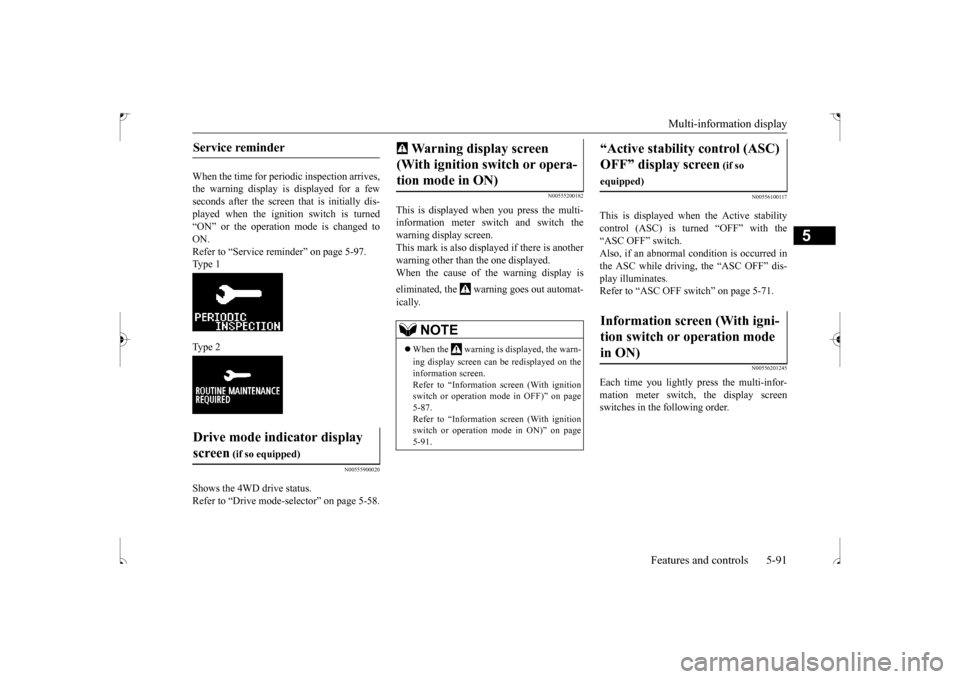
When the time for periodic inspection arrives, the warning display is displayed for a fewseconds after the screen
that is initially dis-
played when the ignition switch is turned “ON” or the operation mode is changed toON. Refer to “Service reminder” on page 5-97. Type 1 Type 2
N00555900020
Shows the 4WD drive status. Refer to “Drive mode-selector” on page 5-58.
N00555200182
This is displayed when you press the multi- information meter switch and switch the warning display screen.This mark is also displayed if there is another warning other than the one displayed. When the cause of the warning display is eliminated, the warning goes out automat- ically.
N00556100117
This is displayed when the Active stability control (ASC) is turned “OFF” with the“ASC OFF” switch. Also, if an abnormal condition is occurred in the ASC while driving, the “ASC OFF” dis-play illuminates.Refer to “ASC OFF switch” on page 5-71.
N00556201245
Each time you lightly press the multi-infor-mation meter switch, the display screenswitches in the following order.
Service reminder Drive mode indicator display screen
(if so equipped)
Warning display screen (With ignition switch or opera- tion mode in ON)
NOTE
When the warning is displayed, the warn- ing display screen can be redisplayed on the information screen. Refer to “Information screen (With ignition switch or operation mode in OFF)” on page5-87. Refer to “Information screen (With ignition switch or operation mode in ON)” on page 5-91.
“Active stability control (ASC) OFF” display screen
(if so
equipped)Information screen (With igni- tion switch or operation mode in ON)
BK0239500US.bo
ok 91 ページ 2016年5月13日 金曜日 午前8時53分
Page 155 of 399
Multi-information display 5-92 Features and controls
5
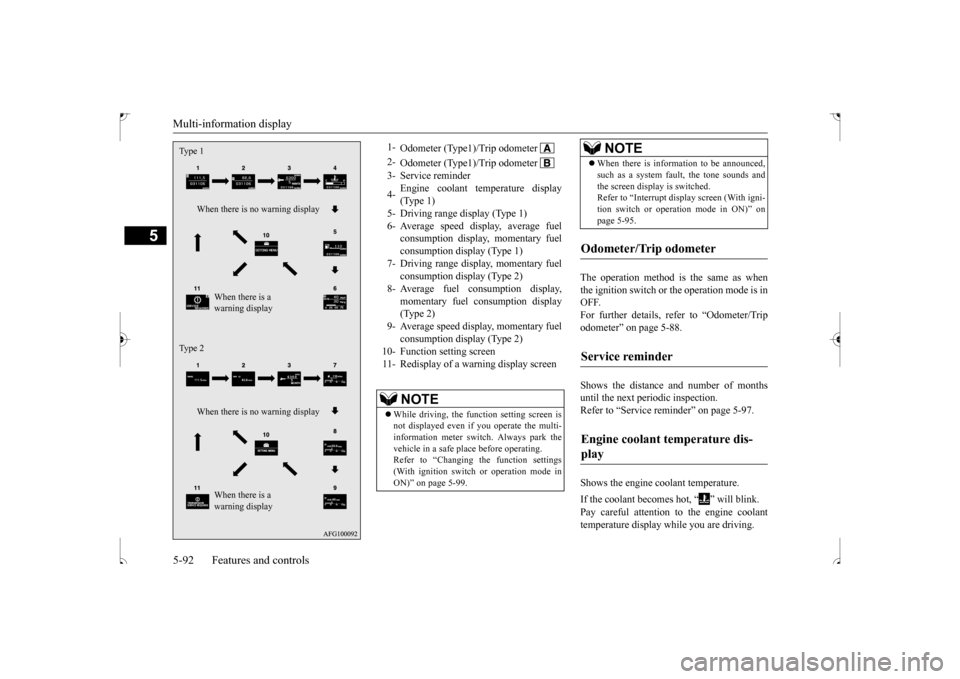
The operation method is the same as when the ignition switch or the operation mode is in OFF.For further details, refer to “Odometer/Trip odometer” on page 5-88. Shows the distance and number of months until the next periodic inspection. Refer to “Service reminder” on page 5-97. Shows the engine coolant temperature. If the coolant becomes hot, “ ” will blink. Pay careful attention to the engine coolant temperature display while you are driving.
Type 1
When there is no warning display
When there is a warning display
Type 2
When there is no warning display
When there is a warning display
1-
Odometer (Type1)/Trip odometer
2-
Odometer (Type1)/Trip odometer
3- Service reminder 4-
Engine coolant temperature display (Type 1)
5- Driving range display (Type 1)6- Average speed display, average fuel
consumption display, momentary fuel consumption display (Type 1)
7- Driving range display, momentary fuel
consumption display (Type 2)
8- Average fuel consumption display,
momentary fuel consumption display(Type 2)
9- Average speed display, momentary fuel
consumption display (Type 2)
10- Function setting screen 11- Redisplay of a warning display screen
NOTE
While driving, the function setting screen is not displayed even if you operate the multi- information meter switch. Always park the vehicle in a safe place before operating. Refer to “Changing the function settings(With ignition switch or operation mode in ON)” on page 5-99.
When there is information to be announced, such as a system fault, the tone sounds and the screen display is switched. Refer to “Interrupt display screen (With igni- tion switch or operation mode in ON)” onpage 5-95.
Odometer/Trip odometer Service reminder Engine coolant temperature dis- play
NOTE
BK0239500US.bo
ok 92 ページ 2016年5月13日 金曜日 午前8時53分
Page 160 of 399
Multi-information display
Features and controls 5-97
5
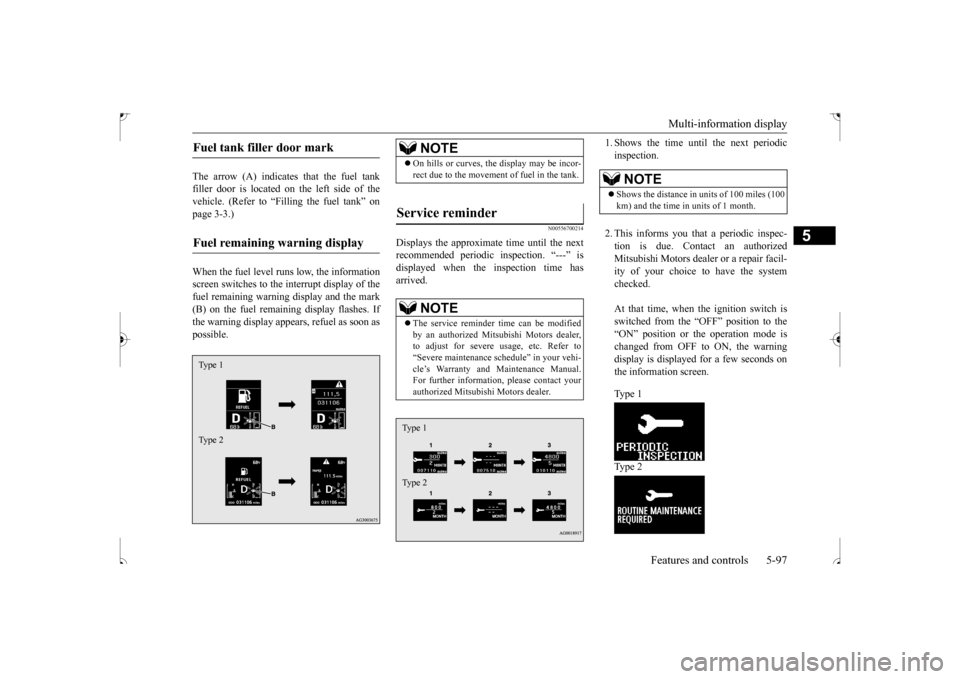
The arrow (A) indicates that the fuel tank filler door is located on the left side of thevehicle. (Refer to “Filling the fuel tank” on page 3-3.) When the fuel level runs low, the information screen switches to the interrupt display of the fuel remaining warning display and the mark (B) on the fuel remaining display flashes. Ifthe warning display appears, refuel as soon as possible.
N00556700214
Displays the approximate time until the nextrecommended periodic inspection. “---” is displayed when the inspection time hasarrived.
1. Shows the time until the next periodic inspection. 2. This informs you that a periodic inspec- tion is due. Contact an authorized Mitsubishi Motors dealer or a repair facil- ity of your choice to have the systemchecked. At that time, when the ignition switch is switched from the “OFF” position to the“ON” position or the operation mode is changed from OFF to ON, the warning display is displayed for a few seconds onthe information screen. Ty p e 1 Ty p e 2
Fuel tank filler door mark Fuel remaining warning display Type 1 Type 2
NOTE
On hills or curves, the display may be incor- rect due to the movement of fuel in the tank.
Service reminder
NOTE
The service reminder time can be modified by an authorized Mitsubishi Motors dealer, to adjust for severe usage, etc. Refer to“Severe maintenance schedule” in your vehi- cle’s Warranty and Maintenance Manual. For further information, please contact yourauthorized Mitsubishi Motors dealer.Type 1 Type 2
NOTE
Shows the distance in units of 100 miles (100 km) and the time in units of 1 month.
BK0239500US.bo
ok 97 ページ 2016年5月13日 金曜日 午前8時53分