battery MITSUBISHI OUTLANDER SPORT 2017 3.G Owner's Guide
[x] Cancel search | Manufacturer: MITSUBISHI, Model Year: 2017, Model line: OUTLANDER SPORT, Model: MITSUBISHI OUTLANDER SPORT 2017 3.GPages: 399, PDF Size: 14.61 MB
Page 199 of 399
Electric rear window defogger switch 5-136 Features and controls
5
N00523700373
The rear window defogger can be used when the engine is running.
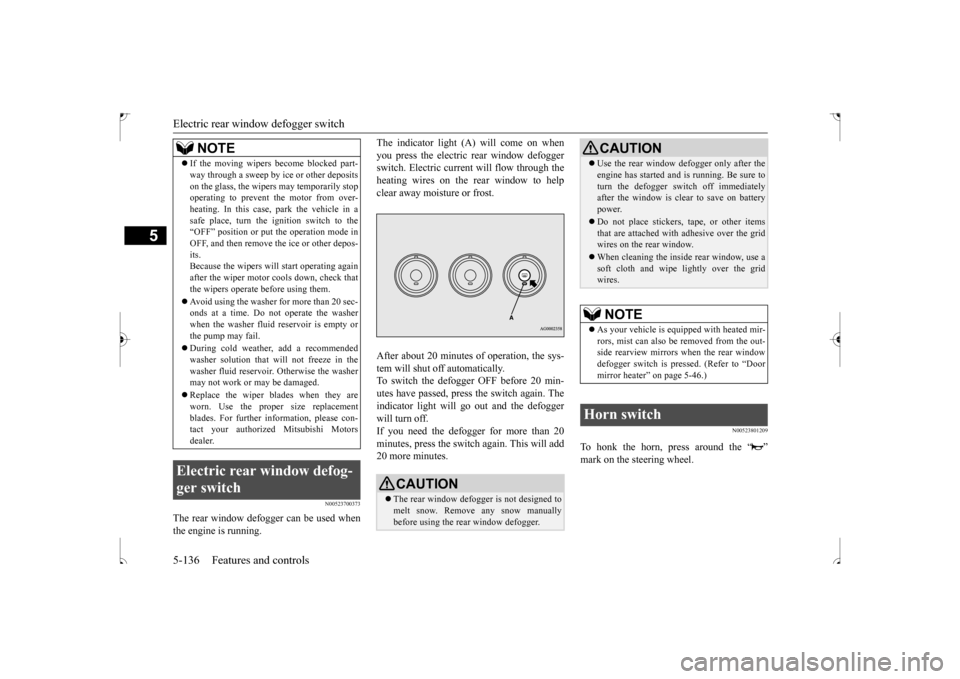
The indicator light (A) will come on when you press the electric rear window defogger switch. Electric current will flow through the heating wires on the rear window to helpclear away moisture or frost. After about 20 minutes of operation, the sys- tem will shut off automatically.To switch the defogger OFF before 20 min-utes have passed, press the switch again. The indicator light will go out and the defogger will turn off.If you need the defogger for more than 20 minutes, press the switch again. This will add 20 more minutes.
N00523801209
To honk the horn, press around the “ ”mark on the steering wheel.
If the moving wipers become blocked part- way through a sweep by ice or other deposits on the glass, the wipers may temporarily stop operating to prevent the motor from over- heating. In this case, park the vehicle in asafe place, turn the ignition switch to the “OFF” position or put the operation mode in OFF, and then remove the ice or other depos-its. Because the wipers will start operating again after the wiper motor cools down, check thatthe wipers operate before using them. Avoid using the washer for more than 20 sec- onds at a time. Do not operate the washer when the washer fluid reservoir is empty or the pump may fail. During cold weather, add a recommended washer solution that will not freeze in thewasher fluid reservoir. Otherwise the washer may not work or may be damaged. Replace the wiper blades when they are worn. Use the proper size replacement blades. For further information, please con-tact your authorized Mitsubishi Motors dealer.
Electric rear window defog- ger switch
NOTE
CAUTION The rear window defogger is not designed to melt snow. Remove any snow manually before using the rear window defogger.
Use the rear window defogger only after the engine has started and is running. Be sure to turn the defogger switch off immediately after the window is clear to save on battery power. Do not place stickers, tape, or other items that are attached with adhesive over the gridwires on the rear window. When cleaning the inside rear window, use a soft cloth and wipe lightly over the grid wires.NOTE
As your vehicle is equipped with heated mir- rors, mist can also be removed from the out-side rearview mirrors when the rear window defogger switch is pressed. (Refer to “Door mirror heater” on page 5-46.)
Horn switch
CAUTION
BK0239500US.book
136 ページ 2016年5月13日 金曜日 午前8時53分
Page 201 of 399
Bluetooth® 2.0 interface (if so equipped) 5-138 Features and controls
5
Steering control switch and microphone
P.5-138 Voice recognition function
P.5-140
Useful voice commands
P.5-140
Speaker enrollment function
P.5-142
Connecting the Bluetooth
® 2.0 interface and
the Bluetooth
® device
P.5-144
Operating a music player connected via Blue- tooth
® P.5-150
How to make or receive hands-free calls
P.5-150 Phonebook function
P.5-153
N00564001167
Press this button to increase the volume.
NOTE
If the ignition switch or the operation mode is left in ACC, the accessory power will automatically turn off after a certain period of time and you will no longer be able to use the Bluetooth
® 2.0 interface. The accessory
power comes on again if the ignition switch or the engine switch is operated. Refer to “ACC power auto-cutout function” on page5-47. The Bluetooth
® 2.0 interface cannot be used
if the Bluetooth
® device has a dead battery
or the device power is turned off. Hands-free calls will not be possible if your phone does not have service available. If you place the Bluetooth
® device in the
luggage compartment, you may not be able to use the Bluetooth
® 2.0 interface.
Some Bluetooth
® devices are not compatible
with the Bluetooth
® 2.0 interface.
You can confirm the Link System software version by pressing the HANG-UP button 3times (press and hold 2 times and then press briefly) within 10 seconds.
For details of the Bluetooth
® 2.0 interface,
refer to the following web site:[For vehicles sold in U.S.A.] You can see to access the Mitsubishi Motors North America website.[For vehicles sold in Canada and MEXICO] You can see to access via the Mitsubishi Motors website.Please read and agree to the “Warning about Links to the Web Sites of Other Companies”. The websites mentioned above may connectyou to websites other
than the Mitsubishi
Motors website. http://www.mitsubishi-motors.com/en/prod-ucts/index.html Software updates by cellular phone/digital audio device manufacturers may change/alter device connectivity.NOTE
Steering control switch and microphone
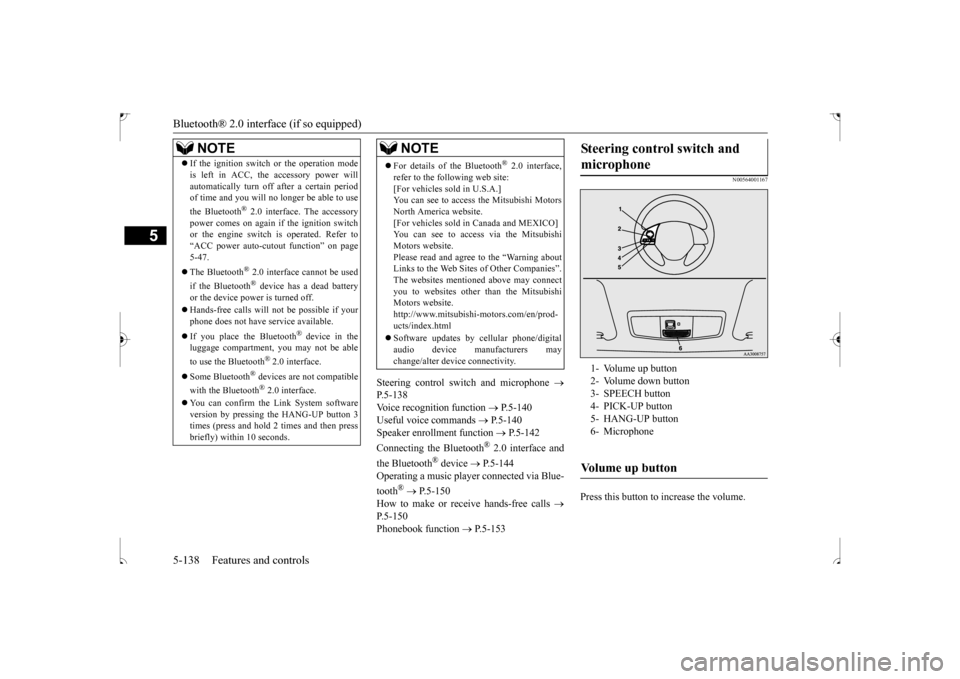
1- Volume up button 2- Volume down button3- SPEECH button 4- PICK-UP button 5- HANG-UP button6- MicrophoneVolume up button
BK0239500US.book
138 ページ 2016年5月13日 金曜日 午前8時53分
Page 202 of 399

Bluetooth® 2.0 interface (if so equipped)
Features and controls 5-139
5
Press this button to decrease the volume. Press this button to activate voice recogni- tion mode. While the system is in voice recognition mode, “Listening” will appear on theaudio display. If you press the button briefly while in voice recognition mode, it will interrupt prompting and allow voice command input.Pressing the button longer will deactivatethe voice recognition mode. Pressing this button briefly during a call will enable voice recognition and allowvoice command input.
Press this button when an incoming call is received to answer the telephone. When another call is received during a call, press this button to put the first caller on hold and talk to the new caller. • In such circumstances, you can press thebutton briefly to switch between callers. You will switch to the first caller and the other caller will be put on hold.• To establish a three-way call in such sit- uations, press the SPEECH button to enter voice recognition mode and thensay “Join calls.”
Press this button when an incoming call is received to refuse the call. Press this button during a call to end the current call. When another call is on hold, you will switch to that call.
If this button is pressed in the voice recog- nition mode, the voice recognition mode will be deactivated.
Your voice will be recognized by a micro- phone in the overhead console, allowing you to make hands-free calls with voice com-mands.
Volume down button
SPEECH button
NOTE
On vehicles equipped with the Mitsubishi Multi-Communication System, pressing theSPEECH button will activate the voice rec- ognition mode (a beep will sound when suc- cessfully activated). To use the voice recognition of the Bluetooth
® 2.0 interface,
press the PICK-UP button.
PICK-UP button
NOTE
When not receiving incoming calls, pressing the PICK-UP button on vehicles equipped with the Mitsubishi Multi-CommunicationSystem, will activate the voice recognition of the Bluetooth
® 2.0 interface.
HANG-UP button
NOTE
When you press the SPEECH button (except for vehicles with Mitsubishi Multi-Commu- nication System) or PICK-UP button (for vehicles with Mitsubishi Multi-Communica-tion System) to enter voice recognition mode with a cellular phone paired to the system, current information on the cellular phone,such as “remaining battery life,” “signal strength” or “roaming,” will be displayed on the audio display.
*
* : Some cellular phones will not send this information to the Bluetooth
® 2.0 interface.
Call waiting and three-way calls can be used by the Bluetooth
® 2.0 interface, only if it is
possible to use those services with your cel- lular phone.
Microphone
BK0239500US.book
139 ページ 2016年5月13日 金曜日 午前8時53分
Page 216 of 399

Bluetooth® 2.0 interface (if so equipped)
Features and controls 5-153
5
N00565900010
At any time during a call, you can mute the vehicle microphone. Pressing the SPEECH button and then saying “Mute” during a call will turn ON the mute function and mute the microphone.Saying “Mute off” in the same way will turn off the mute function and cancel the mute on the microphone.
N00566600014
The Bluetooth
® 2.0 interface can switch
between hands-free mode (hands-free calls) and private mode (calls using cellular phone). If you press the SPEECH button and say“Transfer call” during a hands-free call, you can stop the hands-free mode and talk in pri- vate mode. To return to hands-free mode, press the SPEECH button again and say “Transfer call.”
N00566000018
The Bluetooth
® 2.0 interface has 2 types of
unique phonebooks that are different from thephonebook stored in the cellular phone. They
are the vehicle phonebook and the mobile phonebook. These phonebooks are used to register tele- phone numbers and make calls to desirednumbers via voice recognition function.
N00566101146
This phonebook is us
ed when making calls
with the voice recognition function. Up to 32 names can be registered in the vehi- cle phonebook per language.Also, each entry has 4 locations associated with: home, work, mobile and other. You can register one telephone number for each loca-tion. You can register a desired name as a name for any phonebook entry registered in the vehicle phonebook.Names and telephone numbers can be changed later on. The vehicle phonebook can be used with all paired cellular phones.
N00580500062
You can register a telephone number in the vehicle phonebook in the following 2 ways: Reading out a telephone number, and select-ing and transferring 1 phonebook entry from the phonebook of the cellular phone.
N00580600092
1. Press the SPEECH button (except for vehicles with Mitsubishi Multi-Commu-nication System) or PICK-UP button (for vehicles with Mitsubishi Multi-Commu- nication System).2. Say “Phonebook.” 3. The voice guide will say “Select one of the following: new entry, edit number,edit name, list names, delete, erase all, or import contact.” Say “New entry.” 4. The voice guide will say “Name please.”Say your preferred name to register it.
Mute function
Switching between hands-free mode and private mode
Phonebook function
NOTE
Disconnecting the battery cable will not delete information registered in the phone- book.
Vehicle phonebook
To register a telephone number in the vehicle phonebook
To register by reading out a tele- phone number
BK0239500US.book
153 ページ 2016年5月13日 金曜日 午前8時53分
Page 227 of 399
12 V power outlets 5-164 Features and controls
5
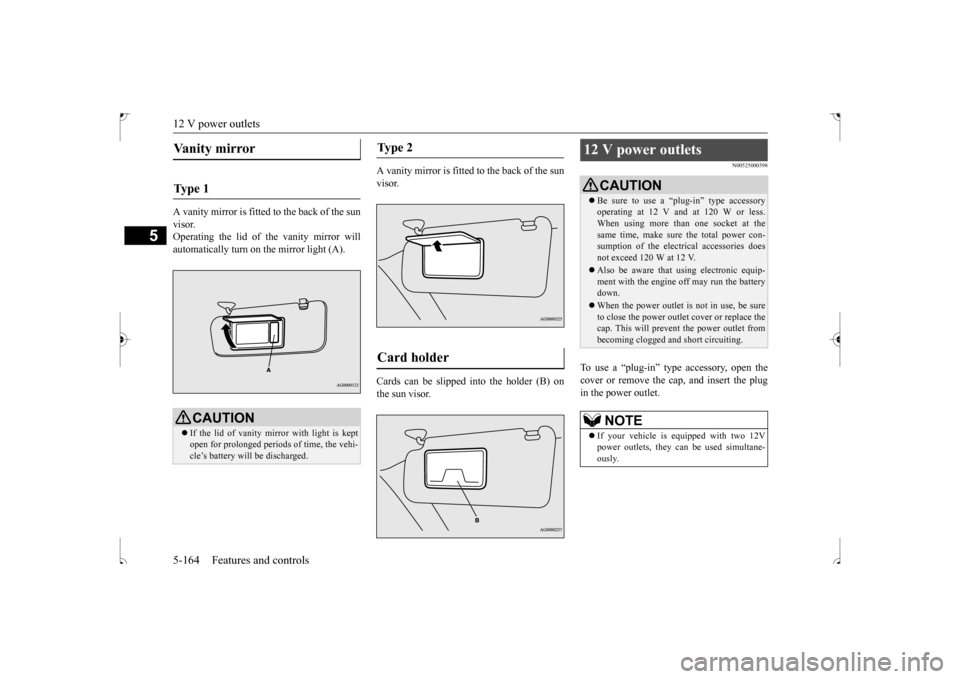
A vanity mirror is fitted to the back of the sun visor. Operating the lid of the vanity mirror willautomatically turn on the mirror light (A).
A vanity mirror is fitted to the back of the sun visor. Cards can be slipped into the holder (B) on the sun visor.
N00525000598
To use a “plug-in” type accessory, open thecover or remove the cap, and insert the plug in the power outlet.
Vanity mirror Ty p e 1
CAUTION If the lid of vanity mirror with light is kept open for prolonged periods of time, the vehi-cle’s battery will be discharged.
Ty p e 2 Card holder
12 V power outlets
CAUTION Be sure to use a “plug-in” type accessory operating at 12 V and at 120 W or less. When using more than one socket at the same time, make sure the total power con-sumption of the electrical accessories does not exceed 120 W at 12 V. Also be aware that using electronic equip- ment with the engine off may run the battery down. When the power outlet is not in use, be sure to close the power outlet cover or replace thecap. This will prevent the power outlet from becoming clogged and short circuiting.NOTE
If your vehicle is equipped with two 12V power outlets, they can be used simultane- ously.
BK0239500US.book
164 ページ 2016年5月13日 金曜日 午前8時53分
Page 229 of 399
HomeLink® Wireless Control System (if so equipped) 5-166 Features and controls
5
N00584600032
Some garage door openers manufactured after 1995 have “rolling code protection”. To program a garage door opener equipped with “rolling code protection”;you will need to access the garage door opener motor to press the motor’s “Learn” or “Smart” buttons. For conve-nience, use a ladder and another person toassist you. It is recommended that a new battery be placed in the hand-held transmitter of the device being programmed to HomeLink
®
for quicker training and accurate trans- mission of the radio-frequency signal.
N00584700033
To program HomeLink
® to operate a garage
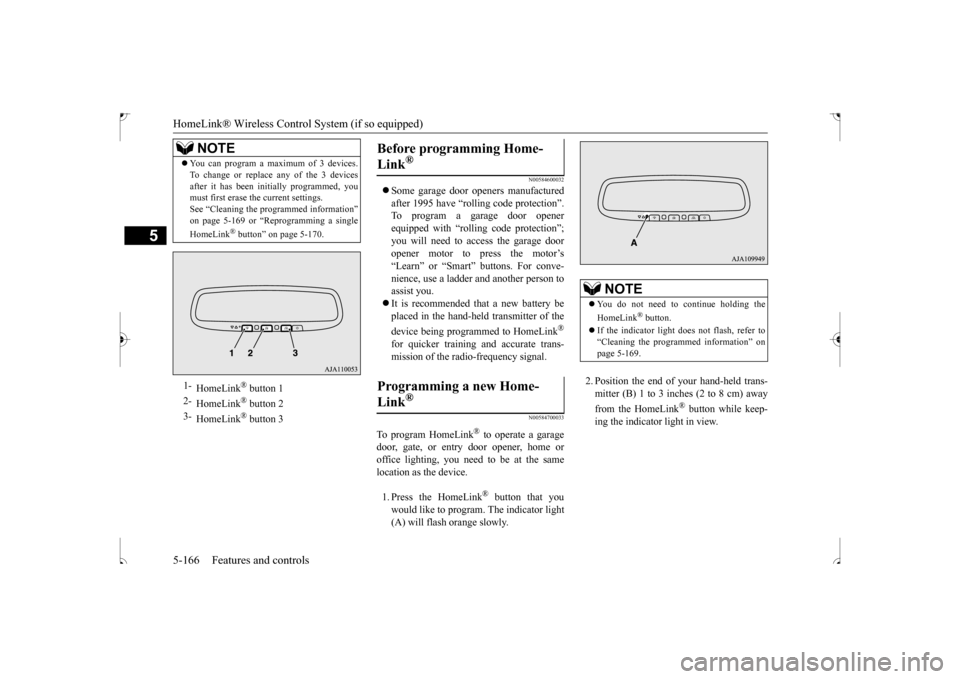
door, gate, or entry door opener, home or office lighting, you need to be at the same location as the device. 1. Press the HomeLink
® button that you
would like to program. The indicator light (A) will flash orange slowly.
2. Position the end of your hand-held trans- mitter (B) 1 to 3 inches (2 to 8 cm) away from the HomeLink
® button while keep-
ing the indicator light in view.
You can program a maximum of 3 devices. To change or replace any of the 3 devices after it has been initially programmed, you must first erase the current settings. See “Cleaning the programmed information”on page 5-169 or “Reprogramming a single HomeLink
® button” on page 5-170.
1-
HomeLink
® button 1
2-
HomeLink
® button 2
3-
HomeLink
® button 3
NOTE
Before programming Home- Link
®
Programming a new Home-Link
®
NOTE
You do not need to continue holding the HomeLink
® button.
If the indicator light does not flash, refer to “Cleaning the programmed information” on page 5-169.
BK0239500US.book
166 ページ 2016年5月13日 金曜日 午前8時53分
Page 233 of 399
Interior lights 5-170 Features and controls
5
1. Press and hold the 2 outer HomeLink
®
buttons for at least 10 seconds. The indi- cator will change from continuous yellow to rapidly flashing green.2. Release both buttons. 3. HomeLink
® is now in the train (or learn-
ing) mode and can be programmed at any time beginning with “Programming a new HomeLink
®” step 1.
N00585400037
To reprogram a HomeLink
® button, complete
the following. 1. Press and hold the desired HomeLink
®
button. Do not release the button. 2. The indicator light will begin to slowlyflash orange after 20 seconds. The Home- Link
® button can be released at this point.
Proceed with “Programming a new HomeLink
®” step 2.
N00585600039
Your HomeLink
® system operates on a radio
frequency subject to Federal Communica- tions Commission (FCC) Rules (For vehiclessold in U.S.A.) and Industry Canada Rules (For vehicles sold in Canada). This device complies with Part 15 of the FCC Rules andRSS- 210 of the Industry Canada Rules. Operation is subject to the following two con- ditions. This device may not cause harmful inter- ference. This device must accept any interference that may be received, including interfer-ence that may cause undesired operation.
This equipment complies with FCC radiation exposure limits set forth for an uncontrolledenvironment. End Users must follow the spe-cific operating instructions for satisfying RF exposure compliance. This transmitter must be at least 12 inches (20 cm) from the userand must not be co-located or operating in conjunction with any other antenna or trans- mitter.The term “IC:” before the certification/regis- tration number only signifies that Industry Canada technical specifications were met.
N00525300562
NOTE
Do not hold for longer than 20 seconds.
Reprogramming a single HomeLink
® button
NOTE
If you do not complete the programming of a new device to the button, it will revert to the previously stored programming. For questions or comments, visit www.homelink.com,www.youtube.com/HomeLinkGentex, or by calling the HomeLink
® Hotline.
General information
CAUTION The transmitter has been tested and complies with FCC and IC rules. Changes or modifications not expressly approved by the party responsible for com- pliance could void the user’s authority tooperate the device.
Interior lights
NOTE
Be aware that leaving the light illuminated with the engine off may run the battery down. Never leave the vehicle without checkingthat the light is off.
BK0239500US.book
170 ページ 2016年5月13日 金曜日 午前8時53分
Page 248 of 399
Driving during cold weather
Driving safety 6-5
6
Before changing lanes, check your mir- rors and use your turn-signal light. While driving, watch the behavior of other drivers, bicyclists, and pedestrians. Always obey applicable laws and regula- tions. Be a polite and alert driver. Always leave room for unexpected events, such assudden braking. If you plan to drive in another country, obey their vehicle registration laws andmake sure you will be able to get the rightfuel.
N00629400461
Check the battery. At the same time, check the terminals and wiring. During extremely cold weather, the battery will not be as strong. Also, the battery powerlevel may drop because more power is used for cold starting and driving. Before driving the vehicle, check to see ifthe engine runs at the proper speed and if the headlights are as bright as normally. Charge or replace the battery if necessary.During extreme cold weather, it is possi- ble that a very low battery could freeze.
Warm the engine sufficiently. After start- ing the engine, allow a short warm-up time to distribute oil to all cylinders. Then drive your vehicle slowly. Stay at low speeds at first so that the transaxle, transfer case and rear axle oil have time to spread to all the lubricationpoints. Manual transaxle can be harder to shift in cold weather conditions. This is normaland shifting will get easier as the transaxle warms up. Check the engine antifreeze. If there is not enough coolant because of a leak or from engine overheating, add Mitsubishi Motors Genuine Super LongLife Coolant Premium or equivalent. Please read this section in conjunction with the “Engine coolant” on page 9-7.
N00629500491
All the parts of the brake system are criticalto safety. Have the vehicle serviced by anauthorized Mitsubishi Motors dealer or a repair facility of your choice at regular inter- vals according to the “WARRANTY ANDMAINTENANCE MANUAL”. Check the brake system while driving at a low speed immediately after starting, espe- cially when the brakes are wet, to confirm they work normally.A film of water can be formed on the brake discs and prevent normal braking after driv- ing in heavy rain or through large puddles, orafter the vehicle is wash
ed. If this occurs, dry
the brakes out by driving slowly while lightly depressing the brake pedal.
Driving during cold weather
WA R N I N G The battery gives off explosive hydrogen gas. Any spark or flame can cause the bat- tery to explode, which could cause serious injury or death. Always wear protective clothes and a facemask when working with your battery, or let a skilled mechanic do it.
WA R N I N G Never open the radiator cap when the radiator is hot. You could be seriously burned.
Braking When brakes are wet
BK0239500US.bo
ok 5 ページ 2016年5月13日 金曜日 午前8時53分
Page 250 of 399
Loading information Driving safety 6-7
6
Always remove the key from the ignition switch and lock all doors and the liftgatewhen leaving the vehicle unattended. Always try to park your vehicle in a well lit area.
N00629900408
It is very importan
t to know how much
weight your vehicle can carry. This weight is called the vehicle capacity weight andincludes the weight of all occupants, cargo (including the roof load), non-factory- installed options, if any, being towed. The tireand loading information placard located on the driver’s door sill of your vehicle will show how much weight it may properly carry. It is important to fami
liarize yourself with the
following terms before loading your vehicle:
Vehicle maximum load on the tire: load on an individual tire that is determined by distributing to each axle its share of the maximum loaded vehicle weight anddividing by two. Vehicle normal load on the tire: load on an individual tire that is determined bydistributing to each axle its share of the curb weight, accessory weight, and nor- mal occupant weight and dividing by two. Maximum loaded vehicle weight: the sum of - (a) Curb weight; (b) Accessory weight;(c) Vehicle capacity weight; and (d) Production options weight. Curb weight: the weight of a motor vehi- cle with standard equipment including the maximum capacity of fuel, oil, and cool- ant. Accessory weight: the combined weight (in excess of those standard items which may be replaced) of automatic transmis-sion, power steering, power brakes, power windows, power seats, radio, and heater, to the extent that these items are availableas factory- installed equipment (whether installed or not). Vehicle capacity weight: the rated cargo and luggage load plus 150 lbs (68 kg)
*
times the vehicle’s designated seating capacity.
Production options weight: the combined weight of those installed regular produc- tion options weighing over 5 lbs (2.3 kg) in excess of those standard items whichthey replace, not previously considered in curb weight or accessory weight, includ- ing heavy duty brakes, ride levelers, roofrack, heavy duty battery, and special trim. Normal occupant weight: 150 lbs (68 kg)
* times the number of specified
occupants. (In your vehicle the number is3) Occupant distribution: Occupant distribu- tion within the passenger compartment (Inyour vehicle the distribution is 2 in front, 1 in second row seat)
N00630100383
The tire and loading information placard is located on the inside sill of the driver’s door.
When leaving the vehicle Loading information
WA R N I N G Never overload your vehicle. Overloading can damage your vehicle, adversely affect vehicle performance, including handling and braking, cause tire failure, and result in an accident.
* :150 lbs (68 kg) is the weight of one per- son as defined by U.S.A. and Canadian regulations.
Tire and loading information placard
BK0239500US.bo
ok 7 ページ 2016年5月13日 金曜日 午前8時53分
Page 319 of 399
Clock (if so equipped) 7-62 Comfort controls
7
N00755001192
The time is displayed when the ignition switch or the operation mode is in ON or ACC.
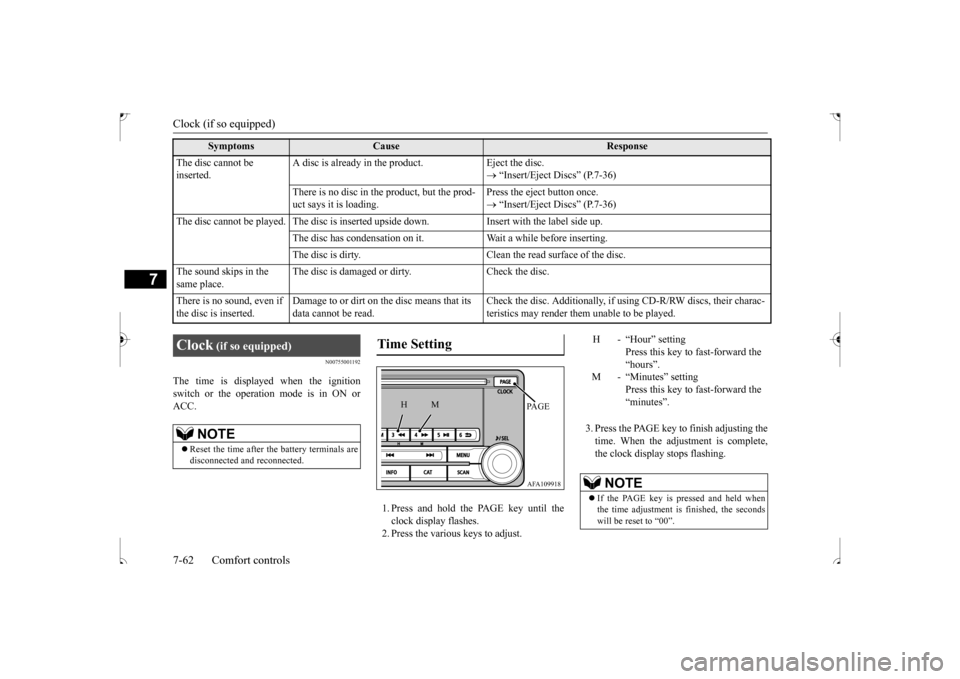
1. Press and hold the PAGE key until the clock display flashes.2. Press the various keys to adjust.
3. Press the PAGE key to finish adjusting the time. When the adjustment is complete,the clock display stops flashing.
The disc cannot be inserted.
A disc is already in the product. Eject the disc.
“Insert/Eject Discs” (P.7-36)
There is no disc in the product, but the prod- uct says it is loading.
Press the eject button once. “Insert/Eject Discs” (P.7-36)
The disc cannot be played. The disc is inserted upside down. Insert with the label side up.
The disc has condensation on it. W
ait a while before inserting.
The disc is dirty. Clean the read surface of the disc.
The sound skips in the same place.
The disc is damaged or dirty. Check the disc.
There is no sound, even if the disc is inserted.
Damage to or dirt on the disc means that its data cannot be read.
Check the disc. Additionally, if using CD-R/RW discs, their charac- teristics may render them unable to be played.
Symptoms
Cause
Response
Clock
(if so equipped)
NOTE
Reset the time after the battery terminals are disconnected and reconnected.
Time Setting
AFA109918PA G E
M
H
H - “Hour” setting
Press this key to fast-forward the“hours”.
M - “Minutes” setting
Press this key to fast-forward the“minutes”.
NOTE
If the PAGE key is pressed and held when the time adjustment is finished, the seconds will be reset to “00”.
BK0239500US.bo
ok 62 ページ 2016年5月13日 金曜日 午前8時53分