Head NISSAN ALMERA N15 1995 Service Manual
[x] Cancel search | Manufacturer: NISSAN, Model Year: 1995, Model line: ALMERA N15, Model: NISSAN ALMERA N15 1995Pages: 1701, PDF Size: 82.27 MB
Page 1671 of 1701
ON-VEHICLESERVICE
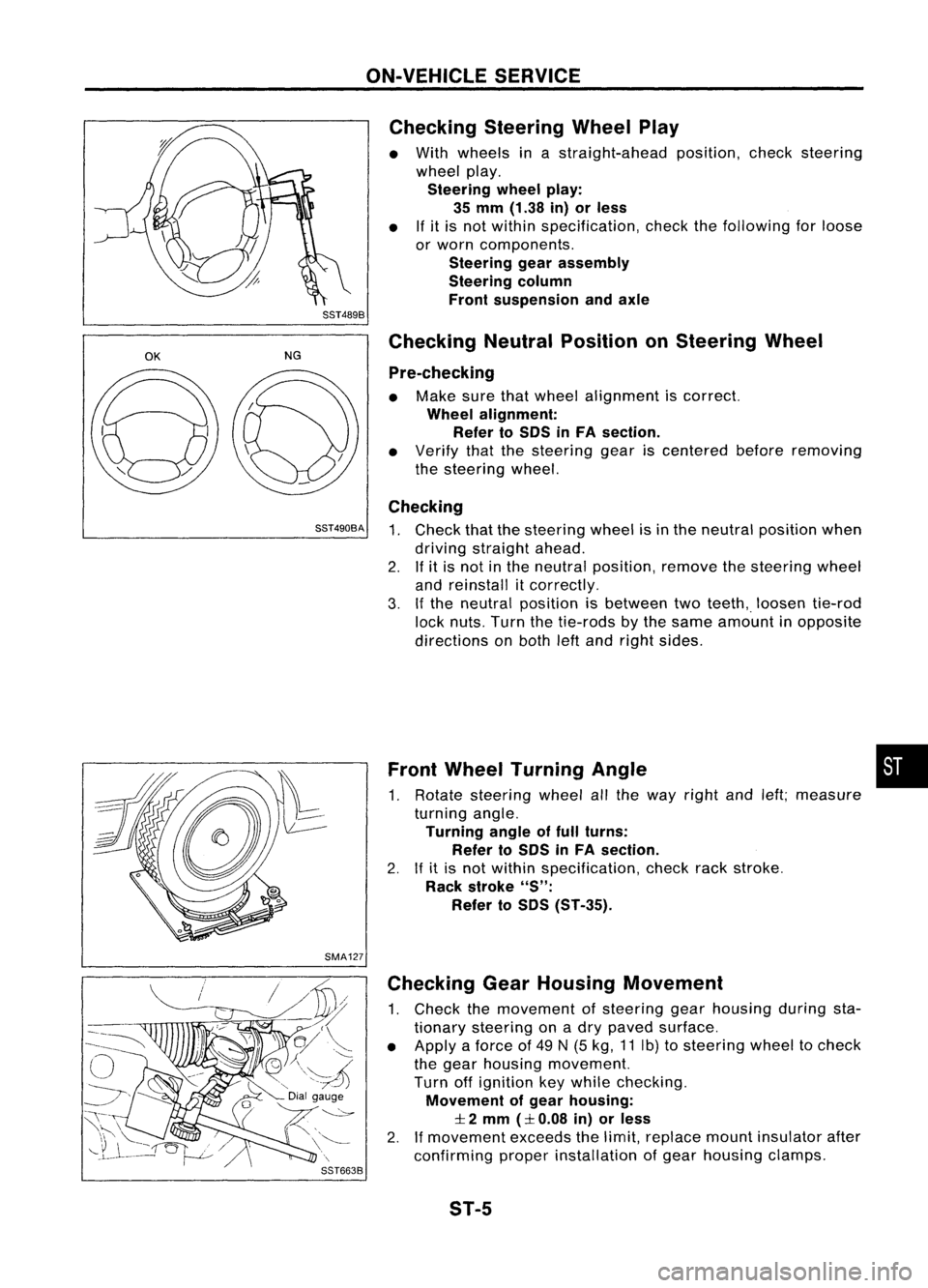
Checking SteeringWheelPlay
• With wheels inastraight-ahead position,checksteering
wheel play.
Steering wheelplay:
35 mm (1.38 in)orless
• Ifit is not within specification, checkthefollowing forloose
or worn components.
Steering gearassembly
Steering column
Front suspension andaxle
SST489B
OK
NGChecking
NeutralPosition onSteering Wheel
Pre-checking
• Make surethatwheel alignment iscorrect.
Wheel alignment:
Refer toSOS inFA section.
• Verify thatthesteering geariscentered beforeremoving
the steering wheel.
Checking
SST490BA
1.Check thatthesteering wheelisin the neutral position when
driving straight ahead.
2. Ifit is not inthe neutral position, removethesteering wheel
and reinstall itcorrectly.
3. Ifthe neutral position isbetween twoteeth,. loosen tie-rod
lock nuts. Turnthetie-rods bythe same amount inopposite
directions onboth leftand right sides.
Front Wheel Turning Angle •
1. Rotate steering wheelallthe way right andleft;measure
turning angle.
Turning angleoffull turns:
Refer toSOS inFA section.
2. Ifit is not within specification, checkrackstroke.
Rack stroke
"S":
Refer toSOS (ST-35).
SMA127 Checking GearHousing Movement
1. Check themovement ofsteering gearhousing duringsta-
tionary steering onadry paved surface.
• Apply aforce of49 N(5 kg, 11Ib) tosteering wheeltocheck
the gear housing movement.
Turn offignition keywhile checking.
Movement ofgear housing:
:I:
2 mm
(:I:
0.08 in)orless
2. Ifmovement exceedsthelimit, replace mountinsulator after
confirming properinstallation ofgear housing clamps.
ST-5
Page 1675 of 1701
![NISSAN ALMERA N15 1995 Service Manual STEERINGWHEELANDSTEERING COLUMN
Removal andInstallation
SEC. 484.487.488
_~ ~4.0-4.9 (0.4 -0.5, 35-43)
ij] :
N.m (kg-m, in-Ib)
co;J :
N.m (kg-m. ft-Ib) With
airbag
Withoutairbag
SST538C
G)
Airb](/img/5/57349/w960_57349-1674.png "NISSAN ALMERA N15 1995 Service Manual STEERINGWHEELANDSTEERING COLUMN
Removal andInstallation
SEC. 484.487.488
_~ ~4.0-4.9 (0.4 -0.5, 35-43)
ij] :
N.m (kg-m, in-Ib)
co;J :
N.m (kg-m. ft-Ib) With
airbag
Withoutairbag
SST538C
G)
Airb")
STEERINGWHEELANDSTEERING COLUMN
Removal andInstallation
SEC. 484.487.488
_~ ~4.0-4.9 (0.4 -0.5, 35-43)
ij] :
N.m (kg-m, in-Ib)
co;J :
N.m (kg-m. ft-Ib) With
airbag
Withoutairbag
SST538C
G)
Airbag module
@
Horn pad
@
Steering wheel
@
Spiral cable
@
Column cover
@
Combination switch
(J)
Steering columnassembly
@
Lower joint
@
Boot
CAUTION (SRSmodels only): •
• The rotation ofthe spiral cable(SRS"Airbag" component
part) islimited. Ifthe steering gearmust beremoved, set
the front wheels inthe straight-ahead direction.Donot
rotate thesteering columnwhilethesteering gearis
removed.
• Remove thesteering wheelbefore removing thesteering
lower jointtoavoid damaging theSRS spiral cable.
STEERING WHEEL
With AirBag
• Remove airbag module andspiral cable.
Refer to"Removal -Air Bag Module andSpiral Cable",
"SUPPLEMENTAL RESTRAINTSYSTEM"inRS section.
SBF812E ST-9
Page 1676 of 1701
STEERINGWHEELANDSTEERING COLUMN
Removal andInstallation (Cont'd)
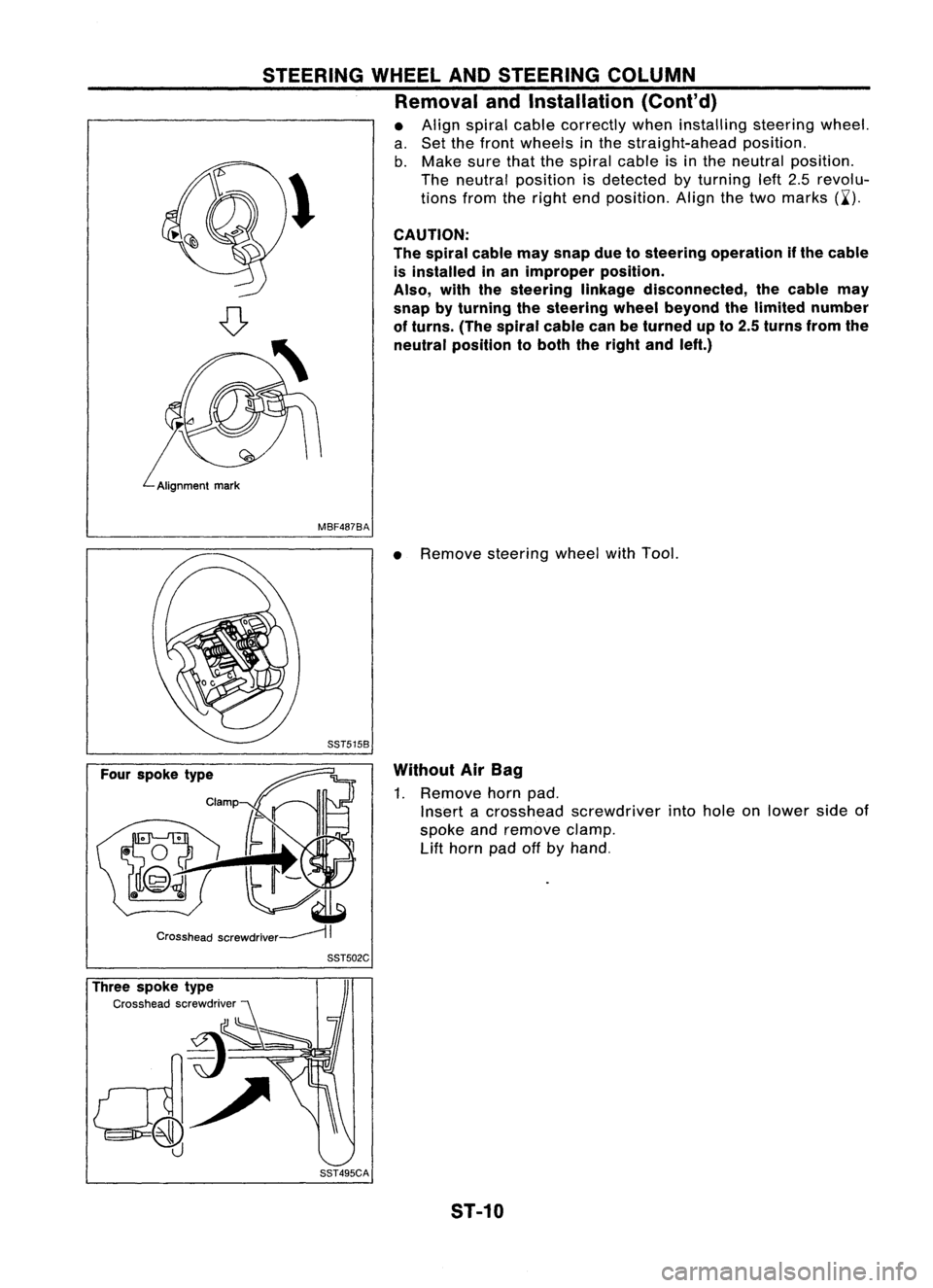
• Align spiral cablecorrectly wheninstalling steeringwheel.
a. Set thefront wheels inthe straight-ahead position.
b. Make surethatthespiral cableisin the neutral position.
\ Theneutral position isdetected byturning left2.5revolu-
~ tionsfromtheright endposition. Alignthetwo marks (~').
CAUTION:
The spiral cablemaysnap duetosteering operation ifthe cable
is installed inan improper position.
Also, withthesteering linkagedisconnected, thecable may
snap byturning thesteering wheelbeyond thelimited number
of turns. (Thespiral cablecanbeturned upto2.5 turns fromthe
neutral position toboth theright andleft.)
MBF487BA
•Remove steering wheelwithTool.
Without AirBag
1. Remove hornpad.
Insert acrosshead screwdriver intohole onlower sideof
spoke andremove clamp.
Lift
horn padoffbyhand.
Three spoke type
Cross headscrewdriver SST502C
SST495CA ST-10
Page 1677 of 1701
STEERINGWHEELANDSTEERING COLUMN
Removal andInstallation (Cont'd)
Two spoke type
Clamp
Crosshead screwdriver~
II
SST503C
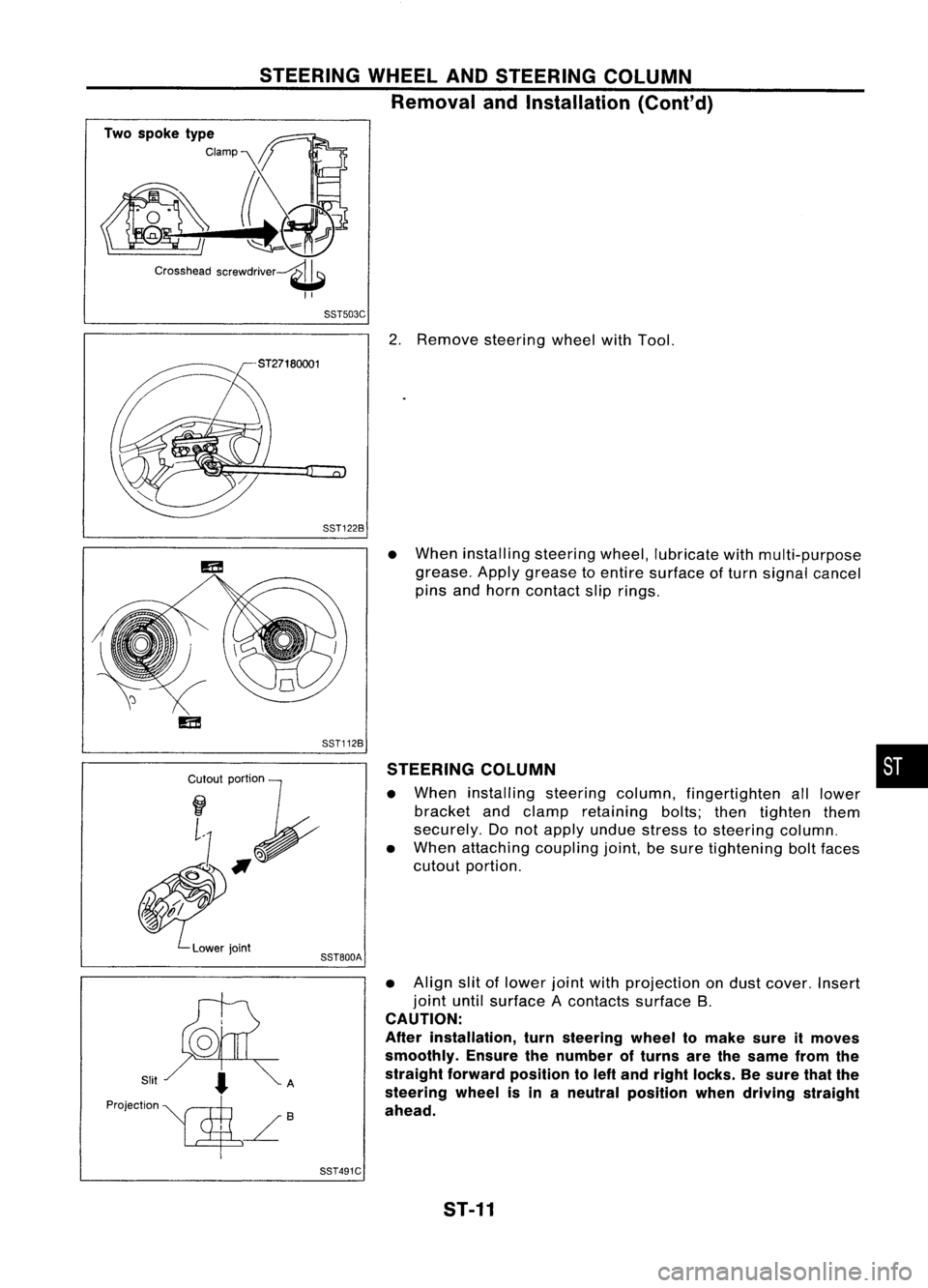
2.Remove steering wheelwithTool.
SST122B
Cr~I~I;~
~#f
~.'".
Lowerjoint
SST112B
SST800A
•
When installing steeringwheel,lubricate withmulti-purpose
grease. Applygrease toentire surface ofturn signal cancel
pins andhorn contact sliprings.
STEERING COLUMN
• When installing steeringcolumn,fingertighten alllower
bracket andclamp retaining bolts;thentighten them
securely. Donot apply undue stress tosteering column.
• When attaching couplingjoint,besure tightening boltfaces
cutout portion.
• Align slitoflower jointwithprojection ondust cover. Insert
joint untilsurface Acontacts surfaceB.
CAUTION:
After installation, turnsteering wheeltomake sureitmoves
smoothly. Ensurethenumber ofturns arethesame fromthe
straight forward position toleft and right locks. Besure thatthe
steering wheelisin aneutral position whendriving straight
ahead.
•
SST491C ST-11
Page 1679 of 1701
STEERINGWHEELANDSTEERING COLUMN
Disassembly andAssembly (Cont'd)
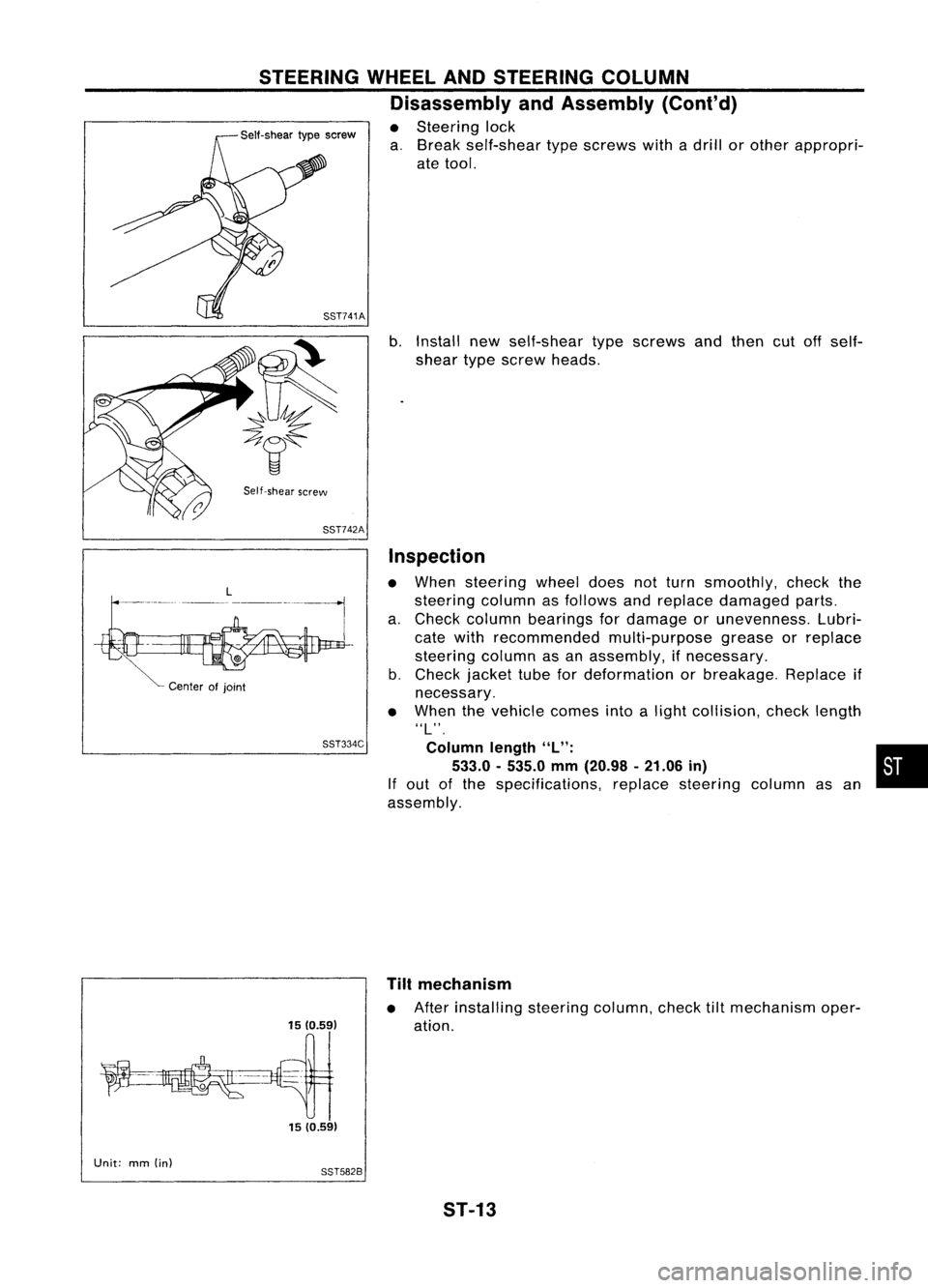
• Steering lock
a. Break self-shear typescrews withadrill orother appropri-
ate tool.
SST741A
b.Install newself-shear typescrews andthen cutoffself-
shear typescrew heads.
Self-shear screw
SST742A
L
-
--- ---_
..
_-------,
I
Center ofjoint
SST334C
1510.59) 15 (0.59)
Inspection
• When steering wheeldoesnotturn smoothly, checkthe
steering columnasfollows andreplace damaged parts.
a. Check column bearings fordamage orunevenness. Lubri-
cate with recommended multi-purposegreaseorreplace
steering columnasan assembly, ifnecessary.
b. Check jackettubefordeformation orbreakage. Replaceif
necessary.
• When thevehicle comesintoalight collision, checklength
ilL",
Column length
"L": •
533.0 -535.0 mm(20.98 -21.06 in)
If out ofthe specifications, replacesteering columnasan
assembly.
Tilt mechanism
• After installing steeringcolumn,checktiltmechanism oper-
ation.
Unit: mm(in)
8ST5828
ST-13
Page 1680 of 1701
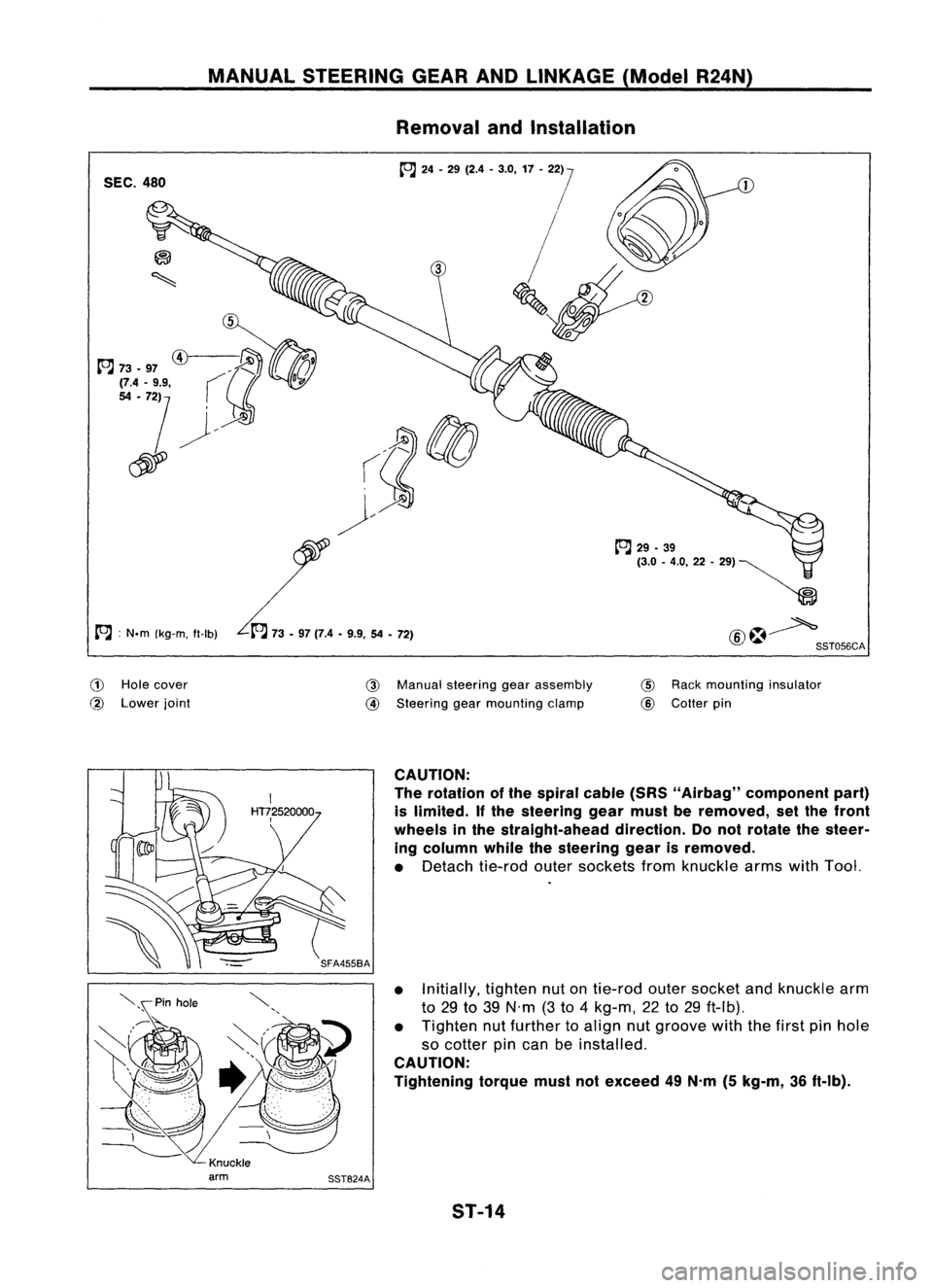
MANUALSTEERING GEARANDLINKAGE (ModelR24N)
Removal andInstallation
SEC. 480
A :
N.m (kg-m, tt-Ib)
(!)
Hole cover
@
Lower joint
@
Manual steering gearassembly
@
Steering gearmounting clamp
tt'J
29•39
(3.0 -4.0,22 -", ~
~
@~ SST056CA
@
Rack mounting insulator
@
Cotter pin
CAUTION:
The rotation ofthe spiral cable(SRS"Airbag" component part)
is limited.
If
the steering gearmust beremoved, setthe front
wheels inthe straight-ahead direction.Donot rotate thesteer-
ing column whilethesteering gearisremoved.
• Detach tie-rodoutersockets fromknuckle armswithTool.
• Initially, tightennutontie-rod outersocket andknuckle arm
to 29 to39 N'm (3to 4kg-m, 22to29 ft-Ib).
• Tighten nutfurther toalign nutgroove withthefirst pinhole
so cotter pincan beinstalled.
CAUTION:
Tightening torquemustnotexceed 49N.m (5kg-m, 36ft-Ib).
ST-14
Page 1685 of 1701
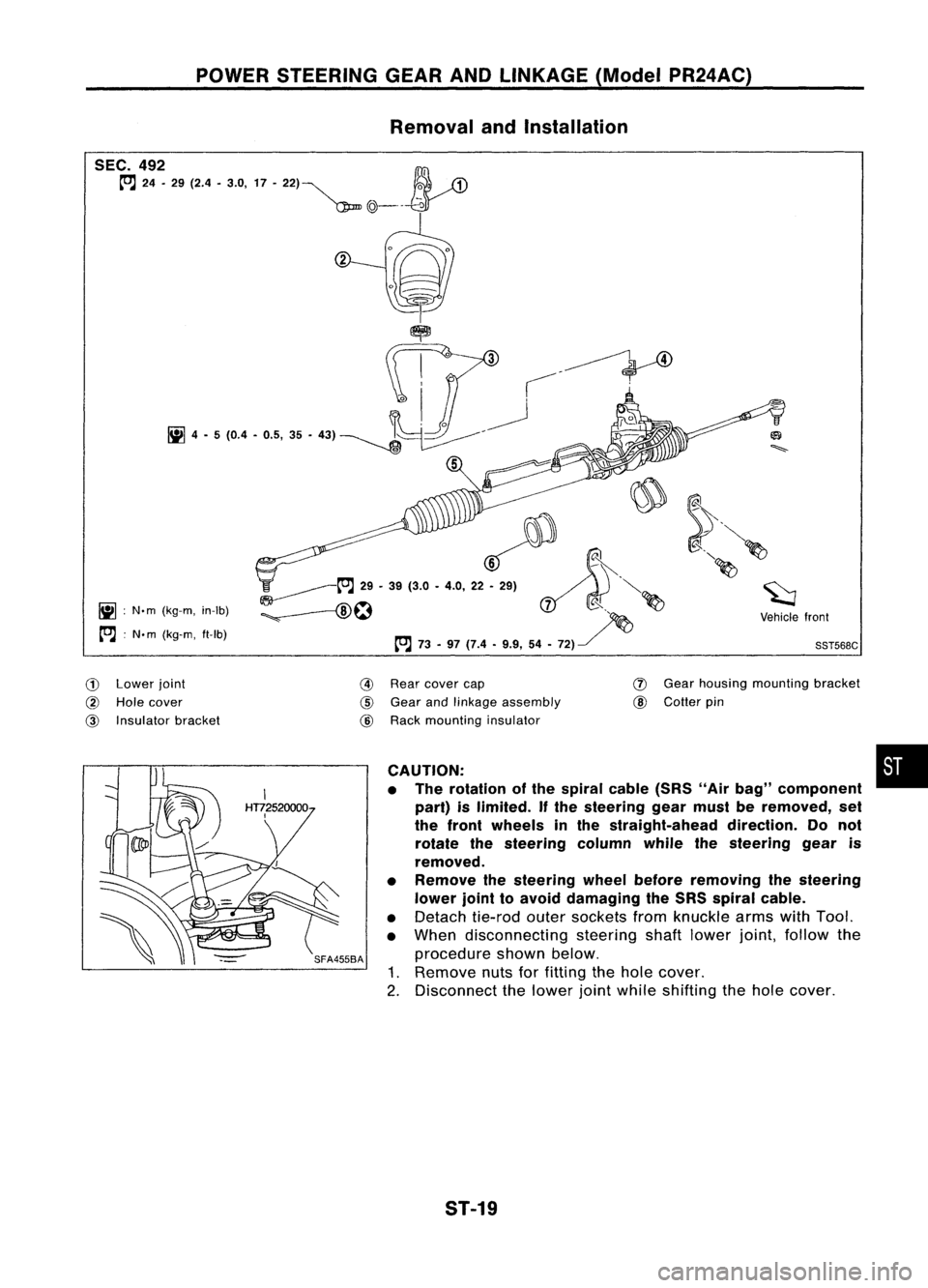
POWERSTEERING GEARANDLINKAGE (ModelPR24AC)
Removal andInstallation
~ :N.m (kg-m, in-Ib)
[O.J :
N. m (kg-m, ft-Ib)
~~.~
';'-------t"J
29•39 (3.0 •4.0, 22~ ~.'.. ~"'-
:;. --f8\~ ~
d( ~ ~
~ ~~ ~Vehiclefront
[O.J
73-97 (7.4 •9.9, 54•72) ~
'
SST568C
CD
Lower joint
@
Hole cover
@
Insulator bracket
@
Rear cover cap
@
Gear andlinkage assembly
@
Rack mounting insulator
(J)
Gear housing mounting bracket
@
Cotter pin
CAUTION: •
• The rotation ofthe spiral cable(SRS"Airbag" component
part) islimited.
If
the steering gearmust beremoved, set
the front wheels inthe straight-ahead direction.Donot
rotate thesteering columnwhilethesteering gearis
removed.
• Remove thesteering wheelbefore removing thesteering
lower jointtoavoid damaging theSRS spiral cable.
• Detach tie-rodoutersockets fromknuckle armswithTool.
• When disconnecting steeringshaftlower joint,follow the
procedure shownbelow.
1. Remove nutsforfitting thehole cover.
2. Disconnect thelower jointwhile shifting thehole cover.
ST-19
Page 1686 of 1701
POWERSTEERING GEARANDLINKAGE (ModelPR24AC)
Removal andInstallation (Cont'd)
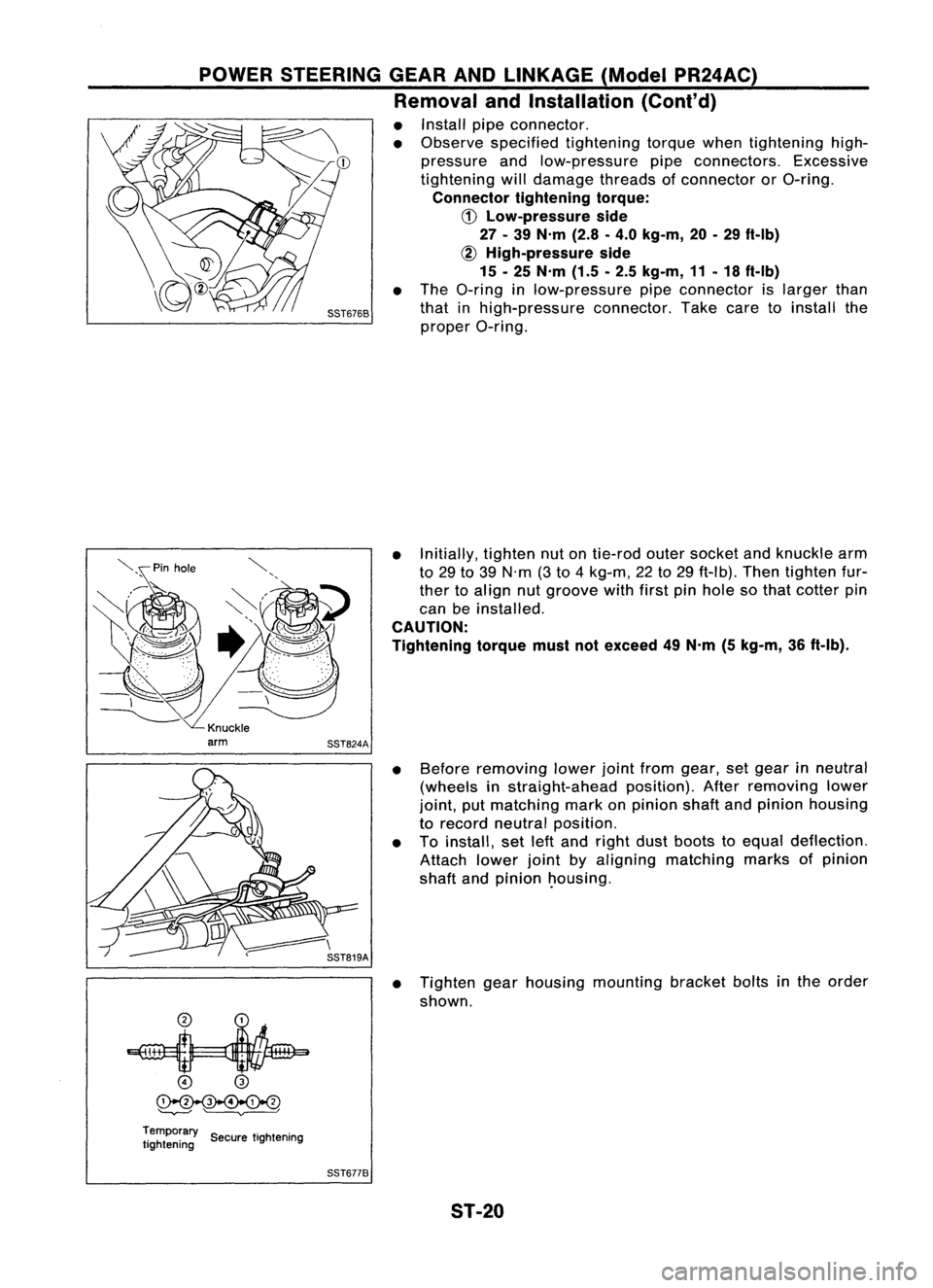
• Install pipeconnector.
• Observe specified tightening torquewhentightening high-
pressure andlow-pressure pipeconnectors. Excessive
tightening willdamage threadsofconnector orO-ring.
Connector tighteningtorque:
CD
Low-pressure side
27 -39 N'm (2.8-4.0 kg-m, 20-29 ft-Ib)
~ High-pressure side
15 -25 N'm (1.5-2.5 kg-m, 11-18 ft-Ib)
• The O-ring inlow-pressure pipeconnector islarger than
that inhigh-pressure connector.Takecaretoinstall the
proper O-ring.
• Initially, tightennutontie-rod outersocket andknuckle arm
to 29 to39 N'm (3to 4kg-m, 22to29 ft-Ib). Thentighten fur-
ther toalign nutgroove withfirstpinhole sothat cotter pin
can beinstalled.
CAUTION:
Tightening torquemustnotexceed 49N'm (5kg-m, 36ft-Ib).
• Before removing lowerjointfrom gear, setgear inneutral
(wheels instraight-ahead position).Afterremoving lower
joint, putmatching markonpinion shaftandpinion housing
to record neutral position.
• Toinstall, setleftand right dustboots toequal deflection.
Attach lowerjointbyaligning matching marksofpinion
shaft andpinion ~ousing.
• Tighten gearhousing mounting bracketboltsinthe order
shown.
o
@
~
'--v---' ~
Temporary ..
tightening SecuretIghtening
SST6778
ST-20
Page 1693 of 1701
POWERSTEERING GEARANDLINKAGE (ModelPR24AC)
Assembly (Cont'd)
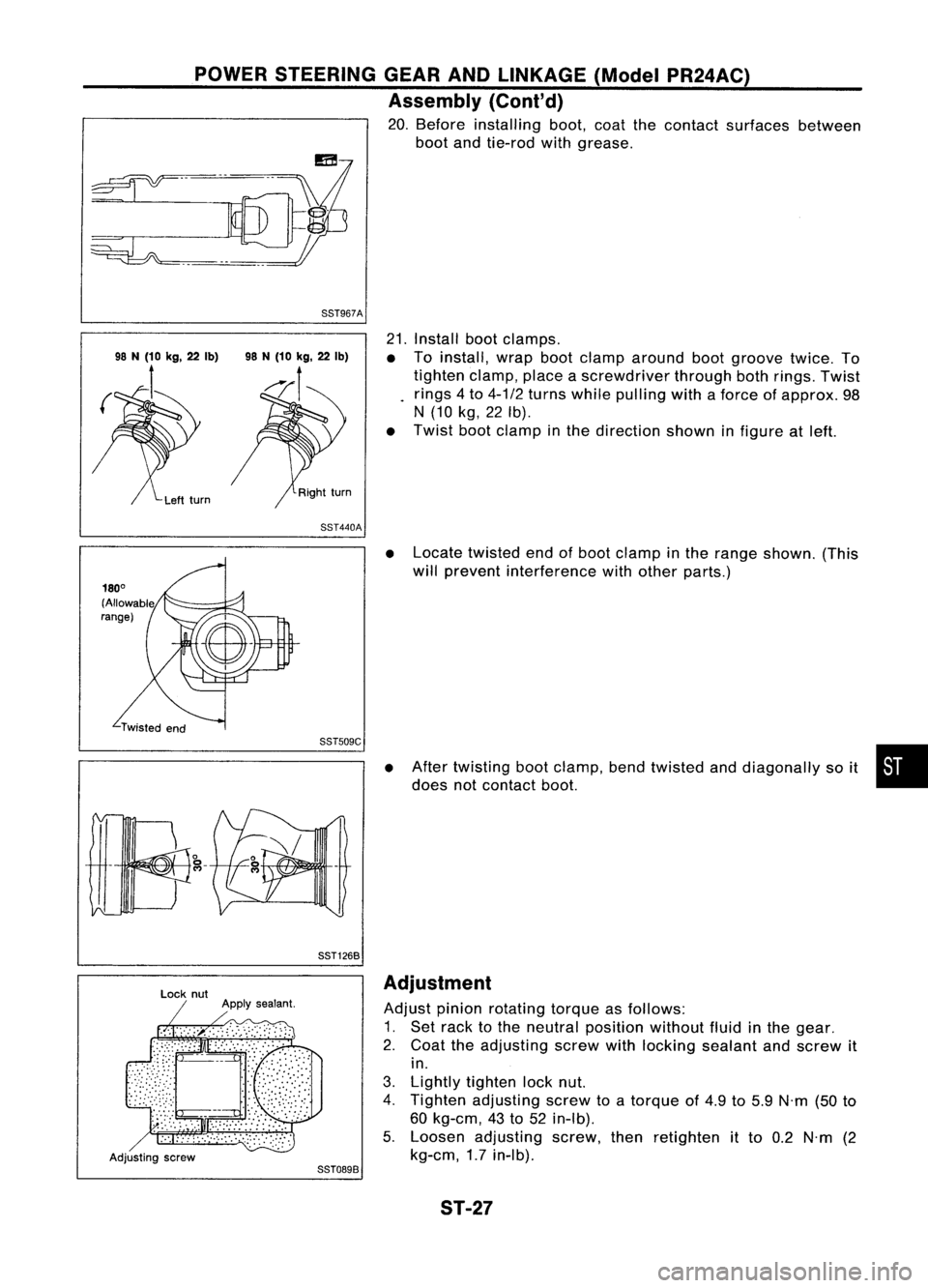
20. Before installing boot,coatthecontact surfaces between
boot andtie-rod withgrease.
88T967A
21.Install bootclamps.
• Toinstall, wrapbootclamp around bootgroove twice.To
tighten clamp,placeascrewdriver throughbothrings. Twist
rings 4to 4-1/2 turns while pulling withaforce ofapprox. 98
N (10 kg,22Ib).
• Twist bootclamp inthe direction showninfigure atleft.
88T440A
•Locate twisted endofboot clamp inthe range shown. (This
will prevent interference withother parts.)
88TS09C
88T1268
•
After twisting bootclamp, bendtwisted anddiagonally soit •
does notcontact boot.
Adjusting screw
88T0898Adjustment
Adjust pinionrotating torqueasfollows:
1. Set rack tothe neutral position withoutfluidinthe gear.
2. Coat theadjusting screwwithlocking sealant andscrew it
in.
3. Lightly tighten locknut.
4. Tighten adjusting screwtoatorque of4.9 to5.9 N'm (50to
60 kg-em, 43to52 in-Ib).
5. Loosen adjusting screw,thenretighten itto 0.2 N'm (2
kg-em, 1.7in-Ib).
ST-27