light NISSAN ARMADA 2017 2.G Owners Manual
[x] Cancel search | Manufacturer: NISSAN, Model Year: 2017, Model line: ARMADA, Model: NISSAN ARMADA 2017 2.GPages: 614, PDF Size: 2.87 MB
Page 525 of 614
8-10Do-it-yourself
SDI2513
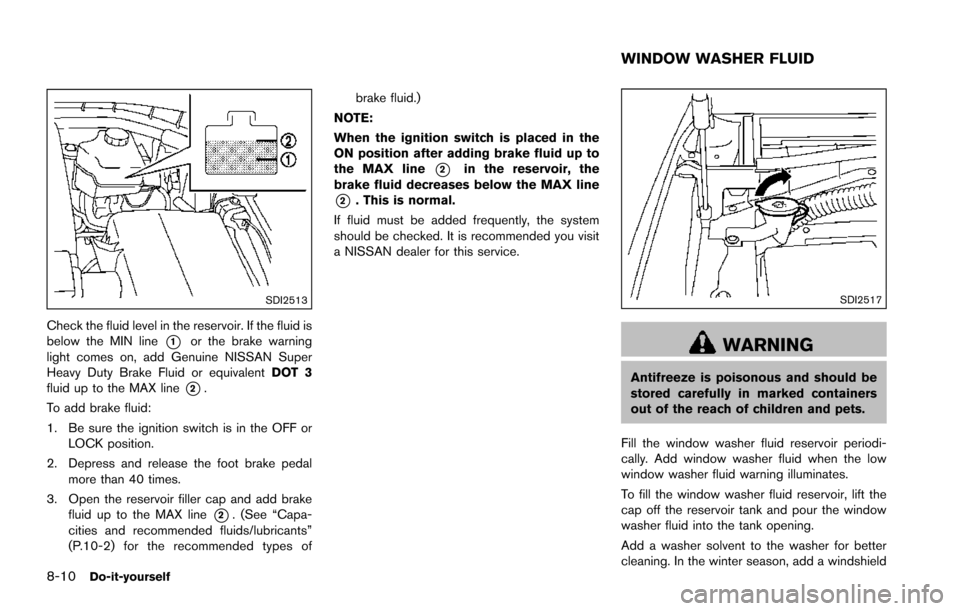
Check the fluid level in the reservoir. If the fluid is
below the MIN line
*1or the brake warning
light comes on, add Genuine NISSAN Super
Heavy Duty Brake Fluid or equivalent DOT 3
fluid up to the MAX line
*2.
To add brake fluid:
1. Be sure the ignition switch is in the OFF or LOCK position.
2. Depress and release the foot brake pedal more than 40 times.
3. Open the reservoir filler cap and add brake fluid up to the MAX line
*2. (See “Capa-
cities and recommended fluids/lubricants”
(P.10-2) for the recommended types of brake fluid.)
NOTE:
When the ignition switch is placed in the
ON position after adding brake fluid up to
the MAX line
*2in the reservoir, the
brake fluid decreases below the MAX line
*2. This is normal.
If fluid must be added frequently, the system
should be checked. It is recommended you visit
a NISSAN dealer for this service.
SDI2517
WARNING
Antifreeze is poisonous and should be
stored carefully in marked containers
out of the reach of children and pets.
Fill the window washer fluid reservoir periodi-
cally. Add window washer fluid when the low
window washer fluid warning illuminates.
To fill the window washer fluid reservoir, lift the
cap off the reservoir tank and pour the window
washer fluid into the tank opening.
Add a washer solvent to the washer for better
cleaning. In the winter season, add a windshield
WINDOW WASHER FLUID
Page 533 of 614
8-18Do-it-yourself
occasional brake squeak, squeal or other noise
may be heard. Occasional brake noise during
light to moderate stops is normal and does not
affect the function or performance of the brake
system.
Proper brake inspection intervals should
be followed.For additional information, see the
maintenance schedule shown in the “9. Main-
tenance and schedules” section.
BRAKE BOOSTER
Check the brake booster function as follows:
1. With the engine off, depress and release the foot brake pedal more than 20 times. When
the foot brake pedal movement (distance of
travel) remains the same from one pedal
application to the next, continue on to the
next step.
2. While depressing the foot brake pedal, start the engine.
3. With the foot brake pedal depressed, stop the engine. Keep the pedal depressed for
about 30 seconds.
4. Run the engine for 1 minute without depressing the foot brake pedal, then turn
it off. Depress the foot brake pedal several
times. The pedal travel distance will de-
crease gradually with each depression as
the hydraulic pressure decreases. If the brakes do not operate properly, have the
brakes checked. It is recommended that you visit
a NISSAN dealer for repair.
SDI2518
SDI2532
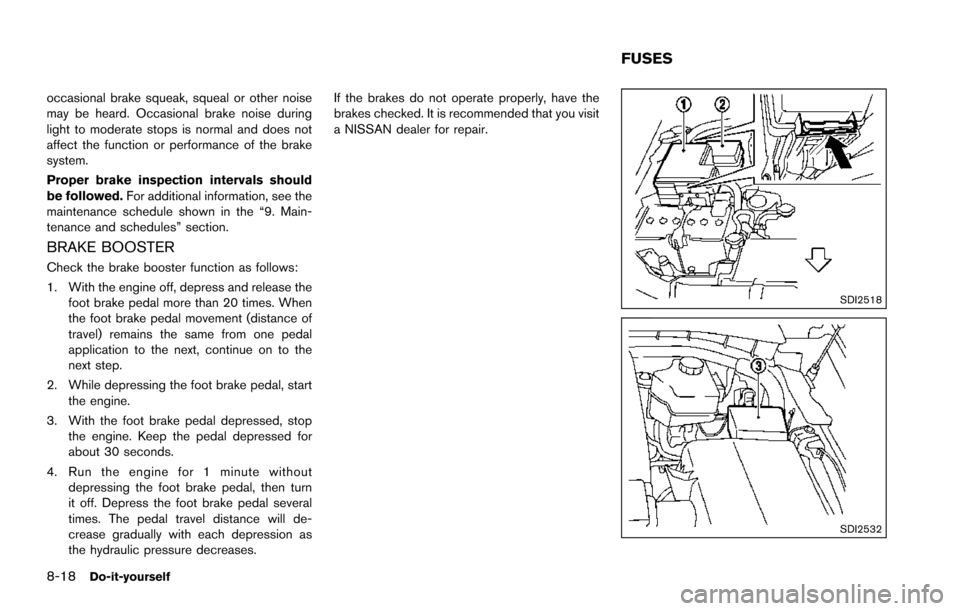
FUSES
Page 534 of 614
ENGINE COMPARTMENT
WARNING
Never use a fuse of a higher or lower
amperage rating than that specified on
the fuse box cover. This could damage
the electrical system or electronic con-
trol units or cause a fire.
If any electrical equipment does not operate,
check for an open fuse.
1. Be sure the ignition switch is pushed to the OFF or LOCK position and the headlight
switch is turned to OFF.
2. Open the engine hood and remove the cover on the battery.
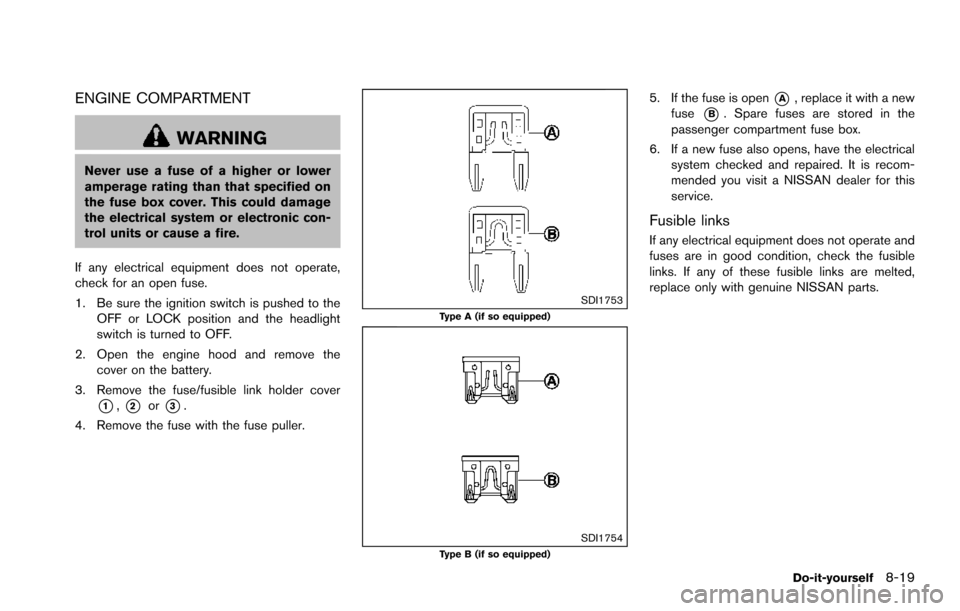
3. Remove the fuse/fusible link holder cover
*1,*2or*3.
4. Remove the fuse with the fuse puller.
SDI1753Type A (if so equipped)
SDI1754Type B (if so equipped)
5. If the fuse is open*A, replace it with a new
fuse
*B. Spare fuses are stored in the
passenger compartment fuse box.
6. If a new fuse also opens, have the electrical system checked and repaired. It is recom-
mended you visit a NISSAN dealer for this
service.
Fusible links
If any electrical equipment does not operate and
fuses are in good condition, check the fusible
links. If any of these fusible links are melted,
replace only with genuine NISSAN parts.
Do-it-yourself8-19
Page 535 of 614
8-20Do-it-yourself
JVM0200X
PASSENGER COMPARTMENT
WARNING
Never use a fuse of a higher or lower
amperage rating than that specified on
the fuse box cover. This could damage
the electrical system or electronic con-
trol units or cause a fire.
If any electrical equipment does not operate,
check for an open fuse.
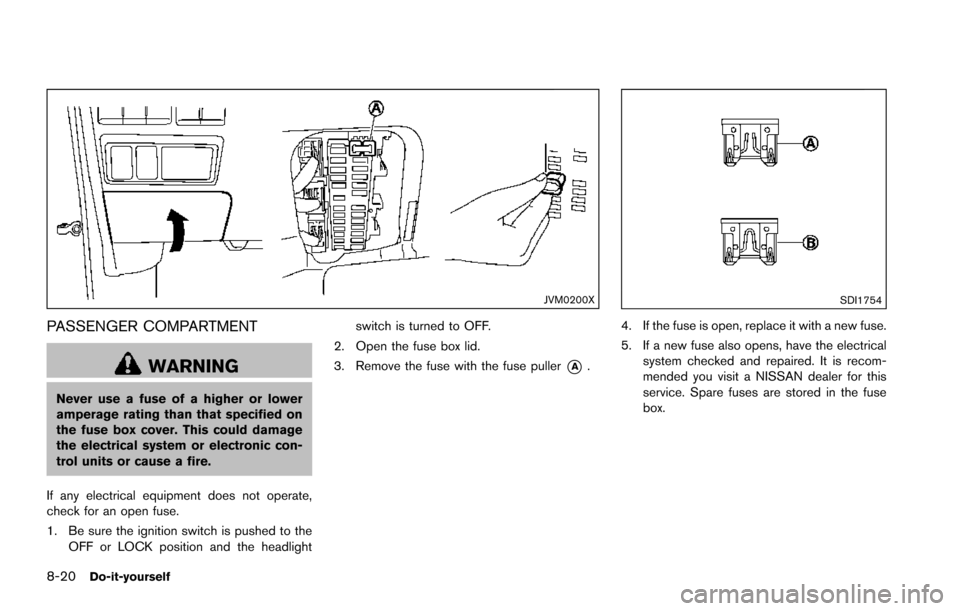
1. Be sure the ignition switch is pushed to the OFF or LOCK position and the headlight switch is turned to OFF.
2. Open the fuse box lid.
3. Remove the fuse with the fuse puller
*A.
SDI1754
4. If the fuse is open, replace it with a new fuse.
5. If a new fuse also opens, have the electrical system checked and repaired. It is recom-
mended you visit a NISSAN dealer for this
service. Spare fuses are stored in the fuse
box.
Page 536 of 614
SDI2704
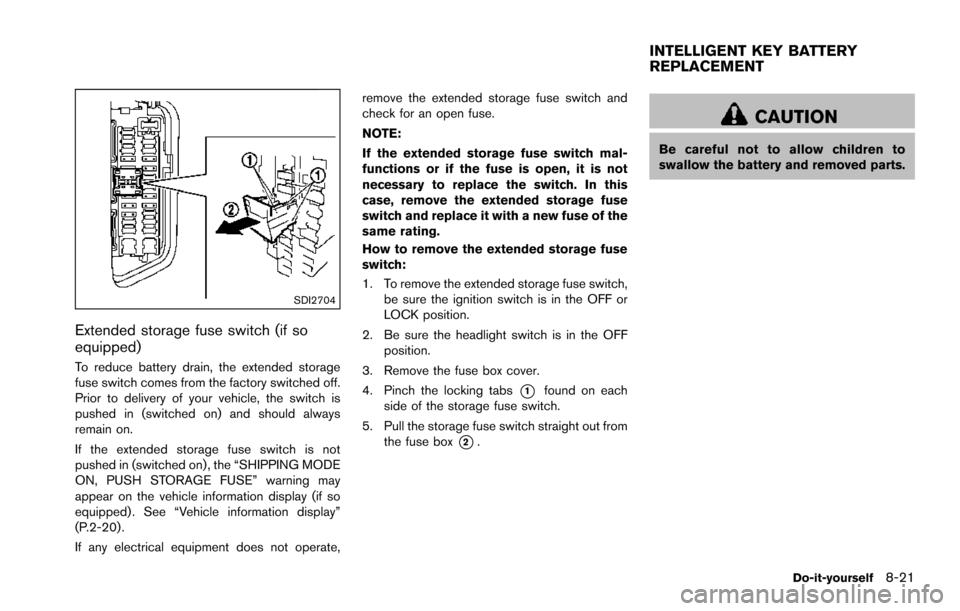
Extended storage fuse switch (if so
equipped)
To reduce battery drain, the extended storage
fuse switch comes from the factory switched off.
Prior to delivery of your vehicle, the switch is
pushed in (switched on) and should always
remain on.
If the extended storage fuse switch is not
pushed in (switched on), the “SHIPPING MODE
ON, PUSH STORAGE FUSE” warning may
appear on the vehicle information display (if so
equipped) . See “Vehicle information display”
(P.2-20) .
If any electrical equipment does not operate,remove the extended storage fuse switch and
check for an open fuse.
NOTE:
If the extended storage fuse switch mal-
functions or if the fuse is open, it is not
necessary to replace the switch. In this
case, remove the extended storage fuse
switch and replace it with a new fuse of the
same rating.
How to remove the extended storage fuse
switch:
1. To remove the extended storage fuse switch,
be sure the ignition switch is in the OFF or
LOCK position.
2. Be sure the headlight switch is in the OFF position.
3. Remove the fuse box cover.
4. Pinch the locking tabs
*1found on each
side of the storage fuse switch.
5. Pull the storage fuse switch straight out from the fuse box
*2.
CAUTION
Be careful not to allow children to
swallow the battery and removed parts.
Do-it-yourself8-21
INTELLIGENT KEY BATTERY
REPLACEMENT
Page 539 of 614
8-24Do-it-yourself
JVM0727X
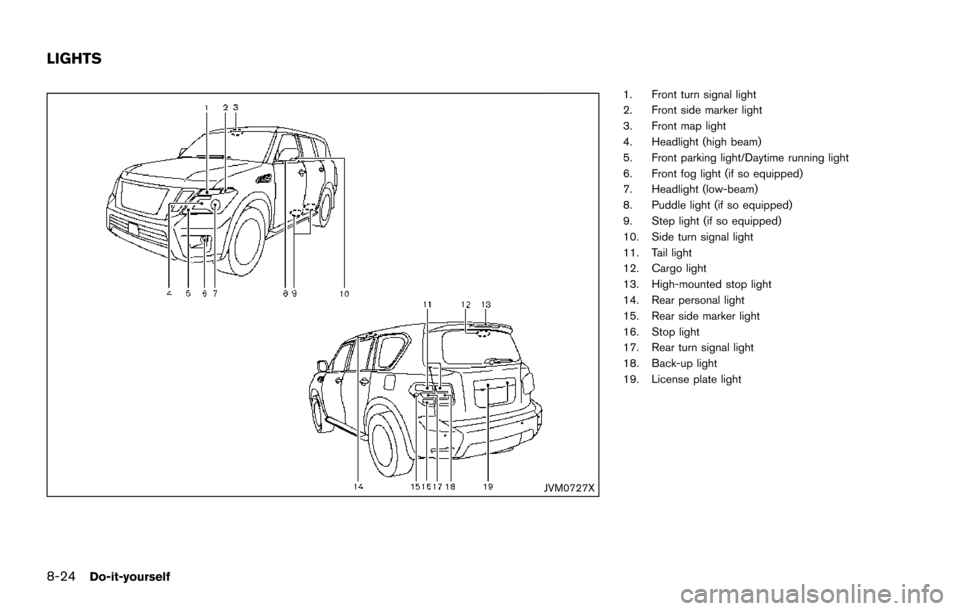
1. Front turn signal light
2. Front side marker light
3. Front map light
4. Headlight (high beam)
5. Front parking light/Daytime running light
6. Front fog light (if so equipped)
7. Headlight (low-beam)
8. Puddle light (if so equipped)
9. Step light (if so equipped)
10. Side turn signal light
11. Tail light
12. Cargo light
13. High-mounted stop light
14. Rear personal light
15. Rear side marker light
16. Stop light
17. Rear turn signal light
18. Back-up light
19. License plate light
LIGHTS
Page 540 of 614
HEADLIGHTS
Fog may temporarily form inside the lens of the
exterior lights in the rain or in a car wash. A
temperature difference between the inside and
the outside of the lens causes the fog. This is
not a malfunction. If large drops of water collect
inside the lens, it is recommended you visit a
NISSAN dealer for this service.
Replacing
LED headlight:
If replacement is required, it is recommended
you visit a NISSAN dealer for this service.
Halogen headlight bulb:
The headlight (high-beam) is a semi-sealed
beam type which uses a replaceable headlight
(halogen) bulb.
CAUTION
.Do not leave the bulb out of the
headlight reflector for a long period
of time. Dust, moisture, smoke, etc.
entering the headlight body may
affect bulb performance.
. High pressure halogen gas is sealed
inside the halogen bulb. The bulb
may break if the glass envelope is scratched or the bulb is dropped.
. Only touch the plastic base when
handling the bulb. Never touch the
glass envelope.
. Aiming is not necessary after repla-
cing the bulb. When aiming adjust-
ment is necessary, it is
recommended you visit a NISSAN
dealer for this service.
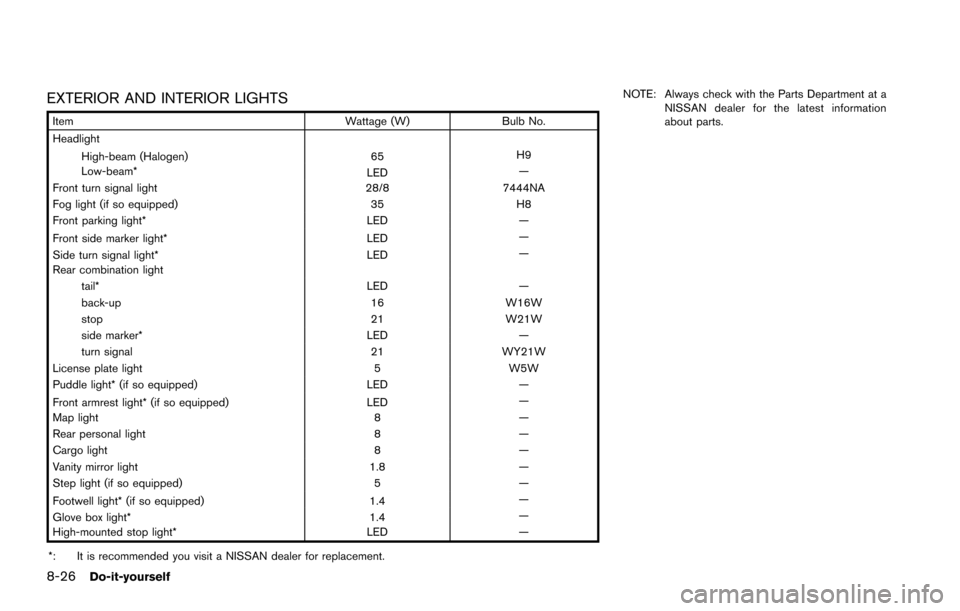
Use the same number and wattage as originally
installed as shown in the chart.
JVM0320X
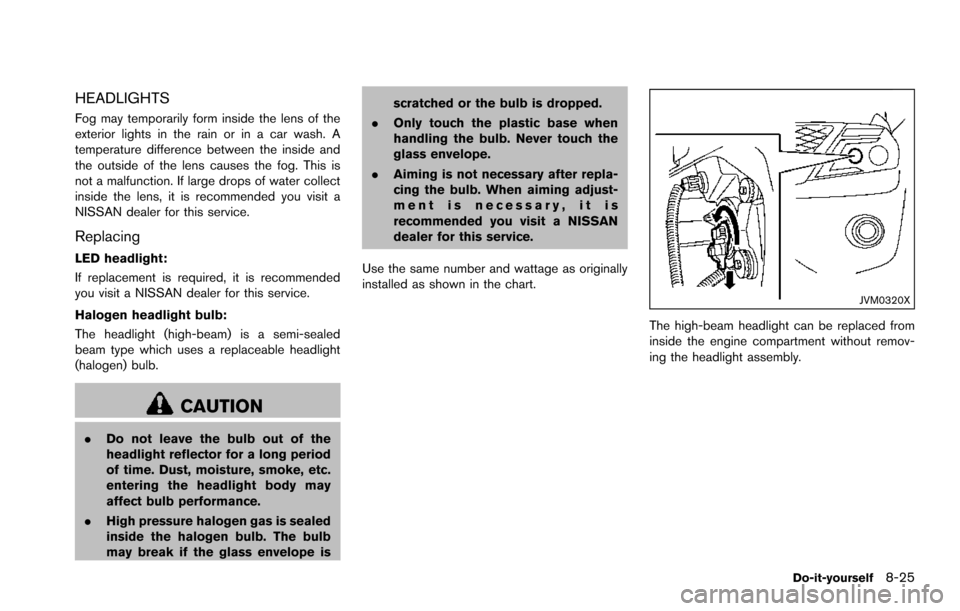
The high-beam headlight can be replaced from
inside the engine compartment without remov-
ing the headlight assembly.
Do-it-yourself8-25
Page 541 of 614
8-26Do-it-yourself
EXTERIOR AND INTERIOR LIGHTS
ItemWattage (W)Bulb No.
Headlight
High-beam (Halogen) 65H9
Low-beam* LED—
Front turn signal light 28/87444NA
Fog light (if so equipped) 35H8
Front parking light* LED—
Front side marker light* LED—
Side turn signal light* LED—
Rear combination light tail* LED—
back-up 16W16W
stop 21W21W
side marker* LED—
turn signal 21WY21W
License plate light 5W5W
Puddle light* (if so equipped) LED—
Front armrest light* (if so equipped) LED—
Map light 8—
Rear personal light 8—
Cargo light 8—
Vanity mirror light 1.8—
Step light (if so equipped) 5—
Footwell light* (if so equipped) 1.4—
Glove box light* 1.4—
High-mounted stop light* LED—
*: It is recommended you visit a NISSAN dealer for replacement. NOTE: Always check with the Parts Department at a
NISSAN dealer for the latest information
about parts.
Page 542 of 614
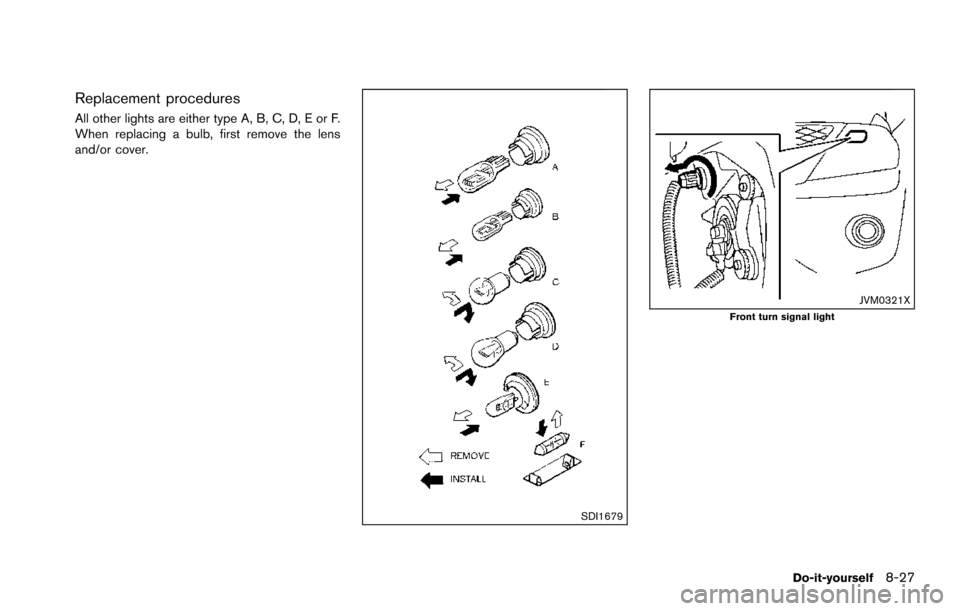
Replacement procedures
All other lights are either type A, B, C, D, E or F.
When replacing a bulb, first remove the lens
and/or cover.
SDI1679
JVM0321XFront turn signal light
Do-it-yourself8-27
Page 543 of 614
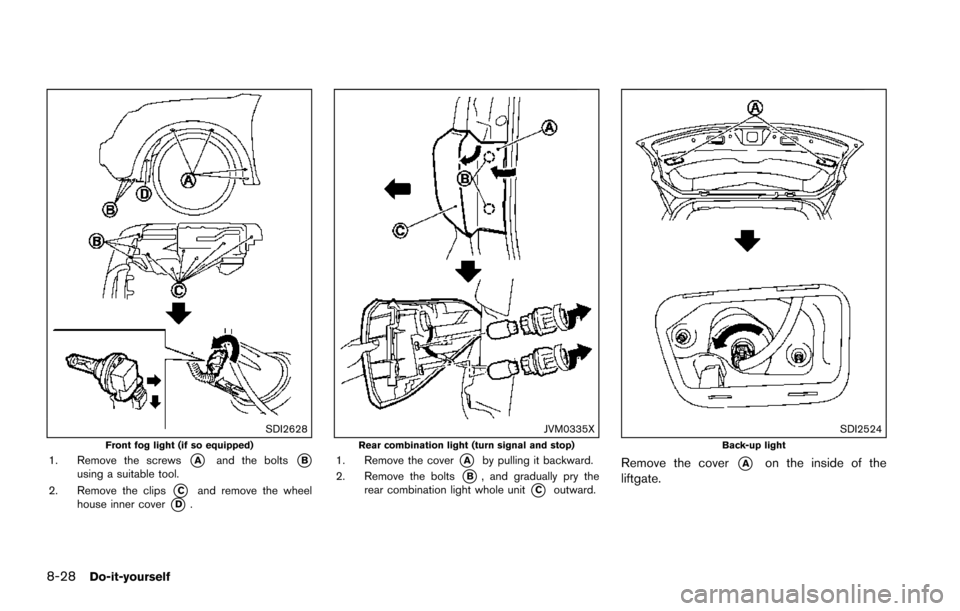
8-28Do-it-yourself
SDI2628Front fog light (if so equipped)1. Remove the screws*Aand the bolts*Busing a suitable tool.
2. Remove the clips
*Cand remove the wheel
house inner cover*D.
JVM0335XRear combination light (turn signal and stop)1. Remove the cover*Aby pulling it backward.
2. Remove the bolts
*B, and gradually pry the
rear combination light whole unit*Coutward.
SDI2524Back-up light
Remove the cover*Aon the inside of the
liftgate.