battery NISSAN FRONTIER 2018 Owner´s Manual
[x] Cancel search | Manufacturer: NISSAN, Model Year: 2018, Model line: FRONTIER, Model: NISSAN FRONTIER 2018Pages: 502, PDF Size: 4.85 MB
Page 264 of 502
iPod®* PLAYER OPERATION
WITHOUT NAVIGATION SYSTEM
(if so equipped)
Connecting iPod®
WARNING
Do not connect, disconnect or operate
the USB device while driving. Doing so
can be a distraction. If distracted you
could lose control of your vehicle and
cause an accident or serious injury.
CAUTION
∙ Do not force the USB device into theUSB port. Inserting the USB device
tilted or up-side-down into the port
may damage the port. Make sure that
the USB device is connected correctly
into the USB port.
∙ Do not grab the USB port cover (if so equipped) when pulling the USB de-
vice out of the port. This could dam-
age the port and the cover.
∙ Do not leave the USB cable in a place where it can be pulled unintentionally.
Pulling the cable may damage the
port.
For additional information, refer to your de-
vice manufacturer’s owner information re-
garding the proper use and care of the
device.
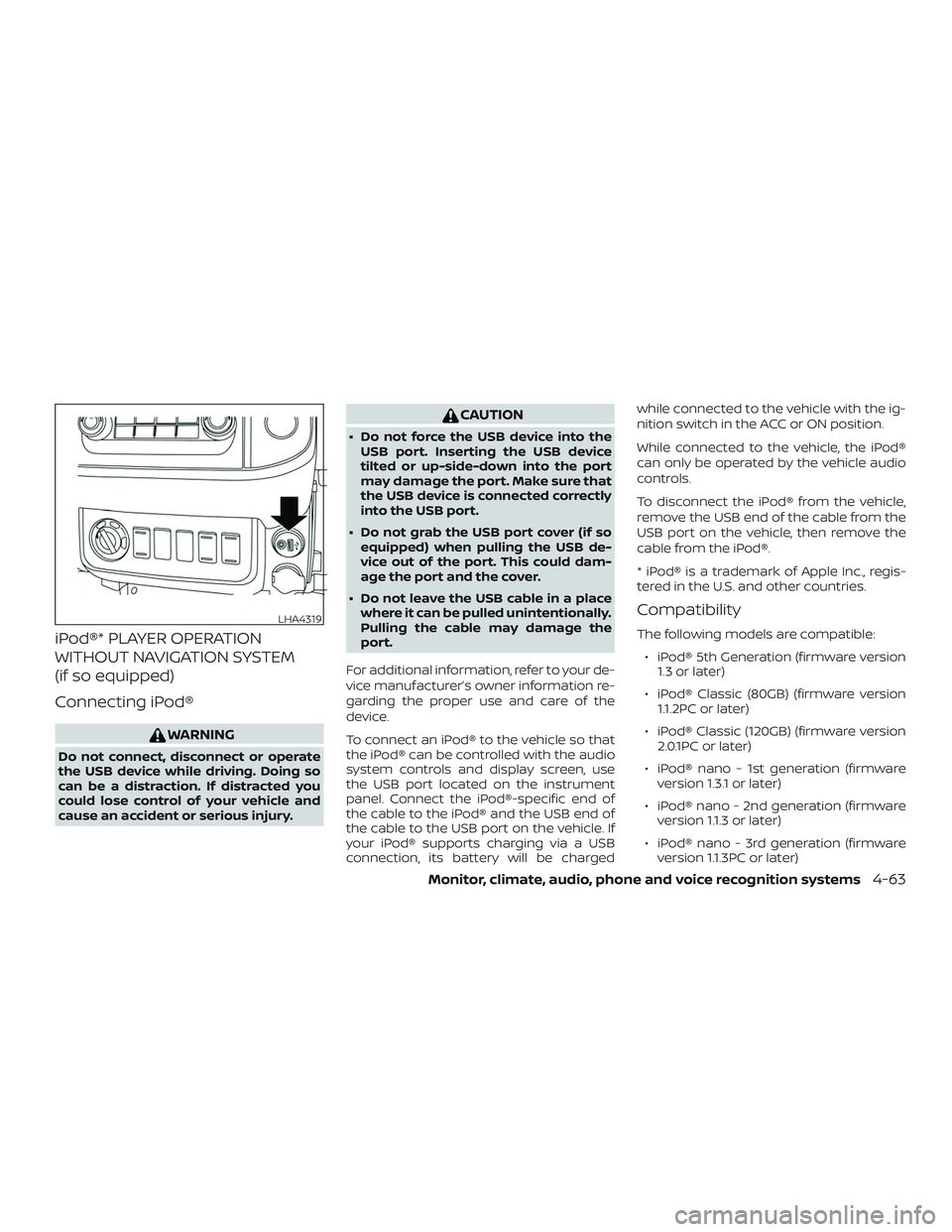
To connect an iPod® to the vehicle so that
the iPod® can be controlled with the audio
system controls and display screen, use
the USB port located on the instrument
panel. Connect the iPod®-specific end of
the cable to the iPod® and the USB end of
the cable to the USB port on the vehicle. If
your iPod® supports charging via a USB
connection, its battery will be charged while connected to the vehicle with the ig-
nition switch in the ACC or ON position.
While connected to the vehicle, the iPod®
can only be operated by the vehicle audio
controls.
To disconnect the iPod® from the vehicle,
remove the USB end of the cable from the
USB port on the vehicle, then remove the
cable from the iPod®.
* iPod® is a trademark of Apple Inc., regis-
tered in the U.S. and other countries.
Compatibility
The following models are compatible:
∙ iPod® 5th Generation (firmware version 1.3 or later)
∙ iPod® Classic (80GB) (firmware version 1.1.2PC or later)
∙ iPod® Classic (120GB) (firmware version 2.0.1PC or later)
∙ iPod® nano - 1st generation (firmware version 1.3.1 or later)
∙ iPod® nano - 2nd generation (firmware version 1.1.3 or later)
∙ iPod® nano - 3rd generation (firmware version 1.1.3PC or later)
LHA4319
Monitor, climate, audio, phone and voice recognition systems4-63
Page 267 of 502
CAUTION
∙ Do not force the USB device into theUSB port. Inserting the USB device
tilted or up-side-down into the port
may damage the port. Make sure that
the USB device is connected correctly
into the USB port.
∙ Do not grab the USB port cover (if so equipped) when pulling the USB de-
vice out of the port. This could dam-
age the port and the cover.
∙ Do not leave the USB cable in a place where it can be pulled unintentionally.
Pulling the cable may damage the
port.
For additional information, refer to your de-
vice manufacturer’s owner information re-
garding the proper use and care of the
device.
To connect an iPod® to the vehicle so that
the iPod® can be controlled with the audio
system controls and display screen, use
the USB port located on the instrument
panel. Connect the iPod®-specific end of
the cable to the iPod® and the USB end of
the cable to the USB port on the vehicle. If
your iPod® supports charging via a USB
connection, its battery will be charged while connected to the vehicle with the ig-
nition switch in the ACC or ON position.
While connected to the vehicle, the iPod®
can only be operated by the vehicle audio
controls.
To disconnect the iPod® from the vehicle,
remove the USB end of the cable from the
USB port on the vehicle, then remove the
cable from the iPod®.
* iPod® is a trademark of Apple Inc., regis-
tered in the U.S. and other countries.
Compatibility
The following models are compatible:
∙ iPod® Classic 5th generation (firmware version 1.3.0 or later)
∙ iPod® Classic 6th generation (firmware version 2.0.1 or later)
∙ iPod® Classic 7th generation (firmware version 2.0.4 or later)
∙ iPod® Touch 2nd generation (firmware version 4.2.1 or later)*
∙ iPod® Touch 3rd generation (firmware version 5.1 or later)
∙ iPod® Touch 4th generation (firmware version 5.1 or later) ∙ iPod® nano - 1st generation (firmware
version 1.3.1 or later)
∙ iPod® nano - 2nd generation (firmware version 1.1.3 or later)
∙ iPod® nano - 3rd generation (firmware version 1.1.3 or later)
∙ iPod® nano - 4th generation (firmware version 1.0.4 or later)
∙ iPod® nano - 5th generation (firmware version 1.0.2 or later)
∙ iPod® nano - 6th generation (firmware version 1.1 or later)
∙ iPhone® 3G (firmware version 4.2.1 or later)
∙ iPhone® 3GS (firmware version 5.1 or later)
∙ iPhone® 4 (firmware version 5.1 or later)
∙ iPhone® 4S (firmware version 5.1 or later)
* Some features of this iPod® may not be
fully functional.
Make sure that your iPod® firmware is up-
dated to the version indicated above.
4-66Monitor, climate, audio, phone and voice recognition systems
Page 280 of 502
When installing a CB, ham radio or car
phone in your vehicle, be sure to observe
the following precautions; otherwise, the
new equipment may adversely affect the
engine control system and other electronic
parts.
WARNING
∙ A cellular phone should not be usedfor any purpose while driving so full
attention may be given to vehicle op-
eration. Some jurisdictions prohibit
the use of cellular phones while
driving.
∙ If you must make a call while your ve- hicle is in motion, the hands free cellu-
lar phone operational mode (if so
equipped) is highly recommended.
Exercise extreme caution at all times
so full attention may be given to ve-
hicle operation.
∙ If you are unable to devote full atten- tion to vehicle operation while talking
on the phone, pull off the road to a
safe location and stop your vehicle.
CAUTION
∙ Keep the antenna as far away as pos-sible from the electronic control
modules.
∙ Keep the antenna wire more than 8 in (20 cm) away from the electronic con-
trol system harnesses. Do not route
the antenna wire next to any harness.
∙ Adjust the antenna standing-wave ratio as recommended by the
manufacturer.
∙ Connect the ground wire from the CB radio chassis to the body.
∙ For additional information, it is rec- ommended that you visit a NISSAN
dealer.
∙ Do not ground electrical accessories directly to the battery terminal. Doing
so will bypass the variable voltage
control system and the vehicle bat-
tery may not charge completely. For
additional information, refer to “Vari-
able voltage control system” in the
“Do-it-yourself ” section of this
manual. ∙ Use electrical accessories with the en-
gine running to avoid discharging the
vehicle battery.
CAR PHONE OR CB RADIO
Monitor, climate, audio, phone and voice recognition systems4-79
Page 282 of 502
with the in-vehicle phone module when
the ignition switch is placed in the ON po-
sition with the previously connected cellu-
lar phone turned on and carried in the ve-
hicle.
NOTE:
Some devices require the user to accept
connections to other Bluetooth® de-
vices. If your phone does not connect au-
tomatic ally to the system, consult the
phone’s Owner’s Manual for details on
device operation.
You can connect up to five different
Bluetooth® cellular phones to the in-
vehicle phone module. However, you can
talk on only one cellular phone at a time.
Before using the Bluetooth® Hands-Free
Phone System, refer to the following notes.∙ Set up the wireless connection be- tween a compatible cellular phone and
the in-vehicle phone module before us-
ing the hands-free phone system. ∙ Some Bluetooth® enabled cellular
phones may not be recognized or work
properly. Please visit
www.nissanusa.com/bluetooth or
www.nissan.ca/bluetooth for a recom-
mended phone list and connecting in-
structions.
∙ You will not be able to use a hands-free phone under the following conditions:
– Your vehicle is outside of the cellular service area.
– Your vehicle is in an area where it is difficult to receive a cellular signal;
such as in a tunnel, in an under-
ground parking garage, near a tall
building or in a mountainous area.
– Your cellular phone is locked to pre- vent it from being dialed.
∙ When the radio wave condition is not ideal or ambient sound is too loud, it
may be difficult to hear the other per-
son’s voice during a call.
∙ Do not place the cellular phone in an area surrounded by metal or far away
from the in-vehicle phone module to
prevent tone quality degradation and
wireless connection disruption. ∙ While a cellular phone is connected
through the Bluetooth® wireless con-
nection, the battery power of the cellu-
lar phone may discharge quicker than
usual. The Bluetooth® Hands-Free
Phone System cannot charge cellular
phones.
∙ For additional information, you can visit www.nissanusa.com/bluetooth or
www.nissan.ca/bluetooth for trouble-
shooting help.
∙ Some cellular phones or other devices may cause interference or a buzzing
noise to come from the audio system
speakers. Storing the device in a differ-
ent location may reduce or eliminate
the noise.
∙ For additional information, refer to the cellular phone Owner’s Manual regard-
ing the telephone charges, cellular
phone antenna and body, etc.
Monitor, climate, audio, phone and voice recognition systems4-81
Page 294 of 502
with the in-vehicle phone module when
the ignition switch is placed in the ON po-
sition with the connected cellular phone
turned on and carried in the vehicle.
You can register up to five different
Bluetooth® cellular phones to the in-
vehicle phone module. However, you can
talk on only one cellular phone at a time.
NISSAN Voice Recognition system sup-
ports the phone commands, so dialing a
phone number using your voice is possible.
For additional information, refer to “NISSAN
Voice Recognition System” in this section.
Before using the Bluetooth® Hands-Free
Phone System, refer to the following notes.∙ Set up the wireless connection be- tween a cellular phone and the in-
vehicle phone module before using the
hands-free phone system.
∙ Some Bluetooth® enabled cellular phones may not be recognized by the
in-vehicle phone module. Please visit
www.nissanusa.com/bluetooth or
www.nissan.ca/bluetooth for a recom-
mended phone list and connecting in-
structions. ∙ You will not be able to use a hands-free
phone under the following conditions:
– Your vehicle is outside of the cellular service area.
– Your vehicle is in an area where it is difficult to receive cellular signal;
such as in a tunnel, in an under-
ground parking garage, near a tall
building or in a mountainous area.
– Your cellular phone is locked to pre- vent it from being dialed.
∙ When the radio wave condition is not ideal or ambient sound is too loud, it
may be difficult to hear the other per-
son’s voice during a call.
∙ Immediately af ter the ignition switch is placed in the ON position, it may be im-
possible to receive a call for a short pe-
riod of time.
∙ Do not place the cellular phone in an area surrounded by metal or far away
from the in-vehicle phone module to
prevent tone quality degradation and
wireless connection disruption. ∙ While a cellular phone is connected
through the Bluetooth® wireless con-
nection, the battery power of the cellu-
lar phone may discharge quicker than
usual. The Bluetooth® Hands-Free
Phone System cannot charge cellular
phones.
∙ If the hands-free phone system seems to be malfunctioning, refer to “Trouble-
shooting guide” in this section. You can
also visit www.nissanusa.com/
bluetooth or www.nissan.ca/bluetooth
for troubleshooting help.
∙ Some cellular phones or other devices may cause interference or a buzzing
noise to come from the audio system
speakers. Storing the device in a differ-
ent location may reduce or eliminate
the noise.
∙ Refer to the cellular phone owner’s manual regarding the telephone
charges, cellular phone antenna and
body, etc.
∙ The signal strength display on the monitor will not coincide with the signal
strength display of some cellular
phones.
Monitor, climate, audio, phone and voice recognition systems4-93
Page 308 of 502
Hill descent control system (if so equipped).....5-41
Hill start assist system (if so equipped) .........5-42
Rear Sonar System (RSS) (if so equipped) .......5-42
Cold weather driving ........................... 5-43
Freeing a frozen door lock ...................5-43
Antifreeze ................................... 5-43Battery......................................
5-43
Draining of coolant water ....................5-44
Tire equipment .............................. 5-44
Special winter equipment ...................5-44
Driving on snow or ice .......................5-44
Engine block heater (if so equipped) .........5-45
Page 321 of 502
CAUTION
Do not operate the starter for more
than 15 seconds at a time. If the engine
does not start, turn the key off and wait
10 seconds before cranking again, oth-
erwise the starter could be damaged.4. Allow the engine to idle for at least 30 seconds af ter starting. Do not race
the engine while warming it up. Drive at
a moderate speed for a short distance
first, especially in cold weather.
NOTE:
Care should be taken to avoid situations
that can lead to potential battery dis-
charge and potential no-start conditions
such as: 1. Installation or extended use of elec-
tronic accessories that consume bat-
tery power when the engine is not
running (phone chargers, GPS, DVD
players, etc.).
2. The vehicle is not driven regularly
and/or only driven short distances.
In these cases, the battery may need to
be charged to maintain battery health.
AUTOMATIC TRANSMISSION (A/T)
(if so equipped)
WARNING
∙ Do not depress the accelerator pedal while shif ting from P (Park) or N (Neu-
tral) to R (Reverse), D (Drive), 3, 2 or 1.
Always depress the brake pedal until
shif ting is completed. Failure to do so
could cause you to lose control and
have an accident.
∙ Cold engine idle speed is high, so use caution when shif ting into a forward
or reverse gear before the engine has
warmed up.
∙ Never shif t to either the P (Park) or R (Reverse) position while the vehicle is
moving forward and P (Park) or D
(Drive) position while the vehicle is re-
versing. This could cause an accident
or damage the transmission.
∙ Except in an emergency, do not shif t to the N (Neutral) position while driv-
ing. Coasting with the transmission in
the N (Neutral) position may cause se-
rious damage to the transmission. ∙ Do not downshif t abruptly on slippery
roads. This may cause a loss of
control.CAUTION
∙ Except in an emergency, do not shif tto the N (Neutral) position while driv-
ing. Coasting with the transmission in
the N (Neutral) position may cause se-
rious damage to the transmission.
∙ To avoid possible damage to your ve- hicle, when stopping the vehicle on an
uphill grade, do not hold the vehicle by
depressing the accelerator pedal. The
foot brake should be used for this
purpose.
The A/T in your vehicle is electronically con-
trolled to produce maximum power and
smooth operation.
The recommended operating procedures
for this transmission are shown on the fol-
lowing pages. Follow these procedures for
maximum vehicle performance and driv-
ing enjoyment.
DRIVING THE VEHICLE
5-14Starting and driving
Page 324 of 502
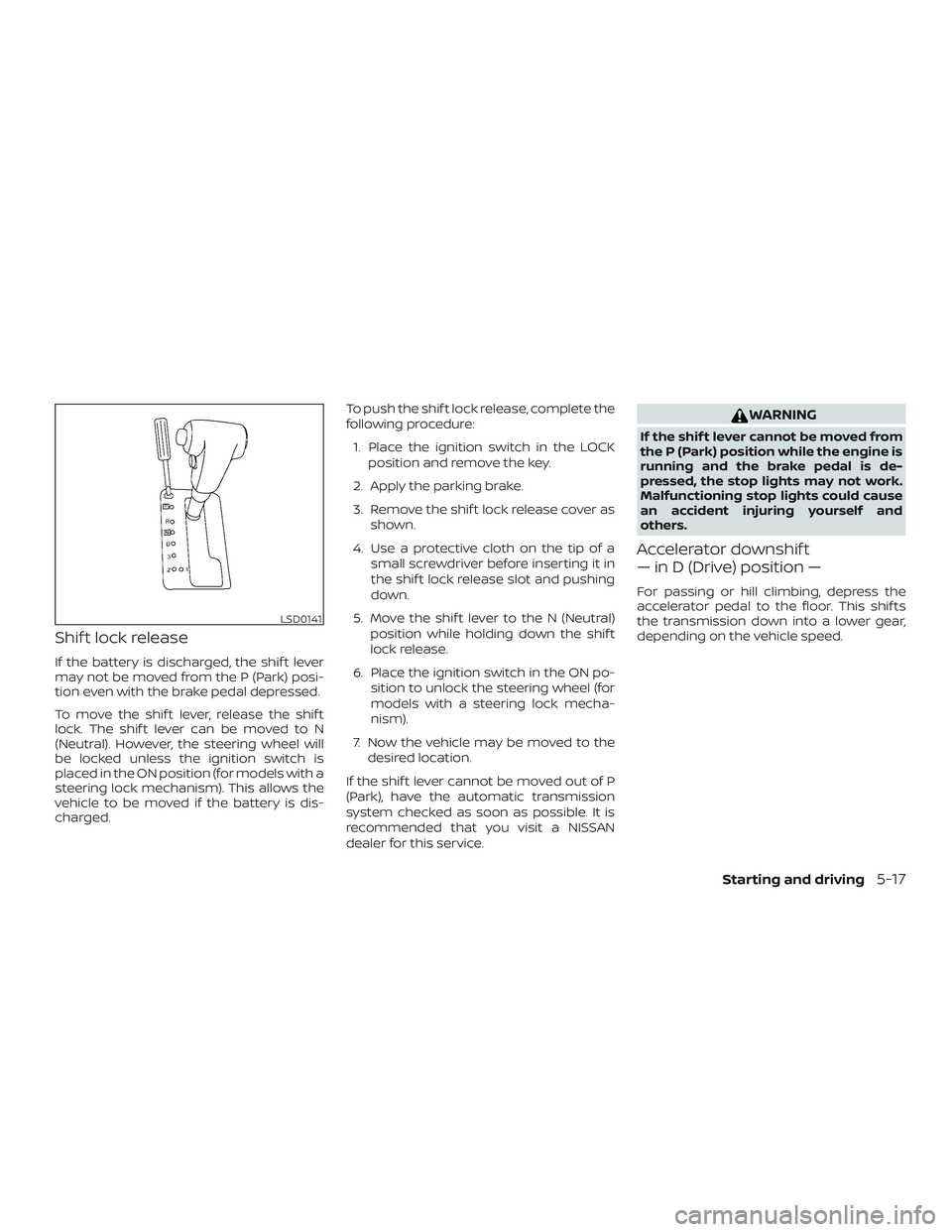
Shif t lock release
If the battery is discharged, the shif t lever
may not be moved from the P (Park) posi-
tion even with the brake pedal depressed.
To move the shif t lever, release the shif t
lock. The shif t lever can be moved to N
(Neutral). However, the steering wheel will
be locked unless the ignition switch is
placed in the ON position (for models with a
steering lock mechanism). This allows the
vehicle to be moved if the battery is dis-
charged.To push the shif t lock release, complete the
following procedure:
1. Place the ignition switch in the LOCK position and remove the key.
2. Apply the parking brake.
3. Remove the shif t lock release cover as shown.
4. Use a protective cloth on the tip of a small screwdriver before inserting it in
the shif t lock release slot and pushing
down.
5. Move the shif t lever to the N (Neutral) position while holding down the shif t
lock release.
6. Place the ignition switch in the ON po- sition to unlock the steering wheel (for
models with a steering lock mecha-
nism).
7. Now the vehicle may be moved to the desired location.
If the shif t lever cannot be moved out of P
(Park), have the automatic transmission
system checked as soon as possible. It is
recommended that you visit a NISSAN
dealer for this service.
WARNING
If the shif t lever cannot be moved from
the P (Park) position while the engine is
running and the brake pedal is de-
pressed, the stop lights may not work.
Malfunctioning stop lights could cause
an accident injuring yourself and
others.
Accelerator downshif t
— in D (Drive) position —
For passing or hill climbing, depress the
accelerator pedal to the floor. This shif ts
the transmission down into a lower gear,
depending on the vehicle speed.
LSD0141
Starting and driving5-17
Page 350 of 502
∙ The system is designed as an aid tothe driver in detecting large station-
ary objects to help avoid damaging
the vehicle. The system will not detect
small objects below the bumper, and
may not detect objects close to the
bumper or on the ground.
∙ If your vehicle sustains damage to the rear bumper fascia, leaving it mis-
aligned or bent, the sensing zone may
be altered causing inaccurate mea-
surement of obstacles or false alarms.
The RSS sounds a tone to warn the driver of
obstacles near the rear bumper when the
shif t lever is in R (Reverse). The system may
not detect objects at speeds above 3 mph
(5 km/h) and may not detect certain angu-
lar or moving objects.
The RSS detects obstacles up to 5.9 f t
(1.8 m) from the rear bumper with a de-
creased coverage area at the outer cor-
ners of the bumper (refer to the illustration
for approximate zone coverage areas). As
you move closer to the obstacle, the rate of
the tone increases. When the obstacle is
less than 10 in (25.0 cm) away, the tone will
sound continuously. If the RSS detects a
stationary or receding object further than
10 in (25.0 cm) from the side of the vehicle, the tone will sound for only 3 seconds.
Once the system detects an object ap-
proaching, the tone will sound again.
The RSS automatically turns on when the
shif t lever is placed in R (Reverse) and the
ignition is ON. The RSS OFF switch on the
instrument panel allows the driver to turn
the RSS on and off. To turn the RSS off, the
ignition must be ON, and the shif t lever in R
(Reverse). An indicator light on the switch
will illuminate when the system is turned
off. If the indicator light illuminates when
the RSS is not turned off, it may indicate a
malfunction in the RSS.
Keep the RSS sensors (located on the rear
bumper fascia) free from snow, ice and
large accumulations of dirt (do not clean
the sensors with sharp objects). If the sen-
sors are covered, it will affect the accuracy
of the RSS.FREEING A FROZEN DOOR LOCK
To prevent a door lock from freezing, apply
de-icer through the key hole. If the lock
becomes frozen, heat the key before in-
serting it into the key hole or use the re-
mote keyless entry key fob (if so equipped).
ANTIFREEZE
In the winter when it is anticipated that the
temperature will drop below 32°F (0°C),
check the antifreeze to assure proper win-
ter protection. For additional information,
refer to “Engine cooling system” in the “Do-
it-yourself ” section of this manual.
BATTERY
If the battery is not fully charged during
extremely cold weather conditions, the
battery fluid may freeze and damage the
battery. To maintain maximum efficiency,
the battery should be checked regularly.
For additional information, refer to “Battery”
in the “Do-it-yourself ” section of this
manual.
COLD WEATHER DRIVING
Starting and driving5-43
Page 365 of 502
WARNING
∙ Always make sure that the spare tireand jacking equipment are properly
secured af ter use. Such items can be-
come dangerous projectiles in an ac-
cident or sudden stop.
∙ The spare tire is designed for emer- gency use. For additional information,
refer to “Wheels and tires” in the “Do-
it-yourself ” section of this manual. To start your engine with a booster battery,
the instructions and precautions below
must be followed.
WARNING
∙ If done incorrectly, jump starting can
lead to a battery explosion, resulting
in severe injury or death. It could also
damage your vehicle.
∙ Explosive hydrogen gas is always present in the vicinity of the battery.
Keep all sparks and flames away from
the battery.
∙ Do not allow battery fluid to come into contact with eyes, skin, clothing or
painted surfaces. Battery fluid is a
corrosive sulfuric acid solution which
can cause severe burns. If the fluid
should come into contact with any-
thing, immediately flush the con-
tacted area with water.
∙ Keep battery out of the reach of children.
∙ The booster battery must be rated at 12 volts. Use of an improperly rated
battery can damage your vehicle. ∙ Whenever working on or near a bat-
tery, always wear suitable eye protec-
tors (for example, goggles or indus-
trial safety spectacles) and remove
rings, metal bands, or any other jew-
elry. Do not lean over the battery
when jump starting.
∙ Do not attempt to jump start a frozen battery. It could explode and cause
serious injury.
∙ The automatic engine cooling fan (if so equipped) may come on at any
time without warning, even if the igni-
tion switch is in the OFF position and
the engine is not running. To avoid in-
jury, keep hands and other objects
away from it.
JUMP STARTING
6-12In case of emergency