instrument panel NISSAN FRONTIER 2018 Owner´s Manual
[x] Cancel search | Manufacturer: NISSAN, Model Year: 2018, Model line: FRONTIER, Model: NISSAN FRONTIER 2018Pages: 502, PDF Size: 4.85 MB
Page 261 of 502
For additional information, refer to your de-
vice manufacturer’s owner information re-
garding the proper use and care of the
device.
The USB port is located on the instrument
panel. Insert the USB device into the instru-
ment panel.
When a compatible storage device is
plugged into the connection port, compat-
ible audio files on the storage device can be
played through the vehicle’s audio system.
Audio file operation
MEDIA button
Place the ignition switch in the ON or ACC
position and press the MEDIA button to
switch to the USB input mode. If a CD is
playing or another audio source is plugged
in through the AUX IN jack, the MEDIA but-
ton toggles between the three sources.
Play information
Information about the audio files being
played can be displayed on the display
screen of the vehicle’s audio system. De-
pending on how the audio files are en-
coded, information such as Folder, Song
and Artist will be displayed.The track number and number of total
tracks in the folder are displayed on the
screen as well.
SEEK/CAT or TRACK
(Reverse or Fast
Forward) buttons
Press and hold the
orSEEK/CAT or TRACK buttons for 1.5 seconds
while an audio file on the USB device is
playing to reverse or fast forward the track
being played. The track plays at an in-
creased speed while reversing or fast for-
warding. When the button is released, the
audio file returns to normal play speed.
SEEK/CAT or TRACK buttons
Press the SEEK/CAT or TRACK button
while an audio file on the USB device is
playing to return to the beginning of the
current track. Press the SEEK/CAT or TRACK
button
several times to skip back-
ward several tracks.
Press the SEEK/CAT or TRACK button
while an audio file on the USB device is
playing to advance one track. Press the
SEEK/CAT or TRACK button
several
times to skip forward several tracks. If the last track in a folder on the USB device is
skipped, the first track of the next folder is
played.
RDM (random) button
When the RDM (random) button is pressed
while an audio file on the USB device is
playing, the play pattern can be changed
as follows:
All Random
→1 Folder Random →OFF
All Random: all tracks on the USB device will
be played randomly.
1 Folder Random: all tracks in the current
folder will be played randomly.
OFF: No random play pattern is applied. The
indicator on the display will turn off.
The current play pattern of the USB device
is displayed on the screen unless no pat-
tern is applied.
RPT (repeat) button
When the RPT (repeat) button is pressed
while an audio file on the USB device is
playing, the play pattern can be changed
as follows:
1 Folder Repeat →1 Track Repeat →OFF
4-60Monitor, climate, audio, phone and voice recognition systems
Page 263 of 502
For additional information, refer to your de-
vice manufacturer’s owner information re-
garding the proper use and care of the
device.
The USB port is located on the instrument
panel. Insert the USB device into the instru-
ment panel.
When a compatible storage device is
plugged into the connection port, compat-
ible audio files on the storage device can be
played through the vehicle’s audio system.
Audio file operation
AUX (auxiliary) button
Place the ignition switch in the ON or ACC
position and press the AUX button to
switch to the USB input mode. If another
audio source is playing and a USB connec-
tion port device is inserted, press the AUX
button until the center display changes to
the USB memory mode.
If the system has been turned off while the
USB memory was playing, press the ON-
OFF button to restart the USB memory.Play information
Information about the audio files being
played is shown on the display screen of
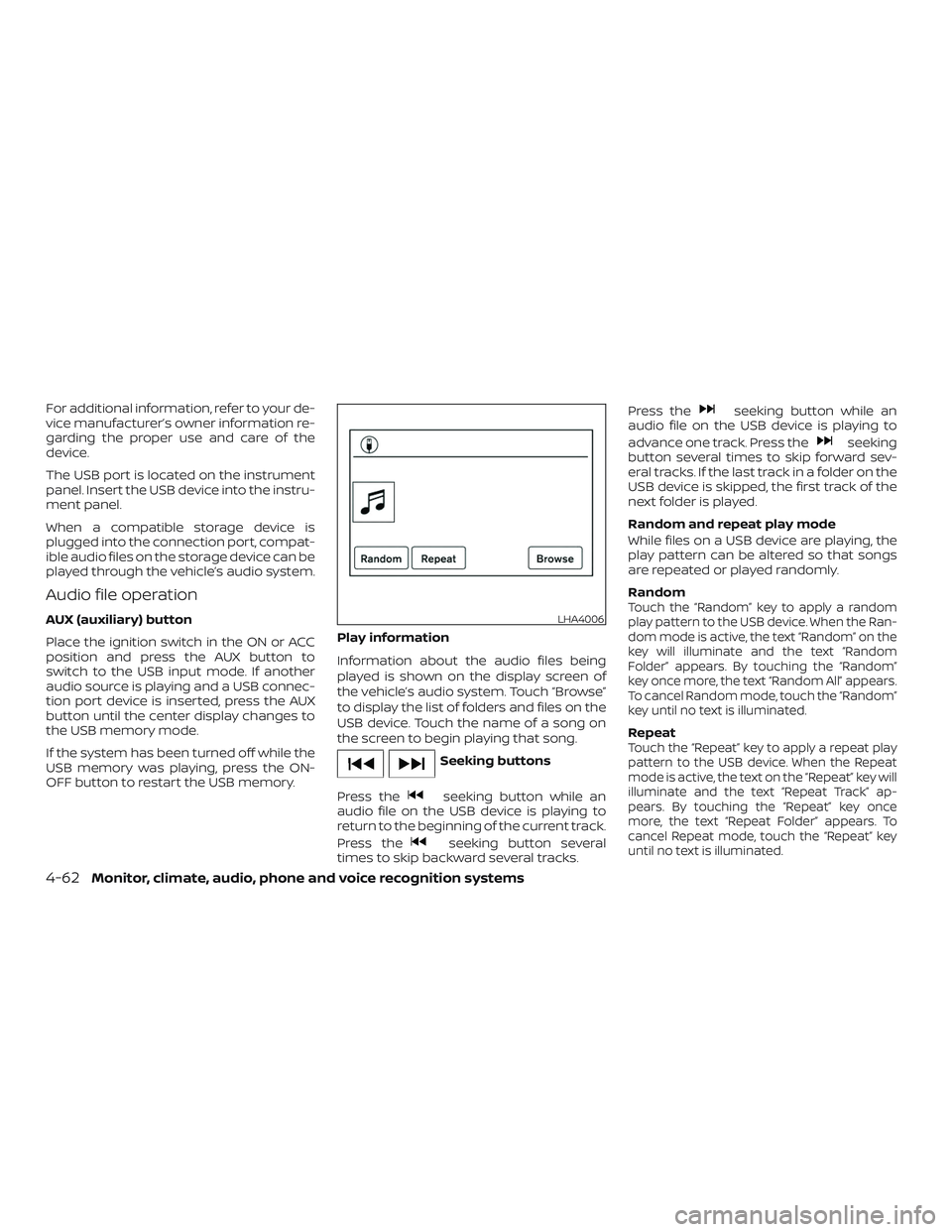
the vehicle’s audio system. Touch “Browse”
to display the list of folders and files on the
USB device. Touch the name of a song on
the screen to begin playing that song.
Seeking buttons
Press the
seeking button while an
audio file on the USB device is playing to
return to the beginning of the current track.
Press the
seeking button several
times to skip backward several tracks. Press the
seeking button while an
audio file on the USB device is playing to
advance one track. Press the
seeking
button several times to skip forward sev-
eral tracks. If the last track in a folder on the
USB device is skipped, the first track of the
next folder is played.
Random and repeat play mode
While files on a USB device are playing, the
play pattern can be altered so that songs
are repeated or played randomly.
Random
Touch the “Random” key to apply a random
play pattern to the USB device. When the Ran-
dom mode is active, the text “Random” on the
key will illuminate and the text “Random
Folder” appears. By touching the “Random”
key once more, the text “Random All” appears.
To cancel Random mode, touch the “Random”
key until no text is illuminated.
RepeatTouch the “Repeat” key to apply a repeat play
pattern to the USB device. When the Repeat
mode is active, the text on the “Repeat” key will
illuminate and the text “Repeat Track” ap-
pears. By touching the “Repeat” key once
more, the text “Repeat Folder” appears. To
cancel Repeat mode, touch the “Repeat” key
until no text is illuminated.
LHA4006
4-62Monitor, climate, audio, phone and voice recognition systems
Page 264 of 502
iPod®* PLAYER OPERATION
WITHOUT NAVIGATION SYSTEM
(if so equipped)
Connecting iPod®
WARNING
Do not connect, disconnect or operate
the USB device while driving. Doing so
can be a distraction. If distracted you
could lose control of your vehicle and
cause an accident or serious injury.
CAUTION
∙ Do not force the USB device into theUSB port. Inserting the USB device
tilted or up-side-down into the port
may damage the port. Make sure that
the USB device is connected correctly
into the USB port.
∙ Do not grab the USB port cover (if so equipped) when pulling the USB de-
vice out of the port. This could dam-
age the port and the cover.
∙ Do not leave the USB cable in a place where it can be pulled unintentionally.
Pulling the cable may damage the
port.
For additional information, refer to your de-
vice manufacturer’s owner information re-
garding the proper use and care of the
device.
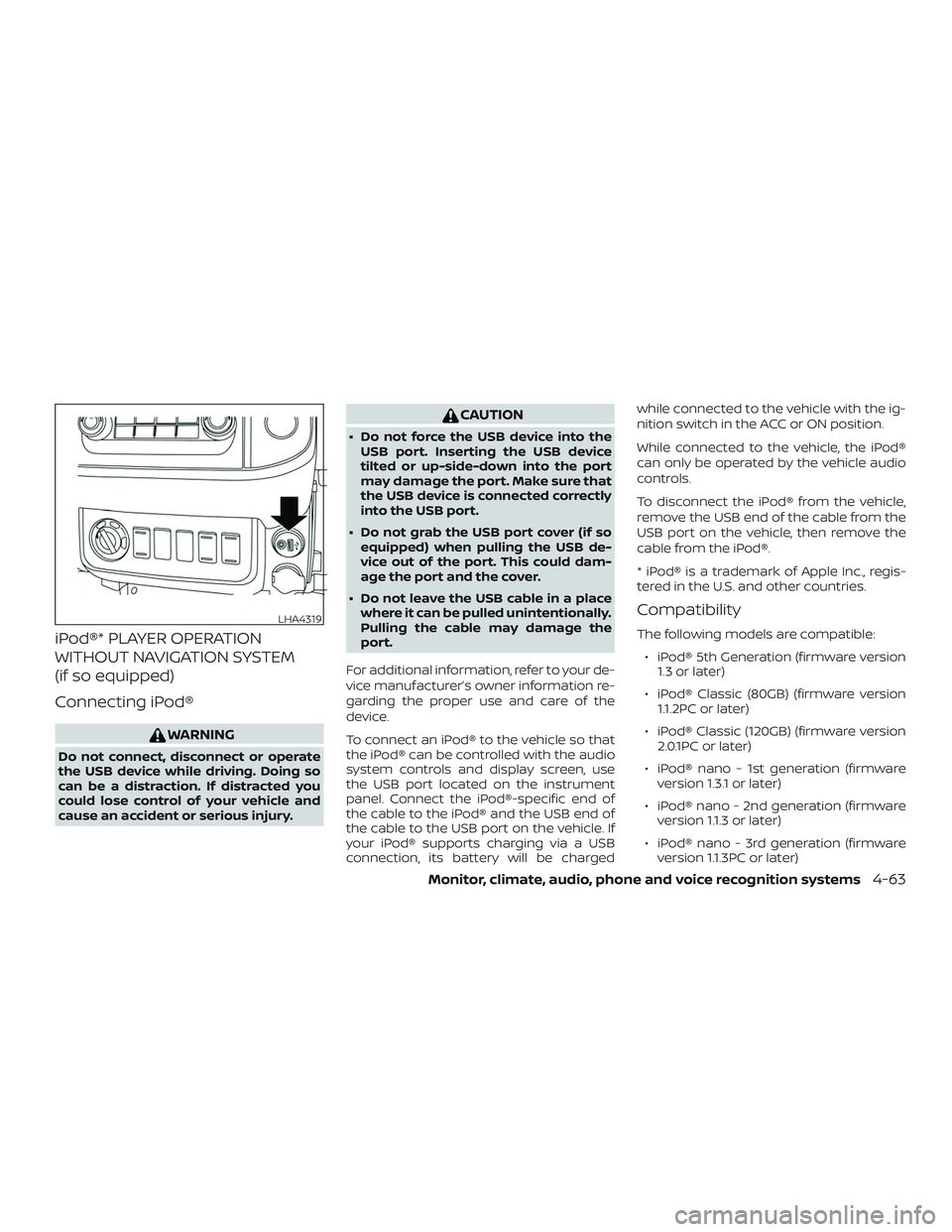
To connect an iPod® to the vehicle so that
the iPod® can be controlled with the audio
system controls and display screen, use
the USB port located on the instrument
panel. Connect the iPod®-specific end of
the cable to the iPod® and the USB end of
the cable to the USB port on the vehicle. If
your iPod® supports charging via a USB
connection, its battery will be charged while connected to the vehicle with the ig-
nition switch in the ACC or ON position.
While connected to the vehicle, the iPod®
can only be operated by the vehicle audio
controls.
To disconnect the iPod® from the vehicle,
remove the USB end of the cable from the
USB port on the vehicle, then remove the
cable from the iPod®.
* iPod® is a trademark of Apple Inc., regis-
tered in the U.S. and other countries.
Compatibility
The following models are compatible:
∙ iPod® 5th Generation (firmware version 1.3 or later)
∙ iPod® Classic (80GB) (firmware version 1.1.2PC or later)
∙ iPod® Classic (120GB) (firmware version 2.0.1PC or later)
∙ iPod® nano - 1st generation (firmware version 1.3.1 or later)
∙ iPod® nano - 2nd generation (firmware version 1.1.3 or later)
∙ iPod® nano - 3rd generation (firmware version 1.1.3PC or later)
LHA4319
Monitor, climate, audio, phone and voice recognition systems4-63
Page 267 of 502
CAUTION
∙ Do not force the USB device into theUSB port. Inserting the USB device
tilted or up-side-down into the port
may damage the port. Make sure that
the USB device is connected correctly
into the USB port.
∙ Do not grab the USB port cover (if so equipped) when pulling the USB de-
vice out of the port. This could dam-
age the port and the cover.
∙ Do not leave the USB cable in a place where it can be pulled unintentionally.
Pulling the cable may damage the
port.
For additional information, refer to your de-
vice manufacturer’s owner information re-
garding the proper use and care of the
device.
To connect an iPod® to the vehicle so that
the iPod® can be controlled with the audio
system controls and display screen, use
the USB port located on the instrument
panel. Connect the iPod®-specific end of
the cable to the iPod® and the USB end of
the cable to the USB port on the vehicle. If
your iPod® supports charging via a USB
connection, its battery will be charged while connected to the vehicle with the ig-
nition switch in the ACC or ON position.
While connected to the vehicle, the iPod®
can only be operated by the vehicle audio
controls.
To disconnect the iPod® from the vehicle,
remove the USB end of the cable from the
USB port on the vehicle, then remove the
cable from the iPod®.
* iPod® is a trademark of Apple Inc., regis-
tered in the U.S. and other countries.
Compatibility
The following models are compatible:
∙ iPod® Classic 5th generation (firmware version 1.3.0 or later)
∙ iPod® Classic 6th generation (firmware version 2.0.1 or later)
∙ iPod® Classic 7th generation (firmware version 2.0.4 or later)
∙ iPod® Touch 2nd generation (firmware version 4.2.1 or later)*
∙ iPod® Touch 3rd generation (firmware version 5.1 or later)
∙ iPod® Touch 4th generation (firmware version 5.1 or later) ∙ iPod® nano - 1st generation (firmware
version 1.3.1 or later)
∙ iPod® nano - 2nd generation (firmware version 1.1.3 or later)
∙ iPod® nano - 3rd generation (firmware version 1.1.3 or later)
∙ iPod® nano - 4th generation (firmware version 1.0.4 or later)
∙ iPod® nano - 5th generation (firmware version 1.0.2 or later)
∙ iPod® nano - 6th generation (firmware version 1.1 or later)
∙ iPhone® 3G (firmware version 4.2.1 or later)
∙ iPhone® 3GS (firmware version 5.1 or later)
∙ iPhone® 4 (firmware version 5.1 or later)
∙ iPhone® 4S (firmware version 5.1 or later)
* Some features of this iPod® may not be
fully functional.
Make sure that your iPod® firmware is up-
dated to the version indicated above.
4-66Monitor, climate, audio, phone and voice recognition systems
Page 325 of 502
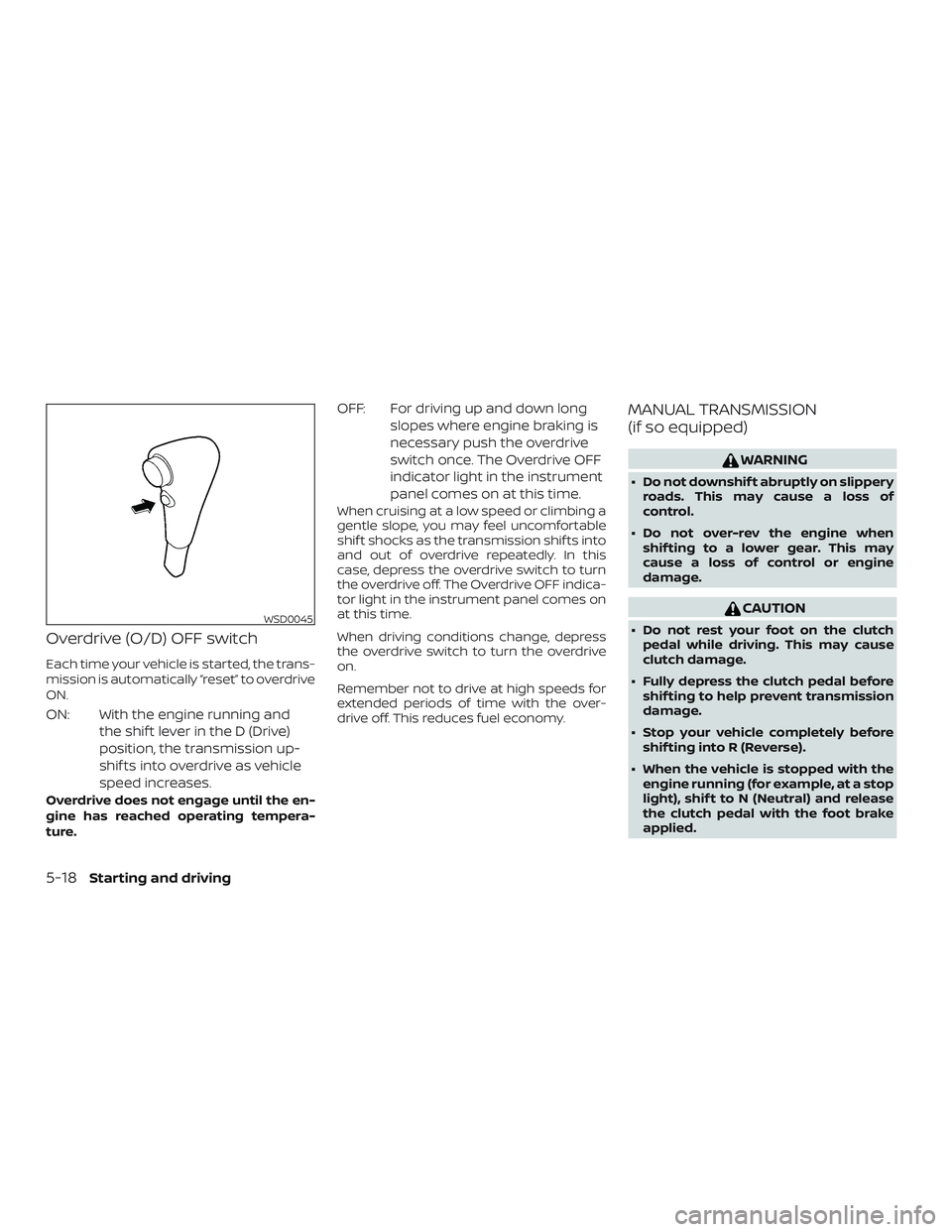
Overdrive (O/D) OFF switch
Each time your vehicle is started, the trans-
mission is automatically “reset” to overdrive
ON.
ON: With the engine running andthe shif t lever in the D (Drive)
position, the transmission up-
shif ts into overdrive as vehicle
speed increases.
Overdrive does not engage until the en-
gine has reached operating tempera-
ture.
OFF: For driving up and down longslopes where engine braking is
necessary push the overdrive
switch once. The Overdrive OFF
indicator light in the instrument
panel comes on at this time.
When cruising at a low speed or climbing a
gentle slope, you may feel uncomfortable
shif t shocks as the transmission shif ts into
and out of overdrive repeatedly. In this
case, depress the overdrive switch to turn
the overdrive off. The Overdrive OFF indica-
tor light in the instrument panel comes on
at this time.
When driving conditions change, depress
the overdrive switch to turn the overdrive
on.
Remember not to drive at high speeds for
extended periods of time with the over-
drive off. This reduces fuel economy.
MANUAL TRANSMISSION
(if so equipped)
WARNING
∙ Do not downshif t abruptly on slipperyroads. This may cause a loss of
control.
∙ Do not over-rev the engine when shif ting to a lower gear. This may
cause a loss of control or engine
damage.
CAUTION
∙ Do not rest your foot on the clutchpedal while driving. This may cause
clutch damage.
∙ Fully depress the clutch pedal before shif ting to help prevent transmission
damage.
∙ Stop your vehicle completely before shif ting into R (Reverse).
∙ When the vehicle is stopped with the engine running (for example, at a stop
light), shif t to N (Neutral) and release
the clutch pedal with the foot brake
applied.WSD0045
5-18Starting and driving
Page 329 of 502
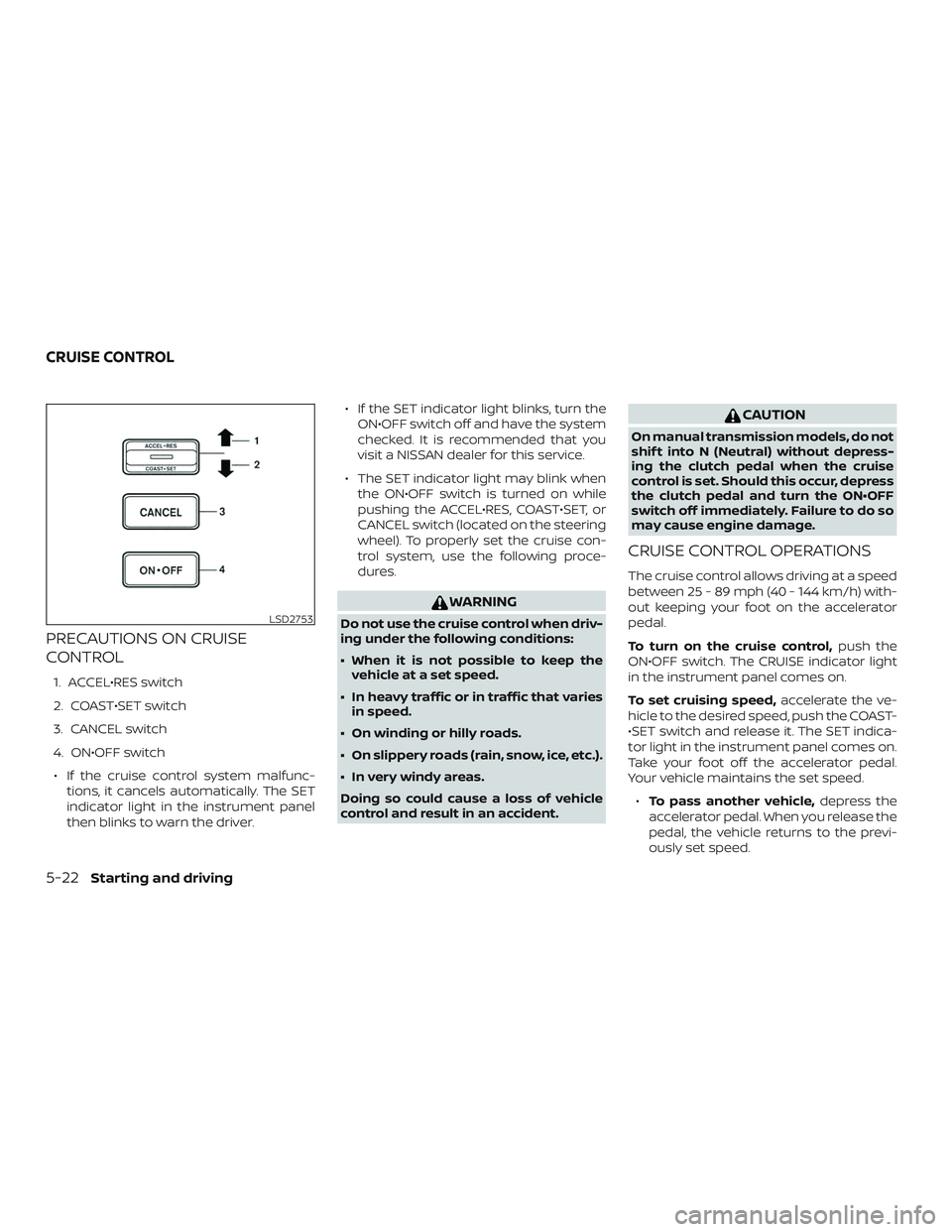
PRECAUTIONS ON CRUISE
CONTROL
1. ACCEL•RES switch
2. COAST•SET switch
3. CANCEL switch
4. ON•OFF switch∙ If the cruise control system malfunc- tions, it cancels automatically. The SET
indicator light in the instrument panel
then blinks to warn the driver. ∙ If the SET indicator light blinks, turn the
ON•OFF switch off and have the system
checked. It is recommended that you
visit a NISSAN dealer for this service.
∙ The SET indicator light may blink when the ON•OFF switch is turned on while
pushing the ACCEL•RES, COAST•SET, or
CANCEL switch (located on the steering
wheel). To properly set the cruise con-
trol system, use the following proce-
dures.
WARNING
Do not use the cruise control when driv-
ing under the following conditions:
∙ When it is not possible to keep thevehicle at a set speed.
∙ In heavy traffic or in traffic that varies in speed.
∙ On winding or hilly roads.
∙ On slippery roads (rain, snow, ice, etc.).
∙ In very windy areas.
Doing so could cause a loss of vehicle
control and result in an accident.
CAUTION
On manual transmission models, do not
shif t into N (Neutral) without depress-
ing the clutch pedal when the cruise
control is set. Should this occur, depress
the clutch pedal and turn the ON•OFF
switch off immediately. Failure to do so
may cause engine damage.
CRUISE CONTROL OPERATIONS
The cruise control allows driving at a speed
between 25 - 89 mph (40 - 144 km/h) with-
out keeping your foot on the accelerator
pedal.
To turn on the cruise control, push the
ON•OFF switch. The CRUISE indicator light
in the instrument panel comes on.
To set cruising speed, accelerate the ve-
hicle to the desired speed, push the COAST-
•SET switch and release it. The SET indica-
tor light in the instrument panel comes on.
Take your foot off the accelerator pedal.
Your vehicle maintains the set speed.
∙ To pass another vehicle, depress the
accelerator pedal. When you release the
pedal, the vehicle returns to the previ-
ously set speed.
LSD2753
CRUISE CONTROL
5-22Starting and driving
Page 330 of 502
∙ The vehicle may not maintain the setspeed when going up or down steep
hills. If this happens, drive without the
cruise control.
To cancel the preset speed, use one of the
following three methods:
∙ Push the CANCEL switch; the SET indi- cator light in the instrument panel goes
out.
∙ Tap the brake pedal; the SET indicator light goes out.
∙ Turn the ON•OFF switch off. Both the CRUISE indicator light and SET indicator
light in the instrument panel go out.
The cruise control is automatically can-
celed and the SET light in the instrument
panel goes out if: ∙ You depress the brake or clutch pedal (if so equipped) while pushing the ACCEL-
•RES or COAST•SET switch. The preset
speed is deleted from memory.
∙ The vehicle slows down more than 8 mph (13 km/h) below the set speed.
∙ You depress the clutch pedal (manual transmission), or move the shif t lever to
N (Neutral) (automatic transmission). To reset at a faster cruising speed,
use
one of the following three methods:
∙ Depress the accelerator pedal. When the vehicle attains the desired speed,
push and release the COAST•SET
switch.
∙ Push and hold the ACCEL•RES switch. When the vehicle attains the speed you
desire, release the switch.
∙ Push and release the ACCEL•RES switch. Each time you do this, the set speed
increases by about 1 mph (1.6 km/h).
To reset at a slower cruising speed, use
one of the following three methods:
∙ Lightly tap the brake pedal. When the vehicle attains the desired speed, push
the COAST•SET switch and release it.
∙ Push and hold the COAST•SET switch. Release the switch when the vehicle
slows to the desired speed.
∙ Push and release the COAST•SET switch. Each time you do this, the set
speed decreases by about 1 mph
(1.6 km/h). To resume the preset speed,
push and
release the ACCEL•RES switch. The vehicle
returns to the last set cruising speed when
the vehicle speed is over 25 mph (40 km/h).
Starting and driving5-23
Page 340 of 502
The E-Lock system can provide additional
traction and should only be used when a
vehicle has become or is becoming stuck.
This system operates by electronically
“locking” the two rear drive wheels to-
gether, allowing them to turn at the same
speed. The system is used when it is not
possible to free a stuck vehicle even when
using the 4LO position (4-wheel drive ve-
hicles).
When added traction is required, activate
the E-Lock system by pushing the switch
ON. For additional information, refer to
“Electronic locking rear differential (E-Lock)
system switch” in the “Instruments and
controls” section of this manual. Once the
system fully engages, the indicator light in
the instrument panel will remain ON. When
the system is activated, both rear wheels
will engage, providing added traction.
The rear wheels may momentarily slip or
move to engage the system, and the sys-
tem will only engage up to approximately
4 mph (7 km/h). Once the vehicle is free, the
system should be turned OFF and driving
resumed.The Anti-Lock Braking (ABS) system is dis-
abled and the ABS light illuminates when
the E-Lock system is ON. Also, the Vehicle
Dynamic Control (VDC) system is disabled
and the
light illuminates when the
E-Lock system is ON.
WARNING
∙ Never leave the E-Lock system ON when driving on paved or hard-
surfaced roads. Turning the vehicle
may result in the rear wheels slipping
and result in an accident and personal
injury. Af ter using the E-Lock system
to free the vehicle, turn the system
OFF.
∙ Use the E-Lock system only when freeing a stuck vehicle. Try the 4LO po-
sition before using the E-Lock system.
Never use the E-Lock system on a slip-
pery road surface such as snow or ice
surface. Using the E-Lock system
when driving in these road conditions
may cause unexpected movement of
the vehicle during engine braking, ac-
celerating or turning, which may re-
sult in an accident and serious per-
sonal injury.
CAUTION
∙ Af ter using the E-Lock system, turnthe switch OFF to prevent possible
damage to driveline components
from extended use.
∙ Do not drive the vehicle at speeds faster than 12 mph (20 km/h) when
the system is engaged. Doing so could
damage drivetrain components.
∙ Do not turn on the E-lock system while the tires are spinning. Doing so
could damage drivetrain
components.
ELECTRONIC LOCKING REAR
DIFFERENTIAL (E-Lock) SYSTEM (if
so equipped)
Starting and driving5-33
Page 344 of 502
Using the system
Depress the brake pedal and hold it down.
Depress the brake pedal with firm steady
pressure, but do not pump the brakes. The
Anti-lock Braking System will operate to
prevent the wheels from locking up. Steer
the vehicle to avoid obstacles.
WARNING
Do not pump the brake pedal. Doing so
may result in increased stopping
distances.
Self-test feature
The Anti-lock Braking System (ABS) in-
cludes electronic sensors, electric pumps,
hydraulic solenoids and a computer. The
computer has a built-in diagnostic feature
that tests the system each time you start
the engine and move the vehicle at a low
speed in forward or reverse. When the self-
test occurs, you may hear a “clunk” noise
and/or feel a pulsation in the brake pedal.
This is normal and does not indicate a mal-
function. If the computer senses a mal-
function, it switches the ABS off and illumi-
nates the ABS warning light on theinstrument panel. The brake system then
operates normally but without anti-lock
assistance.
If the ABS warning light illuminates during
the self-test or while driving, have the ve-
hicle checked. It is recommended that you
visit a NISSAN dealer for this service.
Normal operation
The Anti-lock Braking System (ABS) oper-
ates at speeds abov
e3-6mph(5-
10 km/h). The speed varies according to
road conditions.
When the ABS senses that one or more
wheels are close to locking up, the actuator
rapidly applies and releases hydraulic pres-
sure. This action is similar to pumping the
brakes very quickly. You may feel a pulsa-
tion in the brake pedal and hear a noise
from under the hood or feel a vibration
from the actuator when it is operating. This
is normal and indicates that the ABS is op-
erating properly. However, the pulsation
may indicate that road conditions are haz-
ardous and extra care is required while
driving. ∙ The ABLS system uses automatic brak-
ing to transfer power from a slipping
drive wheel to the wheel on the same
axle with more traction. The ABLS sys-
tem applies braking to the slipping
wheel, which helps redirect power to
the other wheel.
∙ On 4WD models the ABLS system oper- ates in both 4H and 4LO modes. If 4WD
mode is engaged, the ABLS system op-
erates for both drive axles. On 2WD ve-
hicles, the ABLS system operates on the
drive axle only.
∙ The ABLS system is always ON. In some conditions, the system may automati-
cally turn the ABLS system off. If the sys-
tem is automatically turned off, normal
brake function will continue. ABLS will
function even when the VDC system is
turned OFF.
∙ The ABLS does not operate if both wheels on a drive axle are slipping.
ACTIVE BRAKE LIMITED SLIP (ABLS)
SYSTEM
Starting and driving5-37
Page 346 of 502
The VDC system can help the driver to
maintain control of the vehicle, but it can-
not prevent loss of vehicle control in all driv-
ing situations.
When the VDC system operates, the
indicator in the instrument panel flashes
so note the following:∙ The road may be slippery or the system may determine some action is required
to help keep the vehicle on the steered
path.
∙ You may feel a pulsation in the brake pedal and hear a noise or vibration from
under the hood. This is normal and indi-
cates that the VDC system is working
properly.
∙ Adjust your speed and driving to the road conditions.
For additional information, refer to “Slip in-
dicator light” and ”Vehicle Dynamic Control
(VDC) OFF indicator light” in the ”Instru-
ments and controls” section of this manual.
If a malfunction occurs in the system,
the
indicator light will come on in the
instrument panel. The VDC system auto-
matically turns off when these indicator
lights are off. The VDC OFF switch is used to turn off the
VDC system. The
indicator illumi-
nates to indicate the VDC system is off.
When the VDC switch is used to turn off the
system, the VDC system still operates to
prevent one drive wheel from slipping by
transferring power to a non-slipping drive
wheel. The
indicator flashes if this oc-
curs. All other VDC functions are off and
the
indicator will not flash.
The VDC system is automatically reset to
on when the ignition switch is placed in the
OFF position then back to the ON position.
The computer has a built-in diagnostic fea-
ture that tests the system each time you
start the engine and move the vehicle for-
ward or in reverse at a slow speed. When
the self-test occurs, you may hear a clunk
noise and/or feel a pulsation in the brake
pedal. This is normal and is not an indica-
tion of a malfunction.
WARNING
∙ The VDC system is designed to help the driver maintain stability but does
not prevent accidents due to abrupt
steering operation at high speeds or
by careless or dangerous driving
techniques. Reduce vehicle speed and
be especially careful when driving and
cornering on slippery surfaces and al-
ways drive carefully.
∙ Do not modif y the vehicle’s suspen- sion. If suspension parts such as
shock absorbers, struts, springs, sta-
bilizer bars, bushings and wheels are
not NISSAN recommended for your
vehicle or are extremely deteriorated,
the VDC system may not operate
properly. This could adversely affect
vehicle handling performance, and
the
indicator may flash or
the
indicator light may
illuminate.
Starting and driving5-39