battery NISSAN LATIO 2010 Service Workshop Manual
[x] Cancel search | Manufacturer: NISSAN, Model Year: 2010, Model line: LATIO, Model: NISSAN LATIO 2010Pages: 3745, PDF Size: 73.67 MB
Page 246 of 3745
ON-VEHICLE SERVICEAT-229
< SERVICE INFORMATION >
DE
F
G H
I
J
K L
M A
B
AT
N
O P
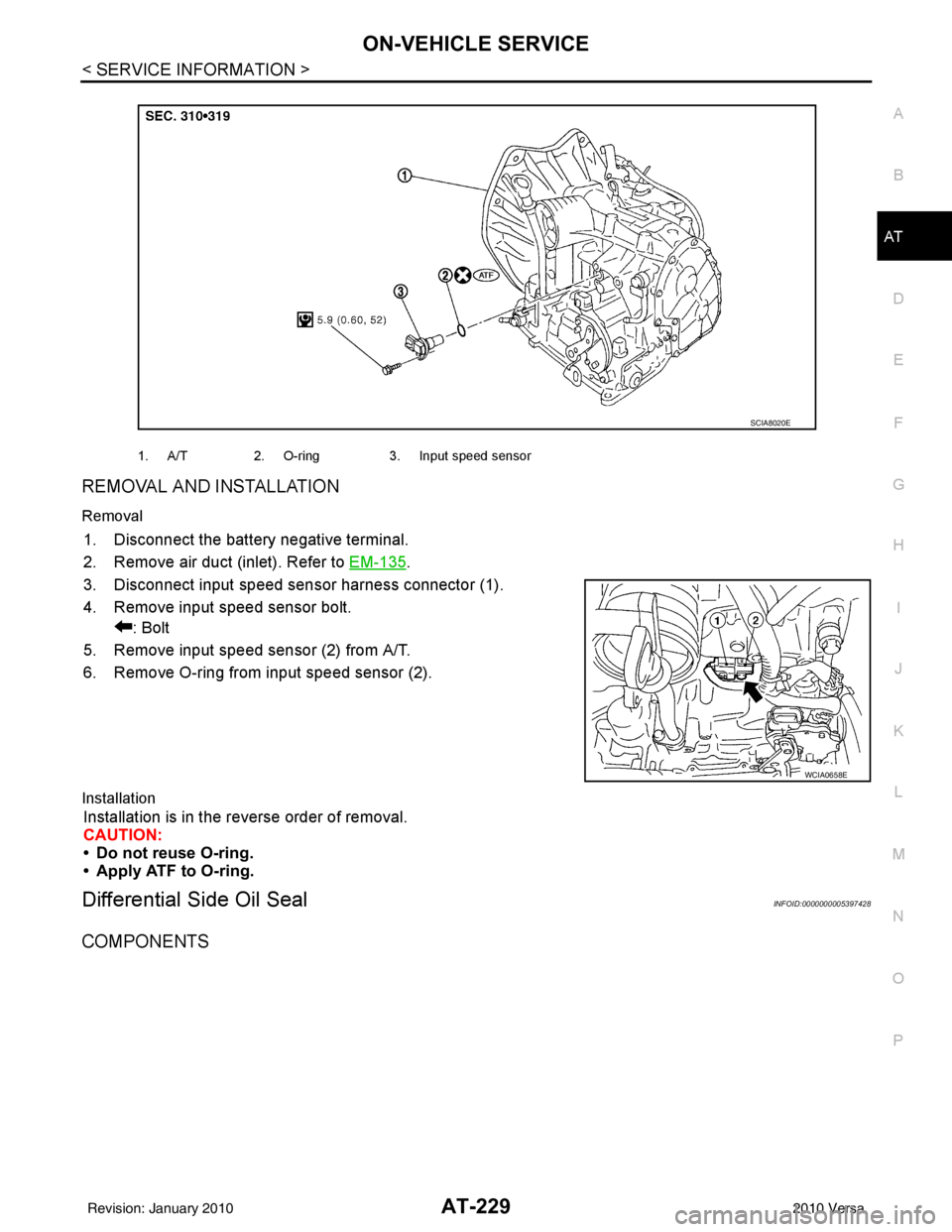
REMOVAL AND INSTALLATION
Removal
1. Disconnect the battery negative terminal.
2. Remove air duct (inlet). Refer to EM-135
.
3. Disconnect input speed sens or harness connector (1).
4. Remove input speed sensor bolt. : Bolt
5. Remove input speed sensor (2) from A/T.
6. Remove O-ring from input speed sensor (2).
Installation
Installation is in the reverse order of removal.
CAUTION:
• Do not reuse O-ring.
• Apply ATF to O-ring.
Differential Side Oil SealINFOID:0000000005397428
COMPONENTS
1. A/T 2. O-ring 3. Input speed sensor
SCIA8020E
WCIA0658E
Revision: January 20102010 Versa
Page 398 of 3745

AV-1
ELECTRICAL
C
DE
F
G H
I
J
L
M
SECTION AV
A
B
AV
N
O P
CONTENTS
AUDIO, VISUAL, NAVIGATION & TELEPHONE SYS- TEM
AUDIO WITHOUT NAVIGATION
SERVICE INFORMATION .. ..........................
3
PRECAUTIONS .............................................. .....3
Precaution for Supplemental Restraint System
(SRS) "AIR BAG" and "SEAT BELT PRE-TEN-
SIONER" ............................................................. ......
3
Precaution Necessary for Steering Wheel Rota-
tion After Battery Disconnect ............................... ......
3
PREPARATION ...................................................5
Commercial Service Tool .................................... ......5
AUDIO .................................................................6
Component Parts Location .................................. ......6
System Description ...................................................6
Schematic .................................................................8
Wiring Diagram - AUDIO - .........................................9
Audio Unit (Base System) Harness Connector
Terminal Layout ......................................................
15
Terminal and Reference Value for Audio Unit
(Base System) .........................................................
15
Audio Unit (Premium System) Harness Connector
Terminal Layout ......................................................
16
Terminal and Reference Value for Audio Unit
(Premium System) ..................................................
16
IPod Adapter Harness Connector Terminal Layout
....
18
Terminal and Reference Value for IPod Adapter ....19
Trouble Diagnosis ...................................................20
Noise Inspection ......................................................21
Power Supply Circuit Inspection .............................22
Steering Switch Check (With Bluetooth) .................22
Sound Is Not Heard from Front Door Speaker
(Base System) .........................................................
24
Sound Is Not Heard from Rear Door Speaker
(Base System) .........................................................
25
Sound Is Not Heard from Front Door Speaker or
Tweeter (Premium System) ....................................
26
Sound Is Not Heard from Rear Door Speaker
(Premium System) ............................................... ....
27
Removal and Installation .........................................29
iPod® CONNECTOR ........................................31
Removal and Installation .........................................31
iPod® ADAPTER ..............................................32
Removal and Installation .........................................32
AUDIO ANTENNA .............................................33
Location of Antenna ............................................. ....33
Removal and Installation of Roof Antenna ..............33
TELEPHONE .....................................................35
Component Parts and Harness Connector Loca-
tion ...........................................................................
35
System Description ..................................................35
Wiring Diagram - H/PHON - ....................................37
Bluetooth Control Unit Harness Connector Termi-
nal Layout ............................................................ ....
39
Terminal and Reference Value for Bluetooth Con-
trol Unit ....................................................................
39
Bluetooth Control Unit Self-Diagnosis Function ......40
Workflow .............................................................. ....41
Power Supply and Ground Circuit Inspection for
Bluetooth Control Unit .............................................
42
Steering Wheel Audio Co ntrol Switch Does Not
Operate ................................................................ ....
42
Voice Activated Control Function Does Not Oper-
ate ........................................................................ ....
43
Removal and Installation .........................................45
AUDIO WITH NAVIGATION
SERVICE INFORMATION .. .........................
49
PRECAUTIONS .................................................49
Precaution for Supplemental Restraint System
(SRS) "AIR BAG" and "SEAT BELT PRE-TEN-
SIONER" ............................................................. ....
49
Precaution Necessary for Steering Wheel Rota-
tion After Battery Disconnect ...................................
49
Revision: January 20102010 Versa
Page 400 of 3745
![NISSAN LATIO 2010 Service Workshop Manual PRECAUTIONSAV-3
< SERVICE INFORMATION > [AUDIO WITHOUT NAVIGATION]
C
D
E
F
G H
I
J
L
M A
B
AV
N
O P
SERVICE INFORMATION
PRECAUTIONS
Precaution for Supplemental Restraint System (SRS) "AIR BAG" and "S](/img/5/57358/w960_57358-399.png "NISSAN LATIO 2010 Service Workshop Manual PRECAUTIONSAV-3
< SERVICE INFORMATION > [AUDIO WITHOUT NAVIGATION]
C
D
E
F
G H
I
J
L
M A
B
AV
N
O P
SERVICE INFORMATION
PRECAUTIONS
Precaution for Supplemental Restraint System (SRS) \"AIR BAG\" and \"S")
PRECAUTIONSAV-3
< SERVICE INFORMATION > [AUDIO WITHOUT NAVIGATION]
C
D
E
F
G H
I
J
L
M A
B
AV
N
O P
SERVICE INFORMATION
PRECAUTIONS
Precaution for Supplemental Restraint System (SRS) "AIR BAG" and "SEAT BELT
PRE-TENSIONER"
INFOID:0000000005395303
The Supplemental Restraint System such as “AIR BAG” and “SEAT BELT PRE-TENSIONER”, used along
with a front seat belt, helps to reduce the risk or severi ty of injury to the driver and front passenger for certain
types of collision. This system includes seat belt switch inputs and dual stage front air bag modules. The SRS
system uses the seat belt switches to determine the front air bag deployment, and may only deploy one front
air bag, depending on the severity of a collision and w hether the front occupants are belted or unbelted.
Information necessary to service the system safely is included in the SRS and SB section of this Service Man-
ual.
WARNING:
• To avoid rendering the SRS inoper ative, which could increase the risk of personal injury or death in
the event of a collision which would result in air bag inflation, all maintenance must be performed by
an authorized NISSAN/INFINITI dealer.
• Improper maintenance, including in correct removal and installation of the SRS can lead to personal
injury caused by unintentional act ivation of the system. For removal of Spiral Cable and Air Bag
Module, see the SRS section.
• Do not use electrical test equipm ent on any circuit related to the SRS unless instructed to in this
Service Manual. SRS wiring harnesses can be identi fied by yellow and/or orange harnesses or har-
ness connectors.
PRECAUTIONS WHEN USING POWER TOOLS (AIR OR ELECTRIC) AND HAMMERS
WARNING:
• When working near the Airbag Diagnosis Sensor Un it or other Airbag System sensors with the Igni-
tion ON or engine running, DO NOT use air or el ectric power tools or strike near the sensor(s) with a
hammer. Heavy vibration could activate the sensor( s) and deploy the air bag(s), possibly causing
serious injury.
• When using air or electric power tools or hammers, always switch the Ignition OFF, disconnect the battery, and wait at least 3 minutes before performing any service.
Precaution Necessary for Steering Wheel Rotation After Battery Disconnect
INFOID:0000000005975903
NOTE:
• This Procedure is applied only to models with Intelligent Key system and NATS (NISSAN ANTI-THEFT SYS-
TEM).
• Remove and install all control units after disconnecti ng both battery cables with the ignition knob in the
″ LOCK ″ position.
• Always use CONSULT-III to perform self-diagnosis as a part of each function inspection after finishing work.
If DTC is detected, perform trouble diagnosis according to self-diagnostic results.
For models equipped with the Intelligent Key system and NATS , an electrically controlled steering lock mech-
anism is adopted on the key cylinder.
For this reason, if the battery is disconnected or if the battery is discharged, the steering wheel will lock and
steering wheel rotation will become impossible.
If steering wheel rotation is required when battery power is interrupted, follow the procedure below before
starting the repair operation.
OPERATION PROCEDURE
1. Connect both battery cables. NOTE:
Supply power using jumper cables if battery is discharged.
2. Use the Intelligent Key or mechanical key to turn the ignition switch to the ″ACC ″ position. At this time, the
steering lock will be released.
3. Disconnect both battery cables. The steering lock will remain released and the steering wheel can be
rotated.
4. Perform the necessary repair operation.
Revision: January 20102010 Versa
Page 401 of 3745
![NISSAN LATIO 2010 Service Workshop Manual AV-4
< SERVICE INFORMATION >[AUDIO WITHOUT NAVIGATION]
PRECAUTIONS
5. When the repair work is completed, return the ignition switch to the
″LOCK ″ position before connecting
the battery cables. (](/img/5/57358/w960_57358-400.png "NISSAN LATIO 2010 Service Workshop Manual AV-4
< SERVICE INFORMATION >[AUDIO WITHOUT NAVIGATION]
PRECAUTIONS
5. When the repair work is completed, return the ignition switch to the
″LOCK ″ position before connecting
the battery cables. (")
AV-4
< SERVICE INFORMATION >[AUDIO WITHOUT NAVIGATION]
PRECAUTIONS
5. When the repair work is completed, return the ignition switch to the
″LOCK ″ position before connecting
the battery cables. (At this time, the steering lock mechanism will engage.)
6. Perform a self-diagnosis check of a ll control units using CONSULT-III.
Revision: January 20102010 Versa
Page 412 of 3745
![NISSAN LATIO 2010 Service Workshop Manual AUDIOAV-15
< SERVICE INFORMATION > [AUDIO WITHOUT NAVIGATION]
C
D
E
F
G H
I
J
L
M A
B
AV
N
O P
Audio Unit (Base System) Har ness Connector Terminal LayoutINFOID:0000000005395309
Terminal and Reference](/img/5/57358/w960_57358-411.png "NISSAN LATIO 2010 Service Workshop Manual AUDIOAV-15
< SERVICE INFORMATION > [AUDIO WITHOUT NAVIGATION]
C
D
E
F
G H
I
J
L
M A
B
AV
N
O P
Audio Unit (Base System) Har ness Connector Terminal LayoutINFOID:0000000005395309
Terminal and Reference")
AUDIOAV-15
< SERVICE INFORMATION > [AUDIO WITHOUT NAVIGATION]
C
D
E
F
G H
I
J
L
M A
B
AV
N
O P
Audio Unit (Base System) Har ness Connector Terminal LayoutINFOID:0000000005395309
Terminal and Reference Value for Audio Unit (Base System)INFOID:0000000005395310
WKIA5439E
Te r m i n a l
(Wire color) ItemSignal
input/
output Condition
Reference value
(Approx.)
+– Ignition
switch Operation
2 (W) 3 (BR) Audio signal front LH Output ON Receive audio signal
4 (V) 5 (R) Audio signal rear LH Output ON Receive audio signal
7 (LG) Ground ACC power supply Input ACC –Battery voltage
11 (G) 12 (SB) Audio signal front RH Output ON Receive audio signal
13 (LG) 14 (GR) Audio signal rear RH Output ON Receive audio signal
19 (BR) Ground Battery power supply Input OFF –Battery voltage
SKIB3609E
SKIB3609E
SKIB3609E
SKIB3609E
Revision: January 20102010 Versa
Page 413 of 3745
![NISSAN LATIO 2010 Service Workshop Manual AV-16
< SERVICE INFORMATION >[AUDIO WITHOUT NAVIGATION]
AUDIO
Audio Unit (Premium System) Ha rness Connector Terminal Layout
INFOID:0000000005395311
Terminal and Reference Value for Audio Unit (Premiu](/img/5/57358/w960_57358-412.png "NISSAN LATIO 2010 Service Workshop Manual AV-16
< SERVICE INFORMATION >[AUDIO WITHOUT NAVIGATION]
AUDIO
Audio Unit (Premium System) Ha rness Connector Terminal Layout
INFOID:0000000005395311
Terminal and Reference Value for Audio Unit (Premiu")
AV-16
< SERVICE INFORMATION >[AUDIO WITHOUT NAVIGATION]
AUDIO
Audio Unit (Premium System) Ha rness Connector Terminal Layout
INFOID:0000000005395311
Terminal and Reference Value for Audio Unit (Premium System)INFOID:0000000005395312
AWNIA2072ZZ
Te r m i n a l
(Wire color) ItemSignal
input/
output Condition
Reference value
(Approx.) Example of symp-
tom
+– Ignition
switch Operation
2 (W) 3 (BR) Audio sound
signal front
LH
Output ON
Receive audio
signal No sound from
front door speaker
LH or tweeter LH.
4 (V) 5 (R) Audio sound
signal rear
LHOutput ON
Receive audio
signal No sound from
rear door speaker
LH.
6 (L)*1 Ground Remote
control A
Input ON Press Phone/
End switch 0V
Steering wheel au-dio controls do not function
Press SEEK UP
switch 1.7V
Press VOL UP switch 3.3V
Except for above 5.0V
7 (LG) Ground ACC signal Input ON Ignition switch
ACC or ON
Battery voltageSystem does not
work properly.
11 (G) 12 (SB) Audio sound
signal front
RHOutput ON
Receive audio
signal No sound from
front door speaker
RH or tweeter RH.
SKIA0177E
SKIA0177E
SKIA0177E
Revision: January 20102010 Versa
Page 414 of 3745
![NISSAN LATIO 2010 Service Workshop Manual AUDIOAV-17
< SERVICE INFORMATION > [AUDIO WITHOUT NAVIGATION]
C
D
E
F
G H
I
J
L
M A
B
AV
N
O P
13 (LG) 14 (GR) Audio sound
signal rear
RHOutput ON
Receive audio
signal No sound from
rear door spea](/img/5/57358/w960_57358-413.png "NISSAN LATIO 2010 Service Workshop Manual AUDIOAV-17
< SERVICE INFORMATION > [AUDIO WITHOUT NAVIGATION]
C
D
E
F
G H
I
J
L
M A
B
AV
N
O P
13 (LG) 14 (GR) Audio sound
signal rear
RHOutput ON
Receive audio
signal No sound from
rear door spea")
AUDIOAV-17
< SERVICE INFORMATION > [AUDIO WITHOUT NAVIGATION]
C
D
E
F
G H
I
J
L
M A
B
AV
N
O P
13 (LG) 14 (GR) Audio sound
signal rear
RHOutput ON
Receive audio
signal No sound from
rear door speaker
RH.
15 (B)*1 – Remote
control
groundInput –
––Steering wheel au-
dio controls do not
function
16 (P)*1 Ground Remote
control BInput ON Press Phone/
Send switch 0V
Steering wheel au-dio controls do not function
Press SEEK
DOWN switch 1.7V
Press VOL
DOWN switch 3.3V
Except for above 5.0V
18 (SB) Ground Vehicle
speed signal
(8–pulse)
Input ON When vehicle
speed is approx.
40 km/h (25 MPH) Speed sensitive
volume is inopera-
tive.
19 (BR) Ground Battery pow-
erInput –
–Battery voltage Audio unit will not
work properly.
20 (B) Ground Ground – – –– –
31 (R) 35 (W) iPod® au-
dio signal
LH
Input ON
With iPod® op-
erating
—
33 (B) 37 (G) iPod® au-
dio signal
RHInput ON
With iPod® op-
erating —
38 — Shield — — —— —
57 (L) — AV c o m m u -
nication sig-
nal 1 (H)Input/
Output ——
——
58 (L) — AV c o m m u -
nication sig-
nal 1 (H)Input/
Output ——
——
Te r m i n a l
(Wire color) ItemSignal
input/
output Condition
Reference value
(Approx.) Example of symp-
tom
+– Ignition
switch Operation
SKIA0177E
PKIC0643E
SKIB3609E
SKIB3609E
Revision: January 20102010 Versa
Page 416 of 3745
![NISSAN LATIO 2010 Service Workshop Manual AUDIOAV-19
< SERVICE INFORMATION > [AUDIO WITHOUT NAVIGATION]
C
D
E
F
G H
I
J
L
M A
B
AV
N
O P
Terminal and Reference Value for IPod AdapterINFOID:0000000005615683
Te r m i n a l
(Wire color) Descrip](/img/5/57358/w960_57358-415.png "NISSAN LATIO 2010 Service Workshop Manual AUDIOAV-19
< SERVICE INFORMATION > [AUDIO WITHOUT NAVIGATION]
C
D
E
F
G H
I
J
L
M A
B
AV
N
O P
Terminal and Reference Value for IPod AdapterINFOID:0000000005615683
Te r m i n a l
(Wire color) Descrip")
AUDIOAV-19
< SERVICE INFORMATION > [AUDIO WITHOUT NAVIGATION]
C
D
E
F
G H
I
J
L
M A
B
AV
N
O P
Terminal and Reference Value for IPod AdapterINFOID:0000000005615683
Te r m i n a l
(Wire color) Description
ConditionReference value
(Approx.)
+ – Signal nameInput/
Output
1
(R) 13
(W) iPod® sound signal LH Output Ignition
switch ON When iPod® mode is se-
lected.
2
(B) 14
(G) iPod® sound signal RH Output Ignition
switch ON When iPod® mode is se-
lected.
3
(Y) Ground ACC power supply
InputIgnition
switch ACC —
Battery voltage
4
(P) —AV communication signal
(L) Input/
Output ——
—
5
(BR) Ground Battery power supply Input Ignition
switch OFF —
Battery voltage
6
(G) 7
(Y) iPod® USD signal
—Ignition
switch
ON ——
8
(W) Ground iPod® battery charge Output Ignition
switch ON Connected to iPod®.
Battery voltage
9
(SB) Ground Communication signal
(iPod® adapter
→iPod®) OutputIgnition
switch ON The wave pattern is dis-
played just after iPod® con-
nection.
NOTE:
After the wave pattern display,
the value continues Approx 3.3V
10
(Y) Ground Communication signal
(iPod®
→iPod® adapter) InputIgnition
switch ON Connected to iPod®.
11
(GR) Ground ACCESSORY-IDENTIFY — Ignition
switch
ON Co
nn
ected to iPod®.
0V
SKIB3609E
SKIB3609E
JPNIA0462GB
JPNIA0462GB
Revision: January 20102010 Versa
Page 417 of 3745
![NISSAN LATIO 2010 Service Workshop Manual AV-20
< SERVICE INFORMATION >[AUDIO WITHOUT NAVIGATION]
AUDIO
Trouble Diagnosis
INFOID:0000000005395317
The vehicle itself can be a source of noise if noise prevention parts or electrical equipment i](/img/5/57358/w960_57358-416.png "NISSAN LATIO 2010 Service Workshop Manual AV-20
< SERVICE INFORMATION >[AUDIO WITHOUT NAVIGATION]
AUDIO
Trouble Diagnosis
INFOID:0000000005395317
The vehicle itself can be a source of noise if noise prevention parts or electrical equipment i")
AV-20
< SERVICE INFORMATION >[AUDIO WITHOUT NAVIGATION]
AUDIO
Trouble Diagnosis
INFOID:0000000005395317
The vehicle itself can be a source of noise if noise prevention parts or electrical equipment is malfunctioning.
Check if noise is caused and/or changed by engine speed, ignition switch turned to each position, and opera-
tion of each piece of electrical equipment, and then determine the cause.
NOTE:
The majority of the audio malfunctions are the result of outside causes (damaged CD, electromagnetic inter-
ference, etc.). Check the sympto ms below to diagnose the malfunction.
12
(BR) Ground
iPod® sound signal RH Input Ignition
switch ON When iPod® mode is se-
lected.
15 — Shield — —— —
16
(L) —AV communication signal
(H) Input/
Output ——
—
17
(P) Ground Ground
—Ignition
switch ON — 0
V
18 — Shield — —— —
19 — Shield — —— —
20
(R) Ground iPod® battery charge Output Ignition
switch ON Connected to iPod®.
5.0V
21
(L) Ground
iPod® connection recogni-
tion signal InputIgnition
switch
ON Not connected to iPod®.
4.0V
Connected to iPod®. 0V
22
(O) Ground ACCESSORY-DETECT — Ignition
switch ON Connected to iPod®.
0V
23 — Shield — —— —
24
(Y) Ground iPod® sound signal LH Input Ignition
switch ON When iPod® mode is se-
lected.
Terminal
(Wire color) Description
ConditionReference value
(Approx.)
+ – Signal nameInput/
Output
SKIB3609E
SKIB3609E
Symptom Check item
Audio system does not work properly. • Audio unit power supply circuit. Refer to
AV- 2 2 , "
Power Supply
Circuit Inspection" .
• Audio unit. Refer to AV- 2 9 , "
Removal and Installation" .
No sound can be heard from all speakers. • Speaker circuit shorted to ground. Refer to
AV- 9 , "
Wiring Dia-
gram - AUDIO -" .
• Audio unit. Refer to AV- 2 9 , "
Removal and Installation" .
Revision: January 20102010 Versa
Page 419 of 3745
![NISSAN LATIO 2010 Service Workshop Manual AV-22
< SERVICE INFORMATION >[AUDIO WITHOUT NAVIGATION]
AUDIO
Power Supply Circuit Inspection
INFOID:0000000005395319
1.CHECK FUSE
Check that the following fuses of the audio unit are not blown.
OK or](/img/5/57358/w960_57358-418.png "NISSAN LATIO 2010 Service Workshop Manual AV-22
< SERVICE INFORMATION >[AUDIO WITHOUT NAVIGATION]
AUDIO
Power Supply Circuit Inspection
INFOID:0000000005395319
1.CHECK FUSE
Check that the following fuses of the audio unit are not blown.
OK or")
AV-22
< SERVICE INFORMATION >[AUDIO WITHOUT NAVIGATION]
AUDIO
Power Supply Circuit Inspection
INFOID:0000000005395319
1.CHECK FUSE
Check that the following fuses of the audio unit are not blown.
OK or NG
OK >> GO TO 2.
NG >> If fuse is blown, be sure to eliminate cause of blown fuse before installing new fuse. Refer to PG-
4 .
2.AUDIO UNIT POWER SUPPLY CIRCUIT CHECK
1. Disconnect audio unit connector.
2. Check voltage between the audio unit and ground.
OK or NG
OK >> With premium system, GO TO 3.
NG >> • Check connector housings for disconnected or loose
terminals.
• Repair harness or connector.
3.GROUND CIRCUIT CHECK
Check continuity between audio uni t (premium system) harness con-
nectors M43 (A), M44 (B) terminals 20, 61 and ground.
OK or NG
OK >> Inspection End.
NG >> • Check connector housings for disconnected or loose
terminals.
• Repair harness or connector.
Steering Switch Check (With Bluetooth)INFOID:0000000005395324
1.CHECK HARNESS
1. Turn ignition switch OFF.
2. Disconnect Bluetooth control unit connector and spiral cable connector M30.
3. Check continuity between Bluetooth control unit (A) connector B121 terminals 12, 14, and 13 and spiral
cable (B) connector M30 terminals 24, 31, and 32.
Unit Terminals Signal name Fuse No.
Audio unit 19
Battery power 27
7 Ignition switch ACC or ON 20
UnitTe r m i n a l N o .
OFF ACC ON
(+)
(-)
Connector Terminal
Audio unit M43 19 Ground
Battery
voltage Battery
voltage Battery
voltage
7Ground0V Battery
voltage Battery
voltage
WKIA5345E
Continuity should exist.
AWNIA2078ZZ
Revision: January 20102010 Versa