ECU NISSAN PULSAR 1987 Repair Manual
[x] Cancel search | Manufacturer: NISSAN, Model Year: 1987, Model line: PULSAR, Model: NISSAN PULSAR 1987Pages: 238, PDF Size: 28.91 MB
Page 112 of 238
112 Fuel and Engine Management
If the voltage does not increase as specified, renew
the throttle position sensor.
If the voltage is as specified, proceed as follows.
(28) With the ignition switched On and the
throttle valve held fully open, measure the voltage at
control unit wiring connector terminal C13. The
voltage should be above 4 volts.
If the voltage is below 4 volts, renew the throttle
position sensor.
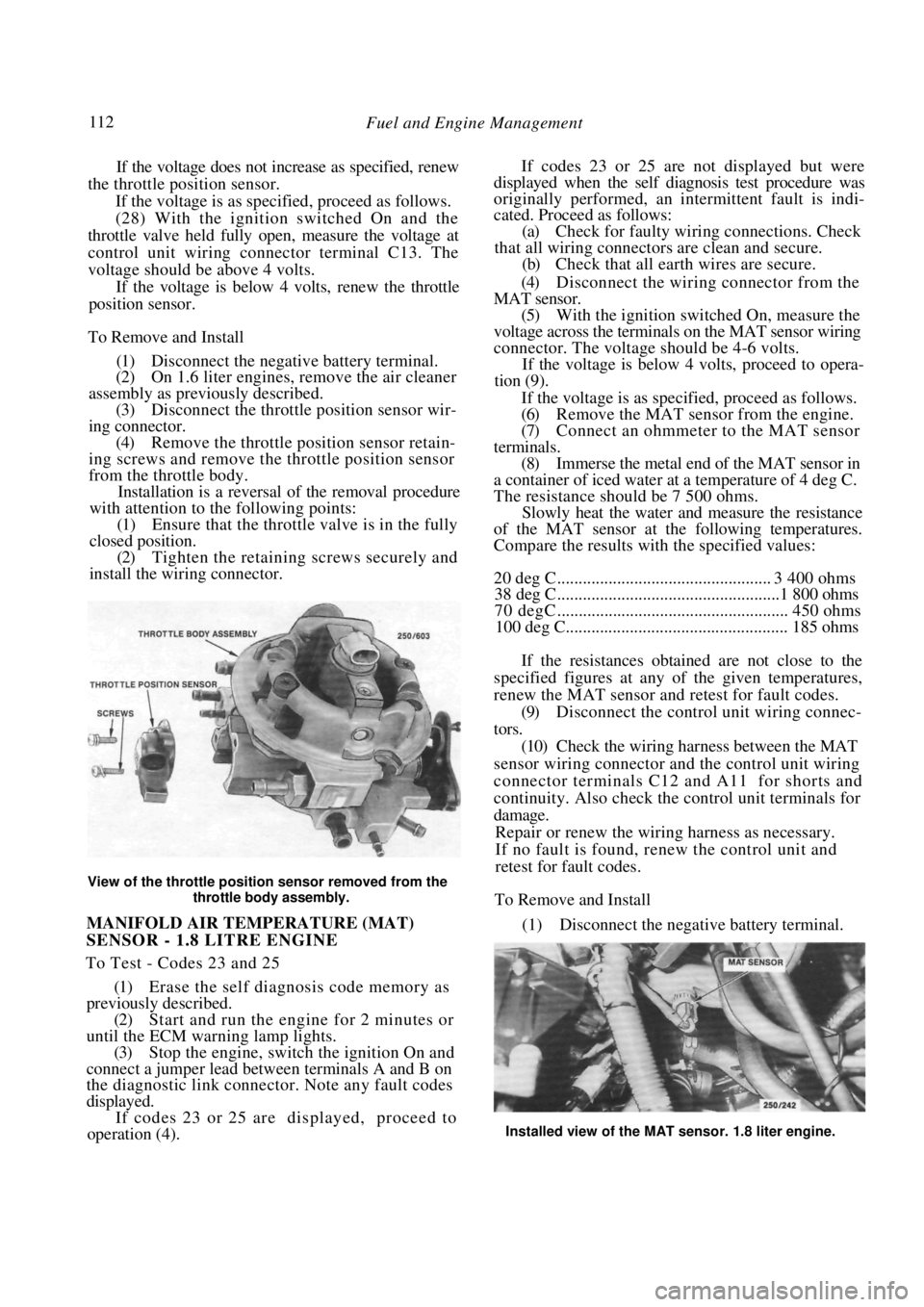
To Remove and Install
(1) Disconnect the negative battery terminal.
(2) On 1.6 liter engines, remove the air cleaner
assembly as previously described. (3) Disconnect the throttle position sensor wir-
ing connector. (4) Remove the throttle position sensor retain-
ing screws and remove the throttle position sensor
from the throttle body. Installation is a reversal of the removal procedure
with attention to the following points:
(1) Ensure that the throttle valve is in the fully
closed position. (2) Tighten the retaining screws securely and
install the wiring connector.
View of the throttle positi on sensor removed from the
throttle body assembly.
MANIFOLD AIR TEMPERATURE (MAT)
SENSOR - 1.8 LITRE ENGINE
To Test - Codes 23 and 25
(1) Erase the self diagnosis code memory as
previously described.
(2) Start and run the engine for 2 minutes or
until the ECM warning lamp lights. (3) Stop the engine, switch the ignition On and
connect a jumper lead between terminals A and B on
the diagnostic link connector . Note any fault codes
displayed. If codes 23 or 25 are displayed, proceed to
operation (4).
If codes 23 or 25 are not displayed but were
displayed when the self diagnosis test procedure was
originally performed, an intermittent fault is indi-
cated. Proceed as follows:
(a) Check for faulty wiri ng connections. Check
that all wiring connectors are clean and secure. (b) Check that all earth wires are secure.
(4) Disconnect the wiring connector from the
MAT sensor. (5) With the ignition switched On, measure the
voltage across the terminals on the MAT sensor wiring
connector. The voltage s hould be 4-6 volts.
If the voltage is below 4 volts, proceed to opera-
tion (9).
If the voltage is as specified, proceed as follows.
(6) Remove the MAT sensor from the engine.
(7) Connect an ohmmeter to the MAT sensor
terminals. (8) Immerse the metal end of the MAT sensor in
a container of iced water at a temperature of 4 deg C.
The resistance should be 7 500 ohms. Slowly heat the water and measure the resistance
of the MAT sensor at the following temperatures.
Compare the results with the specified values:
20 deg C .................................................. 3 400 ohms
38 deg C....................................................1 800 ohms
70 degC ...................................................... 450 ohms
100 deg C.................................................... 185 ohms
If the resistances obtained are not close to the
specified figures at any of the given temperatures,
renew the MAT sensor and retest for fault codes.
(9) Disconnect the control unit wiring connec-
tors. (10) Check the wiring harness between the MAT
sensor wiring connector and the control unit wiring
connector terminals C12 and A11 for shorts and
continuity. Also check the control unit terminals for
damage. Repair or renew the wiring harness as necessary.
If no fault is found, renew the control unit and
retest for fault codes.
To Remove and Install
(1) Disconnect the negative battery terminal.
Installed view of the MAT sensor. 1.8 liter engine.
Page 113 of 238

Fuel and Engine Management 113
(2) Disconnect the wiring connector from the
MAT sensor.
(3) Unscrew the sensor from the inlet manifold.
Installation is a reversal of the removal procedure
with attention to the following points:
(1) Apply Loctite 567 or a similar conductive
sealer to the threads of th e sensor. Tighten the sensor
to the specified torque. (2) Ensure that the wiring connector is clean and
tight.
OXYGEN SENSOR
To Test - Code 13
(1) Run the engine until the normal operating
temperature is obtained. (2) With the ignition switched Off, connect a
jumper lead between terminals A and B on the
diagnostic link connector.
(3) Start and run the engi ne at approximately
1 600-1 800 rpm for 2 minutes and note the ECM
warning lamp.
If the ECM warning lamp flashes at the rate of
twice per second, proceed to operation (5).
If the ECM warning lamp flashes at the rate of
once per second or slower, proceed as follows.
(4) Remove the jumper lead from the diagnostic
link connector and run th e engine above 2 000 rpm
for 2 minutes, noting the ECM warning lamp.
If the ECM warning lamp lights, stop the engine,
switch the ignition On and connect a jumper lead
between terminals A and B on the diagnostic link
connector. If code 13 is displayed proceed to opera-
tion (5).
If the ECM warning lamp does not light, an
intermittent fault is indicated. Proceed as follows:
(a) Check for faulty wiri ng connections. Check
that all wiring connectors are clean and secure.
(b) Check that all earth wires are secure.
(5) Switch the ignition Off and disconnect the
oxygen sensor wiring connector. Using a jumper lead
connect the oxygen sensor wiring connector to a
suitable engine earth. (6) Start and run the engi ne at approximately
1 600-1 800 rpm and note the ECM warning lamp.
The lamp may flash for a few seconds but should then
extinguish for at least 30 seconds.
If the ECM warning lamp functions as described,
proceed to operation (7).
If the ECM warning lamp does not function as
described proceed as follows:
(a) Check the wiring harness between the oxygen
sensor wiring connector and the control unit wiring
connector D7 for open circuits. Repair or renew the
wiring harness as necessary.
{b) Check the earth circuit between the control
unit wiring connect D6 and the right rear cylinder
head bolts. Repair or renew the wiring harness as
necessary.
(c) If no fault is found in (a) and (b) renew the
control unit and retest for fault codes.
(7) Check the wiring harness earth circuit be-
tween the control unit wiring connector D6 and the
right rear cylinder head bolts. Repair or renew the
wiring harness as necessary.
If no fault is found, thoroughly check the oxygen
sensor connector. If the conne ctor is not faulty, renew
the oxygen sensor.
To Test - Code 44
(1) Run the engine until normal operating tem-
perature is attained.
(2) With the ignition switched Off, connect a
jumper lead between terminals A and B on the
diagnostic link connector. (3) Start and run the engi ne at approximately
1 600-1 800 rpm for 2 minutes and note the ECM
warning lamp. If the ECM warning lamp is off more than on or
flashes at the rate of twice per second, proceed to
operation (4).
If the ECM warning lamp flashes evenly at the
rate of once per second an intermittent fault is
indicated. Proceed as follows:
(a) Check for faulty wiri ng connections. Check
that all wiring connectors are clean and secure. (b) Check that all earth wires are secure.
(4) Switch the engine Off and disconnect the
oxygen sensor wiring connector.
(5) Start and run the engine at 1 600-1 800 rpm
for at least 30 seconds and note the ECM warning
lamp. If the ECM warning lamp flashes at the rate of
twice per second procee d to operation (6).
If the ECM warning lamp extinguishes for at least
30 seconds, check the wiring harness between the
oxygen sensor wiring connector and the control unit
wiring connector terminal D7 for shorts to earth.
Repair or renew the wiring harness as necessary.
If no fault can be found in the wiring harness, renew
the control unit.
Installed view of the oxygen sensor.
Page 114 of 238

114 Fuel and Engine Management
(6) Check the vehicle for the following:
(a) Low fuel pressure.
(b) Contaminated fuel.
(c) Vacuum leaks at the inlet manifold, engine
vacuum hoses and engine ventilation hoses. (d) Exhaust manifold leaks before the oxygen
sensor. (e) Correct MAP sensor operation.
(f) Blocked oxygen sensor metal vent cover eg.
plugged with mud etc. (g) Fuel injectors) partially blocked. Refer to a
fuel injection specialis t or a Nissan dealer.
If the above items have been checked and no
faults have been found, a faulty oxygen sensor is
indicated. Renew the oxygen sensor, run the engine
and ensure that no fault codes are set.
To Test — Code 45
(1) Run the engine until normal operating tem-
perature is attained. (2) With the ignition switched Off, connect a
jumper lead between terminals B and A on the
diagnostic link connector. (3) Start and run the engine at approximately
1 600-1 800 rpm for 2 minutes and note the ECM
warning lamp. If the ECM warning lamp is on more than off or
flashes at the rate of twice per second, proceed to the
following operation.
If the ECM warning lamp flashes evenly at the
rate of once per second an intermittent fault is
indicated. Proceed as follows:
(a) Check for faulty wiri ng connections. Check
that all wiring connectors are clean and secure. (b) Check that all earth wires are secure.
(4) Switch the engine Off and disconnect the
oxygen sensor wiring connector. (5) Using a jumper lead, connect the oxygen
sensor wiring connector to a suitable engine earth. (6) Start and run the engine at 1 600-1 800 rpm
and note the ECM warning lamp.
If the ECM warning lamp extinguishes for at least
30 seconds, proceed to operation (7).
If the ECM warning lamp flashes on more than off
or flashes at the rate of twice per second, switch the
engine Off and disconnect the control unit wiring
connectors. Using an ohmmeter, check that there is no
resistance between the co ntrol unit wiring connector
terminal D6 and earth. Repair or renew the wiring as
necessary.
If no fault can be found in the wiring harness,
renew the control unit.
NOTE: The wiring harness for terminal D6
earths through the righ t hand rear cylinder
head bolt.
(7) Check the vehicl e for the following:
(a) High fuel pressure.
(b) Leaking injector(s).
(c) Faulty ignition wiring.
(d) Charcoal canister purge system blocked or
restricted.
(e) Faulty coolant temper ature sensor circuit.
(f) Faulty MAT sensor circuit (1.8 liter engine).
(g) MAP sensor operation.
(h) Throttle position sensor operation.
If the above items have been checked and no
faults have been found, a faulty oxygen sensor is
indicated.
Renew the oxygen sensor, run the engine and
ensure that no fault codes are set.
To Remove and Install
(1) If the engine is cold, run the engine for
approximately two minutes to allow easy oxygen
sensor removal. (2) Disconnect the negative battery terminal and
the oxygen sensor connector.
View of the oxygen sensor removed from the exhaust
manifold.
(3) Remove the exhaust manifold heat shield
retaining bolts and remove the heat shield from the
engine.
(4) Remove the oxygen sensor with a short ring
spanner using care not to damage the sensor wire. Installation is a reversal of the removal procedure
with attention to the following points:
(1) When installing a sensor that has previously
been removed, coat the sen sor threads with anti-seize
compound. Nissan recommend a mixture of liquid
graphite and glass beads. (2) Install the sensor and tighten to the specified
torque. (3) Connect the electrical connector ensuring
that the wiring is secured away from the exhaust. (4) Install the heat shield and tighten the retain-
ing bolts securely. On 1.6 liter engines, ensure that the hot air inlet
tube is located correctly be tween the heat shield and
the air cleaner housing.
(5) Start the engine and check for leaks.
VEHICLE SPEED SENSOR
To Test - Code 24
(1) Check the fuel pump and meter fuses. If the
fuses are serviceable, proceed to operation (5). If a
fuse is blown, rectify the cause and renew the fuse.
Page 115 of 238

Fuel and Engine Management 115
Erase the fault codes and retest for fault codes as
follows:
(2) Start and run the engine until normal oper-
ating temperature is attained. (3) Drive the vehicle at a speed of at least 80
km/h and, with the throttle closed, allow the vehicle to
decelerate until the engine speed is below 1 500 rpm.
NOTE: After rectifying any fault it will be
necessary to retest for fault codes. To test for
Code 24 the vehicle must be driven as
previously described.
(4) Switch the engine Off and connect a jumper
lead between terminals A and B on the diagnostic link
connector. Switch the ignition On and note the fault
codes. If code 24 is displayed proceed as follows. (5) Check the operation of the speedometer and
the instrument cluster warning lamps. If the speed-
ometer only is not functioning, proceed to operation
(13).
If the speedometer and the instrument cluster
warning lamps are not functioning, a fault in the
instrument cluster wiring harness is indicated. Refer
the fault to an auto electrical workshop or a Nissan
dealer.
If the speedometer is functioning, proceed as
follows:
(6) Raise the front of the vehicle and support it
on chassis stands. (7) Place the transaxle in Neutral and switch the
ignition On. (8) With the aid of assistants, slowly spin the
front wheels by hand while backprobing the control
unit wiring connector terminal A10 with a digital
voltmeter to earth. The voltage should alternate from under 1 volt to
over 10 volts.
If the voltmeter readi ng is not as specified,
proceed to operation (9).
If the voltmeter reading is as specified, the vehicle
speed sensor is operating satisfactorily, indicating an
intermittent fault was the cause of the fault code.
Proceed as follows:
(a) Check for faulty wiri ng connections. Check
that all wiring connectors are clean and secure. (b) Check that all earth c onnections are secure.
(9) Remove the instrument cluster as described
in the Electrical System section. (10) With the ignition switched On, backprobe
the control unit wiring connector terminal A10 with a
voltmeter to earth. The voltage should be over 10
volts. If the voltage is less than specified, check the
wiring harness for shorts to earth between the black
and yellow wire terminal on the instrument cluster
wiring connector and the control unit connector
terminal A10. Repair or renew the wiring harness as
necessary. If no fault can be found, renew the control
unit.
(11) With the ignition switched On, backprobe
the black and yellow wire terminal on the instrument
cluster wiring connector with a voltmeter to earth.
The voltage should be over 10 volts.
If the voltage is less than specified, locate the open
circuit between the instrument cluster black and
yellow wire terminal and the control unit wiring
connector terminal A10. Repair or renew the wiring
harness as necessary.
(12) With a test lamp connected to 12 volts,
backprobe the black wire terminals on the instrument
cluster wiring connectors. The test lamp should light.
If the test lamp does not light locate the open
circuit between the black wire terminals and earth.
Repair or renew the wiring harness as necessary.
If the test lamp does light, renew the signal
divider circuit board which is located in the instru-
ment cluster.
(13) With the ignition switched On and the
engine not running, disconnect the vehicle speed
sensor wiring connector from the harness connector.
(14) With a test lamp connected to earth, probe
the yellow wire terminal on the harness wiring con-
nector. The test lamp should light. If the test lamp does not light, locate the open
circuit between the yellow wi re terminal and the Fuel
Pump fuse. Repair or renew the wiring harness as
necessary.
(15) With a test lamp connected to 12 volts,
probe the black wire terminal on the harness wiring
connector. The test lamp should light.
If the test lamp does not light, locate the open
circuit between the black wire terminal and earth.
Repair or renew the wiring harness as necessary.
(16) Using a voltmeter measure the voltage at the
red wire terminal on the harness wiring connector.
If the voltage is 5-9 volts proceed to operation
(19).
If the voltage is over 9 vol ts proceed to operation
(18).
Installed view of the vehicle speed sensor.
Page 116 of 238

116 Fuel and Engine Management
Rear view of the instrument cluster showing the flexible printed circuit.
If the voltage is under 5 volts proceed as follows.
(17) Check the wiring harness for continuity or
shorts to earth between th e red wire terminal on the
speed sensor harness connector and the green and
black wire terminal on th e instrument cluster wiring
connector.
If no fault can be found check the instrument
cluster printed circuit for continuity or shorts. If no
fault can be found, renew the speedometer and the
signal divider circuit board.
(18) Remove the instrument cluster as described
in the Electrical System se ction and repeat operation
(16).
If the voltage is under 1 volt, check the flexible
printed circuit on the rear of the instrument cluster for
continuity or shorts and re new as necessary. If no fault
can be found, renew the speedometer and the signal
divider circuit board.
(19) Connect the harness connector to the vehicle
speed sensor wiring connector. (20) Raise the front of the vehicle and support it on chassis stands. Place the transaxle in Neutral.
(21) With the aid of assistants, slowly spin the
front wheels by hand while backprobing the brown
wire terminal on the vehicle speed sensor wiring
connector with a voltmeter to earth.
The voltage should alternate between approxi-
mately 1 and 7 volts.
If the voltage is as specif ied, check the flexible
printed circuit on the rear of the instrument cluster for
continuity or shorts. If no fault can be found, renew
the speedometer and the signal divider circuit board.
If the voltage is not as specified, proceed as
follows.
(22) Disconnect the vehicle speed sensor wiring
connector and unscrew the sensor from the speedom-
eter drive housing. (23) Rotate both front wheels in the same direc-
tion and check that the speedometer drive shaft is
turning and does not slip. If the drive shaft does not operate as described,
renew the drive assembly as described in the Manual
or Automatic Transaxle section.
If the drive shaft operates satisfactorily, renew the
vehicle speed sensor.
To Remove and Install
(1) Disconnect the negative battery terminal.
(2) Disconnect the vehicle speed sensor wiring
connector. (3) Unscrew the vehicle speed sensor from the
speedometer drive housing.
Installation is a reversal of the removal procedure
with attention to the following points:
(1) Align the cut-out in the speedometer drive
shaft with the notch in the vehicle speed sensor shaft.
(2) Tighten the vehicle speed sensor securely.
Page 131 of 238
Manual Transaxle and Drive Shafts 131
(19) Renew the rear mainshaft bearing outer race
as follows:
(a) Remove the bolts retaining the rear cover to
the transaxle case. (b) Remove the rear cover. O ring, spacer and
adjusting shim from the transaxle case. Discard the O
ring. (c) Using a suitable punch, tap the bearing outer
race out of the transaxle case. (e) Install the adjusting shim, spacer and a new O
ring to the transaxle case. Install the rear cover and
tighten the retain ing bolts securely.
(20) Renew the front mainshaft bearing outer
race as follows:
(a) Using a suitable puller, pull the outer race
out of the clutch housing.
(b) Ensure that the oil groove in the resin oil
channel is facing the oil pocket in the clutch housing. (c) Install the new outer race to the clutch
housing.
(21) Measure the end float of the input shaft fifth
gear using feeler gauges betw een the fifth gear and the
adjacent gear shoulder. Note the measurement for
later reference.
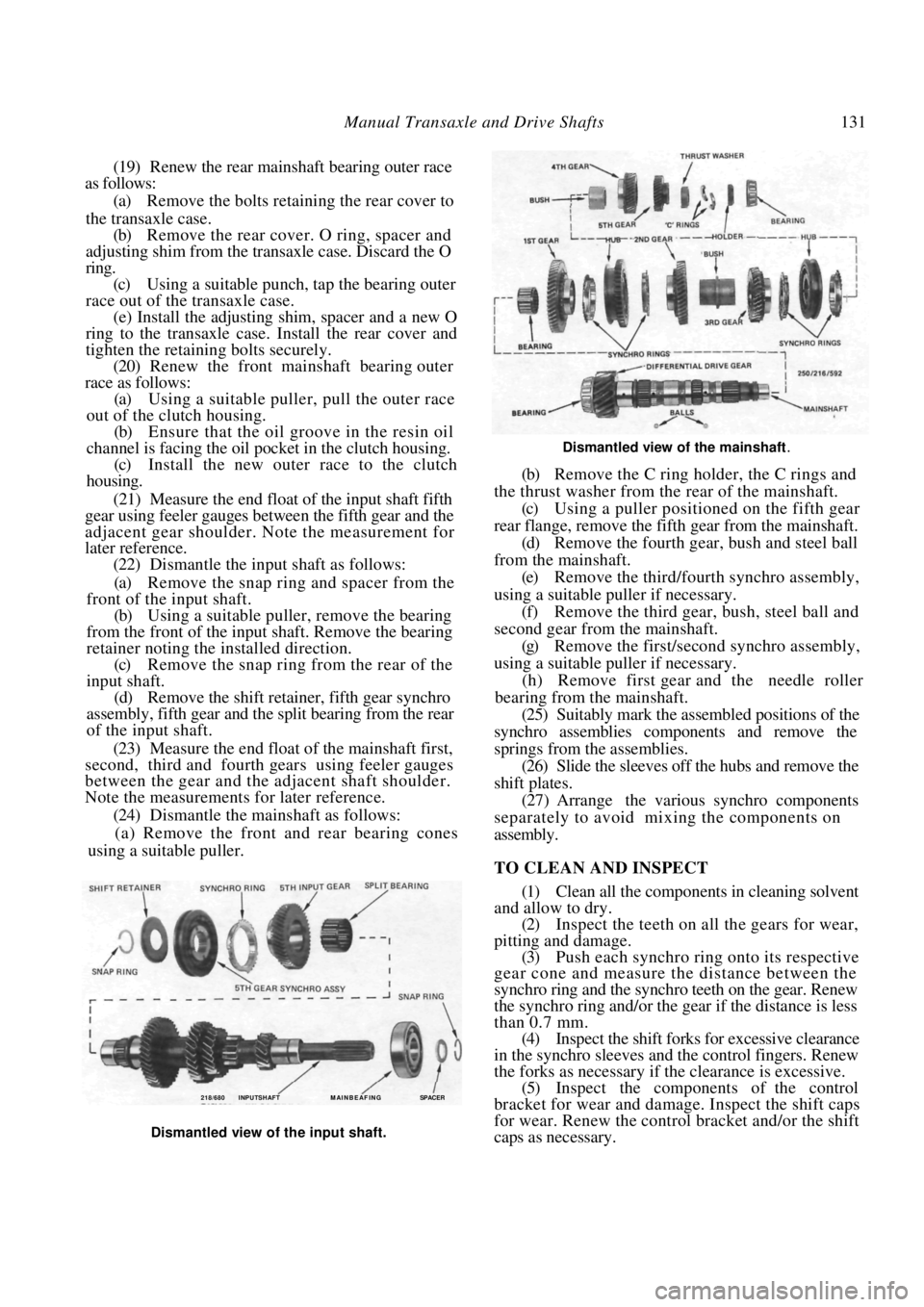
(22) Dismantle the input shaft as follows:
(a) Remove the snap ring and spacer from the
front of the input shaft. (b) Using a suitable puller, remove the bearing
from the front of the input shaft. Remove the bearing
retainer noting the installed direction. (c) Remove the snap ring from the rear of the
input shaft. (d) Remove the shift retainer, fifth gear synchro
assembly, fifth gear and th e split bearing from the rear
of the input shaft.
(23) Measure the end float of the mainshaft first,
second, third and fourth gears using feeler gauges
between the gear and the adjacent shaft shoulder.
Note the measurements for later reference.
(24) Dismantle the mainshaft as follows:
(a) Remove the front and rear bearing cones
using a suitable puller.
Dismantled view of the mainshaft.
(b) Remove the C ring holder, the C rings and
the thrust washer from the rear of the mainshaft. (c) Using a puller positioned on the fifth gear
rear flange, remove the fifth gear from the mainshaft. (d) Remove the fourth gear , bush and steel ball
from the mainshaft. (e) Remove the third/fourth synchro assembly,
using a suitable puller if necessary. (f) Remove the third gear, bush, steel ball and
second gear from the mainshaft. (g) Remove the first/second synchro assembly,
using a suitable puller if necessary. (h) Remove first gear and the needle roller
bearing from the mainshaft.
(25) Suitably mark the assembled positions of the
synchro assemblies components and remove the
springs from the assemblies.
(26) Slide the sleeves off the hubs and remove the
shift plates.
(27) Arrange the various synchro components
separately to avoid mixing the components on
assembly.
TO CLEAN AND INSPECT
(1) Clean all the components in cleaning solvent
and allow to dry.
(2) Inspect the teeth on all the gears for wear,
pitting and damage. (3) Push each synchro ring onto its respective
gear cone and measure the distance between the
synchro ring and the synchro teeth on the gear. Renew
the synchro ring and/or the gear if the distance is less
than 0.7 mm.
(4) Inspect the shift forks for excessive clearance
in the synchro sleeves and the control fingers. Renew
the forks as necessary if the clearance is excessive. (5) Inspect the components of the control
bracket for wear and damage. Inspect the shift caps
for wear. Renew the control bracket and/or the shift
caps as necessary.
218/680 INPUTSHAFT M AI N B E AF I N G SPACER
Dismantled view of the input shaft.
Page 134 of 238

134 Manual Transaxle and Drive Shafts
(32) Install and tighten the retaining bolts to
the specified torque.
(33) Repeat operation (29). The total turning
torque should be 5.9-13.7 Nm if new bearings have
been installed or slightly l ess if the original bearings
have been installed. If the turning torque is no t as specified, adjust the
mainshaft turning torque as follows:
(a) Remove the transaxle case rear cover, O ring,
spacer and adjusting shim from the transaxle case.
(b) Ensure that the mainsh aft rear bearing outer
race is fully seated on the bearing cone. (c) Using micrometer depth gauge, measure the
distance from the transaxle case to the bearing outer
race and note the reading. (d) Referring to the following table, select the
appropriate shim, according to the reading noted in
operation (c), required to correct the mainshaft turn-
ing torque.
READING SHIM
2.35-2.40 mm............................................... 0.10 mm
2.40-2.45 mm............................................... 0.15 mm
2.45-2.50 mm...............................................0.20 mm
2.50-2.55 mm...............................................0.25 mm
2.55-2.60 mm...............................................0.30 mm
2.60-2.65 mm............................................... 0.35 mm
2.65-2.70 mm............................................... 0.40 mm
2.70-2.75 mm............................................... 0.45 mm
2.75-2.80 mm............................................... 0.50 mm
2.80-2.85 mm............................................... 0.55 mm
2.85-2.90 mm............................................... 0.60 mm
2.90-2.95 mm............................................... 0.65 mm
2.95-3.00 mm............................................... 0.70 mm
3.00-3.05 mm............................................... 0.75 mm
3.05-3.10 mm............................................... 0.80 mm
3.10-3.15 mm............................................... 0.85 mm
3.15-3.20 mm............................................... 0.90 mm
3.20-3.25 mm............................................... 0.95 mm
3.25-3.30 mm...............................................1.00 mm.
(e) Install the spacer, shim, O ring and rear
cover to the transaxle case. Tighten the retaining
bolts securely.
(34) Measure the total turning torque as previ-
ously described. (35) Install the striking interlock and striking lever
to the clutch housing. (36) Install the striking ro d to the clutch housing
sliding the rod through the lever and interlock. Take
care that the end of the rod does not damage the seal. (37) Install a new retaining pin to the striking rod
using a pin punch. (38) Install the reverse and fifth gear check
assembly to the clutch housing. Tighten the retaining
screws securely. (39) Install the balls, spring and reverse check
plug to the clutch housing ensuring that the smaller
diameter ball enters the hole in the body of the
reverse and fifth gear check assembly body. Apply locking com-
pound and tighten the reverse check plug securely.
(40) Using a bar clamped to the end of the
striking rod, check that a force of 4.9-7.4 Nm is
required to overcome the spring loading of the reverse
and fifth gear check assembly. If necessary, renew the
springs to achieve this correct spring loading.
NOTE: Ensure that the reverse check plug is
coated with locking compound when finally
installed.
(41) Install the shift check ball, spring and plug to
the clutch housing. Ensure that the ball is centrally
located in the plug.
(42) If removed, install the oil reservoir to the
clutch housing.
(43) Install the input shaft assembly and the
reverse idler gear to the clutch housing taking care not
to damage the seal.
(44) Apply locking compound to the bearing
retainer bolts and tighten the bolts to the specified
torque.
(45) Install the spacer to the reverse idler shaft.
(46) Install the differential assembly to the clutch
housing.
(47) Install the mainshaft to the clutch housing
ensuring that the resin oil ch annel is located centrally
in the end of the mainshaft. (48) Install the shift cap to the slot in the first/
second shift fork and install the shift fork and control
bracket to the clutch housing. Use grease to hold the
shift cap in the shift fork slot. Ensure that the reverse
idler shift fork is correctly located over the gear.
(49) Apply locking compound to the threads of
the control bracket retaining bolts and tighten the
bolts to the specified torque. (50) Install the shift cap in the slot in the third/
fourth shift fork and install the fork to the transaxle
assembly. Use grease to hold the shift cap in the shift
fork slot. (51) Install the fifth gear shift fork to the transaxle
ensuring that the shift fork slot engages the control
finger.
(52) Install the fork shaft an d spring to the clutch
housing sliding the shaft through the shift forks. Use
grease to hold the spring in the end of the shaft. (53) Apply a continuous bead of sealant to the
mating face of the clutch housing so that the bead is
located inside the row of bolt holes.
NOTE: Sealant is available from Nissan
spare parts using the part number KP
610-00250.
(54) Install the transaxle case to the clutch hous-
ing. Install and tighten the retaining bolts to the
specified torque. (55) Select each gear in turn and check that the
transaxle turns freely in each gear. Ensure that it is not
Page 135 of 238
Manual Transaxle and Drive Shafts 135
possible to move the striking rod from fifth gear to
reverse without first moving sideways in the neutral
gate.
4. DIFFERENTIAL AND FINAL DRIVE ASSEMBLY
Special Equipment Required:
To Measure Differential Turning Torque —
Suitable slotted adaptor and torque gauge
TO CHECK VISCOUS COUPLING
From July 1989, Manual transaxle Pulsar Q and
Vector SSS models are equipped with a limited slip
differential incorporating a viscous coupling.
(1) Raise the front of the vehicle and support it
on chassis stands. (2) Rotate one front wheel and check the rota-
tional direction of the opposite wheel. (3) If both front wheels rotate in the same
direction, the viscous coupling is functioning nor-
mally. (4) If the front wheels rota te in opposite direc-
tions, the viscous coupling is unserviceable and must
be renewed as an assembly.
TO DISMANTLE AND ASSEMBLE
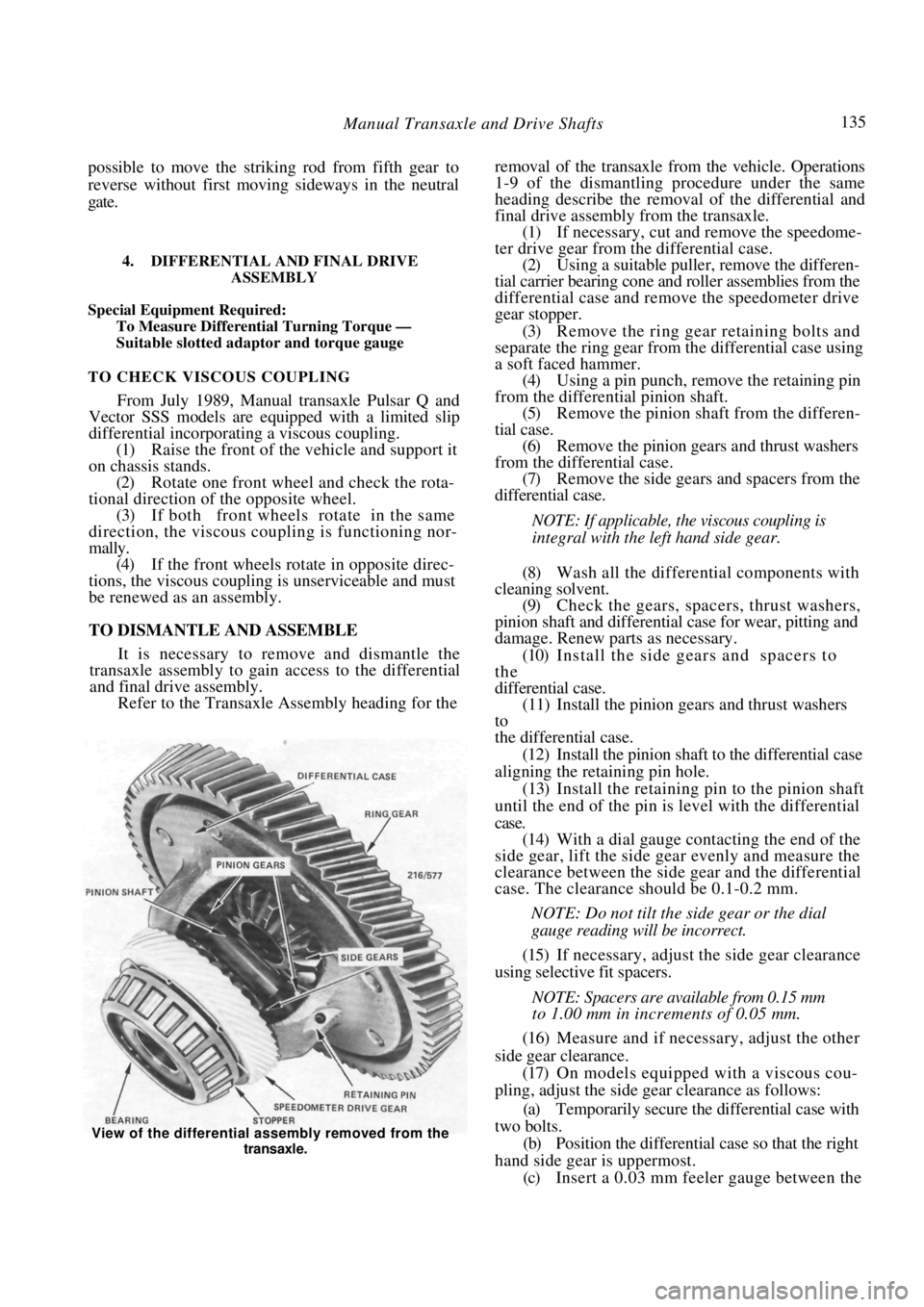
It is necessary to remove and dismantle the
transaxle assembly to gain access to the differential
and final drive assembly.
Refer to the Transaxle Assembly heading for the
removal of the transaxle from the vehicle. Operations
1-9 of the dismantling procedure under the same
heading describe the removal of the differential and
final drive assembly from the transaxle.
(1) If necessary, cut and remove the speedome-
ter drive gear from the differential case. (2) Using a suitable puller, remove the differen-
tial carrier bearing cone and roller assemblies from the
differential case and remove the speedometer drive
gear stopper.
(3) Remove the ring gear retaining bolts and
separate the ring gear from the differential case using
a soft faced hammer.
(4) Using a pin punch, remove the retaining pin
from the differential pinion shaft.
(5) Remove the pinion shaft from the differen-
tial case. (6) Remove the pinion gears and thrust washers
from the differential case. (7) Remove the side gears and spacers from the
differential case.
NOTE: If applicable, the viscous coupling is
integral with the left hand side gear.
(8) Wash all the differential components with
cleaning solvent. (9) Check the gears, spacer s, thrust washers,
pinion shaft and differential case for wear, pitting and
damage. Renew parts as necessary.
(10) Install the side gears and spacers to
the
differential case.
(11) Install the pinion gear s and thrust washers
to
the differential case.
(12) Install the pinion shaft to the differential case
aligning the retaining pin hole. (13) Install the retaining pin to the pinion shaft
until the end of the pin is level with the differential
case. (14) With a dial gauge contacting the end of the
side gear, lift the side gear evenly and measure the
clearance between the side gear and the differential
case. The clearance should be 0.1-0.2 mm.
NOTE: Do not tilt the side gear or the dial
gauge reading will be incorrect.
(15) If necessary, adjust the side gear clearance
using selective fit spacers.
NOTE: Spacers are available from 0.15 mm
to 1.00 mm in increments of 0.05 mm.
(16) Measure and if necessary, adjust the other
side gear clearance. (17) On models equipped with a viscous cou-
pling, adjust the side gear clearance as follows:
(a) Temporarily secure the differential case with
two bolts. (b) Position the differential case so that the right
hand side gear is uppermost. (c) Insert a 0.03 mm feeler gauge between the
View of the differential ass embly removed from the
transaxle.
Page 137 of 238
Manual Transaxle and Drive Shafts 137
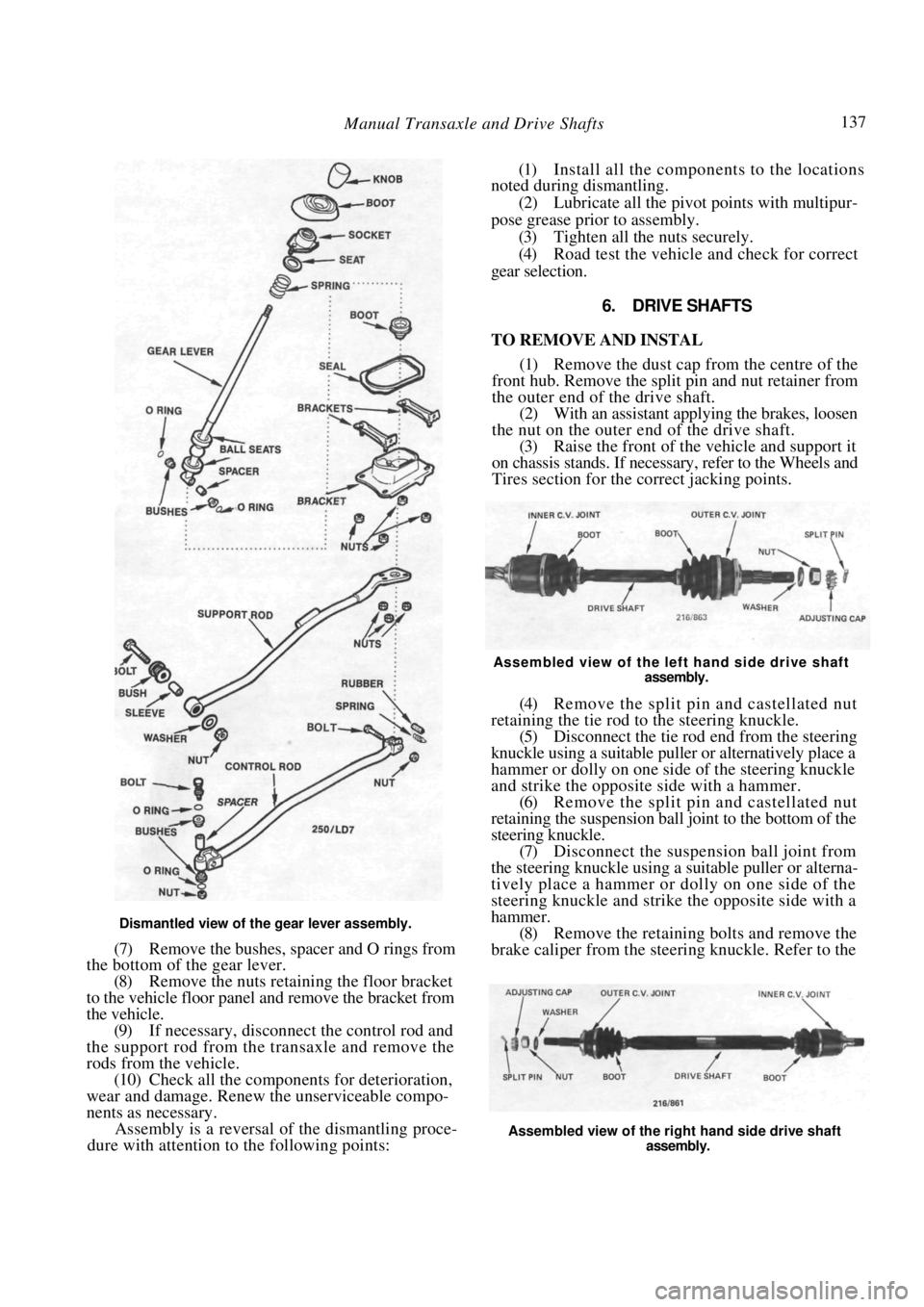
Dismantled view of the gear lever assembly.
(7) Remove the bushes, spacer and O rings from
the bottom of the gear lever.
(8) Remove the nuts retaining the floor bracket
to the vehicle floor panel and remove the bracket from
the vehicle. (9) If necessary, disconnect the control rod and
the support rod from the transaxle and remove the
rods from the vehicle. (10) Check all the components for deterioration,
wear and damage. Renew the unserviceable compo-
nents as necessary. Assembly is a reversal of the dismantling proce-
dure with attention to the following points:
(1) Install all the components to the locations
noted during dismantling.
(2) Lubricate all the pivot points with multipur-
pose grease prior to assembly. (3) Tighten all the nuts securely.
(4) Road test the vehicle and check for correct
gear selection.
6. DRIVE SHAFTS
TO REMOVE AND INSTAL
(1) Remove the dust cap from the centre of the
front hub. Remove the split pin and nut retainer from
the outer end of the drive shaft. (2) With an assistant applying the brakes, loosen
the nut on the outer end of the drive shaft.
(3) Raise the front of the vehicle and support it
on chassis stands. If necessary, refer to the Wheels and
Tires section for the correct jacking points.
Assembled view of the left hand side drive shaft
assembly.
(4) Remove the split pin and castellated nut
retaining the tie rod to the steering knuckle. (5) Disconnect the tie rod end from the steering
knuckle using a suitable puller or alternatively place a
hammer or dolly on one side of the steering knuckle
and strike the opposite side with a hammer.
(6) Remove the split pin and castellated nut
retaining the suspension ball joint to the bottom of the
steering knuckle. (7) Disconnect the suspension ball joint from
the steering knuckle using a suitable puller or alterna-
tively place a hammer or dolly on one side of the
steering knuckle and strike the opposite side with a
hammer. (8) Remove the retaining bolts and remove the
brake caliper from the stee ring knuckle. Refer to the
Assembled view of the right hand side drive shaft
assembly.
Page 138 of 238
138 Manual Transaxle and Drive Shafts
Brakes section if necessary. Suspend the caliper with
wire or cord attached to the coil spring.
(9) Hold the steering knuckle and hub assembly
and tap the drive shaft out of the hub using a soft
faced hammer.
(10) Drain the oil from the transaxle into a
container.
(11) Prise the drive shaft out of the transaxle and
remove the drive shaft from the vehicle.
Installation is a reversal of the removal procedure
with attention to the following points:
(1) Ensure that the drive sh aft is firmly attached
to the differential side gear by attempting to pull the
shaft out of the gear. (2) Tighten all nuts securely and install new split
pins. (3) Fill the transaxle with the specified grade and
quantity of oil.
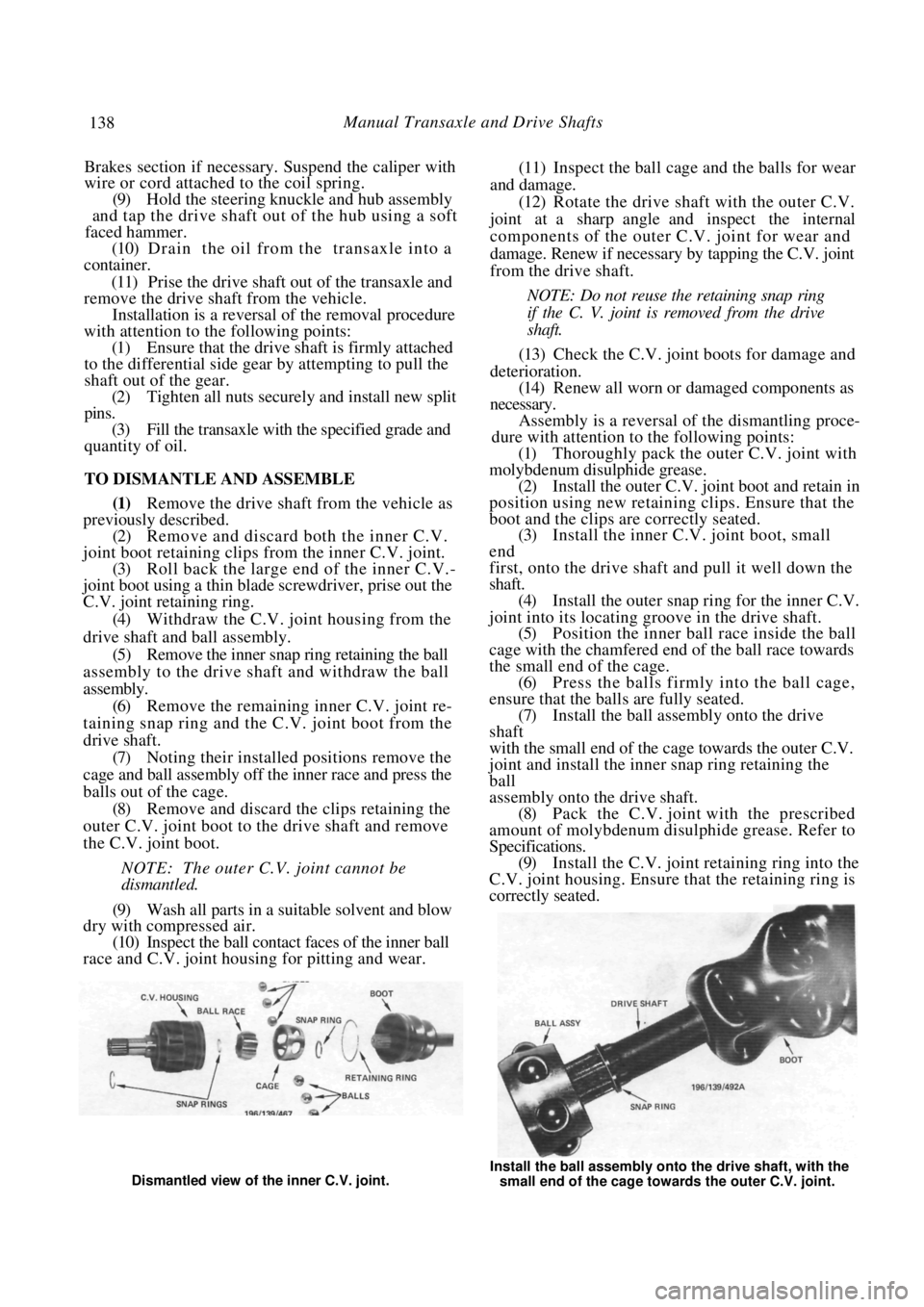
TO DISMANTLE AND ASSEMBLE
(1) Remove the drive shaft from the vehicle as
previously described.
(2) Remove and discard both the inner C.V.
joint boot retaining clips from the inner C.V. joint. (3) Roll back the large en d of the inner C.V.-
joint boot using a thin blade screwdriver, prise out the
C.V. joint retaining ring.
(4) Withdraw the C.V. joint housing from the
drive shaft and ball assembly. (5) Remove the inner snap ring retaining the ball
assembly to the drive shaft and withdraw the ball
assembly. (6) Remove the remaining inner C.V. joint re-
taining snap ring and the C.V. joint boot from the
drive shaft. (7) Noting their installed positions remove the
cage and ball assembly off the inner race and press the
balls out of the cage. (8) Remove and discard the clips retaining the
outer C.V. joint boot to the drive shaft and remove
the C.V. joint boot.
NOTE: The outer C.V. joint cannot be
dismantled.
(9) Wash all parts in a suitable solvent and blow
dry with compressed air.
(10) Inspect the ball contact faces of the inner ball
race and C.V. joint housing for pitting and wear.
(11) Inspect the ball cage and the balls for wear
and damage. (12) Rotate the drive shaft with the outer C.V.
joint at a sharp angle and inspect the internal
components of the outer C.V. joint for wear and
damage. Renew if necessary by tapping the C.V. joint
from the drive shaft.
NOTE: Do not reuse the retaining snap ring
if the C. V. joint is removed from the drive
shaft.
(13) Check the C.V. joint boots for damage and
deterioration. (14) Renew all worn or damaged components as
necessary. Assembly is a reversal of the dismantling proce-
dure with attention to the following points:
(1) Thoroughly pack the outer C.V. joint with
molybdenum disulphide grease. (2) Install the outer C.V. joint boot and retain in
position using new retaining clips. Ensure that the
boot and the clips ar e correctly seated.
(3) Install the inner C.V. joint boot, small
end
first, onto the drive shaft and pull it well down the
shaft. (4) Install the outer snap ri ng for the inner C.V.
joint into its locating groove in the drive shaft. (5) Position the inner ball race inside the ball
cage with the chamfered end of the ball race towards
the small end of the cage. (6) Press the balls firmly into the ball cage,
ensure that the balls are fully seated. (7) Install the ball assem bly onto the drive
shaft
with the small end of the cage towards the outer C.V.
joint and install the inner snap ring retaining the
ball
assembly onto the drive shaft.
(8) Pack the C.V. joint with the prescribed
amount of molybdenum disul phide grease. Refer to
Specifications. (9) Install the C.V. joint retaining ring into the
C.V. joint housing. Ensure that the retaining ring is
correctly seated.
Dismantled view of the inner C.V. joint. Install the ball assembly onto the drive shaft, with the
small end of the cage towards the outer C.V. joint.