park assist NISSAN QASHQAI 2016 Owner´s Manual
[x] Cancel search | Manufacturer: NISSAN, Model Year: 2016, Model line: QASHQAI, Model: NISSAN QASHQAI 2016Pages: 338, PDF Size: 4.87 MB
Page 225 of 338
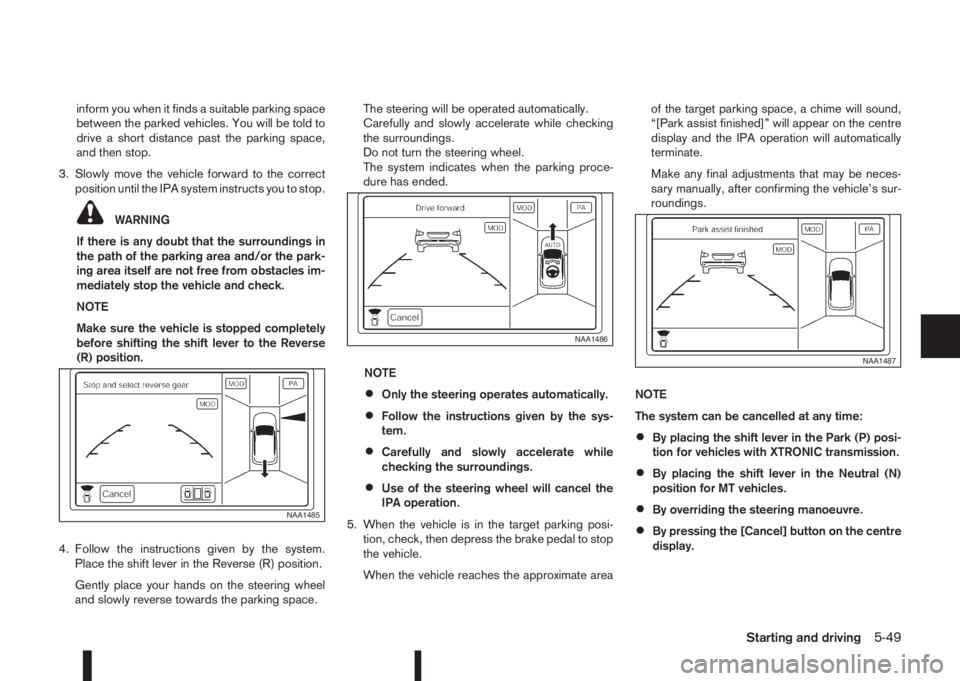
inform you when it finds a suitable parking space
between the parked vehicles. You will be told to
drive a short distance past the parking space,
and then stop.
3. Slowly move the vehicle forward to the correct
position until the IPA system instructs you to stop.
WARNING
If there is any doubt that the surroundings in
the path of the parking area and/or the park-
ing area itself are not free from obstacles im-
mediately stop the vehicle and check.
NOTE
Make sure the vehicle is stopped completely
before shifting the shift lever to the Reverse
(R) position.
4. Follow the instructions given by the system.
Place the shift lever in the Reverse (R) position.
Gently place your hands on the steering wheel
and slowly reverse towards the parking space.The steering will be operated automatically.
Carefully and slowly accelerate while checking
the surroundings.
Do not turn the steering wheel.
The system indicates when the parking proce-
dure has ended.
NOTE
•Only the steering operates automatically.
•Follow the instructions given by the sys-
tem.
•Carefully and slowly accelerate while
checking the surroundings.
•Use of the steering wheel will cancel the
IPA operation.
5. When the vehicle is in the target parking posi-
tion, check, then depress the brake pedal to stop
the vehicle.
When the vehicle reaches the approximate areaof the target parking space, a chime will sound,
“[Park assist finished]” will appear on the centre
display and the IPA operation will automatically
terminate.
Make any final adjustments that may be neces-
sary manually, after confirming the vehicle’s sur-
roundings.
NOTE
The system can be cancelled at any time:
•By placing the shift lever in the Park (P) posi-
tion for vehicles with XTRONIC transmission.
•By placing the shift lever in the Neutral (N)
position for MT vehicles.
•By overriding the steering manoeuvre.
•By pressing the [Cancel] button on the centre
display.
NAA1485
NAA1486
NAA1487
Starting and driving5-49
Page 227 of 338
![NISSAN QASHQAI 2016 Owner´s Manual Adjust the target parking rectanglej1 (blue) us-
ing the arrow keys on the screen so that the
clearance guidelines do not overlap any
obstacles around the vehicle.
CAUTION
After pressing [Start] the v](/img/5/40324/w960_40324-226.png "NISSAN QASHQAI 2016 Owner´s Manual Adjust the target parking rectanglej1 (blue) us-
ing the arrow keys on the screen so that the
clearance guidelines do not overlap any
obstacles around the vehicle.
CAUTION
After pressing [Start] the v")
Adjust the target parking rectanglej1 (blue) us-
ing the arrow keys on the screen so that the
clearance guidelines do not overlap any
obstacles around the vehicle.
CAUTION
After pressing [Start] the vehicle will park within
the blue area. Make sure this area is free of ob-
stacles.
5. Press [Start].
The vehicle starts the parking procedure. The
IPA operation can be started when the following
conditions are met:
•The vehicle is completely stopped.
•The steering wheel is in the straight-ahead
position.
•The shift lever is in the Drive (D) or a forward
shift position.
NOTE
If the vehicle deviates from the parking rect-
angle while following the parking procedure,
stop and adjust the position.
WARNING
If there is any doubt that the surroundings in the
path of the parking area and/or the parking area
itself are not free from obstacles immediately
stop the vehicle and check.6. Gently place hands on the steering wheel and
slowly move forward the vehicle to the correct
position indicated in green in preparation for re-
versing.
Bring the vehicle to a standstill
The steering wheel will operate itself towards the
reverse starting position rectangle (green).
Depress the brake and stop the vehicle when it
approaches another vehicle or object, or when
the vehicle reaches the reverse starting position.
7. Place the shift lever in the Reverse (R) position
Gently place hands on the steering wheel and
slowly back up to the parking space
Steering will be operated automatically.NOTE
•Only the steering operates automatically.
•Follow the instructions given by the sys-
tem.
•Carefully and slowly accelerate while
checking the surroundings.
•Use of the steering wheel will cancel the
IPA operation.
8. When the vehicle is in the target parking posi-
tion, check, then depress the brake pedal to stop
the vehicle.
When the vehicle reaches the approximate area
of the target parking space, a chime will sound,
“[Park assist finished]” will appear on the centre
display and the IPA operation will automatically
terminate.
Make any final adjustments that may be neces-
sary manually, after confirming the vehicle’s sur-
roundings.
NAA1490
NAA1491
Starting and driving5-51
Page 233 of 338
When leaving your vehicle unoccupied:
•Always remove the ignition key and take it with
you – even in your own garage.
•Always remove the ignition key or Intelligent Key
(where fitted) and take it with you – even in your
own garage.
•Close all windows completely and lock all doors.
•Always park your vehicle where it can be seen.
At night, park in a well lit area.
•If the vehicle is equipped with an alarm or immo-
bilization device, use it – even for short periods.
•Do not leave children and pets in the vehicle
unattended.
•Do not leave valuables on view to tempt a thief.
Always take your valuables with you. If you must
leave something in your vehicle, lock it in the lug-
gage compartment or hide it out of sight.
•Do not leave the vehicle documents in your ve-
hicle. In the unfortunate event of your vehicle
being stolen, the documents will only help a thief
to sell the vehicle.
•Do not leave articles on a roof rack as they are
particularly vulnerable. If possible, remove them
from the rack and lock them inside the vehicle.
•Do not leave the spare key in the vehicle – keep
it in a safe place at home.
•Do not leave the spare key or Intelligent Key in
the vehicle – keep it in a safe place at home.
•Do not leave a note of your vehicle’s key number
in the vehicle. A thief may break into the vehicle,
note the key number and return with a new key
and drive the vehicle.WARNING
•If the engine is not running or is turned off
while driving, the power assistance for the
steering will not work. The steering will be
harder to operate.
•When the electric power steering warning light
illuminates with the engine running, the power
assistance for the steering will cease opera-
tion. You will still have control of the vehicle
but the steering will be harder to operate.
The electric power steering system is designed to
provide power assistance while driving to allow you
to operate the steering wheel with light force.
The steering effort can be set to [Normal] or [Sport]
in the vehicle information display under the heading
[Driver assistance]. (See “[Driver assistance]” in the
“2. Instruments and controls” section.)
NOTE
When the steering wheel is operated repeatedly
or continuously while parking or driving at a very
low speed, the power assistance for the steering
wheel will be reduced. This is to prevent over-
heating of the electric power steering system and
protect it from becoming damaged. While the
power assistance is reduced, steering wheel op-
eration will become heavy. When the tempera-
ture of the electric power steering system de-
creases, the power assistance level will return to
normal. Avoid repeating such steering wheel op-
erations that could cause the electric power
steering system to overheat.
VEHICLE SECURITY ELECTRIC POWER STEERING
SYSTEM
Starting and driving5-57
Page 234 of 338
You may hear a sound when the steering wheel
is operated quickly. However, this is not a mal-
function.
If the electric power steering warning light
illu-
minates while the engine is running, it may indicate
the electric power steering system is not functioning
properly and may need servicing. Have the electric
power steering system checked by a NISSAN dealer
or qualified workshop. (See “ Power steering warn-
ing light” in the “2. Instruments and controls” sec-
tion.)
When the electric power steering warning light illu-
minates with the engine running, the power assis-
tance for the steering will cease operation. You will
still have control of the vehicle. However, greater
steering effort is needed, especially in sharp turns
and at low speeds.The brake system has two separate hydraulic cir-
cuits. If one circuit malfunctions, two wheels will still
have braking ability.BRAKE PRECAUTIONS
Vacuum assisted brake
The brake booster aids braking by using engine
vacuum or vacuum from an engine-driven pump. If
the engine stops or the drive belt is broken, you can
stop the vehicle by depressing the brake pedal.
However, greater foot pressure on the brake pedal
will be required to stop the vehicle and the stopping
distance will be longer.
Wet brakes
When the vehicle is washed or driven through wa-
ter, the brakes may get wet. As a result, your brak-
ing distance will be longer and the vehicle may pull
to one side during braking.
To dry brakes, drive the vehicle at a safe speed
while lightly pressing the brake pedal to heat up the
brakes. Do this until the brakes return to normal.
Avoid driving the vehicle at high speeds until the
brakes function correctly.
Using the brakes
Avoid resting your foot on the brake pedal while
driving. This will overheat the brakes, wear out the
brake linings and pads faster and reduce fuel
economy performance.
To help reduce brake wear and to prevent the brakes
from overheating, reduce speed and shift to a lower
gear before going down a slope or long downhillgradient. Overheated brakes may reduce braking
performance and could result in loss of vehicle con-
trol.
CAUTION
While driving on a slippery surface, be careful
when braking, accelerating or downshifting.
Abrupt braking actions or sudden acceleration
could cause the wheels to skid and result in an
accident.
Be aware that brakes will fade if repeated heavy
brake applications are made.
Driving uphill
When starting on a steep gradient, it is sometimes
difficult to operate the brake or both the brake and
clutch (MT models). Use the parking brake to hold
the vehicle. Do not slip the clutch (MT models).
When ready to start, make sure that the shift lever is
in an appropriate forward or reverse driving posi-
tion, slowly release the parking brake while depress-
ing the accelerator pedal and releasing the clutch
(MT models) or depressing the accelerator pedal
(XTRONIC transmission models). If your vehicle has
an electric parking brake, this will automatically re-
lease when you depress the accelerator pedal and
release the clutch (MT models) or depress the ac-
celerator pedal (XTRONIC transmission models).
BRAKE SYSTEM
5-58Starting and driving
Page 241 of 338
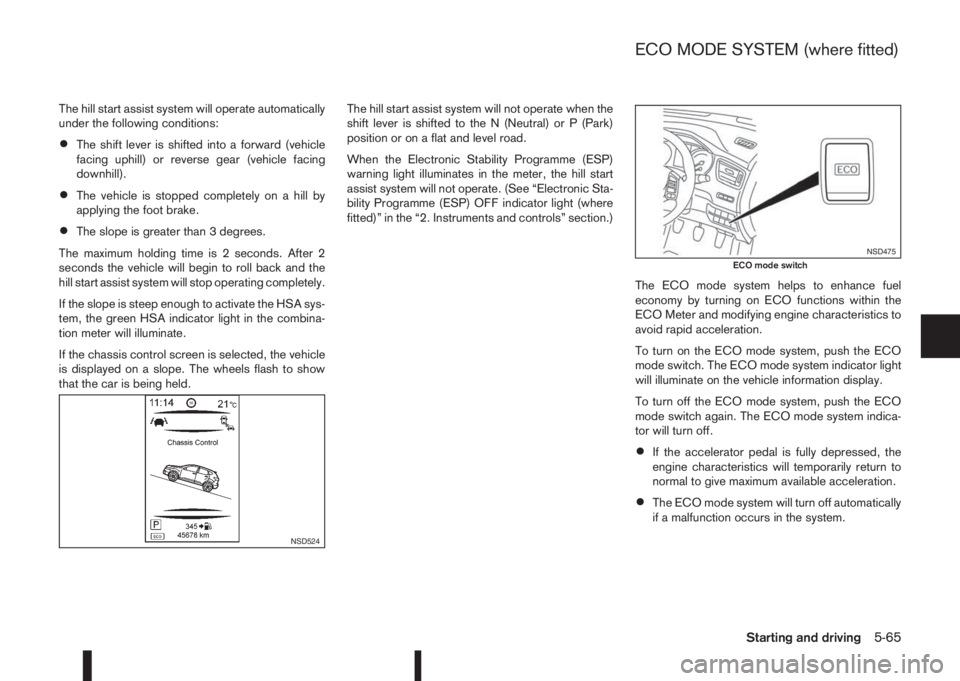
The hill start assist system will operate automatically
under the following conditions:
•The shift lever is shifted into a forward (vehicle
facing uphill) or reverse gear (vehicle facing
downhill).
•The vehicle is stopped completely on a hill by
applying the foot brake.
•The slope is greater than 3 degrees.
The maximum holding time is 2 seconds. After 2
seconds the vehicle will begin to roll back and the
hill start assist system will stop operating completely.
If the slope is steep enough to activate the HSA sys-
tem, the green HSA indicator light in the combina-
tion meter will illuminate.
If the chassis control screen is selected, the vehicle
is displayed on a slope. The wheels flash to show
that the car is being held.The hill start assist system will not operate when the
shift lever is shifted to the N (Neutral) or P (Park)
position or on a flat and level road.
When the Electronic Stability Programme (ESP)
warning light illuminates in the meter, the hill start
assist system will not operate. (See “Electronic Sta-
bility Programme (ESP) OFF indicator light (where
fitted)” in the “2. Instruments and controls” section.)
The ECO mode system helps to enhance fuel
economy by turning on ECO functions within the
ECO Meter and modifying engine characteristics to
avoid rapid acceleration.
To turn on the ECO mode system, push the ECO
mode switch. The ECO mode system indicator light
will illuminate on the vehicle information display.
To turn off the ECO mode system, push the ECO
mode switch again. The ECO mode system indica-
tor will turn off.
•If the accelerator pedal is fully depressed, the
engine characteristics will temporarily return to
normal to give maximum available acceleration.
•The ECO mode system will turn off automatically
if a malfunction occurs in the system.
NSD524
NSD475ECO mode switch
ECO MODE SYSTEM (where fitted)
Starting and driving5-65
Page 247 of 338
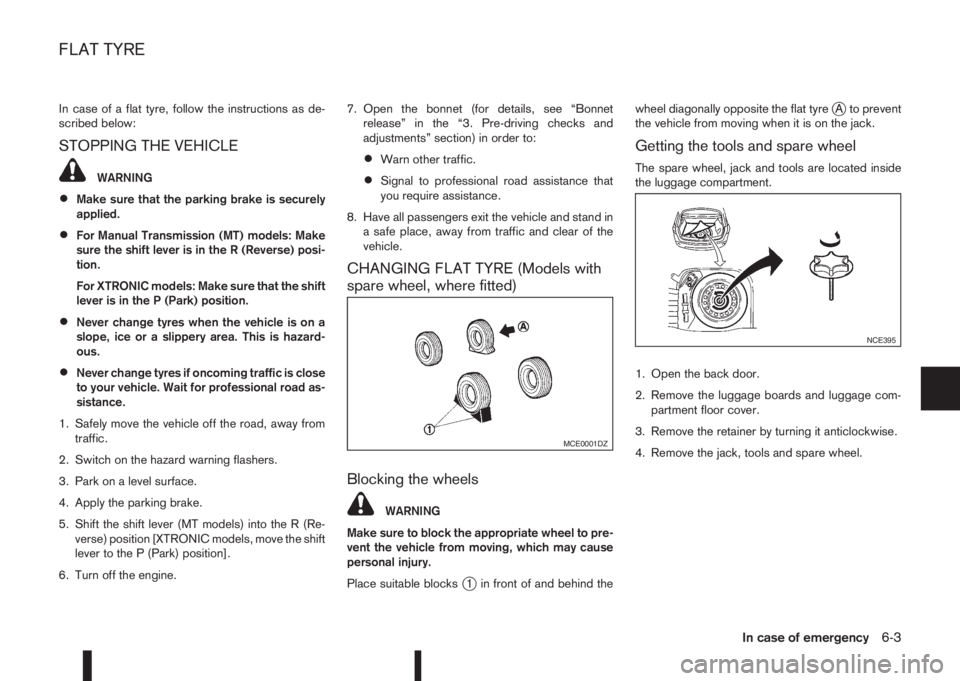
In case of a flat tyre, follow the instructions as de-
scribed below:
STOPPING THE VEHICLE
WARNING
•Make sure that the parking brake is securely
applied.
•For Manual Transmission (MT) models: Make
sure the shift lever is in the R (Reverse) posi-
tion.
For XTRONIC models: Make sure that the shift
lever is in the P (Park) position.
•Never change tyres when the vehicle is on a
slope, ice or a slippery area. This is hazard-
ous.
•Never change tyres if oncoming traffic is close
to your vehicle. Wait for professional road as-
sistance.
1. Safely move the vehicle off the road, away from
traffic.
2. Switch on the hazard warning flashers.
3. Park on a level surface.
4. Apply the parking brake.
5. Shift the shift lever (MT models) into the R (Re-
verse) position [XTRONIC models, move the shift
lever to the P (Park) position].
6. Turn off the engine.7. Open the bonnet (for details, see “Bonnet
release” in the “3. Pre-driving checks and
adjustments” section) in order to:
•Warn other traffic.
•Signal to professional road assistance that
you require assistance.
8. Have all passengers exit the vehicle and stand in
a safe place, away from traffic and clear of the
vehicle.
CHANGING FLAT TYRE (Models with
spare wheel, where fitted)
Blocking the wheels
WARNING
Make sure to block the appropriate wheel to pre-
vent the vehicle from moving, which may cause
personal injury.
Place suitable blocks
j1 in front of and behind thewheel diagonally opposite the flat tyre
jA to prevent
the vehicle from moving when it is on the jack.
Getting the tools and spare wheel
The spare wheel, jack and tools are located inside
the luggage compartment.
1. Open the back door.
2. Remove the luggage boards and luggage com-
partment floor cover.
3. Remove the retainer by turning it anticlockwise.
4. Remove the jack, tools and spare wheel.
MCE0001DZ
NCE395
FLAT TYRE
In case of emergency6-3
Page 262 of 338
In order to maintain the appearance of your vehicle,
it is important to take proper care of it.
Whenever possible, park your vehicle inside a ga-
rage or in a covered area to minimise the chances
of damaging the paint surface of your vehicle.
When it is necessary to park outside, park in a shady
area or protect the vehicle with a body cover.Be
careful not to scratch the paint surface when put-
ting on or removing the body cover.
WASHING
In the following instances, wash your vehicle as soon
as possible to protect the paint surface:
•After a rainfall, to prevent possible damage from
acid rain.
•After driving on coastal roads.
•When contaminants such as soot, bird drop-
pings, tree sap, metal particles or insects get on
the paint surface.
•When dust or mud builds up on the paint sur-
face.
1. Wash the vehicle surface with a wet sponge and
plenty of water.
2. Clean the vehicle surface gently and thoroughly
using a mild soap or a special vehicle wash sham-
poo mixed with clean, lukewarm (never hot) wa-
ter.CAUTION
•Do not wash the vehicle with strong house-
hold soap, strong chemical detergents, petrol
or solvents.
•Do not wash the vehicle in direct sunlight or
while the vehicle body is hot, as the paint sur-
face may become water-spotted.
•Avoid using tight-napped or rough cloths,
such as washing mitts. Care must be taken
when removing caked-on dirt or other foreign
substances so the paint surface is not
scratched or damaged.
3. Rinse the vehicle thoroughly with plenty of clean
water.
4. Use a damp chamois to dry the paint surface to
avoid leaving water spots.
When washing the vehicle, take care of the follow-
ing:
•Inside flanges, joints and folds on the doors, back
door and bonnet are particularly vulnerable to
the effects of road salt. Therefore, these areas
must be cleaned regularly.
•Be sure that the drain holes in the lower edge of
the doors are not clogged.
•Spray water to the underbody and in the wheel
wells to loosen the dirt and/or wash away road
salt.
•If using a high pressure washer always follow
the recommendations on the equipment (pres-
sure and spraying distance).
CAUTION
Do not spray directly into the engine compart-
ment with a high-pressure washer/hose this
could damage the engine.
•If there are damaged areas on the vehicle (e.g.
painted bumpers or headlamp assembly), it is
not recommended to direct the high pressure jet
on to them. Carefully wash these areas by hand.
•Avoid the entry of water into the locks.
REMOVING SPOTS
Remove tar and oil spots, industrial dust, insects,
and tree sap as quickly as possible from the paint
surface to avoid lasting damage or staining. Special
cleaning products are available at a NISSAN dealer
or any automotive accessory store.
WAXING
Regular waxing protects the paint surface and helps
to retain a new vehicle appearance.
After waxing, polishing is recommended to remove
built-up residue.
A NISSAN dealer or qualified workshop can assist
you in choosing the appropriate waxing products.
CAUTION
•Wash your vehicle thoroughly and completely
before applying wax to the paint surface.
CLEANING EXTERIOR
7-2Appearance and care
Page 325 of 338
– Starting the engine .......................................................... 3-8
Intelligent Parking Assist (IPA) ............................................. 5-46
Interior lights .............................................................. 2-50, 8-29
iPod® player operation ........................................................ 4-31
ISOFIX ................................................................................ 1-19
ISOFIX child restraint system .............................................. 1-21
J
Jump-starting .............................................................. 6-11, 8-18
K
Key ....................................................................................... 3-2
– Immobilizer ...................................................................... 3-2
– Integrated keyfob (remote control system) ....................... 3-4
– Intelligent Key battery discharge .................................... 5-14
– Intelligent Key operating range ......................................... 3-6
– Intelligent Key system ............................................. 3-6, 5-12
– Key positions (Ignition switch) ........................................ 5-11
– NISSAN Anti-Theft System (NATS) ................................. 3-2
– NISSAN Anti-Theft System (NATS) key ........................... 3-2
– Radio approval number and information ........................... 9-8
– Remote keyless entry system ........................................... 3-4
– Using Intelligent Key system ............................................ 3-6
L
Lane Departure Warning (LDW) .......................................... 5-33
– LDW system operation .................................................. 5-34
Legal requirements .............................................................. 1-15
Light
– Exterior lights ................................................................. 8-29
– Fog light switch ............................................................. 2-38– Hazard warning flasher switch ......................................... 6-2
– Headlight aiming control switch ..................................... 2-39
– Headlight and turn signal switch .................................... 2-36
– Headlight cleaner .......................................................... 2-40
– Headlight switch ............................................................ 2-36
– Headlights ..................................................................... 8-28
– Interior lights ........................................................ 2-50, 8-29
– LED headlight ................................................................ 8-28
– Light locations ............................................................... 8-30
– Luggage compartment ................................................... 2-51
– Map lights ..................................................................... 2-50
– Rear room/reading light ................................................. 2-51
– Trailer direction indicator light ........................................ 5-56
– Turn signal switch .......................................................... 2-38
– Warning/indicator lights and audible reminders ................ 2-4
Lock
– Anti-Lock Braking System (ABS) ................................... 5-59
– Back door lock .............................................................. 3-11
– Child safety rear door locks ........................................... 3-11
– Door locks ....................................................................... 3-8
– Power door lock switch ................................................. 3-10
– Steering lock ........................................................ 5-11, 5-14
– Super Lock system .......................................................... 3-8
– Unlocking with inside door handle .................................. 3-10
Luggage compartment
– Luggage floor ................................................................ 2-47
M
Maintenance
– Camera unit maintenance .............................................. 5-33
– General maintenance ....................................................... 8-2
– Maintenance precautions ................................................. 8-4
– Maintenance requirements ............................................... 8-2
– Multi-sensing camera unit .............................................. 5-35
Manual transmission
– Driving with manual transmission ................................... 5-17
Index10-5