manual radio set NISSAN QASHQAI 2016 Owner´s Manual
[x] Cancel search | Manufacturer: NISSAN, Model Year: 2016, Model line: QASHQAI, Model: NISSAN QASHQAI 2016Pages: 338, PDF Size: 4.87 MB
Page 12 of 338
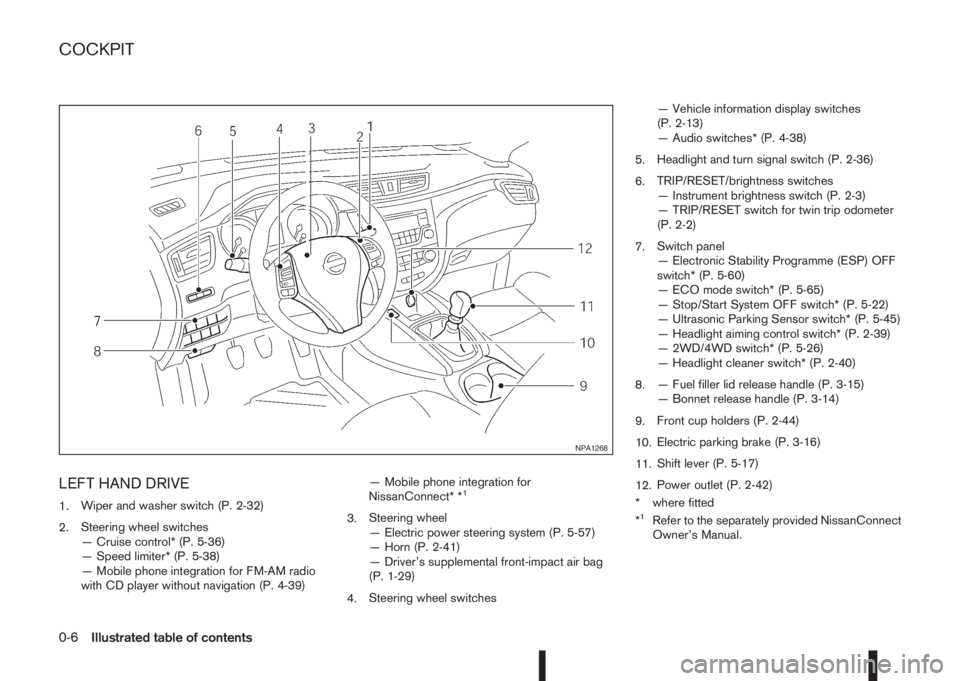
LEFT HAND DRIVE
1.Wiper and washer switch (P. 2-32)
2.Steering wheel switches
— Cruise control* (P. 5-36)
— Speed limiter* (P. 5-38)
— Mobile phone integration for FM-AM radio
with CD player without navigation (P. 4-39)— Mobile phone integration for
NissanConnect* *1
3.Steering wheel
— Electric power steering system (P. 5-57)
— Horn (P. 2-41)
— Driver’s supplemental front-impact air bag
(P. 1-29)
4.Steering wheel switches— Vehicle information display switches
(P. 2-13)
— Audio switches* (P. 4-38)
5.Headlight and turn signal switch (P. 2-36)
6.TRIP/RESET/brightness switches
— Instrument brightness switch (P. 2-3)
— TRIP/RESET switch for twin trip odometer
(P. 2-2)
7.Switch panel
— Electronic Stability Programme (ESP) OFF
switch* (P. 5-60)
— ECO mode switch* (P. 5-65)
— Stop/Start System OFF switch* (P. 5-22)
— Ultrasonic Parking Sensor switch* (P. 5-45)
— Headlight aiming control switch* (P. 2-39)
— 2WD/4WD switch* (P. 5-26)
— Headlight cleaner switch* (P. 2-40)
8.— Fuel filler lid release handle (P. 3-15)
— Bonnet release handle (P. 3-14)
9.Front cup holders (P. 2-44)
10.Electric parking brake (P. 3-16)
11.Shift lever (P. 5-17)
12.Power outlet (P. 2-42)
* where fitted
*1Refer to the separately provided NissanConnect
Owner’s Manual.
NPA1268
COCKPIT
0-6Illustrated table of contents
Page 13 of 338
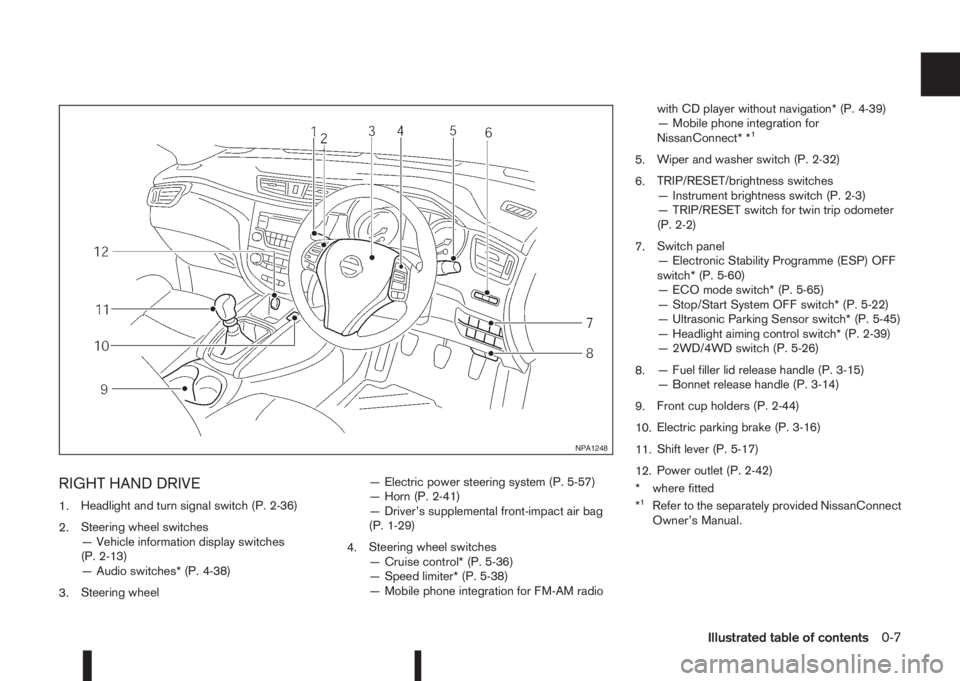
RIGHT HAND DRIVE
1.Headlight and turn signal switch (P. 2-36)
2.Steering wheel switches
— Vehicle information display switches
(P. 2-13)
— Audio switches* (P. 4-38)
3.Steering wheel— Electric power steering system (P. 5-57)
— Horn (P. 2-41)
— Driver’s supplemental front-impact air bag
(P. 1-29)
4.Steering wheel switches
— Cruise control* (P. 5-36)
— Speed limiter* (P. 5-38)
— Mobile phone integration for FM-AM radiowith CD player without navigation* (P. 4-39)
— Mobile phone integration for
NissanConnect* *
1
5.Wiper and washer switch (P. 2-32)
6.TRIP/RESET/brightness switches
— Instrument brightness switch (P. 2-3)
— TRIP/RESET switch for twin trip odometer
(P. 2-2)
7.Switch panel
— Electronic Stability Programme (ESP) OFF
switch* (P. 5-60)
— ECO mode switch* (P. 5-65)
— Stop/Start System OFF switch* (P. 5-22)
— Ultrasonic Parking Sensor switch* (P. 5-45)
— Headlight aiming control switch* (P. 2-39)
— 2WD/4WD switch (P. 5-26)
8.— Fuel filler lid release handle (P. 3-15)
— Bonnet release handle (P. 3-14)
9.Front cup holders (P. 2-44)
10.Electric parking brake (P. 3-16)
11.Shift lever (P. 5-17)
12.Power outlet (P. 2-42)
* where fitted
*
1Refer to the separately provided NissanConnect
Owner’s Manual.
NPA1248
Illustrated table of contents0-7
Page 86 of 338
![NISSAN QASHQAI 2016 Owner´s Manual 1. [Fuel economy] (l (litre)/100 km,
km/l(litre) or MPG)
Current fuel consumption:
The current fuel consumption mode shows the cur-
rent fuel consumption.
Average fuel consumption:
The average fuel co](/img/5/40324/w960_40324-85.png "NISSAN QASHQAI 2016 Owner´s Manual 1. [Fuel economy] (l (litre)/100 km,
km/l(litre) or MPG)
Current fuel consumption:
The current fuel consumption mode shows the cur-
rent fuel consumption.
Average fuel consumption:
The average fuel co")
1. [Fuel economy] (l (litre)/100 km,
km/l(litre) or MPG)
Current fuel consumption:
The current fuel consumption mode shows the cur-
rent fuel consumption.
Average fuel consumption:
The average fuel consumption mode shows the av-
erage fuel consumption since the last reset. Push
the ENTER switch for longer than 1 second to enter
the Reset menu.
The display is updated every 30 seconds. For about
the first 500 m (1/3 mile) after a reset, the display
shows “——”.
Push ENTER briefly to show the second Fuel
Economy page.
2. [Speed] and [Average speed] (km/h
or MPH)
The (digital) speed shows the current speed at
which the vehicle is travelling.
The average speed mode shows the average ve-
hicle speed since the last reset. Push the ENTER
switch for longer than 1 second to enter the Reset
menu.
The display is updated every 30 seconds. The first
30 seconds after a reset, the display shows “——”.
3. [Range] (dte — km or mile)
The distance to empty (dte) mode provides you with
an estimation of the distance that can be driven
before refuelling. The dte is constantly being calcu-
lated, based on the amount of fuel in the fuel tank
and the actual fuel consumption.
The display is updated every 30 seconds.
The dte mode includes a low range warning feature.
If the fuel level is low, the warning is displayed on
the screen.
When the fuel level drops even lower, the dte dis-
play will change to “——”.
•If the amount of fuel added is small, the display
just before the ignition switch is placed in the
“OFF” position may continue to be displayed.
•When driving uphill or rounding curves, the fuel
in the tank shifts, which may momentarily change
the display.
4. Elapsed [time] and [trip distance] (km
or mile)
Elapsed [time]:
The elapsed time mode shows the time since the
last reset. Push the ENTER switch for longer than 1
second to enter the Reset menu. (The trip odometer
is also reset at the same time.)[Trip distance]:
The trip odometer mode shows the total distance
the vehicle has been driven since the last reset.
Push the ENTER switch for longer than 1 second to
enter the Reset menu. (The elapsed time is also
reset at the same time.)
5. Navigation (where fitted)
When the route guidance is set in the navigation
system, this item shows the navigation route infor-
mation.
For more details, see the separately provided Nis-
sanConnect Owner’s manual.
6. Audio
The audio mode shows the status of audio informa-
tion.
For more details, see “FM AM radio with CD player
(where fitted)” in the “4. Display screen, heater and
air conditioner, and audio system” section or the
separately provided NissanConnect Owner’s
manual.
7. [Driving aids] (where fitted)
The driving aids mode shows the operating condi-
tion for the following systems.
•Lane Departure Warning (LDW)
•Blind Spot Warning (BSW)
•Forward Emergency Braking
Push ENTER to access the driving aids setting
menu.
2-28Instruments and controls
Page 131 of 338
4Display screen, heater and air conditioner,
and audio systemDisplay screen, heater and air conditioner,
and audio system
Safety precautions ................................................... 4-2
Rear-view monitor (where fitted)............................... 4-2
How to read the displayed lines .......................... 4-3
Rear-view monitor setting.................................... 4-3
Operating tips..................................................... 4-3
Around View Monitor (where fitted) .......................... 4-4
Operation ........................................................... 4-7
Guide lines ......................................................... 4-7
Difference between predictive and actual
distances ............................................................ 4-9
Moving object detection (MOD) .......................... 4-12
How to adjust the screen view ............................ 4-13
Around View Monitor settings ............................. 4-13
Operating tips..................................................... 4-13
Vents ....................................................................... 4-14
Side and centre vents ......................................... 4-14
Heater and air conditioner operation ........................ 4-15
Manual air conditioner......................................... 4-16
Automatic dual zone air conditioner (where
fitted).................................................................. 4-20
Audio system ........................................................... 4-23Audio operation precautions ............................... 4-23
Antenna .............................................................. 4-23
FM AM radio with CD player (where fitted) .............. 4-24
Audio main operation .......................................... 4-25
Radio operation .................................................. 4-25
SETUP button .................................................... 4-26
Compact Disc (CD) operation ............................ 4-28
AUX socket ........................................................ 4-30
USB Memory operation (where fitted) ................. 4-30
iPod® player operation (where fitted) .................. 4-31
Bluetooth® operation.......................................... 4-32
NissanConnect (where fitted)................................... 4-38
Steering wheel switch for audio control (where
fitted) ....................................................................... 4-38
Main operation .................................................... 4-38
Mobile phone integration for FM AM radio with
CD player (where fitted)........................................... 4-39
Bluetooth® mobile phone feature ........................ 4-39
Hands-free telephone control .............................. 4-42
Steering wheel switches (where fitted)................ 4-44
Car phone or CB radio ............................................ 4-45
Page 155 of 338
AUDIO MAIN OPERATION
The audio unit operates when the ignition switch is
in Acc or ON position.
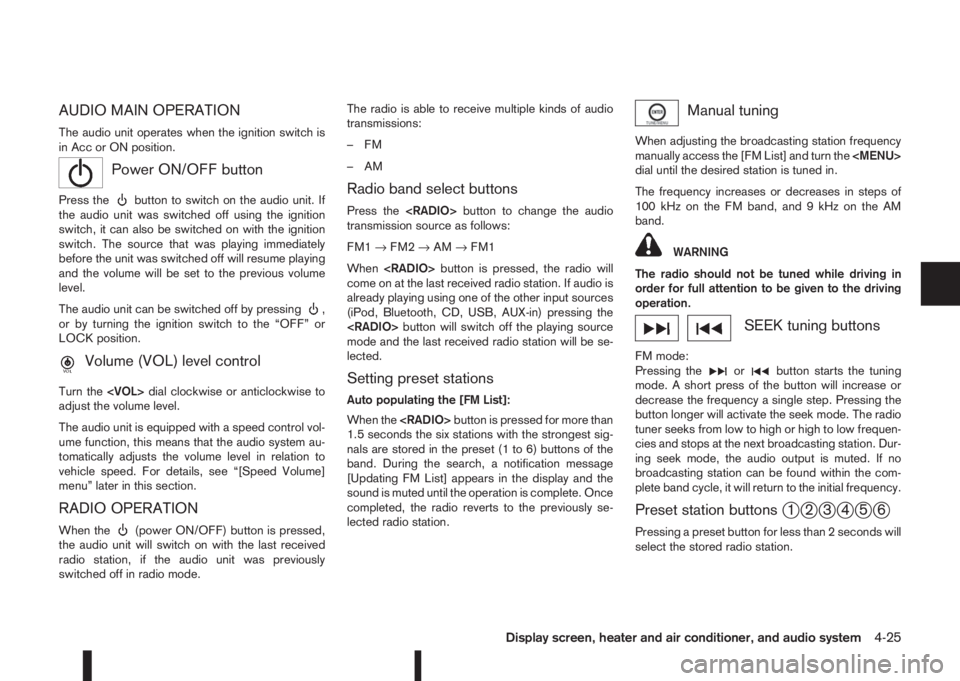
mPower ON/OFF button
Press thebutton to switch on the audio unit. If
the audio unit was switched off using the ignition
switch, it can also be switched on with the ignition
switch. The source that was playing immediately
before the unit was switched off will resume playing
and the volume will be set to the previous volume
level.
The audio unit can be switched off by pressing
,
or by turning the ignition switch to the “OFF” or
LOCK position.
mVolume (VOL) level control
Turn the
adjust the volume level.
The audio unit is equipped with a speed control vol-
ume function, this means that the audio system au-
tomatically adjusts the volume level in relation to
vehicle speed. For details, see “[Speed Volume]
menu” later in this section.
RADIO OPERATION
When the(power ON/OFF) button is pressed,
the audio unit will switch on with the last received
radio station, if the audio unit was previously
switched off in radio mode.The radio is able to receive multiple kinds of audio
transmissions:
–FM
–AM
Radio band select buttons
Press the
transmission source as follows:
FM1→FM2→AM→FM1
When
come on at the last received radio station. If audio is
already playing using one of the other input sources
(iPod, Bluetooth, CD, USB, AUX-in) pressing the
mode and the last received radio station will be se-
lected.
Setting preset stations
Auto populating the [FM List]:
When the
1.5 seconds the six stations with the strongest sig-
nals are stored in the preset (1 to 6) buttons of the
band. During the search, a notification message
[Updating FM List] appears in the display and the
sound is muted until the operation is complete. Once
completed, the radio reverts to the previously se-
lected radio station.
Manual tuning
When adjusting the broadcasting station frequency
manually access the [FM List] and turn the
Page 156 of 338
![NISSAN QASHQAI 2016 Owner´s Manual Pressing a preset button for more than 2 seconds
while in the [FM list] or radio main screen will cause
the station currently being received to be stored
against that preset button.
•Twelve stations](/img/5/40324/w960_40324-155.png "NISSAN QASHQAI 2016 Owner´s Manual Pressing a preset button for more than 2 seconds
while in the [FM list] or radio main screen will cause
the station currently being received to be stored
against that preset button.
•Twelve stations")
Pressing a preset button for more than 2 seconds
while in the [FM list] or radio main screen will cause
the station currently being received to be stored
against that preset button.
•Twelve stations (if available) can be stored in the
FM bands. (Six each for FM1 and FM2)
•Six stations (if available) can be set for the AM
band.
If the battery is disconnected, or if the fuse blows,
the radio memory will be erased. In that case, reset
the desired stations after battery connection or fuse
replacement.
Radio Data System (RDS) operation
(where fitted)
The RDS is a system through which encoded digital
information is transmitted by FM radio stations in
addition to the normal FM radio broadcasting. The
RDS provides information services such as station
name, traffic information, or news.
NOTE
•In some countries or regions, some of these
services may not be available.
Alternative Frequency (AF) mode:
The AF mode operates in the FM (radio) mode.
•The AF mode operates in the FM (radio), AUX or
CD mode (if FM was previously selected in the
radio mode).
•The AF function compares signal strengths and
selects the station with the optimum reception
conditions for the currently tuned-in station.
RDS functions
Programme Service (PS) function (station name
display function):
– FM:
When an RDS station is tuned in with seek or
manual tuning, the RDS data is received and the
PS name is displayed.
TA Traffic announcement
This function operates in FM (Radio) mode. This
function will still operate in the background if any
media source is selected (CD, USB or MEDIA
mode).
•Pressing the
The TA indicator is displayed while TA mode is
on.
•When
switched off and the TA indicator will disappear
from the display.
Traffic announcement interrupt function:
When a traffic announcement is received, the an-
nouncement is tuned in and the display shows a
notification message with the radio station name e.g.
[TA: Radio 1].
Once the traffic announcement has finished, the unit
returns to the source that was active before the traf-
fic announcement started.If
the traffic announcement interrupt mode is can-
celled. The TA mode returns to the standby mode
and the audio unit returns to the previous source.
SETUP BUTTON
To configure [Audio], [Clock], [Radio], and [Lan-
guage] settings, perform the following procedure:
1. Press the
2. Turn the
Page 168 of 338
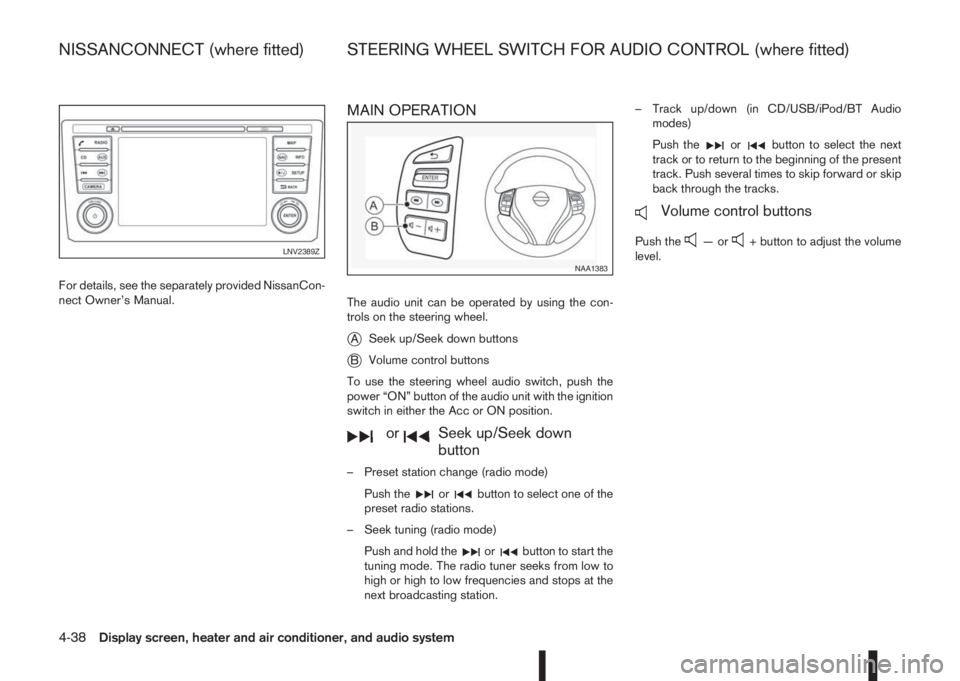
For details, see the separately provided NissanCon-
nect Owner’s Manual.
MAIN OPERATION
The audio unit can be operated by using the con-
trols on the steering wheel.
jASeek up/Seek down buttons
jBVolume control buttons
To use the steering wheel audio switch, push the
power “ON” button of the audio unit with the ignition
switch in either the Acc or ON position.
mormSeek up/Seek down
button
– Preset station change (radio mode)
Push the
orbutton to select one of the
preset radio stations.
– Seek tuning (radio mode)
Push and hold the
orbutton to start the
tuning mode. The radio tuner seeks from low to
high or high to low frequencies and stops at the
next broadcasting station.– Track up/down (in CD/USB/iPod/BT Audio
modes)
Push the
orbutton to select the next
track or to return to the beginning of the present
track. Push several times to skip forward or skip
back through the tracks.
mVolume control buttons
Push the—or+ button to adjust the volume
level.LNV2389Z
NAA1383
NISSANCONNECT (where fitted) STEERING WHEEL SWITCH FOR AUDIO CONTROL (where fitted)
4-38Display screen, heater and air conditioner, and audio system
Page 170 of 338
In order to use your mobile phone with the Blue-
tooth®of the audio system, the mobile phone must
first be setup. For details, see “BLUETOOTH®
settings” later in this section. Once it has been
setup, the hands-free mode is automatically acti-
vated on the registered mobile phone (via Blue-
tooth
®) when it comes into range.
A notification message appears on the audio display
when the phone is connected, when an incoming
call is being received, as well as when a call is initi-
ated.
When a call is active, the audio system, microphone
(located in the ceiling in front of the rear view mir-
ror), and steering wheel switches enable hands-free
communication.
If the audio system is in use at the time, the radio,
CD, iPod, USB audio, Bluetooth audio or AUX
source mode will be muted and will stay muted until
the active call has ended.
The Bluetooth
®system may not be able to connect
with your mobile phone for the following reasons:
•The mobile phone is too far away from the ve-
hicle.
•The Bluetooth®mode on your mobile phone has
not been activated.
•Your mobile phone has not been paired with the
Bluetooth®system of the audio unit.
•The mobile phone does not support Bluetooth®
technology (BT Core v2.0).NOTE
•For models with NissanConnect (Audio with
Navigation system) see the separately pro-
vided Owner’s Manual.
•For details, see your mobile phone’s Owner’s
Manual.
•For assistance with your mobile phone inte-
gration, please visit your local NISSAN dealer.
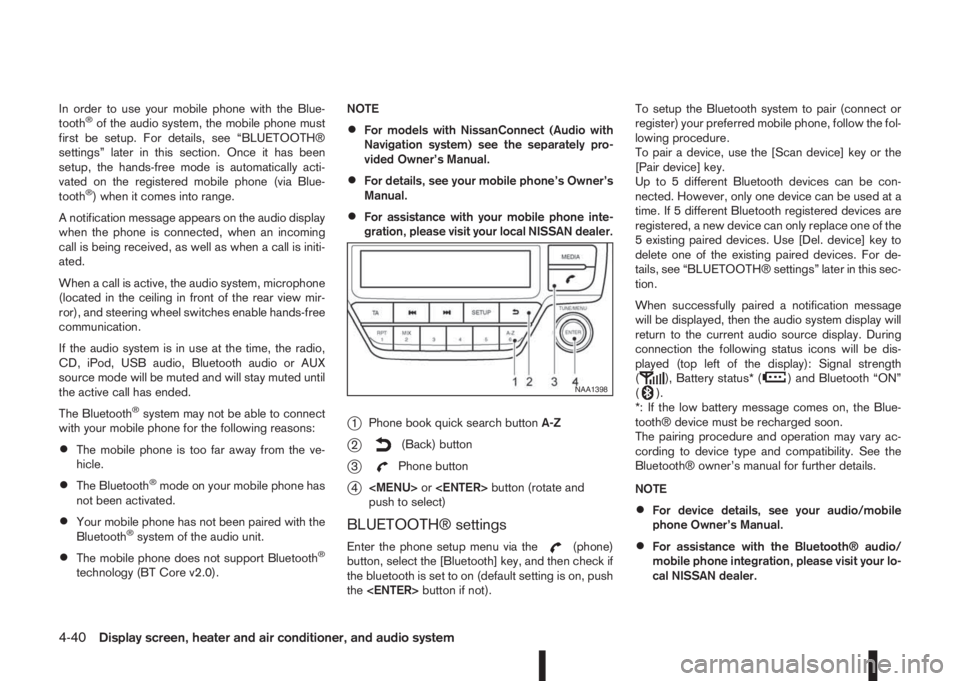
j1Phone book quick search buttonA-Z
j2(Back) button
j3Phone button
j4
Page 285 of 338
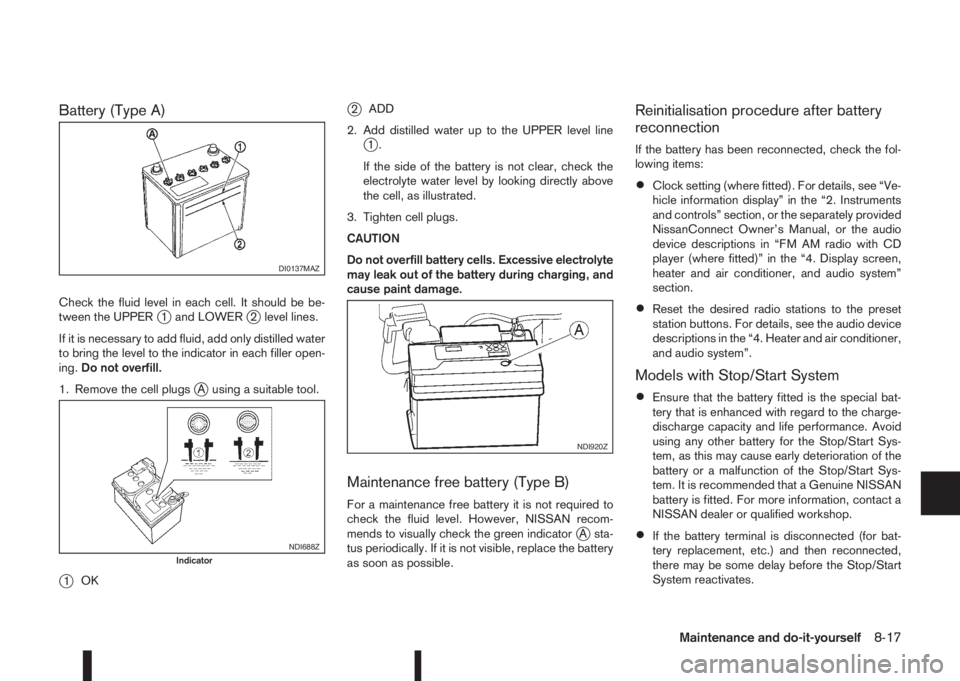
Battery (Type A)
Check the fluid level in each cell. It should be be-
tween the UPPERj1 and LOWERj2 level lines.
If it is necessary to add fluid, add only distilled water
to bring the level to the indicator in each filler open-
ing.Do not overfill.
1. Remove the cell plugs
jA using a suitable tool.
j1OK
j2ADD
2. Add distilled water up to the UPPER level line
j1.
If the side of the battery is not clear, check the
electrolyte water level by looking directly above
the cell, as illustrated.
3. Tighten cell plugs.
CAUTION
Do not overfill battery cells. Excessive electrolyte
may leak out of the battery during charging, and
cause paint damage.
Maintenance free battery (Type B)
For a maintenance free battery it is not required to
check the fluid level. However, NISSAN recom-
mends to visually check the green indicator
jA sta-
tus periodically. If it is not visible, replace the battery
as soon as possible.
Reinitialisation procedure after battery
reconnection
If the battery has been reconnected, check the fol-
lowing items:
•Clock setting (where fitted). For details, see “Ve-
hicle information display” in the “2. Instruments
and controls” section, or the separately provided
NissanConnect Owner’s Manual, or the audio
device descriptions in “FM AM radio with CD
player (where fitted)” in the “4. Display screen,
heater and air conditioner, and audio system”
section.
•Reset the desired radio stations to the preset
station buttons. For details, see the audio device
descriptions in the “4. Heater and air conditioner,
and audio system”.
Models with Stop/Start System
•Ensure that the battery fitted is the special bat-
tery that is enhanced with regard to the charge-
discharge capacity and life performance. Avoid
using any other battery for the Stop/Start Sys-
tem, as this may cause early deterioration of the
battery or a malfunction of the Stop/Start Sys-
tem. It is recommended that a Genuine NISSAN
battery is fitted. For more information, contact a
NISSAN dealer or qualified workshop.
•If the battery terminal is disconnected (for bat-
tery replacement, etc.) and then reconnected,
there may be some delay before the Stop/Start
System reactivates.
DI0137MAZ
NDI688ZIndicator
NDI920Z
Maintenance and do-it-yourself8-17
Page 321 of 338
10IndexIndex
A
Active engine brake ............................................................. 5-63
Active ride control ............................................................... 5-64
Active trace control ............................................................. 5-62
Air cleaner filter ................................................................... 8-23
Air conditioner
– Air conditioner filter .............................................. 4-19, 4-22
– Air conditioner specification label ..................................... 9-8
– Automatic air conditioner ............................................... 4-20
– Heater and air conditioner .............................................. 4-15
– Manual air conditioner ................................................... 4-16
– Servicing air conditioner ....................................... 4-19, 4-22
Air duct removal .................................................................. 8-21
Alarm system ...................................................................... 3-12
Antenna .............................................................................. 4-23
Anti-hijack – unlock mode ...................................................... 3-5
Anti-Lock Braking System (ABS) ......................................... 5-59
Anti-Theft System (NISSAN) ................................................ 3-13
Approval numbers ................................................................. 9-8
Armrest ................................................................................. 1-5
Around View Monitor ............................................................. 4-4
– Around View Monitor settings ........................................ 4-13
– Moving object detection (MOD) ..................................... 4-12
– Operating tips ............................................................... 4-13
Around view monitor operation .............................................. 4-7
Audible reminders, warning/indicator lights ............................ 2-4
Audio
– Audio operation precautions .......................................... 4-23
– Audio system ................................................................. 4-23
– AUX socket ................................................................... 4-30– Bluetooth® audio streaming main operation ................... 4-34
– FM AM radio with CD player ......................................... 4-24
– iPod® player operation .................................................. 4-31
– NissanConnect .............................................................. 4-38
– Steering-wheel switch for audio control ......................... 4-38
– USB Memory operation ................................................. 4-30
B
Battery ....................................................................... 5-66, 8-16
– Caution label ................................................................. 8-16
– Integrated keyfob battery replacement ........................... 8-18
– Intelligent Key battery discharge .................................... 5-14
– Intelligent Key battery replacement ................................. 8-18
– Vehicle battery ............................................................... 8-16
Before starting the engine ..................................................... 5-2
Blind Spot Warning (BSW)
– BSW driving situations .................................................. 5-32
– BSW system operation .................................................. 5-30
Blind Spot Warning (BSW) system ..................................... 5-30
Bluetooth® .......................................................................... 4-39
– Bluetooth® mobile phone feature .................................. 4-39
– Bluetooth® operation .................................................... 4-32
– Bluetooth® settings ....................................................... 4-32
Bonnet release .................................................................... 3-14
Boot .................................................................................... 2-47
Brake .................................................................................. 8-13
– Brake booster ............................................................... 8-14
– Brake fluid ..................................................................... 8-14
– Brake precautions ......................................................... 5-58
– Brake system ................................................................ 5-58