battery NISSAN ROGUE 2021 Owner´s Manual
[x] Cancel search | Manufacturer: NISSAN, Model Year: 2021, Model line: ROGUE, Model: NISSAN ROGUE 2021Pages: 556, PDF Size: 2.7 MB
Page 191 of 556
HOW TO USE REMOTE KEYLESS
ENTRY FUNCTION
WARNING
.Radio waves could adversely af-
fect electric medical equipment.
Those who use a pacemaker
should contact the electric med-
ical equipment manufacturer for
the possible influences before
use.
. The Intelligent Key transmits
radio waves when the buttons
are pushed. The FAA advises that
the radio waves may affect air-
craft navigation and communica-
tion systems. Do not operate the
Intelligent Key while on an air-
plane. Make sure the buttons are
not operated unintentionally
when the unit is stored during a
flight.
CAUTION
.Do not allow the Intelligent Key,
which contains electrical compo-
nents, to come into contact with
water or salt water. This could affect the system function.
. Do not drop the Intelligent Key.
. Do not strike the Intelligent Key
sharply against another object.
. Do not change or modify the
Intelligent Key.
. Wetting may damage the Intelli-
gent Key. If the Intelligent Key
gets wet, immediately wipe until
it is completely dry.
. If the outside temperature is be-
low 14°F (-10°C) degrees, the bat-
tery of the Intelligent Key may not
function properly.
. Do not place the Intelligent Key
for an extended period in an area
where temperatures exceed
140°F (60°C).
. Do not attach the Intelligent Key
with a key holder that contains a
magnet.
. Do not place the Intelligent Key
near equipment that produces a
magnetic field, such as a TV,
audio equipment, personal com-
puters, cellular phone or wireless
charger.
The remote keyless entry function can
operate all door locks using the remote keyless entry function of the Intelligent
Key. The remote keyless entry function
can operate at a distance of approxi-
mately 33 ft (10 m) from the vehicle. (The
operating distance depends upon the
conditions around the vehicle.)
The remote keyless entry function will not
operate:
.
When the Intelligent Key is not within
the operational range.
. When the Intelligent Key battery is
discharged.
The remote keyless entry function can
also operate the vehicle alarm.
Pre-driving checks and adjustments3-15
Page 193 of 556
.Opening any door (including the lift-
gate).
. Pushing the ignition switch.
During this 1-minute time period, if the
UNLOCK
button is pushed, all doors
will be locked automatically after another
1 minute.
NOTE:
The unlocking operation can be chan-
ged in selective unlock in the Vehicle
Settings of the vehicle information dis-
play. For additional information, see
“Vehicle Settings” (P.2-27).
Opening/closing liftgate (if so
equipped)
1. Push the power liftgate buttonfor more than 1 second.
2. The liftgate will automatically open.
The outside chime sounds 3 times for
approximately 3 seconds.
To close the liftgate, push the power
liftgate button
for more than 1
second.
The liftgate will automatically close.
If the button
is pushed while the
liftgate is being opened or closed, the
liftgate will immediately stop. Pushing the
button
again will reverse the direc-
tion of the liftgate. However, when the
liftgate is near the fully open position, it moves in the closing direction and when
the liftgate is near the fully close position,
it moves in the opening direction.
Using panic alarm
If you are near your vehicle and feel
threatened, you may activate the alarm
to call attention as follows:
1. Push the PANIC
buttonon the
Intelligent Key for more than 0.5
seconds.
2. The theft warning alarm and head- lights will stay on for 25 seconds.
3. The panic alarm stops when:
.It has run for 25 seconds, or.Any of the buttons on the Intelligent Key is pushed.
Remote engine start (if so
equipped)
The remote engine startbuttonis
on the Intelligent Key if the vehicle has
remote engine start function. This func-
tion allows the engine to start from
outside the vehicle. See “Remote engine
start” (P.3-19).
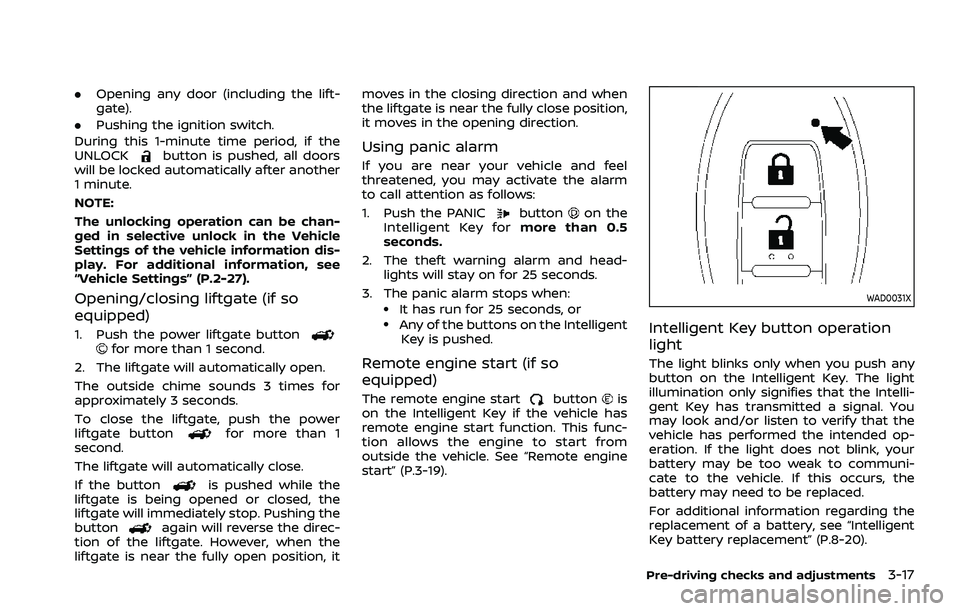
WAD0031X
Intelligent Key button operation
light
The light blinks only when you push any
button on the Intelligent Key. The light
illumination only signifies that the Intelli-
gent Key has transmitted a signal. You
may look and/or listen to verify that the
vehicle has performed the intended op-
eration. If the light does not blink, your
battery may be too weak to communi-
cate to the vehicle. If this occurs, the
battery may need to be replaced.
For additional information regarding the
replacement of a battery, see “Intelligent
Key battery replacement” (P.8-20).
Pre-driving checks and adjustments3-17
Page 196 of 556
3-20Pre-driving checks and adjustments
Other conditions may affect the remote
engine start function. See “Conditions the
remote engine start will not work” (P.3-21).
Other conditions can affect the perfor-
mance of the Intelligent Key transmitter.
See “Intelligent Key system” (P.3-7) for
additional information.
REMOTE ENGINE START OPERATING
RANGE
The remote engine start function can
only be used when the Intelligent Key is
within the specified operating range from
the vehicle.
When the Intelligent Key battery is dis-
charged or other strong radio wave
sources are present near the operating
location, the Intelligent Key operating
range becomes narrower, and the Intelli-
gent Key may not function properly.
The remote engine start operating range
is approximately 197 ft (60 m) from the
vehicle.
REMOTE STARTING THE ENGINE
To use the remote start function to start
the engine, perform the following:
1. If the doors are unlocked, push theLOCK
button to lock all doors.
2. Aim the Intelligent Key at the vehicle. 3. Push the LOCK
button again.
4. Within 5 seconds push and hold the remote engine start
button until
the turn signal lights flash and the tail
lights illuminate. If the vehicle is not
within view, push and hold the remote
engine start
button for at least 2
seconds.
The following events will occur when the
engine starts:
. The front parking lights will turn on
and remain on as long as the engine is
running.
. The doors will be locked and the air
conditioner system may turn on.
. The engine will continue to run for
about 10 minutes. Repeat the steps to
extend the time for an additional 10
minutes. See “Extending engine run
time” (P.3-20).
Depress and hold the brake pedal, then
place the ignition switch in the ON posi-
tion before driving. For further instruc-
tions, see “Driving the vehicle” (P.5-19).
EXTENDING ENGINE RUN TIME
The remote engine start function can be
extended one time by performing the
steps listed in “Remote starting the en-
gine” (P.3-20). Run time will be calculated
as follows:
. The first 10 minute run time will start
when the remote engine start func-
tion is performed.
. The second 10 minutes will start im-
mediately when the remote engine
start function is performed. For exam-
ple, if the engine has been running for
5 minutes, and 10 minutes are added,
the engine will run for a total of 15
minutes.
. Extending engine run time will count
towards the two remote engine start
limit.
A maximum of two remote engine starts,
or a single start with an extension can be
used.
The vehicle needs to be driven at speeds
of 4 MPH (7 km/h) before the remote
engine start procedure can be used
again.
Page 200 of 556
3-24Pre-driving checks and adjustments
OPERATING POWER LIFTGATE (if so
equipped)
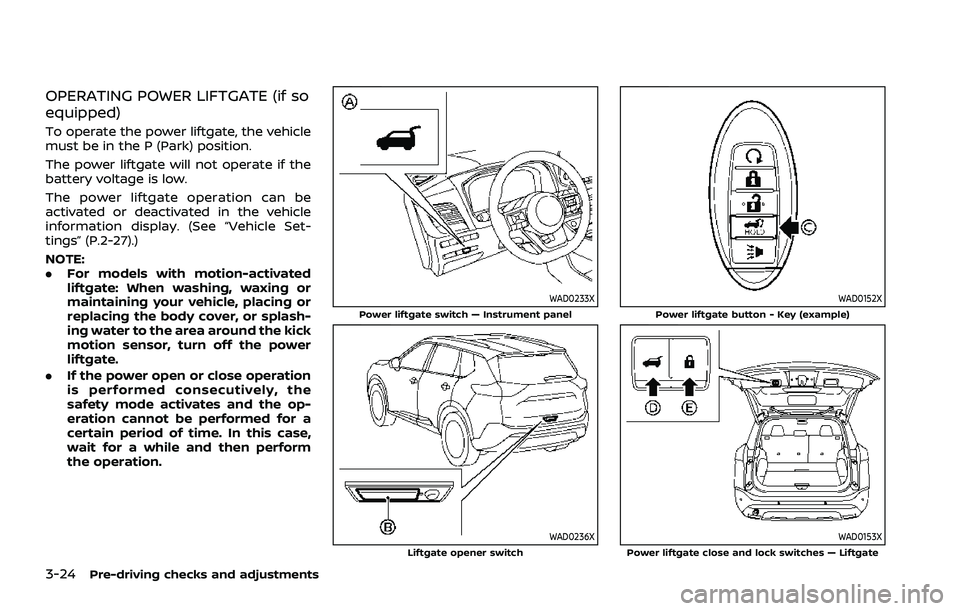
To operate the power liftgate, the vehicle
must be in the P (Park) position.
The power liftgate will not operate if the
battery voltage is low.
The power liftgate operation can be
activated or deactivated in the vehicle
information display. (See “Vehicle Set-
tings” (P.2-27).)
NOTE:
.For models with motion-activated
liftgate: When washing, waxing or
maintaining your vehicle, placing or
replacing the body cover, or splash-
ing water to the area around the kick
motion sensor, turn off the power
liftgate.
. If the power open or close operation
is performed consecutively, the
safety mode activates and the op-
eration cannot be performed for a
certain period of time. In this case,
wait for a while and then perform
the operation.
WAD0233XPower liftgate switch — Instrument panel
WAD0236XLiftgate opener switch
WAD0152XPower liftgate button - Key (example)
WAD0153XPower liftgate close and lock switches — Liftgate
Page 202 of 556
3-26Pre-driving checks and adjustments
all passengers keep their hands, etc.,
clear from the liftgate opening be-
fore closing the liftgate.
Manual mode
If power operation is not available, the
liftgate can be operated manually. Power
operation may not be available if multiple
obstacles have been detected in a single
power cycle or if the battery voltage is
low. When the power liftgate is turned off,
the liftgate can be opened manually by
pushing the liftgate opener switch. If the
power liftgate opener switch is pushed
during power open or close, the power
operation will be canceled and the liftgate
can be operated manually. This will allow
normal power operation functions to
resume.
WAD0154X
JVP0487X
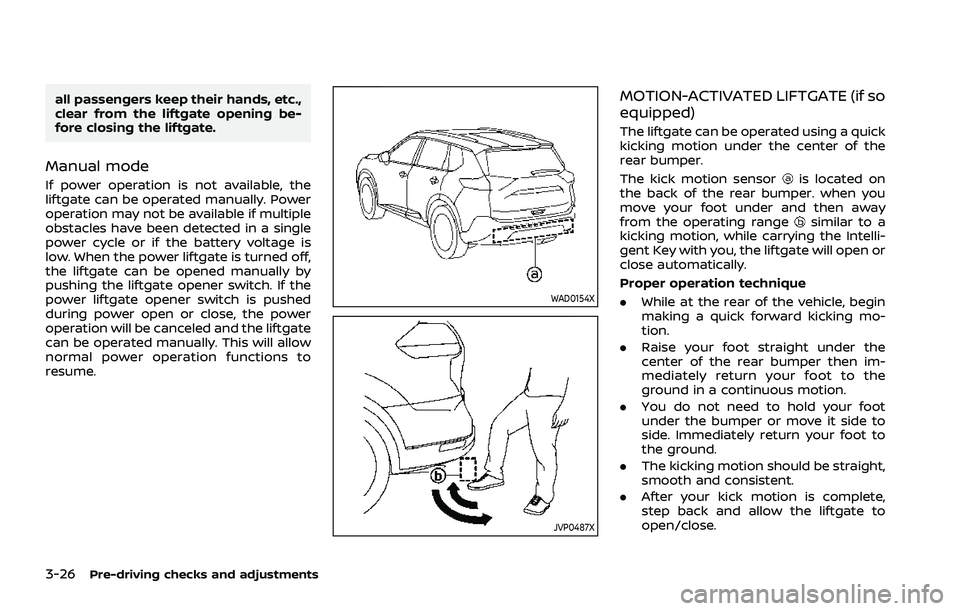
MOTION-ACTIVATED LIFTGATE (if so
equipped)
The liftgate can be operated using a quick
kicking motion under the center of the
rear bumper.
The kick motion sensor
is located on
the back of the rear bumper. when you
move your foot under and then away
from the operating range
similar to a
kicking motion, while carrying the Intelli-
gent Key with you, the liftgate will open or
close automatically.
Proper operation technique
. While at the rear of the vehicle, begin
making a quick forward kicking mo-
tion.
. Raise your foot straight under the
center of the rear bumper then im-
mediately return your foot to the
ground in a continuous motion.
. You do not need to hold your foot
under the bumper or move it side to
side. Immediately return your foot to
the ground.
. The kicking motion should be straight,
smooth and consistent.
. After your kick motion is complete,
step back and allow the liftgate to
open/close.
Page 204 of 556
3-28Pre-driving checks and adjustments
CAUTION
Do not set the height of the liftgate
below approximately 1/3 of the way
to the floor using garage mode. Even
if you set the height below approxi-
mately 1/3 of the way to the floor,
the height will automatically be set
to approximately 1/3 of the way to
the floor.
AUTO CLOSURE (if so equipped)
When the liftgate reaches the secondary
position, the closure motor engages and
pulls the liftgate to its primary latch
position.
Do not apply excessive force when the
auto closure is operating. Excessive
force applied may cause the mechan-
ism to malfunction.
CAUTION
.The liftgate will automatically
close from the secondary posi-
tion. To avoid pinching, keep
hands and fingers away from
liftgate opening. .
Do not let children operate the
liftgate.
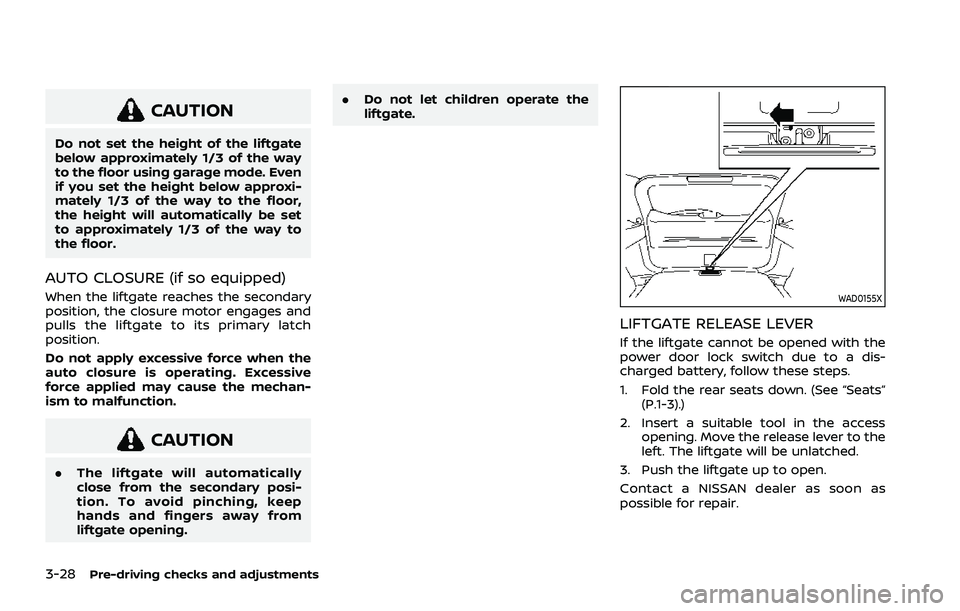
WAD0155X
LIFTGATE RELEASE LEVER
If the liftgate cannot be opened with the
power door lock switch due to a dis-
charged battery, follow these steps.
1. Fold the rear seats down. (See “Seats”
(P.1-3).)
2. Insert a suitable tool in the access opening. Move the release lever to the
left. The liftgate will be unlatched.
3. Push the liftgate up to open.
Contact a NISSAN dealer as soon as
possible for repair.
Page 219 of 556
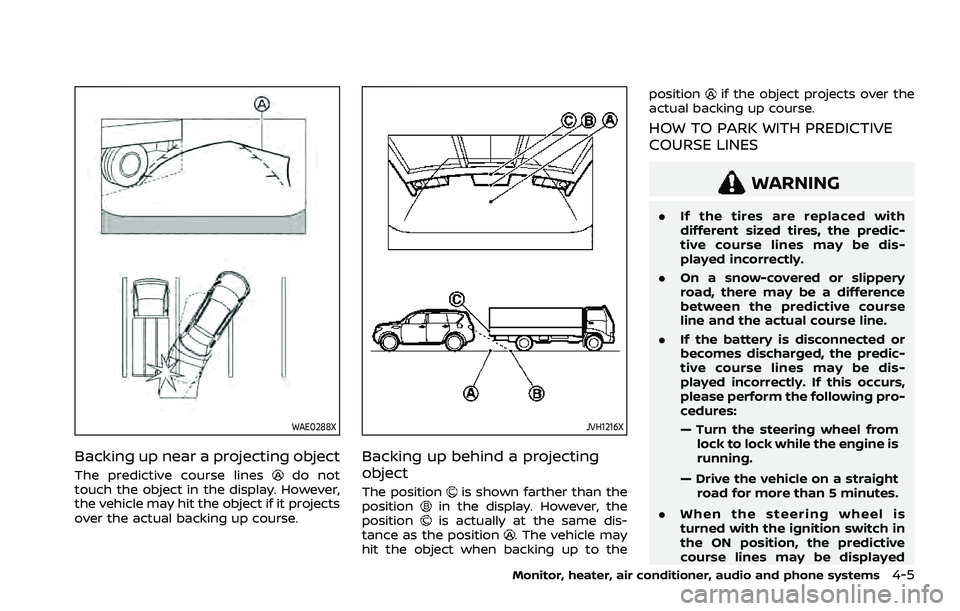
WAE0288X
Backing up near a projecting object
The predictive course linesdo not
touch the object in the display. However,
the vehicle may hit the object if it projects
over the actual backing up course.
JVH1216X
Backing up behind a projecting
object
The positionis shown farther than the
positionin the display. However, the
positionis actually at the same dis-
tance as the position. The vehicle may
hit the object when backing up to the position
if the object projects over the
actual backing up course.
HOW TO PARK WITH PREDICTIVE
COURSE LINES
WARNING
. If the tires are replaced with
different sized tires, the predic-
tive course lines may be dis-
played incorrectly.
. On a snow-covered or slippery
road, there may be a difference
between the predictive course
line and the actual course line.
. If the battery is disconnected or
becomes discharged, the predic-
tive course lines may be dis-
played incorrectly. If this occurs,
please perform the following pro-
cedures:
— Turn the steering wheel from
lock to lock while the engine is
running.
— Drive the vehicle on a straight road for more than 5 minutes.
. When the steering wheel is
turned with the ignition switch in
the ON position, the predictive
course lines may be displayed
Monitor, heater, air conditioner, audio and phone systems4-5
Page 230 of 556
4-16Monitor, heater, air conditioner, audio and phone systems
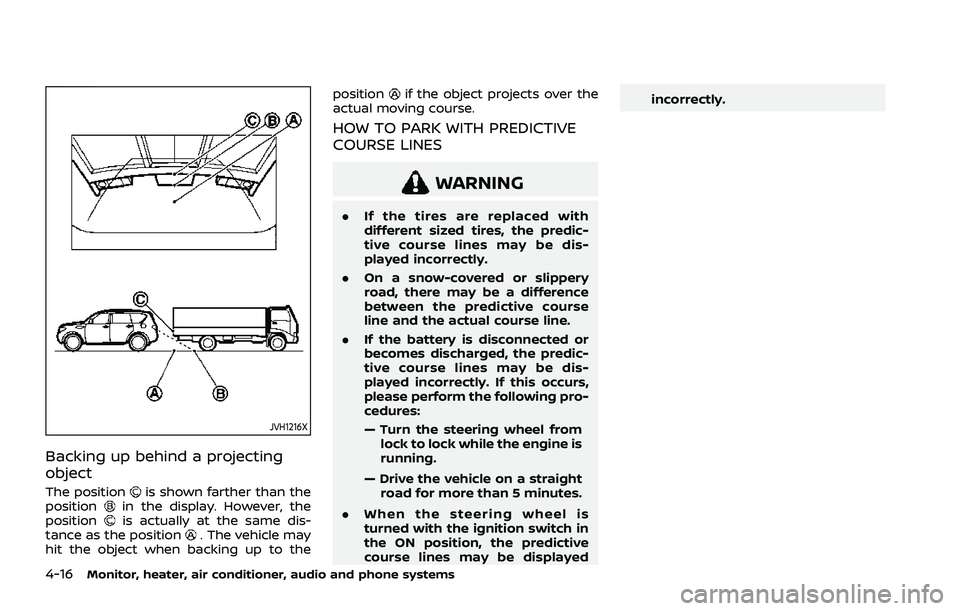
JVH1216X
Backing up behind a projecting
object
The positionis shown farther than the
positionin the display. However, the
positionis actually at the same dis-
tance as the position. The vehicle may
hit the object when backing up to the position
if the object projects over the
actual moving course.
HOW TO PARK WITH PREDICTIVE
COURSE LINES
WARNING
. If the tires are replaced with
different sized tires, the predic-
tive course lines may be dis-
played incorrectly.
. On a snow-covered or slippery
road, there may be a difference
between the predictive course
line and the actual course line.
. If the battery is disconnected or
becomes discharged, the predic-
tive course lines may be dis-
played incorrectly. If this occurs,
please perform the following pro-
cedures:
— Turn the steering wheel from
lock to lock while the engine is
running.
— Drive the vehicle on a straight road for more than 5 minutes.
. When the steering wheel is
turned with the ignition switch in
the ON position, the predictive
course lines may be displayed incorrectly.
Page 255 of 556
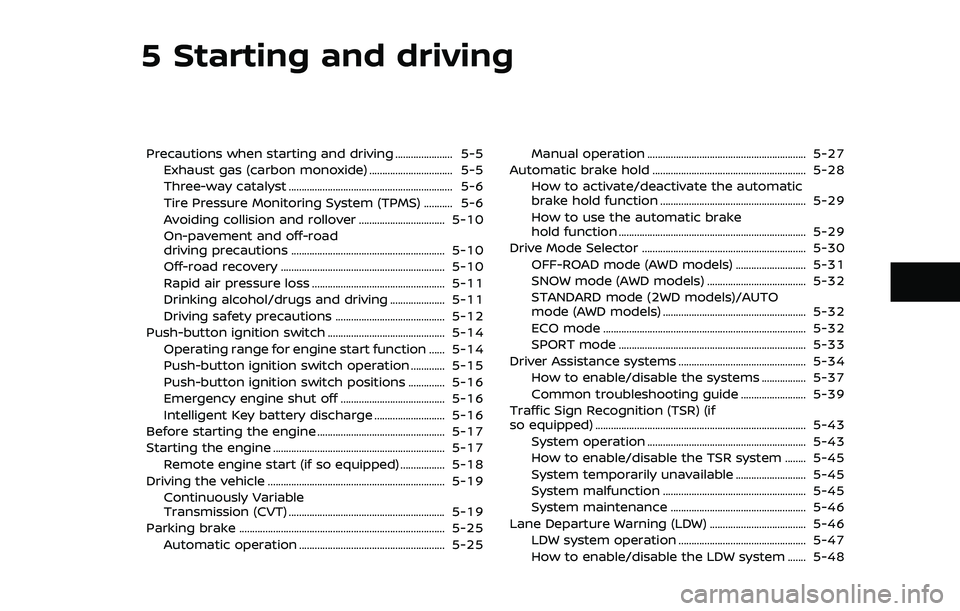
5 Starting and driving
Precautions when starting and driving ...................... 5-5Exhaust gas (carbon monoxide) ................................ 5-5
Three-way catalyst ............................................................... 5-6
Tire Pressure Monitoring System (TPMS) ........... 5-6
Avoiding collision and rollover ................................. 5-10
On-pavement and off-road
driving precautions ........................................................... 5-10
Off-road recovery ............................................................... 5-10
Rapid air pressure loss ................................................... 5-11
Drinking alcohol/drugs and driving ..................... 5-11
Driving safety precautions .......................................... 5-12
Push-button ignition switch ............................................. 5-14 Operating range for engine start function ...... 5-14
Push-button ignition switch operation ............. 5-15
Push-button ignition switch positions .............. 5-16
Emergency engine shut off ........................................ 5-16
Intelligent Key battery discharge ........................... 5-16
Before starting the engine ................................................. 5-17
Starting the engine .................................................................. 5-17 Remote engine start (if so equipped) ................. 5-18
Driving the vehicle .................................................................... 5-19 Continuously Variable
Transmission (CVT) ............................................................ 5-19
Parking brake ........................................................................\
....... 5-25 Automatic operation ........................................................ 5-25 Manual operation ............................................................. 5-27
Automatic brake hold ........................................................... 5-28 How to activate/deactivate the automatic
brake hold function ........................................................ 5-29
How to use the automatic brake
hold function ........................................................................\
5-29
Drive Mode Selector ............................................................... 5-30 OFF-ROAD mode (AWD models) ........................... 5-31
SNOW mode (AWD models) ...................................... 5-32
STANDARD mode (2WD models)/AUTO
mode (AWD models) ....................................................... 5-32
ECO mode ........................................................................\
...... 5-32
SPORT mode ........................................................................\
5-33
Driver Assistance systems ................................................. 5-34 How to enable/disable the systems ................. 5-37
Common troubleshooting guide ......................... 5-39
Traffic Sign Recognition (TSR) (if
so equipped) ........................................................................\
......... 5-43 System operation ............................................................. 5-43
How to enable/disable the TSR system ........ 5-45
System temporarily unavailable ........................... 5-45
System malfunction ....................................................... 5-45
System maintenance .................................................... 5-46
Lane Departure Warning (LDW) ..................................... 5-46 LDW system operation ................................................. 5-47
How to enable/disable the LDW system ....... 5-48
Page 258 of 556
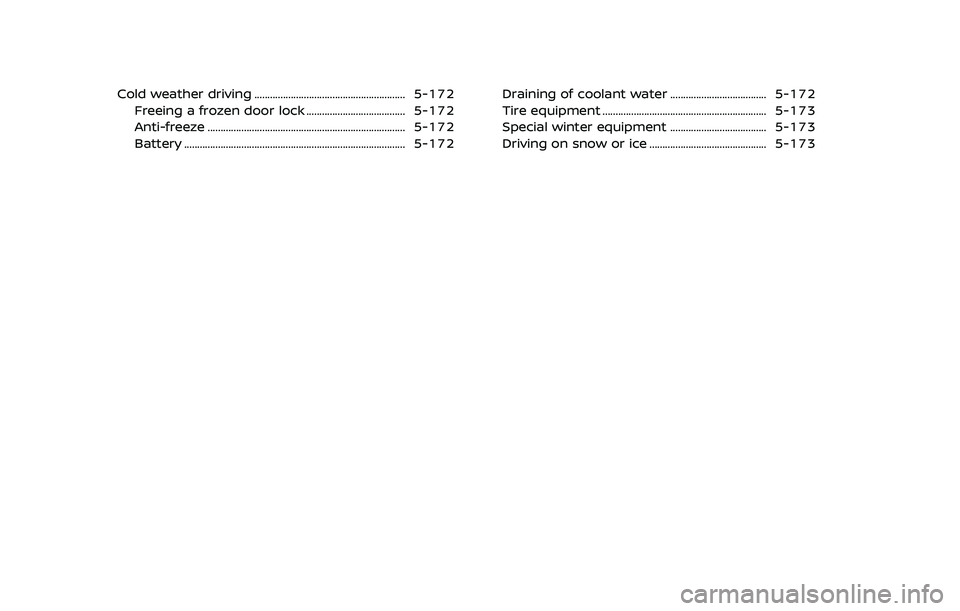
Cold weather driving .......................................................... 5-172Freeing a frozen door lock ...................................... 5-172
Anti-freeze ........................................................................\
.... 5-172
Battery ........................................................................\
............. 5-172 Draining of coolant water ..................................... 5-172
Tire equipment ............................................................... 5-173
Special winter equipment ..................................... 5-173
Driving on snow or ice ............................................. 5-173