window NISSAN ROGUE SELECT 2015 2.G Owner's Manual
[x] Cancel search | Manufacturer: NISSAN, Model Year: 2015, Model line: ROGUE SELECT, Model: NISSAN ROGUE SELECT 2015 2.GPages: 322, PDF Size: 2.21 MB
Page 142 of 322
display object clearly. Clean the camera.
. Do not use alcohol, benzine or thinner to
clean the camera. This will cause discolora-
tion. To clean the camera, wipe with a cloth
dampened with diluted mild cleaning agent
and then wipe with a dry cloth.
. Do not damage the camera as the monitor
screen may be adversely affected.
. Do not use wax on the camera window.
Wipe off any wax with a clean cloth
dampened with mild detergent diluted with
water.
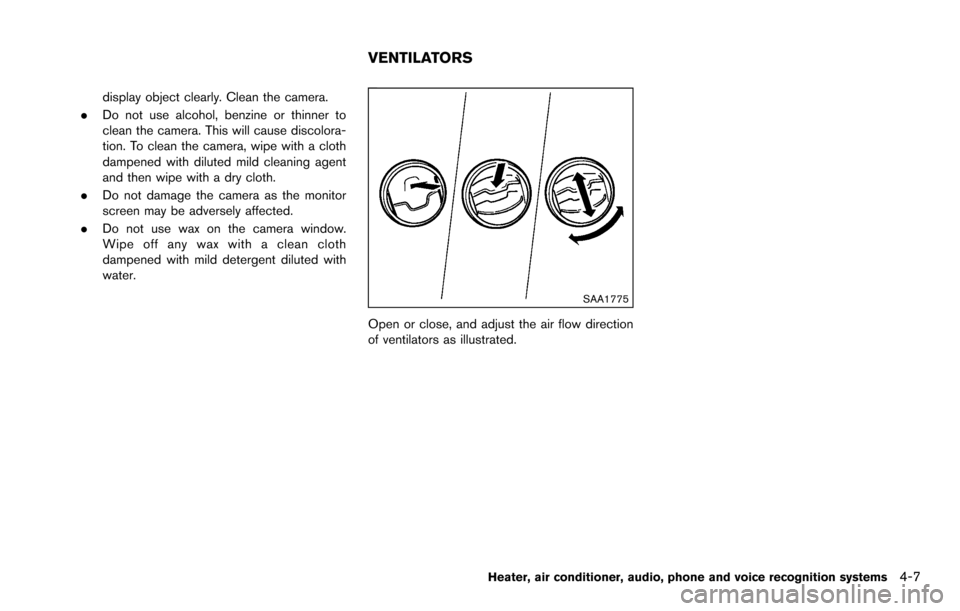
SAA1775
Open or close, and adjust the air flow direction
of ventilators as illustrated.
Heater, air conditioner, audio, phone and voice recognition systems4-7
VENTILATORS
Page 143 of 322
4-8Heater, air conditioner, audio, phone and voice recognition systems
WARNING
.The air conditioner cooling function
operates only when the engine is
running.
. Do not leave children or adults who
would normally require the support
of others alone in your vehicle. Pets
should not be left alone either. On
hot, sunny days, temperatures in a
closed vehicle could quickly become
high enough to cause severe or
possibly fatal injuries to people or
animals.
. Do not use the recirculation mode
for long periods as it may cause the
interior air to become stale and the
windows to fog up.
Start the engine and operate the heater and air
conditioner system.
NOTE:
. Odors from inside and outside the
vehicle can build up in the air condi-
tioner unit. Odor can enter the passen-
ger compartment through the vents. .
When parking, set the heater and air
conditioner controls to turn off air
recirculation to allow fresh air into the
passenger compartment. This should
help reduce odors inside the vehicle.
HEATER AND AIR CONDITIONER
Page 144 of 322
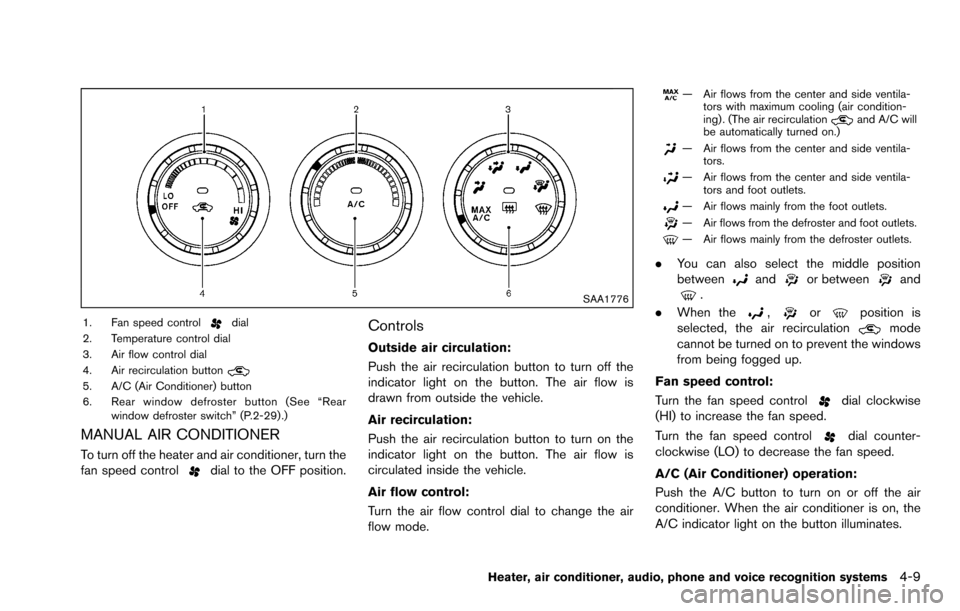
SAA1776
1. Fan speed controldial
2. Temperature control dial
3. Air flow control dial
4. Air recirculation button
5. A/C (Air Conditioner) button
6. Rear window defroster button (See “Rear window defroster switch” (P.2-29) .)
MANUAL AIR CONDITIONER
To turn off the heater and air conditioner, turn the
fan speed controldial to the OFF position.
Controls
Outside air circulation:
Push the air recirculation button to turn off the
indicator light on the button. The air flow is
drawn from outside the vehicle.
Air recirculation:
Push the air recirculation button to turn on the
indicator light on the button. The air flow is
circulated inside the vehicle.
Air flow control:
Turn the air flow control dial to change the air
flow mode.
— Air flows from the center and side ventila-tors with maximum cooling (air condition-
ing) . (The air recirculation
and A/C will
be automatically turned on.)
— Air flows from the center and side ventila- tors.
— Air flows from the center and side ventila-tors and foot outlets.
— Air flows mainly from the foot outlets.
— Air flows from the defroster and foot outlets.
— Air flows mainly from the defroster outlets.
.You can also select the middle position
betweenandor betweenand.
. When the
,orposition is
selected, the air recirculationmode
cannot be turned on to prevent the windows
from being fogged up.
Fan speed control:
Turn the fan speed control
dial clockwise
(HI) to increase the fan speed.
Turn the fan speed control
dial counter-
clockwise (LO) to decrease the fan speed.
A/C (Air Conditioner) operation:
Push the A/C button to turn on or off the air
conditioner. When the air conditioner is on, the
A/C indicator light on the button illuminates.
Heater, air conditioner, audio, phone and voice recognition systems4-9
Page 145 of 322
4-10Heater, air conditioner, audio, phone and voice recognition systems
Temperature control:
Turn the temperature control dial to set the
desired temperature. Turn the dial between the
middle and the right position to select the hot
temperature. Turn the dial between the middle
and the left position to select the cool tempera-
ture.
Heater operation
Heating:
This mode is used to direct heated air to the foot
outlets.
1. Push the air recirculation button
to the
OFF position. (The indicator light turns off.)
2. Turn the air flow control dial to the
position.
3. Turn the fan speed control
dial to the
desired position.
4. Turn the temperature control dial to the desired position between the middle and the
hot (right) position.
Ventilation:
This mode directs outside air to the side and
center ventilators.
1. Push the air recirculation button
to the
OFF position. (The indicator light turns off.) 2. Turn the air flow control dial to the
position.
3. Turn the fan speed control
dial to the
desired position.
4. Turn the temperature control dial to the desired position.
Defrosting or defogging:
This mode directs the air to the defroster outlets
to defrost/defog the windows.
1. Turn the air flow control dial to the
position.
2. Turn the fan speed control
dial to the
desired position.
3. Turn the temperature control dial to the desired position between the middle and the
hot (right) position.
. To remove frost from the outside surface of
the windshield quickly, turn the temperature
control dial to the maximum hot position and
the fan speed control
dial to maximum
(HI) position.
. If it is difficult to defog the windshield, turn
the A/C button on.
Bi-level heating:
This mode directs cool air from the side and
center vents and warm air from the foot outlets.
When the temperature control dial is turned to the maximum hot or cool position, the air
between the ventilators and the foot outlets is
the same temperature.
1. Push the air recirculation button
to the
OFF position. (The indicator light turns off.)
2. Turn the air flow control dial to the
position.
3. Turn the fan speed control
dial to the
desired position.
4. Turn the temperature control dial to the desired position.
Heating and defogging:
This mode heats the interior and defogs the
windows.
1. Turn the air flow control dial to the
position.
2. Turn the fan speed control
dial to the
desired position.
3. Turn the temperature control dial to the desired position.
Page 146 of 322
Air conditioner operation
The air conditioner system should be operated
for approximately 10 minutes at least once a
month. This helps prevent damage to the air
conditioner system due to the lack of lubrication.
Cooling:
This mode is used to cool and dehumidify the air.
1. Push the air recirculation button
to the
OFF position. (The indicator light turns off.)
2. Turn the air flow control dial to the
position.
3. Turn the fan speed control
dial to the
desired position.
4. Push the A/C button on. (The A/C indicator light will illuminate.)
5. Turn the temperature control dial to the desired position between the middle and the
cool (left) position.
. For quick cooling when the outside tem-
perature is high, push the air recirculation
button
to the ON position. Be sure to
push the air recirculation button to the OFF
position for normal cooling.
. A visible mist may be seen coming from the
ventilators in hot, humid conditions as the air
is cooled rapidly. This does not indicate a
malfunction. Dehumidified heating:
This mode is used to heat and dehumidify the
air.
1. Push the air recirculation button
to the
OFF position. (The indicator light turns off.)
2. Turn the air flow control dial to the
position.
3. Turn the fan speed control
dial to the
desired position.
4. Push the A/C button on. (The A/C indicator light will illuminate.)
5. Turn the temperature control dial to the desired position between the middle and the
hot (right) position.
Dehumidified defogging:
This mode is used to defog the windows and
dehumidify the air.
1. Turn the air flow control dial to the
position.
2. Turn the fan speed control
dial to the
desired position.
3. Push the A/C button on. (The A/C indicator light will illuminate.)
4. Turn the temperature control dial to the desired position.
IN-CABIN MICROFILTER
The air conditioning system is equipped with an
in-cabin microfilter which collects dirt, pollen,
dust, etc. To make sure the air conditioner heats,
defogs, and ventilates efficiently, replace the
filter according to the specified maintenance log
shown in the NISSAN Service and Maintenance
Guide. To replace the filter, contact a NISSAN
dealer.
The filter should be replaced if the air flow
decreases significantly or if windows fog up
easily when operating the heater or air con-
ditioning system.
SERVICING AIR CONDITIONER
The air conditioner system in your NISSAN is
charged with a refrigerant designed with the
environment in mind. This refrigerant will not
harm the earth’s ozone layer. Special char-
ging equipment and lubricant are required when
servicing your NISSAN air conditioner. Using
improper refrigerants or lubricants will cause
severe damage to your air conditioner system.
(See “Capacities and recommended fluids/
lubricants” (P.9-2) .)
A NISSAN dealer will be able to service your
environmentally friendly air conditioner system.
Heater, air conditioner, audio, phone and voice recognition systems4-11
Page 151 of 322
4-16Heater, air conditioner, audio, phone and voice recognition systems
may damage the port. Make sure
that the USB device is connected
correctly into the USB port.
. Do not grab the USB port cover (if
so equipped) when pulling the USB
device out of the port. This could
damage the port and the cover.
. Do not leave the USB cable in a
place where it can be pulled unin-
tentionally. Pulling the cable may
damage the port.
The vehicle is not equipped with a USB device.
USB devices should be purchased separately
as necessary.
This system cannot be used to format USB
devices. To format a USB device, use a personal
computer.
In some states/area, the USB device for the
front seats plays only sound without images for
regulatory reasons, even when the vehicle is
parked.
This system supports various USB memory
devices, USB hard drives and iPod
Šplayers.
Some USB devices may not be supported by
this system.
. Partitioned USB devices may not be played
correctly. .
Some characters used in other languages
(Chinese, Japanese, etc.) are not displayed
properly on display. Using English language
characters with a USB device is recom-
mended.
General notes for USB use:
Refer to your device manufacture’s owner
information regarding the proper use and care
of the device.
Notes for iPod
Šuse:
iPodŠis a trademark of Apple Inc., registered in
the U.S. and other countries.
. Improperly plugging in the iPod
Šmay cause
a checkmark to be displayed on and off
(flickering) . Always make sure that the iPod
Š
is connected properly.
. An iPod nanoŠ(1st Generation) may remain
in fast forward or rewind mode if it is
connected during a seek operation. In this
case, please manually reset the iPod
Š.
. An iPod nanoŠ(2nd Generation) will con-
tinue to fast-forward or rewind if it is
disconnected during a seek operation.
. An incorrect song title may appear when the
Play Mode is changed while using an iPod
nano
Š(2nd Generation)
. Audiobooks may not play in the same order
as they appear on an iPod
Š. .
Large video files cause slow responses in an
iPod
Š. The vehicle display may momentarily
black out, but will soon recover.
. If an iPod
Šautomatically selects large video
files while in the shuffle mode, the vehicle
display may momentarily black out, but will
soon recover.
Compressed Audio Files (MP3/WMA)
Explanation of terms:
. MP3 — MP3 is short for Moving Pictures
Experts Group Audio Layer 3. MP3 is the
most well known compressed digital audio
file format. This format allows for near “CD
quality” sound, but at a fraction of the size of
normal audio files. MP3 conversion of an
audio track can reduce the file size by
approximately a 10:1 ratio (Sampling: 44.1
kHz, Bit rate: 128 kbps) with virtually no
perceptible loss in quality. The compression
reduces certain parts of sound that seem
inaudible to most people.
. WMA — Windows Media Audio (WMA) is a
compressed audio format created by Micro-
soft as an alternative to MP3. The WMA
codec offers greater file compression than
the MP3 codec, enabling storage of more
digital audio tracks in the same amount of
space when compared to MP3s at the same
level of quality.
Page 152 of 322
.Bit rate — Bit rate denotes the number of
bits per second used by a digital music file.
The size and quality of a compressed digital
audio file is determined by the bit rate used
when encoding the file.
. Sampling frequency — Sampling frequency
is the rate at which the samples of a signal
are converted from analog to digital (A/D
conversion) per second.
. Multisession — Multisession is one of the
methods for writing data to media. Writing
data once to the media is called a single
session, and writing more than once is
called a multisession.
. ID3/WMA Tag — The ID3/WMA tag is the
part of the encoded MP3 or WMA file that
contains information about the digital music
file such as song title, artist, album title,
encoding bit rate, track time duration, etc.
ID3 tag information is displayed on the
Album/Artist/Track title line on the display.
* Windows
Šand Windows MediaŠare regis-
tered trademarks or trademarks of Microsoft
Corporation in the United States of America
and/or other countries.SAA2494
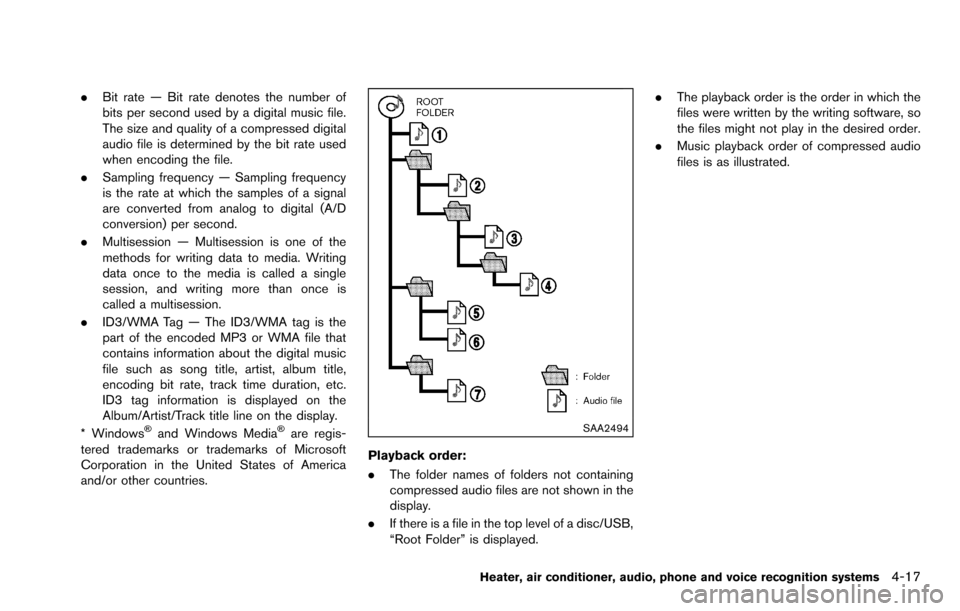
Playback order:
. The folder names of folders not containing
compressed audio files are not shown in the
display.
. If there is a file in the top level of a disc/USB,
“Root Folder” is displayed. .
The playback order is the order in which the
files were written by the writing software, so
the files might not play in the desired order.
. Music playback order of compressed audio
files is as illustrated.
Heater, air conditioner, audio, phone and voice recognition systems4-17
Page 153 of 322
4-18Heater, air conditioner, audio, phone and voice recognition systems
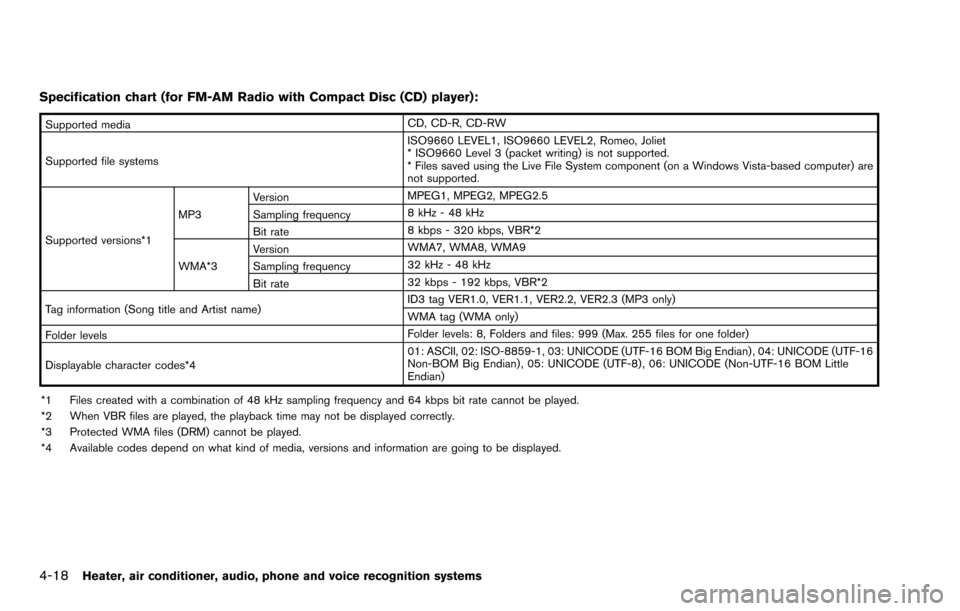
Specification chart (for FM-AM Radio with Compact Disc (CD) player):
Supported mediaCD, CD-R, CD-RW
Supported file systems ISO9660 LEVEL1, ISO9660 LEVEL2, Romeo, Joliet
* ISO9660 Level 3 (packet writing) is not supported.
* Files saved using the Live File System component (on a Windows Vista-based computer) are
not supported.
Supported versions*1 MP3
Version
MPEG1, MPEG2, MPEG2.5
Sampling frequency 8 kHz - 48 kHz
Bit rate 8 kbps - 320 kbps, VBR*2
WMA*3 Version
WMA7, WMA8, WMA9
Sampling frequency 32 kHz - 48 kHz
Bit rate 32 kbps - 192 kbps, VBR*2
Tag information (Song title and Artist name) ID3 tag VER1.0, VER1.1, VER2.2, VER2.3 (MP3 only)
WMA tag (WMA only)
Folder levels Folder levels: 8, Folders and files: 999 (Max. 255 files for one folder)
Displayable character codes*4 01: ASCII, 02: ISO-8859-1, 03: UNICODE (UTF-16 BOM Big Endian) , 04: UNICODE (UTF-16
Non-BOM Big Endian) , 05: UNICODE (UTF-8) , 06: UNICODE (Non-UTF-16 BOM Little
Endian)
*1 Files created with a combination of 48 kHz sampling frequency and 64 kbps bit rate cannot be played.
*2 When VBR files are played, the playback time may not be displayed correctly.
*3 Protected WMA files (DRM) cannot be played.
*4 Available codes depend on what kind of media, versions and information are going to be displayed.
Page 154 of 322
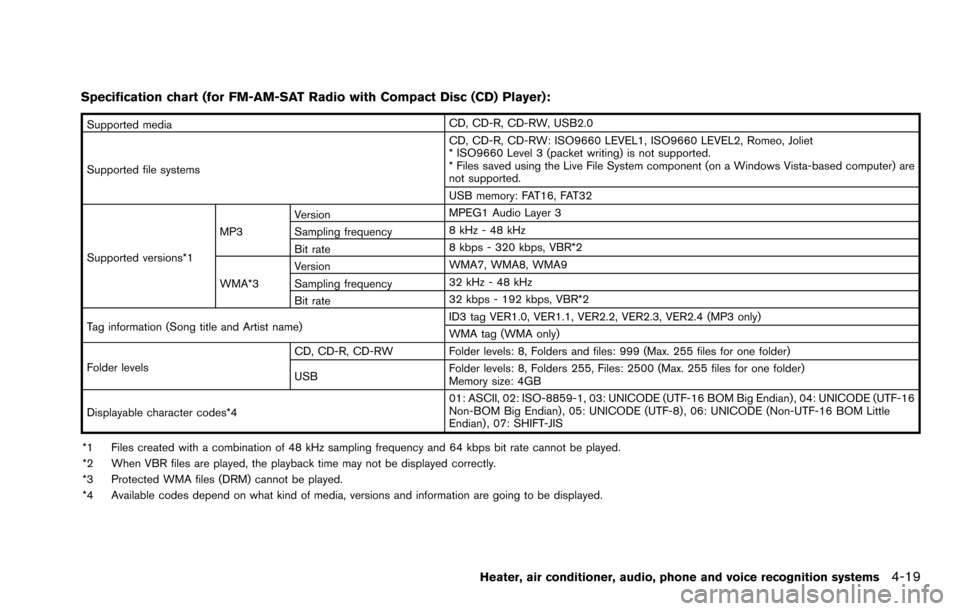
Specification chart (for FM-AM-SAT Radio with Compact Disc (CD) Player):
Supported mediaCD, CD-R, CD-RW, USB2.0
Supported file systems CD, CD-R, CD-RW: ISO9660 LEVEL1, ISO9660 LEVEL2, Romeo, Joliet
* ISO9660 Level 3 (packet writing) is not supported.
* Files saved using the Live File System component (on a Windows Vista-based computer) are
not supported.
USB memory: FAT16, FAT32
Supported versions*1 MP3
Version
MPEG1 Audio Layer 3
Sampling frequency 8 kHz - 48 kHz
Bit rate 8 kbps - 320 kbps, VBR*2
WMA*3 Version
WMA7, WMA8, WMA9
Sampling frequency 32 kHz - 48 kHz
Bit rate 32 kbps - 192 kbps, VBR*2
Tag information (Song title and Artist name) ID3 tag VER1.0, VER1.1, VER2.2, VER2.3, VER2.4 (MP3 only)
WMA tag (WMA only)
Folder levels CD, CD-R, CD-RW Folder levels: 8, Folders and files: 999 (Max. 255 files for one folder)
USB
Folder levels: 8, Folders 255, Files: 2500 (Max. 255 files for one folder)
Memory size: 4GB
Displayable character codes*4 01: ASCII, 02: ISO-8859-1, 03: UNICODE (UTF-16 BOM Big Endian) , 04: UNICODE (UTF-16
Non-BOM Big Endian) , 05: UNICODE (UTF-8) , 06: UNICODE (Non-UTF-16 BOM Little
Endian) , 07: SHIFT-JIS
*1 Files created with a combination of 48 kHz sampling frequency and 64 kbps bit rate cannot be played.
*2 When VBR files are played, the playback time may not be displayed correctly.
*3 Protected WMA files (DRM) cannot be played.
*4 Available codes depend on what kind of media, versions and information are going to be displayed.
Heater, air conditioner, audio, phone and voice recognition systems4-19
Page 177 of 322
4-42Heater, air conditioner, audio, phone and voice recognition systems
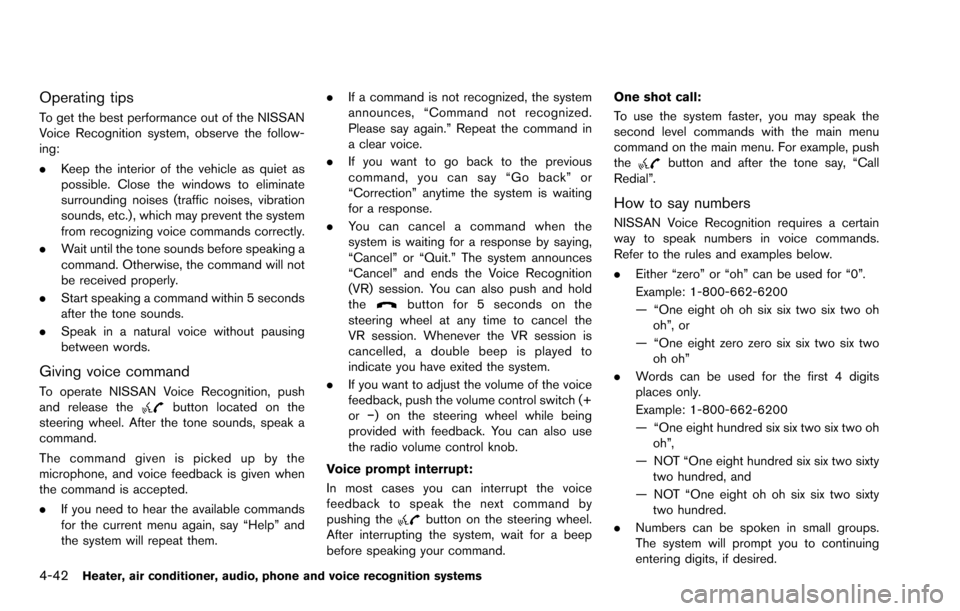
Operating tips
To get the best performance out of the NISSAN
Voice Recognition system, observe the follow-
ing:
.Keep the interior of the vehicle as quiet as
possible. Close the windows to eliminate
surrounding noises (traffic noises, vibration
sounds, etc.) , which may prevent the system
from recognizing voice commands correctly.
. Wait until the tone sounds before speaking a
command. Otherwise, the command will not
be received properly.
. Start speaking a command within 5 seconds
after the tone sounds.
. Speak in a natural voice without pausing
between words.
Giving voice command
To operate NISSAN Voice Recognition, push
and release thebutton located on the
steering wheel. After the tone sounds, speak a
command.
The command given is picked up by the
microphone, and voice feedback is given when
the command is accepted.
. If you need to hear the available commands
for the current menu again, say “Help” and
the system will repeat them. .
If a command is not recognized, the system
announces, “Command not recognized.
Please say again.” Repeat the command in
a clear voice.
. If you want to go back to the previous
command, you can say “Go back” or
“Correction” anytime the system is waiting
for a response.
. You can cancel a command when the
system is waiting for a response by saying,
“Cancel” or “Quit.” The system announces
“Cancel” and ends the Voice Recognition
(VR) session. You can also push and hold
the
button for 5 seconds on the
steering wheel at any time to cancel the
VR session. Whenever the VR session is
cancelled, a double beep is played to
indicate you have exited the system.
. If you want to adjust the volume of the voice
feedback, push the volume control switch (+
orí) on the steering wheel while being
provided with feedback. You can also use
the radio volume control knob.
Voice prompt interrupt:
In most cases you can interrupt the voice
feedback to speak the next command by
pushing the
button on the steering wheel.
After interrupting the system, wait for a beep
before speaking your command. One shot call:
To use the system faster, you may speak the
second level commands with the main menu
command on the main menu. For example, push
the
button and after the tone say, “Call
Redial”.
How to say numbers
NISSAN Voice Recognition requires a certain
way to speak numbers in voice commands.
Refer to the rules and examples below.
. Either “zero” or “oh” can be used for “0”.
Example: 1-800-662-6200
— “One eight oh oh six six two six two oh
oh”, or
— “One eight zero zero six six two six two oh oh”
. Words can be used for the first 4 digits
places only.
Example: 1-800-662-6200
— “One eight hundred six six two six two oh
oh”,
— NOT “One eight hundred six six two sixty two hundred, and
— NOT “One eight oh oh six six two sixty two hundred.
. Numbers can be spoken in small groups.
The system will prompt you to continuing
entering digits, if desired.