ignition NISSAN TEANA 2008 Service Manual
[x] Cancel search | Manufacturer: NISSAN, Model Year: 2008, Model line: TEANA, Model: NISSAN TEANA 2008Pages: 5121, PDF Size: 69.03 MB
Page 14 of 5121

ADP-8
< BASIC INSPECTION >
INSPECTION AND ADJUSTMENT
quirement
INFOID:0000000003759061
1.SYSTEM INITIALIZATION
Perform system initialization. Refer to ADP-8, "
SYSTEM INITIALIZATION : Description".
>> GO TO 2.
2.SYSTEM SETTING
Perform system setting. Refer to ADP-9, "
SYSTEM SETTING : Description".
>> GO TO 3.
3.MEMORY STORAGE
Perform memory storage. Refer to ADP-8, "
MEMORY STORING : Description".
>> END
SYSTEM INITIALIZATION
SYSTEM INITIALIZATION : DescriptionINFOID:0000000003759062
Always perform the initialization when the battery terminal is disconnected or the driver seat control unit is
replaced.
The entry/exit assist function will not operate normally unless initialization is performed.
SYSTEM INITIALIZATION : Special Repair RequirementINFOID:0000000003759063
INITIALIZATION PROCEDURE
1. CHOOSE METHOD
There are two initialization methods.
Which method do you use?
With door switch>>GO TO 2.
With vehicle speed>>GO TO 4.
2. STEP A-1
Turn ignition switch from the ACC to the OFF position.
>> GO TO 3.
3. STEP A-2
Driver door switch is ON (open) → OFF (close) → ON (open).
>> END
4. STEP B-1
Drive the vehicle at more than 25 km/h (16 MPH).
>> END
MEMORY STORING
MEMORY STORING : DescriptionINFOID:0000000003759064
Always perform memory storage when the battery terminal is disconnected or the driver seat control unit is
replaced. The memory function and Intelligent Key interlock function will not operate normally unless memory
storage is performed.
Page 15 of 5121
INSPECTION AND ADJUSTMENT
ADP-9
< BASIC INSPECTION >
C
D
E
F
G
H
I
K
L
MA
B
ADP
N
O
P
MEMORY STORING : Special Repair RequirementINFOID:0000000003759065
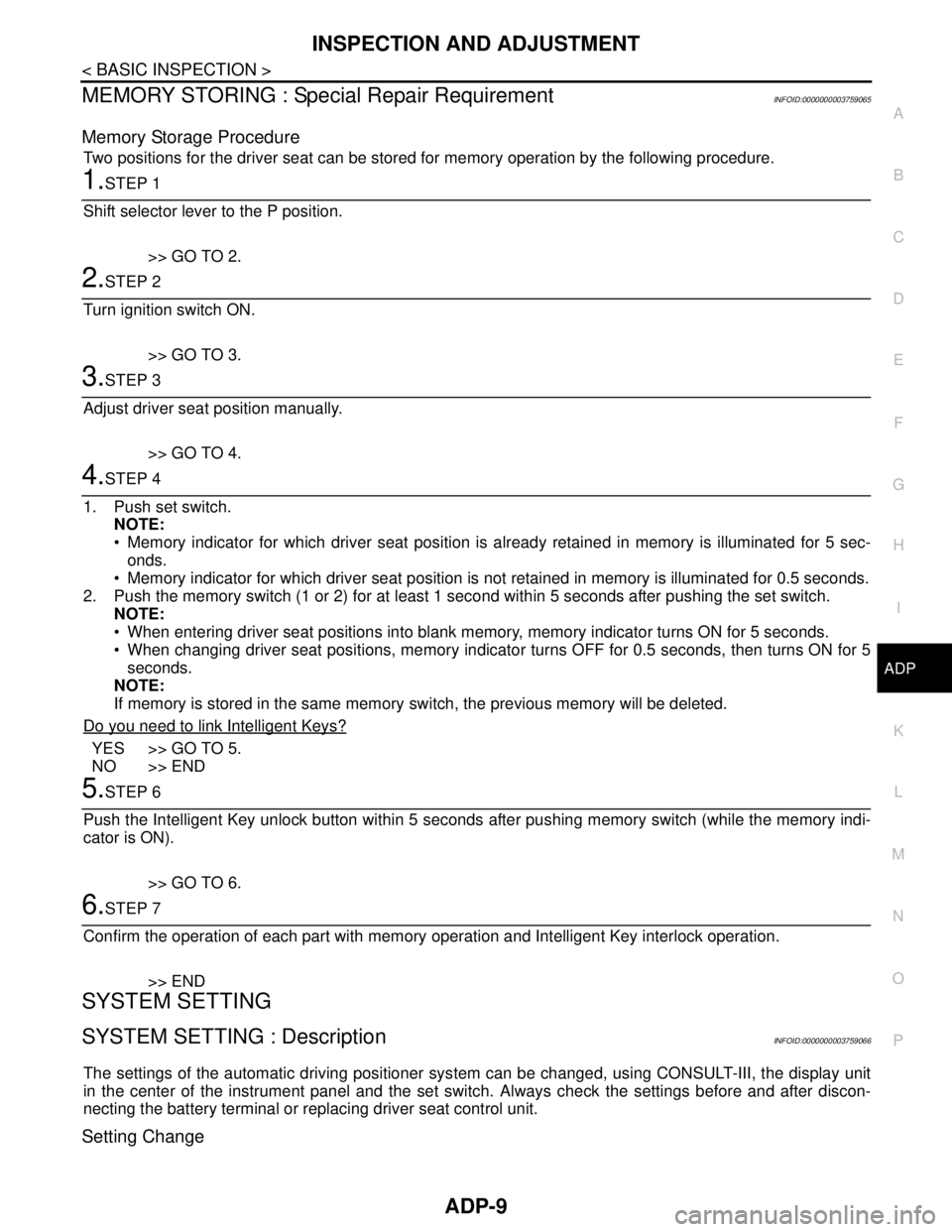
Memory Storage Procedure
Two positions for the driver seat can be stored for memory operation by the following procedure.
1.STEP 1
Shift selector lever to the P position.
>> GO TO 2.
2.STEP 2
Turn ignition switch ON.
>> GO TO 3.
3.STEP 3
Adjust driver seat position manually.
>> GO TO 4.
4.STEP 4
1. Push set switch.
NOTE:
Memory indicator for which driver seat position is already retained in memory is illuminated for 5 sec-
onds.
Memory indicator for which driver seat position is not retained in memory is illuminated for 0.5 seconds.
2. Push the memory switch (1 or 2) for at least 1 second within 5 seconds after pushing the set switch.
NOTE:
When entering driver seat positions into blank memory, memory indicator turns ON for 5 seconds.
When changing driver seat positions, memory indicator turns OFF for 0.5 seconds, then turns ON for 5
seconds.
NOTE:
If memory is stored in the same memory switch, the previous memory will be deleted.
Do you need to link Intelligent Keys?
YES >> GO TO 5.
NO >> END
5.STEP 6
Push the Intelligent Key unlock button within 5 seconds after pushing memory switch (while the memory indi-
cator is ON).
>> GO TO 6.
6.STEP 7
Confirm the operation of each part with memory operation and Intelligent Key interlock operation.
>> END
SYSTEM SETTING
SYSTEM SETTING : DescriptionINFOID:0000000003759066
The settings of the automatic driving positioner system can be changed, using CONSULT-III, the display unit
in the center of the instrument panel and the set switch. Always check the settings before and after discon-
necting the battery terminal or replacing driver seat control unit.
Setting Change
Page 16 of 5121

ADP-10
< BASIC INSPECTION >
INSPECTION AND ADJUSTMENT
×: Applicable
SYSTEM SETTING : Special Repair RequirementINFOID:0000000003759067
1. CHOOSE METHOD
There are three ways of setting methods.
Which method do you choose?
With display>>GO TO 2.
With set switch>>GO TO 4.
With CONSULT-III>>GO TO 6.
2. WITH DISPLAY - STEP 1
Turn ignition switch ON.
>> GO TO 3.
3. WITH DISPLAY - STEP 2
1. Push “SETTING” button.
2. Select “Comfort & Conv.”.
3. Select “Slide Driver′s Seat Back ON Exit” on display, then push
- Slide Driver's Seat Back On Exit: Entry/exit assist (seat)
>> END
4. WITH SET SWITCH - STEP 1
Turn ignition switch OFF.
>> GO TO 5.
5. WITH SET SWITCH - STEP 2
Push setting button and hold for more than 10 seconds, then confirm blinking of the memory switch indicator.
Entry/exit assist (seat) are ON: Memory switch indicator blinks two times.
Entry/exit assist (seat) are OFF: Memory switch indicator blinks once.
>> END
6. WITH CONSULT-III - STEP 1
Select “Work support”.
>> GO TO 7.
7. WITH CONSULT-III - STEP 2
1. Select “EXIT SEAT SLIDE SETTING”, or “SEAT SLIDE VOLUME SET” then touch display to change
between ON and OFF.
- EXIT SEAT SLIDE SETTING: Entry/exit assist (seat)
2. Then touch “OK”.
Item ContentCON-
SULT
–IIIDisplaySet
switchFactory
setting
Amount of seat sliding for
entry/exit assistThe amount of seat sliding for entry/exit assist can
be selected from 3 items.
[40mm/80mm/150mm]x——40mm
Entry/exit assist
(seat)Entry/exit assist (seat) can be selected:
ON (operated) – OFF (not operated)xxxON
Reset custom settings All settings can be set to default (factory setting). — x — —
Page 19 of 5121

AUTOMATIC DRIVE POSITIONER SYSTEM
ADP-13
< FUNCTION DIAGNOSIS >
C
D
E
F
G
H
I
K
L
MA
B
ADP
N
O
P
The seat control unit adopts the sleep mode to reduce the electric power consumption.
The sleep mode is activated when all of the following conditions are fulfilled.
1. Ignition switch turns OFF (Steering LOCK position)
2. No load is applied to the seat control
3. The seat control unit 45 seconds timer is not activated
4. Set switch and memory switch (1 and 2) turn OFF
WAKE-UP MODE
The sleep mode is cancelled when any status change is detected for the followings.
1. CAN communication
2. Power seat switch
3. Set switch and memory switch (1 and 2)
Page 21 of 5121

AUTOMATIC DRIVE POSITIONER SYSTEM
ADP-15
< FUNCTION DIAGNOSIS >
C
D
E
F
G
H
I
K
L
MA
B
ADP
N
O
P
AUTOMATIC DRIVE POSITIONER SYSTEM : Component DescriptionINFOID:0000000003759071
CONTROL UNITS
INPUT PARTS
Switches
Sensors
OUTPUT PARTS
10. Lifting motor (rear) (driver side) B456 11. Power seat switch (driver side) B459
(sliding, lifting switch)12. Power seat switch (driver side) B459
(reclining switch)
13. TCM (transmission control module)
F2314. Control device (detention switch)
M5715. ABS actuator and electric unit (con-
trol unit) E36
A. Behind the combination meter B. View with seat cushion and seatback
pad removedC. Back side of the seat cushion
D. Engine room (LH) E. View with the center console assem-
bly removedF. Engine room (RH)
Item Function
Driver seat control unit Main unit of automatic drive positioner system
Connected to the CAN
BCMTransmits the following status to the driver seat control unit via CAN communication
Driver door: OPEN/CLOSE
Ignition switch position: ACC/ON
Door lock: UNLOCK (with Intelligent Key or driver side door request switch oper-
ation)
Key ID
Key switch: Insert/Pull out Intelligent Key
Starter: CRANKING/OTHER
Steering lock unit status: Lock/Unlock
Handle position
Combination meter / ABS actuator and
electric unit (control unit)Transmits the vehicle speed signal to the driver seat control unit via CAN commu-
nication
AV control unit The setting change of auto drive positioner system can be performed on the display
TCMTransmits the shift position signal (P range) to the driver seat control unit via CAN
communication
Item Function
Key slot The key switch is installed to detect the key inserted/removed status
Front door switch (driver side) Detects front door (driver side) open/close status
Control device (detention switch) Detects the P range position of selector lever
Set switch The registration and system setting can be performed with its operation
Memory switch 1/2 The registration and operation can be performed with its operation
Power seat switchThe following switches are installed
Reclining switch
Lifting switch (front)
Lifting switch (rear)
Sliding switch
Item Function
Lifting sensor (front) Detects the up/down position of seat lifting (front)
Lifting sensor (rear) Detects the up/down position of seat lifting (rear)
Reclining sensor Detects the tilt of seatback
Sliding sensor Detects the front/rear position of seat
Page 25 of 5121

AUTOMATIC DRIVE POSITIONER SYSTEM
ADP-19
< FUNCTION DIAGNOSIS >
C
D
E
F
G
H
I
K
L
MA
B
ADP
N
O
P
MEMORY FUNCTION : System DiagramINFOID:0000000003759076
MEMORY FUNCTION : System DescriptionINFOID:0000000003759077
OUTLINE
The driver seat control unit can store the optimum driving positions (seat) for 2 people. If the front seat position
is changed, one-touch (pressing desired memory switch) operation allows changing to the other driving posi-
tion.
NOTE:
For further information for the memory storage procedure. Refer to ADP-8, "
MEMORY STORING : Descrip-
tion".
OPERATION PROCEDURE
1. Turn ignition switch ON
2. Shift select lever to the P position.
3. Press desired memory switch.
4. Driver seat will move to the memorized position.
OPERATION CONDITION
Satisfy all of the following items. The memory function is not performed if any of these items are not satisfied.
However, the memory operation can be performed for 45 seconds after opening the driver door (driver door switch OFF → ON) even if
the ignition switch position is in the OFF position.
DETAIL FLOW
JMJIA1814GB
Item Request status
Ignition positionON
Switch inputs
Power seat switch
Set switch
Memory switchOFF
(Not operated)
Selector leverP position
Vehicle speed0 km/h (0 MPH)
Page 29 of 5121

AUTOMATIC DRIVE POSITIONER SYSTEM
ADP-23
< FUNCTION DIAGNOSIS >
C
D
E
F
G
H
I
K
L
MA
B
ADP
N
O
P
EXIT ASSIST FUNCTION : System DiagramINFOID:0000000003759080
EXIT ASSIST FUNCTION : System DescriptionINFOID:0000000003759081
OUTLINE
When opening the driver door while the operation condition is satisfied, the seat moves backward 40 mm
(1.57 in) from normal sitting position.
The seat slide amount operation at entry/exit operation can be changed.
NOTE:
This function is set to ON before delivery (initial setting).
Further information for the system setting procedure. Refer to ADP-8, "
SYSTEM INITIALIZATION : Descrip-
tion".
OPERATION PROCEDURE
1. Open the driver door with ignition switch in the OFF position.(Intelligent Key is not inserted into key slot)
2. Driver seat moves to the exiting position.
OPERATION CONDITION
Satisfy all of the following items. The exit assist function is not performed if any of these items are not satisfied.
JMJIA1816GB
Item Request status
Ignition positionOFF
System setting [Entry/exit assist function (seat)] ON
InitializationDone
Key switchOFF
(Intelligent Key is not inserted into key slot)
Switch inputs
Power seat switch
Set switch
Memory switchOFF
(Not operated)
Selector leverP position
BCMHandle position
Page 30 of 5121

ADP-24
< FUNCTION DIAGNOSIS >
AUTOMATIC DRIVE POSITIONER SYSTEM
DETAIL FLOW
Order Input Output Control unit condition
1Door switch
(Driver side)—Driver seat control unit receives door switch signal (driver side/
open) from BCM via CAN communication
2 — Sliding motorDriver seat control unit operates the seat sliding motor, which recog-
nizes that the driver side door is opened with ignition switch OFF
Page 32 of 5121

ADP-26
< FUNCTION DIAGNOSIS >
AUTOMATIC DRIVE POSITIONER SYSTEM
EXIT ASSIST FUNCTION : Component Description
INFOID:0000000003759083
CONTROL UNITS
INPUT PARTS
Switches
Sensors
OUTPUT PARTS
ENTRY ASSIST FUNCTION
10. Lifting motor (rear) (driver side) B45611. Power seat switch (driver side) B459
(sliding, lifting switch)12. Power seat switch (driver side) B459
(reclining switch)
13. TCM (transmission control module)
F2314. Control device (detention switch)
M5715. ABS actuator and electric unit (con-
trol unit) E36
A. Behind the combination meter B. View with seat cushion and seatback
pad removedC. Back side of the seat cushion
D. Engine room (LH) E. View with the center console assem-
bly removedF. Engine room (RH)
Item Function
Driver seat control unit Operates the seat sliding motor for a constant amount
BCMRecognizes the following status and transmits them to the driver seat control unit
via CAN communication
Door switch signal (front driver side)
Key switch signal
Ignition switch signal
IPDM E/RRecognizes the following status and transmits it to the driver seat control unit via
CAN communication
Detente switch signal
Item Function
Front door switch (driver side) Detects front door (driver side) open/close status
Item Function
Sliding sensor Detects the front/rear position of seat
Item Function
Sliding motor Slides the seat frontward/rearward
Page 33 of 5121
AUTOMATIC DRIVE POSITIONER SYSTEM
ADP-27
< FUNCTION DIAGNOSIS >
C
D
E
F
G
H
I
K
L
MA
B
ADP
N
O
P
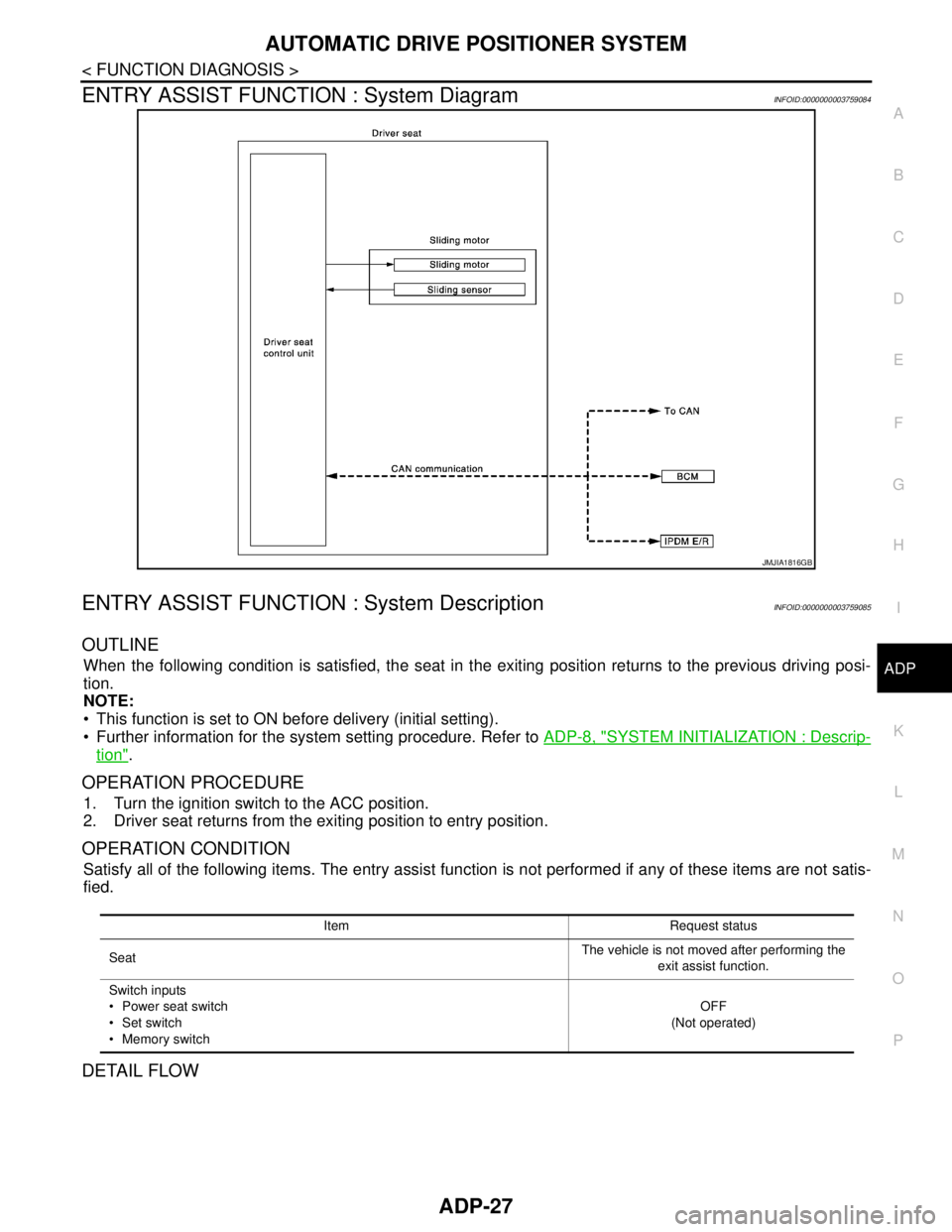
ENTRY ASSIST FUNCTION : System DiagramINFOID:0000000003759084
ENTRY ASSIST FUNCTION : System DescriptionINFOID:0000000003759085
OUTLINE
When the following condition is satisfied, the seat in the exiting position returns to the previous driving posi-
tion.
NOTE:
This function is set to ON before delivery (initial setting).
Further information for the system setting procedure. Refer to ADP-8, "
SYSTEM INITIALIZATION : Descrip-
tion".
OPERATION PROCEDURE
1. Turn the ignition switch to the ACC position.
2. Driver seat returns from the exiting position to entry position.
OPERATION CONDITION
Satisfy all of the following items. The entry assist function is not performed if any of these items are not satis-
fied.
DETAIL FLOW
JMJIA1816GB
Item Request status
SeatThe vehicle is not moved after performing the
exit assist function.
Switch inputs
Power seat switch
Set switch
Memory switchOFF
(Not operated)