engine NISSAN TEANA 2014 Manual PDF
[x] Cancel search | Manufacturer: NISSAN, Model Year: 2014, Model line: TEANA, Model: NISSAN TEANA 2014Pages: 4801, PDF Size: 51.2 MB
Page 371 of 4801
CHG-26
< DTC/CIRCUIT DIAGNOSIS >
B TERMINAL CIRCUIT
B TERMINAL CIRCUIT
DescriptionINFOID:0000000009460661
“B” terminal circuit supplies power to charge the battery and to operate the vehicles electrical system.
Diagnosis ProcedureINFOID:0000000009460662
Regarding Wiring Diagram information. Refer to CHG-12, "Wiring Diagram".
1.CHECK “B” TERMINAL CONNECTION
1. Turn ignition switch OFF.
2. Check if “B” terminal is clean and tight.
Is the inspection result normal?
YES >> GO TO 2.
NO >> Repair terminal “B” connection. Confirm repa ir by performing complete Charging system test
using the EXP-800 NI or GR8-1200 NI (if availabl e). Refer to applicable Instruction Manual for
proper testing procedures.
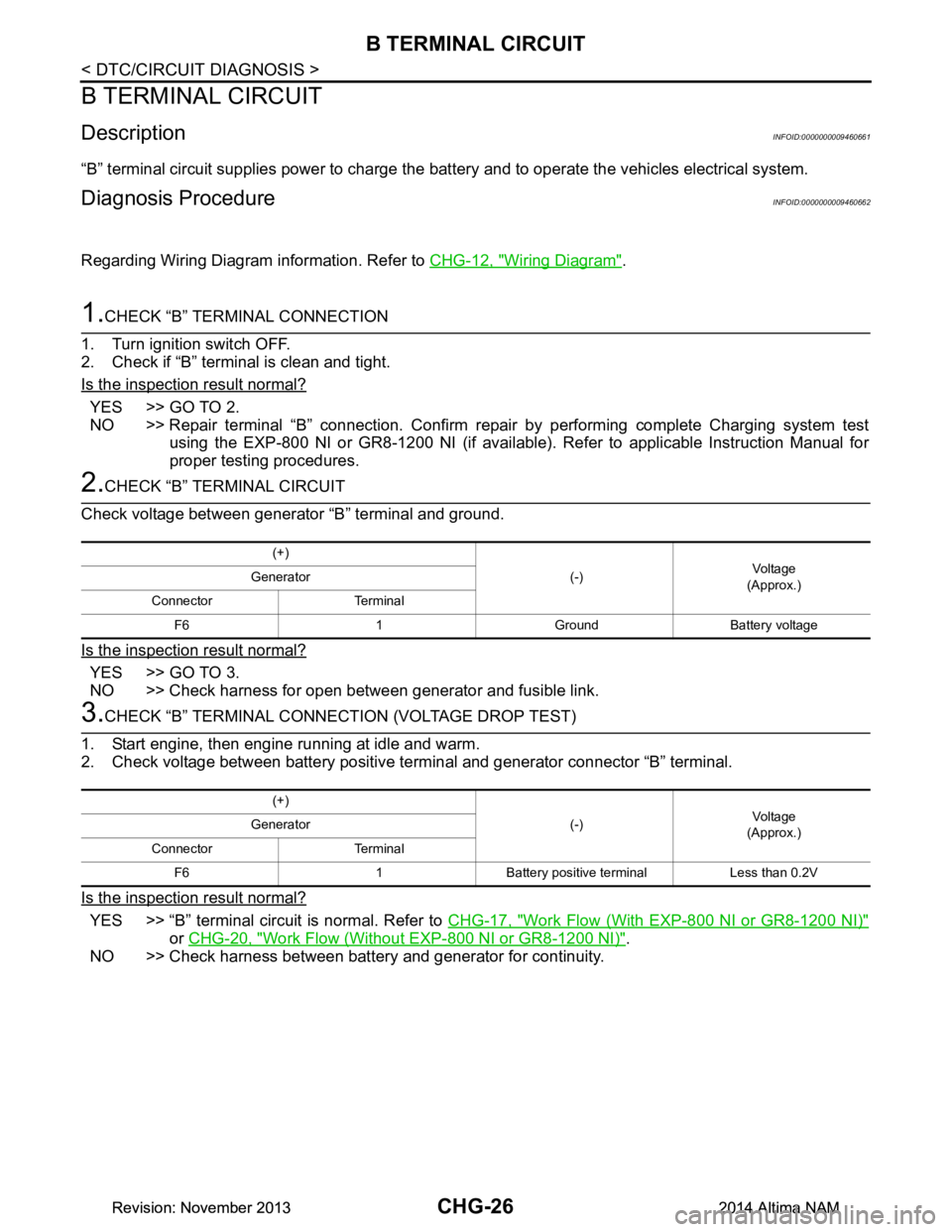
2.CHECK “B” TERMINAL CIRCUIT
Check voltage between generator “B” terminal and ground.
Is the inspection result normal?
YES >> GO TO 3.
NO >> Check harness for open between generator and fusible link.
3.CHECK “B” TERMINAL CONNECT ION (VOLTAGE DROP TEST)
1. Start engine, then engine running at idle and warm.
2. Check voltage between battery positive te rminal and generator connector “B” terminal.
Is the inspection result normal?
YES >> “B” terminal circuit is normal. Refer to CHG-17, "Work Flow (With EXP-800 NI or GR8-1200 NI)"
or CHG-20, "Work Flow (Without EXP-800 NI or GR8-1200 NI)".
NO >> Check harness between battery and generator for continuity.
(+)
(-)Voltage
(Approx.)
Generator
Connector Terminal F6 1 Ground Battery voltage
(+) (-)Voltage
(Approx.)
Generator
Connector Terminal F6 1 Battery positive terminal Less than 0.2V
Revision: November 20132014 Altima NAMRevision: November 20132014 Altima NAM
Page 372 of 4801
CHG
L TERMINAL CIRCUIT (OPEN)CHG-27
< DTC/CIRCUIT DIAGNOSIS >
C
D E
F
G H
I
J
K L
B
A
O P
N
L TERMINAL CIRCUIT (OPEN)
DescriptionINFOID:0000000009460663
The “L” terminal circuit controls the charge warning
lamp. The charge warning lamp turns ON when the igni-
tion switch is set to ON or START. When the generator is providing sufficient voltage with the engine running,
the charge warning lamp turns OFF. If the charge warn ing lamp illuminates with the engine running, a malfunc-
tion is indicated.
Diagnosis ProcedureINFOID:0000000009460664
Regarding Wiring Diagram information. Refer to CHG-12, "Wiring Diagram".
1.CHECK “L” TERMINAL CONNECTION
1. Turn ignition switch OFF.
2. Check if “L” terminal is clean and tight.
Is the inspection result normal?
YES >> GO TO 2.
NO >> Repair “L” terminal connection. Confirm repair by performing complete Charging system test
using EXP-800 NI or GR8-1200 NI (if available). Refer to applicable Instruction Manual for proper
testing procedures.
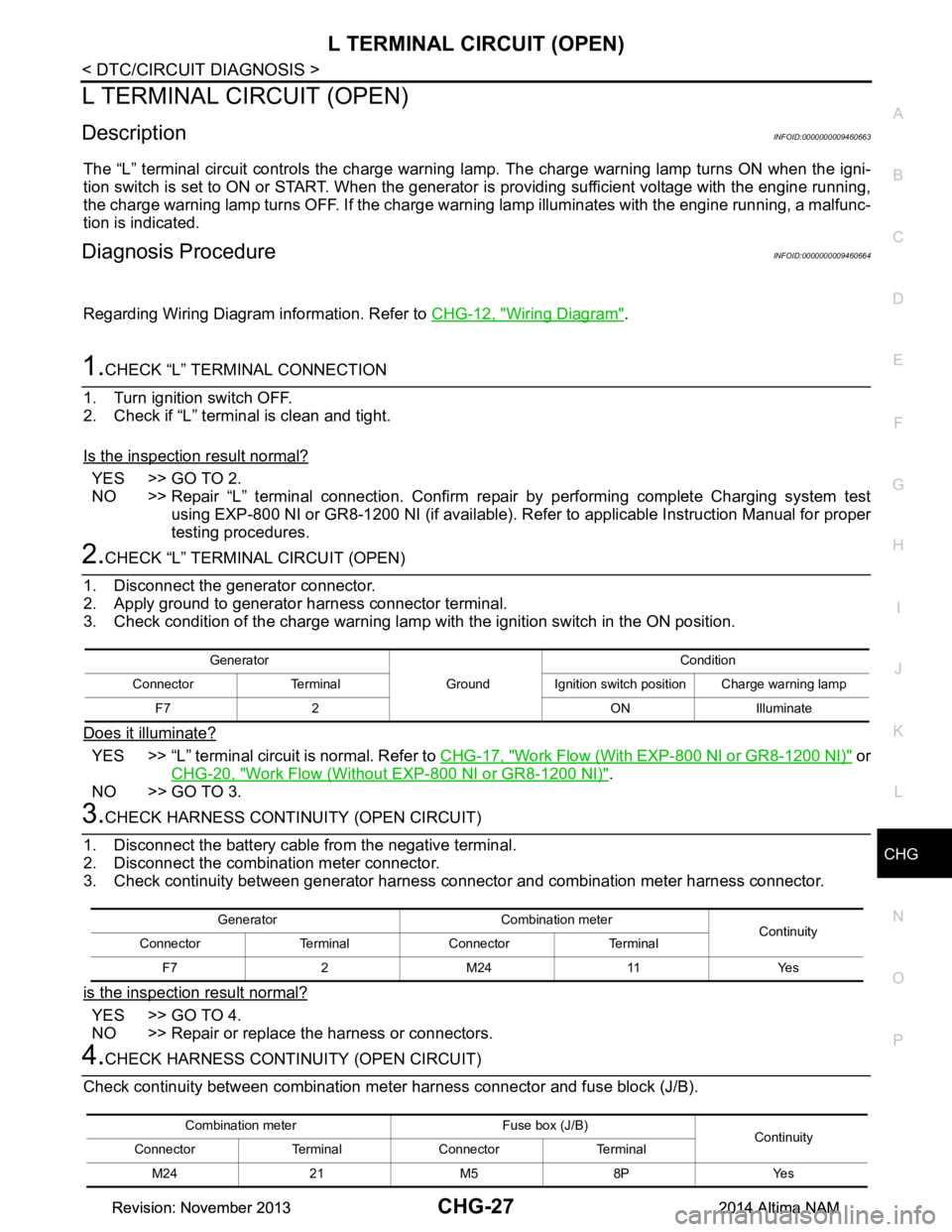
2.CHECK “L” TERMINAL CIRCUIT (OPEN)
1. Disconnect the generator connector.
2. Apply ground to generator harness connector terminal.
3. Check condition of the charge warning lamp with the ignition switch in the ON position.
Does it illuminate?
YES >> “L” terminal circuit is normal. Refer to CHG-17, "Work Flow (With EXP-800 NI or GR8-1200 NI)" or
CHG-20, "Work Flow (Without EXP-800 NI or GR8-1200 NI)"
.
NO >> GO TO 3.
3.CHECK HARNESS CONTI NUITY (OPEN CIRCUIT)
1. Disconnect the battery cabl e from the negative terminal.
2. Disconnect the combination meter connector.
3. Check continuity between generator harness connector and combination meter harness connector.
is the inspection result normal?
YES >> GO TO 4.
NO >> Repair or replace the harness or connectors.
4.CHECK HARNESS CONTI NUITY (OPEN CIRCUIT)
Check continuity between combination me ter harness connector and fuse block (J/B).
Generator
GroundCondition
Connector Terminal Ignition switch position Charge warning lamp F7 2 ON Illuminate
Generator Combination meter Continuity
Connector Terminal Connector Terminal
F7 2 M24 11 Yes
Combination meter Fuse box (J/B) Continuity
Connector Terminal Connector Terminal
M24 21 M5 8P Yes
Revision: November 20132014 Altima NAMRevision: November 20132014 Altima NAM
Page 374 of 4801
CHG
L TERMINAL CIRCUIT (SHORT)CHG-29
< DTC/CIRCUIT DIAGNOSIS >
C
D E
F
G H
I
J
K L
B
A
O P
N
L TERMINAL CIRCUIT (SHORT)
DescriptionINFOID:0000000009460665
The terminal “L” circuit controls the charge warning
lamp. The charge warning lamp turns ON when the igni-
tion switch is set to ON or START. When the generator is providing sufficient voltage with the engine running,
the charge warning lamp turns off. If the charge warn ing lamp illuminates with the engine running, a malfunc-
tion is indicated.
Diagnosis ProcedureINFOID:0000000009460666
Regarding Wiring Diagram information, refer to CHG-12, "Wiring Diagram".
1.CHECK “L” TERMINAL CIRCUIT (SHORT)
1. Turn ignition switch OFF.
2. Disconnect generator connector.
3. Turn ignition switch ON.
Does charge warning lamp illuminate?
YES >> GO TO 2.
NO >> Refer to CHG-17, "Work Flow (With EXP-800 NI or GR8-1200 NI)"
or CHG-20, "Work Flow (With-
out EXP-800 NI or GR8-1200 NI)".
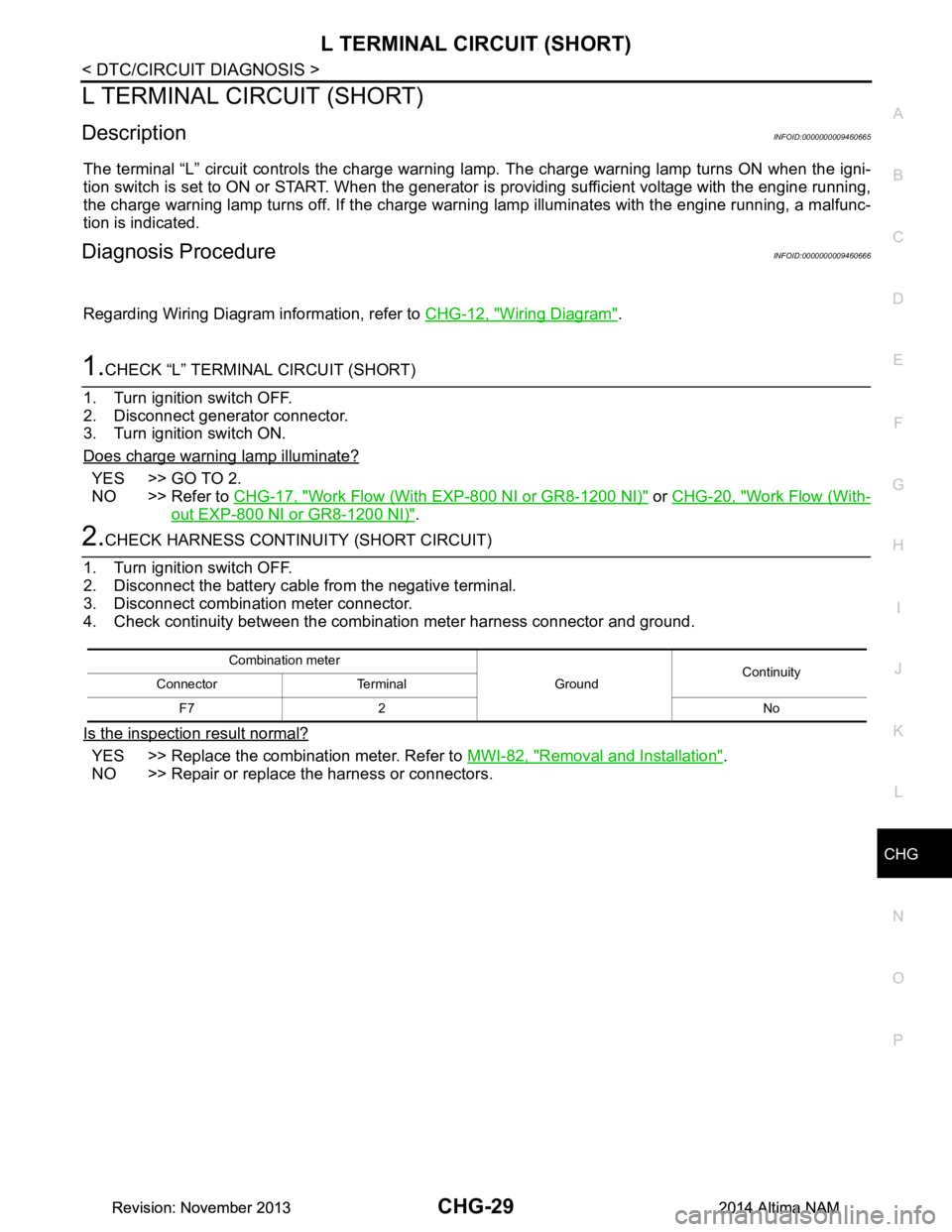
2.CHECK HARNESS CONTINUI TY (SHORT CIRCUIT)
1. Turn ignition switch OFF.
2. Disconnect the battery cabl e from the negative terminal.
3. Disconnect combination meter connector.
4. Check continuity between the comb ination meter harness connector and ground.
Is the inspection result normal?
YES >> Replace the combination meter. Refer to MWI-82, "Removal and Installation".
NO >> Repair or replace the harness or connectors.
Combination meter
GroundContinuity
Connector Terminal
F7 2 No
Revision: November 20132014 Altima NAMRevision: November 20132014 Altima NAM
Page 376 of 4801
CHG
CHARGING SYSTEMCHG-31
< SYMPTOM DIAGNOSIS >
C
D E
F
G H
I
J
K L
B
A
O P
N
SYMPTOM DIAGNOSIS
CHARGING SYSTEM
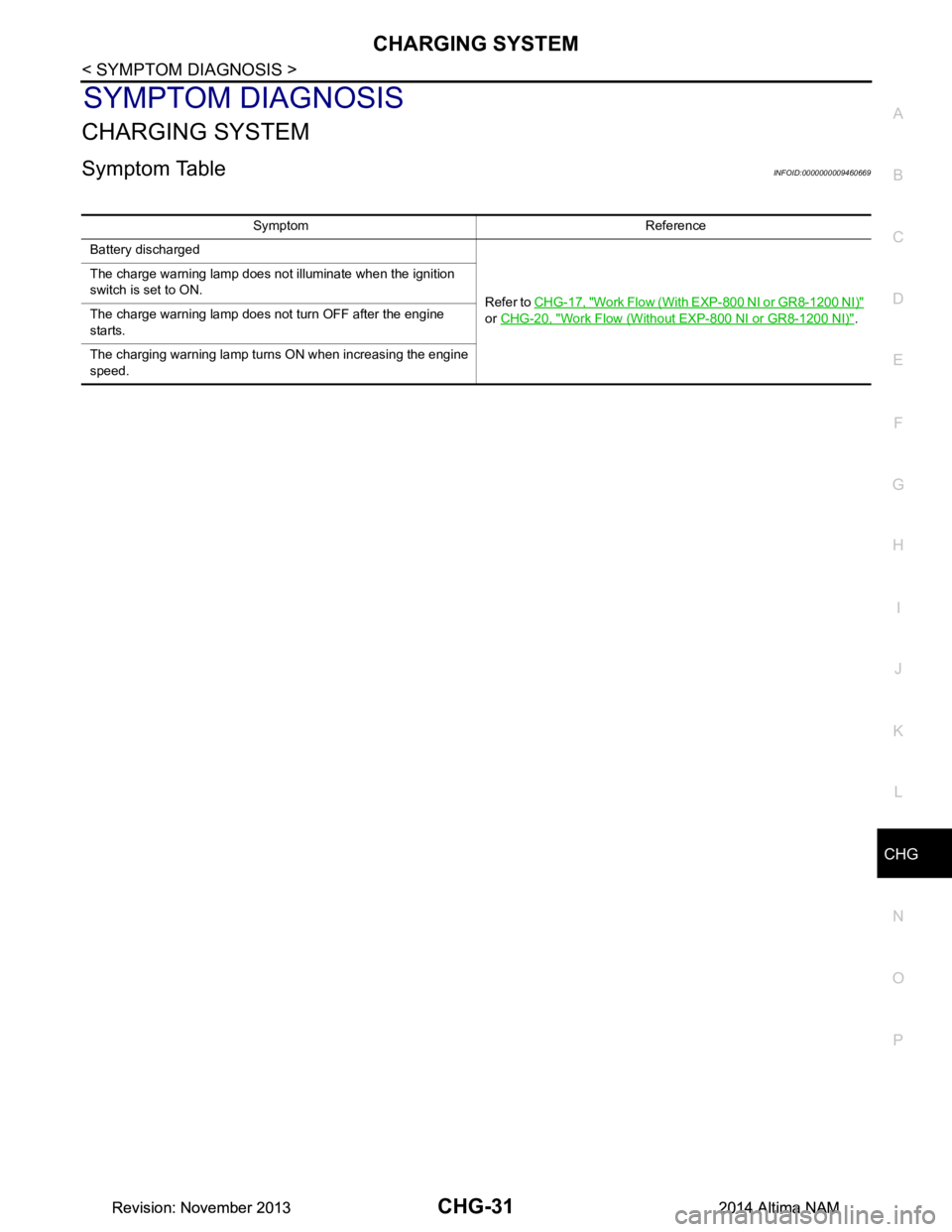
Symptom TableINFOID:0000000009460669
Symptom Reference
Battery discharged
Refer to CHG-17, "Work Flow (With EXP-800 NI or GR8-1200 NI)"
or CHG-20, "Work Flow (Without EXP-800 NI or GR8-1200 NI)"
.
The charge warning lamp does not illuminate when the ignition
switch is set to ON.
The charge warning lamp does not turn OFF after the engine
starts.
The charging warning lamp turns ON when increasing the engine
speed.
Revision: November 20132014 Altima NAMRevision: November 20132014 Altima NAM
Page 377 of 4801
CHG-32
< REMOVAL AND INSTALLATION >
GENERATOR
REMOVAL AND INSTALLATION
GENERATOR
Removal and InstallationINFOID:0000000009460670
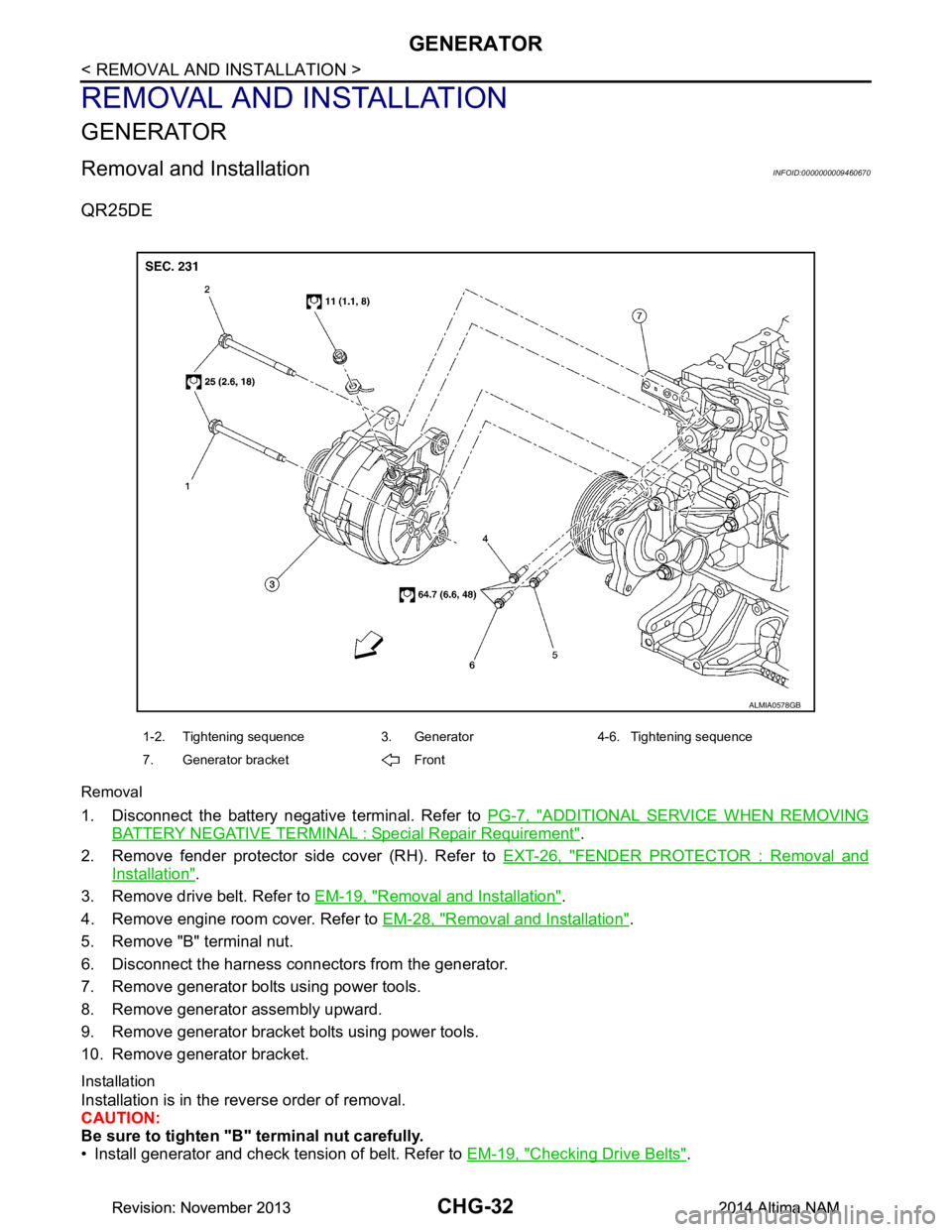
QR25DE
Removal
1. Disconnect the battery negative terminal. Refer to PG-7, "ADDITIONAL SERVICE WHEN REMOVING
BATTERY NEGATIVE TERMINAL : Special Repair Requirement".
2. Remove fender protector side cover (RH). Refer to EXT-26, "FENDER PROTECTOR : Removal and
Installation".
3. Remove drive belt. Refer to EM-19, "Removal and Installation"
.
4. Remove engine room cover. Refer to EM-28, "Removal and Installation"
.
5. Remove "B" terminal nut.
6. Disconnect the harness connectors from the generator.
7. Remove generator bolts using power tools.
8. Remove generator assembly upward.
9. Remove generator bracket bolts using power tools.
10. Remove generator bracket.
Installation
Installation is in the reverse order of removal.
CAUTION:
Be sure to tighten "B" terminal nut carefully.
• Install generator and check tension of belt. Refer to EM-19, "Checking Drive Belts"
.
ALMIA0578GB
1-2. Tightening sequence 3. Generator 4-6. Tightening sequence
7. Generator bracket Front
Revision: November 20132014 Altima NAMRevision: November 20132014 Altima NAM
Page 378 of 4801
CHG
GENERATORCHG-33
< REMOVAL AND INSTALLATION >
C
D E
F
G H
I
J
K L
B
A
O P
N
• This model is equipped with a power generation voltage
variable control system. Therefore, perform an
inspection of the power generation voltage variable c ontrol system operation after replacing the generator.
Refer to CHG-10, "System Description"
.
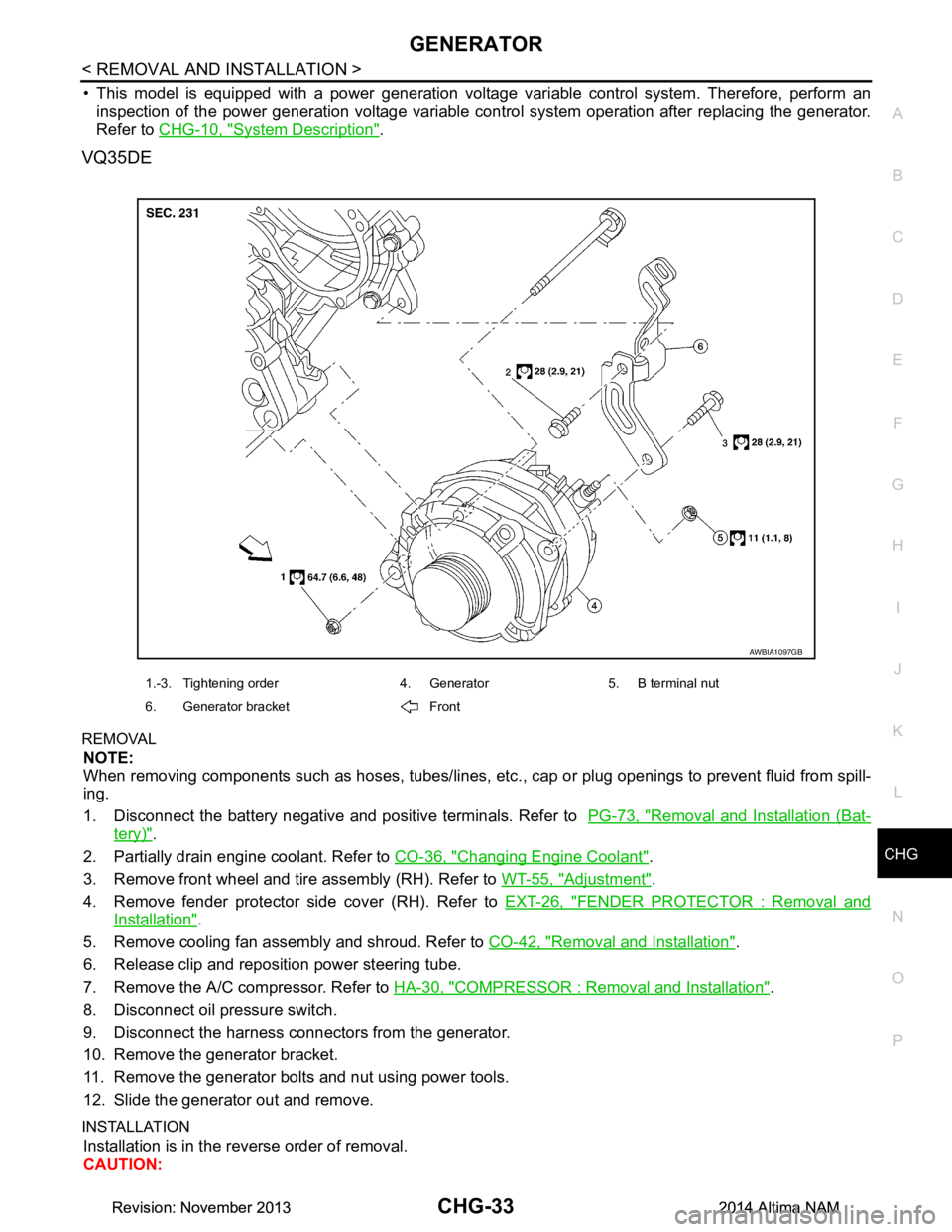
VQ35DE
REMOVAL
NOTE:
When removing components such as hoses, tubes/lines, etc. , cap or plug openings to prevent fluid from spill-
ing.
1. Disconnect the battery negative and positive terminals. Refer to PG-73, "Removal and Installation (Bat-
tery)".
2. Partially drain engine coolant. Refer to CO-36, "Changing Engine Coolant"
.
3. Remove front wheel and tire assembly (RH). Refer to WT-55, "Adjustment"
.
4. Remove fender protector side cover (RH). Refer to EXT-26, "FENDER PROTECTOR : Removal and
Installation".
5. Remove cooling fan assembly and shroud. Refer to CO-42, "Removal and Installation"
.
6. Release clip and reposition power steering tube.
7. Remove the A/C compressor. Refer to HA-30, "COMPRESSOR : Removal and Installation"
.
8. Disconnect oil pressure switch.
9. Disconnect the harness connectors from the generator.
10. Remove the generator bracket.
11. Remove the generator bolts and nut using power tools.
12. Slide the generator out and remove.
INSTALLATION
Installation is in the reverse order of removal.
CAUTION:
AWBIA1097GB
1.-3. Tightening order 4. Generator 5. B terminal nut
6. Generator bracket Front
Revision: November 20132014 Altima NAMRevision: November 20132014 Altima NAM
Page 381 of 4801

CO-1
ENGINE
C
D E
F
G H
I
J
K L
M
SECTION CO
A
CO
N
O P
CONTENTS
ENGINE COOLING SYSTEM
QR25DE
PRECAUTION ................ ...............................
3
PRECAUTIONS .............................................. .....3
Precaution for Supplemental Restraint System
(SRS) "AIR BAG" and "SEAT BELT PRE-TEN-
SIONER" ............................................................. ......
3
Precaution for Liquid Gasket .....................................3
PREPARATION ............................................5
PREPARATION .............................................. .....5
Special Service Tool ........................................... ......5
Commercial Service Tool ..........................................5
SYSTEM DESCRIPTION ..............................7
COOLING SYSTEM ....................................... .....7
Cooling Circuit ..................................................... ......7
Schematic .................................................................8
OVERHEATING CAUSE ANALYSIS ..................9
Troubleshooting Chart ...............................................9
PERIODIC MAINTENANCE .........................11
ENGINE COOLANT ....................................... ....11
System Inspection ............................................... ....11
Changing Engine Coolant .......................................12
REMOVAL AND INSTALLATION ...............16
RADIATOR ..................................................... ....16
Exploded View .................................................... ....16
Removal and Installation .........................................17
Inspection ............................................................ ....17
COOLING FAN ...................................................18
Exploded View .................................................... ....18
Removal and Installation .........................................18
WATER PUMP ............................................... ....20
Exploded View ..................................................... ....20
Removal and Installation .........................................20
THERMOSTAT AND THERMOSTAT HOUS-
ING ....................................................................
22
Exploded View ..................................................... ....22
Removal and Installation .........................................22
WATER OUTLET AND WATER PIPING ..........24
Exploded View .........................................................24
Removal and Installation .........................................24
SERVICE DATA AND SPECIFICATIONS
(SDS) ............... .............................................
26
SERVICE DATA AND SPECIFICATIONS
(SDS) .................................................................
26
Capacity ............................................................... ....26
Thermostat ..............................................................26
Radiator ...................................................................26
VQ35DE
PRECAUTION ...... ........................................
27
PRECAUTIONS .................................................27
Precaution for Supplemental Restraint System
(SRS) "AIR BAG" and "SEAT BELT PRE-TEN-
SIONER" ............................................................. ....
27
Precaution for Liquid Gasket ...................................27
PREPARATION ...........................................29
PREPARATION .................................................29
Special Service Tool ............................................ ....29
Commercial Service Tool ........................................29
SYSTEM DESCRIPTION .............................31
COOLING SYSTEM ..........................................31
Cooling Circuit ..................................................... ....31
Schematic ................................................................32
Revision: November 20132014 Altima NAM
Page 382 of 4801

CO-2
OVERHEATING CAUSE ANALYSIS ................33
Troubleshooting Chart ......................................... ...33
PERIODIC MAINTENANCE ..................... ...35
ENGINE COOLANT ........................................ ...35
System Inspection ............................................... ...35
Changing Engine Coolant .......................................36
REMOVAL AND INSTALLATION ...............40
RADIATOR ..................................................... ...40
Exploded View ..................................................... ...40
Removal and Installation ........................................41
Inspection ...............................................................41
COOLING FAN ..................................................42
Exploded View ..................................................... ...42
Removal and Installation ........................................42
WATER PUMP ...................................................44
Exploded View ..................................................... ...44
Removal and Installation .........................................44
THERMOSTAT AND THERMOSTAT HOUS-
ING .................................................................. ...
49
Exploded View ..................................................... ...49
Removal and Installation .........................................49
WATER OUTLET AND WATER PIPING ....... ...51
Exploded View ..................................................... ...51
Removal and Installation .........................................51
SERVICE DATA AND SPECIFICATIONS
(SDS) ............... ...........................................
53
SERVICE DATA AND SPECIFICATIONS
(SDS) .............................................................. ...
53
Capacity ............................................................... ...53
Thermostat ..............................................................53
Radiator ..................................................................53
Revision: November 20132014 Altima NAM
Page 383 of 4801
![NISSAN TEANA 2014 Manual PDF
PRECAUTIONSCO-3
< PRECAUTION > [QR25DE]
C
D E
F
G H
I
J
K L
M A
CO
NP
O
PRECAUTION
PRECAUTIONS
Precaution for Supplemental
Restraint System (SRS) "AIR BAG" and "SEAT BELT
PRE-TENSIONER"
INFOID:000](/img/5/57390/w960_57390-382.png "NISSAN TEANA 2014 Manual PDF
PRECAUTIONSCO-3
< PRECAUTION > [QR25DE]
C
D E
F
G H
I
J
K L
M A
CO
NP
O
PRECAUTION
PRECAUTIONS
Precaution for Supplemental
Restraint System (SRS) \"AIR BAG\" and \"SEAT BELT
PRE-TENSIONER\"
INFOID:000")
PRECAUTIONSCO-3
< PRECAUTION > [QR25DE]
C
D E
F
G H
I
J
K L
M A
CO
NP
O
PRECAUTION
PRECAUTIONS
Precaution for Supplemental
Restraint System (SRS) "AIR BAG" and "SEAT BELT
PRE-TENSIONER"
INFOID:0000000009951689
The Supplemental Restraint System such as “A IR BAG” and “SEAT BELT PRE-TENSIONER”, used along
with a front seat belt, helps to reduce the risk or severi ty of injury to the driver and front passenger for certain
types of collision. Information necessary to service t he system safely is included in the SR and SB section of
this Service Manual.
WARNING:
• To avoid rendering the SRS inoper ative, which could increase the risk of personal injury or death in
the event of a collision which would result in air bag inflation, all maintenance must be performed by
an authorized NISSAN/INFINITI dealer.
• Improper maintenance, including in correct removal and installation of the SRS, can lead to personal
injury caused by unintentional act ivation of the system. For removal of Spiral Cable and Air Bag
Module, see the SR section.
• Do not use electrical test equipm ent on any circuit related to the SRS unless instructed to in this
Service Manual. SRS wiring harnesses can be identi fied by yellow and/or orange harnesses or har-
ness connectors.
PRECAUTIONS WHEN USING POWER TOOLS (AIR OR ELECTRIC) AND HAMMERS
WARNING:
• When working near the Airbag Diagnosis Sensor Un it or other Airbag System sensors with the Igni-
tion ON or engine running, DO NOT use air or el ectric power tools or strike near the sensor(s) with a
hammer. Heavy vibration could activate the sensor( s) and deploy the air bag(s), possibly causing
serious injury.
• When using air or electric power tools or hammers , always switch the Ignition OFF, disconnect the
battery and wait at least three mi nutes before performing any service.
Precaution for Liquid GasketINFOID:0000000009460384
REMOVAL OF LIQUID GASKET
• After removing the bolts and nuts, separate the mating surface and
remove the liquid gasket using Tool (A).
CAUTION:
Be careful not to damage the mating surfaces.
• In areas where the cutter is difficult to use, use a plastic hammer to lightly tap (1) the cutter where the liquid gasket is applied. Use a
plastic hammer to slide (2) the cutter by tapping on the side.
CAUTION:
Do not damage the mating surfaces.
LIQUID GASKET APPLICATION PROCEDURE
1. Using a scraper, remove the old liquid gasket adhering to the gasket application surface and the mating surface.
• Remove the liquid gasket completely from the groove of the
gasket application surface, mounting bolts, and bolt holes.
2. Thoroughly clean the gasket application surface and the mating surface and remove adhering moisture, grease and foreign
materials.
3. Attach the liquid gasket tube to the tube presser. Use Genuine Silicone RTV Seal ant or equivalent. Refer to
GI-21, "Recommended Chemical Products and Sealants"
.
Tool Number (A): KV10111100 (J-37228)
AWBIA1249GB
PBIC0003E
Revision: November 20132014 Altima NAM
Page 384 of 4801
![NISSAN TEANA 2014 Manual PDF
CO-4
< PRECAUTION >[QR25DE]
PRECAUTIONS
4. Apply the liquid gasket using suitable tool without breaks to the
specified location.
• If there is a groove for the liquid gasket application, apply the](/img/5/57390/w960_57390-383.png "NISSAN TEANA 2014 Manual PDF
CO-4
< PRECAUTION >[QR25DE]
PRECAUTIONS
4. Apply the liquid gasket using suitable tool without breaks to the
specified location.
• If there is a groove for the liquid gasket application, apply the")
CO-4
< PRECAUTION >[QR25DE]
PRECAUTIONS
4. Apply the liquid gasket using suitable tool without breaks to the
specified location.
• If there is a groove for the liquid gasket application, apply the
liquid gasket to the groove.
• As for the bolt holes, normally apply the liquid gasket inside the holes. If specified, it should be applied outside the holes.
Make sure to read the text of this manual.
• Within five minutes of the liquid gasket application, install the mating component.
• If the liquid gasket protrudes, wipe it off immediately.
• Do not retighten after the installation.
• After 30 minutes or more have passed from the installation, fill the engine with the specified oil and coolant. Refer to MA-11,
"FOR USA AND CANADA : Fluids and Lubricants".
CAUTION:
If there are more specific instruct ions in the procedures contained in this manual concerning liquid
gasket applicatio n, observe them.
EMA0622D
SEM159F
Revision: November 20132014 Altima NAM