change wheel NISSAN TEANA 2014 Service Manual
[x] Cancel search | Manufacturer: NISSAN, Model Year: 2014, Model line: TEANA, Model: NISSAN TEANA 2014Pages: 4801, PDF Size: 51.2 MB
Page 156 of 4801
![NISSAN TEANA 2014 Service Manual
BRC-10
< SYSTEM DESCRIPTION >[VDC/TCS/ABS]
COMPONENT PARTS
Suction Valve 1, Suction Valve 2
Supplies the brake fluid from master cylinder to t
he pump, when VDC function and TCS function are activate](/img/5/57390/w960_57390-155.png "NISSAN TEANA 2014 Service Manual
BRC-10
< SYSTEM DESCRIPTION >[VDC/TCS/ABS]
COMPONENT PARTS
Suction Valve 1, Suction Valve 2
Supplies the brake fluid from master cylinder to t
he pump, when VDC function and TCS function are activate")
BRC-10
< SYSTEM DESCRIPTION >[VDC/TCS/ABS]
COMPONENT PARTS
Suction Valve 1, Suction Valve 2
Supplies the brake fluid from master cylinder to t
he pump, when VDC function and TCS function are activated.
Return Check Valve
Returns the brake fluid from brake caliper and wheel cy linder to master cylinder by bypassing orifice of each
valve when brake is released.
Reservoir
Temporarily reserves the brake fluid drained from brake caliper, so that pressure efficiently decreases when
decreasing pressure of brake caliper and wheel cylinder.
Yaw rate/side/decel G sensor
Calculates the following information that affects the vehicle, and transmits a signal to ABS actuator and elec-
tric unit (control unit) via communication lines.
• Vehicle rotation angular velocity (yaw rate signal)
• Vehicle lateral acceleration (side G signal) and longitudinal acceleration (decel G signal)
Pressure Sensor
Detects the brake fluid pressure and transmits signal to ABS actuator and electric unit (control unit).
Wheel Sensor and Sensor RotorINFOID:0000000009463744
NOTE:
• Wheel sensor of front wheel is installed on steering knuckle.
• Sensor rotor of front wheel is integrated in wheel hub assembly.
• Wheel sensor of rear wheel is installed on back plate of rear brake.
• Sensor rotor of rear wheel is installed on rear brake drum.
• Never measure resistance and voltage value using a tester because sensor is active sensor.
• Downsize and weight reduction is aimed. IC for detection portion and magnet for sensor rotor are adopted.
• Power supply is supplied to detection portion so that magnetic field line is read. Magnetic field that is detected is converted to current
signal.
• When sensor rotor rotates, magnetic field changes. Magnetic field change is converted to current signals (rectangular wave) and is
transmitted to ABS actuator and el ectric unit (control unit). Change
of magnetic field is proportional to wheel speed.
Stop Lamp SwitchINFOID:0000000009463745
Detects the operation status of brake pedal and transmits converted electric signal to ABS actuator and elec-
tric unit (control unit).
Steering Angle SensorINFOID:0000000009463746
Detects the following information and transmits steering angl e signal to ABS actuator and electric unit (control
unit) via CAN communication.
• Steering wheel rotation amount
• Steering wheel rotation angular velocity
• Steering wheel rotation direction
Brake Fluid Level SwitchINFOID:0000000009463747
Detects the brake fluid level in reservoir tank and transmi ts converted electric signal from combination meter to
ABS actuator and electric unit (control unit) via CAN communication.
Vacuum SensorINFOID:0000000009463748
Detects the vacuum in brake booster and transmits conver ted electric signal to ABS actuator and electric unit
(control unit).
JPFIC0131GB
Revision: November 20132014 Altima NAMRevision: November 20132014 Altima NAM
Page 179 of 4801
![NISSAN TEANA 2014 Service Manual
DIAGNOSIS SYSTEM [ABS ACTUATOR AND ELECTRIC UNIT (CONTROL
UNIT)]
BRC-33
< SYSTEM DESCRIPTION > [VDC/TCS/ABS]
C
D E
G H
I
J
K L
M A
B
BRC
N
O P
DIAGNOSIS SYSTEM [ABS ACTUATOR AND ELECTRIC UNIT (CO](/img/5/57390/w960_57390-178.png "NISSAN TEANA 2014 Service Manual
DIAGNOSIS SYSTEM [ABS ACTUATOR AND ELECTRIC UNIT (CONTROL
UNIT)]
BRC-33
< SYSTEM DESCRIPTION > [VDC/TCS/ABS]
C
D E
G H
I
J
K L
M A
B
BRC
N
O P
DIAGNOSIS SYSTEM [ABS ACTUATOR AND ELECTRIC UNIT (CO")
DIAGNOSIS SYSTEM [ABS ACTUATOR AND ELECTRIC UNIT (CONTROL
UNIT)]
BRC-33
< SYSTEM DESCRIPTION > [VDC/TCS/ABS]
C
D E
G H
I
J
K L
M A
B
BRC
N
O P
DIAGNOSIS SYSTEM [ABS ACTUATOR AND ELECTRIC UNIT (CONTROL
UNIT)]
CONSULT Function (ABS)INFOID:0000000009463758
CAUTION:
After disconnecting the CONSULT vehicle interface (VI) from the data link connector, the ignition must
be cycled OFF → ON (for at least 5 seconds) → OFF. If this step is not performed, the BCM may not go
to ”sleep mode”, potentiall y causing a discharged battery and a no-start condition.
FUNCTION
CONSULT can display each diagnostic item us ing the following direct diagnostic modes.
ECU IDENTIFICATION
ABS actuator and electric unit (control unit) part number is displayed.
SELF DIAGNOSTIC RESULT
Operation Procedure
1. Before performing the self-diagnosis, start engine and drive vehicle at 30 km/h (19 MPH) or more for
approximately 1 minute.
How To Erase Self Diagnostic Result
1. After erasing DTC memory, start engine and drive vehicle at 30 km/h (19 MPH) or more for approximately 1 minute as the final inspection, and make sure t hat the ABS warning lamp, VDC OFF indicator lamp,
SLIP indicator lamp and brake warning lamp turn OFF.
CAUTION:
If memory cannot be erased, perform applicable diagnosis.
NOTE:
• When the wheel sensor malfunctions, after inspecting the wheel sensor system, the ABS warning lamp,
SLIP indicator lamp and brake warning lamp will not turn OFF even when the system is normal, unless
the vehicle is driven at approximately 30 km/h (19 MPH) or more for approximately 1 minute.
• Brake warning lamp will turn ON in case of parking brake operation (when switch is ON) or of brake fluid
level switch operation (when brake fluid is insufficient).
• VDC OFF switch should not stay in ON position.
Display Item List
Refer to BRC-45, "DTC Index".
DATA MONITOR
Direct Diagnostic Mode Description
ECU identification The ABS actuator and electric un it (control unit) part number is displayed.
Self Diagnostic Result The ABS actuator and electric unit (control unit) self diagnostic results are displayed.
Data Monitor The ABS actuator and elec tric unit (control unit) input/output data is displayed in real time.
Active Test The ABS actuator and elec tric unit (control unit) activates outputs to test components.
Work support The settings for ABS actuator and electric unit (control unit) functions can be changed.
CAN DIAG SUPPORT MNTR The result of transmit/receive diagnosis of CAN communication is displayed.
Configuration • Read and save the vehicle specification (TYPE ID).
• Write the vehicle specification (TYPE ID) when replacing ABS actu ator and electric unit (con-
trol unit).
Revision: November 20132014 Altima NAMRevision: November 20132014 Altima NAM
Page 204 of 4801
![NISSAN TEANA 2014 Service Manual
BRC-58
< BASIC INSPECTION >[VDC/TCS/ABS]
ADJUSTMENT OF STEERING ANGLE
SENSOR NEUTRAL POSITION
ADJUSTMENT OF STEERING ANGLE SENSOR NEUTRAL POSITION
DescriptionINFOID:0000000009463767
Refer to the tab](/img/5/57390/w960_57390-203.png "NISSAN TEANA 2014 Service Manual
BRC-58
< BASIC INSPECTION >[VDC/TCS/ABS]
ADJUSTMENT OF STEERING ANGLE
SENSOR NEUTRAL POSITION
ADJUSTMENT OF STEERING ANGLE SENSOR NEUTRAL POSITION
DescriptionINFOID:0000000009463767
Refer to the tab")
BRC-58
< BASIC INSPECTION >[VDC/TCS/ABS]
ADJUSTMENT OF STEERING ANGLE
SENSOR NEUTRAL POSITION
ADJUSTMENT OF STEERING ANGLE SENSOR NEUTRAL POSITION
DescriptionINFOID:0000000009463767
Refer to the table below to determine if adjustment of steering angle sensor neutral position is required.
×: Required –: Not required
Work ProcedureINFOID:0000000009463768
ADJUSTMENT OF STEERING ANGLE SENSOR NEUTRAL POSITION
CAUTION:
To adjust neutral position of steering an gle sensor, make sure to use CONSULT.
(Adjustment cannot be done without CONSULT).
1.ALIGN THE VEHICLE STATUS
Stop vehicle with front wheels in straight-ahead position.
>> GO TO 2.
2.PERFORM THE NEUTRAL POSITION ADJUST MENT FOR THE STEERING ANGLE SENSOR
1. On the CONSULT screen, touch “WORK SUPPO RT” and “ST ANG SEN ADJUSTMENT” in order.
2. Touch “START”.
CAUTION:
Do not touch steering wheel whil e adjusting steering angle sensor.
3. After approximately 10 seconds, touch “END”. NOTE:
After approximately 60 seconds, it ends automatically.
4. Turn ignition switch OFF, then turn it ON again. CAUTION:
Be sure to perform above operation.
>> GO TO 3.
3.CHECK DATA MONITOR
1. Run vehicle with front wheels in straight-ahead position, then stop.
2. Select “DATA MONITOR”. Then make sure “STR ANGLE SIG” is within 0 ±2.5 °.
Is the steering angle within the specified range?
YES >> GO TO 4.
NO >> Perform the neutral position adjustment fo r the steering angle sensor again, GO TO 1
4.ERASE THE SELF-DIAGNOSIS MEMORY
Erase the self-diagnosis memory of the ABS ac tuator and electric unit (control unit) and ECM.
• ABS actuator and electric unit (control unit): Refer to BRC-33, "CONSULT Function (ABS)"
.
Situation Adjustment of steering angle sensor neutral position
Removing/Installing ABS actuator and electric unit (control unit) —
Replacing ABS actuator and electric unit (control unit) ×
Removing/Installing steering angle sensor ×
Replacing steering angle sensor ×
Removing/Installing steering components ×
Replacing steering components ×
Removing/Installing suspension components ×
Replacing suspension components ×
Change tires to new ones —
Tire rotation —
Adjusting wheel alignment ×
Revision: November 20132014 Altima NAMRevision: November 20132014 Altima NAM
Page 269 of 4801
![NISSAN TEANA 2014 Service Manual
NORMAL OPERATING CONDITIONBRC-123
< SYMPTOM DIAGNOSIS > [VDC/TCS/ABS]
C
D E
G H
I
J
K L
M A
B
BRC
N
O P
NORMAL OPERATING CONDITION
DescriptionINFOID:0000000009463845
Symptom Result
Slight vibration](/img/5/57390/w960_57390-268.png "NISSAN TEANA 2014 Service Manual
NORMAL OPERATING CONDITIONBRC-123
< SYMPTOM DIAGNOSIS > [VDC/TCS/ABS]
C
D E
G H
I
J
K L
M A
B
BRC
N
O P
NORMAL OPERATING CONDITION
DescriptionINFOID:0000000009463845
Symptom Result
Slight vibration")
NORMAL OPERATING CONDITIONBRC-123
< SYMPTOM DIAGNOSIS > [VDC/TCS/ABS]
C
D E
G H
I
J
K L
M A
B
BRC
N
O P
NORMAL OPERATING CONDITION
DescriptionINFOID:0000000009463845
Symptom Result
Slight vibrations are felt on the brake pedal and operation noises occur when VDC, TCS or ABS is activated. This is a normal condi-
tion due to the VDC,
TCS or ABS activation.
Stopping distance is longer than that of vehicles without ABS when the vehicle drives on rough, gravel, or
snow-covered (fresh, deep snow) roads.
The brake pedal moves and generates noises when TCS or VDC is activated due to rapid acceleration or
sharp turn.
The brake pedal vibrates and motor operation noises occur from the engine room after the engine starts and
just after the vehicle starts. This is normal, and it is
caused by the ABS op-
eration check.
Depending on the road conditions, the driver may experience a sluggish feel in the brake pedal. This is normal, because TCS places the highest
priority on the optimum
traction (stability).
TCS may activate momentarily if wheel speed changes when driving where road friction coefficient varies,
when downshifting, or when fully depressing accelerator pedal.
The ABS warning lamp and SLIP indicator lamp may turn ON when the vehicle is subject to strong shaking
or large vibration, such as when the vehicle is rotating on a turntable or located on a ship while the engine
is running. In this case, restart the
engine on a normal
road. If the normal con-
dition is restored, there
is no malfunction. At
that time, erase the self-
diagnosis memory.
VDC may not operate normally or th
e ABS warning lamp, and SLIP indicato r lamp may illuminate when driv-
ing on a road that is extremely slanted (e.g., bank in a circuit course).
A malfunction may occur in the yaw rate/side/decel G sensor system when the vehicle turns sharply, such
as during a spin turn, axle turn, or drift driving, while the VDC function is OFF (VDC OFF indicator lamp illu-
minated).
The vehicle speed will not increase even though the accelerator pedal is depressed, when inspecting the
speedometer on a 2-wheel chassis dynamometer. Normal (Deactivate the
VDC/TCS function be-
fore performing an in-
spection on a chassis
dynamometer.)
SLIP indicator lamp may simultaneously turn ON when low tire pressure warning lamp turns ON. This is not a VDC sys-
tem error but results
from characteristic
change of tire.
Revision: November 20132014 Altima NAMRevision: November 20132014 Altima NAM
Page 515 of 4801
![NISSAN TEANA 2014 Service Manual
DAS-82
< SYSTEM DESCRIPTION >[LDW]
HANDLING PRECAUTION
HANDLING PRECAUTION
Precautions for Lane Departure WarningINFOID:0000000009464727
REAR VIEW CAMERA HANDLING
The rear camera unit “1” for the](/img/5/57390/w960_57390-514.png "NISSAN TEANA 2014 Service Manual
DAS-82
< SYSTEM DESCRIPTION >[LDW]
HANDLING PRECAUTION
HANDLING PRECAUTION
Precautions for Lane Departure WarningINFOID:0000000009464727
REAR VIEW CAMERA HANDLING
The rear camera unit “1” for the")
DAS-82
< SYSTEM DESCRIPTION >[LDW]
HANDLING PRECAUTION
HANDLING PRECAUTION
Precautions for Lane Departure WarningINFOID:0000000009464727
REAR VIEW CAMERA HANDLING
The rear camera unit “1” for the LDW/BSW syst
ems is located above the rear license plate.
To keep the proper operation of the LDW systems and pr event a system malfunction, be sure to observe the
following:
• Always keep the camera lens clean. Be careful not to damage the nozzle of the automatic washer and
blower.
• Do not attach ”license plate accessories” that reflect light.
• Do not strike or damage the areas around the camera unit.
LANE DEPARTURE WARNING (LDW)
• LDW system is only a warning device to inform the dr iver of a potential unintended lane departure. It will not
steer the vehicle or prevent loss of cont rol. It is the driver’s responsibility to stay alert, drive safely, keep the
vehicle in the traveling lane, and be in control of the vehicle at all times.
• The camera unit may not detect properly under the following conditions:
- When towing a trailer.
- When strong light enters the camera unit. (For exampl e, direct sunlight or headlight from the rear.)
- When ambient light changes instantly. (For example, when the vehicle enters or exits a tunnel or passes
under a bridge.)
• Automatic washer and blower may not be able to secure detection capability when excessive dirt adheres on the camera lens.
• Excessive noise (e.g. audio system volume, open vehi cle window) will interfere with the chime sound, and it
may not be heard.
• The camera unit may not be able to detect properly under the following conditions:
- On roads where there are multiple parallel lane marker s; lane markers that are faded or not painted clearly;
yellow painted lane markers; non-standard lane markers; or lane markers covered with water, dirt or snow,
etc.
- On roads where the discontinued lane markers are still detectable.
- On roads where there are sharp curves.
- On roads where there are sharply c ontrasting objects, such as shadows, snow, water, wheel ruts, seams or
lines remaining after road repairs. (The LDW syst em could detect these items as lane markers.)
- On roads where the traveling lane merges or separates.
- When the vehicle's traveling direction does not align with the lane marker.
- When the road surface is very dark due to scarce ambient light or impaired tail lamp.
• When driving on a curved road, warning will be late on the outside of the curve due to the nature of the sys-
tem.
ALOIA0181ZZ
Revision: November 20132014 Altima NAMRevision: November 20132014 Altima NAM
Page 574 of 4801
![NISSAN TEANA 2014 Service Manual
DAS
NORMAL OPERATING CONDITIONDAS-141
< SYMPTOM DIAGNOSIS > [LDW]
C
D E
F
G H
I
J
K L
M B
N P
A
NORMAL OPERATING CONDITION
DescriptionINFOID:0000000009464793
PRECAUTIONS FOR LANE DEPARTURE WARNING](/img/5/57390/w960_57390-573.png "NISSAN TEANA 2014 Service Manual
DAS
NORMAL OPERATING CONDITIONDAS-141
< SYMPTOM DIAGNOSIS > [LDW]
C
D E
F
G H
I
J
K L
M B
N P
A
NORMAL OPERATING CONDITION
DescriptionINFOID:0000000009464793
PRECAUTIONS FOR LANE DEPARTURE WARNING")
DAS
NORMAL OPERATING CONDITIONDAS-141
< SYMPTOM DIAGNOSIS > [LDW]
C
D E
F
G H
I
J
K L
M B
N P
A
NORMAL OPERATING CONDITION
DescriptionINFOID:0000000009464793
PRECAUTIONS FOR LANE DEPARTURE WARNING (LDW)
• LDW system is only a warning devic e to inform the driver of a potential unintended lane departure. It will not
steer the vehicle or prevent loss of c ontrol. It is the driver’s responsibility to stay alert, drive safely, keep the
vehicle in the traveling lane, and be in control of the vehicle at all times.
• LDW system will not operate at s peeds below approximately 70 km/h (45 MPH) or if it cannot detect lane
markers.
• Excessive noise will interfere with the warning chime sound, and the chime may not be heard.
• LDW system may not function proper ly under the following conditions:
- On roads where there are multiple parallel lane marker s; lane markers that are faded or not painted clearly;
yellow painted lane markers; non-standard lane markers; or lane markers covered with water, dirt or snow,
etc.
- On roads where the discontinued lane markers are still detectable.
- On roads where there are sharp curves.
- On roads where there are sharply contrasting objects, such as shadows, snow, water, wheel ruts, seams or
lines remaining after road repairs. (The LDW syst em could detect these items as lane markers.)
- On roads where the traveling lane merges or separates.
- When the vehicle's traveling direction does not align with the lane marker.
- When traveling close to other vehicle in front of the vehicle, which obstructs the lane camera unit detection
range.
- When rain, snow or dirt adheres to the windshield in front of the lane camera unit.
- When a sudden change in brightness occurs. (For exampl e, when the vehicle enters or exits a tunnel or
under a bridge.)
Revision: November 20132014 Altima NAMRevision: November 20132014 Altima NAM
Page 590 of 4801
![NISSAN TEANA 2014 Service Manual
DAS
HANDLING PRECAUTIONDAS-157
< SYSTEM DESCRIPTION > [BSW]
C
D E
F
G H
I
J
K L
M B
N P
A
HANDLING PRECAUTION
Precautions for Blind Spot WarningINFOID:0000000009464811
REAR VIEW CAMERA HANDLING
The](/img/5/57390/w960_57390-589.png "NISSAN TEANA 2014 Service Manual
DAS
HANDLING PRECAUTIONDAS-157
< SYSTEM DESCRIPTION > [BSW]
C
D E
F
G H
I
J
K L
M B
N P
A
HANDLING PRECAUTION
Precautions for Blind Spot WarningINFOID:0000000009464811
REAR VIEW CAMERA HANDLING
The")
DAS
HANDLING PRECAUTIONDAS-157
< SYSTEM DESCRIPTION > [BSW]
C
D E
F
G H
I
J
K L
M B
N P
A
HANDLING PRECAUTION
Precautions for Blind Spot WarningINFOID:0000000009464811
REAR VIEW CAMERA HANDLING
The rear camera unit “1” for the LDW/BSW sy stems is located above the rear license plate.
To keep the proper operation of the LDW systems and prev ent a system malfunction, be sure to observe the
following:
• Always keep the camera lens clean. Be careful not to damage the nozzle of the automatic washer and
blower.
• Do not attach ”license plate accessories” that reflect light.
• Do not strike or damage the areas around the camera unit.
BLIND SPOT WARNING (BSW)
• BSW system is not a replacement for proper drivi ng procedure and is not designed to prevent contact with
vehicles or objects. When changing lanes, always use the side and rear mirrors and turn and look in the
direction you will move to ensure it is safe to change lanes. Never rely solely on the BSW system.
• The camera unit may not detect properly under the following conditions:
- When towing a trailer.
- When strong light enters the camera unit. (For exampl e, direct sunlight or headlight from the rear.)
- When ambient light changes instantly. (For example, when the vehicle enters or exits a tunnel or passes
under a bridge.)
• Automatic washer and blower may not be able to secu re detection capability when excessive dirt adheres on
the camera lens.
• Excessive noise (e.g. audio system volume, open vehicle window) will interfere with the chime sound, and it
may not be heard.
• The camera unit may not be able to detect when certain objects are present such as:
- Pedestrians, bicycles, animals.
- Several types of vehicles such as motorcycles.
- Oncoming vehicles.
- A vehicle approaching rapidly from behind
- A vehicle which your vehicle overtakes rapidly.
• The camera unit may not be able to detect properly when your vehicle travels beside the middle section of a
vehicle with a long wheelbase (e.g., trailer truck, semi-trailer, tractor).
• The camera unit is designed to ignore most stationary objects, however objects such as guardrails, walls,
foliage and parked vehicles may occasionally be det ected. This is a normal operating condition.
• The camera unit may detect reflection image of vehicles or roadside objects that are not actually in the
detection zone, especially when the road is wet.
ALOIA0181ZZ
Revision: November 20132014 Altima NAMRevision: November 20132014 Altima NAM
Page 649 of 4801
![NISSAN TEANA 2014 Service Manual
DAS-216
< SYMPTOM DIAGNOSIS >[BSW]
NORMAL OPERATING CONDITION
NORMAL OPERATING CONDITION
DescriptionINFOID:0000000009464875
PRECAUTIONS FOR BLIND SPOT WARNING (BSW)
• The Blind Spot Warning system](/img/5/57390/w960_57390-648.png "NISSAN TEANA 2014 Service Manual
DAS-216
< SYMPTOM DIAGNOSIS >[BSW]
NORMAL OPERATING CONDITION
NORMAL OPERATING CONDITION
DescriptionINFOID:0000000009464875
PRECAUTIONS FOR BLIND SPOT WARNING (BSW)
• The Blind Spot Warning system")
DAS-216
< SYMPTOM DIAGNOSIS >[BSW]
NORMAL OPERATING CONDITION
NORMAL OPERATING CONDITION
DescriptionINFOID:0000000009464875
PRECAUTIONS FOR BLIND SPOT WARNING (BSW)
• The Blind Spot Warning system is not a replacem
ent for proper driving procedure and are not designed to
prevent contact with vehicles or objects. When c hanging lanes, always use the side and rear mirrors and
turn and look in the direction driver will move to ensure it is safe to change lanes. Never rely solely on the
Blind Spot Warning system.
• The Blind Spot Warning system may not provide a warn ing for vehicles that pass through the detection zone
quickly.
• Do not use the Blind Spot Warning system when towing a trailer.
• Excessive noise (e.g., audio system volume, open v ehicle window) will interfere with the chime sound, and it
may not be heard.
• The rear view camera may not be able to detect and activate Blind Spot Warning when certain objects are present such as:
- Pedestrians, bicycles, animals.
- Several types of vehicles such as motorcycles.
- Oncoming vehicles.
- Vehicles remaining in the detection zone when driver accelerates from a stop.
- A vehicle merging into an adjacent lane at a speed approximately the same as vehicle.
- A vehicle approaching rapidly from behind.
- Another vehicle which overtakes this vehicle rapidly.
• Severe weather or road spray conditions may reduce the abi lity of the rear view camera to detect other vehi-
cles.
• The rear view camera detection zone is designed based on a standard lane width. When driving in a wider
lane, the rear view camera may not detect vehicles in an adjacent lane. When driving in a narrow lane, the
rear view camera may detect vehicles driving two lanes away.
• The rear view camera is designed to ignore most stationary objects, however objects such as guardrails,
walls, foliage and parked vehicles may occasionally be detected. This is a normal operating condition.
PRECAUTIONS FOR BLIND SPOT WARNING
• Do not use the Blind Spot Warning system under the following conditions because the system may not func-
tion properly:
- During bad weather (e.g., rain, fog, snow, wind, etc.)
- When driving on slippery roads, such as on ice or snow, etc.
- When driving on winding or uneven roads.
- When there is a lane closure due to road repairs.
- When driving in a makeshift lane.
- When driving on roads where the lane width is too narrow.
- When driving with a tire that is not within normal tire c onditions (e.g., tire wear, low tire pressure, installation
of spare tire, tire chains, non-standard wheels).
- When the vehicle is equipped with non-original brake parts or suspension parts.
• The rear view camera may not detect lane markers in the following situations and the Blind Spot Warning
system may not operate properly:
- On roads where there are multiple parallel lane marker s; lane markers that are faded or not painted clearly;
yellow painted lane markers; nonstandard lane markers; lane markers covered with water, dirt, snow, etc.
- On roads where discontinued lane markers are still detectable.
- On roads where there are sharp curves.
- On roads where there are sharply c ontrasting objects, such as shadows, snow, water, wheel ruts, seams or
lines remaining after road repairs.
- On roads where the traveling lane merges or separates.
- When the vehicle traveling direction does not align with the lane markers.
- When rain, snow or dirt adheres to the lens of a the rear view camera unit.
- When a sudden change in brightness occurs. (e.g., when the vehicle enters or exits a tunnel or under a
bridge.)
- When steering quickly.
- When the hazard warning flashers are operated.
- When driving on a curve at a high speed.
Revision: November 20132014 Altima NAMRevision: November 20132014 Altima NAM
Page 1338 of 4801
![NISSAN TEANA 2014 Service Manual
EC-338
< DTC/CIRCUIT DIAGNOSIS >[QR25DE]
P0441 EVAP CONTROL SYSTEM
2.PERFORM DTC CONFIRMATION PROCEDURE-1
WITH CONSULT
TESTING CONDITION:
Always perform test at a temperature of 5 °C (41 °F) or mo](/img/5/57390/w960_57390-1337.png "NISSAN TEANA 2014 Service Manual
EC-338
< DTC/CIRCUIT DIAGNOSIS >[QR25DE]
P0441 EVAP CONTROL SYSTEM
2.PERFORM DTC CONFIRMATION PROCEDURE-1
WITH CONSULT
TESTING CONDITION:
Always perform test at a temperature of 5 °C (41 °F) or mo")
EC-338
< DTC/CIRCUIT DIAGNOSIS >[QR25DE]
P0441 EVAP CONTROL SYSTEM
2.PERFORM DTC CONFIRMATION PROCEDURE-1
WITH CONSULT
TESTING CONDITION:
Always perform test at a temperature of 5 °C (41 °F) or more.
1. Start engine and warm it up to normal operating temperature.
2. Turn ignition switch OFF and wait at least 10 seconds.
3. Turn ignition switch ON.
4. Turn ignition switch OFF and wait at least 10 seconds.
5. Start engine and let it idle for at least 70 seconds.
6. Select “PURG FLOW P0441” of “EVAPORATI VE SYSTEM” in “DTC WORK SUPPORT” mode of
“ENGINE” using CONSULT.
7. Touch “START”.
Is
“COMPLETED” displayed on CONSULT screen?
YES >> GO TO 4.
NO >> GO TO 3.
3.PERFORM DTC CONFIRMATION PROCEDURE-2
When the following conditions are met, “TESTING” will be displayed on the CONSULT screen. Maintain the
conditions continuously until “TESTING” changes to “COMPLETED”. (It will take at least 35 seconds.)
CAUTION:
Always drive vehicle at a safe speed.
NOTE:
If “TESTING” does not change for a long time, retry from step 2.
Is
“COMPLETED” displayed on CONSULT screen?
YES >> GO TO 4.
NO >> Perform DTC CONFIRMATION PROCEDURE again. GO TO 2.
4.PERFORM DTC CONFIRMATION PROCEDURE-3
Touch “SELF-DIAG RESULTS”.
Which is displayed on CONSULT screen?
OK >> INSPECTION END
NG >> Proceed to EC-339, "Diagnosis Procedure"
.
5.PERFORM COMPONENT FUNCTION CHECK
WITH GST
Perform component function check. Refer to EC-338, "Component Function Check"
.
NOTE:
Use component function check to check the overall moni toring function of the EVAP control system purge flow
monitoring. During this check, a 1st trip DTC might not be confirmed.
Is the inspection result normal?
YES >> INSPECTION END
NO >> Proceed to EC-339, "Diagnosis Procedure"
.
Component Function CheckINFOID:0000000009462270
1.PERFORM COMPONENT FUNCTION CHECK
1. Lift up drive wheels.
2. Start engine (VDC switch OFF) and warm it up to normal operating temperature.
3. Turn ignition switch OFF and wait at least 10 seconds.
Selector lever Suitable position
VHCL SPEED SE 32 - 120 km/h (20 - 75 MPH)
ENG SPEED 500 - 3,800 rpm
B/FUEL SCHDL 1.0 - 10.0 msec
COOLAN TEMP/S More than 0 °C (32 °F)
Revision: November 20132014 Altima NAMRevision: November 20132014 Altima NAM
Page 3189 of 4801
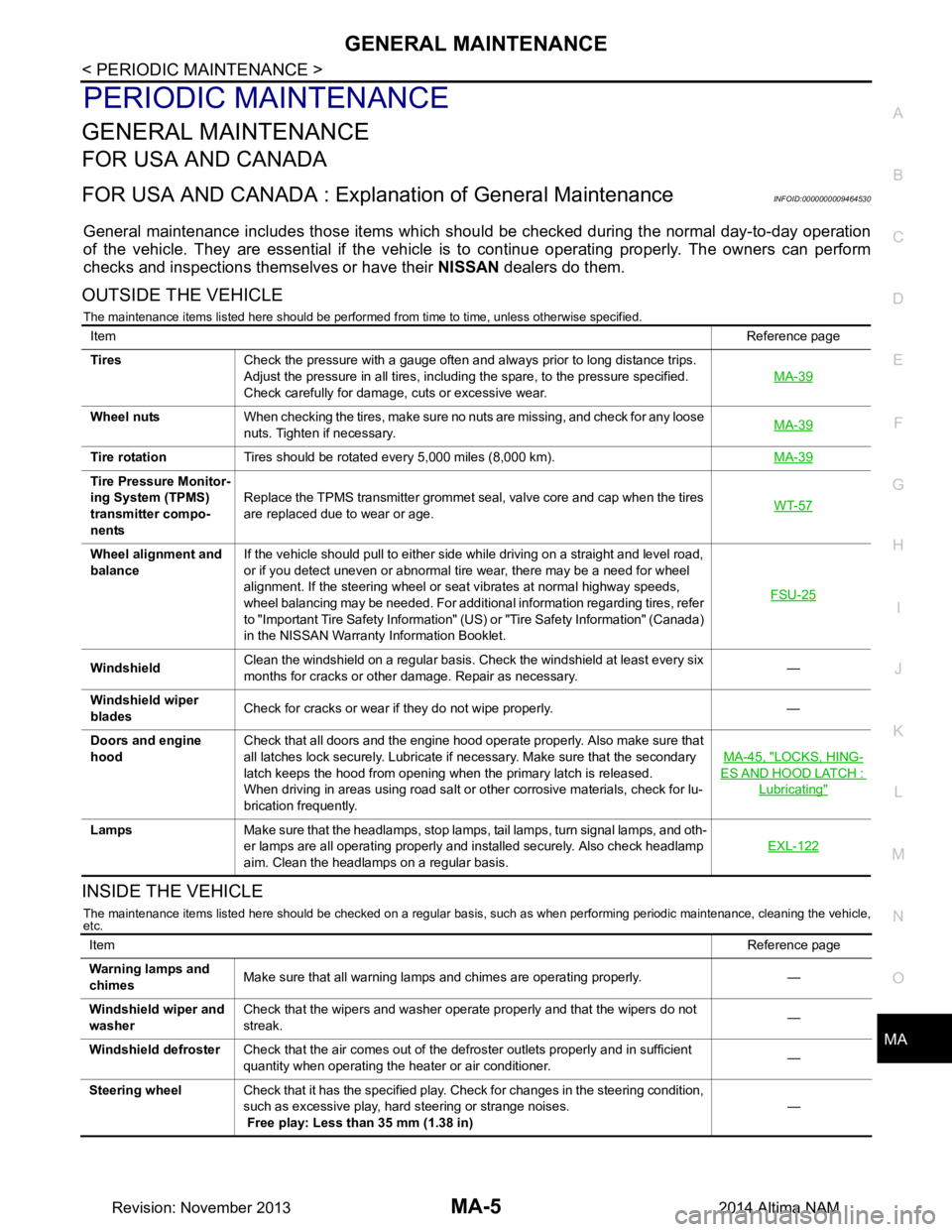
GENERAL MAINTENANCEMA-5
< PERIODIC MAINTENANCE >
C
D E
F
G H
I
J
K L
M B
MA
N
O A
PERIODIC MAINTENANCE
GENERAL MAINTENANCE
FOR USA AND CANADA
FOR USA AND CANADA : Explana
tion of General MaintenanceINFOID:0000000009464530
General maintenance includes those items which shoul d be checked during the normal day-to-day operation
of the vehicle. They are essential if the vehicle is to continue operating properly. The owners can perform
checks and inspections themselves or have their NISSAN dealers do them.
OUTSIDE THE VEHICLE
The maintenance items listed here should be performed from time to time, unless otherwise specified.
INSIDE THE VEHICLE
The maintenance items listed here should be checked on a regular basis, such as when performing periodic maintenance, cleaning the vehicle,
etc.
Item Reference page
Tires Check the pressure with a gauge often and always prior to long distance trips.
Adjust the pressure in all tires, including the spare, to the pressure specified.
Check carefully for damage, cuts or excessive wear. MA-39
Wheel nuts
When checking the tires, make sure no nuts are missing, and check for any loose
nuts. Tighten if necessary. MA-39
Tire rotation
Tires should be rotated every 5,000 miles (8,000 km). MA-39
Tire Pressure Monitor-
ing System (TPMS)
transmitter compo-
nents Replace the TPMS transmitter grommet seal, valve core and cap when the tires
are replaced due to wear or age. WT-57
Wheel alignment and
balance If the vehicle should pull to either side while driving on a straight and level road,
or if you detect uneven or abnormal tire wear, there may be a need for wheel
alignment. If the steering wheel or seat vibrates at normal highway speeds,
wheel balancing may be needed. For additional information regarding tires, refer
to "Important Tire Safety Information" (US) or "Tire Safety Information" (Canada)
in the NISSAN Warranty Information Booklet. FSU-25
Windshield
Clean the windshield on a regular basis. Check the windshield at least every six
months for cracks or other damage. Repair as necessary. —
Windshield wiper
blades Check for cracks or wear if they do not wipe properly. —
Doors and engine
hood Check that all doors and the engine hood operate properly. Also make sure that
all latches lock securely. Lubricate if necessary. Make sure that the secondary
latch keeps the hood from opening when the primary latch is released.
When driving in areas using road salt or other corrosive materials, check for lu-
brication frequently. MA-45, "LOCKS, HING-
ES AND HOOD LATCH :
Lubricating"
Lamps
Make sure that the headlamps, stop lamps, tail lamps, turn signal lamps, and oth-
er lamps are all operating properly and installed securely. Also check headlamp
aim. Clean the headlamps on a regular basis. EXL-122
Item
Reference page
Warning lamps and
chimes Make sure that all warning lamps and chimes are operating properly. —
Windshield wiper and
washer Check that the wipers and washer operate properly and that the wipers do not
streak. —
Windshield defroster Check that the air comes out of the defroster outlets properly and in sufficient
quantity when operating the heater or air conditioner. —
Steering wheel Check that it has the specified play. Check for changes in the steering condition,
such as excessive play, hard steering or strange noises.
Free play: Less than 35 mm (1.38 in) —
Revision: November 20132014 Altima NAM