turn signal NISSAN TIIDA 2007 Service Service Manual
[x] Cancel search | Manufacturer: NISSAN, Model Year: 2007, Model line: TIIDA, Model: NISSAN TIIDA 2007Pages: 5883, PDF Size: 78.95 MB
Page 94 of 5883
![NISSAN TIIDA 2007 Service Service Manual AV
STEERING SWITCH
AV-89
< COMPONENT DIAGNOSIS >[AUDIO WITH NAVIGATION]
C
D
E
F
G
H
I
J
K
L
MB A
O
P
STEERING SWITCH
DescriptionINFOID:0000000001728775
When one of the steering wheel AV control switch](/img/5/57395/w960_57395-93.png "NISSAN TIIDA 2007 Service Service Manual AV
STEERING SWITCH
AV-89
< COMPONENT DIAGNOSIS >[AUDIO WITH NAVIGATION]
C
D
E
F
G
H
I
J
K
L
MB A
O
P
STEERING SWITCH
DescriptionINFOID:0000000001728775
When one of the steering wheel AV control switch")
AV
STEERING SWITCH
AV-89
< COMPONENT DIAGNOSIS >[AUDIO WITH NAVIGATION]
C
D
E
F
G
H
I
J
K
L
MB A
O
P
STEERING SWITCH
DescriptionINFOID:0000000001728775
When one of the steering wheel AV control switches is pushed, the resistance in the steering wheel AV control
switch circuit changes depending on which button is pushed.
Diagnosis ProcedureINFOID:0000000001728776
1.CHECK STEERING WHEEL AUDIO CONTROL SWITCH RESISTANCE
1. Disconnect steering wheel audio control switch connector M102.
2. Check resistance between steering switch connector terminals.
Do the steering wheel audio control switches check OK?
YES >> GO TO 2
NO >> Replace steering wheel audio control switch. Refer to XX-XX, "*****"
.
2.CHECK HARNESS
1. Turn ignition switch OFF.
2. Disconnect AV control unit connector M42 and spiral cable con-
nector M30.
3. Check continuity between AV control unit harness connector
M42 (A) and spiral cable harness connector M30 (B).
4. Check continuity between AV control unit connector M42 (A) and ground.
Are the continuity results as specified?
YES >> GO TO 3
NO >> Repair harness.
3.SPIRAL CABLE CHECK
Terminal Signal name ConditionResistance
(Ω)
(Approx.)
16 17Seek (down)
Depress switch.165
Volume (down) Depress VOL down switch. 487
Power Depress PWR switch. 0
20 17Seek (up)
Depress switch.165
Volume (up) Depress VOL up switch. 487
Mode Depress MODE switch. 0
WKIA4457E
AB
Continuity
Connector Terminal Connector Terminal
M426
M3024
Ye s 15 31
16 32
A
—Continuity
Connector Terminal
M426
Ground No 15
16
ALNIA0332GB
Page 96 of 5883
![NISSAN TIIDA 2007 Service Service Manual AV
MICROPHONE SIGNAL CIRCUIT
AV-91
< COMPONENT DIAGNOSIS >[AUDIO WITH NAVIGATION]
C
D
E
F
G
H
I
J
K
L
MB A
O
P
MICROPHONE SIGNAL CIRCUIT
DescriptionINFOID:0000000001728741
Supplies power from NAVI con](/img/5/57395/w960_57395-95.png "NISSAN TIIDA 2007 Service Service Manual AV
MICROPHONE SIGNAL CIRCUIT
AV-91
< COMPONENT DIAGNOSIS >[AUDIO WITH NAVIGATION]
C
D
E
F
G
H
I
J
K
L
MB A
O
P
MICROPHONE SIGNAL CIRCUIT
DescriptionINFOID:0000000001728741
Supplies power from NAVI con")
AV
MICROPHONE SIGNAL CIRCUIT
AV-91
< COMPONENT DIAGNOSIS >[AUDIO WITH NAVIGATION]
C
D
E
F
G
H
I
J
K
L
MB A
O
P
MICROPHONE SIGNAL CIRCUIT
DescriptionINFOID:0000000001728741
Supplies power from NAVI control unit to microphone. The microphone transmits the sound voice to the NAVI
control unit.
Diagnosis ProcedureINFOID:0000000001728742
1.CHECK HARNESS BETWEEN NAVI CONTROL UNIT AND MICROPHONE
1. Turn ignition switch OFF.
2. Disconnect NAVI control unit connector and microphone connector.
3. Check continuity between NAVI control unit harness connector B68 and microphone harness connector
R15.
4. Check continuity between NAVI control unit harness connector B68 and ground.
Are the continuity test results as specified?
YES >> GO TO 2
NO >> Repair harness or connector.
2.CHECK MICROPHONE POWER SUPPLY
1. Connect NAVI control unit connector and microphone connector.
2. Turn ignition switch ON.
3. Check voltage between microphone harness connector R15 ter-
minal 4 and ground.
Is voltage reading approx. 5 volts?
YES >> GO TO 3
NO >> Replace NAVI control unit. Refer to XX-XX, "*****"
.
3.CHECK MICROPHONE SIGNAL
Check signal between NAVI control unit harness connector B68 terminals 8 and 7 with CONSULT-III or oscilli-
scope.
Te r m i n a l Te r m i n a l
Continuity
Connector Terminal Connector Terminal
B688
R151
Ye s 72
64
Te r m i n a l
— Continuity
Connector Terminal
B688
Ground No 7
6
4 - Ground : Approx. 5V
WKIA5796E
Page 117 of 5883
![NISSAN TIIDA 2007 Service Service Manual AV-112
< SYMPTOM DIAGNOSIS >[AUDIO WITH NAVIGATION]
NORMAL OPERATING CONDITION
MAP DVD-ROM
ROUTE CALCULATION AND VISUAL GUIDANCE
The GPS indicator on the screen
remains gray.GPS signals cannot be rec](/img/5/57395/w960_57395-116.png "NISSAN TIIDA 2007 Service Service Manual AV-112
< SYMPTOM DIAGNOSIS >[AUDIO WITH NAVIGATION]
NORMAL OPERATING CONDITION
MAP DVD-ROM
ROUTE CALCULATION AND VISUAL GUIDANCE
The GPS indicator on the screen
remains gray.GPS signals cannot be rec")
AV-112
< SYMPTOM DIAGNOSIS >[AUDIO WITH NAVIGATION]
NORMAL OPERATING CONDITION
MAP DVD-ROM
ROUTE CALCULATION AND VISUAL GUIDANCE
The GPS indicator on the screen
remains gray.GPS signals cannot be received depending on the
vehicle location, such as in a parking garage, on a
road that has numerous tall buildings, etc.Drive on an open, straight road for a while.
GPS signals cannot be received because objects are
placed on top of the display.Remove the objects from top of the dis-
play.
A sufficient amount of GPS satellites are not avail-
able.Wait for the satellites to move locations
available for navigation system.
The location of vehicle icon is mis-
aligned from the actual position.Speed calculations based on the speed sensor may
be incorrect when using tire chains or replacing the
tires.Drive the vehicle for a while (at approxi-
mately 30 km/h (19 MPH) for about 30
minutes) to automatically correct the vehi-
cle icon position.
Contact an NISSAN / INFINITI dealer if
this does not correct the vehicle icon posi-
tion.
The map data has mistake or is incomplete (the vehi-
cle icon position is always misaligned in the same ar-
ea).Updated road information will be included
in the next version of the map DVD-ROM. Symptoms Possible cause Possible solution
Symptom Possible cause Possible solution
The message “Error” appears. Map DVD-ROM is dirty or partially damaged.Check the DVD-ROM and wipe it clean
with a soft cloth.
Replace the DVD-ROM if there is any
damage.
Symptoms Possible cause Possible solution
In the auto reroute calculation, way-
points are not included.Waypoints already passed are not included in the
auto reroute calculation.In case of going to that waypoints again,
edit the route.
Route information is not displayed.Route calculation has not yet been performed.Set the destination and perform route calcu-
lation.
The vehicle is not driven on the suggested route. Drive on the suggested route.
Route guidance is set to off. Turn on route guidance.
Route information is not provided for narrow streets
(roads displayed in gray).This is not a malfunction.
The auto reroute calculation (or de-
tour calculation) suggests the same
route as the one previously sug-
gested. Route calculation took priority conditions into con-
sideration, but the same route was calculated. This is not a malfunction.
A waypoint cannot be added.Five waypoints are already set on the route, includ-
ing ones that already passed.A maximum of 5 waypoints can be set on
the route. In case of going to 6 or more way-
points, perform route calculations multiple
times as necessary.
The suggested route is not dis-
played.Roads near the destination cannot be calculated.Reset the destination to a main or ordinary
road, and recalculate the route.
The starting point and destination are too close. Set a more distant destination.
The starting point and destination are too far away.Divide the way by selecting one or two inter-
mediate destinations, and perform route
calculations multiple times.
There are time restricted roads (by day of week, by
time) near the current vehicle location or destina-
tion.Set Use Time Restricted Roads to off.
A part of the route is not displayed.The suggested route includes narrow streets (roads
displayed in gray).This is not a malfunction.
Page 121 of 5883
![NISSAN TIIDA 2007 Service Service Manual AV-116
< SYMPTOM DIAGNOSIS >[AUDIO WITH NAVIGATION]
NORMAL OPERATING CONDITION
PlaceIn a parking lotMatching may place the vehicle
mark on a nearby road when driving
in a parking lot, or other locat](/img/5/57395/w960_57395-120.png "NISSAN TIIDA 2007 Service Service Manual AV-116
< SYMPTOM DIAGNOSIS >[AUDIO WITH NAVIGATION]
NORMAL OPERATING CONDITION
PlaceIn a parking lotMatching may place the vehicle
mark on a nearby road when driving
in a parking lot, or other locat")
AV-116
< SYMPTOM DIAGNOSIS >[AUDIO WITH NAVIGATION]
NORMAL OPERATING CONDITION
PlaceIn a parking lotMatching may place the vehicle
mark on a nearby road when driving
in a parking lot, or other locations
where there are no roads on the
map. The vehicle mark may have
deviated from the correct location
when the vehicle returns to the road.
Direction errors accumulate, and the
vehicle mark may deviate from the
correct location when driving in cir-
cle or turning the steering wheel re-
peatedly.
Perform location correction and, if
necessary, direction correction if the
correct location has not been re-
stored after traveling about 10 km/h
(6 MPH). TurntableThe navigation system cannot re-
ceive the signal from the gyroscope
(angular speed sensor) when the ig-
nition switch is OFF. Therefore, the
displayed direction may be incorrect
and the correct road may not be eas-
ily returned to after rotating the vehi-
cle on a turntable with the ignition
OFF.
Slippery roadsOn snow, wet roads, gravel, or other
roads where tires may slip easily, ac-
cumulated mileage errors may
cause the vehicle mark to deviate
from the correct road.
SlopesAn error in the turning angle will oc-
cur, and the vehicle mark may devi-
ate from the road when parking in
sloped garages, when traveling on
banked roads, or in other cases
where the vehicle turns when tilted.
Map dataRoads not displayed on the map screen
Map matching does not function cor-
rectly and matches the location to a
nearby road when driving on new
roads or other roads not displayed
on the map screen. The vehicle
mark may deviate from the correct
road when the vehicle returns to a
road which is on the map.
Different road pattern
(Changed due to repair)
Map matching does not function cor-
rectly and matches the location to a
nearby road if the road pattern
stored in the map data and the actu-
al road pattern are different. The ve-
hicle mark may deviate from the
correct road. Cause (condition) Driving condition Remarks (correction, etc.)
SEL709V
SEL710V
SEL699V
ELK0201D
Page 122 of 5883
![NISSAN TIIDA 2007 Service Service Manual AV
NORMAL OPERATING CONDITION
AV-117
< SYMPTOM DIAGNOSIS >[AUDIO WITH NAVIGATION]
C
D
E
F
G
H
I
J
K
L
MB A
O
P
THE CURRENT POSITION MARK SHOWS A POSITION THAT IS COMPLETELY INCORRECT.
In the following](/img/5/57395/w960_57395-121.png "NISSAN TIIDA 2007 Service Service Manual AV
NORMAL OPERATING CONDITION
AV-117
< SYMPTOM DIAGNOSIS >[AUDIO WITH NAVIGATION]
C
D
E
F
G
H
I
J
K
L
MB A
O
P
THE CURRENT POSITION MARK SHOWS A POSITION THAT IS COMPLETELY INCORRECT.
In the following")
AV
NORMAL OPERATING CONDITION
AV-117
< SYMPTOM DIAGNOSIS >[AUDIO WITH NAVIGATION]
C
D
E
F
G
H
I
J
K
L
MB A
O
P
THE CURRENT POSITION MARK SHOWS A POSITION THAT IS COMPLETELY INCORRECT.
In the following cases, the current location mark may be displayed in a completely incorrect location. If so, per-
form position/direction correction.
When location correction has not been done
- It may shift to a completely unexpected location and not return unless location correction is performed if
GPS satellite reception is poor and the current location mark slips out of place. The position will be corrected
if a GPS signal can be received.
When vehicle is traveled by ferry, or when vehicle is towed.
- Because calculation of the current location cannot be done when traveling with the ignition OFF, for example
when traveling by ferry or when being towed, the location before travel is displayed. The location will be cor-
rected if the precise location can be detected with GPS.
Ve h i c l eUse of tire chains
The vehicle mark may deviate from
the correct road.Drive the vehicle for a while. Adjust
it with the distance adjustment func-
tion if distance still deviates. (Re-
cover the original value if tire chains
are removed.)
Use of tires other than the specified sizeReplace all tires with the specified
size tire.
Malfunctioning air pressure of tireAdjust all tires to the specified air
pressure.
Replace tireDrive the vehicle for a while. It ad-
justs with the distance adjustment
function if the distance is still not in
the correct location.
Driving man-
nerJust after the engine is startedThe vehicle can be shown in the in-
correct direction and may deviate
from the correct location if vehicle is
driven off just after the engine is
started when gyroscope (angular
speed sensor) correction is not com-
pleted.Wait for a short while before driving
after starting the engine.
Continuous driving without stoppingDirection errors may accumulate,
and the current location mark may
deviate from the correct road when
driving long distances without stop-
ping.Stop and adjust orientation.
Abusive drivingSpinning the wheels or engaging in
other kinds of abusive driving may
result in the system being unable
perform correct detection, and may
cause the vehicle mark to deviate
from the correct road.Perform location correction and, if
necessary, direction correction if af-
ter traveling about 10 km/h (6 MPH)
the correct location has not been re-
stored.
Position cor-
rection
methodPosition correction accuracy
Accuracy may be reduced when cor-
rect road cannot be found, particu-
larly in places where there are many
roads if accuracy of location settings
is poor.From the roads displayed on the
screen, input a position within an
accuracy of 1mm (0.04 in).
CAUTION:
When correcting, use the most
detailed map possible.
Direction when location is corrected
Accuracy may be reduced after-
wards if accuracy of location set-
tings during correction is poor.Perform direction correction. Cause (condition) Driving condition Remarks (correction, etc.)
SEL701V
SEL702V
Page 142 of 5883
BCS
BODY CONTROL SYSTEM
BCS-7
< FUNCTION DIAGNOSIS >
C
D
E
F
G
H
I
J
K
L B A
O
P N
FUNCTION DIAGNOSIS
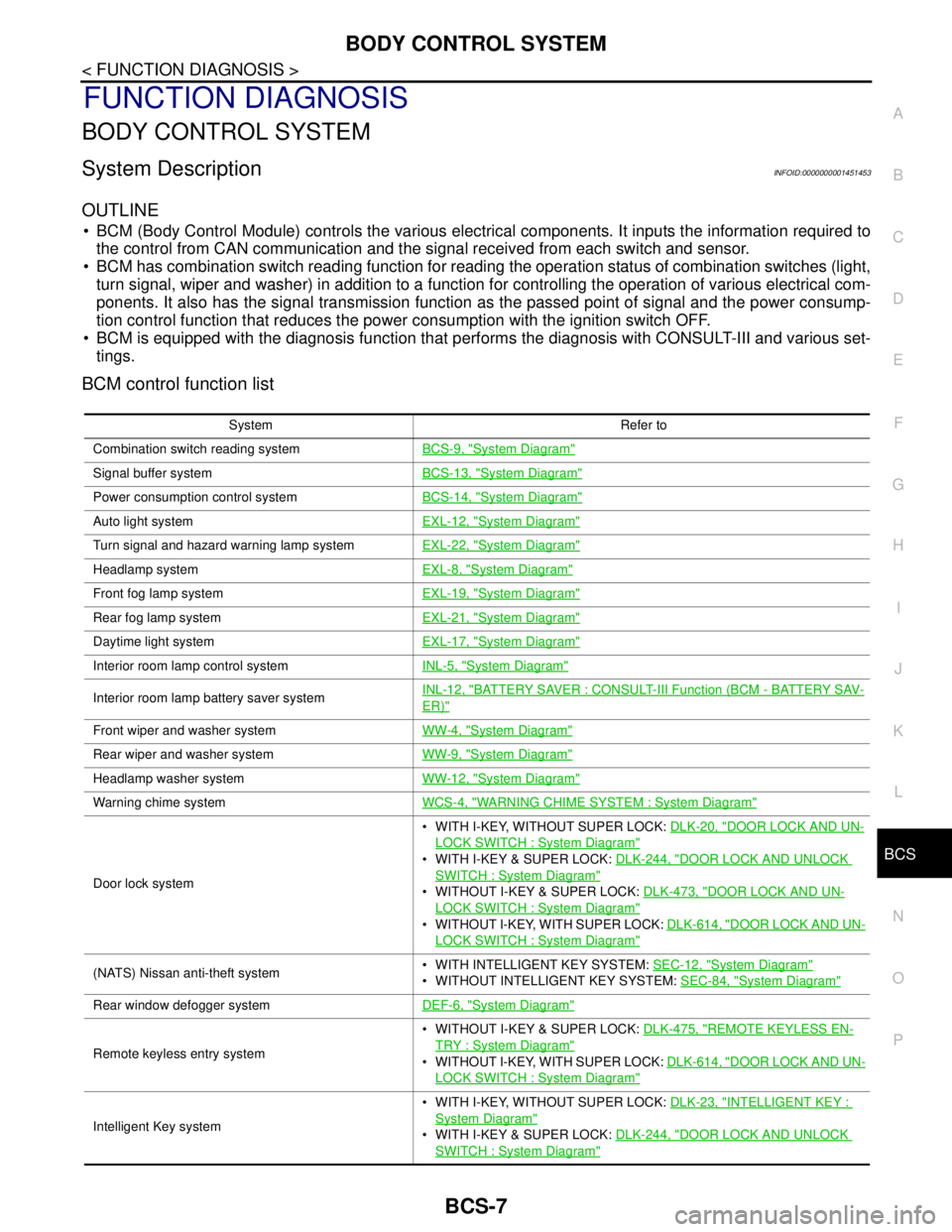
BODY CONTROL SYSTEM
System DescriptionINFOID:0000000001451453
OUTLINE
BCM (Body Control Module) controls the various electrical components. It inputs the information required to
the control from CAN communication and the signal received from each switch and sensor.
BCM has combination switch reading function for reading the operation status of combination switches (light,
turn signal, wiper and washer) in addition to a function for controlling the operation of various electrical com-
ponents. It also has the signal transmission function as the passed point of signal and the power consump-
tion control function that reduces the power consumption with the ignition switch OFF.
BCM is equipped with the diagnosis function that performs the diagnosis with CONSULT-III and various set-
tings.
BCM control function list
System Refer to
Combination switch reading systemBCS-9, "
System Diagram"
Signal buffer systemBCS-13, "System Diagram"
Power consumption control systemBCS-14, "System Diagram"
Auto light systemEXL-12, "System Diagram"
Turn signal and hazard warning lamp systemEXL-22, "System Diagram"
Headlamp systemEXL-8, "System Diagram"
Front fog lamp systemEXL-19, "System Diagram"
Rear fog lamp systemEXL-21, "System Diagram"
Daytime light systemEXL-17, "System Diagram"
Interior room lamp control systemINL-5, "System Diagram"
Interior room lamp battery saver systemINL-12, "BATTERY SAVER : CONSULT-III Function (BCM - BATTERY SAV-
ER)"
Front wiper and washer systemWW-4, "System Diagram"
Rear wiper and washer systemWW-9, "System Diagram"
Headlamp washer systemWW-12, "System Diagram"
Warning chime systemWCS-4, "WARNING CHIME SYSTEM : System Diagram"
Door lock system WITH I-KEY, WITHOUT SUPER LOCK: DLK-20, "
DOOR LOCK AND UN-
LOCK SWITCH : System Diagram"
WITH I-KEY & SUPER LOCK: DLK-244, "DOOR LOCK AND UNLOCK
SWITCH : System Diagram"
WITHOUT I-KEY & SUPER LOCK: DLK-473, "DOOR LOCK AND UN-
LOCK SWITCH : System Diagram"
WITHOUT I-KEY, WITH SUPER LOCK: DLK-614, "DOOR LOCK AND UN-
LOCK SWITCH : System Diagram"
(NATS) Nissan anti-theft system WITH INTELLIGENT KEY SYSTEM: SEC-12, "System Diagram"
WITHOUT INTELLIGENT KEY SYSTEM: SEC-84, "System Diagram"
Rear window defogger systemDEF-6, "System Diagram"
Remote keyless entry system WITHOUT I-KEY & SUPER LOCK: DLK-475, "
REMOTE KEYLESS EN-
TRY : System Diagram"
WITHOUT I-KEY, WITH SUPER LOCK: DLK-614, "DOOR LOCK AND UN-
LOCK SWITCH : System Diagram"
Intelligent Key system WITH I-KEY, WITHOUT SUPER LOCK: DLK-23, "
INTELLIGENT KEY :
System Diagram"
WITH I-KEY & SUPER LOCK: DLK-244, "DOOR LOCK AND UNLOCK
SWITCH : System Diagram"
Page 144 of 5883
BCS
COMBINATION SWITCH READING SYSTEM
BCS-9
< FUNCTION DIAGNOSIS >
C
D
E
F
G
H
I
J
K
L B A
O
P N
COMBINATION SWITCH READING SYSTEM
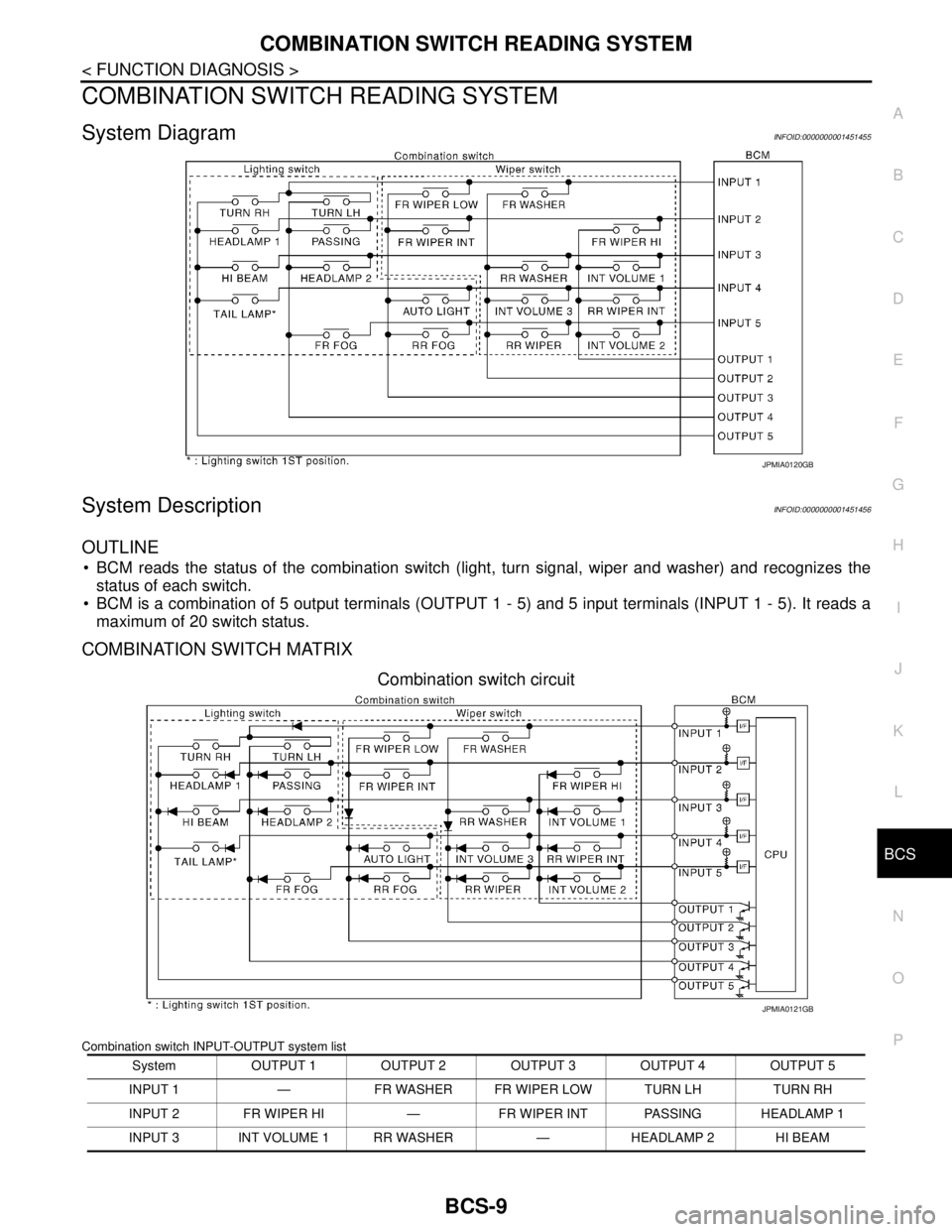
System DiagramINFOID:0000000001451455
System DescriptionINFOID:0000000001451456
OUTLINE
BCM reads the status of the combination switch (light, turn signal, wiper and washer) and recognizes the
status of each switch.
BCM is a combination of 5 output terminals (OUTPUT 1 - 5) and 5 input terminals (INPUT 1 - 5). It reads a
maximum of 20 switch status.
COMBINATION SWITCH MATRIX
Combination switch circuit
Combination switch INPUT-OUTPUT system list
JPMIA0120GB
System OUTPUT 1 OUTPUT 2 OUTPUT 3 OUTPUT 4 OUTPUT 5
INPUT 1 — FR WASHER FR WIPER LOW TURN LH TURN RH
INPUT 2 FR WIPER HI — FR WIPER INT PASSING HEADLAMP 1
INPUT 3 INT VOLUME 1 RR WASHER — HEADLAMP 2 HI BEAM
JPMIA0121GB
Page 145 of 5883
BCS-10
< FUNCTION DIAGNOSIS >
COMBINATION SWITCH READING SYSTEM
NOTE:
Headlamp has a dual system switch.
COMBINATION SWITCH READING FUNCTION
Description
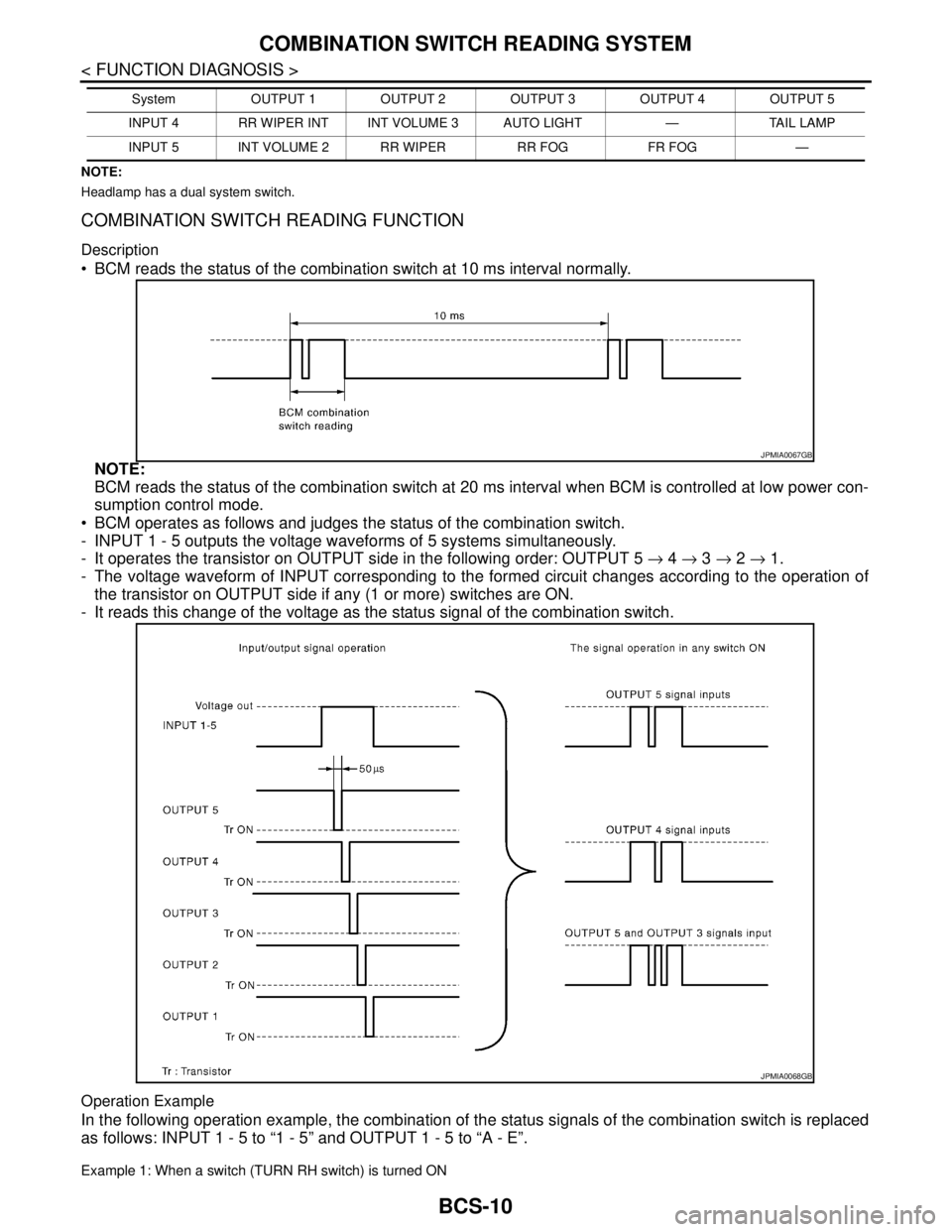
BCM reads the status of the combination switch at 10 ms interval normally.
NOTE:
BCM reads the status of the combination switch at 20 ms interval when BCM is controlled at low power con-
sumption control mode.
BCM operates as follows and judges the status of the combination switch.
- INPUT 1 - 5 outputs the voltage waveforms of 5 systems simultaneously.
- It operates the transistor on OUTPUT side in the following order: OUTPUT 5 → 4 → 3 → 2 → 1.
- The voltage waveform of INPUT corresponding to the formed circuit changes according to the operation of
the transistor on OUTPUT side if any (1 or more) switches are ON.
- It reads this change of the voltage as the status signal of the combination switch.
Operation Example
In the following operation example, the combination of the status signals of the combination switch is replaced
as follows: INPUT 1 - 5 to “1 - 5” and OUTPUT 1 - 5 to “A - E”.
Example 1: When a switch (TURN RH switch) is turned ON
INPUT 4 RR WIPER INT INT VOLUME 3 AUTO LIGHT — TAIL LAMP
INPUT 5 INT VOLUME 2 RR WIPER RR FOG FR FOG —System OUTPUT 1 OUTPUT 2 OUTPUT 3 OUTPUT 4 OUTPUT 5
JPMIA0067GB
JPMIA0068GB
Page 146 of 5883
BCS
COMBINATION SWITCH READING SYSTEM
BCS-11
< FUNCTION DIAGNOSIS >
C
D
E
F
G
H
I
J
K
L B A
O
P N
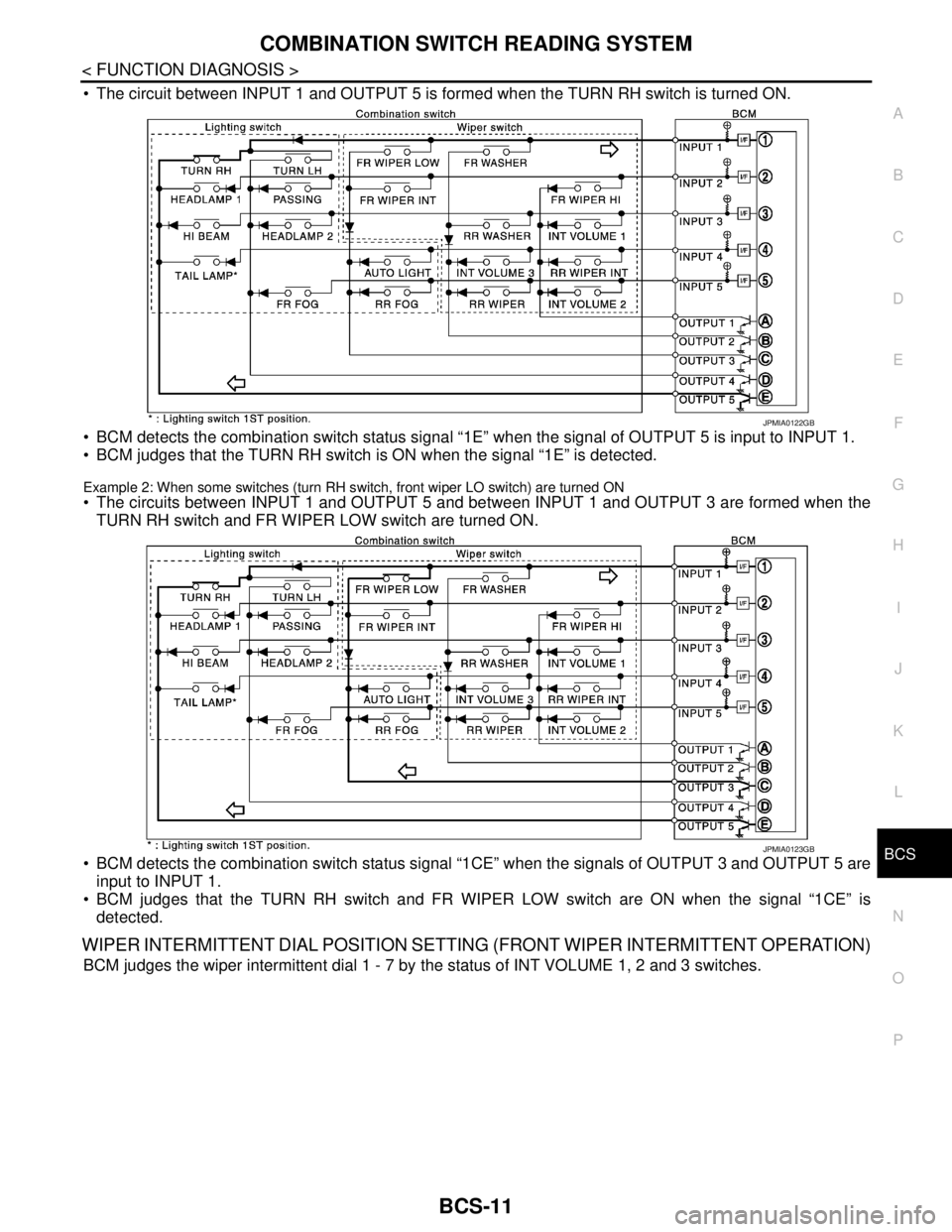
The circuit between INPUT 1 and OUTPUT 5 is formed when the TURN RH switch is turned ON.
BCM detects the combination switch status signal “1E” when the signal of OUTPUT 5 is input to INPUT 1.
BCM judges that the TURN RH switch is ON when the signal “1E” is detected.
Example 2: When some switches (turn RH switch, front wiper LO switch) are turned ON
The circuits between INPUT 1 and OUTPUT 5 and between INPUT 1 and OUTPUT 3 are formed when the
TURN RH switch and FR WIPER LOW switch are turned ON.
BCM detects the combination switch status signal “1CE” when the signals of OUTPUT 3 and OUTPUT 5 are
input to INPUT 1.
BCM judges that the TURN RH switch and FR WIPER LOW switch are ON when the signal “1CE” is
detected.
WIPER INTERMITTENT DIAL POSITION SETTING (FRONT WIPER INTERMITTENT OPERATION)
BCM judges the wiper intermittent dial 1 - 7 by the status of INT VOLUME 1, 2 and 3 switches.
JPMIA0122GB
JPMIA0123GB
Page 147 of 5883
BCS-12
< FUNCTION DIAGNOSIS >
COMBINATION SWITCH READING SYSTEM
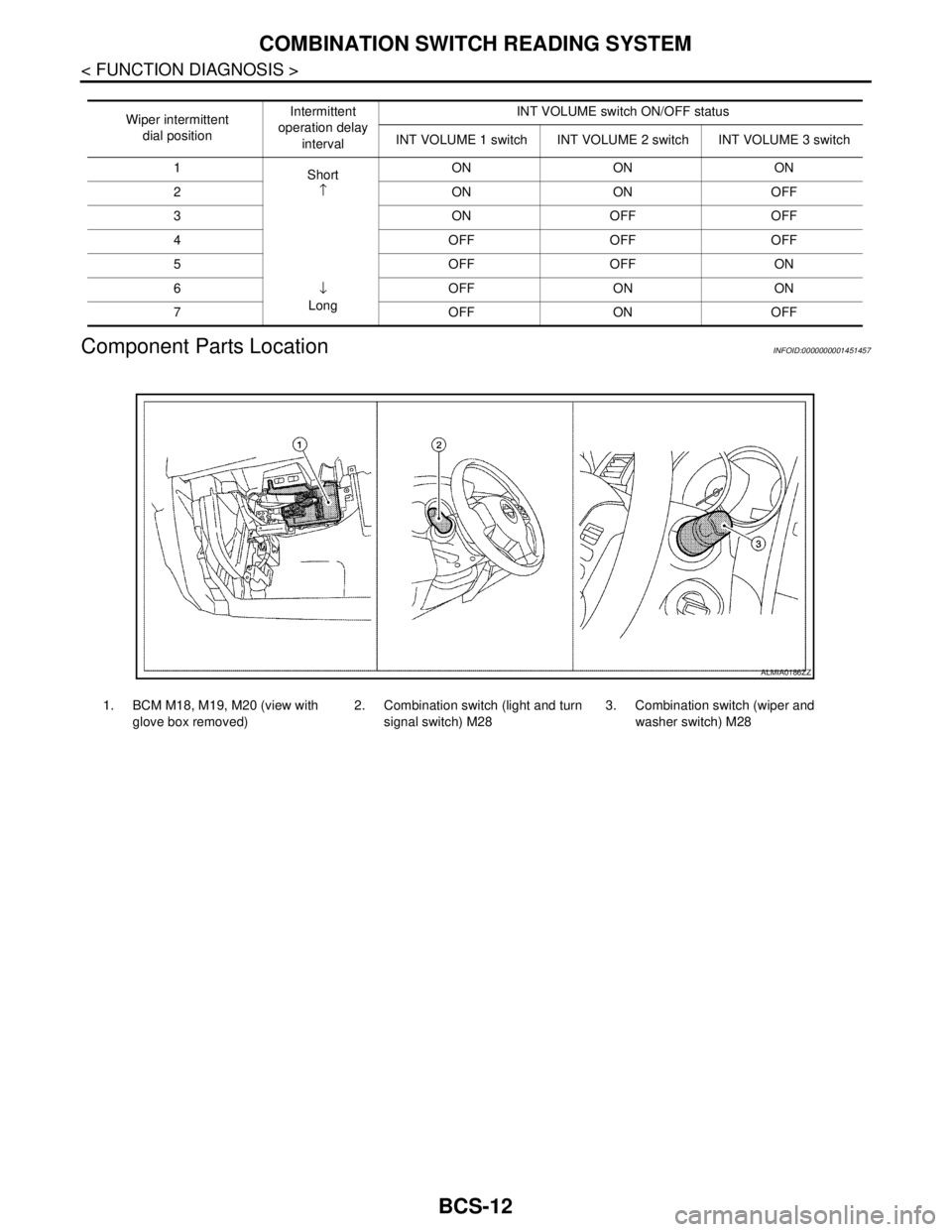
Component Parts Location
INFOID:0000000001451457
Wiper intermittent
dial positionIntermittent
operation delay
intervalINT VOLUME switch ON/OFF status
INT VOLUME 1 switch INT VOLUME 2 switch INT VOLUME 3 switch
1
Short
↑
↓
LongON ON ON
2ONONOFF
3ONOFFOFF
4 OFF OFF OFF
5OFFOFFON
6 OFF ON ON
7 OFF ON OFF
1. BCM M18, M19, M20 (view with
glove box removed)2. Combination switch (light and turn
signal switch) M283. Combination switch (wiper and
washer switch) M28
ALMIA0186ZZ