turn signal NISSAN TIIDA 2007 Service Repair Manual
[x] Cancel search | Manufacturer: NISSAN, Model Year: 2007, Model line: TIIDA, Model: NISSAN TIIDA 2007Pages: 5883, PDF Size: 78.95 MB
Page 5833 of 5883
REAR WIPER AUTO STOP SIGNAL CIRCUIT
WW-31
< COMPONENT DIAGNOSIS >
C
D
E
F
G
H
I
J
K
MA
B
WW
N
O
P
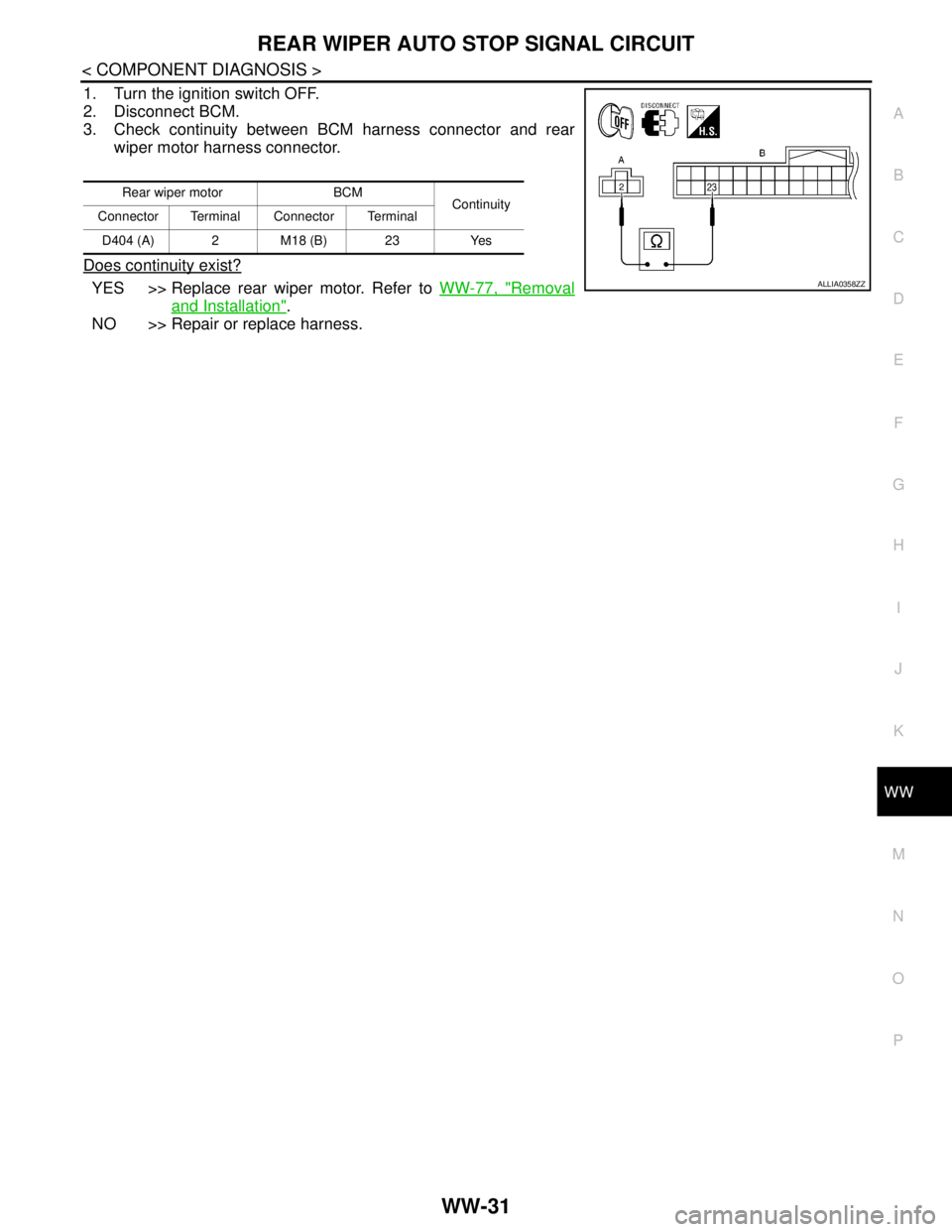
1. Turn the ignition switch OFF.
2. Disconnect BCM.
3. Check continuity between BCM harness connector and rear
wiper motor harness connector.
Does continuity exist?
YES >> Replace rear wiper motor. Refer to WW-77, "Removal
and Installation".
NO >> Repair or replace harness.
Rear wiper motor BCM
Continuity
Connector Terminal Connector Terminal
D404 (A) 2 M18 (B) 23 Yes
ALLIA0358ZZ
Page 5835 of 5883
HEADLAMP WASHER CIRCUIT
WW-33
< COMPONENT DIAGNOSIS >
C
D
E
F
G
H
I
J
K
MA
B
WW
N
O
P
HEADLAMP WASHER CIRCUIT
Component Function CheckINFOID:0000000001366626
1. CHECK HEADLAMP WASHER OPERATION
CONSULT-III ACTIVE TEST
1. Select "HEAD LAMP WASHER" of IPDM E/R active test item.
2. While operating the test item, check headlamp washer operation.
Is the headlamp washer operation normally?
YES >> Headlamp washer circuit is normal.
NO >> Refer to WW-33, "
Diagnosis Procedure".
Diagnosis ProcedureINFOID:0000000001366627
1. CHECK HEADLAMP WASHER FUSIBLE LINK
1. Turn the ignition switch OFF.
2. Check that the following fusible link is not blown.
Is the fusible link blown?
YES >> Replace the fusible link after repairing the applicable circuit.
NO >> GO TO 2
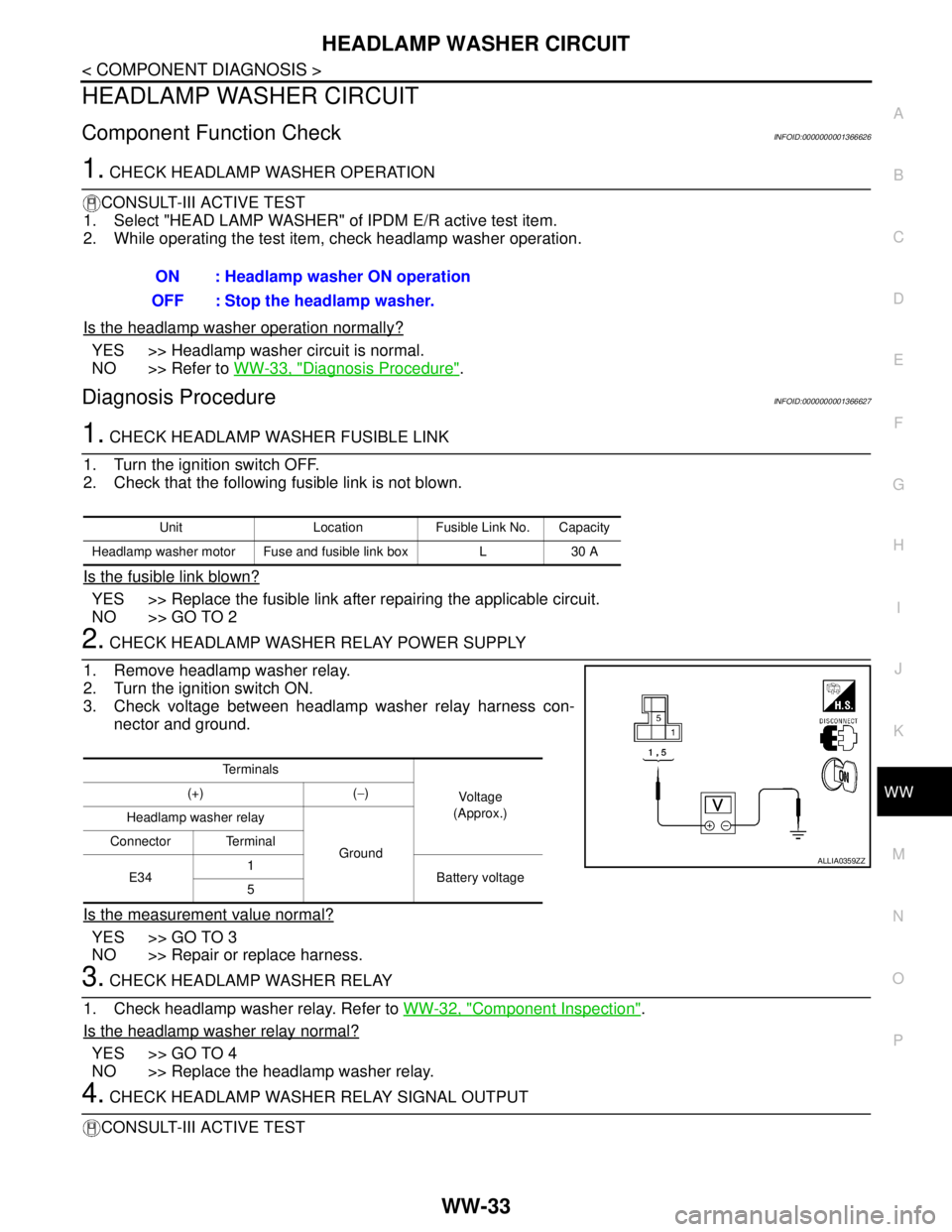
2. CHECK HEADLAMP WASHER RELAY POWER SUPPLY
1. Remove headlamp washer relay.
2. Turn the ignition switch ON.
3. Check voltage between headlamp washer relay harness con-
nector and ground.
Is the measurement value normal?
YES >> GO TO 3
NO >> Repair or replace harness.
3. CHECK HEADLAMP WASHER RELAY
1. Check headlamp washer relay. Refer to WW-32, "
Component Inspection".
Is the headlamp washer relay normal?
YES >> GO TO 4
NO >> Replace the headlamp washer relay.
4. CHECK HEADLAMP WASHER RELAY SIGNAL OUTPUT
CONSULT-III ACTIVE TESTON : Headlamp washer ON operation
OFF : Stop the headlamp washer.
Unit Location Fusible Link No. Capacity
Headlamp washer motor Fuse and fusible link box L 30 A
Te r m i n a l s
Vo l ta g e
(Approx.) (+) (−)
Headlamp washer relay
Ground Connector Terminal
E341
Battery voltage
5
ALLIA0359ZZ
Page 5836 of 5883
WW-34
< COMPONENT DIAGNOSIS >
HEADLAMP WASHER CIRCUIT
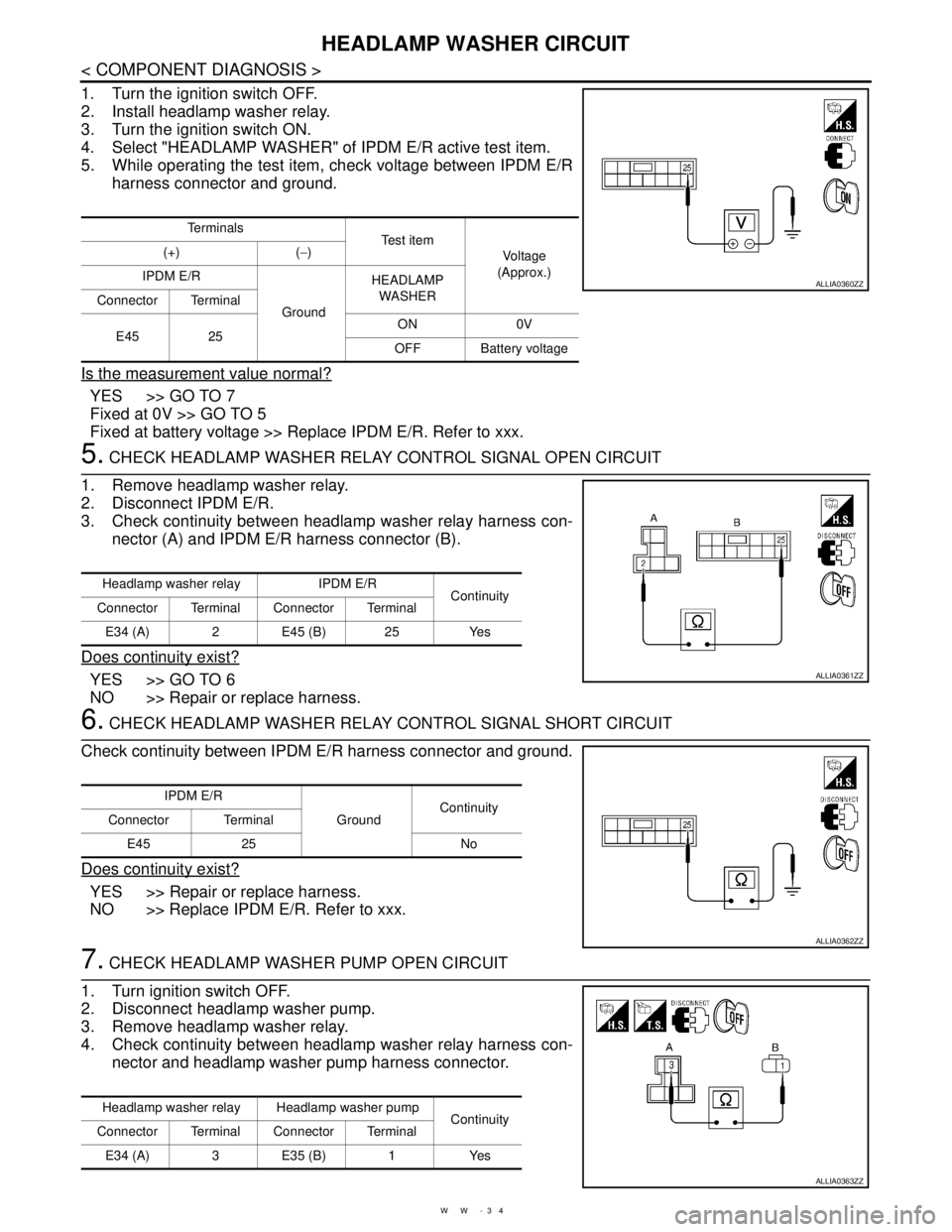
1. Turn the ignition switch OFF.
2. Install headlamp washer relay.
3. Turn the ignition switch ON.
4. Select "HEADLAMP WASHER" of IPDM E/R active test item.
5. While operating the test item, check voltage between IPDM E/R
harness connector and ground.
Is the measurement value normal?
YES >> GO TO 7
Fixed at 0V >> GO TO 5
Fixed at battery voltage >> Replace IPDM E/R. Refer to xxx.
5. CHECK HEADLAMP WASHER RELAY CONTROL SIGNAL OPEN CIRCUIT
1. Remove headlamp washer relay.
2. Disconnect IPDM E/R.
3. Check continuity between headlamp washer relay harness con-
nector (A) and IPDM E/R harness connector (B).
Does continuity exist?
YES >> GO TO 6
NO >> Repair or replace harness.
6. CHECK HEADLAMP WASHER RELAY CONTROL SIGNAL SHORT CIRCUIT
Check continuity between IPDM E/R harness connector and ground.
Does continuity exist?
YES >> Repair or replace harness.
NO >> Replace IPDM E/R. Refer to xxx.
7. CHECK HEADLAMP WASHER PUMP OPEN CIRCUIT
1. Turn ignition switch OFF.
2. Disconnect headlamp washer pump.
3. Remove headlamp washer relay.
4. Check continuity between headlamp washer relay harness con-
nector and headlamp washer pump harness connector.
Te r m i n a l s
Te s t i t e m
Vo l ta g e
(Approx.) (+) (−)
IPDM E/R
GroundHEADLAMP
WASHER
Connector Terminal
E45 25ON 0V
OFF Battery voltage
ALLIA0360ZZ
Headlamp washer relay IPDM E/R
Continuity
Connector Terminal Connector Terminal
E34 (A) 2 E45 (B) 25 Yes
ALLIA0361ZZ
IPDM E/R
GroundContinuity
Connector Terminal
E45 25 No
ALLIA0362ZZ
Headlamp washer relay Headlamp washer pump
Continuity
Connector Terminal Connector Terminal
E34 (A) 3 E35 (B) 1 Yes
ALLIA0363ZZ
Page 5854 of 5883

WW-52
< ECU DIAGNOSIS >
IPDM E/R (INTELLIGENT POWER DISTRIBUTION MODULE ENGINE ROOM)
IPDM E/R (INTELLIGENT POWER DISTRIBUTION MODULE ENGINE
ROOM)
Reference ValueINFOID:0000000001366636
VALUES ON THE DIAGNOSIS TOOL
TERMINAL LAYOUT
Refer to xxx.
PHYSICAL VALUES
Refer to xxx.
Fail SafeINFOID:0000000001366638
CAN communication control
When CAN communication with ECM and BCM is impossible, IPDM E/R performs fail-safe control. After CAN
communication recovers normally, it also returns to normal control.
If no CAN communication is available with BCM
Front wiper control
IPDM E/R detects the front wiper stop position with the front wiper auto stop signal.
When the front wiper auto stop signal is in the conditions listed below, IPDM E/R repeats a front wiper 10 sec-
onds operation and 20 seconds stop five times.
Monitor Item Condition Value/Status
HL WASHER REQIgnition switch ON, and low
beam headlamp is ONFront washer switch OFF Off
Front washer switch ON
(When headlamp washer is operat-
ing)On
FR WIP REQ Ignition switch ONFront wiper switch OFF STOP
Front wiper switch INT 1LOW
Front wiper switch LO Low
Front wiper switch HI Hi
WIP AUTO STOP Ignition switch ONFront wiper stop position STOP P
Any position other than front wiper
stop positionACT P
WIP PROT Ignition switch ONFront wiper operates normally Off
Front wiper stops at fail-safe oper-
ationBLOCK
IGN RLYIgnition switch OFF or ACC Off
Ignition switch ON On
IGN ON SWIgnition switch OFF or ACC Off
Ignition switch ON On
Control part Fail-safe in operation
Front wiper The status just before activation of fail-safe control is maintained until the ignition
switch is turned OFF while the front wiper is operating at LO or HI speed.
The front wiper is operated at LO speed until the ignition switch is turned OFF if the
fail-safe control is activated while the front wiper is set in the INT mode and the front
wiper motor is operating.
Headlamp washer Headlamp washer relay OFF
Page 5857 of 5883
WIPER AND WASHER SYSTEM SYMPTOMS
WW-55
< SYMPTOM DIAGNOSIS >
C
D
E
F
G
H
I
J
K
MA
B
WW
N
O
P
Front wiper does not
stop.HI only Combination switch
BCMCombination switch
Refer to BCS-55, "
Symptom
Ta b l e".
Front wiper request signal
BCM
IPDM E/RIPDM E/R DATA MONITOR
"FR WIP REQ"
IPDM E/R —
LO only Combination switch
BCMCombination switch
Refer to BCS-55, "
Symptom
Ta b l e".
Front wiper request signal
BCM
IPDM E/RIPDM E/R DATA MONITOR
"FR WIP REQ"
IPDM E/R —
INT only Combination switch
BCMCombination switch
Refer to XX-XX, "*****"
.
Front wiper request signal
BCM
IPDM E/RIPDM E/R DATA MONITOR
"FR WIP REQ"
Front wiper does not
operate normally.Intermittent adjustment
cannot be performed. Combination switch
Harness between combination switch and BCM
BCMCombination switch
Refer to BCS-55, "
Symptom
Ta b l e".
BCM —
Intermittent control
linked with vehicle
speed cannot be per-
formed.Check the vehicle speed detection wiper setting.
Refer to WW-14, "
WIPER : CONSULT-III Function (BCM - WIPER)".
Wiper is not linked to
the washer operation. Combination switch
Harness between combination switch and BCM
BCMCombination switch
Refer to BCS-55, "
Symptom
Ta b l e".
BCM —
Does not return to stop
position (Repeatedly
operates for 10 sec-
onds and then stops
for 20 seconds. After
that, it stops the opera-
tion). IPDM E/R
Harness between IPDM E/R and front wiper
motor
Front wiper motorFront wiper auto stop signal
circuit
Refer to WW-22, "
Compo-
nent Function Check".
Front wiper auto op-
eration does not op-
erate. (If equipped)Any Light and rain sensor
Harness between combination switch and BCM
BCMLight and rain sensor
Refer to EXL-55, "
Diagnosis
Procedure".
IPDM E/R
Harness between IPDM E/R and front wiper
motor
Front wiper motorIPDM E/R
Refer to xxx.
BCM — Symptom Probable malfunction location Inspection item
Page 5858 of 5883
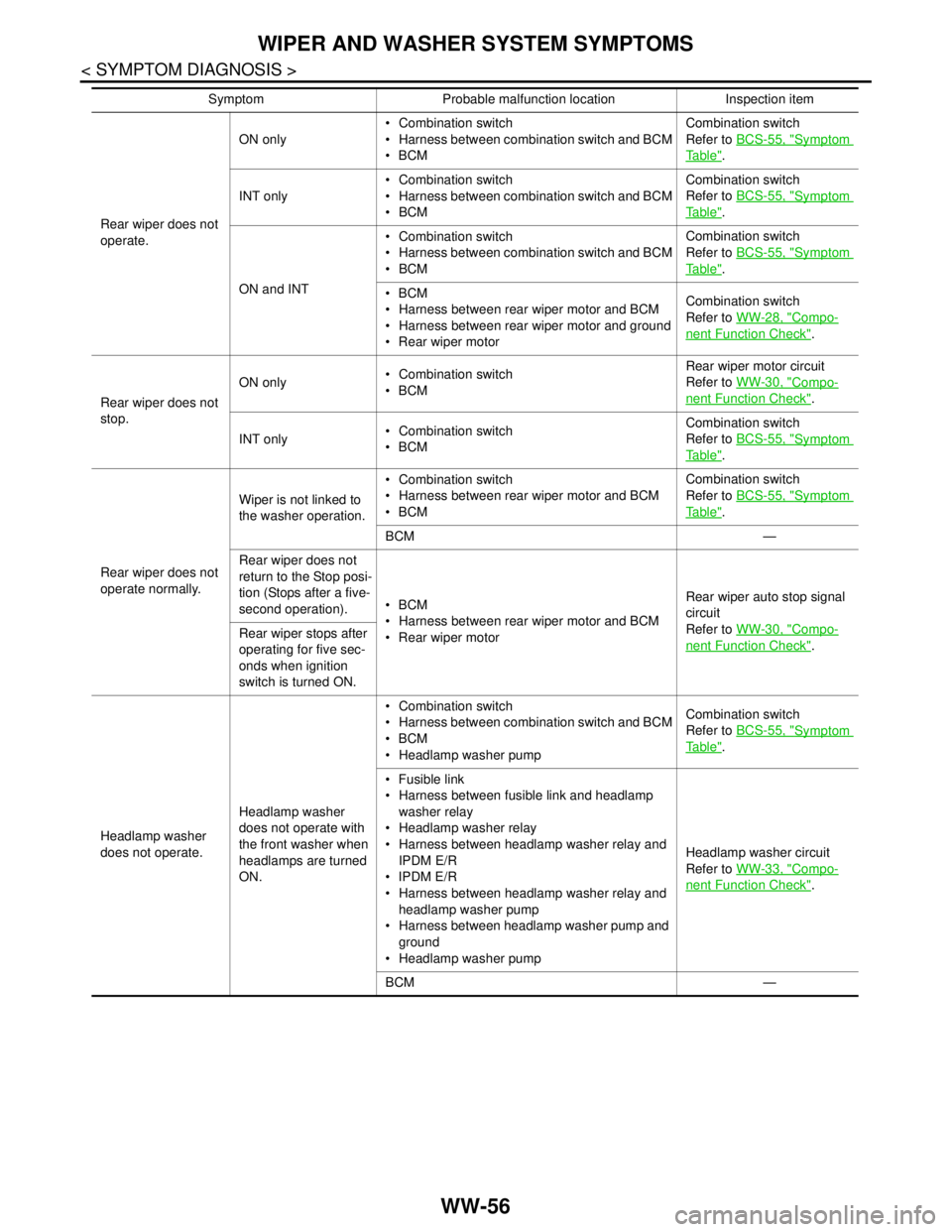
WW-56
< SYMPTOM DIAGNOSIS >
WIPER AND WASHER SYSTEM SYMPTOMS
Rear wiper does not
operate.ON only Combination switch
Harness between combination switch and BCM
BCMCombination switch
Refer to BCS-55, "
Symptom
Ta b l e".
INT only Combination switch
Harness between combination switch and BCM
BCMCombination switch
Refer to BCS-55, "
Symptom
Ta b l e".
ON and INT Combination switch
Harness between combination switch and BCM
BCMCombination switch
Refer to BCS-55, "
Symptom
Ta b l e".
BCM
Harness between rear wiper motor and BCM
Harness between rear wiper motor and ground
Rear wiper motorCombination switch
Refer to WW-28, "
Compo-
nent Function Check".
Rear wiper does not
stop.ON only Combination switch
BCMRear wiper motor circuit
Refer to WW-30, "
Compo-
nent Function Check".
INT only Combination switch
BCMCombination switch
Refer to BCS-55, "
Symptom
Ta b l e".
Rear wiper does not
operate normally.Wiper is not linked to
the washer operation. Combination switch
Harness between rear wiper motor and BCM
BCMCombination switch
Refer to BCS-55, "
Symptom
Ta b l e".
BCM —
Rear wiper does not
return to the Stop posi-
tion (Stops after a five-
second operation).BCM
Harness between rear wiper motor and BCM
Rear wiper motorRear wiper auto stop signal
circuit
Refer to WW-30, "
Compo-
nent Function Check". Rear wiper stops after
operating for five sec-
onds when ignition
switch is turned ON.
Headlamp washer
does not operate.Headlamp washer
does not operate with
the front washer when
headlamps are turned
ON. Combination switch
Harness between combination switch and BCM
BCM
Headlamp washer pumpCombination switch
Refer to BCS-55, "
Symptom
Ta b l e".
Fusible link
Harness between fusible link and headlamp
washer relay
Headlamp washer relay
Harness between headlamp washer relay and
IPDM E/R
IPDM E/R
Harness between headlamp washer relay and
headlamp washer pump
Harness between headlamp washer pump and
ground
Headlamp washer pumpHeadlamp washer circuit
Refer to WW-33, "
Compo-
nent Function Check".
BCM — Symptom Probable malfunction location Inspection item
Page 5861 of 5883
FRONT WIPER DOES NOT OPERATE
WW-59
< SYMPTOM DIAGNOSIS >
C
D
E
F
G
H
I
J
K
MA
B
WW
N
O
P
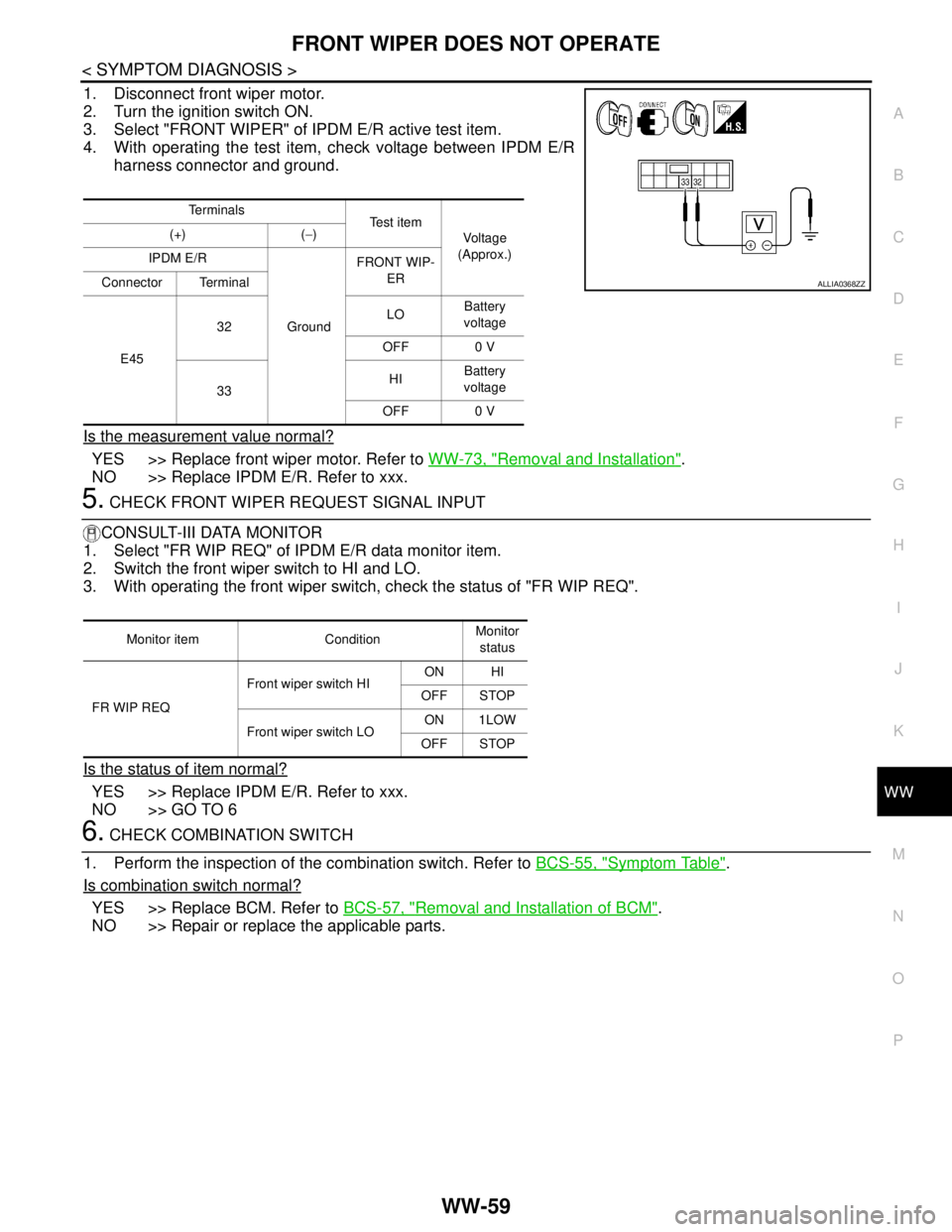
1. Disconnect front wiper motor.
2. Turn the ignition switch ON.
3. Select "FRONT WIPER" of IPDM E/R active test item.
4. With operating the test item, check voltage between IPDM E/R
harness connector and ground.
Is the measurement value normal?
YES >> Replace front wiper motor. Refer to WW-73, "Removal and Installation".
NO >> Replace IPDM E/R. Refer to xxx.
5. CHECK FRONT WIPER REQUEST SIGNAL INPUT
CONSULT-III DATA MONITOR
1. Select "FR WIP REQ" of IPDM E/R data monitor item.
2. Switch the front wiper switch to HI and LO.
3. With operating the front wiper switch, check the status of "FR WIP REQ".
Is the status of item normal?
YES >> Replace IPDM E/R. Refer to xxx.
NO >> GO TO 6
6. CHECK COMBINATION SWITCH
1. Perform the inspection of the combination switch. Refer to BCS-55, "
Symptom Table".
Is combination switch normal?
YES >> Replace BCM. Refer to BCS-57, "Removal and Installation of BCM".
NO >> Repair or replace the applicable parts.
Te r m i n a l s
Te s t i t e m
Voltage
(Approx.) (+) (−)
IPDM E/R
GroundFRONT WIP-
ER
Connector Terminal
E4532LOBattery
voltage
OFF 0 V
33HIBattery
voltage
OFF 0 V
ALLIA0368ZZ
Monitor item ConditionMonitor
status
FR WIP REQFront wiper switch HION HI
OFF STOP
Front wiper switch LOON 1LOW
OFF STOP