window NISSAN TIIDA 2010 Service Owners Manual
[x] Cancel search | Manufacturer: NISSAN, Model Year: 2010, Model line: TIIDA, Model: NISSAN TIIDA 2010Pages: 3745, PDF Size: 73.67 MB
Page 2747 of 3745
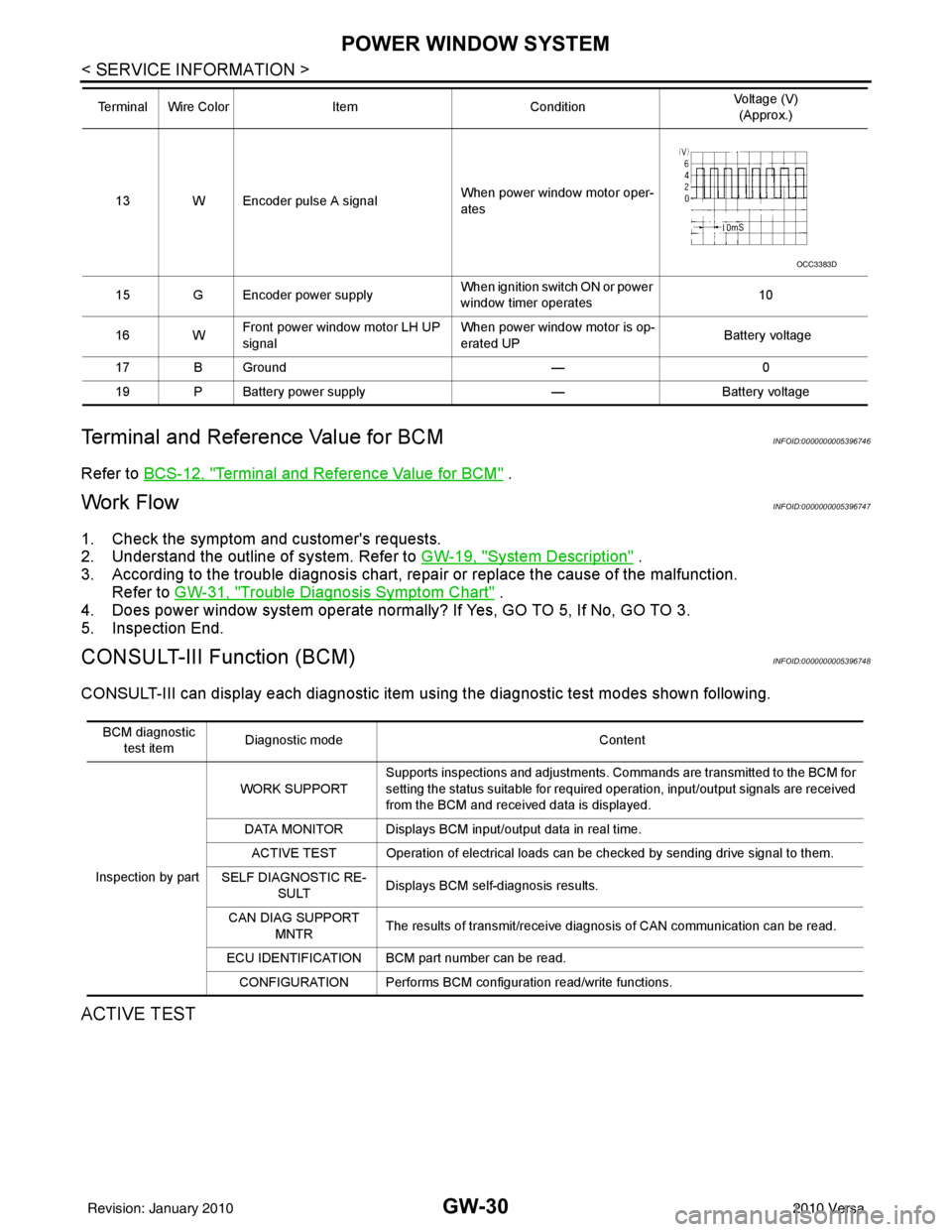
GW-30
< SERVICE INFORMATION >
POWER WINDOW SYSTEM
Terminal and Reference Value for BCM
INFOID:0000000005396746
Refer to BCS-12, "Terminal and Reference Value for BCM" .
Work FlowINFOID:0000000005396747
1. Check the symptom and customer's requests.
2. Understand the outline of system. Refer to GW-19, "
System Description" .
3. According to the trouble diagnosis chart, repa ir or replace the cause of the malfunction.
Refer to GW-31, "
Trouble Diagnosis Symptom Chart" .
4. Does power window system operate normally? If Yes, GO TO 5, If No, GO TO 3.
5. Inspection End.
CONSULT-III Function (BCM)INFOID:0000000005396748
CONSULT-III can display each diagnostic item us ing the diagnostic test modes shown following.
ACTIVE TEST
13 W Encoder pulse A signal When power window motor oper-
ates
15 G Encoder power supply When ignition switch ON or power
window timer operates10
16 W Front power window motor LH UP
signal When power window motor is op-
erated UP
Battery voltage
17 B Ground —0
19 P Battery power supply —Battery voltage
Terminal Wire Color
ItemCondition Voltage (V)
(Approx.)
OCC3383D
BCM diagnostic
test item Diagnostic mode
Content
Inspection by part WORK SUPPORT
Supports inspections and adjustments. Commands are transmitted to the BCM for
setting the status suitable for required operation, input/output signals are received
from the BCM and received data is displayed.
DATA MONITOR Displays BCM input/output data in real time. ACTIVE TEST Operation of electrical loads can be checked by sending drive signal to them.
SELF DIAGNOSTIC RE- SULT Displays BCM self-diagnosis results.
CAN DIAG SUPPORT MNTR The results of transmit/receive diagnosis of CAN communication can be read.
ECU IDENTIFICATION BCM part number can be read. CONFIGURATION Performs BCM configuration read/write functions.
Revision: January 20102010 Versa
Page 2748 of 3745
POWER WINDOW SYSTEMGW-31
< SERVICE INFORMATION >
C
DE
F
G H
J
K L
M A
B
GW
N
O P
WORK SUPPORT
DATA MONITOR
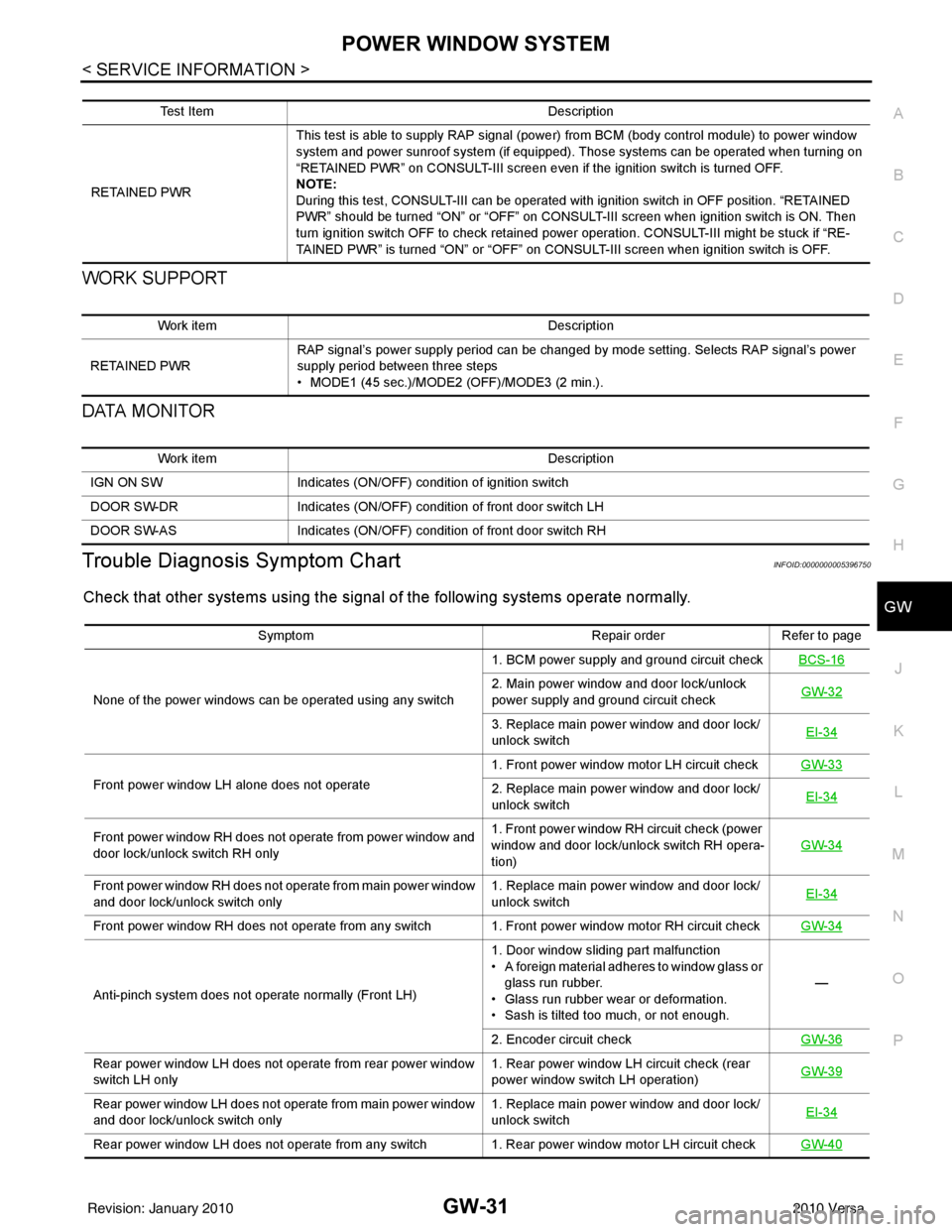
Trouble Diagnosis Symptom ChartINFOID:0000000005396750
Check that other systems us ing the signal of the following systems operate normally.
Test Item Description
RETAINED PWR This test is able to supply RAP signal (powe
r) from BCM (body control module) to power window
system and power sunroof system (if equipped). Those systems can be operated when turning on
“RETAINED PWR” on CONSULT-III screen even if the ignition switch is turned OFF.
NOTE:
During this test, CONSULT-III can be operated with ignition switch in OFF position. “RETAINED
PWR” should be turned “ON” or “OFF” on CONSULT-III screen when ignition switch is ON. Then
turn ignition switch OFF to check retained power operation. CONSULT-III might be stuck if “RE-
TAINED PWR” is turned “ON” or “OFF” on CONSULT-III screen when ignition switch is OFF.
Work item Description
RETAINED PWR RAP signal’s power supply period can be changed by mode setting. Selects RAP signal’s power
supply period between three steps
• MODE1 (45 sec.)/MODE2 (OFF)/MODE3 (2 min.).
Work item
Description
IGN ON SW Indicates (ON/OFF) condition of ignition switch
DOOR SW-DR Indicates (ON/OFF) condition of front door switch LH
DOOR SW-AS Indicates (ON/OFF) condition of front door switch RH
Symptom Repair orderRefer to page
None of the power windows can be operated using any switch 1. BCM power supply and ground circuit check
BCS-16
2. Main power window and door lock/unlock
power supply and ground circuit check GW-32
3. Replace main power window and door lock/
unlock switch EI-34
Front power window LH alone does not operate 1. Front power window motor LH circuit check
GW-332. Replace main power window and door lock/
unlock switch EI-34
Front power window RH does not operate from power window and
door lock/unlock switch RH only 1. Front power window RH circuit check (power
window and door lock/unlock switch RH opera-
tion)
GW-34
Front power window RH does not operate from main power window
and door lock/unlock switch only
1. Replace main power window and door lock/
unlock switch
EI-34
Front power window RH does not operate from any switch 1. Front power window motor RH circuit check
GW-34
Anti-pinch system does not operate normally (Front LH)1. Door window sliding part malfunction
• A foreign material adheres to window glass or
glass run rubber.
• Glass run rubber wear or deformation.
• Sash is tilted too much, or not enough. —
2. Encoder circuit check GW-36
Rear power window LH does not operate from rear power window
switch LH only 1. Rear power window LH circuit check (rear
power window switch LH operation)
GW-39
Rear power window LH does not operate from main power window
and door lock/unlock switch only 1. Replace main power window and door lock/
unlock switch
EI-34
Rear power window LH does not operate from any switch 1. Rear power window motor LH circuit check
GW-40
Revision: January 20102010 Versa
Page 2749 of 3745
GW-32
< SERVICE INFORMATION >
POWER WINDOW SYSTEM
BCM Power Supply and Ground Circuit Inspection
INFOID:0000000005396751
Refer to BCS-16, "BCM Power Supply and Ground Circuit Inspection" .
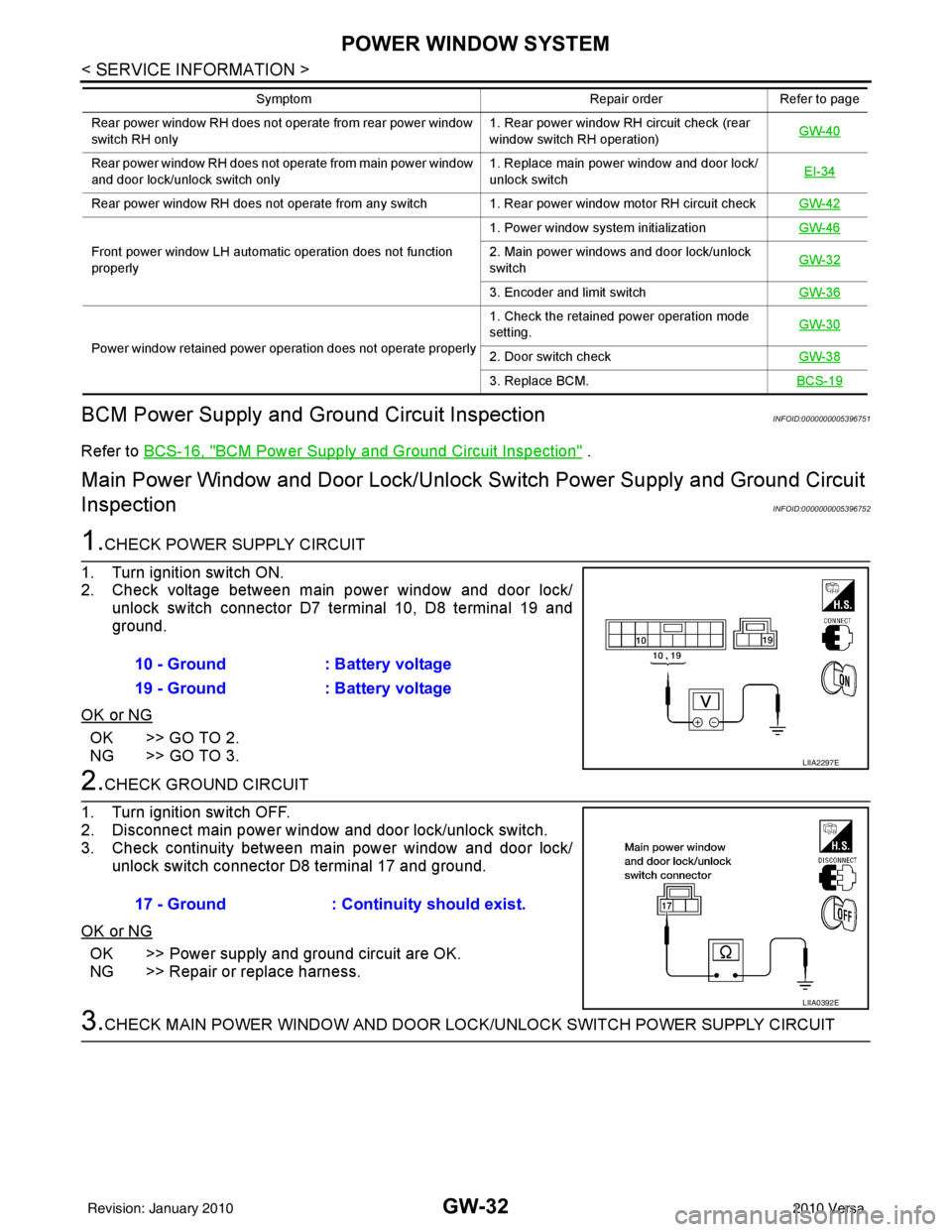
Main Power Window and Door Lock/Unlock Switch Po wer Supply and Ground Circuit
Inspection
INFOID:0000000005396752
1.CHECK POWER SUPPLY CIRCUIT
1. Turn ignition switch ON.
2. Check voltage between main power window and door lock/ unlock switch connector D7 terminal 10, D8 terminal 19 and
ground.
OK or NG
OK >> GO TO 2.
NG >> GO TO 3.
2.CHECK GROUND CIRCUIT
1. Turn ignition switch OFF.
2. Disconnect main power window and door lock/unlock switch.
3. Check continuity between main power window and door lock/ unlock switch connector D8 terminal 17 and ground.
OK or NG
OK >> Power supply and ground circuit are OK.
NG >> Repair or replace harness.
3.CHECK MAIN POWER WINDOW AND DOOR LO CK/UNLOCK SWITCH POWER SUPPLY CIRCUIT
Rear power window RH does not operate from rear power window
switch RH only 1. Rear power window RH circuit check (rear
window switch RH operation)
GW-40
Rear power window RH does not operate from main power window
and door lock/unlock switch only 1. Replace main power window and door lock/
unlock switch
EI-34
Rear power window RH does not operate from any switch 1. Rear power window motor RH circuit check
GW-42
Front power window LH automatic operation does not function
properly1. Power window system initialization
GW-462. Main power windows and door lock/unlock
switchGW-32
3. Encoder and limit switch
GW-36
Power window retained power operation does not operate properly 1. Check the retained power operation mode
setting.
GW-302. Door switch check
GW-38
3. Replace BCM.BCS-19
Symptom Repair orderRefer to page
10 - Ground: Battery voltage
19 - Ground : Battery voltage
LIIA2297E
17 - Ground : Continuity should exist.
LIIA0392E
Revision: January 20102010 Versa
Page 2750 of 3745
POWER WINDOW SYSTEMGW-33
< SERVICE INFORMATION >
C
DE
F
G H
J
K L
M A
B
GW
N
O P
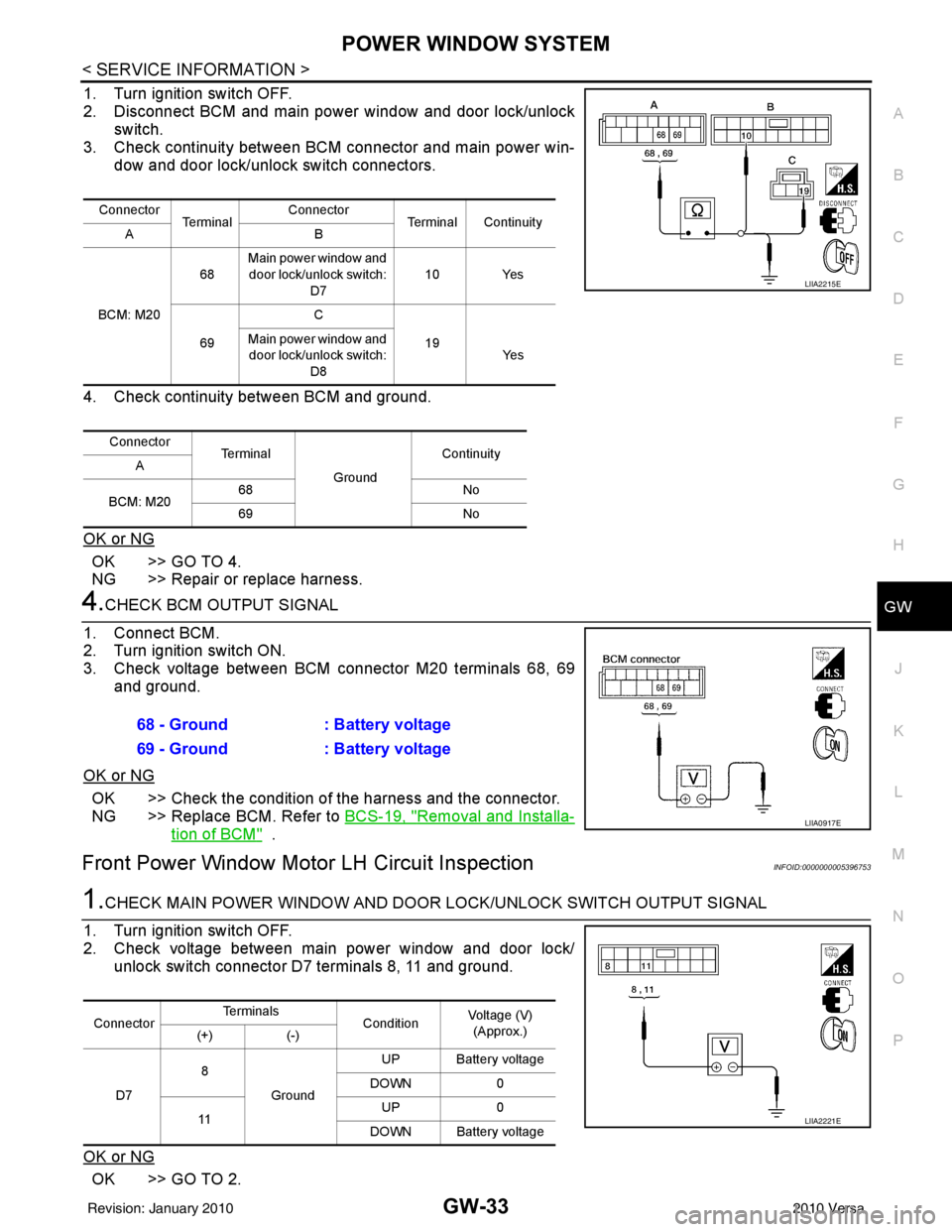
1. Turn ignition switch OFF.
2. Disconnect BCM and main power window and door lock/unlock
switch.
3. Check continuity between BCM connector and main power win- dow and door lock/unlock switch connectors.
4. Check continuity between BCM and ground.
OK or NG
OK >> GO TO 4.
NG >> Repair or replace harness.
4.CHECK BCM OUTPUT SIGNAL
1. Connect BCM.
2. Turn ignition switch ON.
3. Check voltage between BCM connector M20 terminals 68, 69 and ground.
OK or NG
OK >> Check the condition of the harness and the connector.
NG >> Replace BCM. Refer to BCS-19, "
Removal and Installa-
tion of BCM" .
Front Power Window Motor LH Circuit InspectionINFOID:0000000005396753
1.CHECK MAIN POWER WINDOW AND DOOR LOCK/UNLOCK SWITCH OUTPUT SIGNAL
1. Turn ignition switch OFF.
2. Check voltage between main power window and door lock/ unlock switch connector D7 terminals 8, 11 and ground.
OK or NG
OK >> GO TO 2.
Connector Te r m i n a l Connector
Terminal Continuity
AB
BCM: M20 68
Main power window and
door lock/unlock switch: D7 10 Yes
69 C
19
Main power window and
door lock/unlock switch:
D8 Ye s
Connector Te r m i n a l
GroundContinuity
A
BCM: M20 68
No
69 No
LIIA2215E
68 - Ground: Battery voltage
69 - Ground : Battery voltage
LIIA0917E
ConnectorTe r m i n a l s
ConditionVoltage (V)
(Approx.)
(+) (-)
D7 8
Ground UP Battery voltage
DOWN 0
11 UP
0
DOWN Battery voltage
LIIA2221E
Revision: January 20102010 Versa
Page 2751 of 3745
GW-34
< SERVICE INFORMATION >
POWER WINDOW SYSTEM
NG >> Replace main power window and door lock/unlock switch. Refer to EI-34, "Removal and Installa-
tion" .
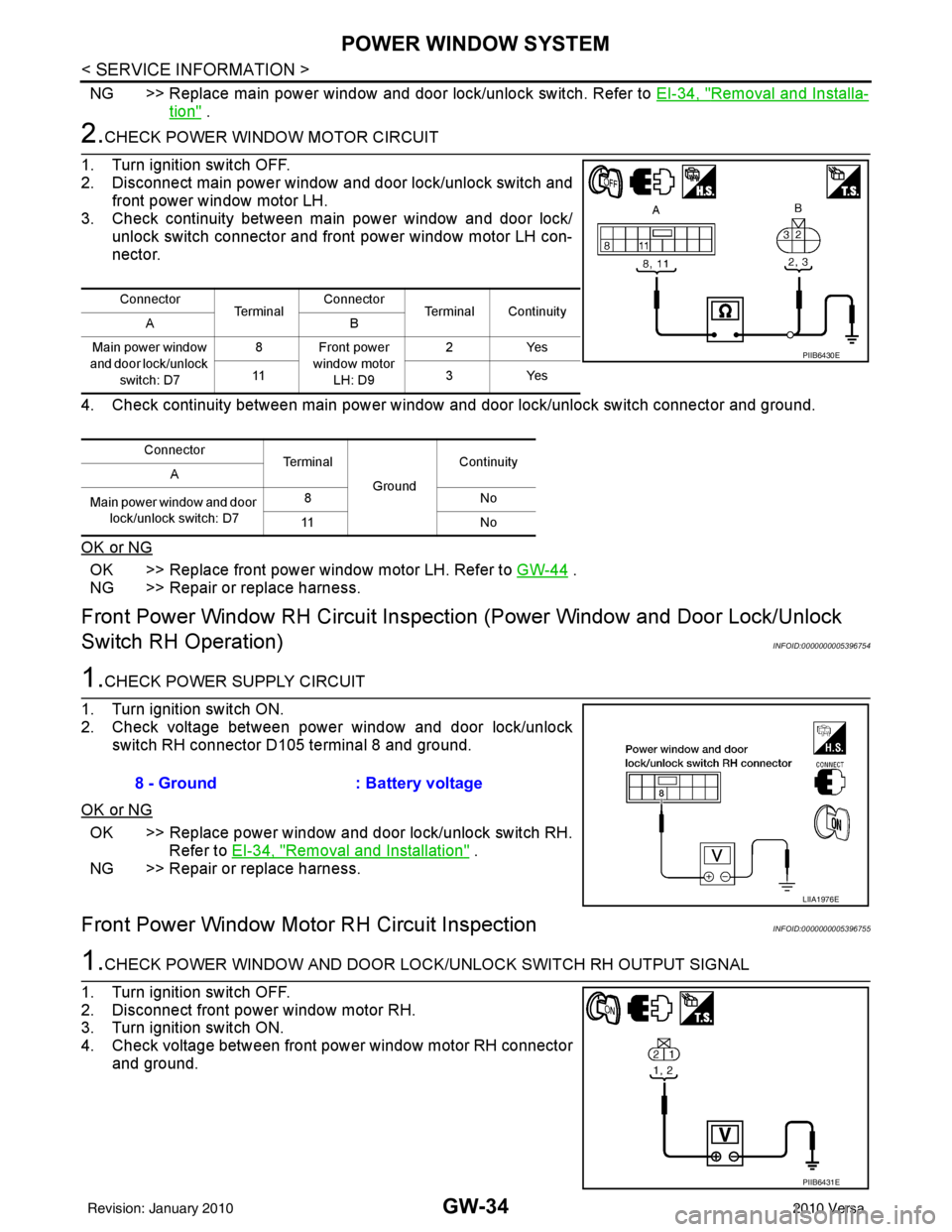
2.CHECK POWER WINDOW MOTOR CIRCUIT
1. Turn ignition switch OFF.
2. Disconnect main power window and door lock/unlock switch and front power window motor LH.
3. Check continuity between main power window and door lock/ unlock switch connector and front power window motor LH con-
nector.
4. Check continuity between main power window and door lock/unlock switch connector and ground.
OK or NG
OK >> Replace front power window motor LH. Refer to GW-44 .
NG >> Repair or replace harness.
Front Power Window RH Circuit Inspecti on (Power Window and Door Lock/Unlock
Switch RH Operation)
INFOID:0000000005396754
1.CHECK POWER SUPPLY CIRCUIT
1. Turn ignition switch ON.
2. Check voltage between power window and door lock/unlock switch RH connector D105 terminal 8 and ground.
OK or NG
OK >> Replace power window and door lock/unlock switch RH. Refer to EI-34, "
Removal and Installation" .
NG >> Repair or replace harness.
Front Power Window Moto r RH Circuit InspectionINFOID:0000000005396755
1.CHECK POWER WINDOW AND DOOR LOCK /UNLOCK SWITCH RH OUTPUT SIGNAL
1. Turn ignition switch OFF.
2. Disconnect front power window motor RH.
3. Turn ignition switch ON.
4. Check voltage between front power window motor RH connector and ground.
Connector Te r m i n a lConnector
Terminal Continuity
AB
Main power window
and door lock/unlock switch: D7 8 Front power
window motor LH: D9 2Y
es
11 3Ye s
Connector Terminal
GroundContinuity
A
Main power window and door lock/unlock switch: D7 8N
o
11 N o
PIIB6430E
8 - Ground: Battery voltage
LIIA1976E
PIIB6431E
Revision: January 20102010 Versa
Page 2752 of 3745
POWER WINDOW SYSTEMGW-35
< SERVICE INFORMATION >
C
DE
F
G H
J
K L
M A
B
GW
N
O P
OK or NG
OK >> Replace front power window motor RH. Refer to GW-44 .
NG >> GO TO 2.
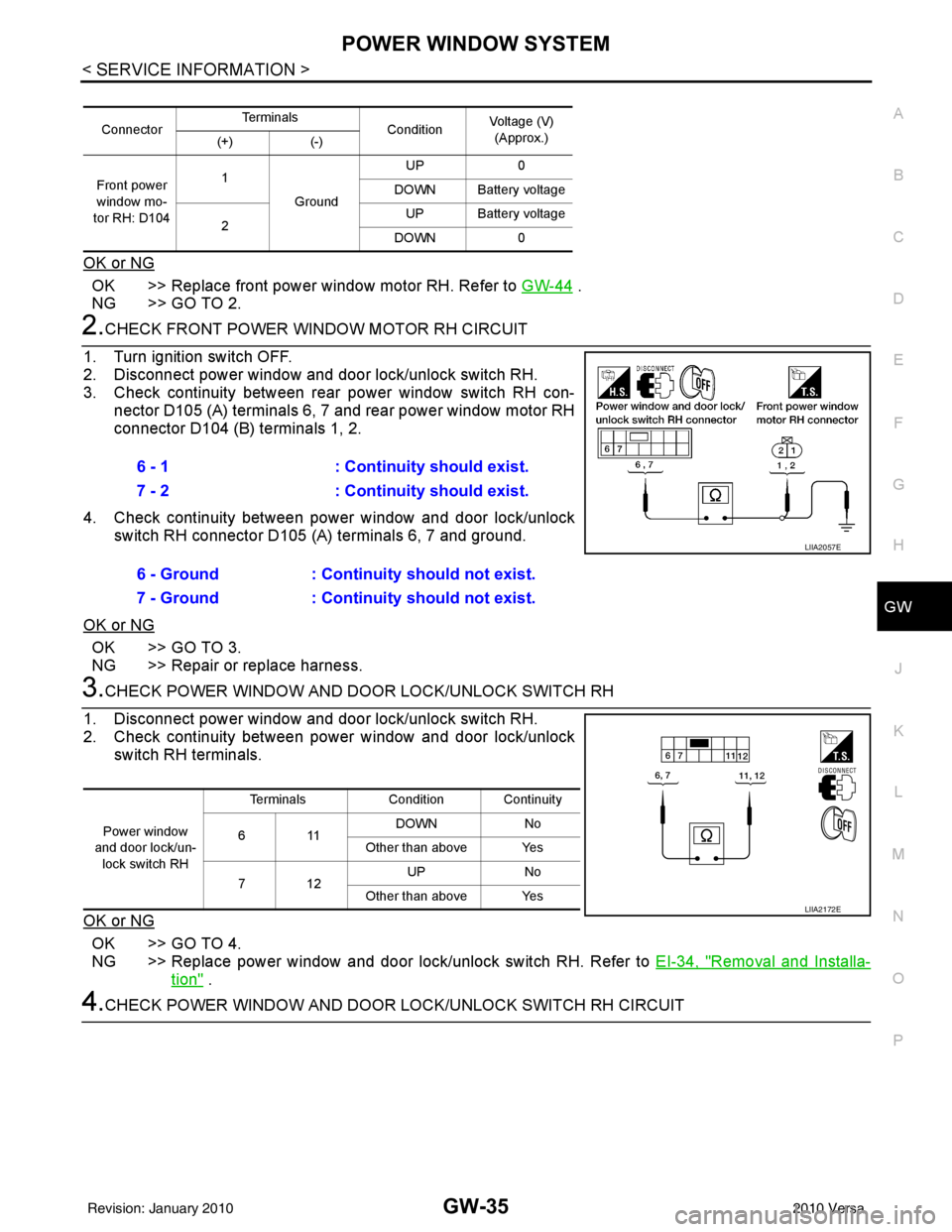
2.CHECK FRONT POWER WINDOW MOTOR RH CIRCUIT
1. Turn ignition switch OFF.
2. Disconnect power window and door lock/unlock switch RH.
3. Check continuity between rear power window switch RH con- nector D105 (A) terminals 6, 7 and rear power window motor RH
connector D104 (B) terminals 1, 2.
4. Check continuity between power window and door lock/unlock switch RH connector D105 (A) terminals 6, 7 and ground.
OK or NG
OK >> GO TO 3.
NG >> Repair or replace harness.
3.CHECK POWER WINDOW AND DOOR LOCK/UNLOCK SWITCH RH
1. Disconnect power window and door lock/unlock switch RH.
2. Check continuity between power window and door lock/unlock switch RH terminals.
OK or NG
OK >> GO TO 4.
NG >> Replace power window and door lock/unlock switch RH. Refer to EI-34, "
Removal and Installa-
tion" .
4.CHECK POWER WINDOW AND DOOR LOCK/UNLOCK SWITCH RH CIRCUIT
ConnectorTe r m i n a l s
ConditionVoltage (V)
(Approx.)
(+) (-)
Front power
window mo-
tor RH: D104 1
Ground UP
0
DOWN Battery voltage
2 UP Battery voltage
DOWN 0
6 - 1 : Continuity should exist.
7 - 2 : Continuity should exist.
6 - Ground : Continuity should not exist.
7 - Ground : Continuity should not exist.
LIIA2057E
Power window
and door lock/un- lock switch RH Terminals
Condition Continuity
611 DOWN
No
Other than above Yes
712 UP
No
Other than above Yes
LIIA2172E
Revision: January 20102010 Versa
Page 2753 of 3745
GW-36
< SERVICE INFORMATION >
POWER WINDOW SYSTEM
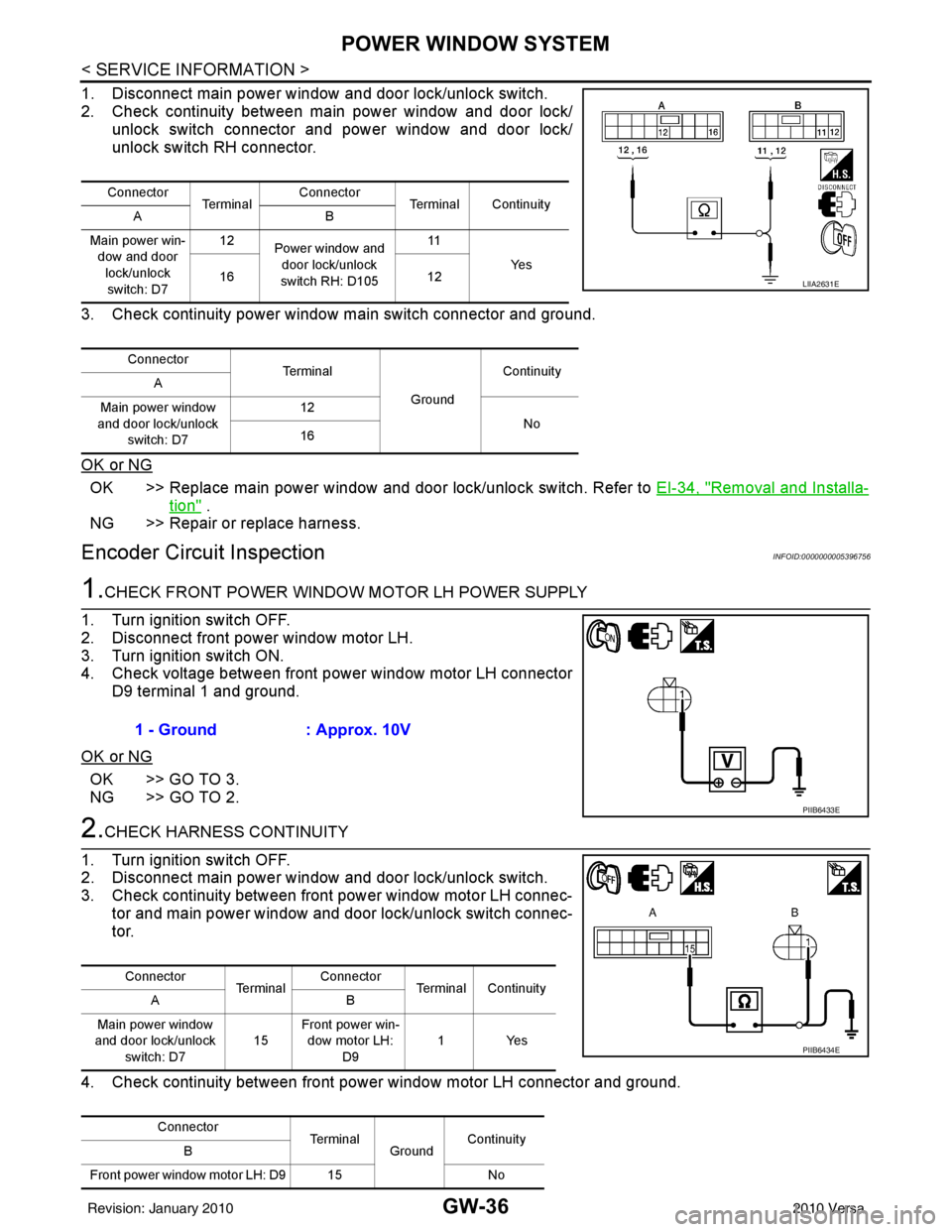
1. Disconnect main power window and door lock/unlock switch.
2. Check continuity between main power window and door lock/ unlock switch connector and power window and door lock/
unlock switch RH connector.
3. Check continuity power window main switch connector and ground.
OK or NG
OK >> Replace main power window and door lock/unlock switch. Refer to EI-34, "Removal and Installa-
tion" .
NG >> Repair or replace harness.
Encoder Circuit InspectionINFOID:0000000005396756
1.CHECK FRONT POWER WINDOW MOTOR LH POWER SUPPLY
1. Turn ignition switch OFF.
2. Disconnect front power window motor LH.
3. Turn ignition switch ON.
4. Check voltage between front power window motor LH connector D9 terminal 1 and ground.
OK or NG
OK >> GO TO 3.
NG >> GO TO 2.
2.CHECK HARNESS CONTINUITY
1. Turn ignition switch OFF.
2. Disconnect main power window and door lock/unlock switch.
3. Check continuity between front power window motor LH connec-
tor and main power window and door lock/unlock switch connec-
tor.
4. Check continuity between front power window motor LH connector and ground.
Connector Te r m i n a l Connector
Terminal Continuity
AB
Main power win- dow and door
lock/unlock switch: D7 12
Power window and
door lock/unlock
switch RH: D105 11
Ye s
16 12
Connector Te r m i n a l
GroundContinuity
A
Main power window
and door lock/unlock switch: D7 12
No
16
LIIA2631E
1 - Ground : Approx. 10V
PIIB6433E
Connector
Te r m i n a lConnector
Terminal Continuity
AB
Main power window
and door lock/unlock switch: D7 15Front power win-
dow motor LH: D9 1Yes
Connector TerminalGroundContinuity
B
Front power window motor LH: D9 15 No
PIIB6434E
Revision: January 20102010 Versa
Page 2754 of 3745
POWER WINDOW SYSTEMGW-37
< SERVICE INFORMATION >
C
DE
F
G H
J
K L
M A
B
GW
N
O P
OK or NG
OK >> Replace main power window and door lock/unlock switch. Refer to EI-34, "Removal and Installa-
tion" .
NG >> Repair or replace harness.
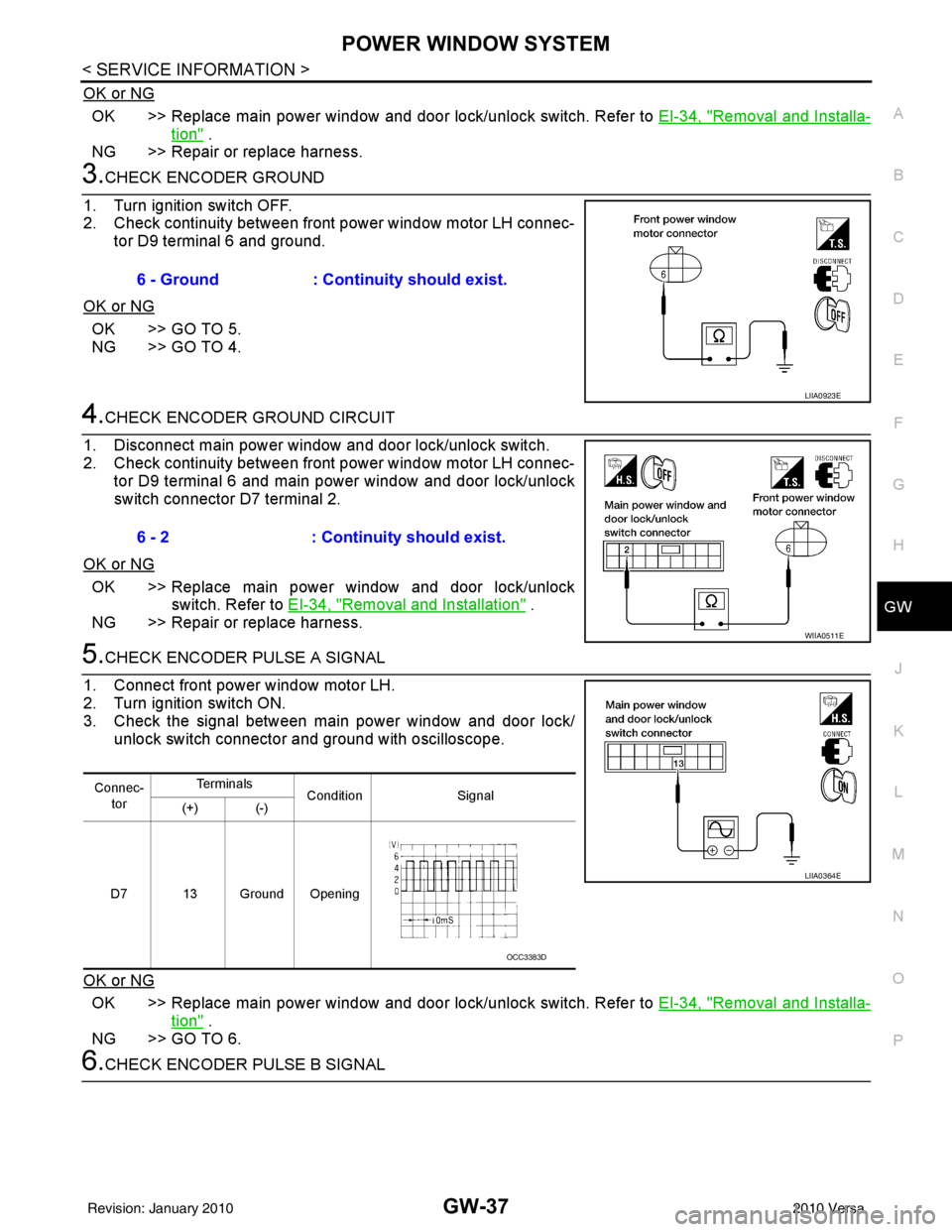
3.CHECK ENCODER GROUND
1. Turn ignition switch OFF.
2. Check continuity between front power window motor LH connec- tor D9 terminal 6 and ground.
OK or NG
OK >> GO TO 5.
NG >> GO TO 4.
4.CHECK ENCODER GROUND CIRCUIT
1. Disconnect main power window and door lock/unlock switch.
2. Check continuity between front power window motor LH connec- tor D9 terminal 6 and main power window and door lock/unlock
switch connector D7 terminal 2.
OK or NG
OK >> Replace main power window and door lock/unlock switch. Refer to EI-34, "
Removal and Installation" .
NG >> Repair or replace harness.
5.CHECK ENCODER PULSE A SIGNAL
1. Connect front power window motor LH.
2. Turn ignition switch ON.
3. Check the signal between main power window and door lock/ unlock switch connector and ground with oscilloscope.
OK or NG
OK >> Replace main power window and door lock/unlock switch. Refer to EI-34, "Removal and Installa-
tion" .
NG >> GO TO 6.
6.CHECK ENCODER PULSE B SIGNAL 6 - Ground
: Continuity should exist.
LIIA0923E
6 - 2: Continuity should exist.
WIIA0511E
Connec-
tor Te r m i n a l s
Condition Signal
(+) (-)
D7 13 Ground Opening
LIIA0364E
OCC3383D
Revision: January 20102010 Versa
Page 2755 of 3745
GW-38
< SERVICE INFORMATION >
POWER WINDOW SYSTEM
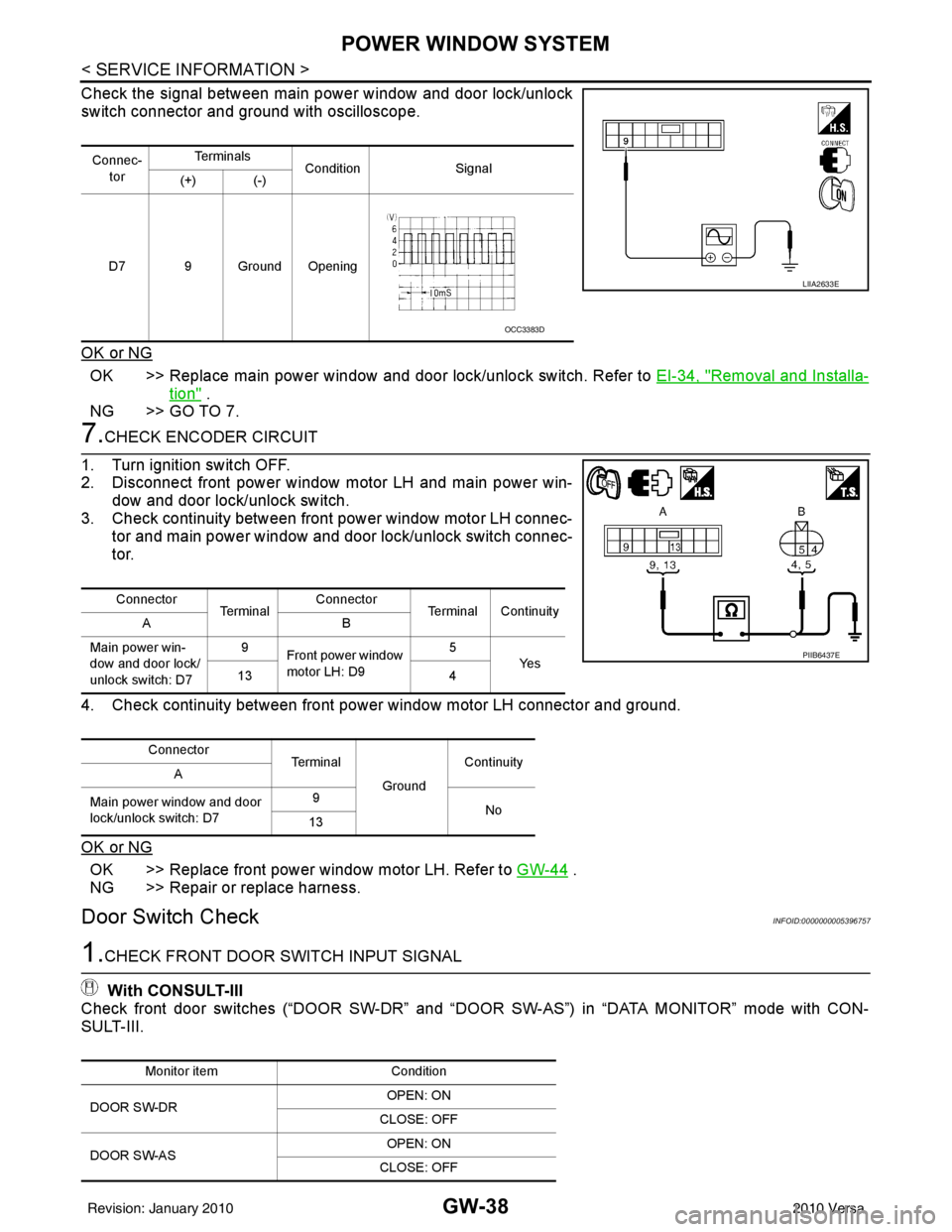
Check the signal between main power window and door lock/unlock
switch connector and ground with oscilloscope.
OK or NG
OK >> Replace main power window and door lock/unlock switch. Refer to EI-34, "Removal and Installa-
tion" .
NG >> GO TO 7.
7.CHECK ENCODER CIRCUIT
1. Turn ignition switch OFF.
2. Disconnect front power window motor LH and main power win- dow and door lock/unlock switch.
3. Check continuity between front power window motor LH connec-
tor and main power window and door lock/unlock switch connec-
tor.
4. Check continuity between front power window motor LH connector and ground.
OK or NG
OK >> Replace front power window motor LH. Refer to GW-44 .
NG >> Repair or replace harness.
Door Switch CheckINFOID:0000000005396757
1.CHECK FRONT DOOR SWITCH INPUT SIGNAL
With CONSULT-III
Check front door switches (“DOOR SW-DR” and “D OOR SW-AS”) in “DATA MONITOR” mode with CON-
SULT-III.
Connec-
tor Te r m i n a l s
Condition Signal
(+) (-)
D7 9 Ground Opening
LIIA2633E
OCC3383D
Connector Te r m i n a lConnector
Terminal Continuity
AB
Main power win-
dow and door lock/
unlock switch: D7 9
Front power window
motor LH: D9 5
Ye s
13 4
Connector Te r m i n a l
GroundContinuity
A
Main power window and door
lock/unlock switch: D7 9
No
13
PIIB6437E
Monitor item Condition
DOOR SW-DR OPEN: ON
CLOSE: OFF
DOOR SW-AS OPEN: ON
CLOSE: OFF
Revision: January 20102010 Versa
Page 2756 of 3745
POWER WINDOW SYSTEMGW-39
< SERVICE INFORMATION >
C
DE
F
G H
J
K L
M A
B
GW
N
O P
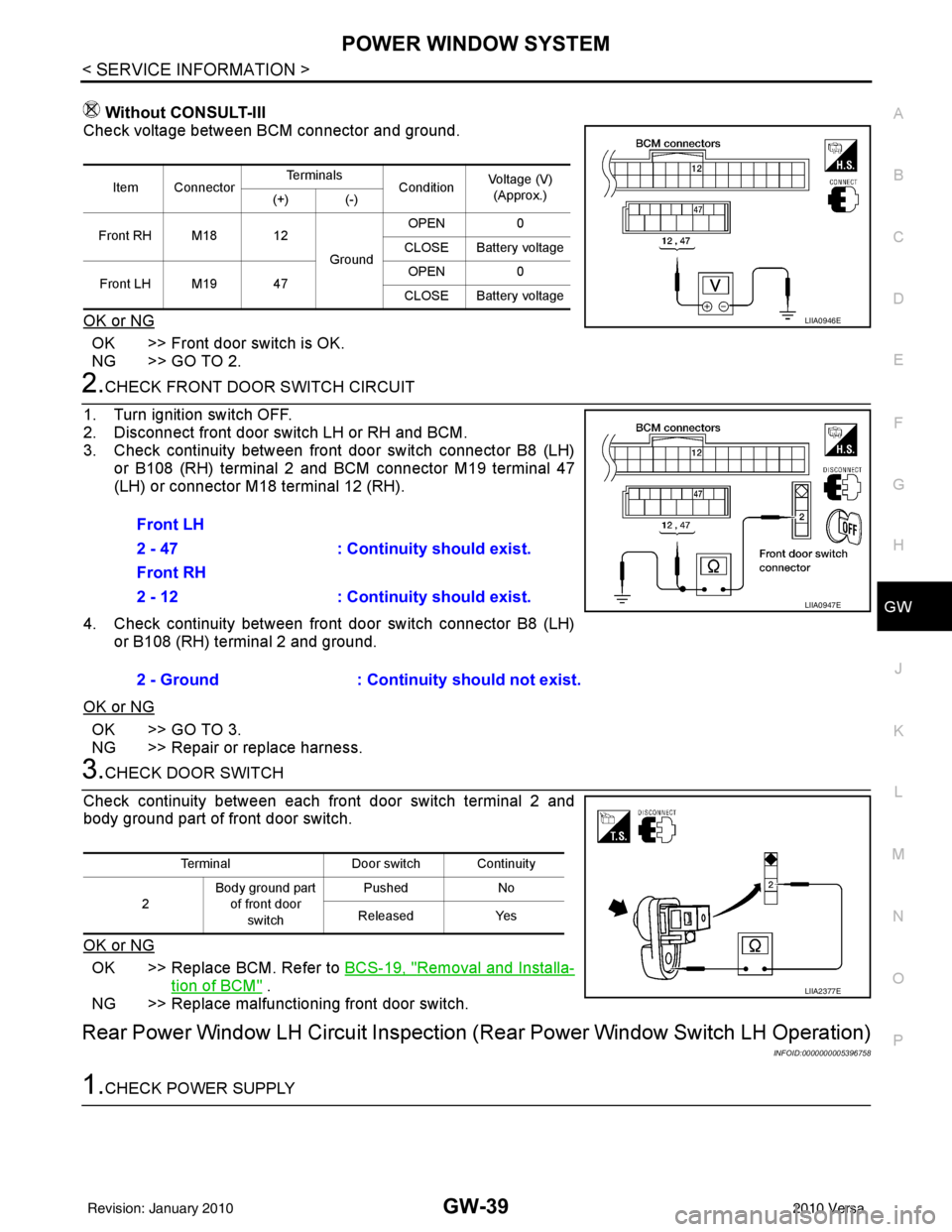
Without CONSULT-III
Check voltage between BCM connector and ground.
OK or NG
OK >> Front door switch is OK.
NG >> GO TO 2.
2.CHECK FRONT DOOR SWITCH CIRCUIT
1. Turn ignition switch OFF.
2. Disconnect front door switch LH or RH and BCM.
3. Check continuity between front door switch connector B8 (LH) or B108 (RH) terminal 2 and BCM connector M19 terminal 47
(LH) or connector M18 terminal 12 (RH).
4. Check continuity between front door switch connector B8 (LH) or B108 (RH) terminal 2 and ground.
OK or NG
OK >> GO TO 3.
NG >> Repair or replace harness.
3.CHECK DOOR SWITCH
Check continuity between each front door switch terminal 2 and
body ground part of front door switch.
OK or NG
OK >> Replace BCM. Refer to BCS-19, "Removal and Installa-
tion of BCM" .
NG >> Replace malfunctioning front door switch.
Rear Power Window LH Circuit Inspection (Rear Power Window Switch LH Operation)
INFOID:0000000005396758
1.CHECK POWER SUPPLY
Item ConnectorTe r m i n a l s
ConditionVoltage (V)
(Approx.)
(+) (-)
Front RH M18 12 GroundOPEN
0
CLOSE Battery voltage
Front LH M19 47 OPEN
0
CLOSE Battery voltage
LIIA0946E
Front LH
2 - 47 : Continuity should exist.
Front RH
2 - 12 : Continuity should exist.
2 - Ground : Continuity should not exist.
LIIA0947E
TerminalDoor switch Continuity
2 Body ground part
of front door
switch Pushed
No
Released Yes
LIIA2377E
Revision: January 20102010 Versa