brake light NISSAN TIIDA 2010 Service Service Manual
[x] Cancel search | Manufacturer: NISSAN, Model Year: 2010, Model line: TIIDA, Model: NISSAN TIIDA 2010Pages: 3745, PDF Size: 73.67 MB
Page 2211 of 3745
![NISSAN TIIDA 2010 Service Service Manual EC-946
< SERVICE INFORMATION >[MR18DE]
DTC P1805 BRAKE SWITCH
Diagnosis Procedure
INFOID:0000000005532828
1.CHECK STOP LAMP SWITCH CIRCUIT
1. Turn ignition switch OFF.
2. Check the stop lamp when depr](/img/5/57397/w960_57397-2210.png "NISSAN TIIDA 2010 Service Service Manual EC-946
< SERVICE INFORMATION >[MR18DE]
DTC P1805 BRAKE SWITCH
Diagnosis Procedure
INFOID:0000000005532828
1.CHECK STOP LAMP SWITCH CIRCUIT
1. Turn ignition switch OFF.
2. Check the stop lamp when depr")
EC-946
< SERVICE INFORMATION >[MR18DE]
DTC P1805 BRAKE SWITCH
Diagnosis Procedure
INFOID:0000000005532828
1.CHECK STOP LAMP SWITCH CIRCUIT
1. Turn ignition switch OFF.
2. Check the stop lamp when depressing and releasing the brake pedal.
OK or NG
OK >> GO TO 4.
NG >> GO TO 2.
2.CHECK STOP LAMP SWIT CH POWER SUPPLY CIRCUIT
1. Disconnect stop lamp switch (1) harness connector.
- Brake pedal (2)
2. Check voltage between stop lamp switch terminal 1 and ground with CONSULT-III or tester.
OK or NG
OK >> GO TO 4.
NG >> GO TO 3.
3.DETECT MALFUNCTIONING PART
Check the following.
• Harness connectors M69, E7
• 10 A fuse
• Harness for open and short between stop lamp switch and battery
TERMI- NAL NO. WIRE
COLOR ITEM
CONDITION DATA (DC Voltage)
99 R Stop lamp switch [Ignition switch: OFF]
• Brake pedal: Fully released
Approximately 0 V
[Ignition switch: OFF]
• Brake pedal: Slightly depressed BATTERY VOLTAGE
(11 - 14 V)
Brake pedal Stop lamp
Fully released Not illuminated
Slightly depressed Illuminated
BBIA0710E
Voltage: Battery voltage
PBIB3317E
Revision: January 20102010 Versa
Page 2212 of 3745
![NISSAN TIIDA 2010 Service Service Manual DTC P1805 BRAKE SWITCHEC-947
< SERVICE INFORMATION > [MR18DE]
C
D
E
F
G H
I
J
K L
M A
EC
NP
O
>> Repair open circuit or short to ground or short to power in harness or connectors.
4.CHECK STOP LAMP SW](/img/5/57397/w960_57397-2211.png "NISSAN TIIDA 2010 Service Service Manual DTC P1805 BRAKE SWITCHEC-947
< SERVICE INFORMATION > [MR18DE]
C
D
E
F
G H
I
J
K L
M A
EC
NP
O
>> Repair open circuit or short to ground or short to power in harness or connectors.
4.CHECK STOP LAMP SW")
DTC P1805 BRAKE SWITCHEC-947
< SERVICE INFORMATION > [MR18DE]
C
D
E
F
G H
I
J
K L
M A
EC
NP
O
>> Repair open circuit or short to ground or short to power in harness or connectors.
4.CHECK STOP LAMP SWITCH INPUT SI
GNAL CIRCUIT FOR OPEN AND SHORT
1. Disconnect stop lamp switch (1) harness connector.
2. Disconnect ECM harness connector.
3. Check harness continuity between stop lamp switch terminal 2 and ECM terminal 99. Refer to Wiring Diagram.
4. Also check harness for short to ground and short to power.
OK or NG
OK >> GO TO 5.
NG >> Repair open circuit or short to ground or short to power in harness connectors.
5.CHECK STOP LAMP SWITCH
Refer to EC-947, "
Component Inspection".
OK or NG
OK >> GO TO 6.
NG >> Replace stop lamp switch.
6.CHECK INTERMITTENT INCIDENT
Refer to EC-632
.
>> INSPECTION END
Component InspectionINFOID:0000000005532829
STOP LAMP SWITCH
1. Turn ignition switch OFF.
2. Disconnect stop lamp switch harness connector.
3. Check continuity between stop lamp switch terminals 1 and 2 under the following conditions.
If NG, adjust stop lamp switch installation, refer to BR-6
, and perform step 3 again.
Continuity should exist.
Condition
Continuity
Brake pedal: Fully released. Should not exist.
Brake pedal: Slightly depressed. Should exist.
PBIB3318E
Revision: January 20102010 Versa
Page 2261 of 3745
![NISSAN TIIDA 2010 Service Service Manual EC-996
< SERVICE INFORMATION >[MR18DE]
ASCD BRAKE SWITCH
ASCD BRAKE SWITCH
Component DescriptionINFOID:0000000005532893
When depress on the brake pedal, ASCD brake switch (2) is turned
OFF and stop la](/img/5/57397/w960_57397-2260.png "NISSAN TIIDA 2010 Service Service Manual EC-996
< SERVICE INFORMATION >[MR18DE]
ASCD BRAKE SWITCH
ASCD BRAKE SWITCH
Component DescriptionINFOID:0000000005532893
When depress on the brake pedal, ASCD brake switch (2) is turned
OFF and stop la")
EC-996
< SERVICE INFORMATION >[MR18DE]
ASCD BRAKE SWITCH
ASCD BRAKE SWITCH
Component DescriptionINFOID:0000000005532893
When depress on the brake pedal, ASCD brake switch (2) is turned
OFF and stop lamp switch (1) is turned ON. ECM detects the state of
the brake pedal by this input of two kinds (ON/OFF signal)
Refer to
EC-522
for the ASCD function.
CONSULT-III Reference Value in Data Monitor ModeINFOID:0000000005532894
Specification data are reference values.
BBIA0708E
Monitor item ConditionSpecification
BRAKE SW1
(ASCD brake switch) • Ignition switch: ON• Brake pedal: Fully released (A/T, CVT)
• Brake pedal and clutch pedal: Fully released
(M/T) ON
• Brake pedal: Slightly depressed (A/T, CVT)
• Brake pedal and/or clutch pedal: Slightly de- pressed (M/T) OFF
BRAKE SW2
(Stop lamp switch) • Ignition switch: ONBrake pedal: Fully released
OFF
Brake pedal: Slightly depressed ON
Revision: January 20102010 Versa
Page 2263 of 3745
![NISSAN TIIDA 2010 Service Service Manual EC-998
< SERVICE INFORMATION >[MR18DE]
ASCD BRAKE SWITCH
Diagnosis Procedure
INFOID:0000000005532896
1.CHECK OVERALL FUNCTION-I
With CONSULT-III
1. Turn ignition switch ON.
2. Select “BRAKE SW1”](/img/5/57397/w960_57397-2262.png "NISSAN TIIDA 2010 Service Service Manual EC-998
< SERVICE INFORMATION >[MR18DE]
ASCD BRAKE SWITCH
Diagnosis Procedure
INFOID:0000000005532896
1.CHECK OVERALL FUNCTION-I
With CONSULT-III
1. Turn ignition switch ON.
2. Select “BRAKE SW1”")
EC-998
< SERVICE INFORMATION >[MR18DE]
ASCD BRAKE SWITCH
Diagnosis Procedure
INFOID:0000000005532896
1.CHECK OVERALL FUNCTION-I
With CONSULT-III
1. Turn ignition switch ON.
2. Select “BRAKE SW1” in “DAT A MONITOR” mode with CONSULT-III.
3. Check “BRAKE SW1” indication under the following conditions.
M/T models
A/T and CVT models
Without CONSULT-III
1. Turn ignition switch ON.
2. Check voltage between ECM terminal 100 and ground under the following conditions.
M/T models
A/T and CVT models
OK or NG
OK >> GO TO 2.
NG (M/T models) >>GO TO 3.
NG (A/T and CVT models) >>GO TO 4.
2.CHECK OVERALL FUNCTION-II
With CONSULT-III
Check “BRAKE SW2” indication in “DATA MONITOR” mode.
TERMI-
NAL NO. WIRE
COLOR ITEM
CONDITION DATA (DC Voltage)
99 R Stop lamp switch [Ignition switch: ON]
• Brake pedal: Fully released
Approximately 0 V
[Ignition switch: ON]
• Brake pedal: Slightly depressed BATTERY VOLTAGE
(11 - 14 V)
100 G ASCD brake switch [Ignition switch: ON]
• Brake pedal: Slightly depressed (A/T, CVT)
• Brake pedal and/or clutch pedal: Slightly de-
pressed (M/T) Approximately 0 V
[Ignition switch: ON]
• Brake pedal: Fully released (A/T, CVT)
• Brake pedal and clutch pedal: Fully released (M/T) BATTERY VOLTAGE
(11 - 14 V)
Condition Indication
Clutch pedal and/or brake pedal: Slightly depressed OFF
Clutch pedal and brake pedal: Fully released ON
Condition Indication
Brake pedal: Slightly depressed OFF
Brake pedal: Fully released ON
Condition Voltage
Clutch pedal and/or brake pedal: Slightly depressed Approximately 0 V
Clutch pedal and brake pedal: Fully released Battery voltage
Condition Voltage
Brake pedal: Slightly depressed Approximately 0 V
Brake pedal: Fully released Battery voltage
PBIB3315E
Revision: January 20102010 Versa
Page 2264 of 3745
![NISSAN TIIDA 2010 Service Service Manual ASCD BRAKE SWITCHEC-999
< SERVICE INFORMATION > [MR18DE]
C
D
E
F
G H
I
J
K L
M A
EC
NP
O
Without CONSULT-III
Check voltage between ECM terminal 99 and ground under the fol-
lowing conditions.
OK or N](/img/5/57397/w960_57397-2263.png "NISSAN TIIDA 2010 Service Service Manual ASCD BRAKE SWITCHEC-999
< SERVICE INFORMATION > [MR18DE]
C
D
E
F
G H
I
J
K L
M A
EC
NP
O
Without CONSULT-III
Check voltage between ECM terminal 99 and ground under the fol-
lowing conditions.
OK or N")
ASCD BRAKE SWITCHEC-999
< SERVICE INFORMATION > [MR18DE]
C
D
E
F
G H
I
J
K L
M A
EC
NP
O
Without CONSULT-III
Check voltage between ECM terminal 99 and ground under the fol-
lowing conditions.
OK or NG
OK >> INSPECTION END.
NG >> GO TO 11.
3.CHECK ASCD CLUTCH SWITCH POWER SUPPLY CIRCUIT
1. Turn ignition switch OFF.
2. Disconnect ASCD clutch switch (1) harness connector.
- Clutch pedal (2)
3. Turn ignition switch ON.
4. Check voltage between ASCD clutch switch terminal 1 and ground under the following conditions with CONSULT-III or
tester.
OK or NG
OK >> GO TO 9.
NG >> GO TO 4.
4.CHECK ASCD BRAKE SWITCH POWER SUPPLY
1. Turn ignition switch OFF.
Condition Indication
Brake pedal: Fully released OFF
Brake pedal: Slightly depressed ON
ConditionVoltage
Brake pedal: Fully released Approximately 0 V
Brake pedal: Slightly depressed Battery voltage
PBIB0311E
BBIA0709E
ConditionVoltage
Brake pedal: Fully released Battery voltage
Brake pedal: Slightly depressed Approx. 0 V
PBIB0857E
Revision: January 20102010 Versa
Page 2267 of 3745
![NISSAN TIIDA 2010 Service Service Manual EC-1002
< SERVICE INFORMATION >[MR18DE]
ASCD BRAKE SWITCH
• Harness for open or short between stop lamp switch and battery
>> Repair open circuit or short to ground or short to power in harness or c](/img/5/57397/w960_57397-2266.png "NISSAN TIIDA 2010 Service Service Manual EC-1002
< SERVICE INFORMATION >[MR18DE]
ASCD BRAKE SWITCH
• Harness for open or short between stop lamp switch and battery
>> Repair open circuit or short to ground or short to power in harness or c")
EC-1002
< SERVICE INFORMATION >[MR18DE]
ASCD BRAKE SWITCH
• Harness for open or short between stop lamp switch and battery
>> Repair open circuit or short to ground or short to power in harness or connectors.
13.CHECK STOP LAMP SWITCH INPUT SIGNAL CIRCUIT FOR OPEN AND SHORT
1. Disconnect ECM harness connector.
2. Check harness continuity between ECM terminal 99 and stop lamp switch terminal 2. Refer to Wiring Diagram.
3. Also check harness for short to ground and short to power.
OK or NG
OK >> GO TO 14.
NG >> Repair open circuit or short to ground or short to power in harness or connectors.
14.CHECK STOP LAMP SWITCH
Refer to EC-938, "
Component Inspection".
OK or NG
OK >> GO TO 15.
NG >> Replace stop lamp switch.
15.CHECK INTERMITTENT INCIDENT
Refer to EC-632
.
>> INSPECTION END
Component InspectionINFOID:0000000005532897
ASCD BRAKE SWITCH
1. Turn ignition switch OFF.
2. Disconnect ASCD brake switch harness connector.
3. Check continuity between ASCD brake switch terminals 1 and 2
under the following conditions.
If NG, adjust ASCD brake switch installation, refer to BR-6
, and
perform step 3 again.
ASCD CLUTCH SWITCH
1. Turn ignition switch OFF.
2. Disconnect ASCD clutch switch harness connector. Continuity should exist.
Condition
Continuity
Brake pedal: Fully released. Should exist.
Brake pedal: Slightly depressed. Should not exist.
SEC023D
Revision: January 20102010 Versa
Page 2268 of 3745
![NISSAN TIIDA 2010 Service Service Manual ASCD BRAKE SWITCHEC-1003
< SERVICE INFORMATION > [MR18DE]
C
D
E
F
G H
I
J
K L
M A
EC
NP
O
3. Check continuity between ASCD clutch switch terminals 1 and 2
under the following conditions.
If NG, adjust](/img/5/57397/w960_57397-2267.png "NISSAN TIIDA 2010 Service Service Manual ASCD BRAKE SWITCHEC-1003
< SERVICE INFORMATION > [MR18DE]
C
D
E
F
G H
I
J
K L
M A
EC
NP
O
3. Check continuity between ASCD clutch switch terminals 1 and 2
under the following conditions.
If NG, adjust")
ASCD BRAKE SWITCHEC-1003
< SERVICE INFORMATION > [MR18DE]
C
D
E
F
G H
I
J
K L
M A
EC
NP
O
3. Check continuity between ASCD clutch switch terminals 1 and 2
under the following conditions.
If NG, adjust ASCD clutch switch installation, refer to CL-6
, and
perform step 3 again.
STOP LAMP SWITCH
1. Turn ignition switch OFF.
2. Disconnect stop lamp switch harness connector.
3. Check continuity between stop lamp switch terminals 1 and 2 under the following conditions.
If NG, adjust stop lamp switch installation, refer to BR-6
, and perform step 3 again.
ConditionContinuity
Clutch pedal: Fully released. Should exist.
Clutch pedal: Slightly depressed. Should not exist.
SEC023D
ConditionContinuity
Brake pedal: Fully released. Should not exist.
Brake pedal: Slightly depressed. Should exist.
PBIB3318E
Revision: January 20102010 Versa
Page 2553 of 3745
![NISSAN TIIDA 2010 Service Service Manual EM-194
< SERVICE INFORMATION >[MR18DE]
ENGINE ASSEMBLY
• Do not allow engine oil to get on engine mounting insulator. Be careful not to damage engine mounting insu-
lator.
• When installation dire](/img/5/57397/w960_57397-2552.png "NISSAN TIIDA 2010 Service Service Manual EM-194
< SERVICE INFORMATION >[MR18DE]
ENGINE ASSEMBLY
• Do not allow engine oil to get on engine mounting insulator. Be careful not to damage engine mounting insu-
lator.
• When installation dire")
EM-194
< SERVICE INFORMATION >[MR18DE]
ENGINE ASSEMBLY
• Do not allow engine oil to get on engine mounting insulator. Be careful not to damage engine mounting insu-
lator.
• When installation directions are specified, install parts according to the directions. Refer to EM-191, "
Com-
ponent".
• Prior to installing the upper torque rod, apply a light coat of silicone lubricant (A) to the washer facing side of the bushing inner tube as
shown.
NOTE:
• Apply silicone lubricant (A) by dabbing the outward facing tube
surface with a sponge or suitable tool.
• Do not apply excess lubricant.
• Make sure that each mounting insulator is seated properly, and tighten nuts and bolts.
• Tighten engine mounting insulator (RH) bolts in the numerical order shown.
INSPECTION AFTER INSTALLATION
Inspection for Leaks
The following are procedures for checking fluids leak, lubricates leak and exhaust gases leak.• Before starting engine, check oil/fluid levels incl uding engine coolant and engine oil. If less than required
quantity, fill to the specified level. Refer to MA-14
.
• Use procedure below to check for fuel leakage.
- Turn ignition switch “ON” (with engine stopped). With fuel pressure applied to fuel piping, check for fuel leak-
age at connection points.
- Start engine. With engine speed increased, che ck again for fuel leakage at connection points.
• Run engine to check for unusual noise and vibration.
• Warm up engine thoroughly to make sure there is no leakage of fuel, exhaust gases, or any oil/fluids includ- ing engine oil and engine coolant.
• Bleed air from lines and hoses of applicable lines, such as in cooling system.
• After cooling down engine, again check oil/fluid levels including engine oil and engine coolant. Refill to the specified level, if necessary.
Summary of the inspection items:
* Transmission/transaxle/CVT fluid, power steering fluid, brake fluid, etc. : Vehicle front
LBIA0470E
: Vehicle front
WBIA0785E
Item
Before starting engine Engine runningAfter engine stopped
Engine coolant LevelLeakage Level
Engine oil LevelLeakage Level
Other oils and fluid* LevelLeakage Level
Fuel LeakageLeakageLeakage
Exhaust gases —Leakage —
Revision: January 20102010 Versa
Page 2612 of 3745
FRONT WHEEL HUB AND KNUCKLEFAX-7
< SERVICE INFORMATION >
CEF
G H
I
J
K L
M A
B
FA X
N
O P
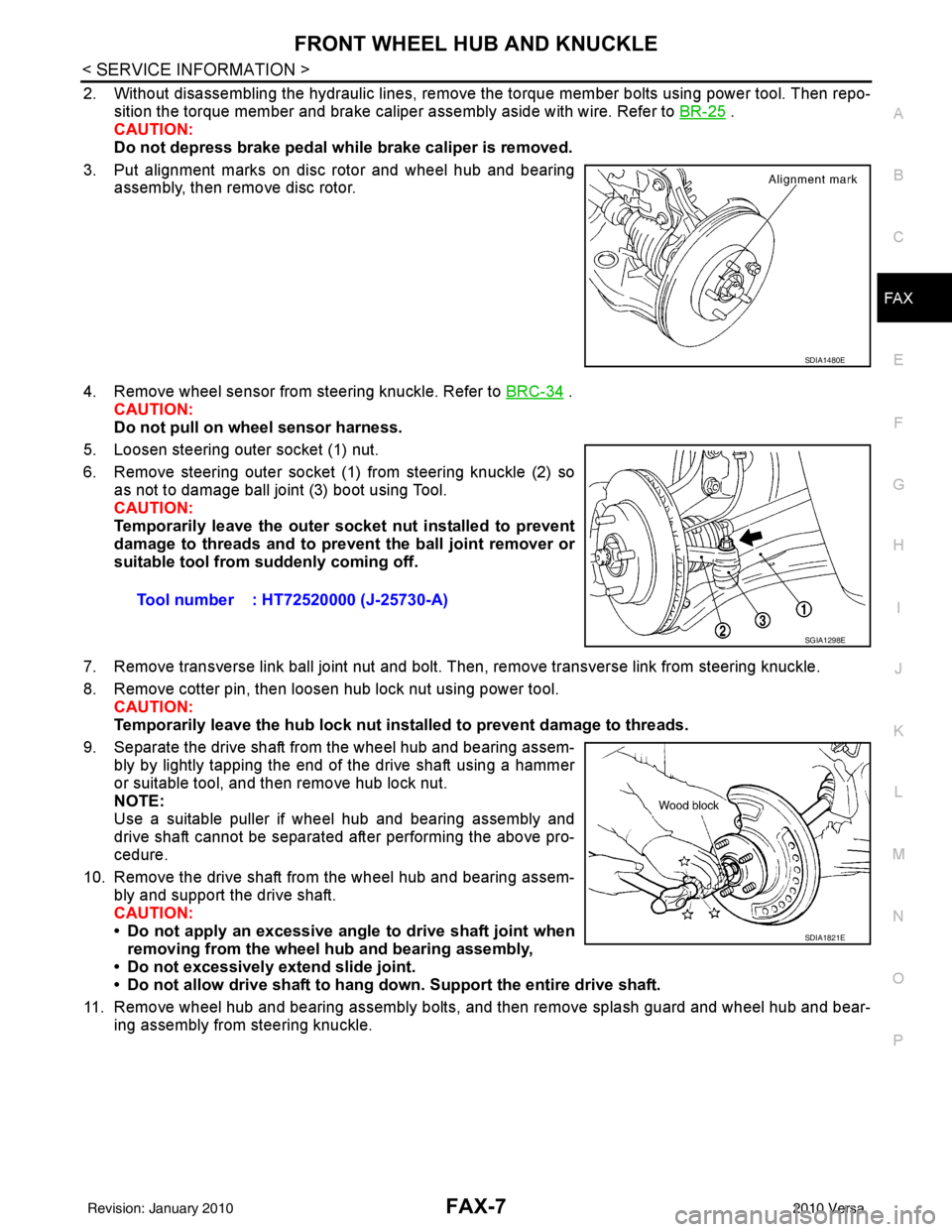
2. Without disassembling the hydraulic lines, remove the torque member bolts using power tool. Then repo- sition the torque member and brake caliper assembly aside with wire. Refer to BR-25
.
CAUTION:
Do not depress brake pedal while brake caliper is removed.
3. Put alignment marks on disc rotor and wheel hub and bearing assembly, then remove disc rotor.
4. Remove wheel sensor from steering knuckle. Refer to BRC-34
.
CAUTION:
Do not pull on wheel sensor harness.
5. Loosen steering outer socket (1) nut.
6. Remove steering outer socket (1) from steering knuckle (2) so as not to damage ball joint (3) boot using Tool.
CAUTION:
Temporarily leave the outer socket nut installed to prevent
damage to threads and to prevent the ball joint remover or
suitable tool from suddenly coming off.
7. Remove transverse link ball joint nut and bolt. Then, remove transverse link from steering knuckle.
8. Remove cotter pin, then loosen hub lock nut using power tool. CAUTION:
Temporarily leave the hub lock nut inst alled to prevent damage to threads.
9. Separate the drive shaft from the wheel hub and bearing assem- bly by lightly tapping the end of the drive shaft using a hammer
or suitable tool, and then remove hub lock nut.
NOTE:
Use a suitable puller if wheel hub and bearing assembly and
drive shaft cannot be separated after performing the above pro-
cedure.
10. Remove the drive shaft from the wheel hub and bearing assem- bly and support the drive shaft.
CAUTION:
• Do not apply an excessive angle to drive shaft joint when
removing from the wheel hub and bearing assembly,
• Do not excessively extend slide joint.
• Do not allow drive shaft to hang do wn. Support the entire drive shaft.
11. Remove wheel hub and bearing assembly bolts, and then remove splash guard and wheel hub and bear- ing assembly from steering knuckle.
SDIA1480E
Tool number : HT72520000 (J-25730-A)
SGIA1298E
SDIA1821E
Revision: January 20102010 Versa
Page 3023 of 3745
LT-28
< SERVICE INFORMATION >
HEADLAMP (FOR CANADA) - DAYTIME LIGHT SYSTEM -
HEADLAMP (FOR CANADA) - DAYTIME LIGHT SYSTEM -
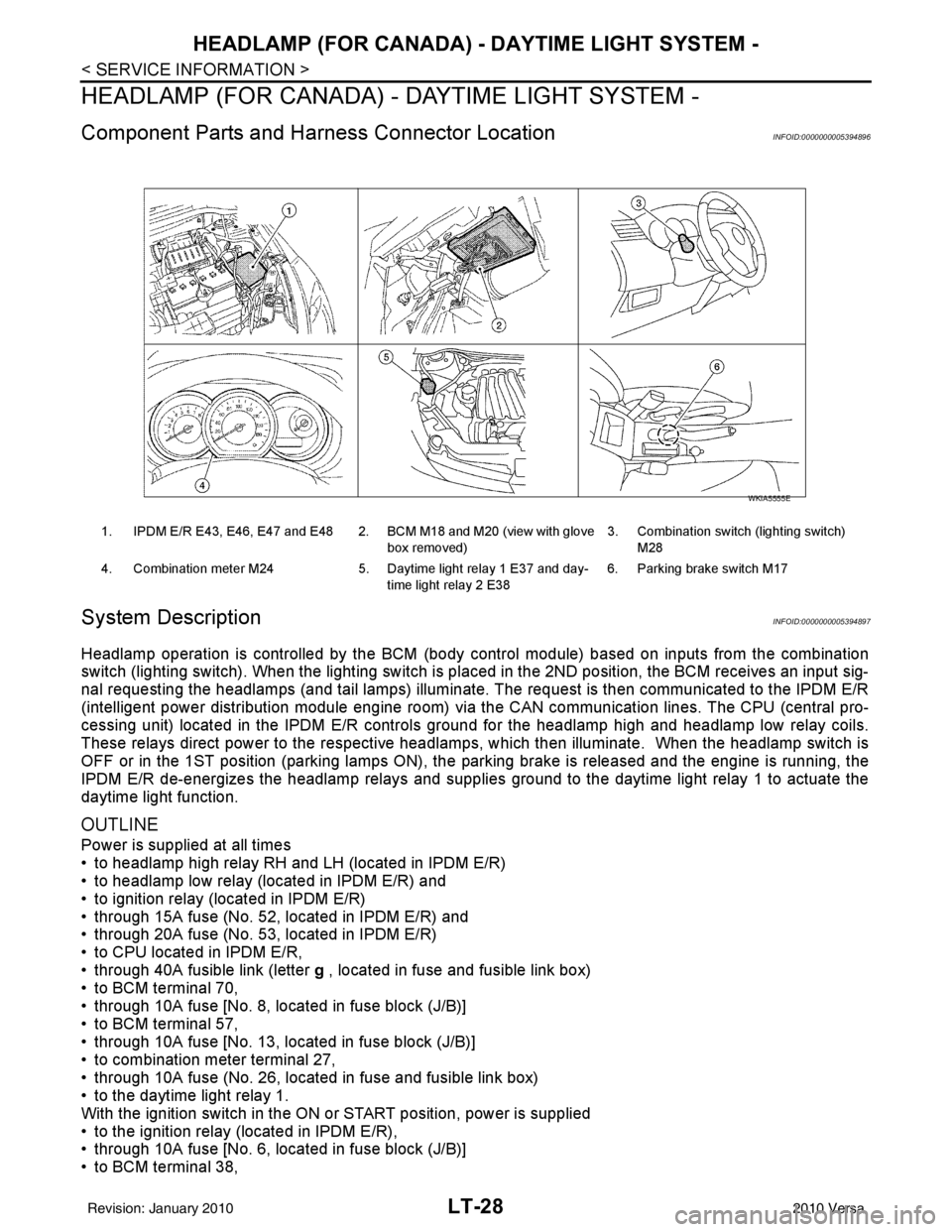
Component Parts and Harness Connector LocationINFOID:0000000005394896
System DescriptionINFOID:0000000005394897
Headlamp operation is controlled by the BCM (body c ontrol module) based on inputs from the combination
switch (lighting switch). When the lighting switch is pl aced in the 2ND position, the BCM receives an input sig-
nal requesting the headlamps (and tail lamps) illuminate. The request is then communicated to the IPDM E/R
(intelligent power distribution module engine room) vi a the CAN communication lines. The CPU (central pro-
cessing unit) located in the IPDM E/R controls ground for the headlamp high and headlamp low relay coils.
These relays direct power to the respective headlamps , which then illuminate. When the headlamp switch is
OFF or in the 1ST position (parking lamps ON), the parking brake is released and the engine is running, the
IPDM E/R de-energizes the headlamp relays and supplies ground to the daytime light relay 1 to actuate the
daytime light function.
OUTLINE
Power is supplied at all times
• to headlamp high relay RH and LH (located in IPDM E/R)
• to headlamp low relay (located in IPDM E/R) and
• to ignition relay (located in IPDM E/R)
• through 15A fuse (No. 52, located in IPDM E/R) and
• through 20A fuse (No. 53, located in IPDM E/R)
• to CPU located in IPDM E/R,
• through 40A fusible link (letter g , located in fuse and fusible link box)
• to BCM terminal 70,
• through 10A fuse [No. 8, located in fuse block (J/B)]
• to BCM terminal 57,
• through 10A fuse [No. 13, located in fuse block (J/B)]
• to combination meter terminal 27,
• through 10A fuse (No. 26, located in fuse and fusible link box)
• to the daytime light relay 1.
With the ignition switch in the ON or START position, power is supplied
• to the ignition relay (located in IPDM E/R),
• through 10A fuse [No. 6, located in fuse block (J/B)]
• to BCM terminal 38,
1. IPDM E/R E43, E46, E47 and E48 2. BCM M18 and M20 (view with glove
box removed)3. Combination switch (lighting switch)
M28
4. Combination meter M24 5. Daytime light relay 1 E37 and day-
time light relay 2 E38 6. Parking brake switch M17
WKIA5555E
Revision: January 20102010 Versa