window NISSAN TIIDA 2010 Service Manual PDF
[x] Cancel search | Manufacturer: NISSAN, Model Year: 2010, Model line: TIIDA, Model: NISSAN TIIDA 2010Pages: 3745, PDF Size: 73.67 MB
Page 1889 of 3745
![NISSAN TIIDA 2010 Service Manual PDF EC-624
< SERVICE INFORMATION >[MR18DE]
TROUBLE DIAGNOSIS - SPECIFICATION VALUE
TROUBLE DIAGNOSIS - SPECIFICATION VALUE
DescriptionINFOID:0000000005532424
The specification (SP) value indicates the tol](/img/5/57397/w960_57397-1888.png "NISSAN TIIDA 2010 Service Manual PDF EC-624
< SERVICE INFORMATION >[MR18DE]
TROUBLE DIAGNOSIS - SPECIFICATION VALUE
TROUBLE DIAGNOSIS - SPECIFICATION VALUE
DescriptionINFOID:0000000005532424
The specification (SP) value indicates the tol")
EC-624
< SERVICE INFORMATION >[MR18DE]
TROUBLE DIAGNOSIS - SPECIFICATION VALUE
TROUBLE DIAGNOSIS - SPECIFICATION VALUE
DescriptionINFOID:0000000005532424
The specification (SP) value indicates the tolerance of
the value that is displayed in “SPEC” of “DATA MONI-
TOR” mode of CONSULT-III during normal operation of the Engine Control System. When the value in
“SPEC” of “DATA MONITOR” mode is within the SP value, the Engine Control System is confirmed OK. When
the value in “SPEC” of “DATA MONITOR” mode is NOT within the SP value, the Engine Control System may
have one or more malfunctions.
The SP value is used to detect malfunctions that may af fect the Engine Control System, but will not light the
MIL.
The SP value will be displayed for the following three items:
• B/FUEL SCHDL (The fuel injection pulse width progr ammed into ECM prior to any learned on board correc-
tion)
• A/F ALPHA-B1 (The mean value of air-fuel ratio feedback correction factor per cycle)
• MAS A/F SE-B1 (The signal voltage of the mass air flow sensor)
Testing ConditionINFOID:0000000005532425
• Vehicle driven distance: More than 5,000 km (3,107 miles)
• Barometric pressure: 98.3 - 104.3 kPa (1.003 - 1.064 kg/cm
2, 14.25 - 15.12 psi)
• Atmospheric temperature: 20 - 30 °C (68 - 86° F)
• Engine coolant temperature: 75 - 95 °C (167 - 203° F)
• Transmission: Warmed-up
- A/T and CVT models: After the engine is warmed up to normal operating temperature, drive vehicle until
“FLUID TEMP SE” (A/T or CVT) fluid temperature sensor signal) indicates more than 60 °C (140° F).
- M/T models: After the engine is warmed up to normal operating temperature, drive vehicle for 5 minutes.
• Electrical load: Not applied
- Rear window defogger switch, air conditioner switch, lighting switch are OFF. Steering wheel is straight ahead.
• Engine speed: Idle
Inspection ProcedureINFOID:0000000005532426
NOTE:
Perform “SPEC” of “DATA MONITOR” mode in maximum scale display.
1. Perform EC-574, "
Basic Inspection".
2. Confirm that the testing conditions indicated above are met.
3. Select “B/FUEL SCHDL”, “A/F ALPHA-B1” and “MAS A/F SE-B1” in “SPEC” of “DATA MONITOR” mode
with CONSULT-III.
4. Make sure that monitor items are within the SP value.
5. If NG, go to EC-624, "
Diagnosis Procedure".
Diagnosis ProcedureINFOID:0000000005532427
OVERALL SEQUENCE
Revision: January 20102010 Versa
Page 2076 of 3745
![NISSAN TIIDA 2010 Service Manual PDF DTC P0441 EVAP CONTROL SYSTEMEC-811
< SERVICE INFORMATION > [MR18DE]
C
D
E
F
G H
I
J
K L
M A
EC
NP
O
1. Start engine and warm it up to normal operating temperature.
2. Turn ignition switch OFF and wai](/img/5/57397/w960_57397-2075.png "NISSAN TIIDA 2010 Service Manual PDF DTC P0441 EVAP CONTROL SYSTEMEC-811
< SERVICE INFORMATION > [MR18DE]
C
D
E
F
G H
I
J
K L
M A
EC
NP
O
1. Start engine and warm it up to normal operating temperature.
2. Turn ignition switch OFF and wai")
DTC P0441 EVAP CONTROL SYSTEMEC-811
< SERVICE INFORMATION > [MR18DE]
C
D
E
F
G H
I
J
K L
M A
EC
NP
O
1. Start engine and warm it up to normal operating temperature.
2. Turn ignition switch OFF and wait at least 10 seconds.
3. Start engine and let it idle for at least 70 seconds.
4. Select “PURG FLOW P0441” of “EVAPORATIVE
SYSTEM” in “DTC CONFIRMATION” mode with CON-
SULT-III.
5. Touch “START”.
If “COMPLETED” is displayed, go to step 7.
6. When the following conditions are met, “TESTING” will be displayed on the CONSULT-III screen. Maintain the conditions continuously until “TES TING” changes to “COMPLETED”. (It will take at least 35 seconds.)
If TESTING is not changed for a long time, retry from step 2.
7. Make sure that “OK” is displayed after touching “S ELF-DIAG RESULTS”. If “NG” is displayed, refer to EC-
811, "Diagnosis Procedure".
Overall Function CheckINFOID:0000000005532660
Use this procedure to check the overall monitoring function of the EVAP control system purge flow monitoring.
During this check, a 1st trip DTC might not be confirmed.
WITH GST
1. Lift up drive wheels.
2. Start engine and warm it up to normal operating temperature.
3. Turn ignition switch OFF and wait at least 10 seconds.
4. Start engine and wait at least 70 seconds.
5. Set voltmeter probes to ECM terminals 42 (EVAP control system
pressure sensor signal) and ground.
6. Check EVAP control system pressure sensor value at idle speed and note it.
7. Establish and maintain the following conditions for at least 1 minute.
8. Verify that EVAP control system pressure sensor va lue stays 0.1 V less than the value at idle speed (mea-
sured at step 6) for at least 1 second.
9. If NG, go to EC-811, "
Diagnosis Procedure".
Diagnosis ProcedureINFOID:0000000005532661
1.CHECK EVAP CANISTER
1. Turn ignition switch OFF.
2. Check EVAP canister for cracks.
OK or NG
OK (With CONSULT-III)>>GO TO 2.
OK (Without CONSULT-III)>>GO TO 3.
NG >> Replace EVAP canister.
2.CHECK PURGE FLOW
Shift lever Suitable position
VHCL SPEED SE 32 - 120 km/h (20 - 75 MPH)
ENG SPEED 500 - 3,800 rpm
B/FUEL SCHDL 1.0 - 10.0 msec
COOLAN TEMP/S More than 0°C
Air conditioner switch ON
Headlamp switch ON
Rear window defogger switch ON
Engine speed Approx. 3,000 rpm
Shift lever Any position other than P, N or R
PBIB3313E
Revision: January 20102010 Versa
Page 2272 of 3745
![NISSAN TIIDA 2010 Service Manual PDF ELECTRICAL LOAD SIGNALEC-1007
< SERVICE INFORMATION > [MR18DE]
C
D
E
F
G H
I
J
K L
M A
EC
NP
O
ELECTRICAL LOAD SIGNAL
CONSULT-III Reference Val
ue in Data Monitor ModeINFOID:0000000005532902
Specifica](/img/5/57397/w960_57397-2271.png "NISSAN TIIDA 2010 Service Manual PDF ELECTRICAL LOAD SIGNALEC-1007
< SERVICE INFORMATION > [MR18DE]
C
D
E
F
G H
I
J
K L
M A
EC
NP
O
ELECTRICAL LOAD SIGNAL
CONSULT-III Reference Val
ue in Data Monitor ModeINFOID:0000000005532902
Specifica")
ELECTRICAL LOAD SIGNALEC-1007
< SERVICE INFORMATION > [MR18DE]
C
D
E
F
G H
I
J
K L
M A
EC
NP
O
ELECTRICAL LOAD SIGNAL
CONSULT-III Reference Val
ue in Data Monitor ModeINFOID:0000000005532902
Specification data are reference values.
Diagnosis ProcedureINFOID:0000000005532903
1.CHECK LOAD SIGNAL CIRCUIT OVERALL FUNCTION-I
1. Turn ignition switch ON.
2. Check “LOAD SIGNAL” in “DATA MONITOR” mode with CONSULT-III under the following conditions.
OK or NG
OK >> GO TO 2.
NG >> GO TO 4.
2.CHECK LOAD SIGNAL CIRCUIT OVERALL FUNCTION-II
Check “LOAD SIGNAL” in “DATA MONITOR” mode with CONSULT-III under the following conditions.
OK or NG
OK >> GO TO 3.
NG >> GO TO 5.
3.CHECK HEATER FAN SIGNAL CIRCUIT OVERALL FUNCTION
Check “HEATER FAN SW” in “DATA MONITOR” mode with CONSULT-III under the following conditions.
OK or NG
OK >> INSPECTION END .
NG >> GO TO 6.
4.CHECK HEADLAMP SYSTEM
Refer to LT- 6
or LT- 2 8.
>> INSPECTION END
5.CHECK REAR WINDOW DEFOGGER SYSTEM
Monitor item ConditionSpecification
LOAD SIGNAL • Ignition switch: ON Rear window defogger switch is ON and/or lighting
switch is in 2nd position.
ON
Rear window defogger switch is OFF and lighting switch
is OFF. OFF
HEATER FAN SW • Ignition switch: ON Heater fan: Operating.
ON
Heater fan: Not operating. OFF
ConditionLOAD SIGNAL
Lighting switch: ON at 2nd position ON
Lighting switch: OFF OFF
ConditionLOAD SIGNAL
Rear window defogger switch: ON ON
Rear window defogger switch: OFF OFF
ConditionHEATER FAN SW
Heater fan control switch: ON ON
Heater fan control switch: OFF OFF
Revision: January 20102010 Versa
Page 2300 of 3745
![NISSAN TIIDA 2010 Service Manual PDF SERVICE DATA AND SPECIFICATIONS (SDS)EC-1035
< SERVICE INFORMATION > [MR18DE]
C
D
E
F
G H
I
J
K L
M A
EC
NP
O
SERVICE DATA AND SPECIFICATIONS (SDS)
Fuel PressureINFOID:0000000005532926
Idle Speed and](/img/5/57397/w960_57397-2299.png "NISSAN TIIDA 2010 Service Manual PDF SERVICE DATA AND SPECIFICATIONS (SDS)EC-1035
< SERVICE INFORMATION > [MR18DE]
C
D
E
F
G H
I
J
K L
M A
EC
NP
O
SERVICE DATA AND SPECIFICATIONS (SDS)
Fuel PressureINFOID:0000000005532926
Idle Speed and")
SERVICE DATA AND SPECIFICATIONS (SDS)EC-1035
< SERVICE INFORMATION > [MR18DE]
C
D
E
F
G H
I
J
K L
M A
EC
NP
O
SERVICE DATA AND SPECIFICATIONS (SDS)
Fuel PressureINFOID:0000000005532926
Idle Speed and Ignition TimingINFOID:0000000005532927
*: Under the following conditions:
• Air conditioner switch: OFF
• Electric load: OFF (Lights, heater fan & rear window defogger)
• Steering wheel: Kept in straight-ahead position
Calculated Load ValueINFOID:0000000005532928
Mass Air Flow SensorINFOID:0000000005532929
*: Engine is warmed up to normal operating temperature and running under no load.
Intake Air Temperature SensorINFOID:0000000005532930
Engine Coolant Temperature SensorINFOID:0000000005532931
Fuel pressure at idle
Approximately 350 kPa (3.57 kg/cm2, 51 psi)
Target idle speedA/T No load* (in P or N position)
700 ± 50 rpm
CVT No load* (In P or N position)
M/T No load* (in Neutral position)
Air conditioner: ON A/T In P or N position
850 rpm or more
CVT In P or N position
M/T In Neutral position
Ignition timing A/T In P or N position
13 ± 5 ° BTDC
CVT In P or N position
M/T In Neutral position
Calculated load value (Using CONSULT-III or GST)
At idle 10 - 35 %
At 2,500 rpm 10 - 35 %
Supply voltageBattery voltage (11 - 14 V )
Output voltage at idle 1.0 - 1.3* V
Mass air flow (Using CONSULT-III or GST) 1.0 - 4.0 g·m/sec at idle*
2.0 - 10.0 g·m/sec at 2,500 rpm*
Temperature [ °C ( °F)] Resistance (k Ω)
25 (77) 1.800 - 2.200
Temperature [°C ( °F)] Resistance (k Ω)
20 (68) 2.1 - 2.9
50 (122) 0.68 - 1.00
90 (194) 0.236 - 0.260
Revision: January 20102010 Versa
Page 2329 of 3745
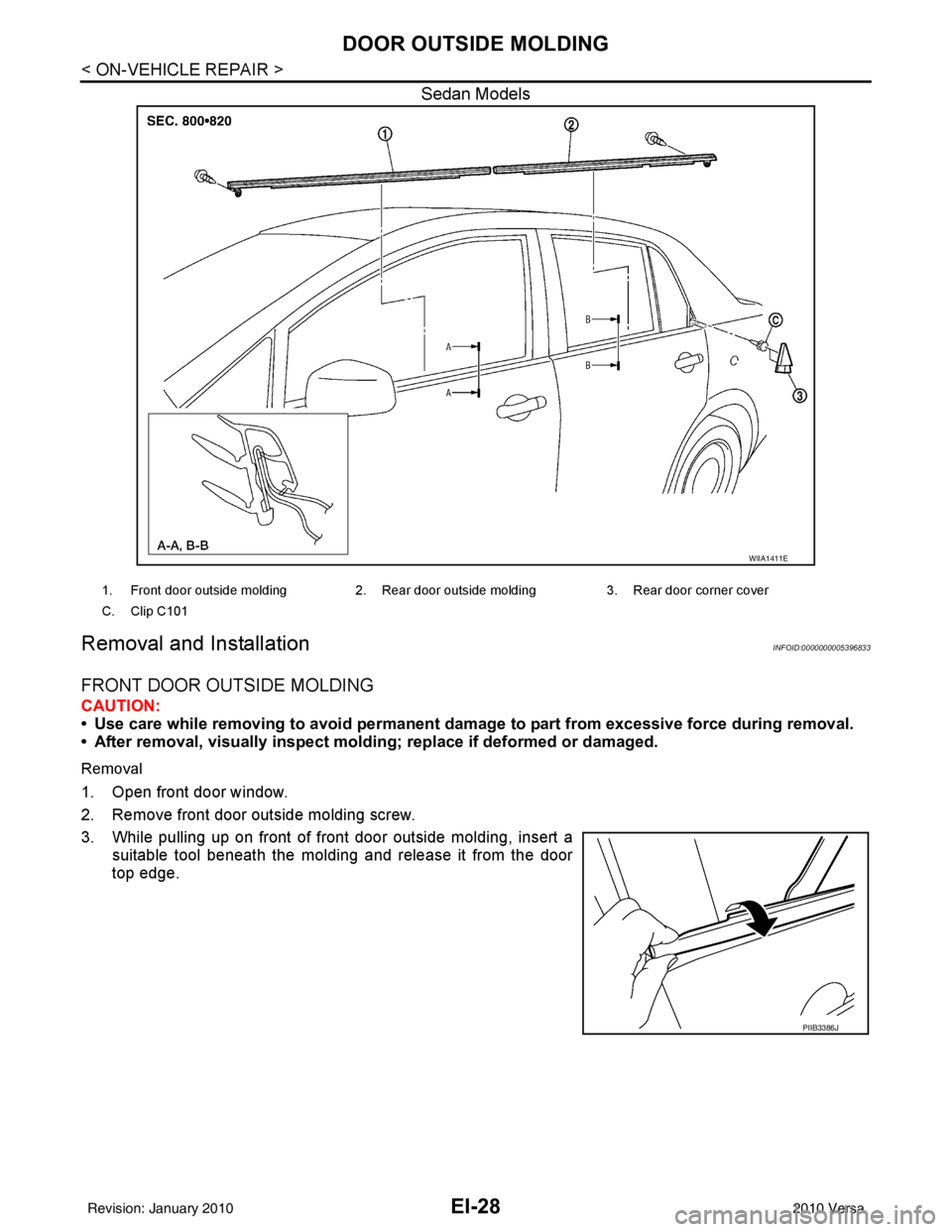
EI-28
< ON-VEHICLE REPAIR >
DOOR OUTSIDE MOLDING
Sedan Models
Removal and InstallationINFOID:0000000005396833
FRONT DOOR OUTSIDE MOLDING
CAUTION:
• Use care while removing to avoid permanent damage to part from excessive force during removal.
• After removal, visually inspect mold ing; replace if deformed or damaged.
Removal
1. Open front door window.
2. Remove front door outside molding screw.
3. While pulling up on front of front door outside molding, insert a
suitable tool beneath the molding and release it from the door
top edge.
WIIA1411E
1. Front door outside molding 2. Rear door outside molding3. Rear door corner cover
C. Clip C101
PIIB3386J
Revision: January 20102010 Versa
Page 2330 of 3745
DOOR OUTSIDE MOLDINGEI-29
< ON-VEHICLE REPAIR >
C
DE
F
G H
J
K L
M A
B
EI
N
O P
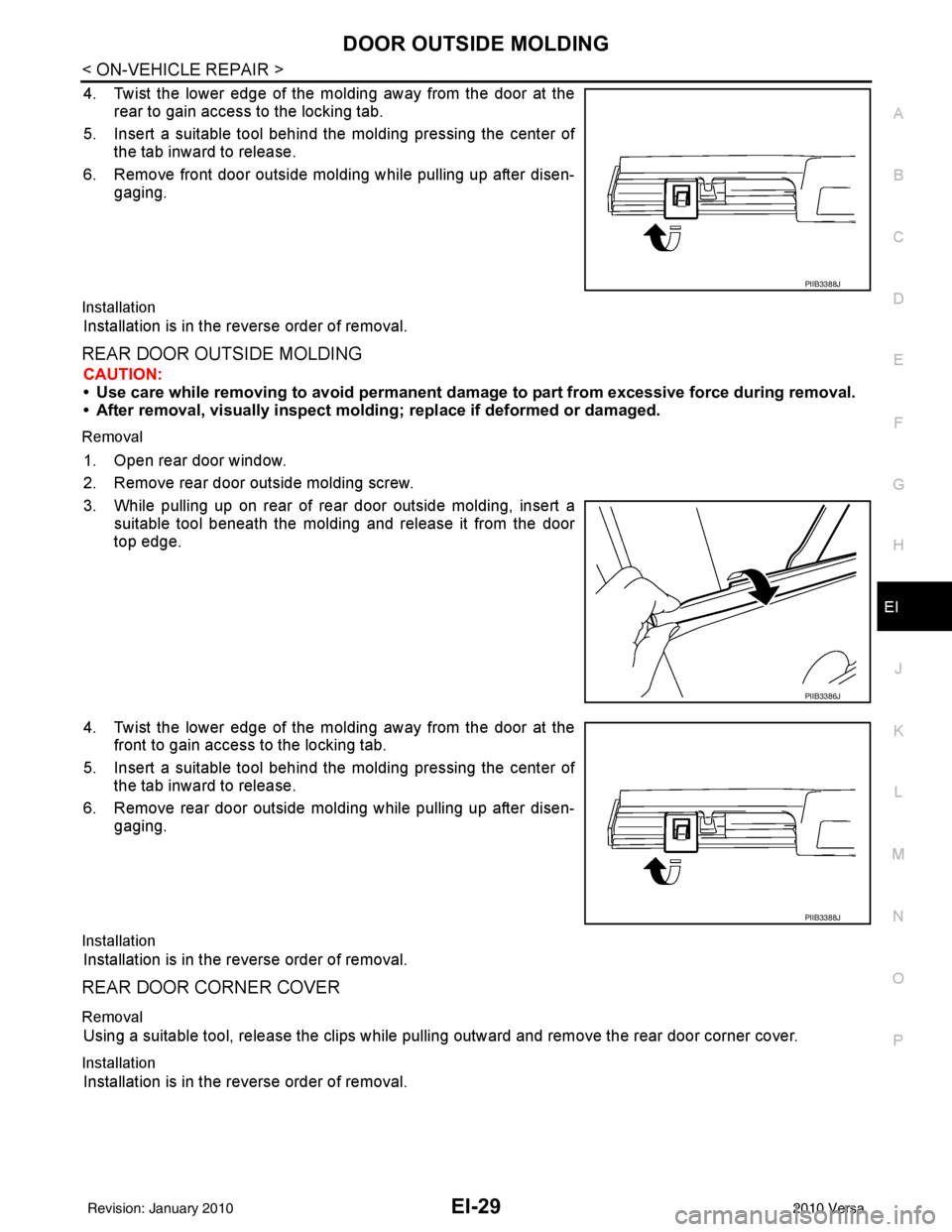
4. Twist the lower edge of the molding away from the door at the rear to gain access to the locking tab.
5. Insert a suitable tool behind the molding pressing the center of the tab inward to release.
6. Remove front door outside molding while pulling up after disen- gaging.
Installation
Installation is in the reverse order of removal.
REAR DOOR OUTSIDE MOLDING
CAUTION:
• Use care while removing to avoid permanent damage to part from excessive force during removal.
• After removal, visually inspect molding; replace if deformed or damaged.
Removal
1. Open rear door window.
2. Remove rear door outside molding screw.
3. While pulling up on rear of rear door outside molding, insert a
suitable tool beneath the molding and release it from the door
top edge.
4. Twist the lower edge of the molding away from the door at the front to gain access to the locking tab.
5. Insert a suitable tool behind the molding pressing the center of the tab inward to release.
6. Remove rear door outside molding while pulling up after disen- gaging.
Installation
Installation is in the reverse order of removal.
REAR DOOR CORNER COVER
Removal
Using a suitable tool, release the clips while pulling outward and remove the rear door corner cover.
Installation
Installation is in the reverse order of removal.
PIIB3388J
PIIB3386J
PIIB3388J
Revision: January 20102010 Versa
Page 2335 of 3745
EI-34
< ON-VEHICLE REPAIR >
DOOR FINISHER
DOOR FINISHER
Removal and InstallationINFOID:0000000005396837
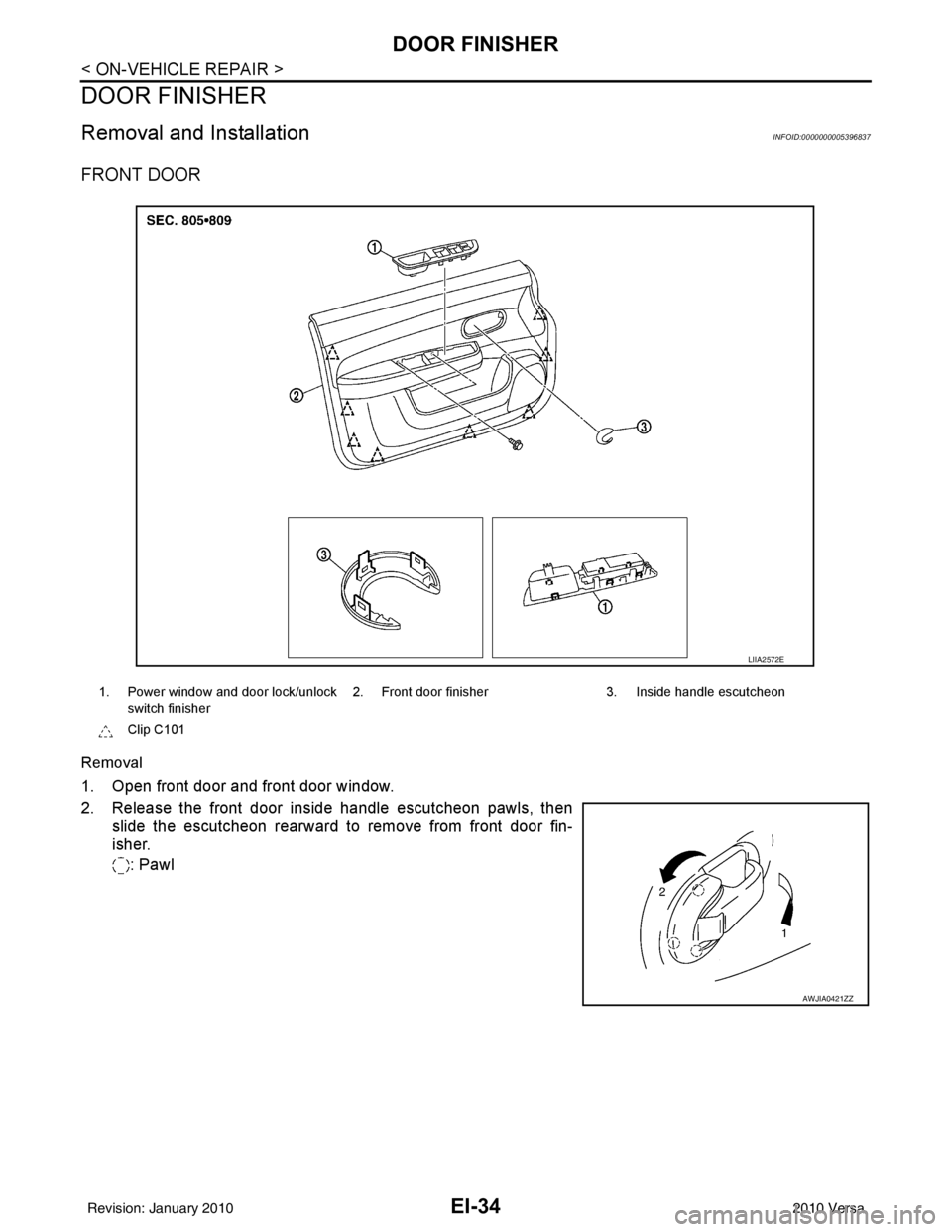
FRONT DOOR
Removal
1. Open front door and front door window.
2. Release the front door inside handle escutcheon pawls, thenslide the escutcheon rearward to remove from front door fin-
isher.
: Pawl
1. Power window and door lock/unlock switch finisher 2. Front door finisher 3. Inside handle escutcheon
Clip C101
LIIA2572E
AWJIA0421ZZ
Revision: January 20102010 Versa
Page 2336 of 3745
DOOR FINISHEREI-35
< ON-VEHICLE REPAIR >
C
DE
F
G H
J
K L
M A
B
EI
N
O P
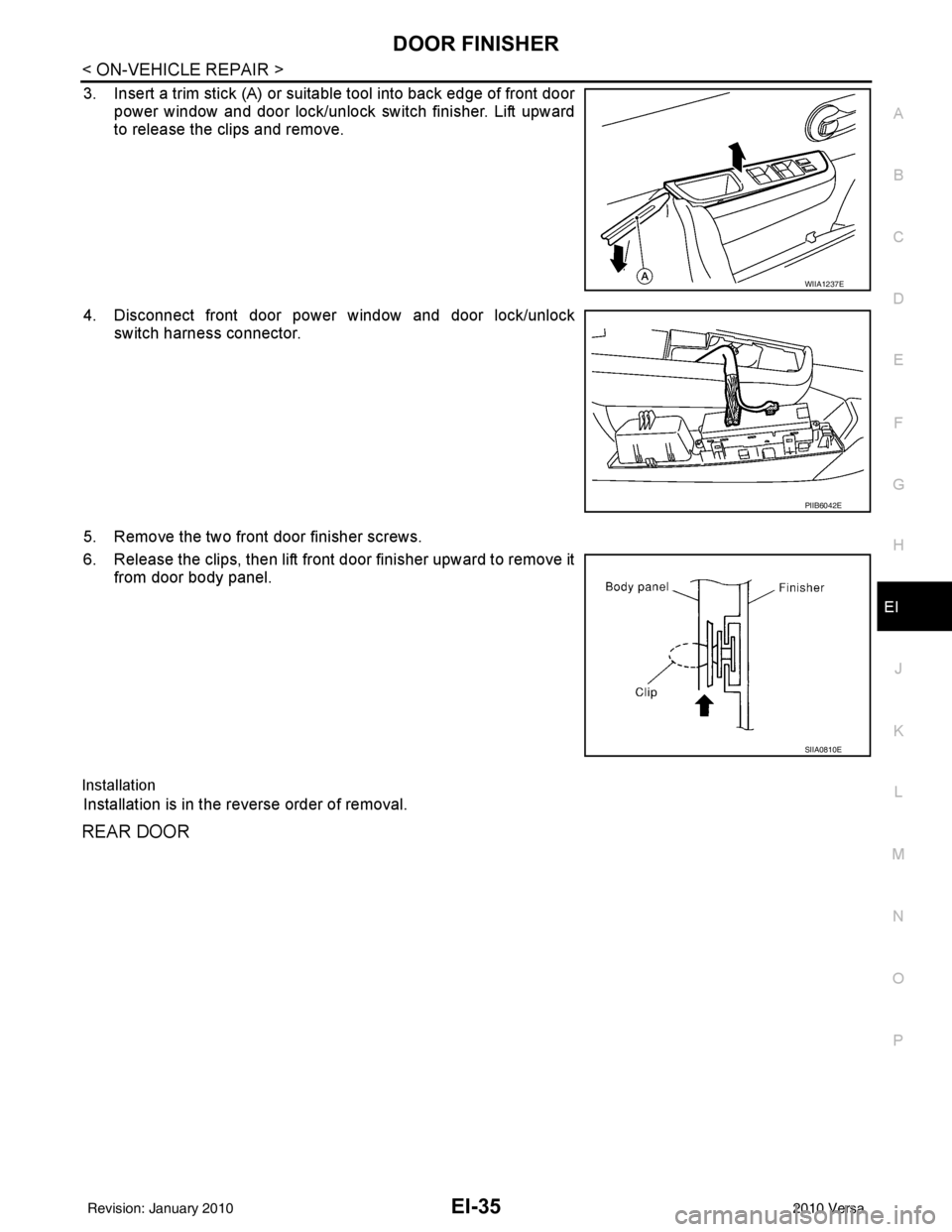
3. Insert a trim stick (A) or suitable tool into back edge of front door power window and door lock/unlock switch finisher. Lift upward
to release the clips and remove.
4. Disconnect front door power window and door lock/unlock switch harness connector.
5. Remove the two front door finisher screws.
6. Release the clips, then lift front door finisher upward to remove it from door body panel.
Installation
Installation is in the reverse order of removal.
REAR DOOR
WIIA1237E
PIIB6042E
SIIA0810E
Revision: January 20102010 Versa
Page 2337 of 3745
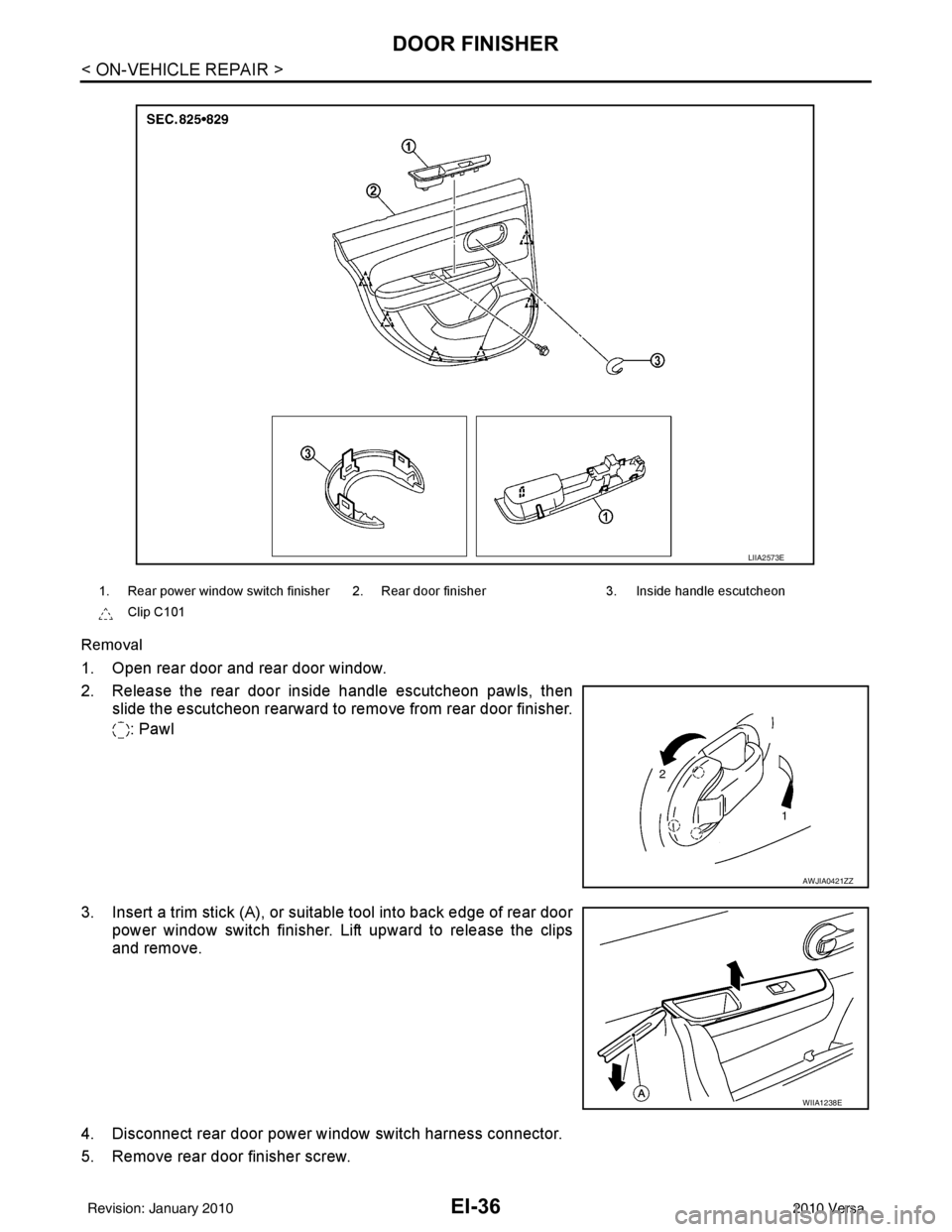
EI-36
< ON-VEHICLE REPAIR >
DOOR FINISHER
Removal
1. Open rear door and rear door window.
2. Release the rear door inside handle escutcheon pawls, thenslide the escutcheon rearward to re move from rear door finisher.
: Pawl
3. Insert a trim stick (A), or suitable tool into back edge of rear door power window switch finisher. Lift upward to release the clips
and remove.
4. Disconnect rear door power window switch harness connector.
5. Remove rear door finisher screw.
1. Rear power window switch finisher 2. Rear door finisher 3. Inside handle escutcheon
Clip C101
LIIA2573E
AWJIA0421ZZ
WIIA1238E
Revision: January 20102010 Versa
Page 2693 of 3745
SERVICE INFORMATION FOR ELECTRICAL INCIDENTGI-27
< SERVICE INFORMATION >
C
DE
F
G H
I
J
K L
M B
GI
N
O P
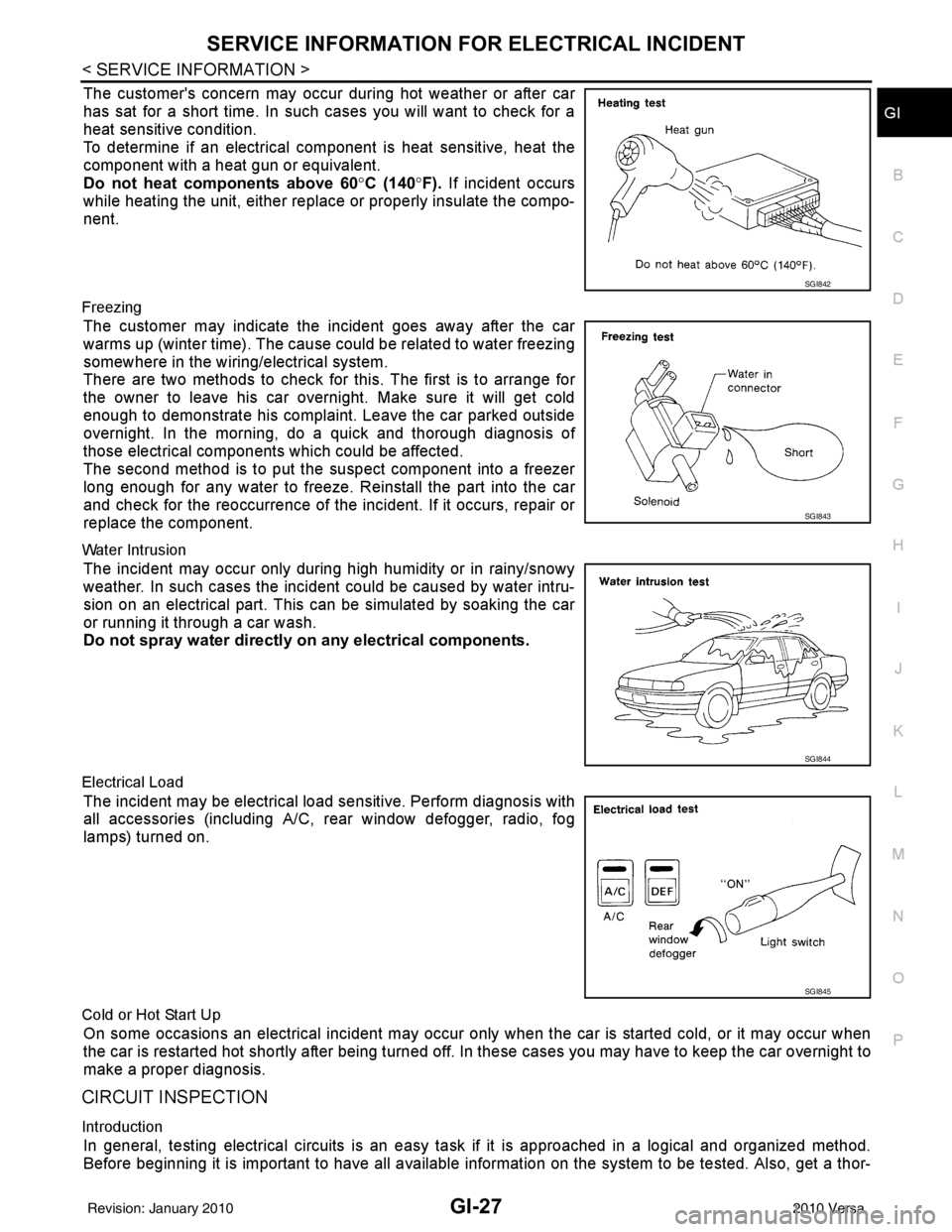
The customer's concern may occur during hot weather or after car
has sat for a short time. In such cases you will want to check for a
heat sensitive condition.
To determine if an electrical com ponent is heat sensitive, heat the
component with a heat gun or equivalent.
Do not heat components above 60 °C (140° F). If incident occurs
while heating the unit, either replace or properly insulate the compo-
nent.
Freezing
The customer may indicate the incident goes away after the car
warms up (winter time). The cause could be related to water freezing
somewhere in the wiring/electrical system.
There are two methods to check for this. The first is to arrange for
the owner to leave his car overnight. Make sure it will get cold
enough to demonstrate his complaint. Leave the car parked outside
overnight. In the morning, do a quick and thorough diagnosis of
those electrical components which could be affected.
The second method is to put the suspect component into a freezer
long enough for any water to freeze. Reinstall the part into the car
and check for the reoccurrence of the incident. If it occurs, repair or
replace the component.
Water Intrusion
The incident may occur only during high humidity or in rainy/snowy
weather. In such cases the incident could be caused by water intru-
sion on an electrical part. This c an be simulated by soaking the car
or running it through a car wash.
Do not spray water directly on any electrical components.
Electrical Load
The incident may be electrical load sensitive. Perform diagnosis with
all accessories (including A/C, rear window defogger, radio, fog
lamps) turned on.
Cold or Hot Start Up
On some occasions an electrical incident may occur only when the car is started cold, or it may occur when
the car is restarted hot shortly after being turned off. In these cases you may have to keep the car overnight to
make a proper diagnosis.
CIRCUIT INSPECTION
Introduction
In general, testing electrical circuits is an easy ta sk if it is approached in a logical and organized method.
Before beginning it is important to have all available information on the system to be tested. Also, get a thor-
SGI842
SGI843
SGI844
SGI845
Revision: January 20102010 Versa