air condition NISSAN X-TRAIL 2003 Electronic Repair Manual
[x] Cancel search | Manufacturer: NISSAN, Model Year: 2003, Model line: X-TRAIL, Model: NISSAN X-TRAIL 2003Pages: 3066, PDF Size: 51.47 MB
Page 2838 of 3066
RFD-16
REAR FINAL DRIVE ASSEMBLY
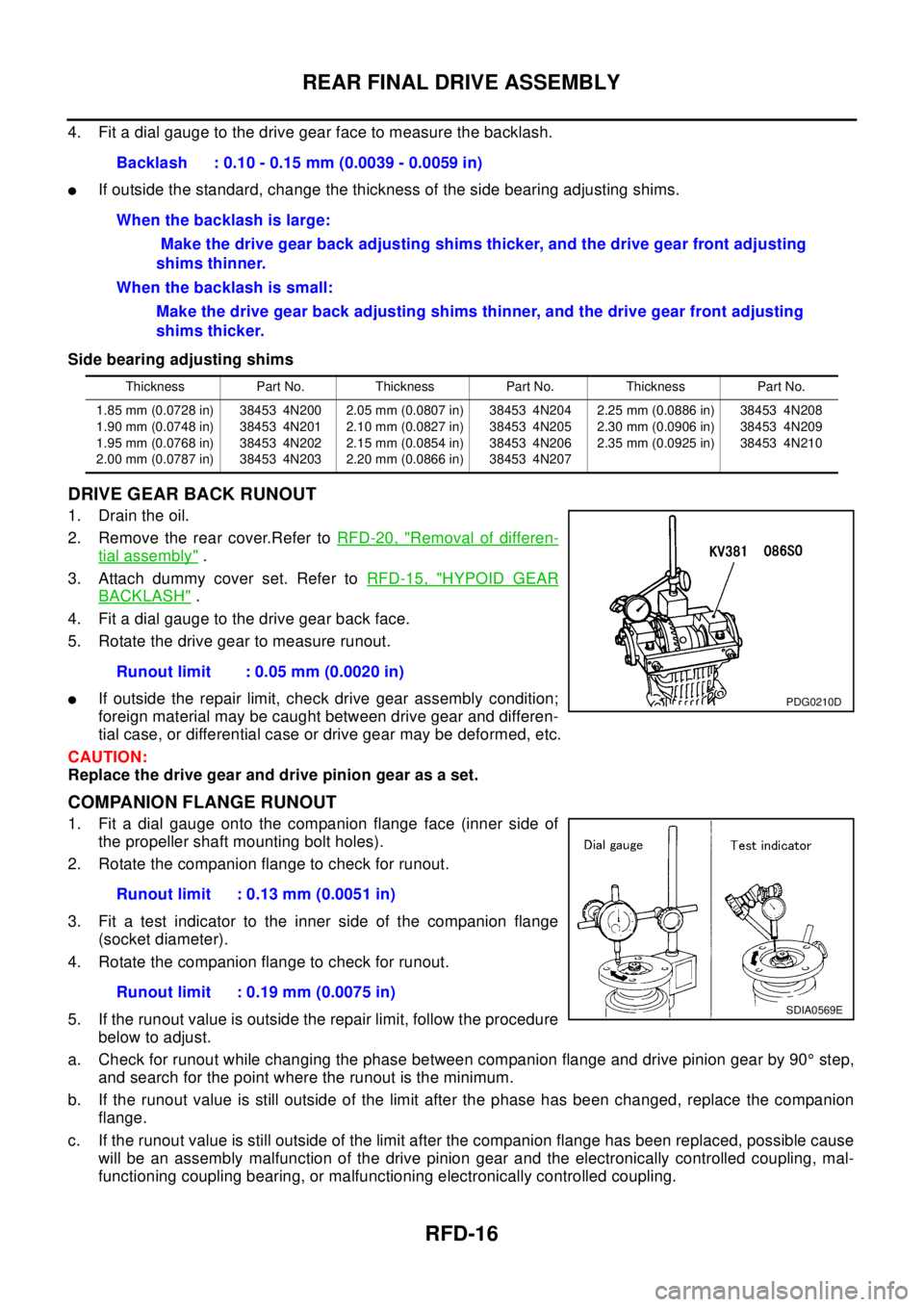
4. Fit a dial gauge to the drive gear face to measure the backlash.
lIf outside the standard, change the thickness of the side bearing adjusting shims.
Side bearing adjusting shims
DRIVE GEAR BACK RUNOUT
1. Drain the oil.
2. Remove the rear cover.Refer toRFD-20, "
Removal of differen-
tial assembly".
3. Attach dummy cover set. Refer toRFD-15, "
HYPOID GEAR
BACKLASH".
4. Fit a dial gauge to the drive gear back face.
5. Rotate the drive gear to measure runout.
lIf outside the repair limit, check drive gear assembly condition;
foreign material may be caught between drive gear and differen-
tial case, or differential case or drive gear may be deformed, etc.
CAUTION:
Replace the drive gear and drive pinion gear as a set.
COMPANION FLANGE RUNOUT
1. Fit a dial gauge onto the companion flange face (inner side of
the propeller shaft mounting bolt holes).
2. Rotate the companion flange to check for runout.
3. Fit a test indicator to the inner side of the companion flange
(socket diameter).
4. Rotate the companion flange to check for runout.
5. If the runout value is outside the repair limit, follow the procedure
below to adjust.
a. Check for runout while changing the phase between companion flange and drive pinion gear by 90°step,
and search for the point where the runout is the minimum.
b. If the runout value is still outside of the limit after the phase has been changed, replace the companion
flange.
c. If the runout value is still outside of the limit after the companion flange has been replaced, possible cause
will be an assembly malfunction of the drive pinion gear and the electronically controlled coupling, mal-
functioning coupling bearing, or malfunctioning electronically controlled coupling.Backlash : 0.10 - 0.15 mm (0.0039 - 0.0059 in)
When the backlash is large:
Make the drive gear back adjusting shims thicker, and the drive gear front adjusting
shims thinner.
When the backlash is small:
Make the drive gear back adjusting shims thinner, and the drive gear front adjusting
shims thicker.
Thickness Part No. Thickness Part No. Thickness Part No.
1.85 mm (0.0728 in)
1.90 mm (0.0748 in)
1.95 mm (0.0768 in)
2.00 mm (0.0787 in)38453 4N200
38453 4N201
38453 4N202
38453 4N2032.05 mm (0.0807 in)
2.10 mm (0.0827 in)
2.15 mm (0.0854 in)
2.20 mm (0.0866 in)38453 4N204
38453 4N205
38453 4N206
38453 4N2072.25 mm (0.0886 in)
2.30 mm (0.0906 in)
2.35 mm (0.0925 in)38453 4N208
38453 4N209
38453 4N210
Runout limit : 0.05 mm (0.0020 in)
PDG0210D
Runout limit : 0.13 mm (0.0051 in)
Runout limit : 0.19 mm (0.0075 in)
SDIA0569E
Page 2858 of 3066
RSU-6
REAR SUSPENSION ASSEMBLY
On-Vehicle Inspection and Service
EES0007F
Check axle and suspension parts for excessive play, wear, and damage.
lMove rear wheels (RH/LH) to check abnormal free play.
lRetighten all nuts and bolts to the specified torque.
lCheck strut for oil leakage and damage.
Wheel AlignmentEES0007G
DESCRIPTION
lMeasure wheel alignment under unladen conditions. “Unladen conditions” means that fuel, coolant, and
lubricant are full. However, spare tire, jack, and hand tools should be unloaded.
PRELIMINARY INSPECTION
1. Check the tires for improper air pressure and wear.
2. Check road wheels for runout.
3. Check wheel bearing axial endplay.
4. Check strut operation.
5. Check each mounting point of axle and suspension for looseness and deformation.
6. Check each link and arm for cracks, deformation, and other damage.
7. Check the vehicle posture.
CAMBER
Camber is preset at factory and cannot be adjusted.
lIf the camber is not within specification, inspect and replace any damaged or worn rear suspension parts.
TOE-IN
Measure toe-in using the following procedure.
lAlways perform following procedure on a flat surface.
lMake sure that no person is in front of the vehicle before push-
ing it.
1. Bounce rear of vehicle up and down to stabilize the posture.
2. Push the vehicle straight ahead about 5 m (16 ft).
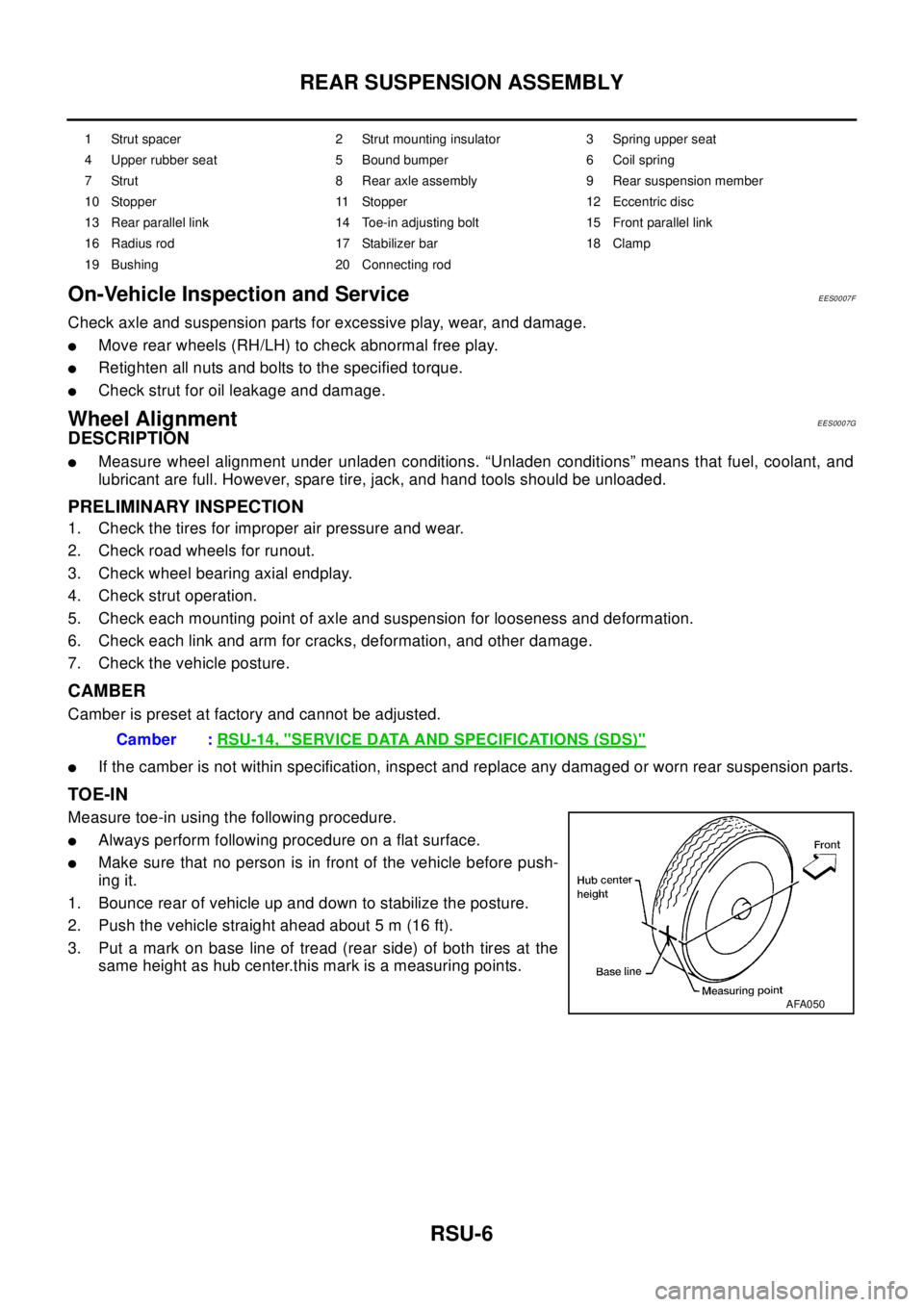
3. Put a mark on base line of tread (rear side) of both tires at the
same height as hub center.this mark is a measuring points.
1 Strut spacer 2 Strut mounting insulator 3 Spring upper seat
4 Upper rubber seat 5 Bound bumper 6 Coil spring
7 Strut 8 Rear axle assembly 9 Rear suspension member
10 Stopper 11 Stopper 12 Eccentric disc
13 Rear parallel link 14 Toe-in adjusting bolt 15 Front parallel link
16 Radius rod 17 Stabilizer bar 18 Clamp
19 Bushing 20 Connecting rod
Camber :RSU-14, "SERVICE DATA AND SPECIFICATIONS (SDS)"
AFA050
Page 2865 of 3066
REAR SUSPENSION MEMBER
RSU-13
C
D
F
G
H
I
J
K
L
MA
B
RSU
REAR SUSPENSION MEMBERPFP:55501
Removal and InstallationEES0007M
REMOVAL
1. Remove tires. Raise vehicle.
2. Remove cotter pin.Remove wheel hub lock nut by using a wheel hub lock nut wrench.
3. Remove ABS wheel speed sensor and wiring (With ABS models).
4. Remove brake caliper and brake hose lock plate, and hang them aside.
5. Remove mounting bolts and nuts on lower portion of strut.
6. Remove axle-side mounting bolts of parallel link and remove rear drive shaft from axle housing.
7. Remove suspension member-side mounting bolt of parallel link and remove parallel link from suspension
member.
8. Remove mounting bolts and nuts on lower portion of strut.
CAUTION:
After removing drive shaft, position axle housing onto strut.
9. Remove propeller shaft.
10. Remove rear exhaust tube.
11. Remove electronically controlled coupling connector and air breather hose from final drive.
12. Set a transmission jack under rear final drive.
13. Remove front and rear mounting bolts from rear final drive.
14. Remove rear final drive from suspension member.
15. Place transmission jack onto rear suspension member. Remove rear suspension member mounting bolts.
Lower transmission jack slowly to remove rear suspension member from vehicle.
INSTALLATION
lRefer toRSU-5, "Components"for tightening torque. Install in the reverse order of removal.
lAfter installation, perform final tightening of each part under unladen conditions with tires on ground.
Check wheel alignment.RSU-6, "
Wheel Alignment".
Page 2929 of 3066
TROUBLE DIAGNOSIS
SRS-7
C
D
E
F
G
I
J
K
L
MA
B
SRS
TROUBLE DIAGNOSISPFP:00004
Trouble Diagnoses-IntroductionEHS0 00 CL
CAUTION:
lDo not use electrical test equipment on any circuit related to the SRS unless instructed to in this
Service Manual. SRS wiring harness can be identified by yellow harness connector.
lDo not attempt to repair, splice or modify the SRS wiring harness. If the harness is damaged,
replace it with a new one.
lKeep ground portion clean.
DIAGNOSIS FUNCTION
The SRS self-diagnosis results can be read by using “AIR BAG” warning lamp and/or CONSULT-II.
The User mode is exclusively prepared for the customer (driver). This mode warns the driver of a system mal-
function through the operation of the “AIR BAG” warning lamp.
The Diagnosis mode allows the technician to locate and inspect the malfunctioning part.
The mode applications for the “AIR BAG” warning lamp and CONSULT-II are as follows:
NOTE:
Seat belt pre-tensioner malfunction is indicated by “AIR BAG” warning lamp.
HOW TO PERFORM TROUBLE DIAGNOSES FOR QUICK AND ACCURATE REPAIR
A good understanding of the malfunction conditions can make troubleshooting faster and more accurate.
In general, each customer feels differently about a malfunction. It is important to fully understand the symp-
toms or conditions for a customer complaint.
Information from customer
WHAT..... Vehicle model
WHEN..... Date, Frequencies
WHERE..... Road conditions
HOW..... Operating conditions, Symptoms
Preliminary check
Check that the following parts are in good order.
lBattery [Refer toSC-3, "BATTERY".]
lFuse [Refer toPG-2, "POWER SUPPLY ROUTING".]
lSystem component-to-harness connections
WORK FLOW
NOTE:
Seat belt pre-tensioner malfunction is indicated by “AIR BAG” warning lamp.
User mode Diagnosis mode Display type
“AIR BAG” warning lamp X X ON-OFF operation
CONSULT-II — X Monitoring
Page 2939 of 3066
TROUBLE DIAGNOSIS
SRS-17
C
D
E
F
G
I
J
K
L
MA
B
SRS
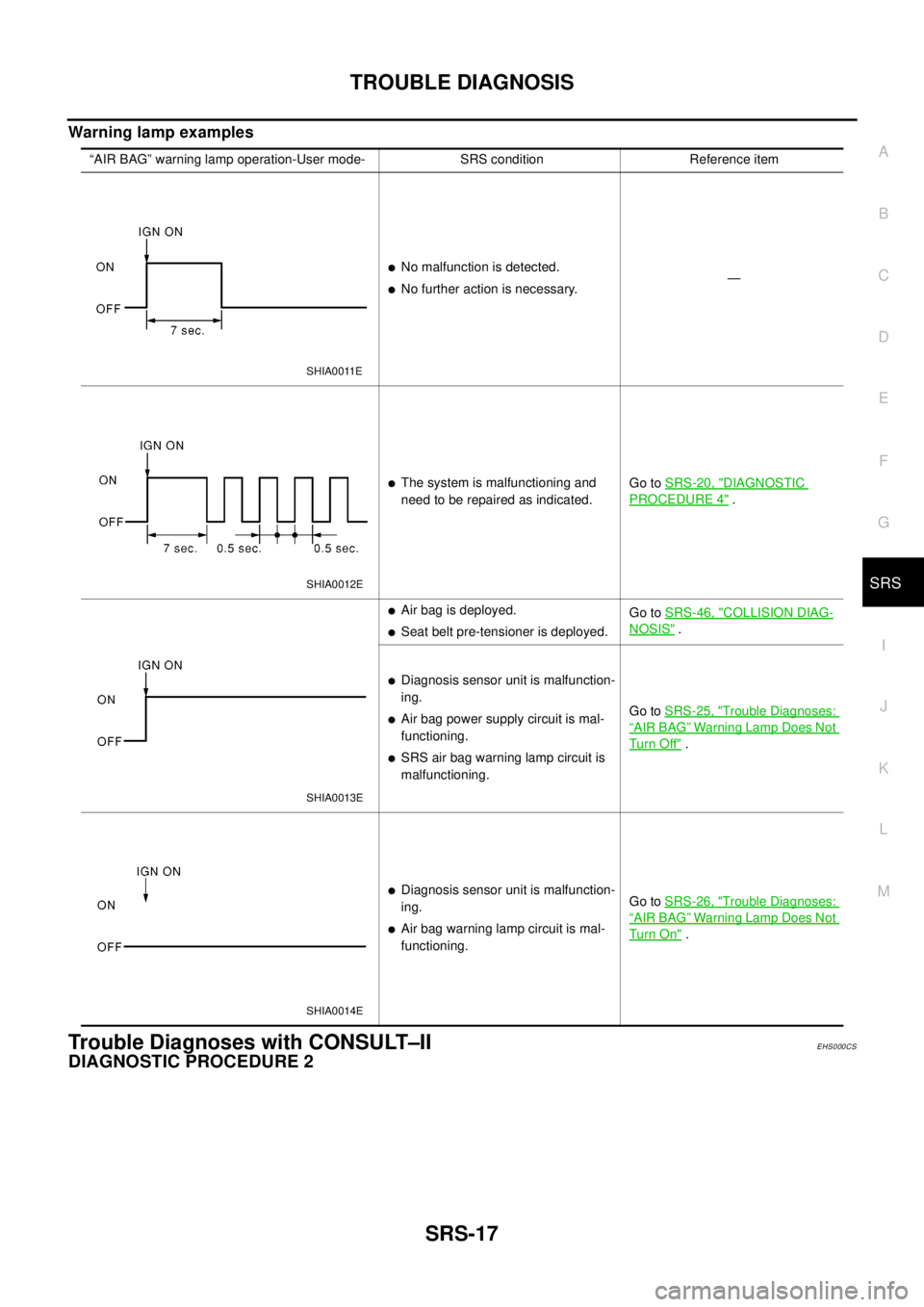
Warninglampexamples
Trouble Diagnoses with CONSULT–IIEHS000CS
DIAGNOSTIC PROCEDURE 2
“AIR BAG” warning lamp operation-User mode- SRS condition Reference item
lNo malfunction is detected.
lNo further action is necessary.—
lThe system is malfunctioning and
need to be repaired as indicated.Go toSRS-20, "DIAGNOSTIC
PROCEDURE 4".
lAir bag is deployed.
lSeat belt pre-tensioner is deployed.Go toSRS-46, "
COLLISION DIAG-
NOSIS".
lDiagnosis sensor unit is malfunction-
ing.
lAir bag power supply circuit is mal-
functioning.
lSRS air bag warning lamp circuit is
malfunctioning.Go toSRS-25, "
Trouble Diagnoses:
“AIR BAG”Warning Lamp Does Not
Tu rn O ff".
lDiagnosis sensor unit is malfunction-
ing.
lAir bag warning lamp circuit is mal-
functioning.Go toSRS-26, "
Trouble Diagnoses:
“AIR BAG”Warning Lamp Does Not
Tu rn O n".
SHIA0011E
SHIA0012E
SHIA0013E
SHIA0014E
Page 3014 of 3066

TF-44
TROUBLE DIAGNOSIS
Specifications defined by CONSULT-II
Check air pressure of tire under normal condition.Items to be monitored ContentsData monitor
(Reference)
Check points when result
was malfunctioning ConditionReference values in
normal operation
DECEL G-SENSOR (G)G-sensor operating
conditionWith vehicle stopped
on flat road.±0.15 G G-sensor and harness
THRTL POS SEN (V)Throttle valve open/
close conditionClosed throttle to wide
open throttleWhen closed throttle:
Approx. 0.5V
Throttle position sensor
and harness
When wide open throt-
tle: Approx. 4.0 V
ENGINE SPEED SIG
(STOP/RUN)With engine runningEngine speed below
400 rpmSTOP
Engine speed signal circuit
Engine speed 400 rpm
or higherRUN
E-TS ACTUATOR (ON/OFF)4WD actuator relay
(4WD actuator relay)
activation conditionVehicle stop (Ignition
switch ON)OFF4WD actuator relay (4WD
actuator relay) and har-
ness
Engine running ON
G-SEN VOLT (V)G-sensor power sup-
ply conditionWith vehicle stopped
on flat road.Approx. 8V (reference
value)G-sensor and harness
BATTERY VOL (V)Battery voltage sup-
plied to control unitIgnition switch ON Approx. 10 - 16 VControl unit power supply
circuit
4WDWARNLAMP(ON/
OFF)4WD warning lamp
ON condition4WD warning lamp
ONON4WD warning lamp and
harness
Refer to "4WD Warning
Lamp". 4WD warning lamp
OFFOFF
4WD MODE SW
(AUTO LOCK 2WD)Input condition of
4WD mode change-
over switchEngine running, vehi-
cle stopped, switch
pressed–4WD mode change-over
switch and circuit
4WD MODE MONI (AUTO,
LOCK, 2WD)Output condition of
4WD mode indicator
lamp signalEngine running, vehi-
cle stoppedUsing 4WD mode
change-over switch4WD mode indicator lamp
and circuit
DIS-TIRE MONI (mm)Improper size tire
installed condition–0-4mm,4-8mm,
8mm -Front/Rear tire size differ-
ence, wear condition
PBRAKESW(ON/OFF)Parking brake switch
operating conditionParking brake
depressedON
Parking brake switch and
harness
Parking brake not
depressedOFF
SPEED MTR O/P (km/h)Output condition of
vehicle speed for
speedometerWhile vehicle is
stopped0km/h(0MPH)
Speedometer and harness
Vehicle runningAlmost in accordance
with the wheel speed
sensor display
ABS 4WD COMMEPS/TCS/ABS con-
trol unit operating con-
ditionIgnition switch ON OKESP/TCS/ABS control unit
and circuit
CAN COMM (OK-NG)CAN communication
signal conditionIgnition switch ON OKCAN communication sig-
nal (OK-NG) condition is
displayed
Page 3015 of 3066
TROUBLE DIAGNOSIS
TF-45
C
E
F
G
H
I
J
K
L
MA
B
TF
CONSULT-II functionsEDS000HA
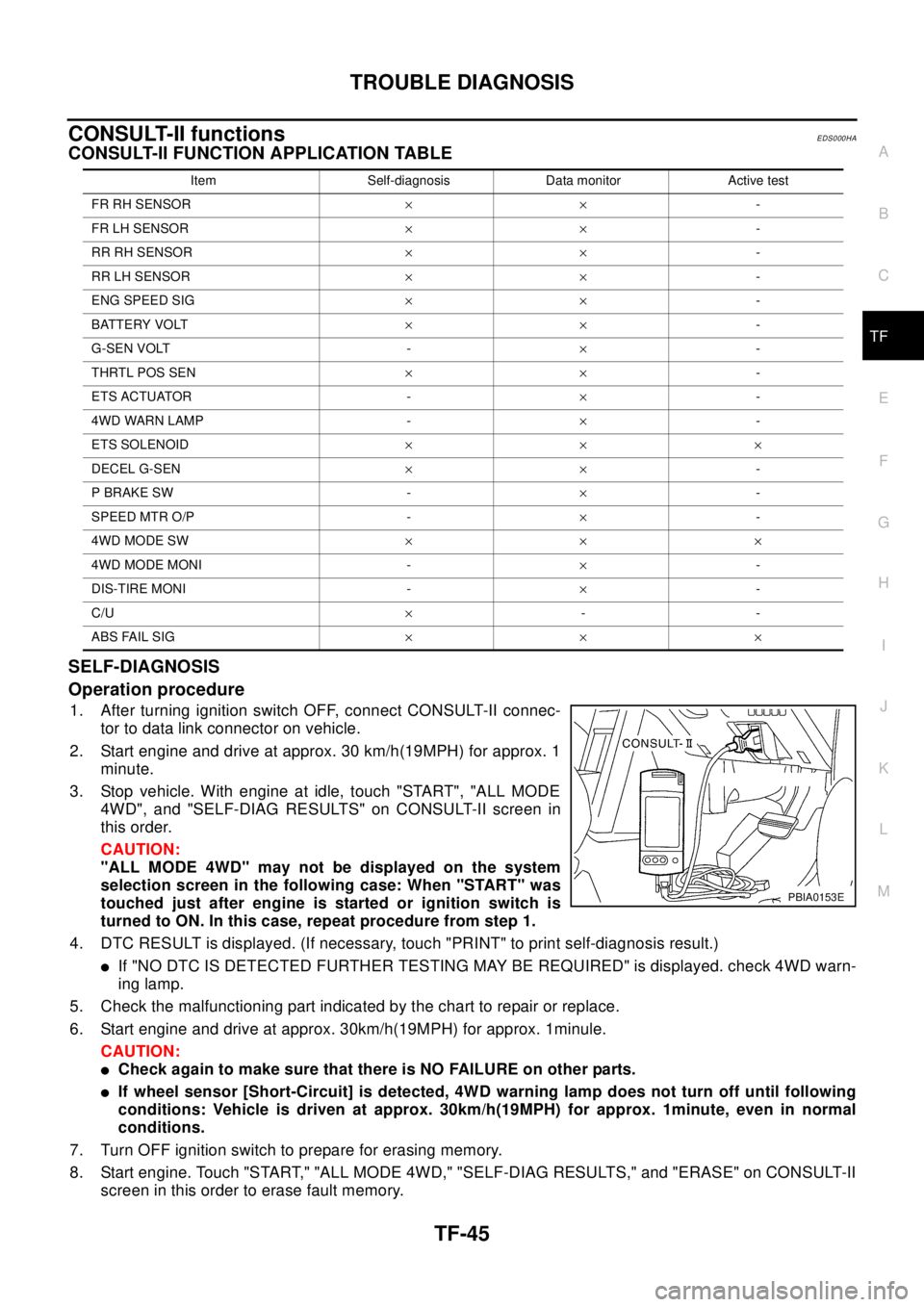
CONSULT-II FUNCTION APPLICATION TABLE
SELF-DIAGNOSIS
Operation procedure
1. After turning ignition switch OFF, connect CONSULT-II connec-
tor to data link connector on vehicle.
2. Start engine and drive at approx. 30 km/h(19MPH) for approx. 1
minute.
3. Stop vehicle. With engine at idle, touch "START", "ALL MODE
4WD", and "SELF-DIAG RESULTS" on CONSULT-II screen in
this order.
CAUTION:
"ALL MODE 4WD" may not be displayed on the system
selection screen in the following case: When "START" was
touched just after engine is started or ignition switch is
turned to ON. In this case, repeat procedure from step 1.
4. DTC RESULT is displayed. (If necessary, touch "PRINT" to print self-diagnosis result.)
lIf "NO DTC IS DETECTED FURTHER TESTING MAY BE REQUIRED" is displayed. check 4WD warn-
ing lamp.
5. Check the malfunctioning part indicated by the chart to repair or replace.
6. Start engine and drive at approx. 30km/h(19MPH) for approx. 1minule.
CAUTION:
lCheck again to make sure that there is NO FAILURE on other parts.
lIf wheel sensor [Short-Circuit] is detected, 4WD warning lamp does not turn off until following
conditions: Vehicle is driven at approx. 30km/h(19MPH) for approx. 1minute, even in normal
conditions.
7. Turn OFF ignition switch to prepare for erasing memory.
8. Start engine. Touch "START," "ALL MODE 4WD," "SELF-DIAG RESULTS," and "ERASE" on CONSULT-II
screen in this order to erase fault memory.
Item Self-diagnosis Data monitor Active test
FR RH SENSOR´´-
FR LH SENSOR´´-
RR RH SENSOR´´-
RR LH SENSOR´´-
ENG SPEED SIG´´-
BATTERY VOLT´´-
G-SEN VOLT -´-
THRTL POS SEN´´-
ETS ACTUATOR -´-
4WD WARN LAMP -´-
ETS SOLENOID´´´
DECEL G-SEN´´-
P BRAKE SW -´-
SPEED MTR O/P -´-
4WD MODE SW´´´
4WD MODE MONI -´-
DIS-TIRE MONI -´-
C/U´--
ABS FAIL SIG´´´
PBIA0153E
Page 3028 of 3066
TF-58
TROUBLE DIAGNOSIS
WHILE DRIVING, 4WD WARNING LAMP FLASHES SLOWLY. (WHEN IT CONTINUES TO ILLU-
MINATE UNTIL ENGINE TURNS OFF.)
1. Check using the data monitor function of the CONSULT-II.
lPerform inspection with the data monitor function of the CONSULT-II.
lCheck if the value of IMPROPER SIZE TIRE MONITOR is 8 mm (0.31 in) or more.
lStop the engine. Restart the engine and drive the vehicle at 20 km/h (12 MPH) or faster for approxi-
mately 200 seconds. Confirm the 4WD warning lamp flashes slowly.
(Check if the value of IMPROPER SIZE TIRE MONITOR is 8 mm (0.31 in) or more.)
When the tire size is normal, the value of IMPROPER SIZE TIRE MONITOR will change from 8 mm
(0.31 in) or more to 0 to 4 mm (0 to 0.16 in) (normal condition) after the vehicle is driven 20 km/h (12
MPH) or faster for approximately 5 seconds.
2. Tire inspection
lInspection of tire pressure
lWear condition
lCheck size of the front and rear tires. (No excessive difference should be observed.)
VEHICLE DOES NOT ENTER 4WD MODE EVEN THOUGH 4WD WARNING LAMP IS OFF.
1. Check using the data monitor function of the CONSULT-II.
Perform inspection by the data monitor function of the CONSULT-II.
–Check if the vehicle operation changes to 2WD, AUTO, and LOCK modes.
–Check current supplied to the 4WD solenoid valve in AUTO mode.
2. Check using the active test function of the CONSULT-II.
Using active test mode of CONSULT-II, supply current to the 4WD solenoid valve and check that the mon-
itor current becomes close to this supply current.
lThe 4WDcontrol unit is normal when the difference between 4WD solenoid valve current and the monitor
current is within±10%.
It is necessary to inspect the electronically controlled coupling assembly.
TIGHT-CONER BRAKING SYMPTOM OCCURS WHEN THE VEHICLE IS STARTED IN AUTO
WARNING LAMP REMAIN OFF).
1.THROTTLE POSITION SENSOR AND HARNESS INSPECTION
Check accelerator pedal stroke.
OK or NG
OK >> Perform self-diagnosis again.
NG >> Malfunctioning throttle position sensor harness
4WD ACTUATOR RELAY (4WD SOLENOID ACTUATOR RELAY) TURNS ON/OFF FREQUENTLY
1.SELF-DIAGNOSIS RESULT IS 4WD ACTUATOR RELAY (4WD SOLENOID ACTUATOR RELAY) ON
ERROR AND OFF ERROR.
Is self-diagnosis result [ON error and OFF error]?
OK or NG
OK >> GO TO 2.
NG >> Repair or replace as necessary.Accelerator pedal not
depressed:Approx. 0A
Accelerator pedal
depressed:Approx. 2.8A
Example) Monitor value becomes approx. 1A for 4WD solenoid current 1A setting.