lock OPEL FRONTERA 1998 Workshop Manual
[x] Cancel search | Manufacturer: OPEL, Model Year: 1998, Model line: FRONTERA, Model: OPEL FRONTERA 1998Pages: 6000, PDF Size: 97 MB
Page 2558 of 6000

LIGHTING SYSTEM8A–19
Fog Light Switch
Removal
1. Disconnect the battery ground cable.
2. Remove the front console assembly(1).
Refer to the Instrument Panel Assembly in Body
Structure section.
3. Remove the lower cluster assembly(2).
Refer to the Instrument Panel Assembly in Body
Structure section.
4. Remove the instrument panel driver lower cover
assembly(3).
Refer to the Instrument Panel Assembly in Body
Structure section.
821RW024
5. Remove the instrument panel cluster assembly(4).
Refer to the Instrument Panel Assembly in Body
Structure section.
6. Disconnect the connector and push the lock from the
back side of the instrument panel cluster assembly to
remove the fog light switch(5).
825RW027
Installation
To install, follow the removal steps in the reverse order,
noting the following point:
1. Push in the switch with your fingers until the switch is
locked securely.
Page 2559 of 6000

8A–20LIGHTING SYSTEM
Stoplight Switch (W/O Cruise Control)
Removal
1. Disconnect the battery ground cable.
2. Disconnect the connector(3), loosen the lock nut(1)
and then remove the stoplight switch(2) by turning it.
310RS007
Installation
To install, follow the removal steps in the reverse order,
noting the following points.
1. Check to see if the brake pedal has been returned by
the return spring to the specified position.
2. Turn the stoplight switch(1) clockwise until the tip of
the threaded portion of the switch contacts the pedal
arm(2).
3. Turn the switch counterclockwise until the space
between the tip of the threaded portion and the pedal
arm is 0.5 to 1.0 mm (0.02 – 0.04 in.).
310RS006
Page 2560 of 6000

LIGHTING SYSTEM8A–21
Brake Switch (W/Cruise Control)
Removal
1. Disconnect the battery ground cable.
2. Disconnect the connector(1), loosen the lock nut(3)
and then remove the brake switch(2) by turning it.
310RW010
Installation
To install, follow the removal steps in the reverse order,
noting the following points.
1. Check to see if the brake pedal has been returned by
the return spring to the specified position.
2. Turn the switch clockwise until the tip of the threaded
portion of the brake switch contacts the pedal arm.
3. Turn the switch counterclockwise until the space
between the tip of the threaded portion and the pedal
arm is 0.5 to 1.0 mm (0.02 – 0.04 in.).
310RS003
Turn Signal Switch (Combination Switch)
Removal and Installation
Refer to the removal and installation steps of the Lighting
Switch (Combination Switch) in this section.
Page 2561 of 6000

8A–22LIGHTING SYSTEM
Hazard Warning Switch
Removal
1. Disconnect the battery ground cable.
2. Remove the front console assembly(1).
Refer to the Instrument Panel Assembly in Body
Structure section.
3. Remove the lower cluster assembly(2).
Refer to the Instrument Panel Assembly in Body
Structure section.
4. Remove the instrument panel driver lower cover
assembly(3).
Refer to the Instrument Panel Assembly in Body
Structure section.
821RW024
5. Remove the instrument panel cluster assembly(4).
Refer to the Instrument Panel Assembly in Body
Structure section.
6. Disconnect the connector and push the lock from the
back side of the instrument panel cluster assembly to
remove the hazard warning switch(5).
825RW024
Installation
To install, follow the removal steps in the reverse order,
noting the following point.
1. Push in the switch with your fingers until it locks
securely.
Page 2563 of 6000

8A–24LIGHTING SYSTEM
Rear Defogger Switch
Removal
1. Disconnect the battery ground cable.
2. Remove the front console assembly(1).
Refer to the Instrument Panel Assembly in Body
Structure section.
3. Remove the lower cluster assembly(2).
Refer to the Instrument Panel Assembly in Body
Structure section.
4. Remove the instrument panel driver lower cover
assembly(3).
Refer to the Instrument Panel Assembly in Body
Structure section.
821RW024
5. Remove the instrument panel cluster assembly(4).
Refer to the Instrument Panel Assembly in Body
Structure section.
6. Disconnect the connector and push the lock from the
back side of the instrument panel cluster assembly to
remove the rear defogger switch(5).
825RW023
Installation
To install, follow the removal steps in the reverse order,
noting the following point.
1. Push in the switch with your fingers until it locks
securely.
Page 2564 of 6000

LIGHTING SYSTEM8A–25
Seat Heater Switch
Removal
1. Disconnect the battery ground cable.
2. Remove four fixing screws and disconnect the switch
connectors to remove the front console assembly(4).
3. Push the lock from the back side of the front console
assembly to remove the seat heater switch(5).
825RW025
Installation
To install, follow the removal steps in the reverse order,
noting the following point.
1. Push the switch with your fingers until it locks
securely.
Key Remind Switch (Starter Switch)
Removal and Installation
Refer to the removal and installation on steps of the
Starter Switch in this section.
Page 2565 of 6000

8A–26LIGHTING SYSTEM
Illumination Controller
Removal
1. Disconnect the battery ground cable.
2. Remove the front console assembly(1).
Refer to the Instrument Panel Assembly in Body
Structure section.
3. Remove the lower cluster assembly(2).
Refer to the Instrument Panel Assembly in Body
Structure section.
4. Remove the instrument panel driver lower cover
assembly(3).
Refer to the Instrument Panel Assembly in Body
Structure section.
821RW024
5. Remove the instrument panel cluster assembly(4).
Refer to the Instrument Panel Assembly in Body
Structure section.
6. Disconnect the connector and push the lock from the
back side of the instrument panel cluster assembly to
remove the illumination controller(5).
825RW026
Installation
To install, follow the removal steps in the reverse order,
noting the following point.
1. Push in the switch with your fingers until the switch is
locked securely.
Page 2566 of 6000

LIGHTING SYSTEM8A–27
Power/Winter Switch
Removal
1. Disconnect the battery ground cable.
2. Remove four fixing screws and disconnect the switch
connectors to remove the front console assembly(4).
3. Push the lock from the back side of the front console
assembly to remove the power/winter switch(5).
825RW204
Installation
To install, follow the removal steps in the reverse order,
noting the following point.
1. Push the switch with your fingers until it locks
securely.
Page 2571 of 6000
8B–2WIPER/WASHER SYSTEM
Service Precaution
WARNING: IF SO EQUIPPED WITH A
SUPPLEMENTAL RESTRAINT SYSTEM (SRS),
REFER TO THE SRS COMPONENT AND WIRING
LOCATION VIEW IN ORDER TO DETERMINE
WHETHER YOU ARE PERFORMING SERVICE ON OR
NEAR THE SRS COMPONENTS OR THE SRS
WIRING. WHEN YOU ARE PERFORMING SERVICE
ON OR NEAR THE SRS COMPONENTS OR THE SRS
WIRING, REFER TO THE SRS SERVICE
INFORMATION. FAILURE TO FOLLOW WARNINGS
COULD RESULT IN POSSIBLE AIR BAG
DEPLOYMENT, PERSONAL INJURY, OR
OTHERWISE UNNEEDED SRS SYSTEM REPAIRS.CAUTION: Always use the correct fastener in the
proper location. When you replace a fastener, use
ONLY the exact part number for that application.
ISUZU will call out those fasteners that require a
replacement after removal. ISUZU will also call out
the fasteners that require thread lockers or thread
sealant. UNLESS OTHERWISE SPECIFIED, do not
use supplemental coatings (Paints, greases, or other
corrosion inhibitors) on threaded fasteners or
fastener joint interfaces. Generally, such coatings
adversely affect the fastener torque and the joint
clamping force, and may damage the fastener. When
you install fasteners, use the correct tightening
sequence and specifications. Following these
instructions can help you avoid damage to parts and
systems.
Windshield Wiper/Washer System
General Description
The circuit consists of the starter switch, windshield wiper
& washer switch, windshield wiper motor, windshield
washer motor and windshield intermittent relay.When the wiper & washer switch is turned on with the
starter switch on, the battery voltage is applied to the
wiper motor to activate the wiper.
The washer motor squirts glass cleaning fluid while the
washer switch is being pushed. The intermittent relay is
used to control motion of the wiper.
Windshield Wiper And Washer Switch
Removal and Installation
Refer to the Lighting Switch (Combination Switch) in
Lighting System section.
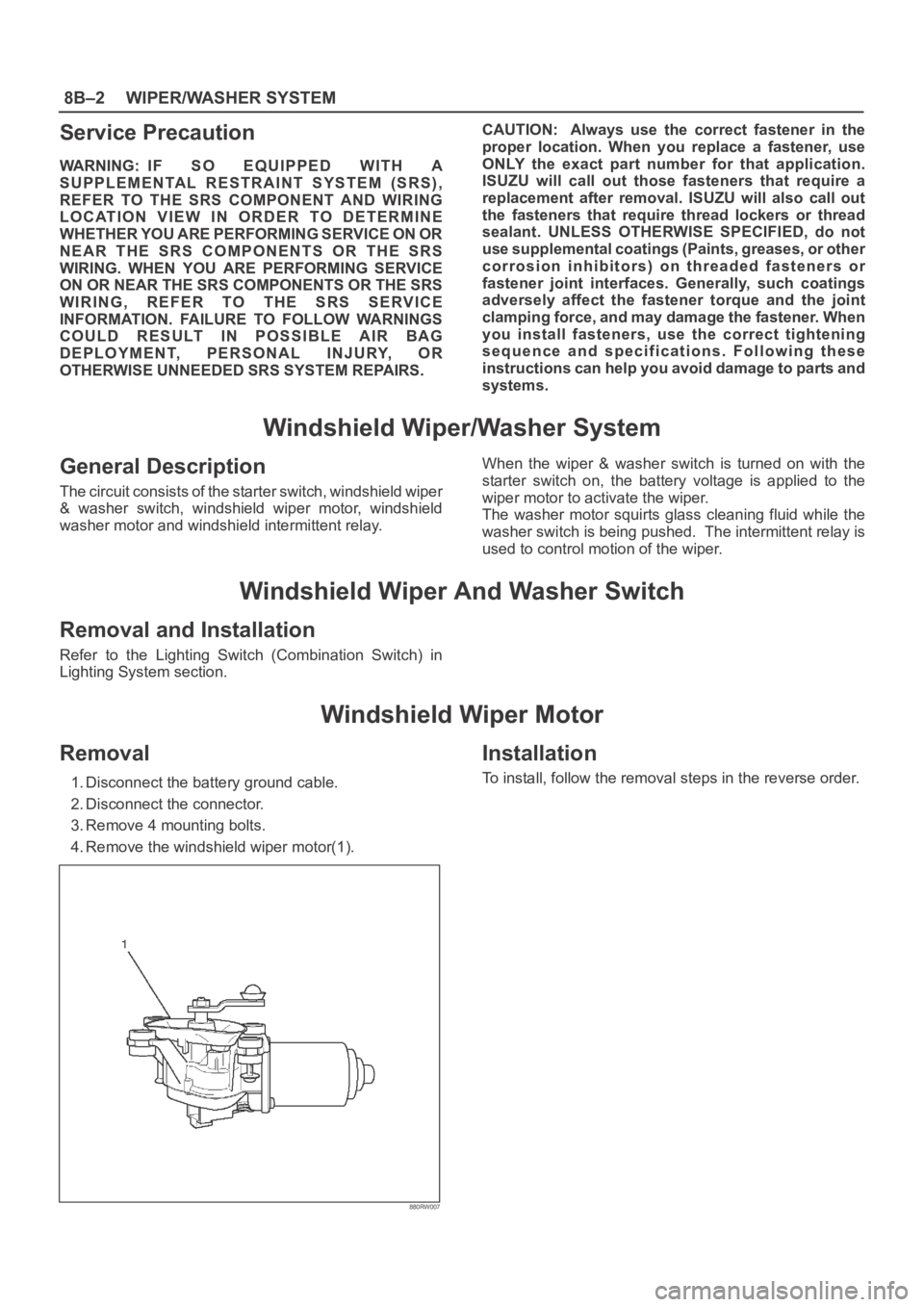
Windshield Wiper Motor
Removal
1. Disconnect the battery ground cable.
2. Disconnect the connector.
3. Remove 4 mounting bolts.
4. Remove the windshield wiper motor(1).
880RW007
Installation
To install, follow the removal steps in the reverse order.
Page 2575 of 6000

8B–6WIPER/WASHER SYSTEM
Windshield Wiper Blade Rubber
Removal
1. Push the wiper blade lock(1) while pulling the wiper
blade in the arrow direction as shown in the figure.
CAUTION: W h e n t h e w i p e r b l a d e h a s b e e n
removed, wrap the tip of the wiper arm with cloth, to
avoid damaging the glass.
880RS011
2. Pull the end of rubber and remove the projection(3)
from the click of the blade stay (2).
880RS010
3. Pull the rubber out in the same direction.
Installation
To install, follow the removal steps in the reverse order,
noting the following points.
1. Install the click of the blade stay in the groove of the
new rubber and slide it in. Complete wiper blade
installation by pushing the click.
885RS002
2. Finally, check that the click of the stay has caught in
the hole of the rubber.
885RS001