brake OPEL INSIGNIA 2019 Service Manual
[x] Cancel search | Manufacturer: OPEL, Model Year: 2019, Model line: INSIGNIA, Model: OPEL INSIGNIA 2019Pages: 347, PDF Size: 9.76 MB
Page 222 of 347
220Driving and operating● Weather limits visibility, such asfog, rain, or snow.
● The sensor is blocked by snow, ice, slush, mud, dirt, windscreen
damage or affected by foreign
items, e.g. stickers.
Active emergency braking
Active emergency braking is part of
the forward collision system 3 124. It
can help to reduce the damage and
injury from crashes with vehicles,
pedestrians and obstacles directly
ahead, when a collision can no longer be avoided either by manual braking
or by steering. Before the active
emergency braking applies, the driver is warned by the Forward collision
alert 3 216 or the Front pedestrian
protection alert 3 223.
The feature uses various inputs (e.g.
camera sensor, radar sensor, brake
pressure, vehicle speed) to calculate
the probability of a frontal collision.9 Warning
This system is not intended to
replace the driver responsibility for driving the vehicle and looking
ahead. Its function is limited to
supplemental use only to reduce
the vehicle speed before a
collision.
The system may not react to
animals. After a sudden lane
change, the system needs a
certain time to detect the next
preceding vehicle.
The driver must always be ready
to take action and apply the brakes and steer to avoid collisions.
Functionality
If equipped only with front camera the
active emergency braking operates in forward gear above walking speed up
to 85 km/h.
With radar sensor active emergency
braking operates in forward gear
above walking speed at all speeds.
A precondition is that forward collision
alert with front camera system is not
deactivated in the vehicle
personalisation menu 3 124.
The system includes: ● brake preparation system
● emergency automatic braking ● forward looking brake assist
● intelligent brake assist (only with radar sensor)
● front pedestrian protection system
Brake preparation system
When approaching a vehicle ahead
or a pedestrian so quickly that a
collision is likely, the brake
preparation system slightly
pressurizes the brakes. This reduces
the response time, when a manual or automatic braking is requested.
The brake system is prepared so that braking can occur more rapidly.
If equipped only with front camera the
system operates up to a speed of 80
km/h.
Page 223 of 347
Driving and operating221Emergency automatic brakingAfter activation of brake preparation
system and just before the imminent
collision, this function automatically
applies limited braking to reduce the
impact speed of the collision or
prohibit a crash. Depending on the
situation, the vehicle may
automatically brake moderately or
hard. This front automatic braking can
only occur if a vehicle ahead is
detected, indicated by the vehicle
ahead indicator A 3 216 . On vehicles
with front pedestrian protection, front automatic braking can also occur
when a pedestrian ahead is detected,
indicated by the pedestrian ahead
indicator 7.
If equipped only with front camera the system operates up to a speed of 80
km/h.
Below a speed of 40 km/h the system
can apply full braking.
Emergency automatic braking may
slow the vehicle to a complete stop to
try to avoid a potential crash. If this
happens, emergency automatic
braking may engage the electricparking brake to hold the vehicle at a
stop. To release press the electric
parking brake button or firmly press
the accelerator pedal.9 Warning
Emergency automatic braking is
an emergency crash preparation
feature and is not designed to
avoid crashes. Do not rely on the
system to brake the vehicle.
Emergency automatic braking will
not brake outside of its operating speed range and only responds to
detected vehicles and
pedestrians.
Forward looking brake assist
In addition to the brake preparation
system and emergency automatic
braking, the forward looking brake
assist function makes the brake assist more sensitive. Therefore, pressing
the brake pedal less strongly results
in immediate hard braking. This
function helps the driver brake
quicker and harder before the
imminent collision.
If equipped only with front camera the
system operates up to a speed of 85
km/h.9 Warning
Active emergency braking is not
designed to apply hard
autonomous braking or to
automatically avoid a collision. It is designed to reduce the vehicle
speed before a collision. It may not
react to animals. After a sudden
lane change, the system needs a
certain time to detect the next
preceding vehicle.
The complete attention of the
driver is always required while
driving. The driver must always be
ready to take action and apply the brakes and steer to avoid
collisions.
The system is designed to work with
all occupants wearing their seat belts.
Intelligent Brake Assist
If the vehicle is equipped with radar
sensor Intelligent brake assist may
activate when the brake pedal is
Page 224 of 347
222Driving and operatingapplied quickly by providing a boost
to braking based on the speed of approach and distance to a vehicle
ahead.
Minor brake pedal pulsations or pedal movement during this time is normal
and the brake pedal should continue to be applied as needed. Intelligent
brake assist will automatically
disengage only when the brake pedal is released.9 Warning
Intelligent brake assist may
increase vehicle braking in
situations when it may not be
necessary. You could block the
flow of traffic. If this occurs, take
your foot off the brake pedal and
then apply the brakes as needed.
Front pedestrian protection
3 223.
Deactivation
Active emergency braking can be
deactivated in the personalisation
menu 3 124. If deactivated a
message is displayed in the Driver
Information Centre.
We recommend to deactivate the
system in the vehicle personalisation
in the following cases:
● when the vehicle is being towed
● before using an automatic car wash with ignition switched on
● if the windscreen has been damaged close to the camera
● if the front bumper has been damaged
System limitations In some cases, the active emergencybraking system may provide an
automatic braking in situations that
seem to be unnecessary, for instance
in parking garages, due to traffic signs
in a curve or due to vehicles in
another lane. This is normal
operation, the vehicle does not need
service. Firmly apply the acceleratorpedal to override the automatic
braking if the situation and the
surroundings permit.
In the following cases, Active
emergency braking performance is
limited:
● Driving on winding or hilly roads.
● Detecting all vehicles, especially vehicles with a trailer, tractors,
muddy vehicles, etc.
● Detecting a vehicle when weather limits visibility, such as in
fog, rain, or snow.
● During nighttime driving.
● Weather limits visibility, such as fog, rain, or snow.
● The sensor in the windscreen is blocked by snow, ice, slush, mud,dirt, windscreen damage or
affected by foreign items, e.g.
stickers.
To avoid malfunction keep the areas
of the camera sensor in the
windscreen and the radar sensor in
the radiator grille always clean from
dirt, dust, ice and snow.
Page 225 of 347
Driving and operating223Complete attention is always required
while driving, and you should be
ready to take action and apply the
brakes and/or steer the vehicle to
avoid crashes.
Fault
In case the system requires a service,
a message is displayed in the Driver
Information Centre.
If the system does not work as it
should do, vehicle messages are
displayed in the Driver Information
Centre.
Vehicle messages 3 123.
Front pedestrian protection Front pedestrian protection may help
to avoid or reduce the harm caused
by front-end crashes with nearby
pedestrians when driving in a forward
gear.
The system uses the front camera in
the windscreen to detect a pedestrian directly ahead, in your path.
Front pedestrian protection can
detect and alert to pedestrians in a
forward gear at speeds between 8km/h and 80 km/h. Additionally Front
pedestrian protection can provide a
boost to braking or automatically
brake the vehicle.
During daytime driving, the system detects pedestrians up to a distance
of approximately 40 metres. During
nighttime driving, system
performance is limited.
Front pedestrian protection can be
set to Off, Alert, or Alert & Brake in
vehicle personalisation 3 124.9 Danger
Front pedestrian braking does not
provide an alert or automatically
brake the vehicle, unless it detects
a pedestrian.
The system may not detect
pedestrians, including children,
when the pedestrian is not directly ahead, not fully visible, not
standing upright, or when part of a
group.
Front pedestrian protection includes:
● detecting front pedestrian ahead● front pedestrian alert
● automatic braking
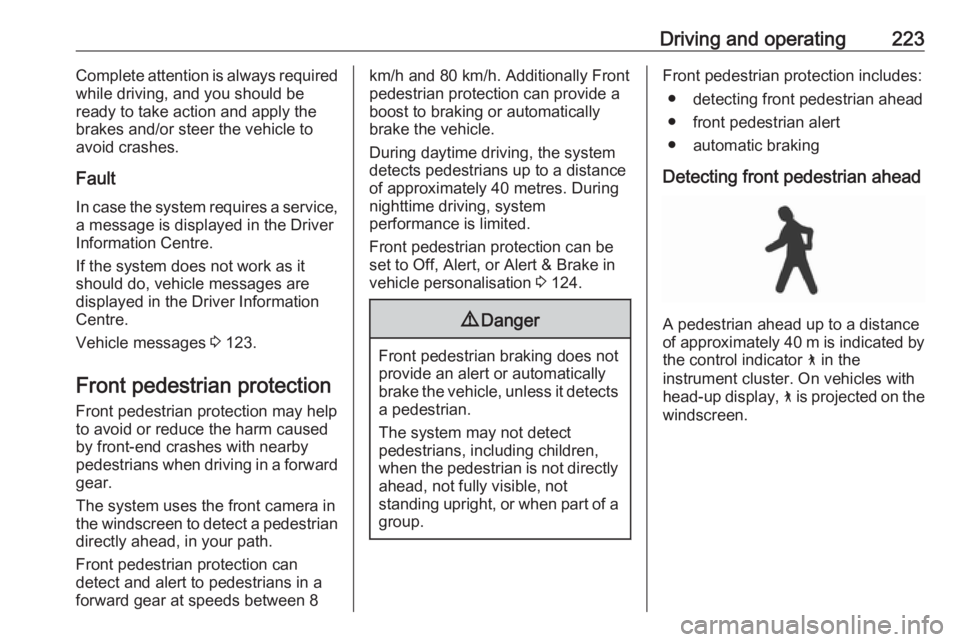
Detecting front pedestrian ahead
A pedestrian ahead up to a distance
of approximately 40 m is indicated by the control indicator 7 in the
instrument cluster. On vehicles with
head-up display, 7 is projected on the
windscreen.
Page 226 of 347
224Driving and operatingFront pedestrian alert
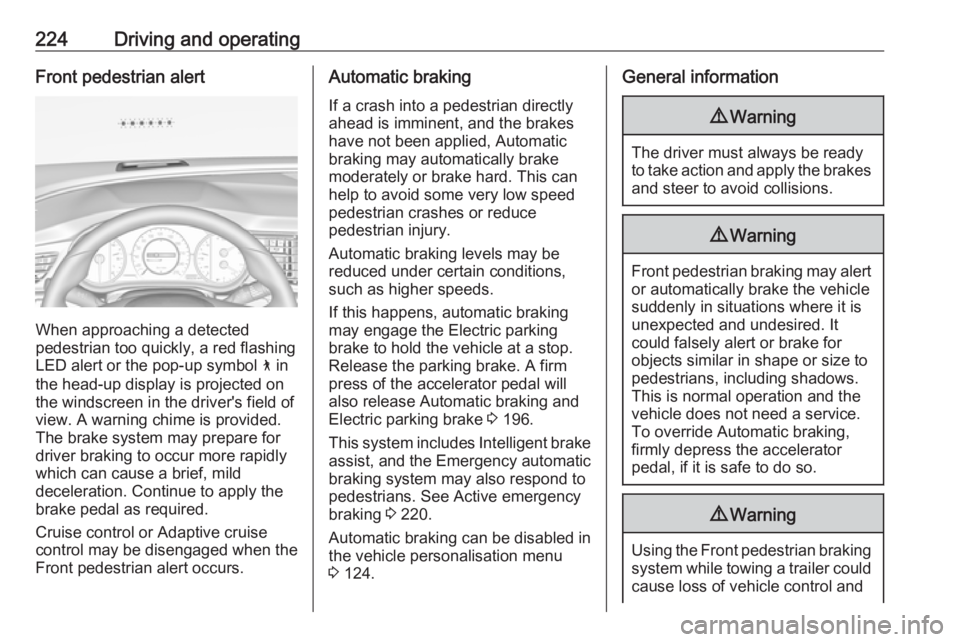
When approaching a detected
pedestrian too quickly, a red flashing
LED alert or the pop-up symbol 7 in
the head-up display is projected on the windscreen in the driver's field of
view. A warning chime is provided.
The brake system may prepare for
driver braking to occur more rapidly
which can cause a brief, mild
deceleration. Continue to apply the
brake pedal as required.
Cruise control or Adaptive cruise
control may be disengaged when the
Front pedestrian alert occurs.
Automatic braking
If a crash into a pedestrian directly
ahead is imminent, and the brakes
have not been applied, Automatic
braking may automatically brake
moderately or brake hard. This can
help to avoid some very low speed
pedestrian crashes or reduce
pedestrian injury.
Automatic braking levels may be reduced under certain conditions,
such as higher speeds.
If this happens, automatic braking
may engage the Electric parking
brake to hold the vehicle at a stop.
Release the parking brake. A firm
press of the accelerator pedal will
also release Automatic braking and
Electric parking brake 3 196.
This system includes Intelligent brake assist, and the Emergency automatic
braking system may also respond to
pedestrians. See Active emergency
braking 3 220.
Automatic braking can be disabled in
the vehicle personalisation menu
3 124.General information9 Warning
The driver must always be ready
to take action and apply the brakes and steer to avoid collisions.
9 Warning
Front pedestrian braking may alert
or automatically brake the vehicle
suddenly in situations where it is
unexpected and undesired. It
could falsely alert or brake for
objects similar in shape or size to
pedestrians, including shadows.
This is normal operation and the
vehicle does not need a service.
To override Automatic braking,
firmly depress the accelerator
pedal, if it is safe to do so.
9 Warning
Using the Front pedestrian braking
system while towing a trailer could
cause loss of vehicle control and
Page 228 of 347
226Driving and operating
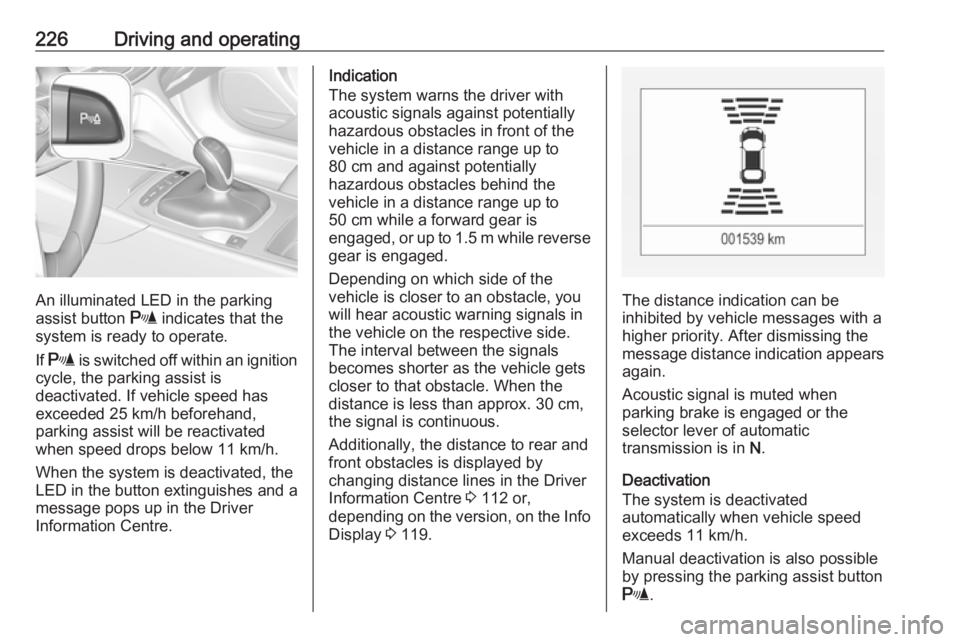
An illuminated LED in the parking
assist button r indicates that the
system is ready to operate.
If r is switched off within an ignition
cycle, the parking assist is
deactivated. If vehicle speed has exceeded 25 km/h beforehand,
parking assist will be reactivated when speed drops below 11 km/h.
When the system is deactivated, the
LED in the button extinguishes and a
message pops up in the Driver
Information Centre.
Indication
The system warns the driver with
acoustic signals against potentially
hazardous obstacles in front of the
vehicle in a distance range up to
80 cm and against potentially
hazardous obstacles behind the
vehicle in a distance range up to
50 cm while a forward gear is
engaged, or up to 1.5 m while reverse gear is engaged.
Depending on which side of the
vehicle is closer to an obstacle, you
will hear acoustic warning signals in the vehicle on the respective side.
The interval between the signals
becomes shorter as the vehicle gets
closer to that obstacle. When the
distance is less than approx. 30 cm,
the signal is continuous.
Additionally, the distance to rear and
front obstacles is displayed by
changing distance lines in the Driver
Information Centre 3 112 or,
depending on the version, on the Info Display 3 119.
The distance indication can be
inhibited by vehicle messages with a
higher priority. After dismissing the
message distance indication appears
again.
Acoustic signal is muted when
parking brake is engaged or the
selector lever of automatic
transmission is in N.
Deactivation
The system is deactivated
automatically when vehicle speed
exceeds 11 km/h.
Manual deactivation is also possible by pressing the parking assist button
r .
Page 232 of 347
230Driving and operatingDisplay priorities
Advanced parking assist indication in the Driver Information Centre can beinhibited by vehicle messages with a
higher priority. After approving the
message by pressing SET/CLR on
the turn signal lever or 9 on the
steering wheel, advanced parking
assist instructions appear again and
the parking manoeuvre can be
continued.
Deactivation
The system is deactivated by:
● a short press of (
● parking manoeuvre successfully ended
● driving faster than 30 km/h during
parking slot search
● driving faster than 8 km/h during parking guidance
● driver interference on steering wheel detected
● steep hill incline detected● exceeding maximum number of gear changes: eight cycles when
parallel parking or five cycles
when perpendicular parking
● switching off the ignition
Deactivation by the driver or by the system during manoeuvring will beindicated by a message on the
display. Additionally, an acoustic
signal sounds.
Automatic transmission:
If advanced park assist is deactivated
during the parking manoeuvre or
manoeuvre is finished successfully,
the assist holds the vehicle in position
until one of the following conditions
occur:
1. brake pedal is applied.
2. electric parking brake is activated.
3. Selector lever is set to P
Fault
A message appears when:
● There is a fault in the system.● The driver did not successfully complete the parking
manoeuvre.● The system is not operational.
● Any of the deactivation reasons described above apply.
If an object is detected during parking instructions, a message to stop the
vehicle is indicated. Removing the
object will resume the parking
manoeuvre. If the object is not
removed, the system will be
deactivated.
Basic notes on parking assist
systems9 Warning
Under certain circumstances,
various reflective surfaces on
objects or clothing as well as
external noise sources may cause the system to fail to detect
obstacles.
Page 252 of 347
250Driving and operating
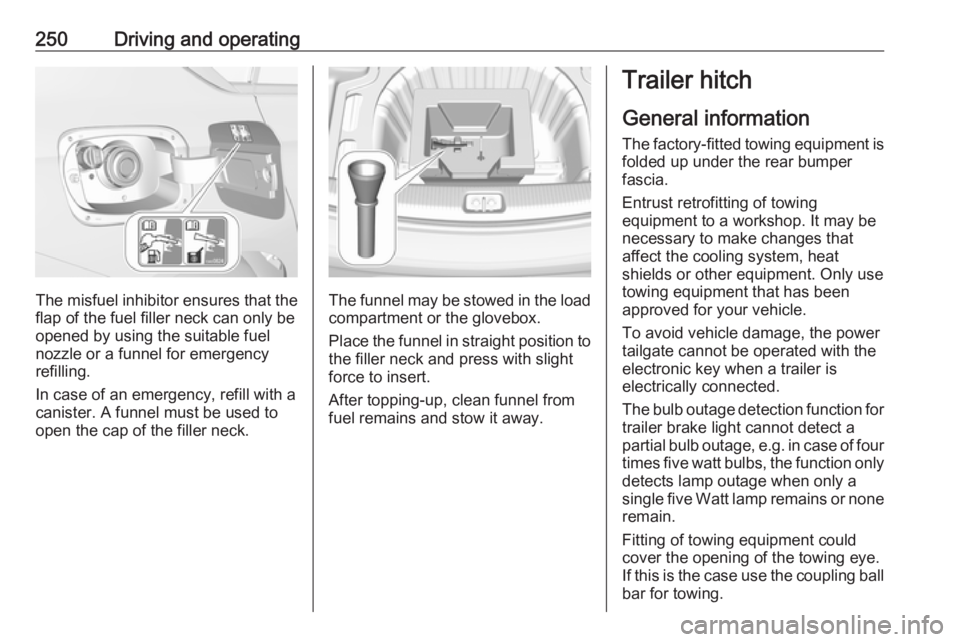
The misfuel inhibitor ensures that theflap of the fuel filler neck can only be
opened by using the suitable fuel
nozzle or a funnel for emergency
refilling.
In case of an emergency, refill with a
canister. A funnel must be used to
open the cap of the filler neck.The funnel may be stowed in the load
compartment or the glovebox.
Place the funnel in straight position to the filler neck and press with slight
force to insert.
After topping-up, clean funnel from
fuel remains and stow it away.
Trailer hitch
General information
The factory-fitted towing equipment is
folded up under the rear bumper
fascia.
Entrust retrofitting of towing
equipment to a workshop. It may be
necessary to make changes that
affect the cooling system, heat
shields or other equipment. Only use
towing equipment that has been
approved for your vehicle.
To avoid vehicle damage, the power
tailgate cannot be operated with the
electronic key when a trailer is
electrically connected.
The bulb outage detection function for trailer brake light cannot detect a
partial bulb outage, e.g. in case of four
times five watt bulbs, the function only detects lamp outage when only a
single five Watt lamp remains or none remain.
Fitting of towing equipment could
cover the opening of the towing eye.
If this is the case use the coupling ball
bar for towing.
Page 253 of 347
Driving and operating251Driving characteristics and
towing tips
Before attaching a trailer, lubricate
the coupling ball. However, do not do
so if a stabiliser, which acts on the
coupling ball, is being used to reduce snaking movements.
During trailer towing do not exceed a
speed of 80 km/h. A maximum speed
of 100 km/h is only appropriate if an
oscillation damper is used and the
permissible gross trailer weight does
not exceed the vehicle’s kerb weight.
For trailers with low driving stability
and caravan trailers, the use of an
oscillation damper is strongly
recommended.
If the trailer starts snaking, drive more slowly, do not attempt to correct the
steering and brake sharply if
necessary.
When driving downhill, drive in the
same gear as if driving uphill and
drive at a similar speed.
Adjust tyre pressure to the value
specified for full load 3 319.Trailer towing
Trailer loads The permissible trailer loads are
vehicle and engine-dependent
maximum values which must not be
exceeded. The actual trailer load is the difference between the actual
gross weight of the trailer and the
actual coupling socket load with the
trailer coupled.
The permissible trailer loads are
specified in the vehicle documents. In general, they are valid for gradients
up to 12%.
The permissible trailer load applies
up to the specified incline and at sea
level. Since engine power decreases
as altitude increases due to the air
becoming thinner, therefore reducing
climbing ability, the permissible gross
train weight also decreases by 10%
for every 1000 metres of altitude. The gross train weight does not have to be
reduced when driving on roads with
slight inclines (less than 8%, e.g.
motorways).The permissible gross train weight must not be exceeded. This weight is specified on the identification plate
3 304.
Vertical coupling load
The vertical coupling load is the load
exerted by the trailer on the coupling
ball. It can be varied by changing the
weight distribution when loading the
trailer.
The maximum permissible vertical
coupling load of:
● 60 kg (Grand Sport with all engines except B20DTH /
B20NFT / D20DTR)
● 75 kg (Sports Tourer, Country Tourer with all engines except
B20DTH / B20NFT / D20DTR)
● 90 kg (All bodystyles with engines B20DTH / B20NFT /
D20DTR)
is specified on the towing equipment
identification plate and in the vehicle
documents. Always aim for the
maximum load, especially in the case
of heavy trailers. The vertical coupling load should never fall below 25 kg.
Page 255 of 347
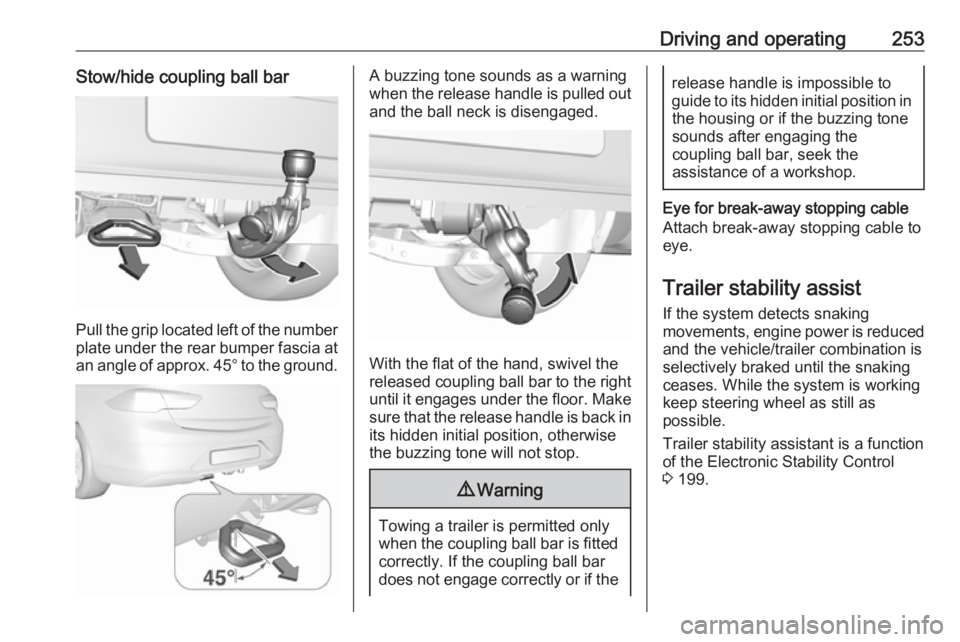
Driving and operating253Stow/hide coupling ball bar
Pull the grip located left of the number
plate under the rear bumper fascia at an angle of approx. 45° to the ground.
A buzzing tone sounds as a warning
when the release handle is pulled out and the ball neck is disengaged.
With the flat of the hand, swivel the
released coupling ball bar to the right
until it engages under the floor. Make sure that the release handle is back inits hidden initial position, otherwise
the buzzing tone will not stop.
9 Warning
Towing a trailer is permitted only
when the coupling ball bar is fitted correctly. If the coupling ball bar
does not engage correctly or if the
release handle is impossible to guide to its hidden initial position in the housing or if the buzzing tone
sounds after engaging the
coupling ball bar, seek the
assistance of a workshop.
Eye for break-away stopping cable
Attach break-away stopping cable to
eye.
Trailer stability assist
If the system detects snaking
movements, engine power is reduced
and the vehicle/trailer combination is
selectively braked until the snaking ceases. While the system is working
keep steering wheel as still as
possible.
Trailer stability assistant is a function
of the Electronic Stability Control
3 199.