radio PEUGEOT 5008 2018 Workshop Manual
[x] Cancel search | Manufacturer: PEUGEOT, Model Year: 2018, Model line: 5008, Model: PEUGEOT 5008 2018Pages: 364, PDF Size: 13.03 MB
Page 336 of 364
22
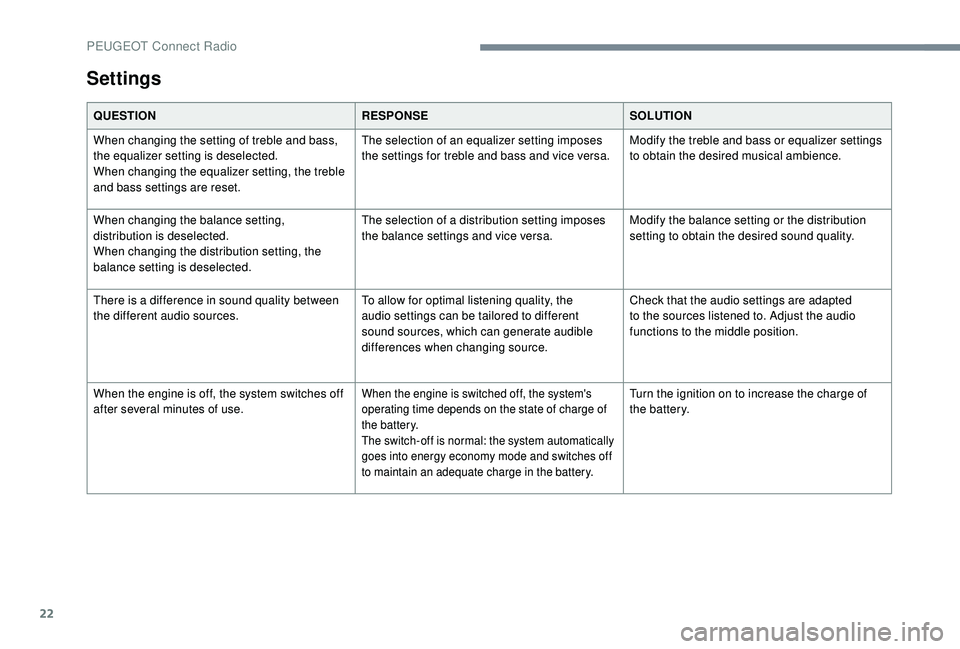
Settings
QUESTIONRESPONSESOLUTION
When changing the setting of treble and bass,
the equalizer setting is deselected.
When changing the equalizer setting, the treble
and bass settings are reset. The selection of an equalizer setting imposes
the settings for treble and bass and vice versa.
Modify the treble and bass or equalizer settings
to obtain the desired musical ambience.
When changing the balance setting,
distribution is deselected.
When changing the distribution setting, the
balance setting is deselected. The selection of a
distribution setting imposes
the balance settings and vice versa. Modify the balance setting or the distribution
setting to obtain the desired sound quality.
There is a
difference in sound quality between
the different audio sources. To allow for optimal listening quality, the
audio settings can be tailored to different
sound sources, which can generate audible
differences when changing source.Check that the audio settings are adapted
to the sources listened to. Adjust the audio
functions to the middle position.
When the engine is off, the system switches off
after several minutes of use.
When the engine is switched off, the system's
operating time depends on the state of charge of
the battery.
The switch-off is normal: the system automatically
goes into energy economy mode and switches off
to maintain an adequate charge in the battery.Turn the ignition on to increase the charge of
the battery.
PEUGEOT Connect Radio
Page 337 of 364
1
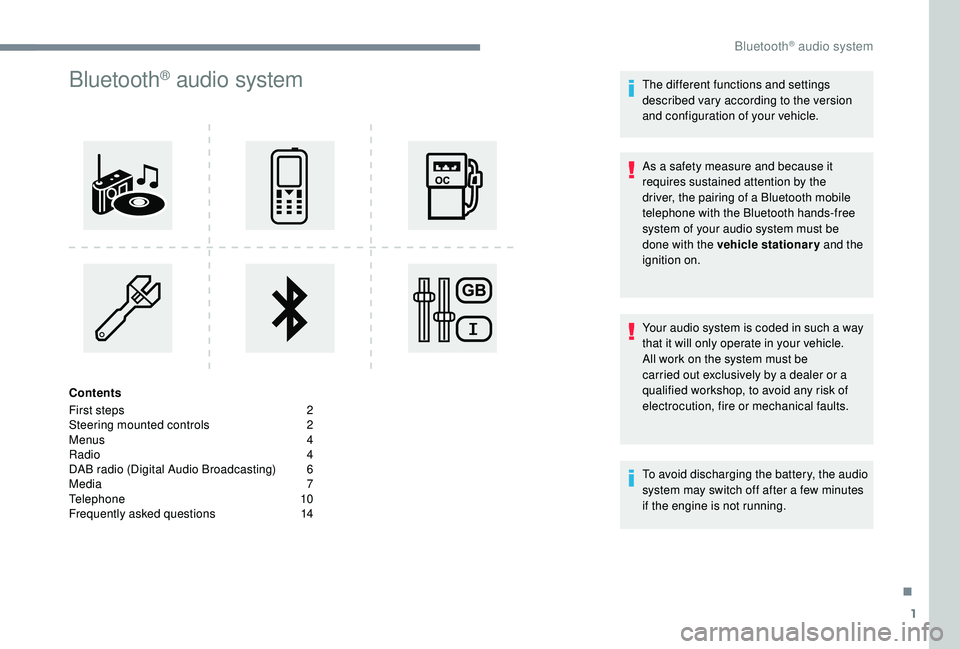
Bluetooth® audio system
Contents
First steps
2
S
teering mounted controls
2
M
enus
4
R
adio
4
D
AB radio (Digital Audio Broadcasting)
6
M
edia
7
T
elephone
1
0
Frequently asked questions
1
4 The different functions and settings
described vary according to the version
and configuration of your vehicle.
As a
safety measure and because it
requires sustained attention by the
driver, the pairing of a Bluetooth mobile
telephone with the Bluetooth hands-free
system of your audio system must be
done with the vehicle stationary and the
ignition on.
Your audio system is coded in such a way
that it will only operate in your vehicle.
All work on the system must be
carried out exclusively by a dealer or a
qualified workshop, to avoid any risk of
electrocution, fire or mechanical faults.
To avoid discharging the battery, the audio
system may switch off after a
few minutes
if the engine is not running.
.
Bluetooth® audio system
Page 338 of 364
2
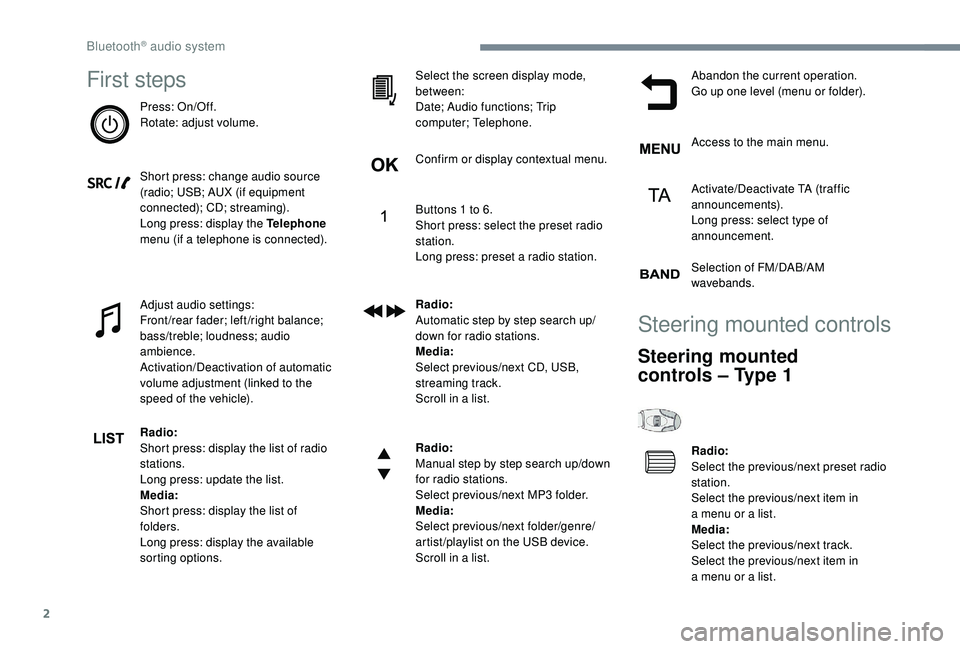
First steps
Press: On/Off.
Rotate: adjust volume.
Short press: change audio source
(radio; USB; AUX (if equipment
connected); CD; streaming).
Long press: display the Telephone
menu (if a
telephone is connected).
Adjust audio settings:
Front/rear fader; left/right balance;
bass/treble; loudness; audio
ambience.
Activation/Deactivation of automatic
volume adjustment (linked to the
speed of the vehicle).
Radio:
Short press: display the list of radio
stations.
Long press: update the list.
Media:
Short press: display the list of
folders.
Long press: display the available
sorting options. Select the screen display mode,
between:
Date; Audio functions; Trip
computer; Telephone.
Confirm or display contextual menu.
Buttons 1
to 6.
Short press: select the preset radio
station.
Long press: preset a
radio station.
Radio:
Automatic step by step search up/
down for radio stations.
Media:
Select previous/next CD, USB,
streaming track.
Scroll in a
list.
Radio:
Manual step by step search up/down
for radio stations.
Select previous/next MP3
folder.
Media:
Select previous/next folder/genre/
artist/playlist on the USB device.
Scroll in a
list.Abandon the current operation.
Go up one level (menu or folder).
Access to the main menu.
Activate/Deactivate TA (traffic
announcements).
Long press: select type of
announcement.
Selection of FM/DAB/AM
wavebands.
Steering mounted controls
Steering mounted
controls – Type 1
Radio:
Select the previous/next preset radio
station.
Select the previous/next item in
a
menu or a list.
Media:
Select the previous/next track.
Select the previous/next item in
a
menu or a list.
Bluetooth® audio system
Page 339 of 364
3
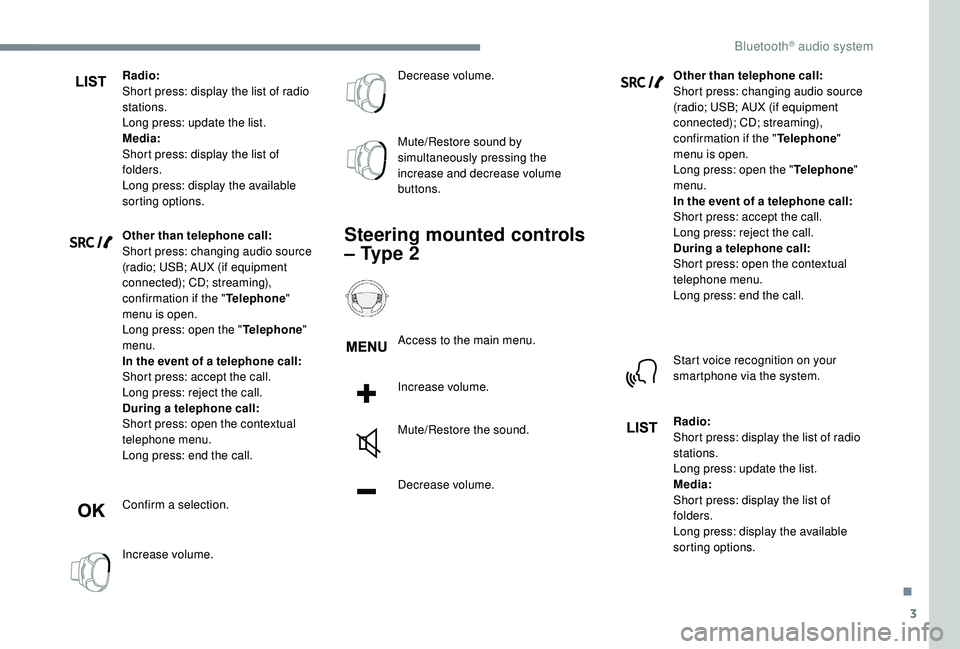
Radio:
Short press: display the list of radio
stations.
Long press: update the list.
Media:
Short press: display the list of
folders.
Long press: display the available
sorting options.
Other than telephone call:
Short press: changing audio source
(radio; USB; AUX (if equipment
connected); CD; streaming),
confirmation if the "Telephone"
menu is open.
Long press: open the " Telephone"
menu.
In the event of a
telephone call:
Short press: accept the call.
Long press: reject the call.
During a
telephone call:
Short press: open the contextual
telephone menu.
Long press: end the call.
Confirm a
selection.
Increase volume. Decrease volume.
Mute/Restore sound by
simultaneously pressing the
increase and decrease volume
buttons.
Steering mounted controls
– Type 2
Access to the main menu.
Increase volume.
Mute/Restore the sound.
Decrease volume.
Other than telephone call:
Short press: changing audio source
(radio; USB; AUX (if equipment
connected); CD; streaming),
confirmation if the "
Telephone"
menu is open.
Long press: open the " Telephone"
menu.
In the event of a telephone call:
Short press: accept the call.
Long press: reject the call.
During a
telephone call:
Short press: open the contextual
telephone menu.
Long press: end the call.
Start voice recognition on your
smartphone via the system.
Radio:
Short press: display the list of radio
stations.
Long press: update the list.
Media:
Short press: display the list of
folders.
Long press: display the available
sorting options.
.
Bluetooth® audio system
Page 340 of 364
4
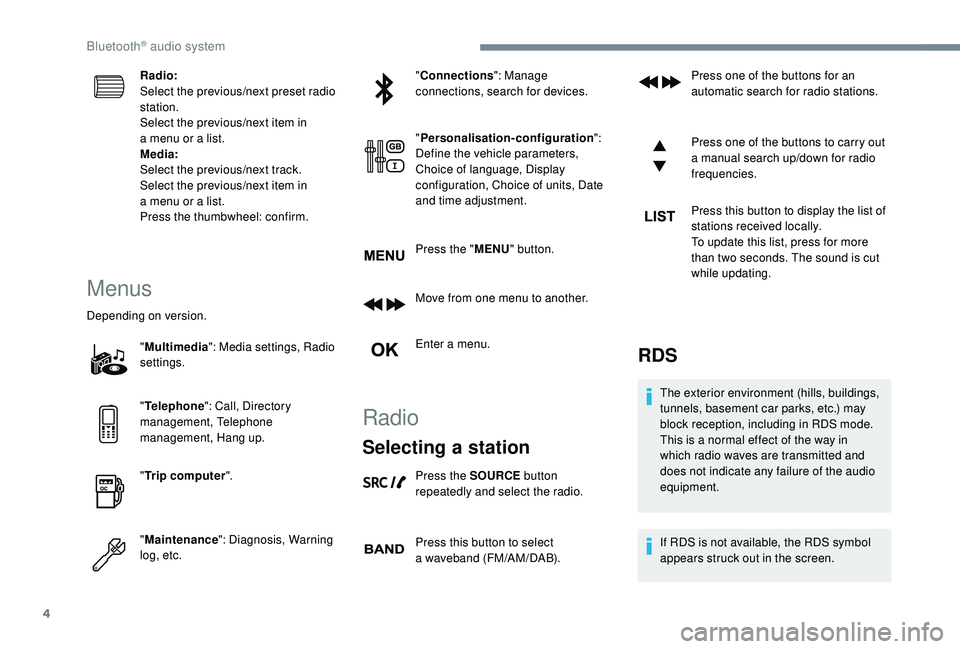
Radio:
Select the previous/next preset radio
station.
Select the previous/next item in
a menu or a list.
Media:
Select the previous/next track.
Select the previous/next item in
a
menu or a list.
Press the thumbwheel: confirm.
Menus
Depending on version.
"Multimedia ": Media settings, Radio
settings.
" Telephone ": Call, Directory
management, Telephone
management, Hang up.
" Trip computer ".
" Maintenance ": Diagnosis, Warning
log, etc. "
Connections ": Manage
connections, search for devices.
" Personalisation-configuration ":
Define the vehicle parameters,
Choice of language, Display
configuration, Choice of units, Date
and time adjustment.
Press the " MENU" button.
Move from one menu to another.
Enter a menu.
Radio
Selecting a station
Press the SOURCE button
repeatedly and select the radio.
Press this button to select
a
waveband (FM/AM/DAB). Press one of the buttons for an
automatic search for radio stations.
Press one of the buttons to carry out
a
manual search up/down for radio
frequencies.
Press this button to display the list of
stations received locally.
To update this list, press for more
than two seconds. The sound is cut
while updating.
RDS
The exterior environment (hills, buildings,
tunnels, basement car parks, etc.) may
block reception, including in RDS mode.
This is a
normal effect of the way in
which radio waves are transmitted and
does not indicate any failure of the audio
equipment.
If RDS is not available, the RDS symbol
appears struck out in the screen.
Bluetooth® audio system
Page 341 of 364
5
The RDS, if activated, enables you to continue
listening to the same station by automatic
retuning to alternative frequencies. However,
in certain conditions, coverage of an RDS
station may not be assured throughout the
entire country as radio stations do not cover
100% of the territory. This explains the loss of
reception of the station during a journey.
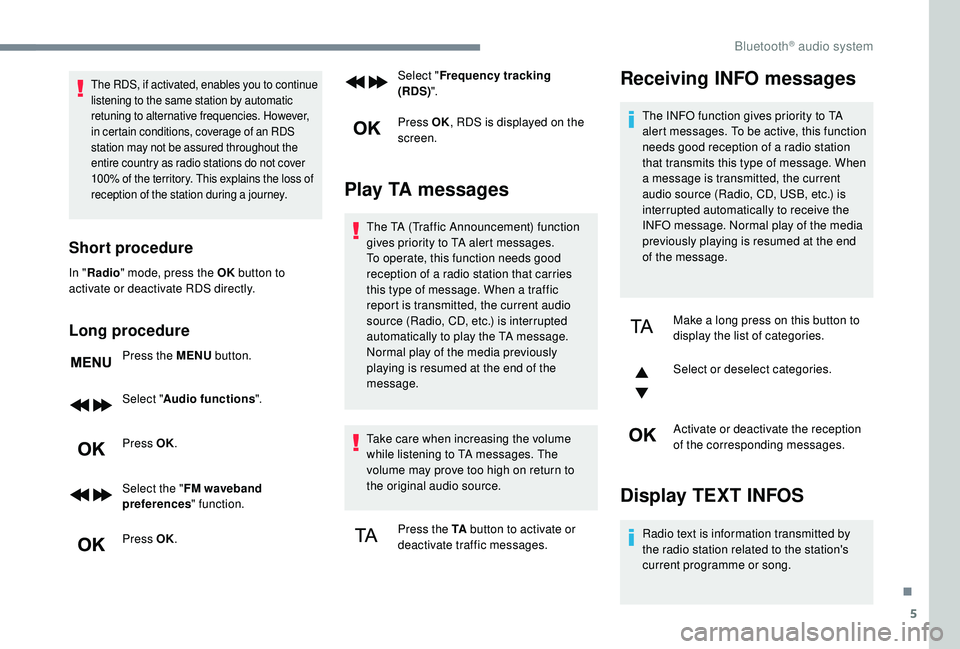
Short procedure
In "Radio " mode, press the OK button to
activate or deactivate RDS directly.
Long procedure
Press the MENU button.
Select " Audio functions ".
Press OK.
Select the " FM waveband
preferences " function.
Press OK. Select "
Frequency tracking
(RDS) ".
Press OK , RDS is displayed on the
screen.
Play TA messages
The TA (Traffic Announcement) function
gives priority to TA alert messages.
To operate, this function needs good
reception of a
radio station that carries
this type of message. When a
traffic
report is transmitted, the current audio
source (Radio, CD, etc.) is interrupted
automatically to play the TA message.
Normal play of the media previously
playing is resumed at the end of the
message.
Take care when increasing the volume
while listening to TA messages. The
volume may prove too high on return to
the original audio source.
Press the TA button to activate or
deactivate traffic messages.
Receiving INFO messages
The INFO function gives priority to TA
alert messages. To be active, this function
needs good reception of a
radio station
that transmits this type of message. When
a
message is transmitted, the current
audio source (Radio, CD, USB, etc.) is
interrupted automatically to receive the
INFO message. Normal play of the media
previously playing is resumed at the end
of the message.
Make a
long press on this button to
display the list of categories.
Select or deselect categories.
Activate or deactivate the reception
of the corresponding messages.
Display TEXT INFOS
Radio text is information transmitted by
the radio station related to the station's
current programme or song.
.
Bluetooth® audio system
Page 342 of 364
6
When the radio station is displayed
in the screen, press OK to display
the contextual menu.
Select " RadioText (TXT) display "
and confirm OK to save.
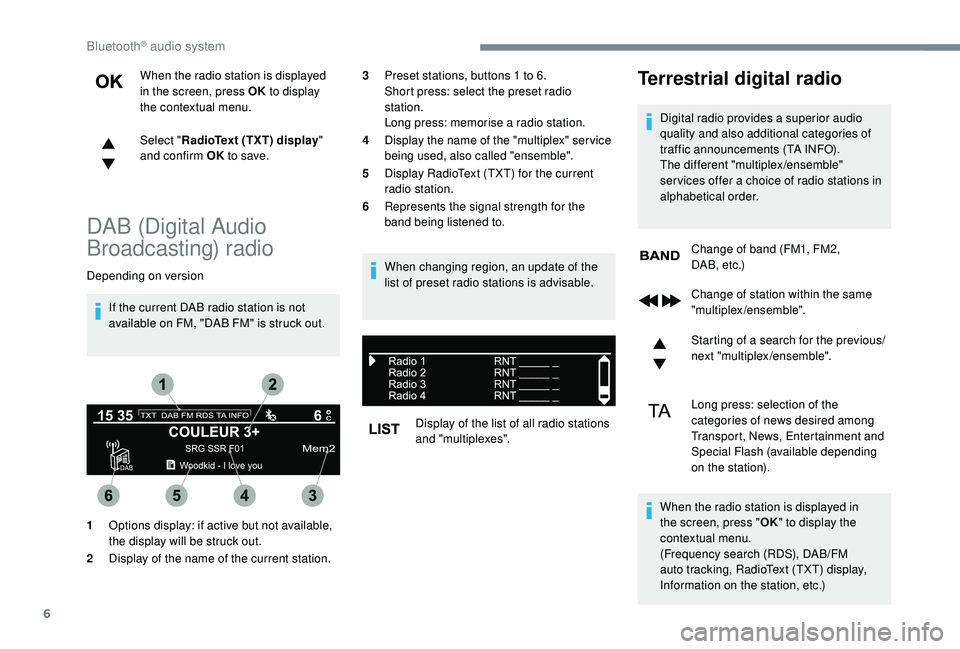
DAB (Digital Audio
Broadcasting) radio
Depending on version
If the current DAB radio station is not
available on FM, "DAB FM" is struck out. When changing region, an update of the
list of preset radio stations is advisable.
Display of the list of all radio stations
and "multiplexes".
Terrestrial digital radio
Digital radio provides a superior audio
q uality and also additional categories of
traffic announcements (TA INFO).
The different "multiplex/ensemble"
ser vices offer a
choice of radio stations in
alphabetical order.
Change of band (FM1, FM2,
DA B , e t c .)
1 Options display: if active but not available,
the display will be struck out.
2 Display of the name of the current station. 3
Preset stations, buttons 1
to 6.
Short press: select the preset radio
station.
Long press: memorise a
radio station.
4 Display the name of the "multiplex" ser vice
being used, also called "ensemble".
5 Display RadioText (TXT) for the current
radio station.
6 Represents the signal strength for the
band being listened to.
Change of station within the same
"multiplex/ensemble".
Starting of a
search for the previous/
next "multiplex/ensemble".
Long press: selection of the
categories of news desired among
Transport, News, Entertainment and
Special Flash (available depending
on the station).
When the radio station is displayed in
the screen, press " OK" to display the
contextual menu.
(Frequency search (RDS), DAB/FM
auto tracking, RadioText (TXT) display,
Information on the station, etc.)
Bluetooth® audio system
Page 351 of 364
15
QUESTIONRESPONSESOLUTION
With the engine off, the audio system switches
off after a
few minutes of use. When the engine is switched off, the audio
system operating time depends on the state of
charge of the battery.
The switch-off is normal: the audio system
switches to economy mode and switches off to
prevent discharging the vehicle's battery. Turn the ignition on to increase the charge of
the battery.
The message "the audio system is overheated"
appears on the display. In order to protect the installation if the
surrounding temperature is too high, the audio
system switches to an automatic thermal
protection mode leading to a
reduction in
volume or the CD play stopping. Switch the audio system off for a
few minutes
to allow the system to cool.
Radio
QUESTION RESPONSESOLUTION
There is a difference in sound quality between
the different audio sources (radio, CD, etc.). To allow for optimal listening quality, the audio
settings (Volume, Bass, treble, Ambience,
Loudness) can be tailored to different
sound sources, which can generate audible
differences when changing source (radio, CD,
e t c .) .Check that the audio settings (Volume, Bass,
Treble, Ambience and Loudness) are adapted
to the sources listened to. It is advisable to set
the audio functions (Bass, Treble, Front-Rear
Balance and Left-Right Balance) to the middle
position, select the musical ambience "None"
and set the loudness correction to the "Active"
position in CD mode or to the "Inactive"
position in radio mode.
.
Bluetooth® audio system
Page 352 of 364
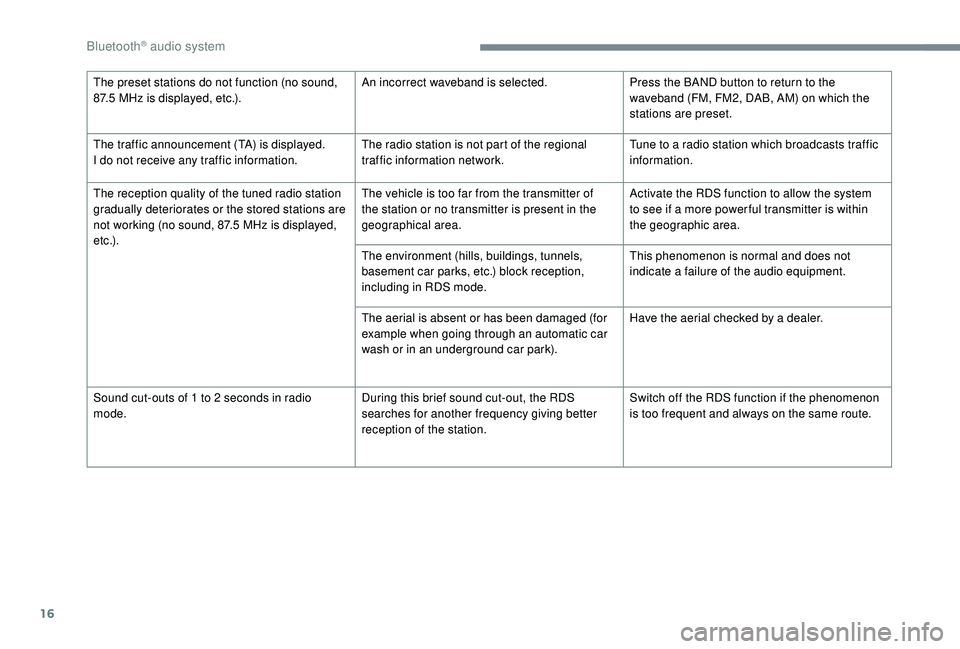
16
The preset stations do not function (no sound,
87.5 MHz is displayed, etc.). An incorrect waveband is selected.
Press the BAND button to return to the
waveband (FM, FM2, DAB, AM) on which the
stations are preset.
The traffic announcement (TA) is displayed.
I do not receive any traffic information. The radio station is not part of the regional
traffic information network.Tune to a
radio station which broadcasts traffic
information.
The reception quality of the tuned radio station
gradually deteriorates or the stored stations are
not working (no sound, 87.5
MHz is displayed,
e t c .) . The vehicle is too far from the transmitter of
the station or no transmitter is present in the
geographical area.
Activate the RDS function to allow the system
to see if a
more power ful transmitter is within
the geographic area.
The environment (hills, buildings, tunnels,
basement car parks, etc.) block reception,
including in RDS mode. This phenomenon is normal and does not
indicate a
failure of the audio equipment.
The aerial is absent or has been damaged (for
example when going through an automatic car
wash or in an underground car park). Have the aerial checked by a
dealer.
Sound cut-outs of 1
to 2 seconds in radio
mode. During this brief sound cut-out, the RDS
searches for another frequency giving better
reception of the station.Switch off the RDS function if the phenomenon
is too frequent and always on the same route.
Bluetooth® audio system
Page 356 of 364
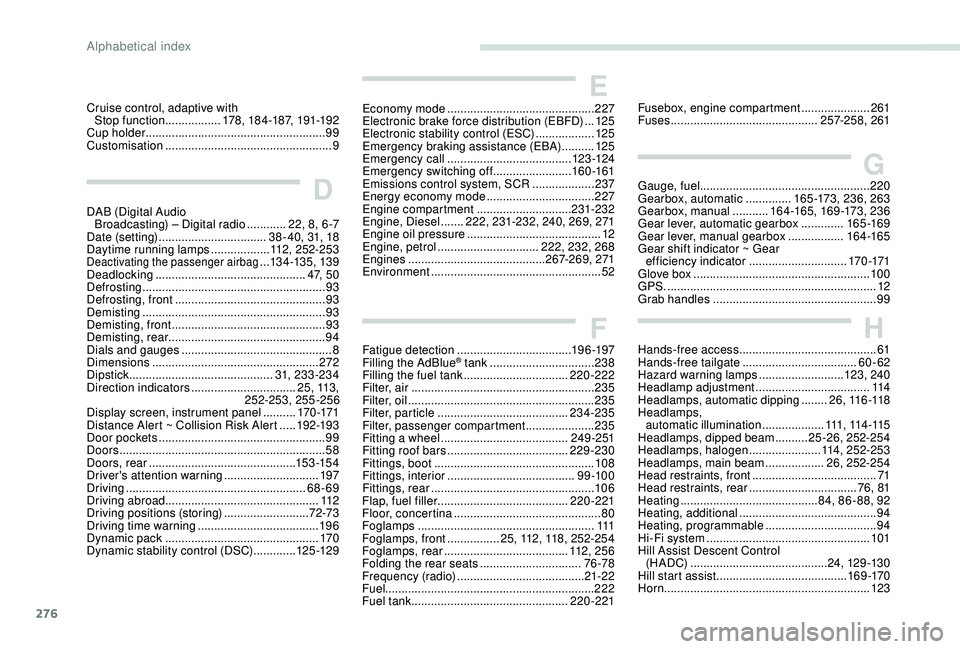
276
HHands-free access .......................................... 61
Hands-free tailgate ................................... 60-62
Hazard warning lamps
..........................123, 24 0
Headlamp adjustment
...................................114
Headlamps, automatic dipping
........2 6 , 11 6 -11 8
Headlamps, automatic illumination
...................111, 114 -115
Headlamps, dipped beam
..........25 -26, 252-254
Headlamps, halogen
......................114, 252-253
Headlamps, main beam
..................26, 252-254
Head restraints, front
...................................... 71
Head restraints, rear
.................................76, 81
Heating
.......................................... 8
4, 86 - 88, 92
Heating, additional
.......................................... 94
Heating, programmable
..................................94
Hi-Fi system
.................................................. 10
1
Hill Assist Descent Control (H A DC)
.......................................... 24, 12 9 -13 0
Hill start assist
........................................ 16 9 -170
Horn ............................................................... 123
Fusebox, engine compartment
.....................
261
Fuses
............................................. 25
7-258, 261
Cruise control, adaptive with
Stop function
.................
178, 184-187, 191-192
Cup holder
.......................................................
99
Customisation
...................................................
9Economy mode
.............................................
2
27
Electronic brake force distribution (EBFD)
...
125
Electronic stability control (ESC)
..................
12
5
Emergency braking assistance (EBA)
..........
125
Emergency call
......................................
123 -124
Emergency switching off
........................
160 -161
Emissions control system, SCR
...................
237
Energy economy mode
................................. 2
27
Engine compartment
............................. 23
1-232
Engine, Diesel
.......
222, 231-232, 240, 269, 271
Engine oil pressure
.........................................
12
Engine, petrol
............................... 2
22, 232, 268
Engines
..........................................
267-269, 271
Environment
....................................................
52
E
D
DAB (Digital Audio
Broadcasting) – Digital radio ............22, 8, 6 -7
Date (setting)
................................. 38 - 40, 31, 18
Daytime running lamps
..................112, 252-253
Deactivating the passenger airbag ...134 -13 5, 13 9
Deadlocking
.............................................. 4 7, 5 0
Defrosting
........................................................ 93
Defrosting, front
.............................................. 93
Demisting
........................................................ 93
Demisting, front
............................................... 93
D
emisting, rear
................................................ 94
Dials and gauges
...............................
............... 8
Dimensions
..............................
..................... 272
Dipstick
................
............................ 31, 233-234
Direction indicators
................................ 2 5 , 113 ,
25
2-253, 255-256
Display screen, instrument panel
.......... 170 -171
Distance Alert ~ Collision Risk Alert
.....19
2-193
Door pockets
...............................
.................... 99
Doors
............................................................... 58
Doors, rear
............................................. 15 3 -15 4
Driver's attention warning
............................. 19
7
Driving
....................................................... 68-69
Driving abroad ............................................... 112
Driving positions (storing)
.......................... 72-73
Driving time warning
..................................... 19 6
Dynamic pack
............................................... 17
0
Dynamic stability control (DSC)
............. 125 -12 9
F
G
Fatigue detection ................................... 19 6 -197
Filling the AdBlue® tank ................................ 238
Filling the fuel tank ................................ 220-222
Filter, air
........................................................ 235
Filter, oil
................
......................................... 235
Filter, particle
........................................ 234-235
Filter, passenger compartment
..................... 235
Fitting a
wheel
....................................... 24 9 - 2 51
Fitting roof bars
..................................... 229-230
Fittings, boot
................................................. 108
Fittings, interior
....................................... 9
9 -10 0
Fittings, rear
.................................................. 10 6
Flap, fuel filler
........................................ 220-221
Floor, concertina
............................................. 80
Foglamps
...................................................... 111
Foglamps, front
................ 25, 112, 118, 252-254
Foglamps, rear
...................................... 11
2 , 2 5 6
Folding the rear seats
............................... 76 -78
Frequency (radio)
....................................... 21-22
Fuel ................................................................ 222
Fuel tank ................................................ 220-221Gauge, fuel
.................................................... 220
Gearbox, automatic
..............
165 -173, 236, 263
Gearbox, manual
...........
16 4 -165, 169 -173, 236
Gear lever, automatic gearbox
.............
165 -169
Gear lever, manual gearbox
.................
16 4 -165
Gear shift indicator ~ Gear efficiency indicator
..............................
170 -171
Glove box ......................................................
10 0
GPS.
................
................................................
12
Grab handles
..................................................
99
Alphabetical index