boot PEUGEOT LANDTREK 2022 Owners Manual
[x] Cancel search | Manufacturer: PEUGEOT, Model Year: 2022, Model line: LANDTREK, Model: PEUGEOT LANDTREK 2022Pages: 164, PDF Size: 5.87 MB
Page 20 of 164
18
Access
Anti-theft protection
Do not modify the electronic vehicle
immobiliser, as this might result in
malfunctions.
For vehicles with a key ignition switch,
remember to remove the key and turn the
steering wheel to engage the steering lock.
Locking the vehicle
Driving with the doors locked could make
it more difficult for the emergency services
to enter the passenger compartment in an
emergency.
As a safety precaution, remove the key from
the ignition or take the electronic key with you
when leaving the vehicle, even for a short
time.
Purchasing a second-hand vehicle
Have the key codes memorised by a
PEUGEOT dealer, to ensure that the keys
in your possession are the only ones able to
start the vehicle.
Keyless Entry and
Starting
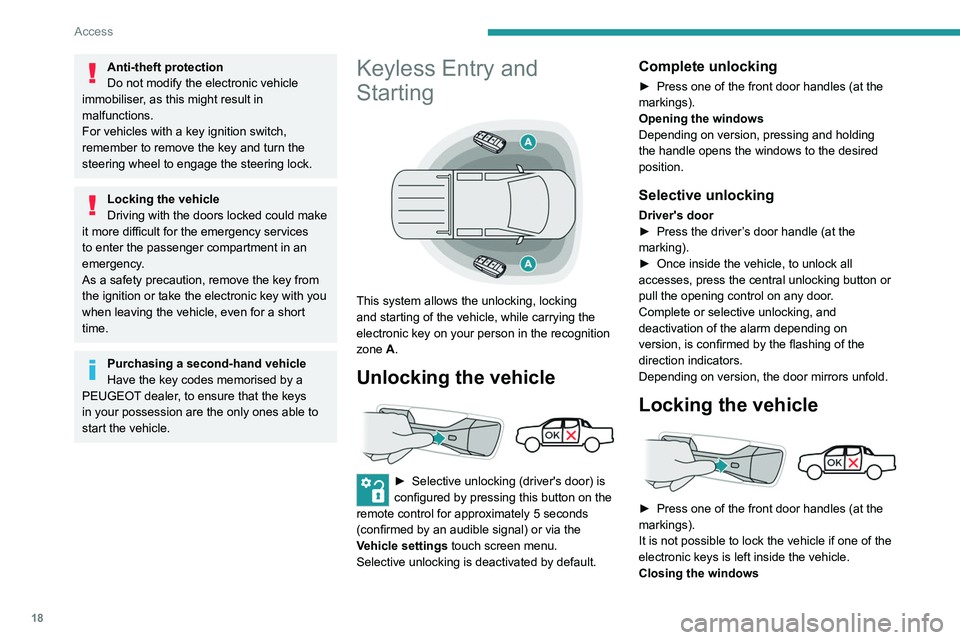
This system allows the unlocking, locking
and starting of the vehicle, while carrying the
electronic key on your person in the recognition
zone A.
Unlocking the vehicle
► Selective unlocking (driver's door) is
configured by pressing this button on the
remote control for approximately 5 seconds
(confirmed by an audible signal) or via the
Vehicle settings touch screen menu.
Selective unlocking is deactivated by default.
Complete unlocking
► Press one of the front door handles (at the
markings).
Opening the windows
Depending on version, pressing and holding
the handle opens the windows to the desired
position.
Selective unlocking
Driver's door
► Press the driver ’s door handle (at the
marking).
►
Once inside the vehicle, to unlock all
accesses, press the central unlocking button or
pull the opening control on any door
.
Complete or selective unlocking, and
deactivation of the alarm
depending on
version,
is confirmed by the flashing of the
direction indicators.
Depending on version, the door mirrors unfold.
Locking the vehicle
► Press one of the front door handles (at the
markings).
It is not possible to lock the vehicle if one of the
electronic keys is left inside the vehicle.
Closing the windows
Pressing and holding the handle closes the
windows.
When closing windows, ensure that no
person or object could prevent their
correct closure.
The locking, and the activation of the alarm
depending on version, is confirmed by the
temporary lighting of the direction indicators.
Depending on version, the door mirrors fold.
If one of the doors or the boot is still open
or if the electronic key for the Keyless
Entry and Starting system has been left inside
the vehicle, central locking will not take place.
However, if the vehicle is fitted with an alarm,
it will be activated after 45 seconds.
If the vehicle is unlocked but the doors
are not subsequently opened, the vehicle
will automatically lock itself again after about
30 seconds. If the vehicle is fitted with an
alarm, it will be reactivated automatically.
The automatic relocking function is configured
via the touch screen’s vehicle configuration
menu.
Depending on version, the automatic
door mirror folding/unfolding function is
configured by pressing the folding/unfolding
button on the mirrors control.
Page 21 of 164
19
Access
2Pressing and holding the handle closes the
windows.
When closing windows, ensure that no
person or object could prevent their
correct closure.
The locking, and the activation of the alarm
depending on version, is confirmed by the
temporary lighting of the direction indicators.
Depending on version, the door mirrors fold.
If one of the doors or the boot is still open
or if the electronic key for the Keyless
Entry and Starting
system has been left inside
the vehicle, central locking will not take place.
However
, if the vehicle is fitted with an alarm,
it will be activated after 45
seconds.
If the vehicle is unlocked but the doors
are not subsequently opened, the vehicle
will automatically lock itself again after about
30
seconds. If the vehicle is fitted with an
alarm, it will be reactivated automatically.
The automatic relocking function is configured
via the touch screen’s vehicle configuration
menu.
Depending on version, the automatic
door mirror folding/unfolding function is
configured by pressing the folding/unfolding
button on the mirrors control.
As a safety measure, never leave the vehicle, even for a short time, without
taking the Keyless Entry and Starting
system’s electronic key with you.
Be aware of the risk of theft of the vehicle if
the key is present in one of the defined areas
while the vehicle is unlocked.
To preserve the battery charge in the electronic key and the vehicle's battery,
the "hands-free" functions are set to
hibernation mode after 21 days without use.
To restore these functions, press one of the
remote control buttons or start the engine with
the electronic key against the back-up reader.
For more information on starting with the
Keyless Entry and Starting system, refer to
the corresponding section.
Electrical interference
The electronic key may not operate if
close to certain electronic devices such as
telephones (switched on or on standby) or
laptop computers, strong magnetic fields, etc.
Central locking
Manual
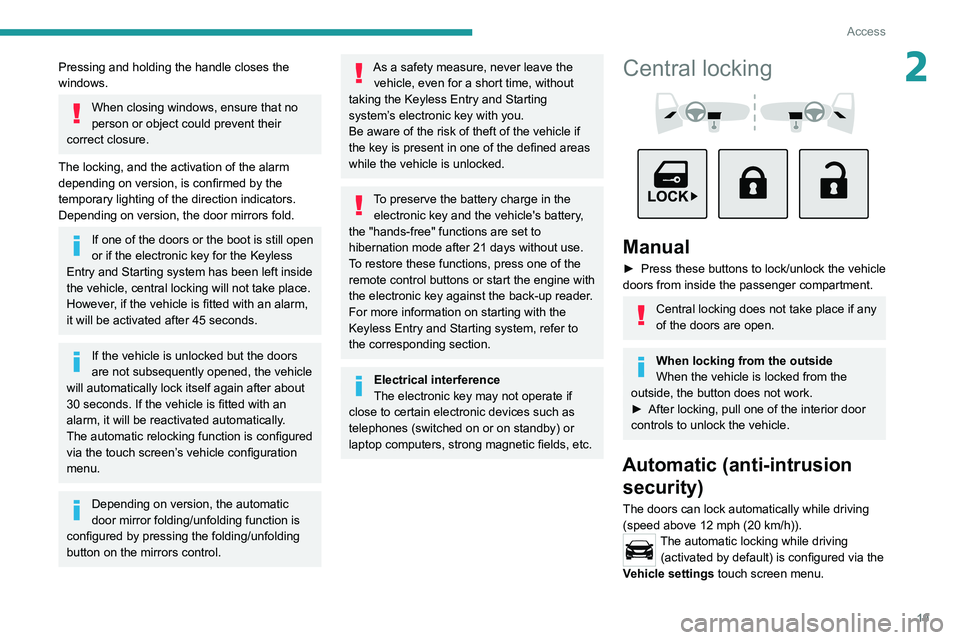
► Press these buttons to lock/unlock the vehicle
doors from inside the passenger compartment.
Central locking does not take place if any
of the doors are open.
When locking from the outside
When the vehicle is locked from the
outside, the button does not work.
►
After locking, pull one of the interior door
controls to unlock the vehicle.
Automatic (anti-intrusion security)
The doors can lock automatically while driving
(speed above 12 mph (20
km/h)).
The automatic locking while driving (activated by default) is configured via the
Vehicle settings touch screen menu.
Page 34 of 164
32
Ease of use and comfort
For more information on the Tool kit,
refer to the corresponding section.
Repositioning the seat
cushions
Before lowering the seat cushion to the
normal position, make sure that you take
the seat belt buckle and hold it during the
operation.
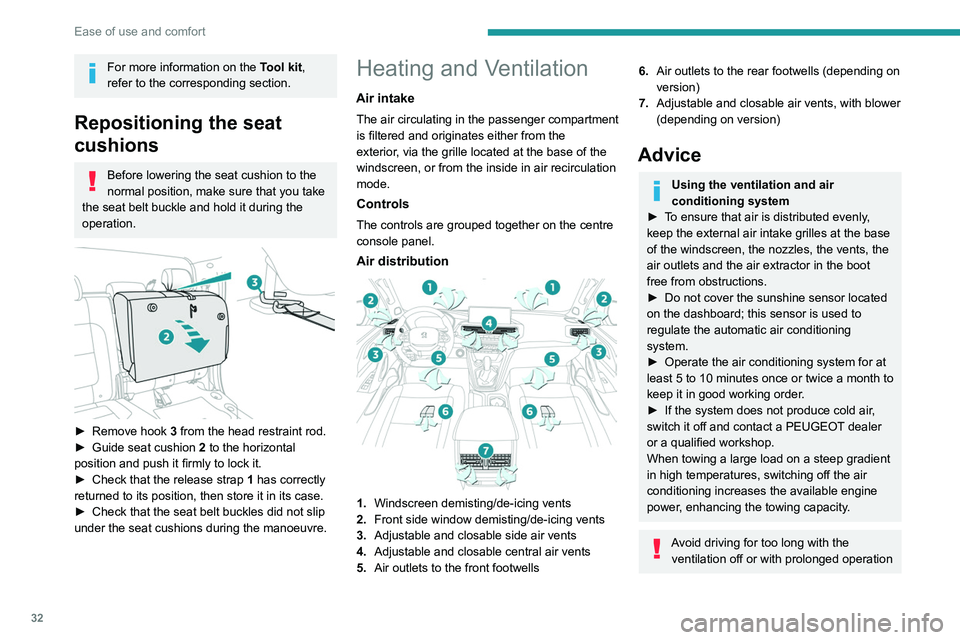
► Remove hook 3 from the head restraint rod.
► Guide seat cushion 2
to the horizontal
position and push it firmly to lock it.
►
Check that the release strap 1
has correctly
returned to its position, then store it in its case.
►
Check that the seat belt buckles did not slip
under the seat cushions during the manoeuvre.
Heating and Ventilation
Air intake
The air circulating in the passenger compartment
is filtered and originates either from the
exterior, via the grille located at the base of the
windscreen, or from the inside in air recirculation
mode.
Controls
The controls are grouped together on the centre
console panel.
Air distribution
1. Windscreen demisting/de-icing vents
2. Front side window demisting/de-icing vents
3. Adjustable and closable side air vents
4. Adjustable and closable central air vents
5. Air outlets to the front footwells
6.Air outlets to the rear footwells (depending on
version)
7. Adjustable and closable air vents, with blower
(depending on version)
Advice
Using the ventilation and air
conditioning system
►
T
o ensure that air is distributed evenly,
keep the external air intake grilles at the base
of the windscreen, the nozzles, the vents, the
air outlets and the air extractor in the boot
free from obstructions.
►
Do not cover the sunshine sensor located
on the dashboard; this sensor is used to
regulate the automatic air conditioning
system.
►
Operate the air conditioning system for at
least 5 to 10 minutes once or twice a month to
keep it in good working order
.
►
If the system does not produce cold air
,
switch it off and contact a PEUGEOT dealer
or a qualified workshop.
When towing a large load on a steep gradient
in high temperatures, switching off the air
conditioning increases the available engine
power, enhancing the towing capacity.
Avoid driving for too long with the ventilation off or with prolonged operation
Page 84 of 164
82
Driving
Rear parking sensors
► Engage reverse gear to start the system
(confirmed by an audible signal).
The system is switched off when reverse gear is
disengaged.
Audible assistance
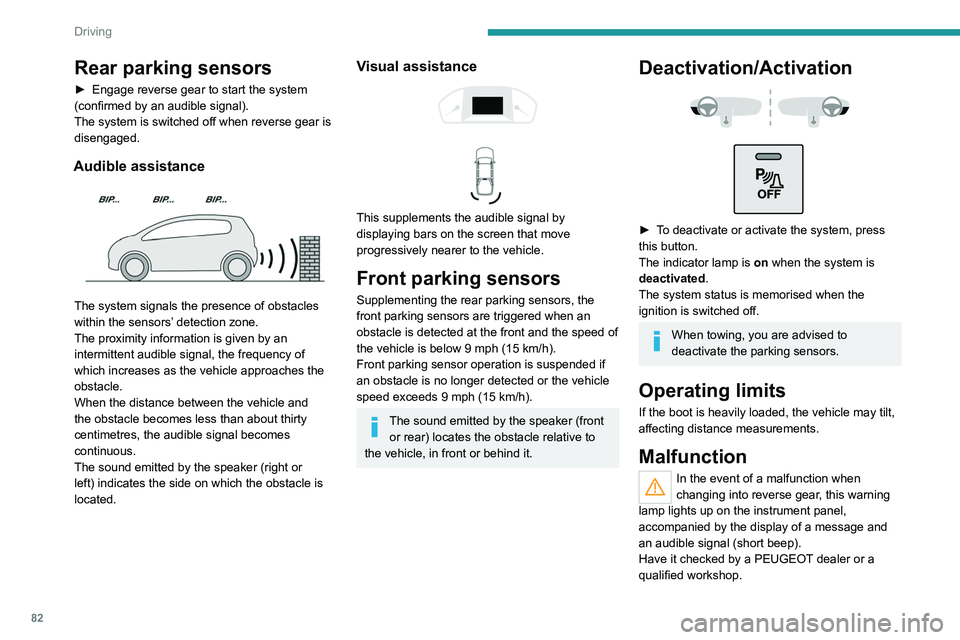
The system signals the presence of obstacles
within the sensors’ detection zone.
The proximity information is given by an
intermittent audible signal, the frequency of
which increases as the vehicle approaches the
obstacle.
When the distance between the vehicle and
the obstacle becomes less than about thirty
centimetres, the audible signal becomes
continuous.
The sound emitted by the speaker (right or
left) indicates the side on which the obstacle is
located.
Visual assistance
This supplements the audible signal by
displaying bars on the screen that move
progressively nearer to the vehicle.
Front parking sensors
Supplementing the rear parking sensors, the
front parking sensors are triggered when an
obstacle is detected at the front and the speed of
the vehicle is below 9 mph (15 km/h).
Front parking sensor operation is suspended if
an obstacle is no longer detected or the vehicle
speed exceeds 9 mph (15
km/h).
The sound emitted by the speaker (front or rear) locates the obstacle relative to
the vehicle, in front or behind it.
Deactivation/Activation
► To deactivate or activate the system, press
this button.
The indicator lamp is on when the system is
deactivated.
The system status is memorised when the
ignition is switched off.
When towing, you are advised to
deactivate the parking sensors.
Operating limits
If the boot is heavily loaded, the vehicle may tilt,
affecting distance measurements.
Malfunction
In the event of a malfunction when
changing into reverse gear, this warning
lamp lights up on the instrument panel,
accompanied by the display of a message and
an audible signal (short beep).
Have it checked by a PEUGEOT dealer or a
qualified workshop.
Reversing camera
For more information, refer to the
General recommendations on the use
of driving and manoeuvring aids .
The visual reversing assistance camera is
activated automatically when reverse gear is
engaged.
The function may be supplemented by parking
sensors.
The image is displayed on the touch screen.
Page 143 of 164
141
Alphabetical index
4x4 transmission selector 69
360° camera
84
A
ABS 50
Accessories
49
Additive, Diesel
95
Adjusting headlamp beam height
45
Adjusting headlamps
45
Adjusting head restraints
26
Adjusting seat
26–27
Adjusting the air distribution
35
Adjusting the air flow
35
Adjusting the date
13, 137
Adjusting the height and reach
of the steering wheel
28
Adjusting the seat angle
27
Adjusting the seat belt height
54
Adjusting the temperature
35
Adjusting the time
13, 137
Advice on care and maintenance
103
Advice on driving
6, 62–63
Airbags
55–57, 59
Airbags, curtain
56–57
Airbags, front
56–57, 60
Airbags, lateral
56–57
Air conditioning
32, 34, 35
Air conditioning, automatic
36
Air conditioning, dual-zone automatic
34–36
Air conditioning, manual
33, 36
Air intake 35
Air vents
32
Alarm
23
Android Auto connection
136
Anti-lock braking system (ABS)
50
Antitheft / Immobiliser
17
Apple CarPlay connection
135
Area, loading
41
Armrest, front
38
Armrest, rear
39
Assistance, emergency braking
50
Audible warning
50
Audio streaming (Bluetooth)
129
B
Battery 99
Battery, 12 V
95, 99, 116–119
Battery, charging
118–119
Battery, remote control
20–21
Bluetooth (hands-free)
129–130
Bluetooth (telephone)
135
Bodywork
104
Bonnet
91–92
Brake discs
96
Brake lamps
11 5
Brakes
96
Braking assistance system
50
Bulbs
11 3
Bulbs (changing)
112, 115
C
Capacity, fuel tank 89
Cap, fuel filler
89
Care of the bodywork
104
Central locking
17, 19
Changing a bulb
112, 115
Changing a fuse
11 6
Changing a wheel
107–109
Changing a wiper blade
47
Changing the engine oil
101
Changing the remote control battery
20
Checking the levels
93–95
Checks
92, 95–97
Checks, routine
95–96, 98
Child lock
61
Children
55, 60
Children (safety)
61
Child seats
55, 58–59
Child seats, ISOFIX
60
Cigar lighter
37
Cleaning (advice)
102–104
Cleaning the engine throttle housing
102
Closing the boot
18, 23
Closing the doors
18–19, 22
Configuration, vehicle
13–15
Connection, Bluetooth
130, 135
Connection, MirrorLink
136
Connectivity
135
Control, emergency door
20
Control stalk, lighting
43, 45
Control stalk, wipers
46, 48
Page 146 of 164
144
Alphabetical index
N
Normal mode 73
O
Obstacle detection 81
Off-road camera
83
Oil change
93, 101
Oil consumption
93
OIl, engine
93, 101
On-board tools
107–108
Opening the bonnet
91
Opening the boot
18
Opening the doors
18, 22
Opening the windows
16
Over-speed buzzer
78
P
Pads, brake 96
Paint
104, 125
Paint colour code
125
Parking brake
68, 96
Parking sensors, audible and visual
81
Parking sensors, front
82
Parking sensors, rear
82
Plates, identification
125
Player, Apple®
129
Player, USB
129, 133–134
Port, USB 37, 129, 133–135
Pressures, tyres
96, 126
Pre-tensioning seat belts
55
Priming pump
107
Priming the fuel system
107
Protecting children
56, 58–60
Puncture
108
R
Radio 128, 133
Reading lamps
39
Rear differential locking
68
Rear screen, demisting
36
Recharging the battery
118–119
Recirculation, air
35
Recovery
119–121
Recovery of the vehicle
119
Regeneration of the particle filter
95
Reinitialisation of the under-inflation
detection system
75
Reinitialising the remote control
21
Reminder, key in ignition
66
Reminder, lighting on
44
Remote control
16–20
Removing a wheel
109, 111
Removing the mat
38
Replacing bulbs
112, 115
Replacing fuses
11 6
Replacing the air filter
95, 100
Replacing the battery
99
Replacing the Diesel filter 102
Replacing the oil filter
95, 101
Replacing the passenger
compartment filter
95, 99
Reservoir, screenwash
95
Reset trip
12
Rev counter
7
Reversing camera
76, 83
Reversing lamps
11 5
Roof bars
91
Running out of fuel (Diesel)
107
S
Safety, children 56, 58–60
Saturation of the particle filter (Diesel)
95
Screen, monochrome
13
Screenwash
47
Screenwash, front
47
Seat angle
27
Seat belts
53–55
Seat belts, rear
54
Seat, bench front, 2-seat
27–28, 54
Seat, rear bench
30–31
Seats, electric
27
Seats, front
26–27
Seats, rear
30, 58
Selector, gear
71
Sensors (warnings)
76
Serial number, vehicle
125
Servicing
95, 97