radio PONTIAC GTO 2006 Owner's Manual
[x] Cancel search | Manufacturer: PONTIAC, Model Year: 2006, Model line: GTO, Model: PONTIAC GTO 2006Pages: 326, PDF Size: 1.62 MB
Page 149 of 326

rTUNE DISC[:When more than one CD is
loaded, press the left or right arrow to go to the previous
or next CD loaded. If the audio system is in random
mode, pressing the left arrow will only go to the start of
the current track.
FR FF (Fast Reverse/ Fast Forward):Press and hold
FR to reverse quickly within a track. Press and hold
FF to advance quickly within a track. You will hear sound
at a reduced volume. Release this button to play the
passage. The elapsed time of the track will appear
on the display.
EJECT:Press this button to eject a single CD or
multiple CDs.
To eject the CD that is currently playing, press and
release this button. EJECTING CD # will appear on the
display, the indicator light, located to the left of the
slot, will ¯ash, and the radio will produce a beep,
if beeps are turned on. See ªCon®rmation Beepsº later
in this section for information about turning beeps
on and off. You can now remove the CD. Press the
LOAD button to cancel the eject function.To eject multiple CDs, press and hold this button for
two seconds. EJECTING ALL will appear on the display,
the indicator light, located to the left of the slot, will
¯ash, and the radio will produce a beep, if beeps are
turned on. See ªCon®rmation Beepsº later in this section
for information about turning beeps on and off. You
can now remove the CD. Press the LOAD button
to cancel the eject function.
If the CD is not removed, after 25 seconds, the CD will
be automatically pulled back into the player. If you
try to push the CD back into the player before the
25 second time period is complete, the player will sense
an error and will try to eject the CD several times
before stopping.
Do not repeatedly press the EJECT button to eject a
CD after you have tried to push it in manually. The
player's 25-second eject timer will reset at each press of
eject, which will cause the player to not eject the CD
until the 25-second time period has elapsed.
Once the player stops and the CD is ejected, remove
the CD. After removing the CD, press the ON OFF
button, off and then on again. This will clear the
CD-sensing feature and enable CDs to be loaded into
the player again.
3-51
2006 - Pontiac GTO Owner Manual
Page 150 of 326

CD Messages
CD ERROR PLAY:The CD cannot be read. The CD is
dirty, scratched, wet, or upside down.
CD ERROR MECH (Mechanism):If this message
appears on the display, it could be for one of the
following reasons:
·The CD is stuck in the player and cannot be
played, loaded, or ejected.
·It is very hot. When the temperature returns to
normal, the CD should play.
·You are driving on a very rough road. When the
road becomes smoother, the CD should play.
·The air is very humid. If so, wait about an hour and
try again.
·There may have been a problem while burning
the CD.
·The label may be caught in the CD player.
If the CD is not playing correctly, for any other reason,
try a known good CD.
If any error occurs repeatedly or if an error cannot be
corrected, contact your dealer. If the radio displays
an error message, write it down and provide it to your
dealer when reporting the problem.
Options Menu
The following features can be adjusted through the
vehicle's options menu located in the instrument panel
cluster in the trip computer display window.
Con®rmation Beeps
Beeps are used to con®rm various actions of the radio
such as storing a preset. The beeps can be turned
on or off using the options menu. See ªOptions Menu
Adjustmentº later in this section to adjust the
con®rmation beeps.
BEEPS ON:The radio will make a beep sound when
storing radio stations, when it is time to insert or remove
a CD from the CD changer, or to con®rm that the
LOAD ALL or EJECT ALL functions have started.
BEEP ONLY:The radio will make a beep sound when
it is time to insert or remove a CD from the CD
changer or to con®rm that the LOAD ALL or EJECT ALL
functions have started.
BEEPS OFF:The radio will not produce any beeps.
3-52
2006 - Pontiac GTO Owner Manual
Page 151 of 326
Speed-Dependent Volume (SDV)
With SDV, the audio system adjusts automatically to
make up for road or wind noise as you drive.
This feature will never completely compensate for
driving noise. There are other factors such as road
surface, wind noise, windows open, and engine speed
that may alter the interior noise for any given road
speed.
You can select compensation rates between 0 (off) and
5 (maximum compensation) in the options menu.
See ªOptions Menu Adjustmentº later in this section to
adjust SDV.
Dynamic Distortion Limiting (DDL)
The radio has a feature that limits the amount of
ampli®er distortion that you can hear. When this feature
is turned on, it continuously monitors the quality of
the signal to the speakers. When the signal distortion
exceeds the preset limits the radio will automatically limit
or reduce the volume until the distortion is minimized.
Under some circumstances, distortion may be heard for
a very short period of time until the system has taken
the necessary steps to limit it.The speakers may go off when the volume level is set
at a high or full volume for a long period of time in order
to protect the ampli®er from overheating. When the
ampli®er cools down, the radio will reset and you will
again hear sound through the speakers.
The main source of distortion in music is the low
frequency bass caused by drums or large instruments.
Music that features very strong bass may trigger the
distortion limiting system and the system will then
reduce the volume to minimize the distortion. Increasing
the bass control or the EQ boost may also result in a
reduced volume level due to the emphasized bass. See
ªSetting the Tone (Bass/Treble)º previously in this
section. The DDL can be turned off so that the radio will
deliver a higher volume level, but distortion will also
be increased.
See ªOptions Menu Adjustmentº later in this section to
adjust DDL.
3-53
2006 - Pontiac GTO Owner Manual
Page 152 of 326

Options Menu Adjustment
Con®rmation beeps, SDV, and DDL can all be adjusted
by doing the following:
1. Turn off the radio by pressing the OFF button.
2. Press and hold pushbutton 1, then press the ON
button until OPTION MENU appears on the
display.
3. Push the AUDIO knob until the correct option
appears on the display.
4. Turn the AUDIO knob to adjust the setting of the
option being displayed.
5. Push the AUDIO knob to select another option or
press the OFF button to exit the options menu.
The selection will be saved.
If no buttons are pressed or turned for eight
seconds, the radio will automatically exit the menu
and the radio will turn on.
Master Reset
The radio has a reset feature that allows you to return
certain settings back to the factory default settings.
Use this feature when adjustments have been made that
affect the sound quality or operation of the radio and
you are unsure of how to return to the original settings.
This master reset feature will reset the following:
·Bass, Treble, Fade, and Balance
·Con®rmation beeps to on
·SDV to setting 2
·DDL to on
·EQ to off.
To perform the master reset, do the following:
1. Turn off the radio by pressing the OFF button.
2. Press the ON button and pushbutton 4 at the same
time for about two seconds.
After the radio has ®nished resetting, the radio will
turn on with the original settings and no message
will appear on the display.
3-54
2006 - Pontiac GTO Owner Manual
Page 153 of 326

Theft-Deterrent Feature
Your vehicle's radio has an electronically coded security
system. The system recognizes the vehicle which the
radio has been installed. If the radio is kept in the
vehicle, the PIN should not be required, even if the
battery or the radio has been removed and reinstalled.
If the link between your vehicle and the radio is
disrupted, the radio will prompt you for a four-digit PIN
code to be entered.
The PIN is supplied on the security card. As the pin is
the only means of enabling operation of the radio, place
the security card in a safe place. Do not leave the
security card in the glovebox. The PIN should also be
written down and kept with other important documents.
If the security card is lost and the PIN is not recorded,
the PIN can be requested from your GM dealer,
after supplying proof of ownership. There may be a
charge for this service.
When the radio and vehicle are turned off, the blinking
red light indicates that the radio is armed.
Security Release Procedure
To type in the PIN code, do the following:
1. Turn the ignition to ON.
2. Turn the radio on. CODE____will appear on the
display.
3. Use the preset buttons to enter the PIN code.
If the wrong PIN code is entered, the radio will display
CODE ERR WAIT.
After a few seconds, the radio will display
CODE 2____,indicating that this is the second
attempt. The correct code should now be entered.
After three attempts, the radio will display
LOCK OUT 1 HR. After 1 hour, the radio will allow
another three attempts to enter the PIN.
3-55
2006 - Pontiac GTO Owner Manual
Page 154 of 326
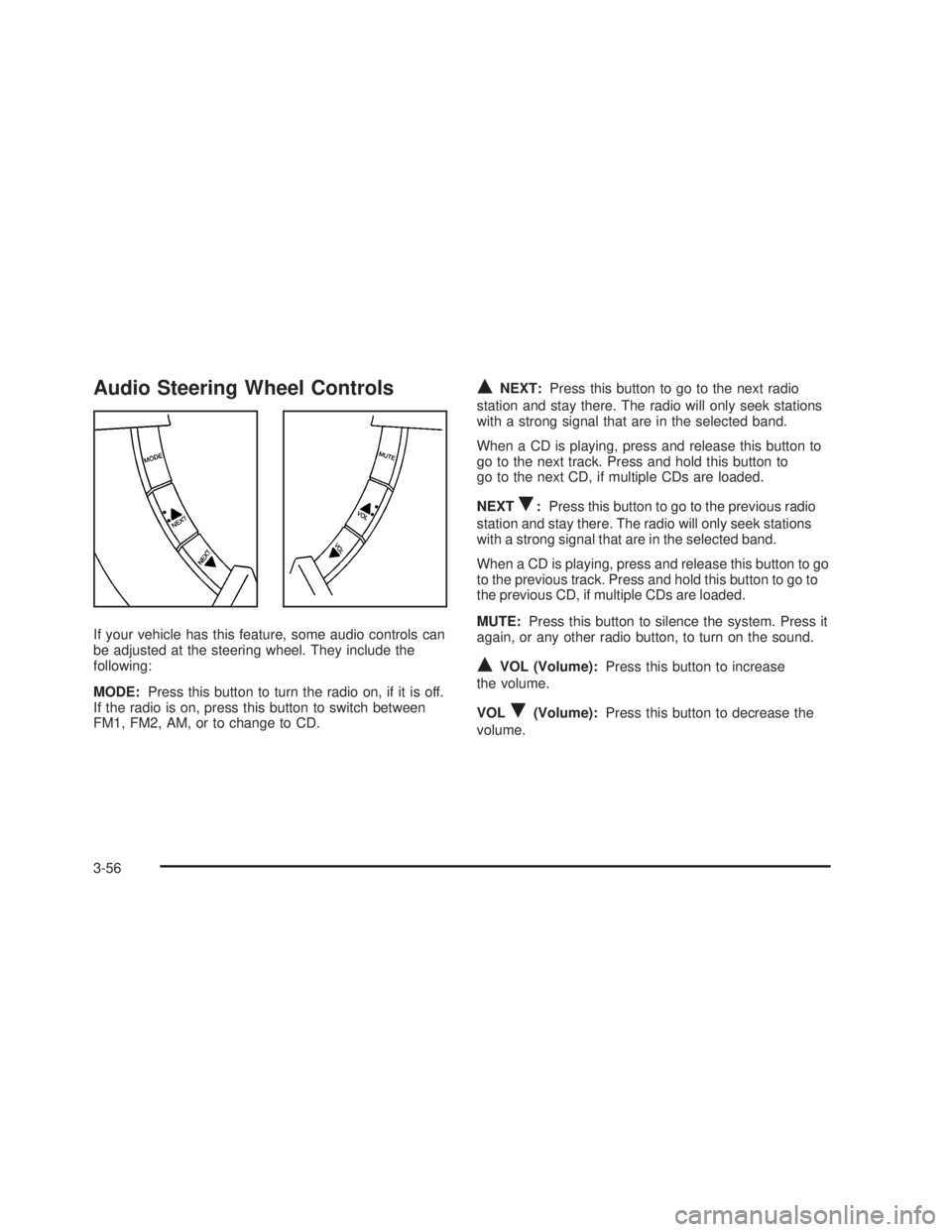
Audio Steering Wheel Controls
If your vehicle has this feature, some audio controls can
be adjusted at the steering wheel. They include the
following:
MODE:Press this button to turn the radio on, if it is off.
If the radio is on, press this button to switch between
FM1, FM2, AM, or to change to CD.
QNEXT:Press this button to go to the next radio
station and stay there. The radio will only seek stations
with a strong signal that are in the selected band.
When a CD is playing, press and release this button to
go to the next track. Press and hold this button to
go to the next CD, if multiple CDs are loaded.
NEXT
R:Press this button to go to the previous radio
station and stay there. The radio will only seek stations
with a strong signal that are in the selected band.
When a CD is playing, press and release this button to go
to the previous track. Press and hold this button to go to
the previous CD, if multiple CDs are loaded.
MUTE:Press this button to silence the system. Press it
again, or any other radio button, to turn on the sound.
QVOL (Volume):Press this button to increase
the volume.
VOL
R(Volume):Press this button to decrease the
volume.
3-56
2006 - Pontiac GTO Owner Manual
Page 155 of 326

Radio Reception
You may experience frequency interference and static
during normal radio reception if items such as cellphone
chargers, vehicle convenience accessories, and
external electronic devices are plugged into the
accessory power outlet. If there is interference or static,
unplug the item from the accessory power outlet.
AM
The range for most AM stations is greater than for FM,
especially at night. The longer range can cause
station frequencies to interfere with each other. For
better radio reception, most AM radio stations will boost
the power levels during the day, and then reduce
these levels during the night. Static can also occur when
things like storms and power lines interfere with radio
reception. When this happens, try reducing the treble on
your radio.
FM Stereo
FM stereo will give the best sound, but FM signals will
reach only about 10 to 40 miles (16 to 65 km). Tall
buildings or hills can interfere with FM signals, causing
the sound to fade in and out.
Care of Your CDs
Handle CDs carefully. Store them in their original cases
or other protective cases and away from direct
sunlight and dust. The CD player scans the bottom
surface of the disc. If the surface of a CD is damaged,
such as cracked, broken, or scratched, the CD will
not play properly or not at all. If the surface of a CD is
soiled, take a soft, lint free cloth or dampen a clean, soft
cloth in a mild, neutral detergent solution mixed with
water, and clean it. Make sure the wiping process starts
from the center to the edge.
Do not touch the bottom side of a CD while handling it;
this could damage the surface. Pick up CDs by
grasping the outer edges or the edge of the hole and
the outer edge.
Care of the CD Player
The use of CD lens cleaners for CD players is not
advised, due to the risk of contaminating the internal
lens of the CD optics with lubricants.
3-57
2006 - Pontiac GTO Owner Manual
Page 156 of 326
Backglass Antenna
The AM-FM antenna is integrated with the rear window
defogger, located in the rear window. Make sure that the
inside surface of the rear window is not scratched and
that the lines on the glass are not damaged. If the inside
surface is damaged, it could interfere with radio
reception. Also, for proper radio reception, the antenna
connector at the top-center of the rear window needs to
be properly attached to the post on the glass.
Notice:Do not apply aftermarket glass tinting with
metallic ®lm. The metallic ®lm in some tinting
materials will interfere with or distort the incoming
radio reception. Any damage caused to your
backglass antenna due to metallic tinting materials
will not be covered by your warranty.
Notice:Using a razor blade or sharp object to clear
the inside rear window may damage the rear
window antenna and/or the rear window defogger.
Repairs would not be covered by your warranty. Do
not clear the inside rear window with sharp
objects.Because this antenna is built into your rear window,
there is a reduced risk of damage caused by car washes
and vandals.
If static is heard on the radio, when the rear window
defogger is turned on, it could mean that a defogger grid
line has been damaged. If this is true, the grid line
must be repaired.
If you choose to add a cellular telephone to your
vehicle, and the antenna needs to be attached to the
glass, make sure that you do not damage the grid lines
for the AM-FM antenna. There is enough space
between the lines to attach a cellular telephone antenna
without interfering with radio reception.
3-58
2006 - Pontiac GTO Owner Manual
Page 229 of 326

Notice:If you leave your radio or other accessories
on during the jump starting procedure, they could
be damaged. The repairs would not be covered
by your warranty. Always turn off your radio and
other accessories when jump starting your vehicle.
3. Turn off the ignition on both vehicles. Unplug
unnecessary accessories plugged into the cigarette
lighter. Turn off the radio and all lamps that are
not needed. This will avoid sparks and help save
both batteries. And it could save the radio!
4. Open the hoods and locate the batteries. Find the
positive (+) and negative (-) terminal locations on
each vehicle. See
Engine Compartment Overview
on page 5-12for more information on location.
{CAUTION:
An electric fan can start up even when the
engine is not running and can injure you. Keep
hands, clothing and tools away from any
underhood electric fan.
{CAUTION:
Using a match near a battery can cause battery
gas to explode. People have been hurt doing
this, and some have been blinded. Use a
¯ashlight if you need more light.
Be sure the battery has enough water. You do
not need to add water to the battery installed
in your new vehicle. But if a battery has ®ller
caps, be sure the right amount of ¯uid is there.
If it is low, add water to take care of that ®rst.
If you don't, explosive gas could be present.
Battery ¯uid contains acid that can burn you.
Do not get it on you. If you accidentally get it
in your eyes or on your skin, ¯ush the place
with water and get medical help immediately.
5-39
2006 - Pontiac GTO Owner Manual
Page 267 of 326
Notice:If you use abrasive cleaners when cleaning
glass surfaces on your vehicle, you could scratch
the glass and/or cause damage to the integrated
radio antenna and the rear window defogger. When
cleaning the glass on your vehicle, use only a
soft cloth and glass cleaner.
Many cleaners contain solvents that may become
concentrated in your vehicle's breathing space. Before
using cleaners, read and adhere to all safety
instructions on the label. While cleaning your vehicle's
interior, maintain adequate ventilation by opening
your vehicle's doors and windows.
Dust may be removed from small buttons and knobs
using a small brush with soft bristles.
Your GM dealer has a product for cleaning your
vehicle's glass. Should it become necessary, you can
also obtain a product from your GM dealer to remove
odors from your vehicle's upholstery.Do not clean your vehicle using the following cleaners
or techniques:
·Never use a knife or any other sharp object to
remove a soil from any interior surface.
·Never use a stiff brush. It can cause damage to
your vehicle's interior surfaces.
·Never apply heavy pressure or rub aggressively
with a cleaning cloth. Use of heavy pressure
can damage your interior and does not improve the
effectiveness of soil removal.
·Use only mild, neutral-pH soaps. Avoid laundry
detergents or dishwashing soaps with degreasers.
Using too much soap will leave a residue that
leaves streaks and attracts dirt. For liquid cleaners,
about 20 drops per gallon (3.78 L) of water is a
good guide.
·Do not heavily saturate your upholstery while
cleaning.
·Damage to your vehicle's interior may result from
the use of many organic solvents such as naptha,
alcohol, etc.
5-77
2006 - Pontiac GTO Owner Manual