park assist Ram 1500 2015 User Guide
[x] Cancel search | Manufacturer: RAM, Model Year: 2015, Model line: 1500, Model: Ram 1500 2015Pages: 871, PDF Size: 24.83 MB
Page 364 of 871

entire surroundings” across the top of the screen. After
five seconds, this note will disappear. To make your
selection, press the “ParkView® Backup Camera Active
Guidelines” button on the touchscreen and make your
selection. Press arrow button on the touchscreen to return
to the previous menu.
•ParkView® Backup Camera Delay
When the vehicle is shifted out of REVERSE (with camera
delay turned OFF), the rear camera mode is exited and
the navigation or audio screen appears again. When the
vehicle is shifted out of REVERSE (with camera delay
turned ON), the rear view image with dynamic grid lines
will be displayed for up to 10 seconds after shifting out of
“REVERSE” unless the forward vehicle speed exceeds
8 mph (12 km/h), the transmission is shifted into PARK
or the ignition is switched to the OFF position. To set the
ParkView® Backup Camera Delay push the SETTINGS
button on the faceplate, then the “Safety & Driving
Assistance” button on the touchscreen. Press the
“Parkview Backup camera Delay” button on the touch-
screen to turn the ParkView® Delay ON or OFF.
•Rain Sensing Auto Wipers
When this feature is selected, the system will automati-
cally activate the windshield wipers if it senses moisture
on the windshield. To make your selection, press the
“Rain Sensing” button on the touchscreen and make your
selection. Press the back arrow/Done button on the
touchscreen to return to the previous menu.
•Hill Start Assist — If Equipped
When this feature is selected, the Hill Start Assist (HSA)
system is active. Refer to “Electronic Brake Control
System” in “Starting And Operating” for system function
and operating information. To make your selection, press
the “Hill Start Assist” button on the touchscreen and
make your selection. Press the back arrow/Done button
on the touchscreen to return to the previous menu.
362 UNDERSTANDING YOUR INSTRUMENT PANEL
Page 371 of 871
•Auto Entry/Exit Suspension
When this feature is selected, the vehicle automatically
lowers from ride height position when vehicle shifted to
park for easy entry/exit. To make your selection, press
the “Auto Entry/Exit” button on the touchscreen, select
“On” or “Off” followed by pressing the back arrow/
Done button on the touchscreen.
•Display Suspension Messages
When “All” is selected, all the Air Suspension Alerts will
be displayed. When “Warning Only” is selected only the
Air Suspension Warnings will be displayed.
•Automatic Aero Mode (1500 Model Only)
When this feature is selected the Ride Height will auto-
matically be adjusted depending on the vehicle speed. To
make your selection, press the “Aero Mode” button on
the touchscreen, select “On” or “Off” followed by press-
ing the back arrow/Done button on the touchscreen.
•Tire Jack Mode
When this feature is selected the air suspension system is
disabled to prevent auto leveling of the suspension, while
the vehicle is on a jack changing a tire. To make your
selection, press the “Tire Jack Mode” button on the
touchscreen, select “On” or “Off” followed by pressing
the back arrow/Done button on the touchscreen.
•Transport Mode
When this feature is selected the air suspension system is
disabled to assist with flat bed towing. To make your
selection, press the “Transport Mode” button on the
touchscreen, select “On” or “Off” followed by pressing
the back arrow/Done button on the touchscreen.
•Wheel Alignment Mode
This feature prevents auto leveling of the air suspension
while performing a wheel alignment service. Before per-
forming a wheel alignment this mode must be enabled.
Refer to your authorized dealer for further information.
4
UNDERSTANDING YOUR INSTRUMENT PANEL 369
Page 382 of 871
•Time Format
This feature will allow you to select the time format
display setting. Press the “Time Format” button on the
touchscreen and select from “12hrs” or “24hrs.” Press the
back arrow button on the touchscreen to return to the
previous menu.
•Show Time In Status Bar — If Equipped
This feature will allow you to turn on or shut off the
digital clock in the status bar. To change the Show Time
Status setting press the “Show Time in Status Bar” button
on the touchscreen to turn the feature on or off. Press the
back arrow button on the touchscreen to return to the
previous menu.
Safety & Driving Assistance
After pressing the “Safety & Driving Assistance” button
on the touchscreen the following settings will be avail-
able.
•ParkSense®
The Rear Park Assist system will scan for objects behind
the vehicle when the transmission shift lever is in RE-
VERSE and the vehicle speed is less than 11 mph
(18 km/h). The system can be enabled with Sound Only
or Sound and Display. To change the Park Assist status,
select the “Sound Only” or the “Sound and Display”
button on the touchscreen. Press the back arrow button
on the touchscreen. Refer to “ParkSense® Rear Park
Assist” in “Understanding The Features Of Your Vehicle”
for system function and operating information.
•Front ParkSense® Chime Volume
The Front ParkSense® Chime Volume settings can be
selected from the EVIC/DID or Uconnect® System — if
equipped. The chime volume settings include LOW,
MEDIUM, and HIGH. The factory default volume setting
is MEDIUM. To change the mode status, press the “Front
ParkSense® Volume” button and select the “Low” “Med”
380 UNDERSTANDING YOUR INSTRUMENT PANEL
Page 446 of 871
▫After Driving Off-Road.................555
!WINCH USAGE — POWER WAGON ONLY —
(IF EQUIPPED)........................556
▫Things To Know Before Using Your Winch . . . .556
▫Understanding The Features Of Your Winch . . .558
▫Winch Accessories....................560
▫Operating Your Winch..................561
▫Rigging Techniques....................573
!POWER STEERING — 1500 MODELS........575
▫POWER STEERING — 2500/3500 MODELS . .576
!FUEL SAVER TECHNOLOGY 5.7L/6.4L ENGINES
ONLY — IF EQUIPPED..................578
!PARKING BRAKE......................578
!BRAKE SYSTEM.......................581
▫Hydraulic Brake Assist — 2500/3500 Models Only
(Except Power Wagon)..................581
!ELECTRONIC BRAKE CONTROL SYSTEM . . . .581
▫Anti-Lock Brake System (ABS)............581
▫Traction Control System (TCS)............583
▫Brake Assist System (BAS)...............583
▫Hill Start Assist (HSA)..................584
▫Electronic Stability Control (ESC)..........587
▫ESC Activation/Malfunction Indicator Light And
ESC OFF Indicator Light................591
▫Trailer Sway Control (TSC)..............592
▫Hill Descent Control (HDC) — If Equipped . . .593
!TIRE SAFETY INFORMATION.............597
▫Tire Markings........................597
444 STARTING AND OPERATING
Page 577 of 871
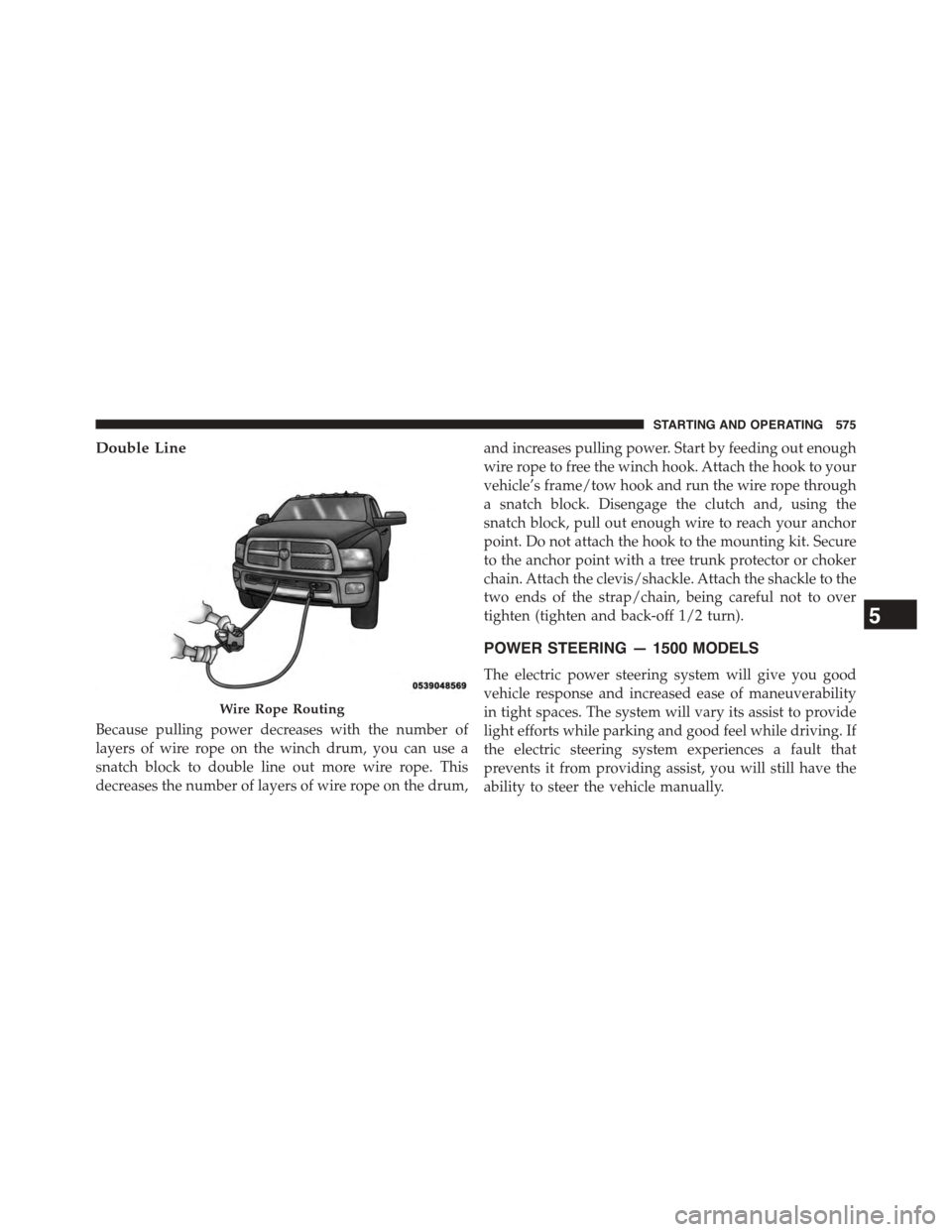
Double Line
Because pulling power decreases with the number of
layers of wire rope on the winch drum, you can use a
snatch block to double line out more wire rope. This
decreases the number of layers of wire rope on the drum,
and increases pulling power. Start by feeding out enough
wire rope to free the winch hook. Attach the hook to your
vehicle’s frame/tow hook and run the wire rope through
a snatch block. Disengage the clutch and, using the
snatch block, pull out enough wire to reach your anchor
point. Do not attach the hook to the mounting kit. Secure
to the anchor point with a tree trunk protector or choker
chain. Attach the clevis/shackle. Attach the shackle to the
two ends of the strap/chain, being careful not to over
tighten (tighten and back-off 1/2 turn).
POWER STEERING — 1500 MODELS
The electric power steering system will give you good
vehicle response and increased ease of maneuverability
in tight spaces. The system will vary its assist to provide
light efforts while parking and good feel while driving. If
the electric steering system experiences a fault that
prevents it from providing assist, you will still have the
ability to steer the vehicle manually.
Wire Rope Routing
5
STARTING AND OPERATING 575
Page 578 of 871
If the Steering icon is flashing, it indicates that the vehicle
needs to be taken to the dealer for service. It is likely the
vehicle has lost power steering assistance.
If the Steering icon is displayed and the “POWER STEER-
ING SYSTEM OVER TEMP” message is displayed on the
EVIC/DID screen, they indicate that extreme steering
maneuvers may have occurred which caused an over
temperature condition in the power steering system.
Once driving conditions are safe, pull over and let the
vehicle idle for a few moments until the icon and
message turn off. Refer to “Electronic Vehicle Information
Center (EVIC) or Driver Information Display (DID)” in
“Understanding Your Instrument Panel” for further in-
formation.
If the Steering icon is displayed and the “SERVICE
POWER STEERING – ASSIST OFF” message is displayed
the EVIC/DID screen, they indicate the vehicle needs to
be taken to the dealer for service. Refer to “Electronic
Vehicle Information Center (EVIC) or Driver Information
Display (DID)” in “Understanding Your Instrument
Panel” for further information.
NOTE:
•Even if the power steering assistance is no longer
operational, it is still possible to steer the vehicle.
Under these conditions there will be a substantial
increase in steering effort, especially at low speeds and
during parking maneuvers.
•If the condition persists, see your authorized dealer for
service.
POWER STEERING — 2500/3500 MODELS
The standard power steering system will give you good
vehicle response and increased ease of maneuverability
in tight spaces. The system will provide mechanical
steering capability if power assist is lost.
576 STARTING AND OPERATING
Page 579 of 871
If for some reason the power assist is interrupted, it will
still be possible to steer your vehicle. Under these condi-
tions, you will observe a substantial increase in steering
effort, especially at very low vehicle speeds and during
parking maneuvers.
NOTE:
•Increased noise levels at the end of the steering wheel
travel are considered normal and do not indicate that
there is a problem with the power steering system.
•Upon initial start-up in cold weather, the power steer-
ing pump may make noise for a short amount of time.
This is due to the cold, thick fluid in the steering
system. This noise should be considered normal, and it
does not in any way damage the steering system.
CAUTION!
Prolonged operation of the steering system at the end
of the steering wheel travel will increase the steering
fluid temperature and it should be avoided when
possible. Damage to the power steering pump may
occur.
Power Steering Fluid Check — 2500/3500 Models
Checking the power steering fluid level at a defined
service interval is not required. The fluid should only be
checked if a leak is suspected, abnormal noises are
apparent, and/or the system is not functioning as antici-
pated. Coordinate inspection efforts through an autho-
rized dealer.
5
STARTING AND OPERATING 577
Page 589 of 871
WARNING!(Continued)
•HSA is not a parking brake. If you stop the vehicle
on a hill without putting the transmission in PARK
or using the parking brake, it will roll down the
incline and could collide with another vehicle,
object or person, and cause serious or fatal injury.
Always remember to use the parking brake while
parking on a hill and that the driver is responsible
for braking the vehicle.
HSA Off
HSA is a Customer Programmable Feature in the EVIC/
DID. If you wish to turn off the HSA feature, refer to
“Electronic Vehicle Information Center (EVIC)/Driver
Information Display (DID)” in “Understanding Your
Instrument Panel” for further information.
Electronic Stability Control (ESC)
The ESC system enhances directional control and stabil-
ity of the vehicle under various driving conditions. ESC
corrects for oversteering or understeering of the vehicle
by applying the brake of the appropriate wheel to assist
in counteracting the oversteer or understeer condition.
Engine power may also be reduced to help the vehicle
maintain the desired path.
ESC uses sensors in the vehicle to determine the vehicle
path intended by the driver and compares it to the actual
path of the vehicle. When the actual path does not match
the intended path, ESC applies the brake of the appro-
priate wheel to assist in counteracting the oversteer or
understeer condition.
•Oversteer - when the vehicle is turning more than
appropriate for the steering wheel position.
•Understeer - when the vehicle is turning less than
appropriate for the steering wheel position.
5
STARTING AND OPERATING 587
Page 640 of 871
CAUTION!(Continued)
•An out-of-tune engine or certain fuel or ignition
malfunctions can cause the catalytic converter to
overheat. If you notice a pungent burning odor or
some light smoke, your engine may be out of tune
or malfunctioning and may require immediate ser-
vice. Contact your authorized dealer for service
assistance.
•The use of fuel additives, which are now being
sold as octane enhancers, is not recommended.
Most of these products contain high concentrations
of methanol. Fuel system damage or vehicle perfor-
mance problems resulting from the use of such
fuels or additives is not the responsibility of the
manufacturer.
NOTE:Intentional tampering with the emissions control
system can result in civil penalties being assessed against
you.
Carbon Monoxide Warnings
WARNING!
Carbon monoxide (CO) in exhaust gases is deadly.
Follow the precautions below to prevent carbon
monoxide poisoning:
•Do not inhale exhaust gases. They contain carbon
monoxide, a colorless and odorless gas, which can
kill. Never run the engine in a closed area, such as
a garage, and never sit in a parked vehicle with the
engine running for an extended period. If the
vehicle is stopped in an open area with the engine
running for more than a short period, adjust the
ventilation system to force fresh, outside air into
the vehicle.
(Continued)
638 STARTING AND OPERATING
Page 808 of 871
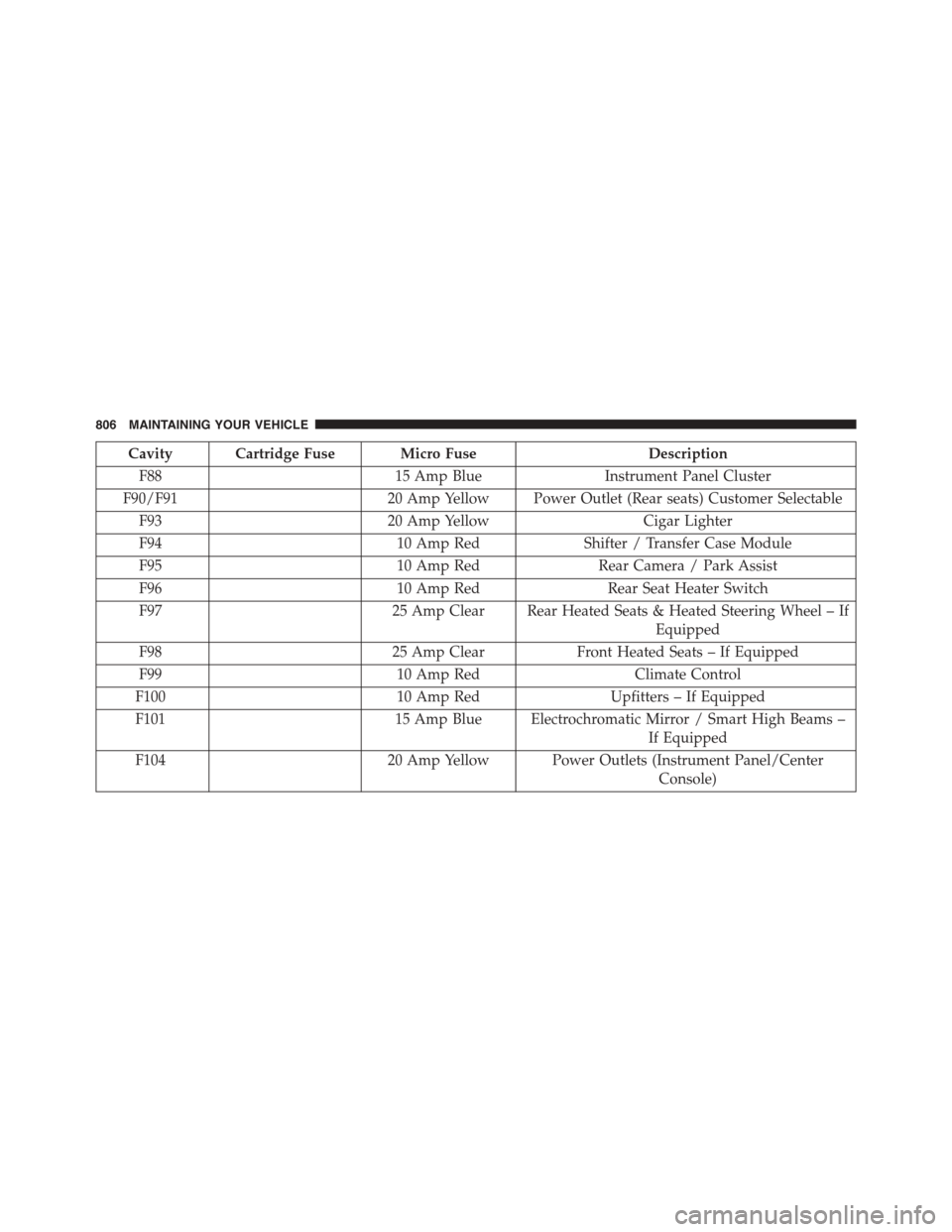
Cavity Cartridge Fuse Micro FuseDescription
F8815 Amp BlueInstrument Panel Cluster
F90/F9120 Amp Yellow Power Outlet (Rear seats) Customer Selectable
F9320 Amp YellowCigar Lighter
F9410 Amp RedShifter / Transfer Case Module
F9510 Amp RedRear Camera / Park Assist
F9610 Amp RedRear Seat Heater Switch
F9725 Amp Clear Rear Heated Seats & Heated Steering Wheel – If
Equipped
F9825 Amp ClearFront Heated Seats – If Equipped
F9910 Amp RedClimate Control
F10010 Amp RedUpfitters – If Equipped
F10115 Amp Blue Electrochromatic Mirror / Smart High Beams –
If Equipped
F10420 Amp Yellow Power Outlets (Instrument Panel/Center
Console)
806 MAINTAINING YOUR VEHICLE