4WD RAM 1500 2021 Owner's Manual
[x] Cancel search | Manufacturer: RAM, Model Year: 2021, Model line: 1500, Model: RAM 1500 2021Pages: 496, PDF Size: 20.89 MB
Page 209 of 496
STARTING AND OPERATING207
NOTE:
If the Surround View Camera is activated manu -
ally, and the vehicle is shifted into REVERSE,
deactivation methods for automatic activation
are assumed.
The camera delay system is turned off manually
through the Uconnect settings menu
Ú page 237.
NOTE:
If snow, ice, mud, or any foreign substance
builds up on the camera lenses, clean the
lenses, rinse with water, and dry with a soft
cloth. Do not cover the lenses.
If a malfunction with the system has
occurred, see an authorized dealer.
Forward Facing Camera With Tire Lines — If
Equipped
The Forward Facing Camera displays a front
view image of the road ahead, along with tire
lines to guide the driver when driving on narrow
roads. Tire lines can be activated/deactivated
through the Uconnect settings. Activation
The Forward Facing Camera can be activated in
the following ways:
Pressing the Forward Facing Camera button
in the Controls screen or Apps menu
Pressing the Backup Camera or Surround
View Camera button (if equipped) on the
touchscreen, followed by the AUX button
located in the upper left corner of the rear
-
view display
Pressing the Forward Facing Camera button
while the vehicle is in REVERSE
Once activated, the camera image will remain
on as long as the vehicle speed is below 8 mph
(13 km/h) and the vehicle is not in 4WD Low.
Deactivation
The Forward Facing Camera is deactivated in
the following conditions:
The vehicle is not in 4WD Low and the vehicle
speed exceeds 8 mph (13 km/h) for 10
seconds.
The “X” button on the display is pressed.
The vehicle is shifted into PARK.
The ignition is placed in the OFF position.
NOTE:
If the vehicle is in 4WD Low, the Forward Facing
Camera image will be displayed until the “X”
button is pressed or the ignition is placed in the
OFF position.
WARNING!
Drivers must be careful when backing up
even when using the Surround View Camera.
Always check carefully behind your vehicle,
and be sure to check for pedestrians,
animals, other vehicles, obstructions, or blind
spots before backing up. You are responsible
for the safety of your surroundings and must
continue to pay attention while backing up.
Failure to do so can result in serious injury or
death.
4
21_DT_OM_EN_USC_t.book Page 207
Page 231 of 496

STARTING AND OPERATING229
OVER THE ROAD OPERATION WITH
S
NOWPLOW ATTACHED
The blade restricts air flow to the radiator and
causes the engine to operate at higher than
normal temperatures. Therefore, when
transporting the plow, angle the blade
completely and position it as low as road or
surface conditions permit. Do not exceed
40 mph (64 km/h). The operator should always
maintain a safe stopping distance and allow
adequate passing clearance.
OPERATING TIPS
Under ideal snow plowing conditions, 20 mph
(32 km/h) should be maximum operating
speed. The operator should be familiar with the
area and surface to be cleaned. Reduce speed
and use extreme caution when plowing
unfamiliar areas or under poor visibility.
GENERAL MAINTENANCE
Snowplows should be maintained in
accordance with the plow manufacturer's
instructions.
Keep all snowplow electrical connections and
battery terminals clean and free of corrosion.
When plowing snow, to avoid transmission and
drivetrain damage, the following precautions
should be observed:
Operate with transfer case in 4WD Low when
plowing small or congested areas where
speeds are not likely to exceed 15 mph
(24 km/h). At higher speeds operate in 4WD
High.
Vehicles with automatic transmissions
should use 4WD Low when plowing deep or
heavy snow for extended periods of time to
avoid transmission overheating.
Do not shift the transmission unless the
engine has returned to idle and wheels have
stopped. Make a practice of stepping on the
brake pedal while shifting the transmission.
4
21_DT_OM_EN_USC_t.book Page 229
Page 233 of 496
STARTING AND OPERATING231
(Continued)
4. Properly secure the rear wheels to the dolly, following the dolly manufacturer's
instructions.
5. Turn the ignition OFF.
6. Install a suitable clamping device, designed for towing, to secure the front wheels in the
straight position.
RECREATIONAL TOWING —
F
OUR-WHEEL DRIVE MODELS
NOTE:
The transfer case must be shifted into N
(Neutral) for recreational towing. The transmis -
sion must be shifted into PARK for recreational
towing. Refer to the following for the proper
transfer case N (Neutral) shifting procedure for
your vehicle.
CAUTION!
Towing with the rear wheels on the ground will
cause severe transmission damage. Damage
from improper towing is not covered under
the New Vehicle Limited Warranty.
CAUTION!
DO NOT dolly tow any 4WD vehicle. Towing
with only one set of wheels on the ground
(front or rear) will cause severe transmis -
sion and/or transfer case damage. Tow
with all four wheels either ON the ground, or
OFF the ground (using a vehicle trailer).
Tow only in the forward direction. Towing
this vehicle backwards can cause severe
damage to the transfer case.
Before recreational towing, the transfer
case must be in N (Neutral). To be certain
the transfer case is fully in N (Neutral),
perform the procedure outlined under
“Shifting Into N (Neutral)”. Internal trans -
mission damage will result, if the transfer
case is not in N (Neutral) during towing.
The transmission must be in PARK for
recreational towing.
Ensure that the Electric Park Brake is
released, and remains released, while
being towed.
Towing this vehicle in violation of the above
requirements can cause severe transmis -
sion and/or transfer case damage.
Damage from improper towing is not
covered under the New Vehicle Limited
Warranty.
Do not disconnect the rear driveshaft
because fluid will leak from the transfer
case, causing damage to internal parts.
Do not use a bumper-mounted clamp-on
tow bar on your vehicle. The bumper face
bar will be damaged.
CAUTION! (Continued)
4
21_DT_OM_EN_USC_t.book Page 231
Page 309 of 496
MULTIMEDIA307
Use of any of the Uconnect Services including
SiriusXM Guardian™ is deemed to be your
consent to the collection, use and disclosure of
this information in accordance with the
Uconnect Privacy Policy. If you do not want this
information to be collected, used, or shared,
you must cancel your Uconnect services in their
entirety by contacting us as referenced in the
Uconnect Privacy Policy.
OFF-ROAD PAGES — IF EQUIPPED
Your vehicle may be equipped with Off-Road
Pages which display vehicle information related
to the drivetrain, transfer case, and coolant/oil
gauges.
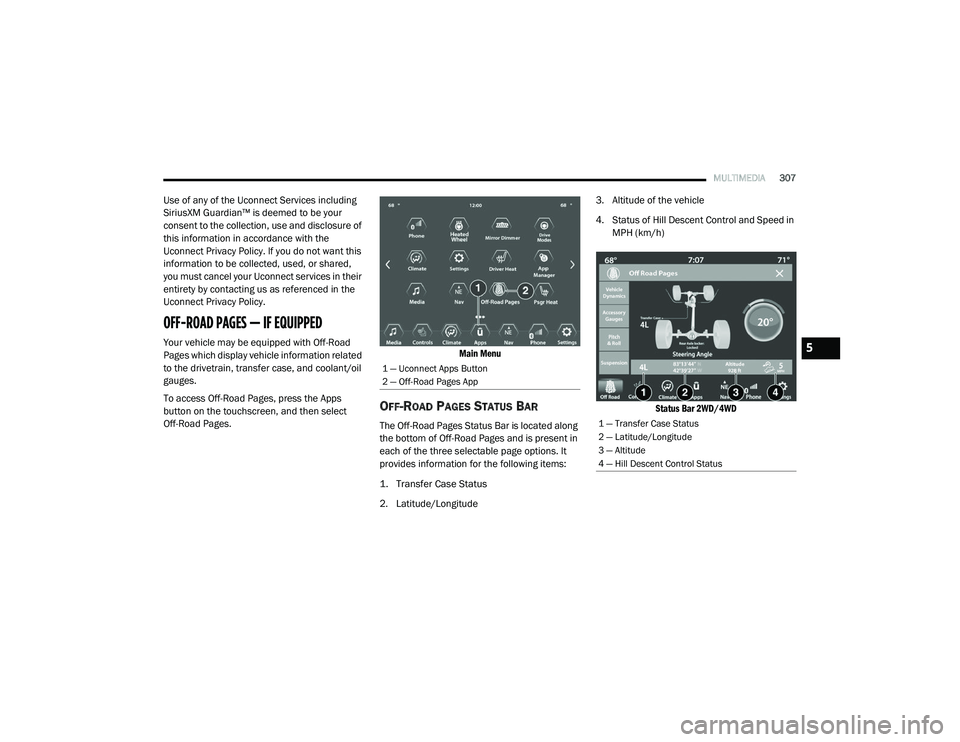
To access Off-Road Pages, press the Apps
button on the touchscreen, and then select
Off-Road Pages.
Main Menu
OFF-ROAD PAGES STATUS BAR
The Off-Road Pages Status Bar is located along
the bottom of Off-Road Pages and is present in
each of the three selectable page options. It
provides information for the following items:
1. Transfer Case Status
2. Latitude/Longitude3. Altitude of the vehicle
4. Status of Hill Descent Control and Speed in
MPH (km/h)
Status Bar 2WD/4WD
1 — Uconnect Apps Button
2 — Off-Road Pages App
1 — Transfer Case Status
2 — Latitude/Longitude
3 — Altitude
4 — Hill Descent Control Status
5
21_DT_OM_EN_USC_t.book Page 307
Page 310 of 496
308MULTIMEDIA
VEHICLE DYNAMICS
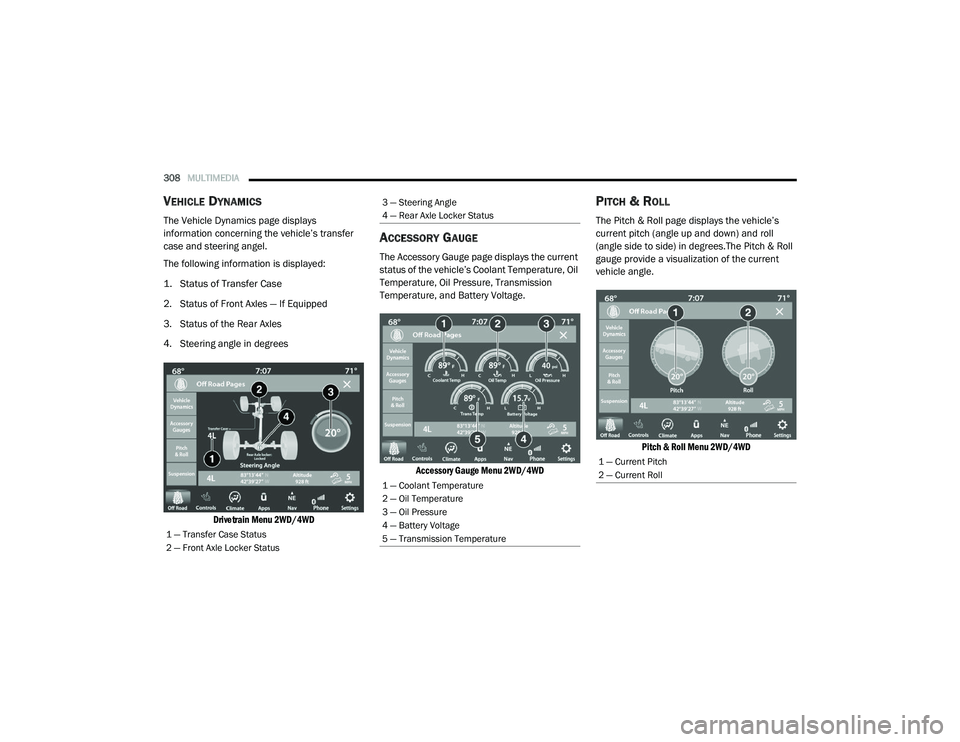
The Vehicle Dynamics page displays
information concerning the vehicle’s transfer
case and steering angel.
The following information is displayed:
1. Status of Transfer Case
2. Status of Front Axles — If Equipped
3. Status of the Rear Axles
4. Steering angle in degrees
Drivetrain Menu 2WD/4WD
ACCESSORY GAUGE
The Accessory Gauge page displays the current
status of the vehicle’s Coolant Temperature, Oil
Temperature, Oil Pressure, Transmission
Temperature, and Battery Voltage.
Accessory Gauge Menu 2WD/4WD
PITCH & ROLL
The Pitch & Roll page displays the vehicle’s
current pitch (angle up and down) and roll
(angle side to side) in degrees.The Pitch & Roll
gauge provide a visualization of the current
vehicle angle.
Pitch & Roll Menu 2WD/4WD
1 — Transfer Case Status
2 — Front Axle Locker Status
3 — Steering Angle
4 — Rear Axle Locker Status
1 — Coolant Temperature
2 — Oil Temperature
3 — Oil Pressure
4 — Battery Voltage
5 — Transmission Temperature
1 — Current Pitch
2 — Current Roll
21_DT_OM_EN_USC_t.book Page 308
Page 311 of 496
MULTIMEDIA309
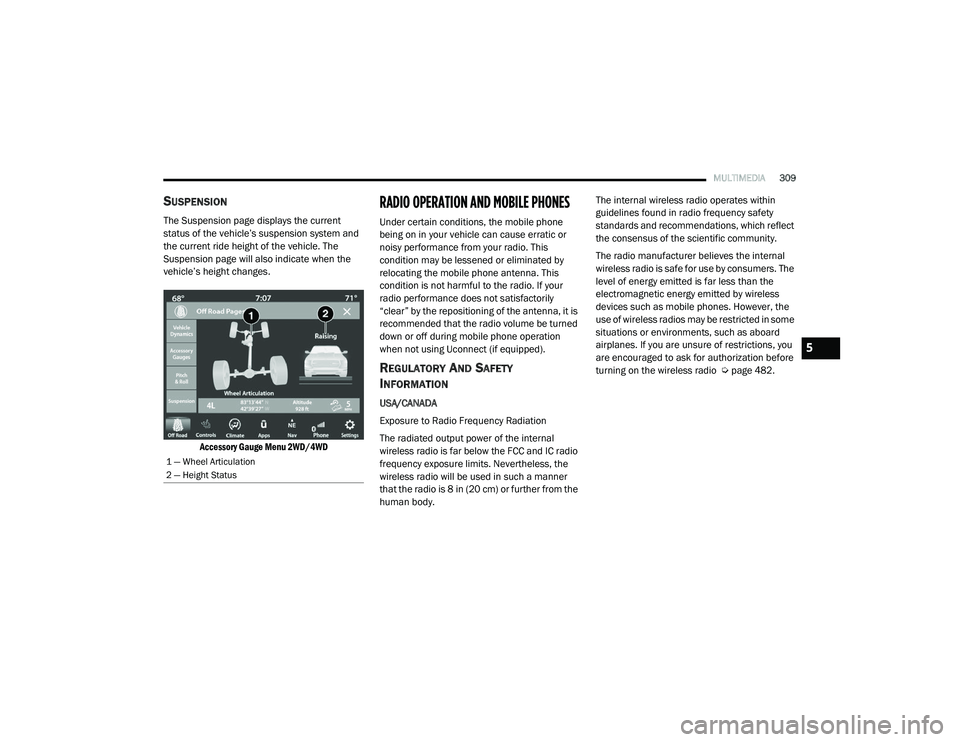
SUSPENSION
The Suspension page displays the current
status of the vehicle’s suspension system and
the current ride height of the vehicle. The
Suspension page will also indicate when the
vehicle’s height changes.
Accessory Gauge Menu 2WD/4WD
RADIO OPERATION AND MOBILE PHONES
Under certain conditions, the mobile phone
being on in your vehicle can cause erratic or
noisy performance from your radio. This
condition may be lessened or eliminated by
relocating the mobile phone antenna. This
condition is not harmful to the radio. If your
radio performance does not satisfactorily
“clear” by the repositioning of the antenna, it is
recommended that the radio volume be turned
down or off during mobile phone operation
when not using Uconnect (if equipped).
REGULATORY AND SAFETY
I
NFORMATION
USA/CANADA
Exposure to Radio Frequency Radiation
The radiated output power of the internal
wireless radio is far below the FCC and IC radio
frequency exposure limits. Nevertheless, the
wireless radio will be used in such a manner
that the radio is 8 in (20 cm) or further from the
human body. The internal wireless radio operates within
guidelines found in radio frequency safety
standards and recommendations, which reflect
the consensus of the scientific community.
The radio manufacturer believes the internal
wireless radio is safe for use by consumers. The
level of energy emitted is far less than the
electromagnetic energy emitted by wireless
devices such as mobile phones. However, the
use of wireless radios may be restricted in some
situations or environments, such as aboard
airplanes. If you are unsure of restrictions, you
are encouraged to ask for authorization before
turning on the wireless radio Ú
page 482.
1 — Wheel Articulation
2 — Height Status
5
21_DT_OM_EN_USC_t.book Page 309
Page 317 of 496

SAFETY315
The ESC Activation/Malfunction Indicator Light
starts to flash as soon as the tires lose traction
and the ESC system becomes active. The ESC
Activation/Malfunction Indicator Light also
flashes when TCS is active. If the ESC
Activation/Malfunction Indicator Light begins to
flash during acceleration, ease up on the
accelerator and apply as little throttle as
possible. Be sure to adapt your speed and
driving to the prevailing road conditions.
The ESC OFF Indicator Light indicates
that the Electronic Stability Control
(ESC) is in a reduced mode.
NOTE:
The ESC Activation/Malfunction Indicator
Light and the ESC OFF Indicator Light come
on momentarily each time the ignition is
placed in the ON/RUN mode.
Each time the ignition is placed in the ON/
RUN mode, the ESC system will be on even if
it was turned off previously.
The ESC system will make buzzing or clicking
sounds when it is active. This is normal; the
sounds will stop when ESC becomes inactive
following the maneuver that caused the ESC
activation.
Hill Descent Control (HDC) — If Equipped
HDC is intended for low speed off-road driving
while in 4WD Low. HDC maintains vehicle speed
while descending hills during various driving
situations. HDC controls vehicle speed by
actively controlling the brakes.
HDC Has Three States:
1. Off (feature is not enabled and will not activate).
2. Enabled (feature is enabled and ready but activation conditions are not met, or driver
is actively overriding with brake or throttle
application).
3. Active (feature is enabled and actively controlling vehicle speed).
Enabling HDC
HDC is enabled by pushing the HDC switch, but
the following conditions must also be met to
enable HDC:
Driveline is in 4WD Low.
Vehicle speed is below 5 mph (8 km/h).
The parking brake is released.
The driver door is closed. Activating HDC
Once HDC is enabled it will activate
automatically if driven down a grade of
sufficient magnitude. The set speed for HDC is
selectable by the driver, and can be adjusted by
using the gear shift +/-. The following
summarizes the HDC set speeds:
HDC Target Set Speeds
P = No set speed. HDC may be enabled but
will not activate.
R = 0.6 mph (1 km/h)
N = 1.2 mph (2 km/h)
D = 0.6 mph (1 km/h)
1st = 0.6 mph (1 km/h)
2nd = 1.2 mph (2 km/h)
3rd = 1.8 mph (3 km/h)
4th = 2.5 mph (4 km/h)
5th = 3.1 mph (5 km/h)
6th = 3.7 mph (6 km/h)
7th = 4.3 mph (7 km/h)
8th = 5.0 mph (8 km/h)
9th = 5.6 mph (9 km/h) – If Equipped
6
21_DT_OM_EN_USC_t.book Page 315
Page 318 of 496
316SAFETY
NOTE:
During HDC the +/- shifter input is used for HDC
target speed selection, but will not affect the
gear chosen by the transmission. When actively
controlling HDC the transmission will shift
appropriately for the driver-selected set speed
and corresponding driving conditions.
Driver Override
The driver may override HDC activation with
throttle or brake application at any time.
Deactivating HDC
HDC will be deactivated but remain available if
any of the following conditions occur:
The driver overrides HDC set speed with
throttle or brake application.
The vehicle speed exceeds 20 mph (32 km/h)
but remains below 40 mph (64 km/h).
The vehicle is on a downhill grade of insuffi -
cient magnitude, is on level ground, or is on
an uphill grade.
The vehicle is shifted to PARK. Disabling HDC
HDC will be deactivated and disabled if any of
the following conditions occur:
The driver pushes the HDC switch.
The driveline is shifted out of the 4WD Low.
The parking brake is applied.
The driver door opens.
The vehicle is driven greater than 20 mph
(32 km/h) for greater than 70 seconds.
The vehicle is driven greater than 40 mph
(64 km/h) (HDC exits immediately).
HDC detects excessive brake temperature.
Feedback To The Driver
The instrument cluster has an HDC icon and the
HDC switch has an LED icon, which offers
feedback to the driver about the state HDC is in.
The cluster icon and switch lamp will illumi -
nate and remain on solid when HDC is
enabled or activated. This is the normal oper -
ating condition for HDC.
The cluster icon and switch lamp will flash for
several seconds, then extinguish when the
driver pushes the HDC switch but enable
conditions are not met.
The cluster icon and switch lamp will flash for
several seconds, then extinguish when HDC
disables due to excess speed.
The cluster icon and switch lamp will flash
when HDC deactivates due to overheated
brakes. The flashing will stop and HDC will
activate again once the brakes have cooled
sufficiently.
WARNING!
HDC is only intended to assist the driver in
controlling vehicle speed when descending
hills. The driver must remain attentive to the
driving conditions and is responsible for
maintaining a safe vehicle speed.
21_DT_OM_EN_USC_t.book Page 316
Page 394 of 496
392IN CASE OF EMERGENCY
TOWING A DISABLED VEHICLE
This section describes procedures for towing a
disabled vehicle using a commercial towing
service.
If the transmission and drivetrain are operable,
disabled vehicles may also be towed as
described on Úpage 230. NOTE:
Vehicles equipped with the Active-Level Four
Corner Air Suspension System must be placed
in Transport mode, before tying them down
(from the body) on a trailer or flatbed truck
Ú
page 165. If the vehicle cannot be placed in
Transport mode (for example, engine will not
run), tie-downs must be fastened to the axles
(not to the body). Failure to follow these instruc -
tions may cause fault codes to be set and/or
cause loss of proper tie-down tension.When “rocking” a stuck vehicle by shifting
between DRIVE and REVERSE, do not spin
the wheels faster than 15 mph (24 km/h), or drivetrain damage may result.
Revving the engine or spinning the wheels
too fast may lead to transmission over -
heating and failure. It can also damage the
tires. Do not spin the wheels above 30 mph
(48 km/h) while in gear (no transmission
shifting occurring).
CAUTION! (Continued)
Towing Condition Wheels OFF The
Ground 2WD Models
4WD Models
Flat Tow NONE If transmission is operable:
• Transmission in NEUTRAL
• 30 mph (48 km/h) max speed
• 30 miles (48 km) max distance Detailed instruction on
Ú page 230
• Automatic Transmission in PARK
• Transfer Case in NEUTRAL (N)
• Tow in forward direction
Wheel Lift Or Dolly Tow Front
NOT ALLOWED
Rear OK NOT ALLOWED
Flatbed ALL BEST METHOD BEST METHOD
21_DT_OM_EN_USC_t.book Page 392
Page 461 of 496
SERVICING AND MAINTENANCE459
(Continued)
(Continued)
4x4 (4WD)
Trim Level Axle
Tire/Wheel Size Snow Traction Device
(maximum projection beyond tire profile or equivalent)
Tradesman
Bighorn Lonestar Laramie Rear
275/65R18
275/55/R20 S Class
Longhorn Sport
Limited Rear
275/55R20 S Class
REBEL Not Chainable
WARNING!
Using tires of different size and type (M+S,
Snow) between front and rear axles can
cause unpredictable handling. You could lose
control and have a collision.
CAUTION!
To avoid damage to your vehicle or tires,
observe the following precautions:
Because of restricted traction device clear-
ance between tires and other suspension
components, it is important that only trac-
tion devices in good condition are used.
Broken devices can cause serious damage.
Stop the vehicle immediately if noise
occurs that could indicate device breakage.
Remove the damaged parts of the device
before further use.
Install device as tightly as possible and
then retighten after driving about ½ mile
(0.8 km). Autosock traction devices do not
require retightening.
Do not exceed 30 mph (48 km/h).
Drive cautiously and avoid severe turns and
large bumps, especially with a loaded
vehicle.
Do not drive for a prolonged period on dry
pavement.
CAUTION! (Continued)
8
21_DT_OM_EN_USC_t.book Page 459