wheel size RAM 1500 2021 Owners Manual
[x] Cancel search | Manufacturer: RAM, Model Year: 2021, Model line: 1500, Model: RAM 1500 2021Pages: 496, PDF Size: 20.89 MB
Page 8 of 496
6
VEHICLE LOADING ............................................. 213 Gross Vehicle Weight Rating (GVWR) ......213Payload .......................................................213Gross Axle Weight Rating (GAWR) ............213
Tire Size ......................................................213
Rim Size......................................................214
Inflation Pressure ......................................214
Curb Weight................................................214
Loading .......................................................214
TRAILER TOWING .............................................. 214
Common Towing Definitions .....................214Trailer Hitch Type and Maximum Trailer
Weight.........................................................218 Trailer Towing Weights (Maximum Trailer
Weight Ratings) ..........................................218 Trailer And Tongue Weight ........................ 219Trailer Reverse Steering Control ...............219
Towing Requirements ...............................221
Towing Tips ................................................227
SNOWPLOW ...................................................... 227
Before Plowing ........................................... 228
Snowplow Prep Package Model
Availability .................................................. 228 Over The Road Operation With Snowplow
Attached .....................................................229 Operating Tips ............................................229
General Maintenance ................................229 RECREATIONAL TOWING (BEHIND
MOTORHOME) ...................................................230
Towing This Vehicle Behind Another
Vehicle ........................................................ 230 Recreational Towing — Two-Wheel Drive
Models ........................................................ 230 Recreational Towing — Four-Wheel Drive
Models ........................................................ 231
DRIVING TIPS ...................................................... 234
Driving On Slippery Surfaces ................... 234
Driving Through Water .............................. 234
Off-Road Driving Tips ................................. 235
MULTIMEDIA
UCONNECT SYSTEMS .......................................236
CYBERSECURITY ............................................... 236
UCONNECT SETTINGS ........................................ 237Customer Programmable Features .......... 237
HEAD-UP DISPLAY (HUD) .................................. 254
UCONNECT INTRODUCTION ..............................256
System Overview ....................................... 256Safety And General Information ............... 258
UCONNECT MODES ............................................259
Steering Wheel Audio Controls ................ 259
Radio Mode ............................................... 259Media Mode .............................................. 268
Phone Mode .............................................. 271 CONNECTED VEHICLE SERVICES —
IF EQUIPPED ...................................................... 282
Is My Vehicle Connected? ......................... 282
Introduction To Connected Vehicle
Services ..................................................... 282 Getting Started With Connected Vehicle
Services ..................................................... 284 Using SiriusXM Guardian™ ...................... 286
Manage My SiriusXM Guardian™
Account ...................................................... 301
CONNECTED SERVICES FAQs ......................... 301
Connected Services SOS FAQs ................ 301
Connected Services Remote Door Lock/
Unlock FAQs .............................................. 302 Connected Services Roadside
Assistance FAQs ....................................... 302 Connected Services Send & Go FAQs ..... 302Connected Services Vehicle Finder
FAQs .......................................................... 303 Connected Services Stolen Vehicle
Assistance FAQs ....................................... 303 Connected Services Remote Vehicle
Start FAQs ................................................. 303 Connected Services Remote Horn &
Lights FAQs ................................................ 304 Connected Services Account FAQs........... 304
Data Collection & Privacy .......................... 306
21_DT_OM_EN_USC_t.book Page 6
Page 134 of 496
132GETTING TO KNOW YOUR INSTRUMENT PANEL
Your vehicle has also been equipped with a
TPMS malfunction indicator to indicate when
the system is not operating properly. The TPMS
malfunction indicator is combined with the low
tire pressure telltale. When the system detects
a malfunction, the telltale will flash for
approximately one minute and then remain
continuously illuminated. This sequence will
continue upon subsequent vehicle start-ups as
long as the malfunction exists. When the
malfunction indicator is illuminated, the system
may not be able to detect or signal low tire
pressure as intended. TPMS malfunctions may
occur for a variety of reasons, including the
installation of replacement or alternate tires or
wheels on the vehicle that prevent the TPMS
from functioning properly. Always check the
TPMS malfunction telltale after replacing one or
more tires or wheels on your vehicle to ensure
that the replacement or alternate tires and
wheels allow the TPMS to continue to function
properly.
Anti-Lock Brake System (ABS) Warning
Light
This warning light monitors the ABS.
The light will turn on when the ignition
is placed in the ON/RUN or ACC/ON/
RUN position and may stay on for as
long as four seconds.If the ABS light remains on or turns on while
driving, then the Anti-Lock portion of the brake
system is not functioning and service is
required as soon as possible. However, the
conventional brake system will continue to
operate normally, assuming the Brake Warning
Light is not also on.
If the ABS light does not turn on when the
ignition is placed in the ON/RUN or ACC/ON/
RUN position, have the brake system inspected
by an authorized dealer.
Rear Axle Locker Fault Indicator Light — If
Equipped
This warning light will illuminate to
indicate when a rear axle locker fault
has been detected.
Service Forward Collision Warning (FCW)
Light — If Equipped
This warning light will illuminate to
indicate a fault in the FCW System.
Contact an authorized dealer for
service Ú
page 324.
CAUTION!
The TPMS has been optimized for the original
equipment tires and wheels. TPMS pressures
and warning have been established for the
tire size equipped on your vehicle.
Undesirable system operation or sensor
damage may result when using replacement
equipment that is not of the same size, type,
and/or style. Aftermarket wheels can cause
sensor damage. Using aftermarket tire
sealants may cause the Tire Pressure
Monitoring System (TPMS) sensor to become
inoperable. After using an aftermarket tire
sealant it is recommended that you take your
vehicle to an authorized dealer to have your
sensor function checked.
21_DT_OM_EN_USC_t.book Page 132
Page 164 of 496

162STARTING AND OPERATING
NOTE:
The 4WD High and 4WD Low positions are
designed for loose, slippery road surfaces
only. Driving in the 4WD High and 4WD Low
positions on dry, hard surfaced roads may
cause increased tire wear and damage to the
driveline components.
The transfer case N (Neutral) button is located
in the center of the 4WD Control Switch and is
pushed by using a ballpoint pen or similar
object. The transfer case N (Neutral) position
is to be used for recreational towing only
Úpage 231.
Transfer Case Position Indicator Lights
The Transfer Case Position Indicator Lights
(4WD High and 4WD Low) are located in the
instrument cluster and indicate the current and
desired transfer case selection. When you
select a different transfer case position, the
indicator lights will do the following:
1. The current position indicator light will turn off.
2. The selected position indicator light will flash until the transfer case completes the
shift. 3. When the shift is complete, the indicator
light for the selected position will stop
flashing and remain on.
If the transfer case does not shift into the
desired position, one or more of the following
events may occur:
1. The indicator light for the current position will remain on.
2. The newly selected position indicator light will continue to flash.
3. If the transfer case will not shift, a message
will appear on the cluster stating the 4WD
shift has canceled.
NOTE:
Before retrying a selection, make certain that all
the necessary requirements for selecting a new
transfer case position have been met. To retry
the selection, push the current position, wait
five seconds, and retry selection.
The “SVC 4WD Warning Light” monitors the
electronic shift four-wheel drive system. If this
light remains on after engine start up or
illuminates during driving, it means that the
four-wheel drive system is not functioning
properly and that service is required. NOTE:
Do not attempt to make a shift while only the
front or rear wheels are spinning. This could
cause damage to driveline components.
When operating your vehicle in 4WD Low, the
engine speed is approximately three times that
of the 2WD or 4WD High positions at a given
road speed. Take care not to overspeed the
engine and do not exceed 25 mph (40 km/h).
Proper operation of four-wheel drive vehicles
depends on tires of equal size, type and
circumference on each wheel. Any difference in
tire size can cause damage to the drivetrain.
Because four-wheel drive provides improved
traction, there is a tendency to exceed safe
turning and stopping speeds. Do not go faster
than road conditions permit.
WARNING!
Always engage the parking brake when
powering down the vehicle if the “SVC 4WD
Warning Light” is illuminated. Not engaging
the parking brake may allow the vehicle to roll
which may cause personal injury or death.
21_DT_OM_EN_USC_t.book Page 162
Page 167 of 496
STARTING AND OPERATING165
NOTE:
Do not attempt to make a shift while only the
front or rear wheels are spinning. This could
cause damage to driveline components.
When operating your vehicle in 4WD Low, the
engine speed is approximately three times that
of the 2WD, 4WD Auto or 4WD High positions
at a given road speed. Take care not to
overspeed the engine and do not exceed
25 mph (40 km/h).
Proper operation of four-wheel drive vehicles
depends on tires of equal size, type and
circumference on each wheel. Any difference in
tire size can cause damage to the drivetrain.
Because four-wheel drive provides improved
traction, there is a tendency to exceed safe
turning and stopping speeds. Do not go faster
than road conditions permit.
Shifting Procedure
If any of the requirements to select a new
transfer case position have not been met,
then the transfer case will not shift. The posi -
tion indicator light for the previous position
will remain on and the newly selected posi -
tion indicator light will continue to flash until
all the requirements for the selected position
have been met.
If all the requirements to select a new
transfer case position have been met, then
the current position indicator light will turn off
and the selected position indicator light will
flash until the transfer case completes the
shift. When the shift is complete, the position
indicator light for the selected position will
stop flashing and remain on.
ACTIVE-LEVEL FOUR CORNER AIR
SUSPENSION SYSTEM — IF EQUIPPED
DESCRIPTION
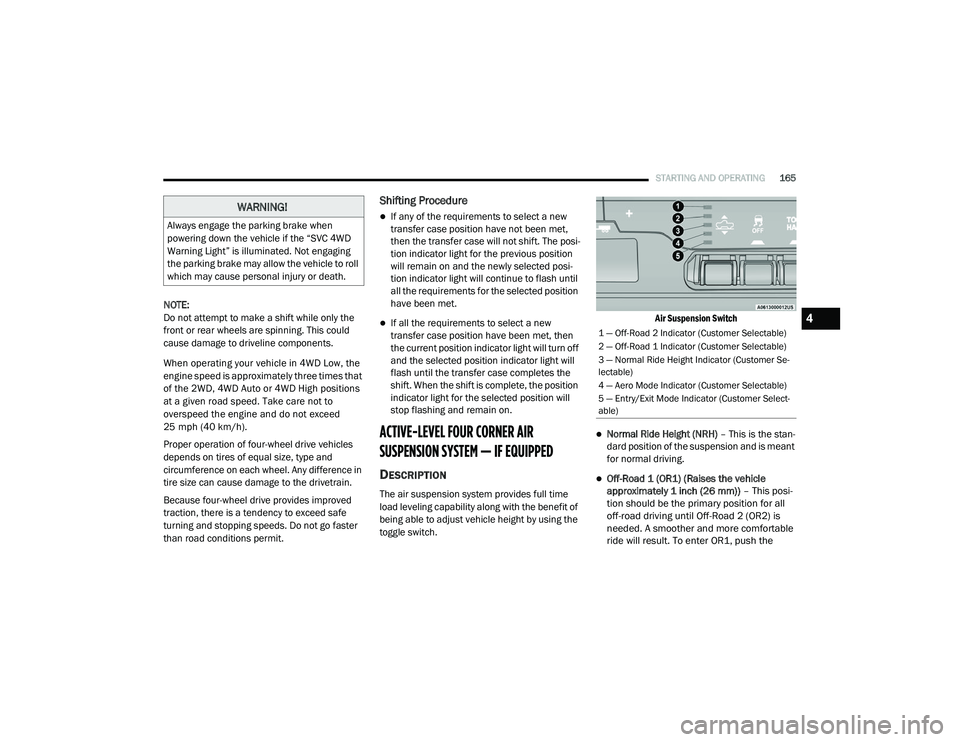
The air suspension system provides full time
load leveling capability along with the benefit of
being able to adjust vehicle height by using the
toggle switch.
Air Suspension Switch
Normal Ride Height (NRH)
– This is the stan-
dard position of the suspension and is meant
for normal driving.
Off-Road 1 (OR1) (Raises the vehicle
approximately 1 inch (26 mm)) – This posi-
tion should be the primary position for all
off-road driving until Off-Road 2 (OR2) is
needed. A smoother and more comfortable
ride will result. To enter OR1, push the
WARNING!
Always engage the parking brake when
powering down the vehicle if the “SVC 4WD
Warning Light” is illuminated. Not engaging
the parking brake may allow the vehicle to roll
which may cause personal injury or death.
1 — Off-Road 2 Indicator (Customer Selectable)
2 — Off-Road 1 Indicator (Customer Selectable)
3 — Normal Ride Height Indicator (Customer Se -
lectable)
4 — Aero Mode Indicator (Customer Selectable)
5 — Entry/Exit Mode Indicator (Customer Select -
able)
4
21_DT_OM_EN_USC_t.book Page 165
Page 197 of 496

STARTING AND OPERATING195
PARKSENSE ACTIVE PARK ASSIST SYSTEM
— IF EQUIPPED
The ParkSense Active Park Assist system is
intended to assist the driver during parallel and
perpendicular parking maneuvers by identifying
a proper parking space, providing audible/
visual instructions, and controlling the steering
wheel. The ParkSense Active Park Assist system
is defined as “semi-automatic” since the driver
maintains control of the accelerator, gear
selector and brakes. Depending on the driver's parking maneuver selection, the ParkSense
Active Park Assist system is capable of
maneuvering a vehicle into a parallel or a
perpendicular parking space on either side (i.e.,
driver side or passenger side).
NOTE:
The driver is always responsible for
controlling the vehicle, responsible for any
surrounding objects, and must intervene as
required.
The system is provided to assist the driver
and not to substitute the driver.
During a semi-automatic maneuver, if the
driver touches the steering wheel after being
instructed to remove their hands from the
steering wheel, the system will cancel, and
the driver will be required to manually
complete the parking maneuver.
The system may not work in all conditions
(e.g. environmental conditions such as heavy
rain, snow, etc., or if searching for a parking
space that has surfaces that will absorb the
ultrasonic sensor waves).
WARNING!
Drivers must be careful when backing up
even when using ParkSense. Always check
carefully behind your vehicle, look behind
you, and be sure to check for pedestrians,
animals, other vehicles, obstructions, and
blind spots before backing up. You are
responsible for safety and must continue to
pay attention to your surroundings. Failure
to do so can result in serious injury or
death.
Before using ParkSense, it is strongly
recommended that the ball mount and
hitch ball assembly is disconnected from
the vehicle when the vehicle is not used for
towing. Failure to do so can result in injury
or damage to vehicles or obstacles
because the hitch ball will be much closer
to the obstacle than the rear fascia when
the loudspeaker sounds the continuous
tone. Also, the sensors could detect the ball
mount and hitch ball assembly, depending
on its size and shape, and give a false indi
-
cation that an obstacle is behind the
vehicle, and could cause false braking.
CAUTION!
ParkSense is only a parking aid and it is
unable to recognize every obstacle,
including small obstacles. Parking curbs
might be temporarily detected or not
detected at all. Obstacles located above or
below the sensors will not be detected
when they are in close proximity.
The vehicle must be driven slowly when
using ParkSense in order to be able to stop
in time when an obstacle is detected. It is
recommended that the driver looks over
his/her shoulder when using ParkSense.4
21_DT_OM_EN_USC_t.book Page 195
Page 215 of 496

STARTING AND OPERATING213
3. Stop filling the DEF tank immediately when
any of the following happen: DEF stops
flowing from the fill bottle into the DEF tank,
DEF splashes out the filler neck, or a DEF
pump nozzle automatically shuts off.
4. Reinstall cap onto DEF tank.
Filling The Def Tank In Cold Climates
Your vehicle is equipped with an automatic DEF
heating system. This allows the DEF injection
system to operate properly at temperatures below 12°F (-11°C). If your vehicle is not in
operation for an extended period of time with
temperatures below 12°F (-11°C), the DEF in
the tank may freeze. Do not overfill the DEF
tank. If the tank is overfilled and freezes, it
could be damaged.
Extra care should be taken when filling with
portable containers to avoid overfilling. Keep an
eye on the DEF gauge in your instrument
cluster. You may safely add a maximum of
2 gallons (7.6 Liters) when your DEF gauge is
reading at the half mark.
VEHICLE LOADING
GROSS VEHICLE WEIGHT RATING
(GVWR)
The GVWR is the total permissible weight of your
vehicle including driver, passengers, vehicle,
options and cargo. The label also specifies
maximum capacities of front and rear Gross
Axle Weight Rating (GAWR). Total load must be
limited so GVWR and front and rear GAWR are
not exceeded.
PAYLOAD
The payload of a vehicle is defined as the
allowable load weight a truck can carry,
including the weight of the driver, all
passengers, options and cargo.
GROSS AXLE WEIGHT RATING (GAWR)
The GAWR is the maximum permissible load on
the front and rear axles. The load must be
distributed in the cargo area so that the GAWR
of each axle is not exceeded.
Each axle GAWR is determined by the
components in the system with the lowest load
carrying capacity (axle, springs, tires or wheels).
Heavier axles or suspension components
sometimes specified by purchasers for
increased durability does not necessarily
increase the vehicle's GVWR.
TIRE SIZE
The tire size on the Vehicle Certification Label
represents the actual tire size on your vehicle.
Replacement tires must be equal to the load
capacity of this tire size.
Never add anything other than DEF to the
tank – especially any form of hydrocarbon
such as diesel fuel, fuel system additives,
gasoline, or any other petroleum-based
product. Even a very small amount of these,
less than 100 parts per million or less than
1 oz. per 78 gallons (295 liters) will contam -
inate the entire DEF system and will require
replacement. If owners use a container,
funnel or nozzle when refilling the tank, it
should either be new or one that is has only
been used for adding DEF. Mopar provides
an attachable nozzle with its DEF for this
purpose.
CAUTION! (Continued)
4
21_DT_OM_EN_USC_t.book Page 213
Page 217 of 496

STARTING AND OPERATING215
Gross Trailer Weight (GTW)
The GTW is the weight of the trailer plus the
weight of all cargo, consumables and
equipment (permanent or temporary) loaded in
or on the trailer in its “loaded and ready for
operation” condition.
The recommended way to measure GTW is to
put your fully loaded trailer on a vehicle scale.
The entire weight of the trailer must be
supported by the scale.
Gross Combination Weight Rating (GCWR)
The GCWR is the total allowable weight of your
vehicle and trailer when weighed in
combination.
Gross Axle Weight Rating (GAWR)
The GAWR is the maximum capacity of the front
and rear axles. Distribute the load over the front and rear axles evenly. Make sure that you do
not exceed either front or rear GAWR
Ú
page 213.
Tongue Weight (TW)
The TW is the downward force exerted on the
hitch ball by the trailer. You must consider this
as part of the load on your vehicle.
Trailer Frontal Area
The frontal area is the maximum height
multiplied by the maximum width of the front of
a trailer.
Trailer Sway Control (TSC)
The TSC can be a mechanical telescoping link
that can be installed between the hitch receiver
and the trailer tongue that typically provides
adjustable friction associated with the
telescoping motion to dampen any unwanted
trailer swaying motions while traveling. If equipped, the electronic TSC recognizes a
swaying trailer and automatically applies
individual wheel brakes and/or reduces engine
power to attempt to eliminate the trailer sway.
Weight-Carrying Hitch
A weight-carrying hitch supports the trailer
tongue weight, just as if it were luggage located
at a hitch ball or some other connecting point of
the vehicle. These kinds of hitches are
commonly used to tow small and medium sized
trailers.
Weight-Distributing Hitch
A weight-distributing system works by applying
leverage through spring (load) bars. They are
typically used for heavier loads to distribute
trailer tongue weight to the tow vehicle's front
axle and the trailer axle(s). When used in
accordance with the manufacturer's directions,
it provides for a more level ride, offering more
consistent steering and brake control, thereby
enhancing towing safety. The addition of a
friction/hydraulic sway control also dampens
sway caused by traffic and crosswinds and
contributes positively to tow vehicle and trailer
stability. Trailer sway control and a weight
distributing (load equalizing) hitch are
WARNING!
If the gross trailer weight is 5,000 lbs (2,267 kg)
or more, it is recommended to use a weight-dis
-
tributing hitch to ensure stable handling of your
vehicle. If you use a standard weight-carrying
hitch, you could lose control of your vehicle and
cause a collision.
WARNING!
It is important that you do not exceed the
maximum front or rear GAWR. A dangerous
driving condition can result if either rating is
exceeded. You could lose control of the vehi -
cle and have a collision.
4
21_DT_OM_EN_USC_t.book Page 215
Page 224 of 496

222STARTING AND OPERATING
Towing Requirements — Tires
Do not attempt to tow a trailer while using a
compact spare tire.
Do not drive more than 50 mph (80 km/h)
when towing while using a full size spare tire.
Proper tire inflation pressures are essential
to the safe and satisfactory operation of your
vehicle.
Check the trailer tires for proper tire inflation
pressures before trailer usage.
Check for signs of tire wear or visible tire
damage before towing a trailer.
Replacing tires with a higher load carrying
capacity will not increase the vehicle's GVWR
and GAWR limits.
For further information Ú page 443.
Towing Requirements — Trailer Brakes
Do not interconnect the hydraulic brake
system or vacuum system of your vehicle
with that of the trailer.
An electronically actuated trailer brake
controller is required when towing a trailer
with electronically actuated brakes. When
towing a trailer equipped with a hydraulic
surge actuated brake system, an electronic
brake controller is not required.
Trailer brakes are recommended for trailers
over 1,000 lbs (453 kg) and required for
trailers in excess of 2,000 lbs (907 kg).
Vehicles with trailers should not be parked
on a grade. When parking, apply the
parking brake on the tow vehicle. Put the
tow vehicle transmission in PARK. For
four-wheel drive vehicles, make sure the
transfer case is not in NEUTRAL. Always,
block or "chock" the trailer wheels.
GCWR must not be exceeded.
Total weight must be distributed between
the tow vehicle and the trailer such that the
following four ratings are not exceeded :
GVWR
GTW
GAWR
Tongue weight rating for the trailer
hitch utilized.
WARNING! (Continued)WARNING!
Do not connect trailer brakes to your
vehicle's hydraulic brake lines. It can over -
load your brake system and cause it to fail.
You might not have brakes when you need
them and could have an accident.
Towing any trailer will increase your stop -
ping distance. When towing, you should
allow for additional space between your
vehicle and the vehicle in front of you.
Failure to do so could result in an accident.
CAUTION!
If the trailer weighs more than 1,000 lbs
(453 kg) loaded, it should have its own
brakes and they should be of adequate
capacity. Failure to do this could lead to
accelerated brake lining wear, higher brake
pedal effort, and longer stopping distances.
21_DT_OM_EN_USC_t.book Page 222
Page 315 of 496
SAFETY313
(Continued)
ESC Operating Modes
Depending upon model and mode of operation,
the ESC system may have multiple operating
modes. ESC On
This is the normal operating mode for the ESC.
Whenever the vehicle is started, the ESC system
will be in this mode. This mode should be used
for most driving conditions. Alternate ESC
modes should only be used for specific reasons
as noted in the following paragraphs.
Partial Off
This mode may be useful if the vehicle becomes
stuck. This mode may modify TCS and ESC
thresholds for activation, which allows for more
wheel spin than normally allowed.
To enter the “Partial Off” mode, momentarily
push the ESC OFF switch and the ESC OFF
Indicator Light will illuminate. To turn the ESC
on again, momentarily push the ESC OFF switch
and the ESC OFF Indicator Light will turn off.
NOTE:
For vehicles with multiple partial ESC modes,
the push and release of the button will toggle
the ESC modes. Multiple attempts may be
required to return to “ESC On”.
WARNING!
Electronic Stability Control (ESC) cannot
prevent the natural laws of physics from
acting on the vehicle, nor can it increase
the traction afforded by prevailing road
conditions. ESC cannot prevent accidents,
including those resulting from excessive
speed in turns, driving on very slippery
surfaces, or hydroplaning. ESC also cannot
prevent accidents resulting from loss of
vehicle control due to inappropriate driver
input for the conditions. Only a safe, atten
-
tive, and skillful driver can prevent acci -
dents. The capabilities of an ESC equipped
vehicle must never be exploited in a reck -
less or dangerous manner which could
jeopardize the user’s safety or the safety of
others.Vehicle modifications, or failure to properly
maintain your vehicle, may change the
handling characteristics of your vehicle,
and may negatively affect the performance
of the ESC system. Changes to the steering
system, suspension, braking system, tire
type and size or wheel size may adversely
affect ESC performance. Improperly
inflated and unevenly worn tires may also
degrade ESC performance. Any vehicle
modification or poor vehicle maintenance
that reduces the effectiveness of the ESC
system can increase the risk of loss of
vehicle control, vehicle rollover, personal
injury and death.
WARNING! (Continued)
6
21_DT_OM_EN_USC_t.book Page 313
Page 325 of 496

SAFETY323
a trailer will be detected using the blind spot
radar within 90 seconds of forward move -
ment of the vehicle. The vehicle must be
moving above 6 mph (10 km/h) to activate the feature. Once the trailer has been
detected, the system will default to the
maximum blind spot zone until the length has
been verified. You will see “Auto” in the
instrument panel cluster .
Maximum Mode — When “Max Mode” is
selected, the system will default to the
maximum blind spot zone regardless of what
size trailer is attached .
NOTE:
Selected setting is stored when the ignition is
placed in the OFF position. To change this
setting, it must be selected through the
Uconnect settings Ú page 237.
Trailer Length Detection
Once the trailer presence has been established,
the trailer length will be established (by making
a 90 degree turn) and then the trailer length
category (example 10-20 ft (3 m to 6 m)) will be
displayed. This can take up to 30 seconds after
completing the turn. NOTE:
During the same ignition cycle, if the vehicle is
at a standstill for a minimum of 90 seconds, a
new “trailer detection request” is enabled by
the system once the vehicle resumes motion.
Maximum length supported by the Trailer Merge
Assist feature is 39.5 ft (12 m). Trailer length is
considered the forward most portion of the
trailer hitch to the rearward most portion of the
body, fascia/bumper, or ramp of the trailer.
Maximum width supported by the Trailer Merge
Assist feature is 8.5 ft (2.59 m). Trailer width is
measured at the widest portion of the trailer
and may include wheels, tires, finders, or rails.
NOTE:
Fifth wheel or gooseneck trailers are not
supported by Trailer Merge Assist.
NOTE:
The ability to detect a trailer may be degraded in
crowded or busy environments. Busy parking
lots, narrow areas surrounded with trees, or any
other crowded area may prevent the radar
sensors from being able to adequately detect
the trailer. The system will try to detect a trailer
at every ignition cycle or 90 seconds of stand
-
still.
Trailer Length Detection
Trailer length will be identified and placed into
one of the following categories:
Trailer length up to 10 ft (3 m) — Blind spot
zone will be adjusted to 10 ft (3 m) .
Trailer length between 10 ft to 20 ft (3 m to
6 m) — Blind spot zone will be adjusted to
20 ft (6 m) .
Trailer length between 20 ft to 30 ft (6 m to
9 m) — Blind spot zone will be adjusted to
30 ft (9 m) .
1 — Trailer Length
2 — Trailer Width
3 — Trailer Hitch
6
21_DT_OM_EN_USC_t.book Page 323