warning RAM 1500 2022 Manual Online
[x] Cancel search | Manufacturer: RAM, Model Year: 2022, Model line: 1500, Model: RAM 1500 2022Pages: 496, PDF Size: 18.03 MB
Page 162 of 496
160STARTING AND OPERATING
Transmission shifting will be more noticeable
when AutoStick is enabled.
The system may revert to automatic shift mode
if a fault or overheat condition is detected.
NOTE:When Selec-Speed or Hill Descent Control is
enabled, AutoStick is not active.
To disengage AutoStick, return the gear selector to
the DRIVE position, or press and hold the “+”
paddle shifter (and the gear selector is already in
DRIVE) until "D" is once again indicated in the
instrument cluster. You can shift in or out of
AutoStick at any time without taking your foot off
the accelerator pedal.
When to Use TOW/HAUL Mode
Select TOW/HAUL mode when driving in conditions
such as: driving in hilly areas, towing a trailer,
carrying a heavy load, etc. This mode will improve
performance and reduce the potential for
transmission overheating or failure due to
excessive shifting.
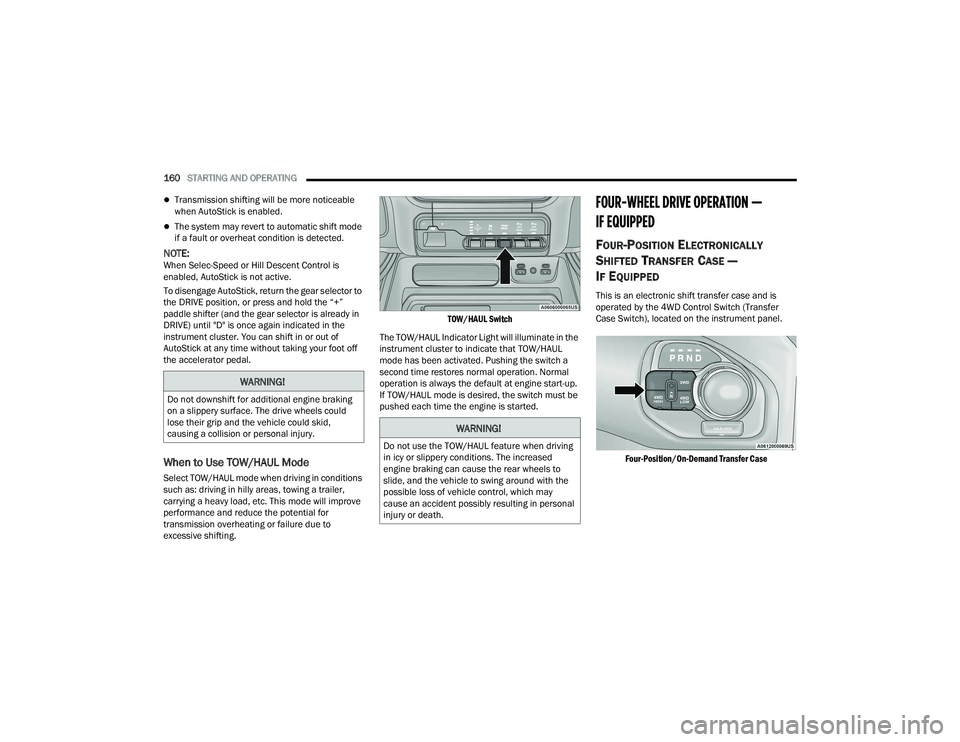
TOW/HAUL Switch
The TOW/HAUL Indicator Light will illuminate in the
instrument cluster to indicate that TOW/HAUL
mode has been activated. Pushing the switch a
second time restores normal operation. Normal
operation is always the default at engine start-up.
If TOW/HAUL mode is desired, the switch must be
pushed each time the engine is started.
FOUR-WHEEL DRIVE OPERATION —
IF EQUIPPED
FOUR-POSITION ELECTRONICALLY
S
HIFTED TRANSFER CASE —
I
F EQUIPPED
This is an electronic shift transfer case and is
operated by the 4WD Control Switch (Transfer
Case Switch), located on the instrument panel.
Four-Position/On-Demand Transfer Case
WARNING!
Do not downshift for additional engine braking
on a slippery surface. The drive wheels could
lose their grip and the vehicle could skid,
causing a collision or personal injury.
WARNING!
Do not use the TOW/HAUL feature when driving
in icy or slippery conditions. The increased
engine braking can cause the rear wheels to
slide, and the vehicle to swing around with the
possible loss of vehicle control, which may
cause an accident possibly resulting in personal
injury or death.
22_DT_OM_EN_USC_t.book Page 160
Page 163 of 496

STARTING AND OPERATING161
This electronically shifted transfer case provides
four positions:
Two-Wheel Drive High Range (2WD) — This
range is for normal street and highway driving
on dry hard surfaced roads. Driving the vehicle
in 2WD will have greater fuel economy benefits
as the front axle is not engaged in 2WD.
Four-Wheel Drive High Range (4WD HIGH) —
This range provides torque to the front drive -
shaft (engages four-wheel drive) which allows
front and rear wheels to spin at the same speed.
This provides additional traction for loose or
slippery road surfaces only.
Four-Wheel Drive Low Range (4WD LOW) — This
range provides low speed four-wheel drive. It
maximizes torque (increased torque over 4WD
HIGH) to the front driveshaft; allowing front and
rear wheels to rotate at the same speed. This
range provides additional traction and
maximum pulling power for loose or slippery
road surfaces only. Do not exceed 25 mph
(40 km/h) in this range.
N (Neutral) — This range disengages both the
front and rear driveshafts from the powertrain.
To be used for flat towing behind another
vehicle Ú page 228.
NOTE:
The 4WD HIGH and 4WD LOW positions are
designed for loose, slippery road surfaces only.
Driving in the 4WD HIGH and 4WD LOW posi -
tions on dry, hard surfaced roads may cause
increased tire wear and damage to the driveline
components.
The transfer case N (Neutral) button is located
in the center of the 4WD Control Switch and is
pushed by using a ballpoint pen or similar
object. The transfer case N (Neutral) position is
to be used for recreational towing only
Ú page 228.
Transfer Case Position Indicator Lights
The Transfer Case Position Indicator Lights (4WD
HIGH and 4WD LOW) are located in the instrument
cluster and indicate the current and desired
transfer case selection. When you select a
different transfer case position, the indicator lights
will do the following:
1. The current position indicator light will turn off.
2. The selected position indicator light will flash until the transfer case completes the shift.
3. When the shift is complete, the indicator light for the selected position will stop flashing and
remain on.
If the transfer case does not shift into the desired
position, one or more of the following events may
occur:
1. The indicator light for the current position will remain on.
2. The newly selected position indicator light will continue to flash.WARNING!
You or others could be injured or killed if you
leave the vehicle unattended with the transfer
case in the N (Neutral) position without first
fully engaging the parking brake. The transfer
case N (Neutral) position disengages both the
front and rear drive shaft from the powertrain,
and will allow the vehicle to roll, even if the
transmission is in PARK. The parking brake
should always be applied when the driver is
not in the vehicle.
The transmission may not engage PARK if the
vehicle is moving. Always bring the vehicle to a
complete stop before shifting to PARK, and
verify that the transmission gear position indi -
cator solidly indicates PARK (P) without
blinking. Ensure that the vehicle is completely
stopped, and the PARK position is properly
indicated, before exiting the vehicle.
4
22_DT_OM_EN_USC_t.book Page 161
Page 164 of 496

162STARTING AND OPERATING
3. If the transfer case will not shift, a message
will appear on the cluster stating the 4WD shift
has canceled.
NOTE:
Before retrying a selection, make certain that all the
necessary requirements for selecting a new transfer
case position have been met. To retry the selection,
push the current position, wait five seconds, and
retry selection.
The SERV 4WD Warning Light monitors the
electronic shift four-wheel drive system. If this light
remains on after engine start-up or illuminates
during driving, it means that the four-wheel drive
system is not functioning properly and that service
is required.
NOTE:Do not attempt to make a shift while only the front
or rear wheels are spinning. This could cause
damage to driveline components.
When operating your vehicle in 4WD LOW, the
engine speed is approximately three times that of the 2WD or 4WD HIGH positions at a given road
speed. Take care not to overspeed the engine and
do not exceed 25 mph (40 km/h).
Proper operation of four-wheel drive vehicles
depends on tires of equal size, type and
circumference on each wheel. Any difference in
tire size can cause damage to the drivetrain.
Because four-wheel drive provides improved
traction, there is a tendency to exceed safe turning
and stopping speeds. Do not go faster than road
conditions permit.
Shifting Procedure
If any of the requirements to select a new
transfer case position have not been met, then
the transfer case will not shift. The position indi -
cator light for the previous position will remain
on and the newly selected position indicator
light will continue to flash until all the require -
ments for the selected position have been met.
If all the requirements to select a new transfer
case position have been met, then the current
position indicator light will turn off and the
selected position indicator light will flash until
the transfer case completes the shift. When the
shift is complete, the position indicator light for
the selected position will stop flashing and
remain on.
FIVE-POSITION ELECTRONICALLY
S
HIFTED TRANSFER CASE —
I
F EQUIPPED
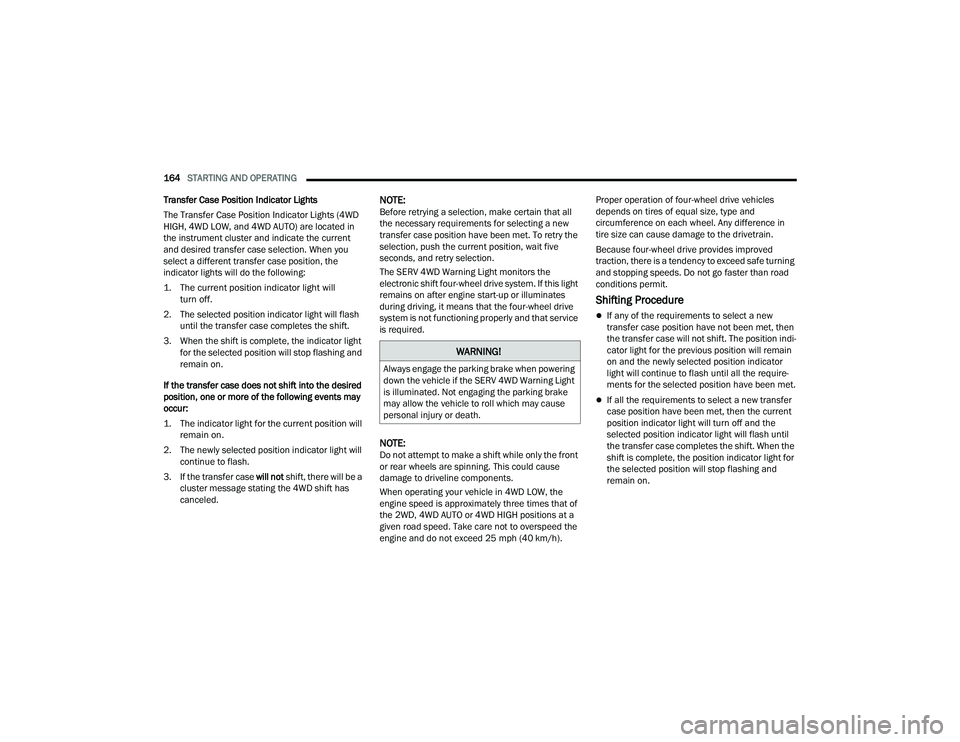
This is an electronic shift transfer case and is
operated by the 4WD Control Switch (Transfer
Case Switch), which is located on the instrument
panel.
Five-Position/On-Demand Transfer Case
WARNING!
Always engage the parking brake when powering
down the vehicle if the SERV 4WD Warning Light
is illuminated. Not engaging the parking brake
may allow the vehicle to roll which may cause
personal injury or death.
22_DT_OM_EN_USC_t.book Page 162
Page 165 of 496

STARTING AND OPERATING163
(Continued)
Five-Position/On-Demand Transfer Case — GT Models
This electronically shifted transfer case provides
five positions:
Two-Wheel Drive High Range (2WD) — This
range is for normal street and highway driving
on dry hard surfaced roads. Driving the vehicle
in 2WD will have greater fuel economy benefits
as the front axle is not engaged in 2WD.
Four-Wheel Drive Automatic High Range (4WD
AUTO) — This range sends power to the front
wheels automatically when the vehicle senses a
loss of traction. This range may be used during
varying road conditions.
Four-Wheel Drive High Range (4WD HIGH) —
This range provides torque to the front drive -
shaft (engages four-wheel drive) which allows
front and rear wheels to spin at the same speed.
This provides additional traction for loose or
slippery road surfaces only.
Four-Wheel Drive Low Range (4WD LOW) — This
range provides low speed four-wheel drive. It
maximizes torque (increased torque over 4WD
HIGH) to the front driveshaft; allowing front and
rear wheels to rotate at the same speed. This
range provides additional traction and
maximum pulling power for loose or slippery
road surfaces only. Do not exceed 25 mph
(40 km/h) in this range.
N (Neutral) — This range disengages both the
front and rear driveshafts from the powertrain.
To be used for flat towing behind another
vehicle Ú page 228.
NOTE:
The 4WD HIGH and 4WD LOW positions are
designed for loose, slippery road surfaces only.
Driving in the 4WD HIGH and 4WD LOW posi -
tions on dry hard surfaced roads may cause
increased tire wear and damage to the driveline
components.
The transfer case N (Neutral) button is located
in the center of the 4WD Control Switch and is
pushed by using a ballpoint pen or similar
object. The transfer case N (Neutral) position is
to be used for recreational towing only
Ú page 228.
WARNING!
You or others could be injured or killed if you
leave the vehicle unattended with the transfer
case in the N (Neutral) position without first
fully engaging the parking brake. The transfer
case N (Neutral) position disengages both the
front and rear drive shaft from the powertrain,
and will allow the vehicle to roll, even if the
transmission is in PARK. The parking brake
should always be applied when the driver is
not in the vehicle.
The transmission may not engage PARK if the
vehicle is moving. Always bring the vehicle to a
complete stop before shifting to PARK, and
verify that the transmission gear position indi -
cator solidly indicates PARK (P) without
blinking. Ensure that the vehicle is completely
stopped, and the PARK position is properly
indicated, before exiting the vehicle.
WARNING!
4
22_DT_OM_EN_USC_t.book Page 163
Page 166 of 496
164STARTING AND OPERATING
Transfer Case Position Indicator Lights
The Transfer Case Position Indicator Lights (4WD
HIGH, 4WD LOW, and 4WD AUTO) are located in
the instrument cluster and indicate the current
and desired transfer case selection. When you
select a different transfer case position, the
indicator lights will do the following:
1. The current position indicator light will turn off.
2. The selected position indicator light will flash until the transfer case completes the shift.
3. When the shift is complete, the indicator light for the selected position will stop flashing and
remain on.
If the transfer case does not shift into the desired
position, one or more of the following events may
occur:
1. The indicator light for the current position will remain on.
2. The newly selected position indicator light will continue to flash.
3. If the transfer case will not shift, there will be a
cluster message stating the 4WD shift has
canceled.
NOTE:Before retrying a selection, make certain that all
the necessary requirements for selecting a new
transfer case position have been met. To retry the
selection, push the current position, wait five
seconds, and retry selection.
The SERV 4WD Warning Light monitors the
electronic shift four-wheel drive system. If this light
remains on after engine start-up or illuminates
during driving, it means that the four-wheel drive
system is not functioning properly and that service
is required.
NOTE:Do not attempt to make a shift while only the front
or rear wheels are spinning. This could cause
damage to driveline components.
When operating your vehicle in 4WD LOW, the
engine speed is approximately three times that of
the 2WD, 4WD AUTO or 4WD HIGH positions at a
given road speed. Take care not to overspeed the
engine and do not exceed 25 mph (40 km/h). Proper operation of four-wheel drive vehicles
depends on tires of equal size, type and
circumference on each wheel. Any difference in
tire size can cause damage to the drivetrain.
Because four-wheel drive provides improved
traction, there is a tendency to exceed safe turning
and stopping speeds. Do not go faster than road
conditions permit.
Shifting Procedure
If any of the requirements to select a new
transfer case position have not been met, then
the transfer case will not shift. The position indi
-
cator light for the previous position will remain
on and the newly selected position indicator
light will continue to flash until all the require -
ments for the selected position have been met.
If all the requirements to select a new transfer
case position have been met, then the current
position indicator light will turn off and the
selected position indicator light will flash until
the transfer case completes the shift. When the
shift is complete, the position indicator light for
the selected position will stop flashing and
remain on.
WARNING!
Always engage the parking brake when powering
down the vehicle if the SERV 4WD Warning Light
is illuminated. Not engaging the parking brake
may allow the vehicle to roll which may cause
personal injury or death.
22_DT_OM_EN_USC_t.book Page 164
Page 169 of 496
STARTING AND OPERATING167
NOTE:Default Ride Height:
Select Aero Height or Normal Ride Height as the
default for all vehicle speeds and operation.
This is the selected height that the suspension
will level for speed changes (e.g. raising from
Entry/Exit Height at speed, lowering from Off
Road Height at speed, etc.).
Default ride height can be changed by manually
adjusting the Air Suspension switch to Normal
Ride Height or Aero Ride Height and staying in
the selected height for 2.5 seconds. It will be
stored as the default ride height and the height
will be maintained until a new default ride
height is selected.
If equipped with a touchscreen radio, all enabling/
disabling of air suspension features must be done
through the radio Ú page 234.
AIR SUSPENSION MODES
The air suspension system has multiple modes to
protect the system in unique situations. The engine
should be running to change between Air
Suspension Modes.
Automatic Areo Mode
To improve aerodynamics, the air suspension
system has a feature which will put the vehicle into
Aeroheight automatically at higher speeds
Úpage 114.
Automatic Aero Mode may be disabled through
vehicle settings in the Uconnect Radio (if
equipped) Ú page 234.
Tire Jack Mode
To assist with changing a tire, the air suspension
system has a feature which allows the automatic
leveling to be disabled Ú page 234.
Transport Mode
For towing your vehicle with four wheels off the
road, the air suspension system has a feature
which will put the vehicle into Entry/Exit height and
disable the automatic load leveling system
Ú page 234. Wheel Alignment Mode
Before performing a wheel alignment, this mode
must be enabled which will put the vehicle into
NRH and disable automatic leveling Ú
page 234.
Protection Strategy
In order to protect the air suspension system, the
vehicle will disable load leveling as required
(suspension overloaded, battery charge low, etc.).
Load leveling will automatically resume as soon as
system operation requirements are met. See an
authorized dealer if system does not resume.
NOTE:For towing with air suspension Ú page 212.
INSTRUMENT CLUSTER DISPLAY
M
ESSAGES
When the appropriate conditions exist, a message
will appear in the instrument cluster display
Ú page 114.
An audible chime will be heard whenever a system
error has been detected.
See an authorized dealer for system service if
normal operation does not resume.
WARNING!
The air suspension system uses a high pressure
volume of air to operate the system. To avoid
personal injury or damage to the system, see an
authorized dealer for service.
4
22_DT_OM_EN_USC_t.book Page 167
Page 172 of 496
170STARTING AND OPERATING
NOTE:
Automatic Aero mode will be disabled if a
trailer is detected to prevent shifting loads.
Speed thresholds for raising or lowering the
vehicle only apply if Automatic Aero Mode is
enabled through vehicle settings on your
Uconnect Radio.
To enter Aero Height manually push the
height selector switch down once from NRH
at any vehicle speed. To return to NRH push
the height selector switch up once while
vehicle speed is less than 56 mph (90 km/
h).
Automatic Aero Mode may be disabled
through vehicle settings on your Uconnect
Radio.
Entry/Exit Height (Lowers the vehicle approxi -
mately 3 inches [73 mm]) – This position lowers
the vehicle for easier passenger entry and exit
as well as lowering the vehicle for easier loading
and unloading of cargo. To enter Entry/Exit
Mode, push the height selector switch down
twice from the NRH while the vehicle speed is
below 33 mph (53 km/h). Once the vehicle
speed goes below 15 mph (24 km/h) the
vehicle height will begin to lower. If the vehicle
speed remains between 15 mph (24 km/h) and
25 mph (40 km/h) for greater than 60 seconds,
or the vehicle speed exceeds 25 mph (40 km/h)
the Entry/Exit change will be canceled. To return to Normal Height Mode, push the height
selector switch up twice while in Entry/Exit or
drive the vehicle over 15 mph (24 km/h). Entry/
Exit Height may not be available due to vehicle
payload, an instrument cluster display message
will be shown when this occurs Ú
page 114.
The system requires that the ignition be in the ON/
RUN position or the engine running for all user
requested changes. When lowering the vehicle, all
of the doors must be closed. If a door is opened at
any time while the vehicle is lowering, the change
will not be completed until the open door(s) is
closed.
This system uses a lifting and lowering pattern
which keeps the headlights from incorrectly
shining into oncoming traffic. When raising the
vehicle, the rear of the vehicle will move up first
and then the front. When lowering the vehicle, the
front will move down first and then the rear.
After the engine is turned off, it may be noticed that
the air suspension system operates briefly; this is
normal. The system is correcting the position of the
vehicle to ensure a proper appearance. To assist with changing a spare tire, the air
suspension system has a feature which allows the
automatic leveling to be disabled Ú
page 234.
NOTE:Default Ride Height:
Select Aero Height or Normal Ride Height as the
default for all vehicle speeds and operation.
This is the selected height that the suspension
will level for speed changes (e.g. raising from
Entry/Exit Height at speed, lowering from Off
Road Height at speed, etc.).
Default ride height can be changed by manually
adjusting the Air Suspension switch to Normal
Ride Height or Aero Ride Height and staying in
the selected height for 2.5 seconds. It will be
stored as the default ride height and the height
will be maintained until a new default ride
height is selected.
If equipped with a touchscreen radio, all enabling/
disabling of air suspension features must be done
through the radio Ú page 234.
CAUTION!
When in ENTRY/EXIT Height, be aware of your
surroundings, you may not have the clearance
required for certain areas and vehicle damage
may occur.
WARNING!
The air suspension system uses a high pressure
volume of air to operate the system. To avoid
personal injury or damage to the system, see an
authorized dealer for service.
22_DT_OM_EN_USC_t.book Page 170
Page 175 of 496

STARTING AND OPERATING173
Operating the locker in 2WD, 4WD AUTO, and
4WD LOCK/HIGH, the locker can be engaged up to
20 mph (32 km/h). While driving with the locker
engaged, if speed exceeds 25 mph (40 km/h), the
locker will automatically disengage, but will
automatically re-engage at 20 mph (32 km/h).
NOTE:Left to right wheel speed difference may be
necessary to allow the rear axle to fully lock. If the
indicator light is flashing after selecting the rear
axle lock mode, drive the vehicle in a turn or on
loose gravel to expedite the locking action.
The axle locker could become torque locked due to
side to side loads on the rear axle. Driving slowly
while turning the steering wheel from a left hand
turn to a right hand turn or driving in REVERSE for
a short distance may be required to release the
torque lock and unlock the axles.
To unlock the rear axle, push the AXLE LOCK
button. The AXLE LOCK indicator light will go out
when the rear axle is unlocked.
LIMITED-SLIP DIFFERENTIAL —
IF EQUIPPED
The limited-slip differential provides additional
traction on snow, ice, mud, sand and gravel,
particularly when there is a difference between the
traction characteristics of the surface under the
right and left rear wheels. During normal driving and cornering, the limited-slip unit performs
similarly to a conventional differential. On slippery
surfaces, however, the differential delivers more of
the driving effort to the rear wheel having the
better traction.
The limited-slip differential is especially helpful
during slippery driving conditions. With both rear
wheels on a slippery surface, a slight application of
the accelerator will supply maximum traction.
When starting with only one rear wheel on an
excessively slippery surface, slight momentary
application of the parking brake may be necessary
to gain maximum traction.
Care should be taken to avoid sudden
accelerations when both rear wheels are on a
slippery surface. This could cause both rear wheels
to spin, and allow the vehicle to slide sideways on
the crowned surface of a road or in a turn.
POWER STEERING
ELECTRIC POWER STEERING
The electric power steering system will provide
increased vehicle response and ease of
maneuverability. The power steering system
adapts to different driving conditions.
If the steering icon is flashing, it indicates that the
vehicle needs to be taken to the dealer for service.
It is likely the vehicle has lost power steering
assistance.
If the steering icon is displayed and the “POWER
STEERING SYSTEM OVER TEMP” message is
displayed on the instrument cluster screen, this
indicates an over temperature condition in the
power steering system. Once driving conditions are
safe, pull over and let the vehicle idle for a few
moments until the icon and message turn off
Ú
page 114.
If the steering icon is displayed and the “SERVICE
POWER STEERING – ASSIST OFF” message is
displayed on the instrument cluster screen, this
indicates the vehicle needs to be taken to the
dealer for service Ú page 114.
WARNING!
When servicing vehicles equipped with a
limited-slip or locking differential, never run the
engine with one rear wheel off the ground as the
vehicle may drive through the rear wheel
remaining on the ground and result in
unintended movement.
4
22_DT_OM_EN_USC_t.book Page 173
Page 178 of 496

176STARTING AND OPERATING
SYSTEM MALFUNCTION
If there is a malfunction in the Stop/Start system,
the system will not shut down the engine. A
“SERVICE STOP/START SYSTEM” message will
appear in the instrument cluster display
Úpage 128.
The system will need to be checked by an
authorized dealer.
CRUISE CONTROL SYSTEMS — IF EQUIPPED
Your vehicle may be equipped with the Cruise
Control system, or the Adaptive Cruise Control
(ACC) system:
Cruise Control will keep your vehicle at a
constant preset speed.
Adaptive Cruise Control (ACC) will adjust the
vehicle speed up to the preset speed to main -
tain a distance with the vehicle ahead.
NOTE:
In vehicles equipped with ACC, if ACC is not
enabled, Fixed Speed Cruise Control will not
detect vehicles directly ahead of you. Always be
aware of the feature selected.
Only one Cruise Control feature can operate at a
time. For example, if Fixed Speed Cruise Control
is enabled, Adaptive Cruise Control will be
unavailable, and vice versa.
CRUISE CONTROL
When engaged, the Cruise Control takes over
accelerator operations at speeds greater than
20 mph (32 km/h).
The Cruise Control buttons are located on the right
side of the steering wheel.
Cruise Control Buttons
To Activate
Push the on/off button to activate the Cruise
Control. The cruise indicator light in the instrument
cluster display will illuminate. To turn the system
off, push the on/off button a second time. The
cruise indicator light will turn off. The system
should be turned off when not in use.
1 — SET (+)/Accel
2 — CANC/Cancel
3 — SET (-)/Decel
4 — On/Off
5 — RES/Resume
WARNING!
Cruise Control can be dangerous where the
system cannot maintain a constant speed. Your
vehicle could go too fast for the conditions, and
you could lose control and have an accident. Do
not use Cruise Control in heavy traffic or on
roads that are winding, icy, snow-covered or
slippery.
WARNING!
Leaving the Cruise Control system on when not
in use is dangerous. You could accidentally set
the system or cause it to go faster than you
want. You could lose control and have an
accident. Always ensure the system is off when
you are not using it.
22_DT_OM_EN_USC_t.book Page 176
Page 179 of 496
STARTING AND OPERATING177
To Set A Desired Speed
Turn the Cruise Control on.
When the vehicle has reached the desired speed,
push the SET (+) or SET (-) button and release.
Release the accelerator and the vehicle will
operate at the selected speed.
NOTE:The vehicle should be traveling at a steady speed
and on level ground before pushing the SET (+) or
SET (-) button.
To Vary The Speed Setting
To Increase Or Decrease The Set Speed
After setting a speed, you can increase the set
speed by pushing the SET (+) button, or decrease
speed by pushing the SET (-) button.
U.S. Speed (mph)
Pushing the SET (+) , or SET (-) button once will
result in a 1 mph speed adjustment. Each
subsequent tap of the button results in an
adjustment of 1 mph.
If the button is continually pushed, the set
speed will continue to adjust in 5 mph incre -
ments until the button is released. The new set
speed is reflected in the instrument cluster
display. Metric Speed (km/h)
Pushing the SET (+)
, or SET (-) button once will
result in a 1 km/h speed adjustment. Each
subsequent tap of the button results in an
adjustment of 1 km/h.
If the button is continually pushed, the set
speed will continue to adjust in 10 km/h incre -
ments until the button is released. The new set
speed is reflected in the instrument cluster
display.
NOTE:When you override and push the SET (+) or SET (-)
button, the new set speed will be the current speed
of the vehicle.
To Accelerate For Passing
While the Cruise Control is set, press the
accelerator to pass as you would normally. When
the pedal is released, the vehicle will return to the
set speed.
USING CRUISE CONTROL ON HILLS
The transmission may downshift on hills to
maintain the vehicle set speed.
The Cruise Control system maintains speed up and
down hills. A slight speed change on moderate hills
is normal. On steep hills, a greater speed loss or
gain may occur so it may be preferable to drive
without Cruise Control.
To Resume Speed
To resume a previously set speed, push the RES
button and release. Resume can be used at any
speed above 20 mph (32 km/h).
To Deactivate
A tap on the brake pedal, pushing the CANC
(cancel) button, or normal brake pressure while
slowing the vehicle will deactivate the Cruise
Control system without erasing the set speed from
memory.
The following conditions will also deactivate the
Cruise Control system without erasing the set
speed from memory:
Vehicle parking brake is applied
Stability event occurs
Gear selector is moved out of DRIVE
Engine overspeed occurs
WARNING!
Cruise Control can be dangerous where the
system cannot maintain a constant speed. Your
vehicle could go too fast for the conditions, and
you could lose control and have an accident. Do
not use Cruise Control in heavy traffic or on
roads that are winding, icy, snow-covered or
slippery.
4
22_DT_OM_EN_USC_t.book Page 177