traction control RAM 1500 2022 Owners Manual
[x] Cancel search | Manufacturer: RAM, Model Year: 2022, Model line: 1500, Model: RAM 1500 2022Pages: 496, PDF Size: 18.03 MB
Page 139 of 496

GETTING TO KNOW YOUR INSTRUMENT PANEL137
Turn Signal Indicator Lights
When the left or right turn signal is
activated, the turn signal indicator will
flash independently and the
corresponding exterior turn signal lamps
will flash. Turn signals can be activated when the
multifunction lever is moved down (left) or
up (right).
NOTE:
A continuous chime will sound if the vehicle is
driven more than 1 mile (1.6 km) with either
turn signal on.
Check for an inoperative outside light bulb if
either indicator flashes at a rapid rate.
If equipped with fog lamps, the fog lamp on the
side of the activated turn signal will also illumi -
nate to provide additional light when turning.
4WD AUTO Indicator Light — If Equipped
This light alerts the driver that the vehicle
is in the four-wheel drive auto mode, and
the front axle is engaged, but the
vehicle's power is sent to the rear wheels.
Four-wheel drive will be automatically engaged
when the vehicle senses a loss of traction
Ú page 160.
WHITE INDICATOR LIGHTS
Adaptive Cruise Control (ACC) Ready Light —
If Equipped
This light will illuminate when the vehicle
equipped with ACC has been turned on
but not set Ú page 178.
Cruise Control Ready Indicator
This indicator light will illuminate when
the cruise control is ready, but not set
Úpage 176.
Hill Descent Control (HDC) Indicator Light —
If Equipped
This indicator shows when the HDC
feature is turned on. The lamp will be on
solid when HDC is armed. HDC can only
be armed when the transfer case is in the
4WD Low position and the vehicle speed is less
then 20 mph (32 km/h). If these conditions are not
met while attempting to use the HDC feature, the
HDC indicator light will flash on/off.
LaneSense Indicator Light — If Equipped
When the LaneSense system is ON, but
not armed, the LaneSense indicator light
illuminates solid white. This occurs when
only left, right, or neither lane line has
been detected. If a single lane line is detected, the
system is ready to provide only visual warnings if
an unintentional lane departure occurs on the
detected lane line Ú page 196.
Cruise Control SET Indicator Light —
If Equipped With Base/Midline Instrument
Cluster Display
This light will turn on when the cruise
control is set Úpage 176.
BLUE INDICATOR LIGHTS
High Beam Indicator Light
This indicator light will illuminate to
indicate that the high beam headlights
are on. With the low beams activated,
push the multifunction lever forward
(toward the front of the vehicle) to turn on the high
beams. Pull the multifunction lever rearward
(toward the rear of the vehicle) to turn off the high
beams. If the high beams are off, pull the lever
toward you for a temporary high beam on, “flash to
pass” scenario.
3
22_DT_OM_EN_USC_t.book Page 137
Page 155 of 496

STARTING AND OPERATING153
(Continued)
(Continued)
SafeHold can be temporarily bypassed by pushing
the EPB switch while the driver door is open. Once
manually bypassed, SafeHold will be enabled
again once the vehicle reaches 12 mph (20 km/h)
or the ignition is turned to the OFF position and
back to ON again.
Brake Service Mode
We recommend having your brakes serviced by an
authorized dealer. You should only make repairs
for which you have the knowledge and the right
equipment. You should only enter Brake Service
Mode during brake service.
When servicing your rear brakes, it may be
necessary for you or your technician to push the
rear piston into the rear caliper bore. With the
Electric Park Brake (EPB) system, this can only be
done after retracting the EPB actuator.
Fortunately, actuator retraction can be done easily
by entering the Brake Service Mode through the
Uconnect Settings in your vehicle. This
menu-based system will guide you through the
steps necessary to retract the EPB actuator in
order to perform rear brake service.
Service Mode has requirements that must be met
in order to be activated:
The vehicle must be at a standstill.
The parking brake must be unapplied.
The transmission must be in PARK or NEUTRAL.
While in Service Mode, the EPB fault lamp will flash
continuously while the ignition is in ON/RUN.
When brake service work is complete, the following
steps must be followed to reset the park brake
system to normal operation:
Ensure the vehicle is at a standstill.
Press the brake pedal with moderate force.
Apply the EPB Switch.
AUTOMATIC TRANSMISSION
You must press and hold the brake pedal while
shifting out of PARK.
WARNING!
You can be badly injured working on or around a
motor vehicle. Do only that service work for
which you have the knowledge and the right
equipment. If you have any doubt about your
ability to perform a service job, take your vehicle
to a competent mechanic.
WARNING!
Never use the PARK position as a substitute
for the parking brake. Always apply the
parking brake fully when exiting the vehicle to
guard against vehicle movement and possible
injury or damage.
Your vehicle could move and injure you and
others if it is not in PARK. Check by trying to
move the transmission gear selector out of
PARK with the brake pedal released. Make
sure the transmission is in PARK before
exiting the vehicle.
The transmission may not engage PARK if the
vehicle is moving. Always bring the vehicle to a
complete stop before shifting to PARK, and
verify that the transmission gear position indi
-
cator solidly indicates PARK (P) without
blinking. Ensure that the vehicle is completely
stopped, and the PARK position is properly
indicated, before exiting the vehicle.
It is dangerous to shift out of PARK or
NEUTRAL if the engine speed is higher than
idle speed. If your foot is not firmly pressing
the brake pedal, the vehicle could accelerate
quickly forward or in reverse. You could lose
control of the vehicle and hit someone or
something. Only shift into gear when the
engine is idling normally and your foot is firmly
pressing the brake pedal.
WARNING!
4
22_DT_OM_EN_USC_t.book Page 153
Page 163 of 496

STARTING AND OPERATING161
This electronically shifted transfer case provides
four positions:
Two-Wheel Drive High Range (2WD) — This
range is for normal street and highway driving
on dry hard surfaced roads. Driving the vehicle
in 2WD will have greater fuel economy benefits
as the front axle is not engaged in 2WD.
Four-Wheel Drive High Range (4WD HIGH) —
This range provides torque to the front drive -
shaft (engages four-wheel drive) which allows
front and rear wheels to spin at the same speed.
This provides additional traction for loose or
slippery road surfaces only.
Four-Wheel Drive Low Range (4WD LOW) — This
range provides low speed four-wheel drive. It
maximizes torque (increased torque over 4WD
HIGH) to the front driveshaft; allowing front and
rear wheels to rotate at the same speed. This
range provides additional traction and
maximum pulling power for loose or slippery
road surfaces only. Do not exceed 25 mph
(40 km/h) in this range.
N (Neutral) — This range disengages both the
front and rear driveshafts from the powertrain.
To be used for flat towing behind another
vehicle Ú page 228.
NOTE:
The 4WD HIGH and 4WD LOW positions are
designed for loose, slippery road surfaces only.
Driving in the 4WD HIGH and 4WD LOW posi -
tions on dry, hard surfaced roads may cause
increased tire wear and damage to the driveline
components.
The transfer case N (Neutral) button is located
in the center of the 4WD Control Switch and is
pushed by using a ballpoint pen or similar
object. The transfer case N (Neutral) position is
to be used for recreational towing only
Ú page 228.
Transfer Case Position Indicator Lights
The Transfer Case Position Indicator Lights (4WD
HIGH and 4WD LOW) are located in the instrument
cluster and indicate the current and desired
transfer case selection. When you select a
different transfer case position, the indicator lights
will do the following:
1. The current position indicator light will turn off.
2. The selected position indicator light will flash until the transfer case completes the shift.
3. When the shift is complete, the indicator light for the selected position will stop flashing and
remain on.
If the transfer case does not shift into the desired
position, one or more of the following events may
occur:
1. The indicator light for the current position will remain on.
2. The newly selected position indicator light will continue to flash.WARNING!
You or others could be injured or killed if you
leave the vehicle unattended with the transfer
case in the N (Neutral) position without first
fully engaging the parking brake. The transfer
case N (Neutral) position disengages both the
front and rear drive shaft from the powertrain,
and will allow the vehicle to roll, even if the
transmission is in PARK. The parking brake
should always be applied when the driver is
not in the vehicle.
The transmission may not engage PARK if the
vehicle is moving. Always bring the vehicle to a
complete stop before shifting to PARK, and
verify that the transmission gear position indi -
cator solidly indicates PARK (P) without
blinking. Ensure that the vehicle is completely
stopped, and the PARK position is properly
indicated, before exiting the vehicle.
4
22_DT_OM_EN_USC_t.book Page 161
Page 164 of 496

162STARTING AND OPERATING
3. If the transfer case will not shift, a message
will appear on the cluster stating the 4WD shift
has canceled.
NOTE:
Before retrying a selection, make certain that all the
necessary requirements for selecting a new transfer
case position have been met. To retry the selection,
push the current position, wait five seconds, and
retry selection.
The SERV 4WD Warning Light monitors the
electronic shift four-wheel drive system. If this light
remains on after engine start-up or illuminates
during driving, it means that the four-wheel drive
system is not functioning properly and that service
is required.
NOTE:Do not attempt to make a shift while only the front
or rear wheels are spinning. This could cause
damage to driveline components.
When operating your vehicle in 4WD LOW, the
engine speed is approximately three times that of the 2WD or 4WD HIGH positions at a given road
speed. Take care not to overspeed the engine and
do not exceed 25 mph (40 km/h).
Proper operation of four-wheel drive vehicles
depends on tires of equal size, type and
circumference on each wheel. Any difference in
tire size can cause damage to the drivetrain.
Because four-wheel drive provides improved
traction, there is a tendency to exceed safe turning
and stopping speeds. Do not go faster than road
conditions permit.
Shifting Procedure
If any of the requirements to select a new
transfer case position have not been met, then
the transfer case will not shift. The position indi -
cator light for the previous position will remain
on and the newly selected position indicator
light will continue to flash until all the require -
ments for the selected position have been met.
If all the requirements to select a new transfer
case position have been met, then the current
position indicator light will turn off and the
selected position indicator light will flash until
the transfer case completes the shift. When the
shift is complete, the position indicator light for
the selected position will stop flashing and
remain on.
FIVE-POSITION ELECTRONICALLY
S
HIFTED TRANSFER CASE —
I
F EQUIPPED
This is an electronic shift transfer case and is
operated by the 4WD Control Switch (Transfer
Case Switch), which is located on the instrument
panel.
Five-Position/On-Demand Transfer Case
WARNING!
Always engage the parking brake when powering
down the vehicle if the SERV 4WD Warning Light
is illuminated. Not engaging the parking brake
may allow the vehicle to roll which may cause
personal injury or death.
22_DT_OM_EN_USC_t.book Page 162
Page 165 of 496

STARTING AND OPERATING163
(Continued)
Five-Position/On-Demand Transfer Case — GT Models
This electronically shifted transfer case provides
five positions:
Two-Wheel Drive High Range (2WD) — This
range is for normal street and highway driving
on dry hard surfaced roads. Driving the vehicle
in 2WD will have greater fuel economy benefits
as the front axle is not engaged in 2WD.
Four-Wheel Drive Automatic High Range (4WD
AUTO) — This range sends power to the front
wheels automatically when the vehicle senses a
loss of traction. This range may be used during
varying road conditions.
Four-Wheel Drive High Range (4WD HIGH) —
This range provides torque to the front drive -
shaft (engages four-wheel drive) which allows
front and rear wheels to spin at the same speed.
This provides additional traction for loose or
slippery road surfaces only.
Four-Wheel Drive Low Range (4WD LOW) — This
range provides low speed four-wheel drive. It
maximizes torque (increased torque over 4WD
HIGH) to the front driveshaft; allowing front and
rear wheels to rotate at the same speed. This
range provides additional traction and
maximum pulling power for loose or slippery
road surfaces only. Do not exceed 25 mph
(40 km/h) in this range.
N (Neutral) — This range disengages both the
front and rear driveshafts from the powertrain.
To be used for flat towing behind another
vehicle Ú page 228.
NOTE:
The 4WD HIGH and 4WD LOW positions are
designed for loose, slippery road surfaces only.
Driving in the 4WD HIGH and 4WD LOW posi -
tions on dry hard surfaced roads may cause
increased tire wear and damage to the driveline
components.
The transfer case N (Neutral) button is located
in the center of the 4WD Control Switch and is
pushed by using a ballpoint pen or similar
object. The transfer case N (Neutral) position is
to be used for recreational towing only
Ú page 228.
WARNING!
You or others could be injured or killed if you
leave the vehicle unattended with the transfer
case in the N (Neutral) position without first
fully engaging the parking brake. The transfer
case N (Neutral) position disengages both the
front and rear drive shaft from the powertrain,
and will allow the vehicle to roll, even if the
transmission is in PARK. The parking brake
should always be applied when the driver is
not in the vehicle.
The transmission may not engage PARK if the
vehicle is moving. Always bring the vehicle to a
complete stop before shifting to PARK, and
verify that the transmission gear position indi -
cator solidly indicates PARK (P) without
blinking. Ensure that the vehicle is completely
stopped, and the PARK position is properly
indicated, before exiting the vehicle.
WARNING!
4
22_DT_OM_EN_USC_t.book Page 163
Page 182 of 496
180STARTING AND OPERATING
To Activate/Deactivate
Push and release the Adaptive Cruise Control
(ACC) on/off button. The ACC menu in the
instrument cluster displays “ACC Ready.”
To turn the system off, push and release the
Adaptive Cruise Control (ACC) on/off button again.
At this time, the system will turn off and the
instrument cluster display will show “Adaptive
Cruise Control (ACC) Off.”
To Set A Desired ACC Speed
When the vehicle reaches the speed desired, push
the SET (+) button or the SET (-) button and
release. The instrument cluster display will show
the set speed.
NOTE:Fixed Speed Cruise Control can be used without
ACC enabled. To change between the different
modes, push the ACC on/off button which turns
the ACC and the Fixed Speed Cruise Control off. Pushing the Fixed Speed Cruise Control on/off
button will result in turning on (changing to) Fixed
Speed Cruise Control mode.
If ACC is set when the vehicle speed is
below
20 mph (32 km/h), the set speed will default to
20 mph (32 km/h).
NOTE:Fixed Speed Cruise Control cannot be set below
20 mph (32 km/h).
If either system is set when the vehicle speed is
above 20 mph (32 km/h), the set speed shall be
the current speed of the vehicle.
NOTE:
Keeping your foot on the accelerator pedal can
cause the vehicle to continue to accelerate
beyond the set speed. If this occurs, the
message “ACC DRIVER OVERRIDE” will display
in the instrument cluster display.
If you continue to accelerate beyond the set
speed while ACC is enabled, the system will not
control the distance between your vehicle and
the vehicle ahead. The vehicle speed will only be
determined by the position of the accelerator
pedal.
To Cancel
The following conditions cancel the ACC or Fixed
Speed Cruise Control systems:
The brake pedal is applied
The CANC (cancel) button is pushed
The Anti-Lock Brake system (ABS) activates
The trailer brake is applied manually (if
equipped)
The gear selector is removed from the DRIVE
position
The Electronic Stability Control/Traction Control
System (ESC/TCS) activates
The vehicle parking brake is applied
The Trailer Sway Control (TSC) activates
WARNING!
Leaving the Adaptive Cruise Control (ACC)
system on when not in use is dangerous. You
could accidentally set the system or cause it to
go faster than you want. You could lose control
and have a collision. Always leave the system off
when you are not using it.
WARNING!
In the Fixed Speed Cruise Control mode, the
system will not react to vehicles ahead. In
addition, the proximity warning does not activate
and no alarm will sound even if you are too close
to the vehicle ahead since neither the presence
of the vehicle ahead nor the vehicle-to-vehicle
distance is detected. Be sure to maintain a safe
distance between your vehicle and the vehicle
ahead. Always be aware which mode is selected.
22_DT_OM_EN_USC_t.book Page 180
Page 200 of 496
198STARTING AND OPERATING
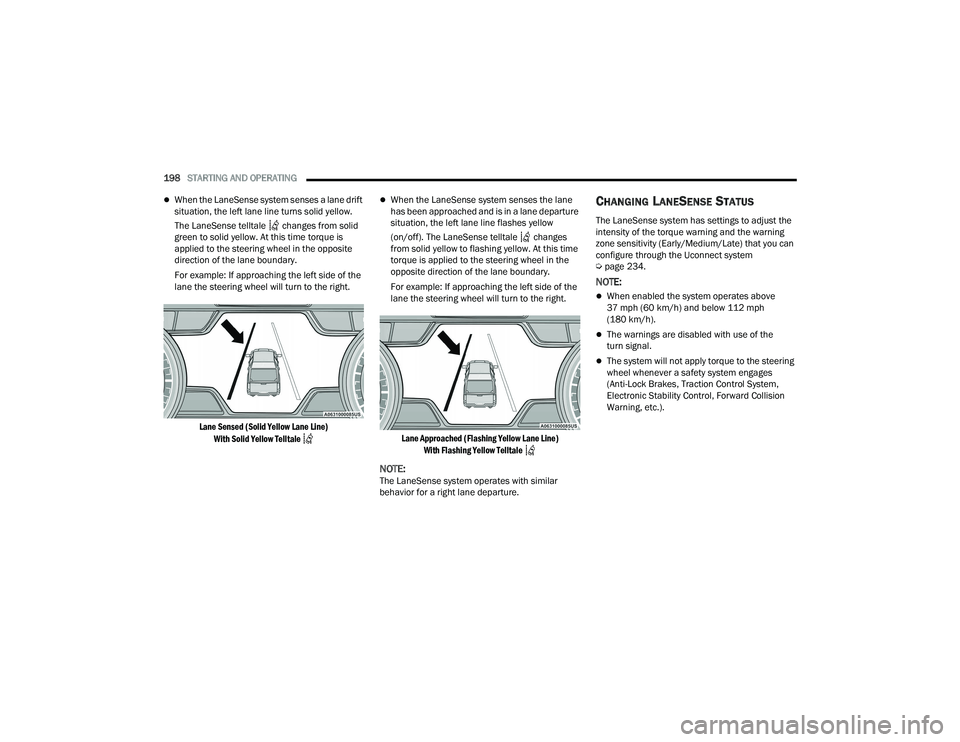
When the LaneSense system senses a lane drift
situation, the left lane line turns solid yellow.
The LaneSense telltale changes from solid
green to solid yellow. At this time torque is
applied to the steering wheel in the opposite
direction of the lane boundary.
For example: If approaching the left side of the
lane the steering wheel will turn to the right.
Lane Sensed (Solid Yellow Lane Line) With Solid Yellow Telltale
When the LaneSense system senses the lane
has been approached and is in a lane departure
situation, the left lane line flashes yellow
(on/off). The LaneSense telltale changes
from solid yellow to flashing yellow. At this time
torque is applied to the steering wheel in the
opposite direction of the lane boundary.
For example: If approaching the left side of the
lane the steering wheel will turn to the right.
Lane Approached (Flashing Yellow Lane Line) With Flashing Yellow Telltale
NOTE:The LaneSense system operates with similar
behavior for a right lane departure.
CHANGING LANESENSE STATUS
The LaneSense system has settings to adjust the
intensity of the torque warning and the warning
zone sensitivity (Early/Medium/Late) that you can
configure through the Uconnect system
Úpage 234.
NOTE:
When enabled the system operates above
37 mph (60 km/h) and below 112 mph
(180 km/h).
The warnings are disabled with use of the
turn signal.
The system will not apply torque to the steering
wheel whenever a safety system engages
(Anti-Lock Brakes, Traction Control System,
Electronic Stability Control, Forward Collision
Warning, etc.).
22_DT_OM_EN_USC_t.book Page 198
Page 232 of 496

230STARTING AND OPERATING
If the vehicle is equipped with air suspension,
the engine should be started and left running for
a minimum of 60 seconds (with all the doors
closed) at least once every 24 hours. This
process allows the air suspension to adjust the
vehicle’s ride height to compensate for
temperature effects.
Shifting Out Of N (Neutral)
Use the following procedure to prepare your
vehicle for normal usage:
1. Bring the vehicle to a complete stop, leaving
it connected to the tow vehicle.
2. Press and hold the brake pedal.
3. Start the engine. Apply the parking brake. Shift the transmission into NEUTRAL.
4. Using a ballpoint pen or similar object, push and hold the recessed transfer case N
(Neutral) button (at the center of the transfer
case switches).
5. When the N (Neutral) indicator light turns off, release the N (Neutral) button.
6. Turn the engine off. The transmission will automatically select PARK when the engine is
turned off.
7. Release the brake pedal. 8. Disconnect vehicle from the tow vehicle.
9. Press and hold the brake pedal.
10. Start the engine.
11. Release the parking brake.
12. Shift the transmission into DRIVE, release the
brake pedal, and check that the vehicle
operates normally.NOTE:
Steps 3 and 4 are requirements that must be
met before pushing the button to shift out of
N (Neutral), and must continue to be met until
the shift has been completed. If any of these
requirements are not met before pushing the
button or are no longer met during the shift, the
N (Neutral) indicator light will flash continuously
until all requirements are met or until the button
is released.
The ignition must be in the ON/RUN mode for a
shift to take place and for the position indicator
lights to be operable. If the ignition is not in the
ON/RUN mode, the shift will not take place and
no position indicator lights will be on or flashing.
A flashing N (Neutral) position indicator light
indicates that shift requirements have not been
met.
DRIVING TIPS
DRIVING ON SLIPPERY SURFACES
Acceleration
Rapid acceleration on snow covered, wet, or other
slippery surfaces may cause the driving wheels to
pull erratically to the right or left. This phenomenon
occurs when there is a difference in the surface
traction under the rear (driving) wheels.
WARNING!
Rapid acceleration on slippery surfaces is
dangerous. Unequal traction can cause sudden
pulling of the rear wheels. You could lose control
of the vehicle and possibly have a collision.
Accelerate slowly and carefully whenever there
is likely to be poor traction (ice, snow, wet, mud,
loose sand, etc.).
22_DT_OM_EN_USC_t.book Page 230
Page 314 of 496

312 (Continued)
SAFETY
SAFETY FEATURES
ANTI-LOCK BRAKE SYSTEM (ABS)
The ABS provides increased vehicle stability and
brake performance under most braking conditions.
The system automatically prevents wheel lock and
enhances vehicle control during braking.
The ABS performs a self-check cycle to ensure that
the ABS is working properly each time the vehicle
is started and driven. During this self-check, you
may hear a slight clicking sound as well as some
related motor noises.
The ABS is activated during braking when the
system detects one or more wheels are beginning
to lock. Road conditions such as ice, snow, gravel,
bumps, railroad tracks, loose debris, or panic stops
may increase the likelihood of ABS activation(s).
You also may experience the following normal
characteristics when the ABS activates:
ABS motor noise or clicking sounds (you may
continue to hear for a short time after the stop)
Brake pedal pulsations
A slight drop of the brake pedal at the end of the
stopThe ABS is designed to function with the Original
Equipment Manufacturer (OEM) tires. Modification
may result in degraded ABS performance.
Anti-Lock Brake System (ABS) Warning
Light
The yellow ABS Warning Light will turn on when the
ignition is placed in the ON/RUN mode and may
stay on for as long as four seconds.
If the ABS Warning Light remains on or comes on
while driving, it indicates that the anti-lock portion
of the brake system is not functioning and that
service is required. However, the conventional
brake system will continue to operate normally if
the ABS Warning Light is on.
WARNING!
The ABS contains sophisticated electronic
equipment that may be susceptible to interfer
-
ence caused by improperly installed or high
output radio transmitting equipment. This
interference can cause possible loss of
anti-lock braking capability. Installation of
such equipment should be performed by qual -
ified professionals.
Pumping of the Anti-Lock Brakes will diminish
their effectiveness and may lead to a collision.
Pumping makes the stopping distance longer.
Just press firmly on your brake pedal when you
need to slow down or stop.
The ABS cannot prevent the natural laws of
physics from acting on the vehicle, nor can it
increase braking or steering efficiency beyond
that afforded by the condition of the vehicle
brakes and tires or the traction afforded.
The ABS cannot prevent collisions, including
those resulting from excessive speed in turns,
following another vehicle too closely, or hydro -
planing.
The capabilities of an ABS equipped vehicle
must never be exploited in a reckless or
dangerous manner that could jeopardize the
user’s safety or the safety of others.
WARNING!
22_DT_OM_EN_USC_t.book Page 312
Page 315 of 496

SAFETY313
If the ABS Warning Light is on, the brake system
should be serviced as soon as possible to restore
the benefits of anti-lock brakes. If the ABS Warning
Light does not come on when the ignition is placed
in the ON/RUN mode, have the light repaired as
soon as possible.
ELECTRONIC BRAKE CONTROL (EBC)
S
YSTEM
Your vehicle is equipped with an advanced
Electronic Brake Control (EBC) system. This system
includes Anti-Lock Brake System (ABS), Brake
Assist System (BAS), Electronic Brake Force
Distribution (EBD), Electronic Roll Mitigation
(ERM), Electronic Stability Control (ESC), Hill Start
Assist (HSA), and Traction Control System (TCS).
These systems work together to enhance both
vehicle stability and control in various driving
conditions.
Your vehicle may also be equipped with Trailer
Sway Control (TSC) and Hill Descent Control (HDC).
Brake Assist System (BAS)
The BAS is designed to optimize the vehicle’s
braking capability during emergency braking
maneuvers. The system detects an emergency
braking situation by sensing the rate and amount
of brake application, and then applies optimum
pressure to the brakes. This can help reduce
braking distances. The BAS complements the
Anti-Lock Brake System (ABS). Applying the brakes
very quickly results in the best BAS assistance. To
receive the benefit of the system, you must apply
continuous braking pressure during the stopping
sequence (do not “pump” the brakes). Do not
reduce brake pedal pressure unless braking is no
longer desired. Once the brake pedal is released,
the BAS is deactivated.
Brake System Warning Light
The red Brake System Warning Light will turn on
when the ignition is placed in the ON/RUN mode
and may stay on for as long as four seconds.
If the Brake System Warning Light remains on or
comes on while driving, it indicates that the brake
system is not functioning properly and that
immediate service is required. If the Brake System
Warning Light does not come on when the ignition
is placed in the ON/RUN mode, have the light
repaired as soon as possible.
Electronic Brake Force Distribution (EBD)
EBD manages the distribution of the braking
torque between the front and rear axles by limiting
braking pressure to the rear axle. This is done to
prevent overslip of the rear wheels to avoid vehicle
instability, and to prevent the rear axle from
entering the Anti-Lock Brake System (ABS) before
the front axle.
WARNING!
The Brake Assist System (BAS) cannot prevent
the natural laws of physics from acting on the
vehicle, nor can it increase the traction afforded
by prevailing road conditions. BAS cannot
prevent collisions, including those resulting from
excessive speed in turns, driving on very slippery
surfaces, or hydroplaning. The capabilities of a
BAS-equipped vehicle must never be exploited in
a reckless or dangerous manner, which could
jeopardize the user's safety or the safety of
others.
6
22_DT_OM_EN_USC_t.book Page 313