seats RAM 1500 2023 User Guide
[x] Cancel search | Manufacturer: RAM, Model Year: 2023, Model line: 1500, Model: RAM 1500 2023Pages: 416, PDF Size: 20.59 MB
Page 62 of 416

60GETTING TO KNOW YOUR VEHICLE
Stop/Start System — If Equipped
While in an Autostop, the Climate Control system may
automatically adjust airflow to maintain cabin comfort.
Customer settings will be maintained upon return to an
engine running condition.
Operating Tips Chart
INTERIOR STORAGE AND EQUIPMENT
STORAGE
Glove Compartment
The glove compartment is located on the passenger side
of the instrument panel and features both an upper and
lower storage area.
Glove Compartment
If equipped with a covered upper glove compartment,
push the release button to open.
To open the lower glove compartment, pull the release
handle.
Door Storage — If Equipped
Front Door Storage
Storage areas are located in the door trim panels.
Rear Door Storage
Storage areas are located in the door trim panels.
Center Storage Compartment —
If Equipped
The center storage compartment is located between the
driver and passenger seats. The storage compartment
provides an armrest and contains both an upper and lower
storage area.
WEATHER CONTROL SETTINGS
Hot Weather And
Vehicle Interior Is Very Hot Set the mode control to
(Panel Mode), (A/C) on, and blower on high. Roll down the
windows for a minute to flush out the hot air. Adjust the controls as needed to achieve comfort.
Warm Weather Turn (A/C) on and set the
mode control to (Panel Mode).
Cool Sunny Operate in (Bi-Level Mode).
Cool & Humid Conditions Set the mode control to
(Floor Mode) and turn (A/C) on to keep windows clear.
Cold Weather Set the mode control to
(Floor Mode). If windshield fogging
starts to occur, move the control to
(Mix Mode).
1 — Upper Glove Compartment Release Button
(If Equipped)
2 — Upper Glove Compartment
3 — Lower Glove Compartment
WARNING!
Do not operate this vehicle with a glove compartment in
the open position. Driving with the glove compartment
open may result in injury in a collision.
23_DT_OM_EN_USC_t.book Page 60
Page 65 of 416
GETTING TO KNOW YOUR VEHICLE63
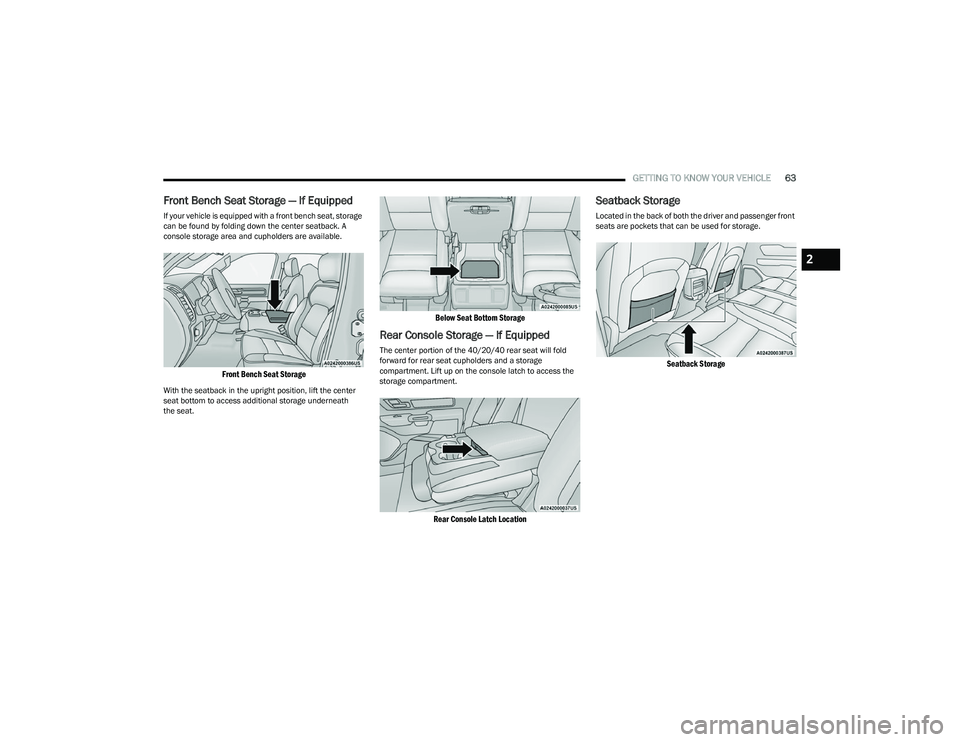
Front Bench Seat Storage — If Equipped
If your vehicle is equipped with a front bench seat, storage
can be found by folding down the center seatback. A
console storage area and cupholders are available.
Front Bench Seat Storage
With the seatback in the upright position, lift the center
seat bottom to access additional storage underneath
the seat.
Below Seat Bottom Storage
Rear Console Storage — If Equipped
The center portion of the 40/20/40 rear seat will fold
forward for rear seat cupholders and a storage
compartment. Lift up on the console latch to access the
storage compartment.
Rear Console Latch Location
Seatback Storage
Located in the back of both the driver and passenger front
seats are pockets that can be used for storage.
Seatback Storage
2
23_DT_OM_EN_USC_t.book Page 63
Page 66 of 416
64GETTING TO KNOW YOUR VEHICLE
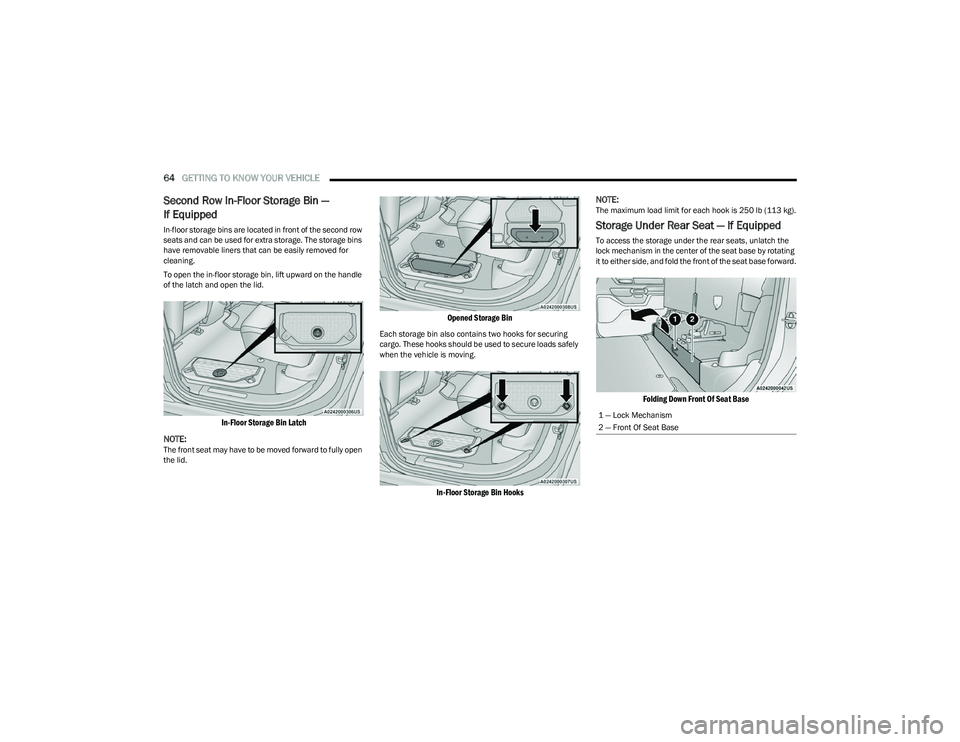
Second Row In-Floor Storage Bin —
If Equipped
In-floor storage bins are located in front of the second row
seats and can be used for extra storage. The storage bins
have removable liners that can be easily removed for
cleaning.
To open the in-floor storage bin, lift upward on the handle
of the latch and open the lid.
In-Floor Storage Bin Latch
NOTE:
The front seat may have to be moved forward to fully open
the lid.
Opened Storage Bin
Each storage bin also contains two hooks for securing
cargo. These hooks should be used to secure loads safely
when the vehicle is moving.
In-Floor Storage Bin Hooks
NOTE:
The maximum load limit for each hook is 250 lb (113 kg).
Storage Under Rear Seat — If Equipped
To access the storage under the rear seats, unlatch the
lock mechanism in the center of the seat base by rotating
it to either side, and fold the front of the seat base forward.
Folding Down Front Of Seat Base
1 — Lock Mechanism
2 — Front Of Seat Base
23_DT_OM_EN_USC_t.book Page 64
Page 67 of 416

GETTING TO KNOW YOUR VEHICLE65
Flip the inside of the base upward into the upright position,
locking into place, creating and extended storage area.
Fully Extended Storage Area
NOTE:
The rear seats do not need to be folded up to access this
feature.
USB/AUX CONTROL
Located on the center stack, just below the instrument
panel, is the main media hub. There are four total USB
ports: Two Mini-USBs (Type C) and two Standard USBs
(Type A). There is also an AUX port located in the middle of
the USB ports.
Plugging in a smartphone device to a USB port may
activate Android Auto™ or Apple CarPlay® features, if
equipped. For further information, refer to “Android
Auto™” or “Apple CarPlay®” in the Uconnect Radio
Instruction Manual.
NOTE:Two devices can be plugged in at the same time, and both
ports will provide charging capabilities. Only one port can
transfer data to the system at a time. A pop-up will appear
and allow you to select the device transferring data.
For example, if a device is plugged into the Type A USB port
and another device is plugged into the Type C USB port, a
message will appear and allow you to select which device
to use.
Center Stack USB/AUX Media Hub
The third and fourth USB ports are located behind the
center console, above the power inverter. Both are charge
only.
Rear USB Ports
Applicable to only Uconnect 5/5 NAV With 8.4-inch
Display, and Uconnect 5 NAV With 12-inch Display radios,
different scenarios are listed below when a non-phone
device is plugged into the smaller and larger USB ports,
and when a phone device is plugged into the smaller and
larger USB ports:
“A new device is now connected. Previous connection
was lost”.
“(Phone Name) now connected. Previous connection
was lost”.
“Another device is in use through the same USB port.
Please disconnect the first device to use the second
device”.
1 — Standard USB Type A Port #1
2 — AUX Port
3 — Standard USB Type A Port #2
1 — Rear Charge Only USB Ports 1
2 — Rear Charge Only USB Ports 2
2
23_DT_OM_EN_USC_t.book Page 65
Page 76 of 416
74GETTING TO KNOW YOUR VEHICLE
HOOD
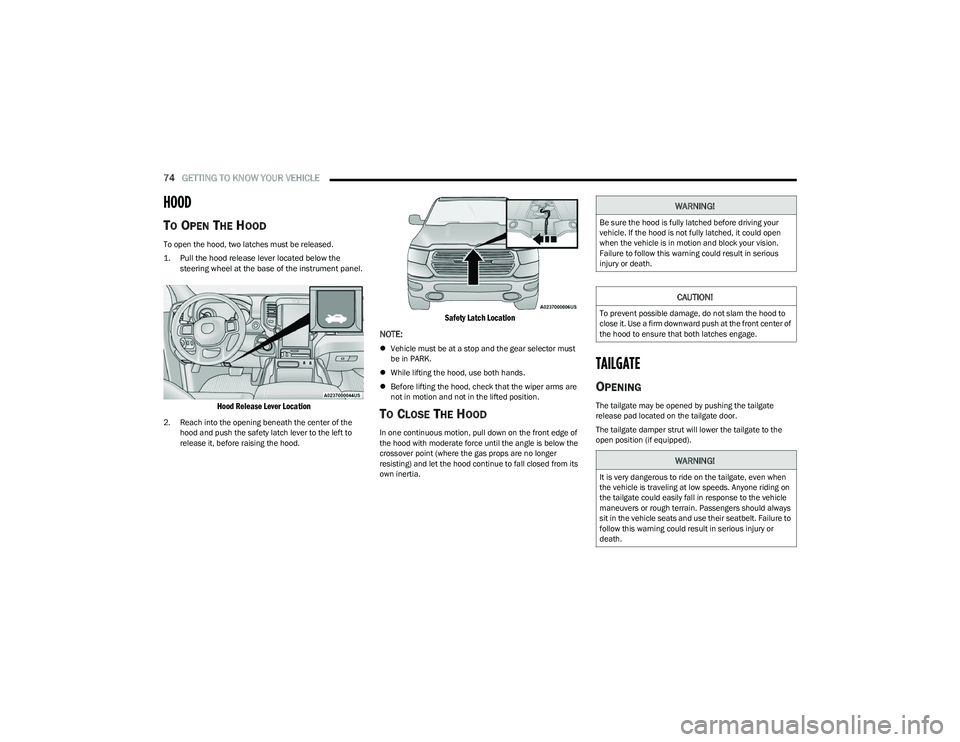
TO OPEN THE HOOD
To open the hood, two latches must be released.
1. Pull the hood release lever located below the
steering wheel at the base of the instrument panel.
Hood Release Lever Location
2. Reach into the opening beneath the center of the hood and push the safety latch lever to the left to
release it, before raising the hood.
Safety Latch Location
NOTE:
Vehicle must be at a stop and the gear selector must
be in PARK.
While lifting the hood, use both hands.
Before lifting the hood, check that the wiper arms are
not in motion and not in the lifted position.
TO CLOSE THE HOOD
In one continuous motion, pull down on the front edge of
the hood with moderate force until the angle is below the
crossover point (where the gas props are no longer
resisting) and let the hood continue to fall closed from its
own inertia.
TAILGATE
OPENING
The tailgate may be opened by pushing the tailgate
release pad located on the tailgate door.
The tailgate damper strut will lower the tailgate to the
open position (if equipped).
WARNING!
Be sure the hood is fully latched before driving your
vehicle. If the hood is not fully latched, it could open
when the vehicle is in motion and block your vision.
Failure to follow this warning could result in serious
injury or death.
CAUTION!
To prevent possible damage, do not slam the hood to
close it. Use a firm downward push at the front center of
the hood to ensure that both latches engage.
WARNING!
It is very dangerous to ride on the tailgate, even when
the vehicle is traveling at low speeds. Anyone riding on
the tailgate could easily fall in response to the vehicle
maneuvers or rough terrain. Passengers should always
sit in the vehicle seats and use their seatbelt. Failure to
follow this warning could result in serious injury or
death.
23_DT_OM_EN_USC_t.book Page 74
Page 82 of 416
80GETTING TO KNOW YOUR VEHICLE
You can carry wide building materials (sheets of plywood,
etc.) by building a raised load floor. Place lumber across
the box in the indentations provided above the wheel
housings and in the bulkhead dividers to form the floor.
There are stampings in the sheet metal on the inner side
bulkheads of the box in front of and behind both wheel
housings. Place wooden boards across the box from side
to side to create separate load compartments in the
pickup box. There are four tie-down cleats bolted to the lower sides of
the pickup box that can sustain loads up to 1,000 lb
(450 kg) total.
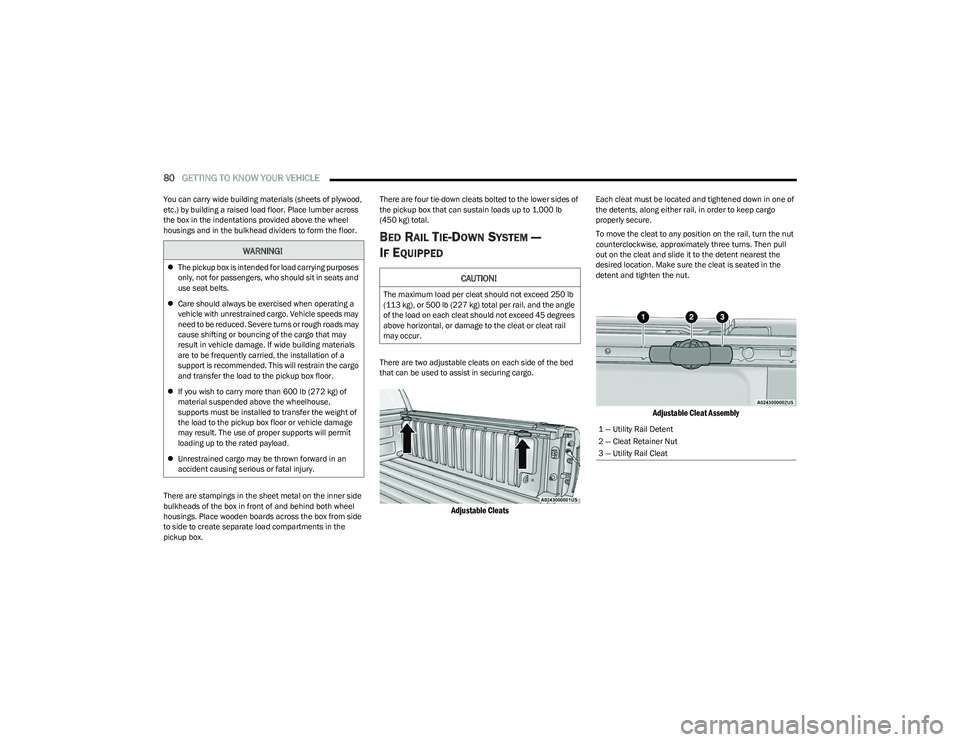
BED RAIL TIE-DOWN SYSTEM —
I
F EQUIPPED
There are two adjustable cleats on each side of the bed
that can be used to assist in securing cargo.
Adjustable Cleats
Each cleat must be located and tightened down in one of
the detents, along either rail, in order to keep cargo
properly secure.
To move the cleat to any position on the rail, turn the nut
counterclockwise, approximately three turns. Then pull
out on the cleat and slide it to the detent nearest the
desired location. Make sure the cleat is seated in the
detent and tighten the nut.
Adjustable Cleat Assembly
WARNING!
The pickup box is intended for load carrying purposes
only, not for passengers, who should sit in seats and
use seat belts.
Care should always be exercised when operating a
vehicle with unrestrained cargo. Vehicle speeds may
need to be reduced. Severe turns or rough roads may
cause shifting or bouncing of the cargo that may
result in vehicle damage. If wide building materials
are to be frequently carried, the installation of a
support is recommended. This will restrain the cargo
and transfer the load to the pickup box floor.
If you wish to carry more than 600 lb (272 kg) of
material suspended above the wheelhouse,
supports must be installed to transfer the weight of
the load to the pickup box floor or vehicle damage
may result. The use of proper supports will permit
loading up to the rated payload.
Unrestrained cargo may be thrown forward in an
accident causing serious or fatal injury.CAUTION!
The maximum load per cleat should not exceed 250 lb
(113 kg), or 500 lb (227 kg) total per rail, and the angle
of the load on each cleat should not exceed 45 degrees
above horizontal, or damage to the cleat or cleat rail
may occur.
1 — Utility Rail Detent
2 — Cleat Retainer Nut
3 — Utility Rail Cleat
23_DT_OM_EN_USC_t.book Page 80
Page 109 of 416

GETTING TO KNOW YOUR INSTRUMENT PANEL107
NOTE:
The charging system is independent from load reduc -
tion. The charging system performs a diagnostic on the
charging system continuously.
If the Battery Charge Warning Light is on it may indicate
a problem with the charging system
Úpage 108.
The electrical loads that may be switched off (if equipped),
and vehicle functions which can be affected by load
reduction:
Heated Seats / Vented Seats / Heated Wheel
Rear Defroster And Heated Mirrors
HVAC System
115 Volts AC Power Inverter System
Audio and Telematics System
Loss of the battery charge may indicate one or more of the
following conditions:
The charging system cannot deliver enough electrical
power to the vehicle system because the electrical
loads are larger than the capability of charging system.
The charging system is still functioning properly.
Turning on all possible vehicle electrical loads
(e.g. HVAC to max settings, exterior and interior lights,
overloaded power outlets +12 Volts, 115 Volts AC, USB
ports) during certain driving conditions (city driving,
towing, frequent stopping).
Installing options like additional lights, upfitter
electrical accessories, audio systems, alarms and
similar devices.
Unusual driving cycles (short trips separated by long
parking periods).
The vehicle was parked for an extended period of time
(weeks, months).
The battery was recently replaced and was not charged
completely.
The battery was discharged by an electrical load left on
when the vehicle was parked.
The battery was used for an extended period with the
engine not running to supply radio, lights, chargers,
+12 Volt portable appliances like vacuum cleaners,
game consoles and similar devices.
What to do when an electrical load reduction action
message is present (“Battery Saver On” or “Battery Saver
Mode”)
During a trip:
Reduce power to unnecessary loads if possible:
Turn off redundant lights (interior or exterior).
Check what may be plugged in to power outlets
+12 Volts, 115 Volts AC, USB ports.
Check HVAC settings (blower, temperature).
Check the audio settings (volume). After a trip:
Check if any aftermarket equipment was installed
(additional lights, upfitter electrical accessories, audio
systems, alarms) and review specifications if any
(load and Ignition Off Draw currents).
Evaluate the latest driving cycles (distance, driving
time and parking time).
The vehicle should have service performed if the
message is still present during consecutive trips and
the evaluation of the vehicle and driving pattern did not
help to identify the cause.
WARNING LIGHTS AND MESSAGES
The warning/indicator lights will illuminate in the
instrument panel together with a dedicated message
and/or acoustic signal when applicable. These indications
are indicative and precautionary and as such must not be
considered as exhaustive and/or alternative to the
information contained in the Owner’s Manual, which you
are advised to read carefully in all cases. Always refer to
the information in this chapter in the event of a failure
indication. All active telltales will display first if applicable.
The system check menu may appear different based upon
equipment options and current vehicle status. Some
telltales are optional and may not appear.
3
23_DT_OM_EN_USC_t.book Page 107
Page 196 of 416
194MULTIMEDIA
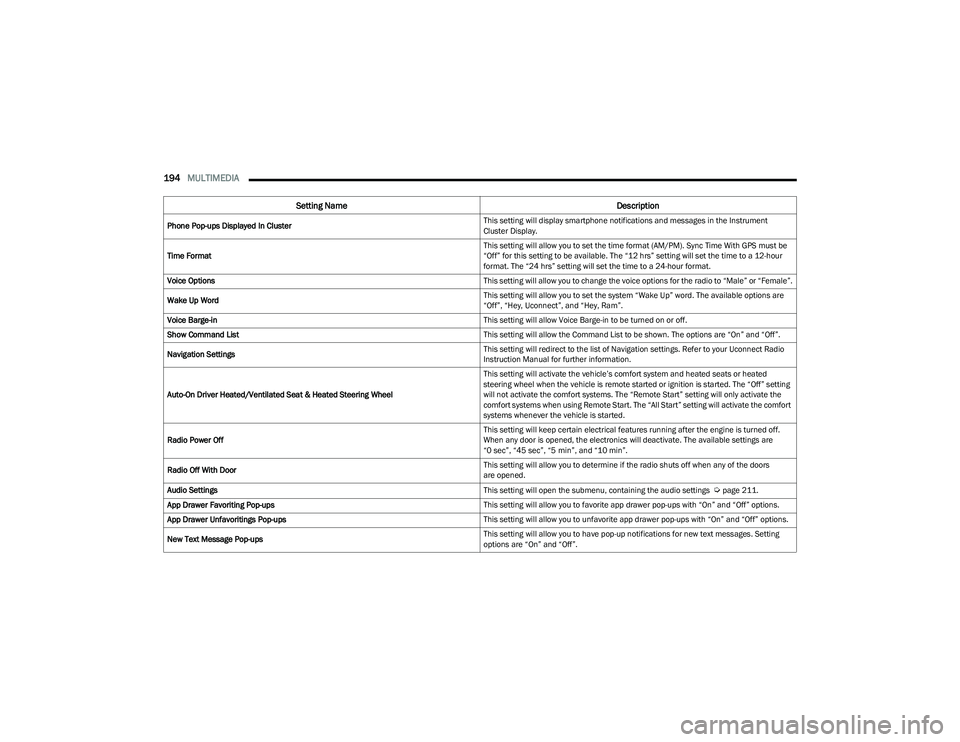
Phone Pop-ups Displayed In Cluster This setting will display smartphone notifications and messages in the Instrument
Cluster Display.
Time Format This setting will allow you to set the time format (AM/PM). Sync Time With GPS must be
“Off” for this setting to be available. The “12 hrs” setting will set the time to a 12-hour
format. The “24 hrs” setting will set the time to a 24-hour format.
Voice Options This setting will allow you to change the voice options for the radio to “Male” or “Female”.
Wake Up Word This setting will allow you to set the system “Wake Up” word. The available options are
“Off”, “Hey, Uconnect”, and “Hey, Ram”.
Voice Barge-in This setting will allow Voice Barge-in to be turned on or off.
Show Command List This setting will allow the Command List to be shown. The options are “On” and “Off”.
Navigation Settings This setting will redirect to the list of Navigation settings. Refer to your Uconnect Radio
Instruction Manual for further information.
Auto-On Driver Heated/Ventilated Seat & Heated Steering Wheel This setting will activate the vehicle’s comfort system and heated seats or heated
steering wheel when the vehicle is remote started or ignition is started. The “Off” setting
will not activate the comfort systems. The “Remote Start” setting will only activate the
comfort systems when using Remote Start. The “All Start” setting will activate the comfort
systems whenever the vehicle is started.
Radio Power Off This setting will keep certain electrical features running after the engine is turned off.
When any door is opened, the electronics will deactivate. The available settings are
“0 sec”, “45 sec”, “5 min”, and “10 min”.
Radio Off With Door This setting will allow you to determine if the radio shuts off when any of the doors
are opened.
Audio Settings This setting will open the submenu, containing the audio settings
Úpage 211.
App Drawer Favoriting Pop-ups This setting will allow you to favorite app drawer pop-ups with “On” and “Off” options.
App Drawer Unfavoritings Pop-ups This setting will allow you to unfavorite app drawer pop-ups with “On” and “Off” options.
New Text Message Pop-ups This setting will allow you to have pop-up notifications for new text messages. Setting
options are “On” and “Off”.
Setting Name
Description
23_DT_OM_EN_USC_t.book Page 194
Page 210 of 416

208MULTIMEDIA
Seats & Comfort/Auto-On Comfort Systems
Key Off Options/Engine Off Options
When Seats & Comfort/Auto-On Comfort Systems button is pressed on the touchscreen, the system displays the options related to the vehicle’s comfort systems when remote start
has been activated or the vehicle has been started.
NOTE:Depending on the vehicle’s options, feature settings may vary.
Setting Name Description
Auto-On Driver Heated/Ventilated Seat & Heated Steering Wheel With Vehicle Start This setting will activate the vehicle’s comfort systems and heated seats or heated
steering wheel when the vehicle is remote started or ignition is started. The “Off” setting
will not activate the comfort systems. The “Remote Start” setting will only activate the
comfort systems when using Remote Start. The “All Start” setting will activate the comfort
systems whenever the vehicle is started.
Easy Exit Seats This setting will automatically move the driver seat rearward when the engine is shut off.
The available settings are “On” and “Off”.
When the Key Off Options/Engine Off Options button is pressed on the touchscreen, the system displays the options related to vehicle shutoff. These settings will only activate when
the ignition is set to OFF.
NOTE:Depending on the vehicle’s options, feature settings may vary.
Setting Name
Description
Easy Exit Seat This setting adjusts the seats to make exiting the vehicle easier.
Key Off Power Delay/Engine Off Power Delay This setting will keep certain electrical features running after the engine is turned off.
When any door is opened, the electronics will deactivate. The available settings are
“0 sec”, “45 sec”, “5 min”, and “10 min”.
23_DT_OM_EN_USC_t.book Page 208
Page 265 of 416
SAFETY263
REAR SEAT REMINDER ALERT (RSRA)
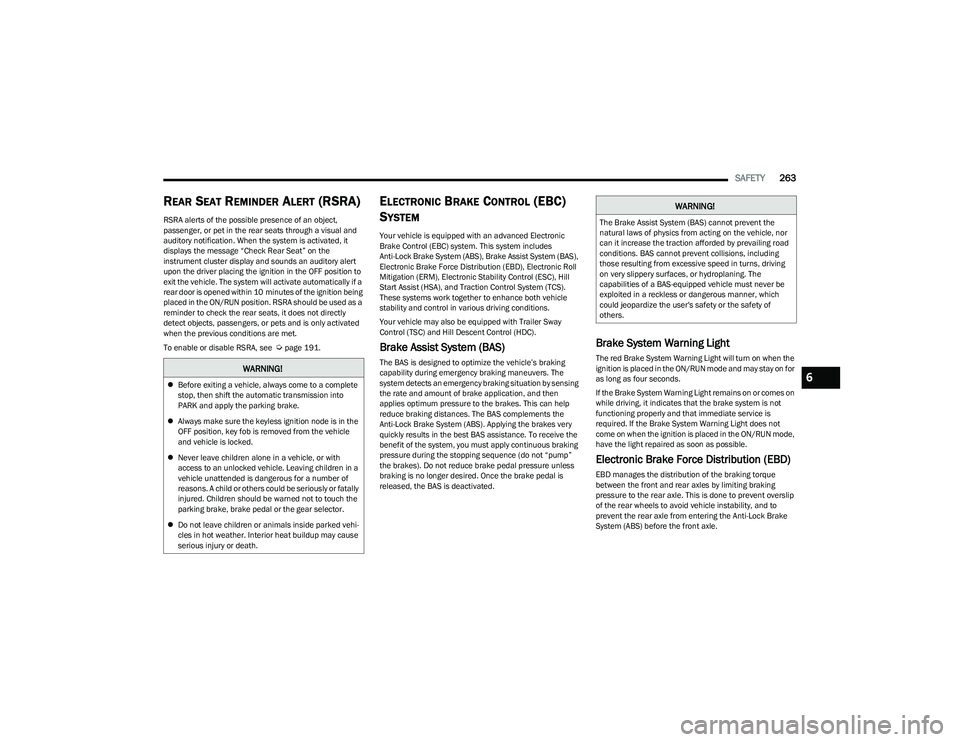
RSRA alerts of the possible presence of an object,
passenger, or pet in the rear seats through a visual and
auditory notification. When the system is activated, it
displays the message “Check Rear Seat” on the
instrument cluster display and sounds an auditory alert
upon the driver placing the ignition in the OFF position to
exit the vehicle. The system will activate automatically if a
rear door is opened within 10 minutes of the ignition being
placed in the ON/RUN position. RSRA should be used as a
reminder to check the rear seats, it does not directly
detect objects, passengers, or pets and is only activated
when the previous conditions are met.
To enable or disable RSRA, see
Úpage 191.
ELECTRONIC BRAKE CONTROL (EBC)
S
YSTEM
Your vehicle is equipped with an advanced Electronic
Brake Control (EBC) system. This system includes
Anti-Lock Brake System (ABS), Brake Assist System (BAS),
Electronic Brake Force Distribution (EBD), Electronic Roll
Mitigation (ERM), Electronic Stability Control (ESC), Hill
Start Assist (HSA), and Traction Control System (TCS).
These systems work together to enhance both vehicle
stability and control in various driving conditions.
Your vehicle may also be equipped with Trailer Sway
Control (TSC) and Hill Descent Control (HDC).
Brake Assist System (BAS)
The BAS is designed to optimize the vehicle’s braking
capability during emergency braking maneuvers. The
system detects an emergency braking situation by sensing
the rate and amount of brake application, and then
applies optimum pressure to the brakes. This can help
reduce braking distances. The BAS complements the
Anti-Lock Brake System (ABS). Applying the brakes very
quickly results in the best BAS assistance. To receive the
benefit of the system, you must apply continuous braking
pressure during the stopping sequence (do not “pump”
the brakes). Do not reduce brake pedal pressure unless
braking is no longer desired. Once the brake pedal is
released, the BAS is deactivated.
Brake System Warning Light
The red Brake System Warning Light will turn on when the
ignition is placed in the ON/RUN mode and may stay on for
as long as four seconds.
If the Brake System Warning Light remains on or comes on
while driving, it indicates that the brake system is not
functioning properly and that immediate service is
required. If the Brake System Warning Light does not
come on when the ignition is placed in the ON/RUN mode,
have the light repaired as soon as possible.
Electronic Brake Force Distribution (EBD)
EBD manages the distribution of the braking torque
between the front and rear axles by limiting braking
pressure to the rear axle. This is done to prevent overslip
of the rear wheels to avoid vehicle instability, and to
prevent the rear axle from entering the Anti-Lock Brake
System (ABS) before the front axle.
WARNING!
Before exiting a vehicle, always come to a complete
stop, then shift the automatic transmission into
PARK and apply the parking brake.
Always make sure the keyless ignition node is in the
OFF position, key fob is removed from the vehicle
and vehicle is locked.
Never leave children alone in a vehicle, or with
access to an unlocked vehicle. Leaving children in a
vehicle unattended is dangerous for a number of
reasons. A child or others could be seriously or fatally
injured. Children should be warned not to touch the
parking brake, brake pedal or the gear selector.
Do not leave children or animals inside parked vehi -
cles in hot weather. Interior heat buildup may cause
serious injury or death.
WARNING!
The Brake Assist System (BAS) cannot prevent the
natural laws of physics from acting on the vehicle, nor
can it increase the traction afforded by prevailing road
conditions. BAS cannot prevent collisions, including
those resulting from excessive speed in turns, driving
on very slippery surfaces, or hydroplaning. The
capabilities of a BAS-equipped vehicle must never be
exploited in a reckless or dangerous manner, which
could jeopardize the user's safety or the safety of
others.
6
23_DT_OM_EN_USC_t.book Page 263