tires RAM 1500 2023 Owner's Manual
[x] Cancel search | Manufacturer: RAM, Model Year: 2023, Model line: 1500, Model: RAM 1500 2023Pages: 416, PDF Size: 20.59 MB
Page 282 of 416

280SAFETY
The system will be activated when a positive increase in
tire pressure is detected by the TPMS while inflating the
tire. The ignition must be in the RUN mode, with the
transmission in PARK.
NOTE:It is not required to have the engine running to enter Tire
Fill Alert mode.
The hazard lamps will come on to confirm the vehicle is in
Tire Fill Alert mode.
When Tire Fill Alert mode is entered, the tire pressure
display screen will be displayed in the instrument cluster.
If the hazard lamps do not come on while inflating the tire,
the TPMS sensor may be out of range preventing the TPMS
sensor signal from being received. In this case, the vehicle
may need to be moved either forward or backward slightly
to exit the null spot.
Operation:
The horn will sound once to let the user know when to
stop filling the tire, when it reaches recommended
pressure.
The horn will sound three times if the tire is overfilled
and will continue to sound every five seconds if the
user continues to inflate the tire.
The horn will sound once again when enough air is let
out to reach proper inflation level.
The horn will also sound three times if the tire is then
underinflated and will continue to sound every five
seconds if the user continues to deflate the tire.
Trailer Tire Pressure Monitoring System
(TTPMS) — If Equipped
The Trailer Tire Pressure Monitoring System (TTPMS) is a
feature that displays the trailer tire pressure values and
warns the driver of a low tire pressure event based on the
driver’s set target tire pressure value, through TTPMS
settings found in the radio.
The TTPMS monitors the pressure of each tire and warns
the driver through the instrument cluster, when either a
low tire pressure condition falls below 25% of the driver’s
set pressure or if a system malfunction occurs. The
instrument cluster will display the actual tire pressure or
dashes for each of the trailer tires in the correct trailer
position, based on trailer configuration. The TTPMS can
support up to 12 trailer tires per configured trailer on up to
four configurable trailers
Úpage 191.
Trailer Tire Pressure Monitoring System
Trailer Tire Pressure Sensor Pairing
In order use this feature, the provided tire pressure
sensors must be installed in the desired trailer tires and
the sensors must be paired to the truck. If the target trailer
requires more than the provided four sensors, additional
sensors can be purchased at an authorized Ram
dealership.
With the sensors installed and the trailer near or
connected to your Ram truck, initiate the pairing process
by entering the settings menu in the radio and selecting
trailer. Select the desired trailer profile to pair to, open the
“Tire Pressure” menu, and hit “Setup All Tires”
Úpage 191.
NOTE:The vehicle may not be driven until the pairing process is
complete.
Trailer Tire Pressure Settings
23_DT_OM_EN_USC_t.book Page 280
Page 283 of 416

SAFETY281
Trailer Tire Pressure Pairing
Follow the on screen prompts to select the number of
axles (1-3), the number of trailer tires (2, 4, 6, 8, or 12),
and the set trailer tire pressure. The range is selectable
anywhere between 25-125 psi (172-862 kPa).
Once psi (kPa) is programmed, the pairing screen
appears. Tire sensors must be paired in order shown.
Starting with Tire 1, deflate tire by 5 psi (34 kPa) and wait
for a horn chirp. It may take up to three minutes for the
chirp to occur, indicating that the sensor has paired.
Repeat process on each tire, in order, until complete.
Do not exit the pairing screen until process is complete.
If pairing was unsuccessful, a double horn chirp will
sound, and a prompt on the touchscreen will allow you to
retry the procedure; “Retry” will only appear when setup
fails. Each tire must be successfully paired during a single
pairing process to receive the success screen.
NOTE:If the pairing process times out after three minutes of no
communication with a sensor, a double horn chip will
occur indicating the pairing has failed and a message will
display on the radio indicating the process was unsuc -
cessful. Under certain circumstances, the double horn
chirp may continue to happen every three minutes indi -
cating the failed pairing. If this happens, the horn chirping
may be canceled by cycling the ignition button OFF and
then back to RUN position.
Tire Pressure Monitoring System Low Pressure Warnings
When a tire pressure low in one or more of the active road
tires is detected, the instrument cluster will display a
message stating “Trailer Tire Pressure Low”.
The instrument cluster will then display the TTPMS graphic
showing the pressure values of each tire with the low tire
pressure values in a different color.
Should this occur, you should stop as soon as possible
and inflate the tires with a low pressure condition (those in
a different color in the instrument cluster graphic) to the
customer programmed target tire pressure value as
shown at the top of the TTPMS instrument cluster graphic.
Once the tire(s) are inflated, the system will automatically
update the graphic display in the instrument cluster,
returning to its original color. The vehicle may need to be
driven for up to 10 minutes above 15 mph (24 km/h) in
order for the TTPMS to receive the updated information. Service TTPMS Warning
If a system fault is detected, the instrument cluster will
display a “Trailer Tire Pressure System Service Required”
message for a minimum of five seconds.
Once the system fault is corrected the "Trailer Tire
Pressure System Service Required" message will no
longer be displayed. The vehicle may need to be driven for
up to 10 minutes above 15 mph (24 km/h) in order for the
TTPMS to receive the trailer tire pressure information.
Trailer Tire Pressure System Not Configured
A “Trailer Tire Pressure System Not Configured” message
will be displayed in the instrument cluster on the TTPMS
instrument cluster graphic when a trailer number is
selected that has not had trailer tire pressure sensors
paired. To correct this condition, see
Úpage 191.
Trailer Sensors Detected Do Not Match Active Trailer
The “Trailer Sensors Detected Do Not Match Active
Trailer” message will be displayed in the instrument
cluster when the trailer sensors being received by the
TTPMS module do not match the trailer sensors paired to
the current trailer number selected. This message will be
displayed when the sensors being received completely
match the sensors paired to another trailer number
configured in the TTPMS module.
To correct this condition, the correct trailer number must
be selected in the radio
Úpage 191.
6
23_DT_OM_EN_USC_t.book Page 281
Page 314 of 416

312SAFETY
(Continued)
(Continued)
Floor Mat Safety Information
Always use floor mats designed to fit your vehicle. Only use
a floor mat that does not interfere with the operation of the
accelerator, brake or clutch pedals. Only use a floor mat
that is securely attached using the floor mat fasteners so
it cannot slip out of position and interfere with the
accelerator, brake or clutch pedals or impair safe
operation of your vehicle in other ways.
PERIODIC SAFETY CHECKS YOU SHOULD
M
AKE OUTSIDE THE VEHICLE
Tires
Examine tires for excessive tread wear and uneven wear
patterns. Check for stones, nails, glass, or other objects
lodged in the tread or sidewall. Inspect the tread for cuts
and cracks. Inspect sidewalls for cuts, cracks, and bulges.
Check the lug nut/bolt torque for tightness. Check the
tires (including spare) for proper cold inflation pressure.
WARNING!
An improperly attached, damaged, folded, or stacked
floor mat, or damaged floor mat fasteners may cause
your floor mat to interfere with the accelerator, brake, or
clutch pedals and cause a loss of vehicle control.
To prevent SERIOUS INJURY or DEATH:
ALWAYS securely attach your floor mat
using the floor mat fasteners. DO NOT
install your floor mat upside down or turn
your floor mat over. Lightly pull to confirm
mat is secured using the floor mat fasteners on a
regular basis.
ALWAYS REMOVE THE EXISTING FLOOR
MAT FROM THE VEHICLE before installing
any other floor mat. NEVER install or stack
an additional floor mat on top of an
existing floor mat.
ONLY install floor mats designed to fit your vehicle.
NEVER install a floor mat that cannot be properly
attached and secured to your vehicle. If a floor mat
needs to be replaced, only use a FCA approved floor
mat for the specific make, model, and year of your
vehicle.
ONLY use the driver’s side floor mat on the driver’s
side floor area. To check for interference, with the
vehicle properly parked with the engine off, fully
depress the accelerator, the brake, and the clutch
pedal (if present) to check for interference. If your
floor mat interferes with the operation of any pedal,
or is not secure to the floor, remove the floor mat
from the vehicle and place the floor mat in your
trunk.
ONLY use the passenger’s side floor mat on the
passenger’s side floor area.
ALWAYS make sure objects cannot fall or slide into
the driver’s side floor area when the vehicle is
moving. Objects can become trapped under acceler -
ator, brake, or clutch pedals and could cause a loss
of vehicle control.
NEVER place any objects under the floor mat (e.g.,
towels, keys, etc.). These objects could change the
position of the floor mat and may cause interference
with the accelerator, brake, or clutch pedals.
WARNING!
If the vehicle carpet has been removed and
re-installed, always properly attach carpet to the floor
and check the floor mat fasteners are secure to the
vehicle carpet. Fully depress each pedal to check for
interference with the accelerator, brake, or clutch
pedals then re-install the floor mats.
It is recommended to only use mild soap and water
to clean your floor mats. After cleaning, always check
your floor mat has been properly installed and is
secured to your vehicle using the floor mat fasteners
by lightly pulling mat.
WARNING!
23_DT_OM_EN_USC_t.book Page 312
Page 319 of 416
IN CASE OF EMERGENCY317
NOTE:
Your vehicle may be transmitting data as authorized by
the subscriber.
Never place anything on or near the vehicle’s LTE
(voice/data) or 4G (data) and GPS antennas. You could
prevent LTE (voice/data) or 4G (data) and GPS signal
reception, which can prevent your vehicle from placing
an emergency call. An operable LTE (voice/data) or 4G
(data) network connection and a GPS signal is required
for the SOS Call system to function properly.
NOTE:Changes or modifications not expressly approved by the
party responsible for compliance could void the user's
authority to operate the equipment.
Automatic SOS — If Equipped
Automatic SOS is a hands-free safety service that can
immediately connect you with help in the event that your
vehicle’s airbags deploy. Please refer to your provided
radio supplement for complete information.
JACKING AND TIRE CHANGING
Use this QR code to access your digital
experience. NOTE:
If your vehicle is equipped with an air suspension system,
there is a feature which allows the automatic leveling to be
disabled to assist with changing a tire. This feature can be
activated through the Uconnect system
Úpage 209.
PREPARATIONS FOR JACKING
NOTE:If your vehicle is equipped with Air Suspension, you will
need to enable Tire Jack Mode in the Uconnect system
before changing the tire
Úpage 134.
1. Park on a firm, level surface. Avoid ice or slippery areas.
2. Turn on the Hazard Warning Flashers.
3. Apply the parking brake.
4. Shift the transmission into PARK (P).
5. Turn the ignition OFF.
WARNING!
Do not attempt to change a tire on the side of the
vehicle close to moving traffic. Pull far enough off the
road to avoid the danger of being hit when operating
the jack or changing the wheel.
Being under a jacked-up vehicle is dangerous. The
vehicle could slip off the jack and fall on you. You
could be crushed. Never put any part of your body
under a vehicle that is on a jack. If you need to get
under a raised vehicle, take it to a service center
where it can be raised on a lift.
Never start or run the engine while the vehicle is on
a jack.
The jack is designed to be used as a tool for changing
tires only. The jack should not be used to lift the
vehicle for service purposes. The vehicle should be
jacked on a firm level surface only. Avoid ice or slip -
pery areas.
WARNING!
Do not attempt to change a tire on the side of the
vehicle close to moving traffic. Pull far enough off the
road to avoid being hit when operating the jack or
changing the wheel.
7
23_DT_OM_EN_USC_t.book Page 317
Page 323 of 416
IN CASE OF EMERGENCY321
JACKING INSTRUCTIONS
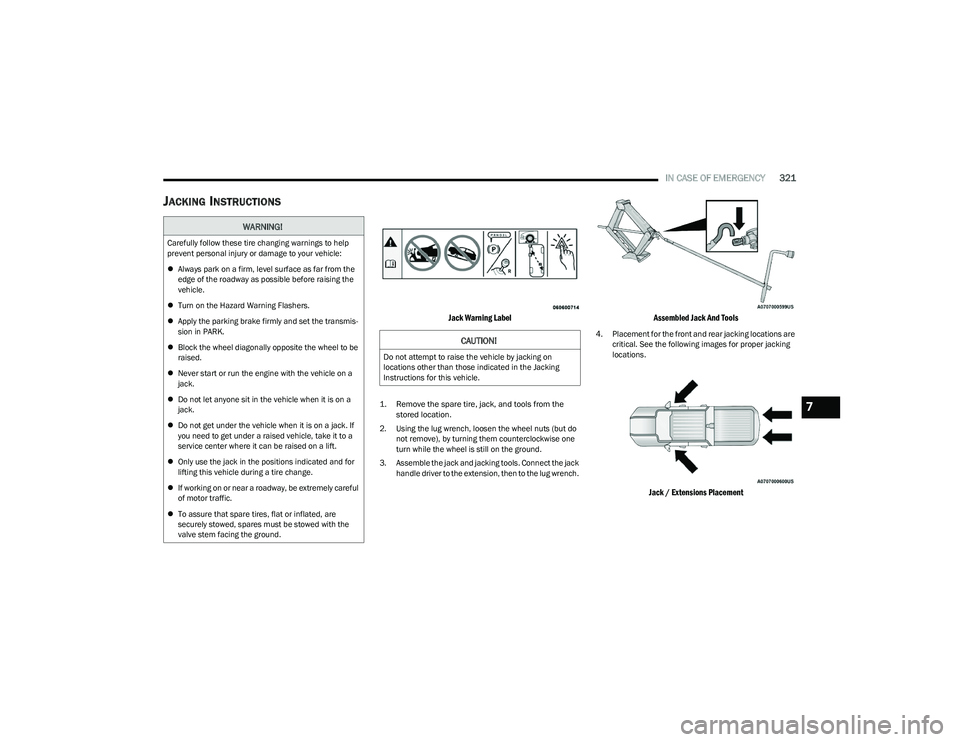
Jack Warning Label
1. Remove the spare tire, jack, and tools from the
stored location.
2. Using the lug wrench, loosen the wheel nuts (but do not remove), by turning them counterclockwise one
turn while the wheel is still on the ground.
3. Assemble the jack and jacking tools. Connect the jack handle driver to the extension, then to the lug wrench.
Assembled Jack And Tools
4. Placement for the front and rear jacking locations are critical. See the following images for proper jacking
locations.
Jack / Extensions Placement
WARNING!
Carefully follow these tire changing warnings to help
prevent personal injury or damage to your vehicle:
Always park on a firm, level surface as far from the
edge of the roadway as possible before raising the
vehicle.
Turn on the Hazard Warning Flashers.
Apply the parking brake firmly and set the transmis -
sion in PARK.
Block the wheel diagonally opposite the wheel to be
raised.
Never start or run the engine with the vehicle on a
jack.
Do not let anyone sit in the vehicle when it is on a
jack.
Do not get under the vehicle when it is on a jack. If
you need to get under a raised vehicle, take it to a
service center where it can be raised on a lift.
Only use the jack in the positions indicated and for
lifting this vehicle during a tire change.
If working on or near a roadway, be extremely careful
of motor traffic.
To assure that spare tires, flat or inflated, are
securely stowed, spares must be stowed with the
valve stem facing the ground.
CAUTION!
Do not attempt to raise the vehicle by jacking on
locations other than those indicated in the Jacking
Instructions for this vehicle.
7
23_DT_OM_EN_USC_t.book Page 321
Page 331 of 416
IN CASE OF EMERGENCY329
To Reset The Manual Park Release:
1. Apply firm pressure to the brake pedal while seated
in the driver’s seat.
2. Pull the tether strap out again, then release it.
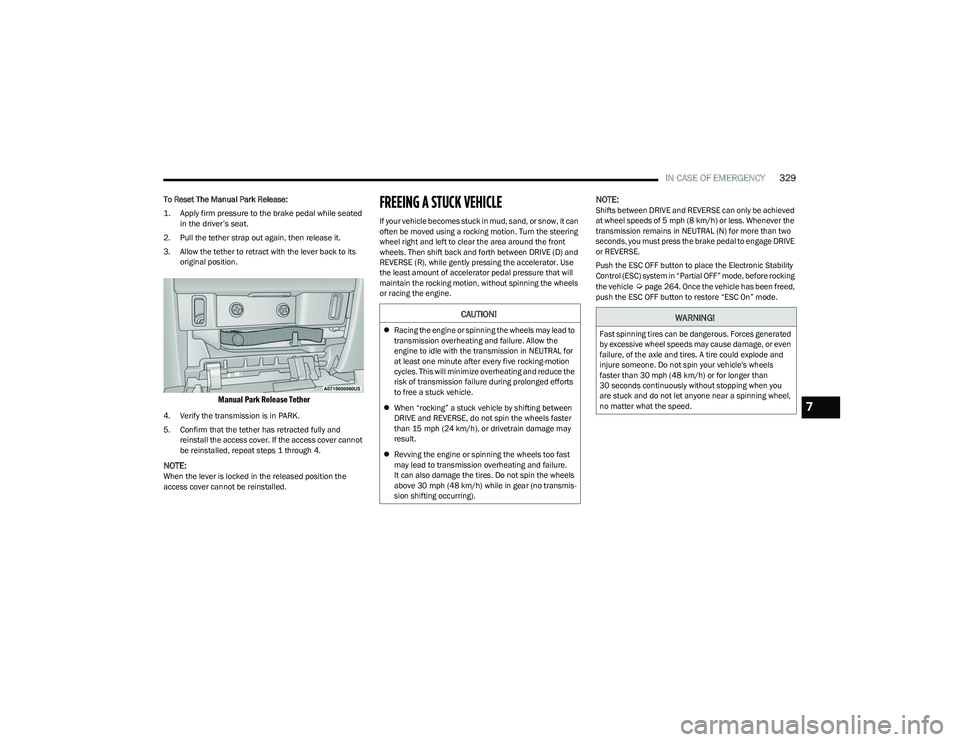
3. Allow the tether to retract with the lever back to its original position.
Manual Park Release Tether
4. Verify the transmission is in PARK.
5. Confirm that the tether has retracted fully and reinstall the access cover. If the access cover cannot
be reinstalled, repeat steps 1 through 4.
NOTE:When the lever is locked in the released position the
access cover cannot be reinstalled.
FREEING A STUCK VEHICLE
If your vehicle becomes stuck in mud, sand, or snow, it can
often be moved using a rocking motion. Turn the steering
wheel right and left to clear the area around the front
wheels. Then shift back and forth between DRIVE (D) and
REVERSE (R), while gently pressing the accelerator. Use
the least amount of accelerator pedal pressure that will
maintain the rocking motion, without spinning the wheels
or racing the engine.
NOTE:Shifts between DRIVE and REVERSE can only be achieved
at wheel speeds of 5 mph (8 km/h) or less. Whenever the
transmission remains in NEUTRAL (N) for more than two
seconds, you must press the brake pedal to engage DRIVE
or REVERSE.
Push the ESC OFF button to place the Electronic Stability
Control (ESC) system in “Partial OFF” mode, before rocking
the vehicle
Úpage 264. Once the vehicle has been freed,
push the ESC OFF button to restore “ESC On” mode.
CAUTION!
Racing the engine or spinning the wheels may lead to
transmission overheating and failure. Allow the
engine to idle with the transmission in NEUTRAL for
at least one minute after every five rocking-motion
cycles. This will minimize overheating and reduce the
risk of transmission failure during prolonged efforts
to free a stuck vehicle.
When “rocking” a stuck vehicle by shifting between
DRIVE and REVERSE, do not spin the wheels faster
than 15 mph (24 km/h), or drivetrain damage may
result.
Revving the engine or spinning the wheels too fast
may lead to transmission overheating and failure.
It can also damage the tires. Do not spin the wheels
above 30 mph (48 km/h) while in gear (no transmis -
sion shifting occurring).
WARNING!
Fast spinning tires can be dangerous. Forces generated
by excessive wheel speeds may cause damage, or even
failure, of the axle and tires. A tire could explode and
injure someone. Do not spin your vehicle's wheels
faster than 30 mph (48 km/h) or for longer than
30 seconds continuously without stopping when you
are stuck and do not let anyone near a spinning wheel,
no matter what the speed.
7
23_DT_OM_EN_USC_t.book Page 329
Page 335 of 416
333
SERVICING AND MAINTENANCE
SCHEDULED SERVICING
Your vehicle is equipped with an automatic oil change
indicator system. The oil change indicator system will
remind you that it is time to take your vehicle in for
scheduled maintenance.
Based on engine operation conditions, the oil change
indicator message will illuminate. This means that service
is required for your vehicle. Operating conditions such as
frequent short-trips, trailer tow, and extremely hot or cold
ambient temperatures will influence when the “Oil Change
Required” message is displayed. Have your vehicle
serviced as soon as possible, within the next 500 miles
(805 km).An authorized dealer will reset the oil change indicator
message after completing the scheduled oil change. If a
scheduled oil change is performed by someone other than
an authorized dealer, the message can be reset by
referring to the steps described under Instrument Cluster
Display
Úpage 98.
NOTE:Under no circumstances should oil change intervals
exceed 10,000 miles (16,000 km), 12 months or
350 hours of engine run time, whichever comes first.
The 350 hours of engine run or idle time is generally only
a concern for fleet customers.
Once A Month Or Before A Long Trip:
Check engine oil level.
Check windshield washer fluid level.
Check tire pressure and look for unusual wear or
damage. Rotate tires at the first sign of irregular
wear, even if it occurs before the oil indicator system
turns on.
Check the fluid levels of the coolant reservoir, brake
master cylinder, and fill as needed.
Check function of all interior and exterior lights.
8
23_DT_OM_EN_USC_t.book Page 333
Page 336 of 416
334SERVICING AND MAINTENANCE
MAINTENANCE PLAN
Refer to the Maintenance Plan for required maintenance. More frequent maintenance may be needed in severe conditions, such as dusty areas and very short trip driving. In some
extreme conditions, additional maintenance not specified in the maintenance schedule may be required.
NOTE:Using white lithium grease, lubricate the door hinge roller pivot joints twice a year to prevent premature wear.
At Every Oil Change Interval As Indicated By Oil Change Indicator System
Change the oil and filter.
Rotate the tires at the first sign of irregular wear, even if it occurs before the oil indicator system turns on.
Inspect the battery and clean and tighten terminals as required.
Inspect the CV/Universal joints.
Inspect the brake pads, shoes, rotors, drums, and hoses.
Inspect the engine cooling system protection and hoses.
Inspect the exhaust system.
Inspect the engine air cleaner if using in dusty or off-road conditions, replace the engine air cleaner, as necessary.
Inspect and replace the Evaporative System Fresh Air Filter as necessary; replacement may be more frequent if vehicle is operated in extreme dusty conditions.
23_DT_OM_EN_USC_t.book Page 334
Page 372 of 416
370SERVICING AND MAINTENANCE
TIRES
TIRE SAFETY INFORMATION
Tire safety information will cover aspects of the following
information: Tire Markings, Tire Identification Numbers,
Tire Terminology and Definitions, Tire Pressures, and Tire
Loading.
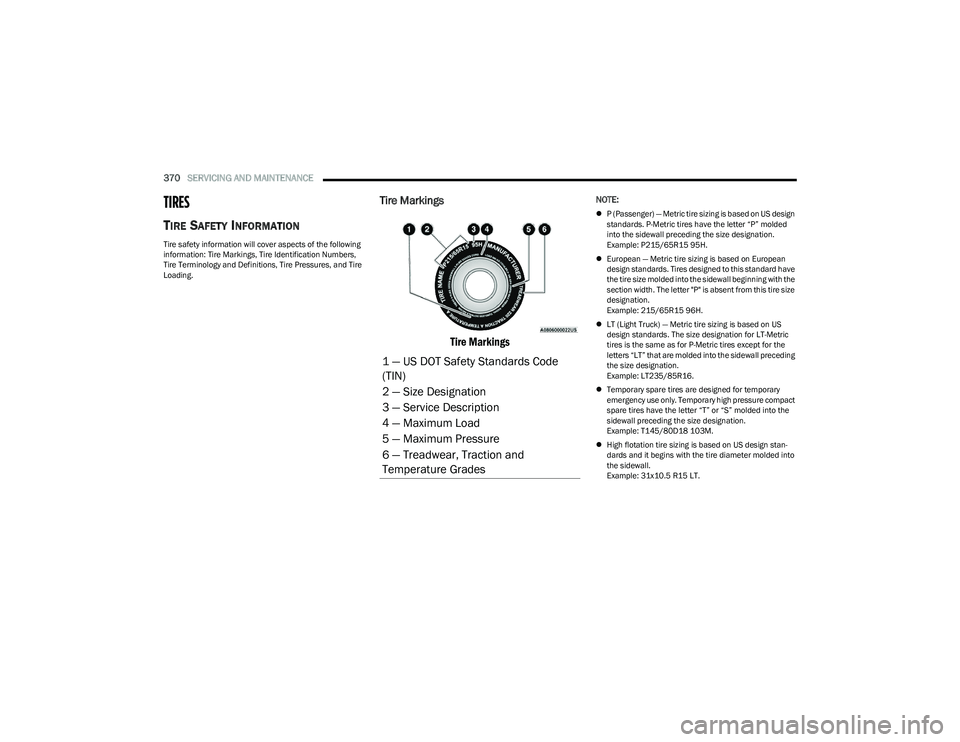
Tire Markings
Tire Markings
NOTE:
P (Passenger) — Metric tire sizing is based on US design
standards. P-Metric tires have the letter “P” molded
into the sidewall preceding the size designation.
Example: P215/65R15 95H.
European — Metric tire sizing is based on European
design standards. Tires designed to this standard have
the tire size molded into the sidewall beginning with the
section width. The letter "P" is absent from this tire size
designation.
Example: 215/65R15 96H.
LT (Light Truck) — Metric tire sizing is based on US
design standards. The size designation for LT-Metric
tires is the same as for P-Metric tires except for the
letters “LT” that are molded into the sidewall preceding
the size designation.
Example: LT235/85R16.
Temporary spare tires are designed for temporary
emergency use only. Temporary high pressure compact
spare tires have the letter “T” or “S” molded into the
sidewall preceding the size designation.
Example: T145/80D18 103M.
High flotation tire sizing is based on US design stan -
dards and it begins with the tire diameter molded into
the sidewall.
Example: 31x10.5 R15 LT.
1 — US DOT Safety Standards Code
(TIN)
2 — Size Designation
3 — Service Description
4 — Maximum Load
5 — Maximum Pressure
6 — Treadwear, Traction and
Temperature Grades
23_DT_OM_EN_USC_t.book Page 370
Page 374 of 416
372SERVICING AND MAINTENANCE
Tire Identification Number (TIN)
The Tire Identification Number (TIN) may be found on one or both sides of the tire; however, the date code may only be on one side. Tires with white sidewalls will have the full TIN,
including the date code, located on the white sidewall side of the tire. Look for the TIN on the outboard side of black sidewall tires as mounted on the vehicle. If the TIN is not found on
the outboard side, then you will find it on the inboard side of the tire.Load Identification:
Absence of the following load identification symbols on the sidewall of the tire indicates a Standard Load (SL) tire:
XL = Extra load (or reinforced) tire, or
LL = Light load tire or
C, D, E, F, G = Load range associated with the maximum load a tire can carry at a specified pressure
Maximum Load – Maximum load indicates the maximum load this tire is designed to carry
Maximum Pressure – Maximum pressure indicates the maximum permissible cold tire inflation pressure for this tire
EXAMPLE:
EXAMPLE:
DOT MA L9 ABCD 0301
DOT = Department of Transportation
This symbol certifies that the tire is in compliance with the US Department of Transportation tire safety standards and is approved for highway use
MA = Code representing the tire manufacturing location (two digits)
L9 = Code representing the tire size (two digits)
ABCD = Code used by the tire manufacturer (one to four digits)
23_DT_OM_EN_USC_t.book Page 372