audio Ram 3500 2019 Owner's Guide
[x] Cancel search | Manufacturer: RAM, Model Year: 2019, Model line: 3500, Model: Ram 3500 2019Pages: 696, PDF Size: 13.89 MB
Page 620 of 696

618 MULTIMEDIA
Phone/Bluetooth Settings
After pressing the “Phone/Bluetooth Settings” button on the touchscreen, the following settings will be available:
SiriusXM Setup — If Equipped
After pressing the “SiriusXM Setup” button on the touchscreen, the following settings will be available:Setting Name
Selectable Options
Phone Pop-ups Displayed in Cluster — If Equipped On
Off
Do Not Disturb List of Settings
NOTE:
Press “Do Not Disturb” to access the available settings. The following settings are: Auto Reply (both, text, call), Auto Reply
Message (custom, default) and Custom Auto Reply Message (create message). Paired Phones and Audio Devices List Of Paired Phones and Audio Sources
NOTE:
The “Paired Phones and Audio Devices” feature shows which phones and audio sources are paired to the Phone and Audio
Sources Settings system. For further information, refer to the Uconnect Owner’s Manual Supplement. Smartphone Projection Manager OnOff
Setting Name Selectable Options
Tune Start OnOff
Page 622 of 696

620 MULTIMEDIA
Restore Default Settings
After pressing the “Restore Default Settings” button on the touchscreen, the following settings will be available:
System Information
After pressing the “System Information” button on the touchscreen, the following settings will be available:Setting Name
Selectable Options
Restore Default Settings YesCancel
NOTE:
When the “Restore Settings” feature is selected it resets clock, audio and other features to their default settings.
Setting Name Selectable Options
Software License System Software Information Screen
NOTE:
When the “Software License” feature is selected, a “System Software Information” screen will appear, displaying the system
software version.
Page 623 of 696
MULTIMEDIA 621
Uconnect 4C NAV With 12–inch Display Settings
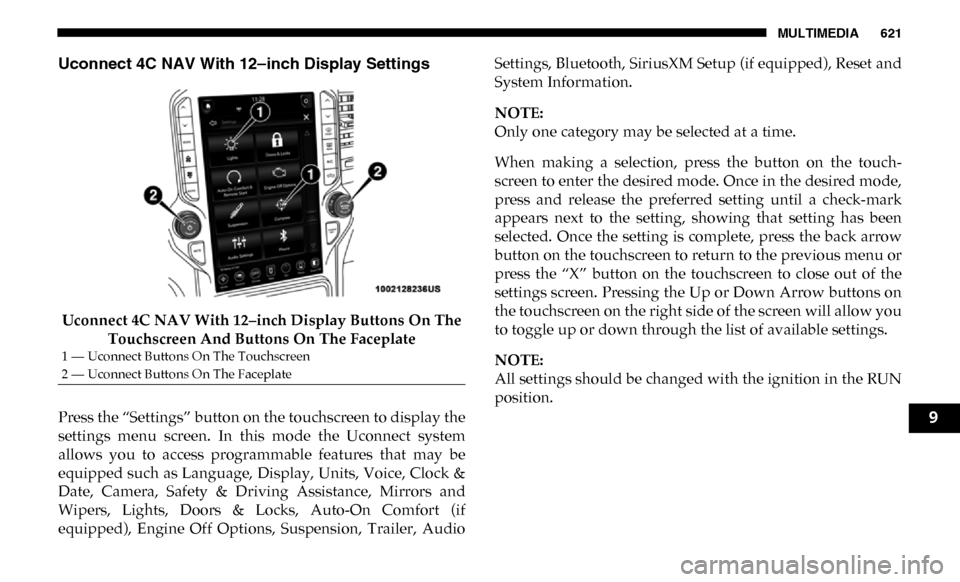
Uconnect 4C NAV With 12–inch Display Buttons On The Touchscreen And Buttons On The Faceplate
Press the “Settings” button on the touchscreen to display the
settings menu screen. In this mode the Uconnect system
allows you to access programmable features that may be
equipped such as Language, Display, Units, Voice, Clock &
Date, Camera, Safety & Driving Assistance, Mirrors and
Wipers, Lights, Doors & Locks, Auto-On Comfort (if
equipped), Engine Off Options, Suspension, Trailer, Audio Settings, Bluetooth, SiriusXM Setup (if equipped), Reset and
System Information.
NOTE:
Only one category may be selected at a time.
When making a selection, press the button on the touch
-
screen to enter the desired mode. Once in the desired mode,
press and release the preferred setting until a check-mark
appears next to the setting, showing that setting has been
selected. Once the setting is complete, press the back arrow
button on the touchscreen to return to the previous menu or
press the “X” button on the touchscreen to close out of the
settings screen. Pressing the Up or Down Arrow buttons on
the touchscreen on the right side of the screen will allow you
to toggle up or down through the list of available settings.
NOTE:
All settings should be changed with the ignition in the RUN
position.
1 — Uconnect Buttons On The Touchscreen
2 — Uconnect Buttons On The Faceplate
9
Page 639 of 696

MULTIMEDIA 637
Audio
After pressing the “Audio” button on the touchscreen, the following settings will be available:Setting Name Selectable Options
Balance/Fade FrontRight Back Left
NOTE:
The “Balance/Fade” feature allows you to adjust the Balance and Fade settings. Press and drag the speaker icon or use the
arrows to adjust, tap the “C” icon to readjust to the center.
Equalizer + –
NOTE:
When in the “Equalizer” display you may adjust the Bass, Mid and Treble settings.
Speed Adjusted
Volume Off
123
NOTE:
The “Speed Adjusted Volume” feature increases or decreases volume relative to vehicle speed.
Surround Sound — If
Equipped On
Off
NOTE:
The “Surround Sound” feature provides simulated surround sound mode.
9
Page 640 of 696

638 MULTIMEDIA
Bluetooth
After pressing the “Bluetooth” button on the touchscreen, the following settings will be available:AUX Volume Offset
— If Equipped
On
Off
NOTE:
The “AUX Volume Offset” feature provides the ability to tune the audio level for portable devices connected through the
AUX input.
Auto Play On Off
Setting Name
Selectable Options
Setting NameSelectable Options
Phone Pop-Ups Displayed in Cluster On
Off
Do Not Disturb List of Settings
NOTE:
Press “Do Not Disturb” to access the available settings. The following settings are: Auto Reply (both, text, call), Auto Reply
Message (custom, default) and Custom Auto Reply Message (create message). Paired Phones and Audio Devices List Of Paired Phones and Audio Sources
NOTE:
The “Paired Phones and Audio Sources” feature shows which phones and audio sources are paired to the Phone and Audio
Sources Settings system. For further information, refer to the Uconnect Owner’s Manual Supplement.
Page 644 of 696
642 MULTIMEDIA
STEERING WHEEL AUDIO CONTROLS — IF
EQUIPPED
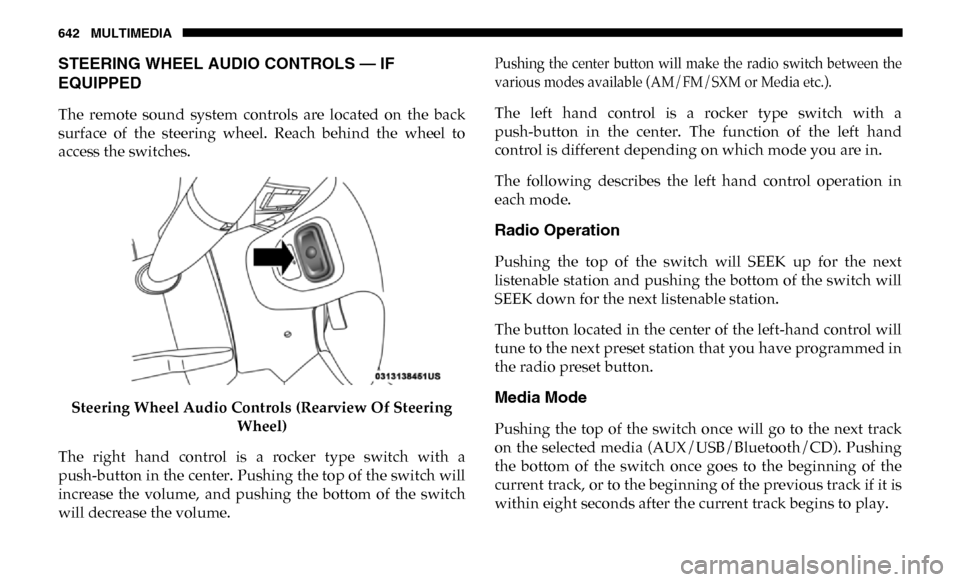
The remote sound system controls are located on the back
surface of the steering wheel. Reach behind the wheel to
access the switches.Steering Wheel Audio Controls (Rearview Of Steering Wheel)
The right hand control is a rocker type switch with a
push-button in the center. Pushing the top of the switch will
increase the volume, and pushing the bottom of the switch
will decrease the volume.
Pushing the center button will make the radio switch between the
various modes available (AM/FM/SXM or Media etc.).
The left hand control is a rocker type switch with a
push-button in the center. The function of the left hand
control is different depending on which mode you are in.
The following describes the left hand control operation in
each mode.
Radio Operation
Pushing the top of the switch will SEEK up for the next
listenable station and pushing the bottom of the switch will
SEEK down for the next listenable station.
The button located in the center of the left-hand control will
tune to the next preset station that you have programmed in
the radio preset button.
Media Mode
Pushing the top of the switch once will go to the next track
on the selected media (AUX/USB/Bluetooth/CD). Pushing
the bottom of the switch once goes to the beginning of the
current track, or to the beginning of the previous track if it is
within eight seconds after the current track begins to play.
Page 680 of 696

INDEX
A
Adaptive Cruise Control (ACC) (Cruise Control) ............. 357
Adding Engine Coolant (Antifreeze) ................................... 524
Adding Fuel ............................................................................. 408
Additives, Fuel ........................................................................ 568
Adjust Down....................................................................................... 44
Forward .................................................................................. 44
Rearward ................................................................................ 44
Up ............................................................................................ 44
Adjustable Pedals...................................................................... 56
Air Bag Air Bag Operation ............................................................... 249Air Bag Warning Light ....................................................... 245
Enhanced Accident Response ................................... 255, 498
Event Data Recorder (EDR) ............................................... 498
If Deployment Occurs ........................................................ 254
Knee Impact Bolsters .......................................................... 249Maintaining Your Air Bag System.................................... 256
Maintenance......................................................................... 256
Transporting Pets ................................................................ 286
Air Bag Light ........................................................... 180, 245, 287
Air Cleaner, Engine (Engine Air Cleaner Filter) ................ 509
Air Conditioner Maintenance ............................................... 511 Air Conditioner Refrigerant ..........................................511, 512
Air Conditioner System..........................................................511
Air Conditioning ................................................................. 79, 90
Air Conditioning Filter .....................................................93, 512
Air Conditioning System .........................................................91
Air Conditioning, Operating Tips ..........................................91
Air Filter ...................................................................................509
Air Pressure Tires .......................................................................................542
Alarm Panic ........................................................................................19
Security Alarm ...............................................................32, 181
Alterations/Modifications Vehicle.....................................................................................15
Android Auto ..........................................................................668
Antifreeze (Engine Coolant) ..........................................523, 571 Disposal ................................................................................525
Anti-Lock Brake System (ABS) .............................................195
Anti-Lock Warning Light.......................................................187
Apple CarPlay .........................................................................670
Assist, Hill Start .......................................................................198
Audio Systems (Radio)........................................................... 575
Auto Down Power Windows ..................................................95
Auto Unlock, Doors ................................................................306
Page 691 of 696

689
Sliding Rear Window, Power .................................................. 96Snow Chains (Tire Chains) .................................................... 552
Snow Plow ............................................................................... 427
Snow Tires................................................................................ 548
Spare Tire Changing ............................................................... 469
Spare Tire Stowage ................................................................. 483
Spare Tires................................................................ 548, 549, 550
Spark Plugs .............................................................................. 572
Speed Control Accel/Decel.......................................................................... 356
Cancel.................................................................................... 357Resume ................................................................................. 357
Speed Control (Cruise Control) .................................... 354, 357
Stabilizer/Sway Bar System .................................................. 322
Starting ............................................................................. 290, 292 Automatic Transmission .................................................... 291
Button...................................................................................... 25
Cold Weather ....................................................................... 296Engine Fails To Start ........................................................... 295
Starting And Operating ......................................................... 292
Starting Procedures ................................................................ 292
Starting Procedures (Gas Engines) ....................................... 290
Steering Tilt Column ............................................................................ 54
Wheel, Heated ................................................................. 54, 55
Wheel, Tilt .............................................................................. 54 Steering Wheel Audio Controls ............................................642
Steering Wheel Mounted Sound System Controls .............642
Steps, Power Side ......................................................................35
Storage ...................................................................................... 111
Storage Compartment, Center Seat ......................................113
Storage, Vehicle .................................................................92, 557
Storing Your Vehicle ...............................................................557
Sun Roof .............................................................................97, 100
Sunglasses Storage ..................................................................130
Sunshade Operation .................................................................99
Sway Control, Trailer .............................................................205
Synthetic Engine Oil ...............................................................508 T
Tailgate .....................................................................................144
Tailgate, Electronic Lowering................................................102
Telescoping Steering Column .................................................54
Temperature Control, Automatic (ATC) ...............................91
Tilt Down .......................................................................................44
Up ............................................................................................44
Tilt Steering Column ................................................................54
Tip Start ....................................................................................291
Tire And Loading Information Placard ...............................537
Tire Changing ..........................................................................469
Tire Markings ..........................................................................531
Tire Safety Information ..........................................................531
11