heating RENAULT KANGOO Z.E. 2018 Owners Manual
[x] Cancel search | Manufacturer: RENAULT, Model Year: 2018, Model line: KANGOO Z.E., Model: RENAULT KANGOO Z.E. 2018Pages: 230, PDF Size: 5.03 MB
Page 7 of 230

1.1
Section 1: Getting to know your vehicle
Electric vehicle: introduction . . . . . . . . . . . . . . . . . . . . . . . . . . . . . . . . . . . .\
. . . . . . . . . . . . . . . . . . . 1.2
Important recommendations . . . . . . . . . . . . . . . . . . . . . . . . . . . . . . . . . . . .\
. . . . . . . . . . . . . . . . . . . 1.8
Electric vehicle: charging . . . . . . . . . . . . . . . . . . . . . . . . . . . . . . . . . . . . \
. . . . . . . . . . . . . . . . . . . . . . 1.9
Key, radio frequency remote control: general information, use, deadlocking . . . . . . . . . . . . . . . . . . 1.17
Doors . . . . . . . . . . . . . . . . . . . . . . . . . . . . . . . . . . . . \
. . . . . . . . . . . . . . . . . . . . . . . . . . . . . . . . . . . . . 1.22
Automatic locking when driving . . . . . . . . . . . . . . . . . . . . . . . . . . . . . . . . . . . . \
. . . . . . . . . . . . . . . . . 1.28
Headrests/Front seats . . . . . . . . . . . . . . . . . . . . . . . . . . . . . . . . . . . . \
. . . . . . . . . . . . . . . . . . . . . . . . 1.29
Roof flap . . . . . . . . . . . . . . . . . . . . . . . . . . . . . . . . . . . .\
. . . . . . . . . . . . . . . . . . . . . . . . . . . . . . . . . . 1.34
Swivelling partition . . . . . . . . . . . . . . . . . . . . . . . . . . . . . . . . . . . . \
. . . . . . . . . . . . . . . . . . . . . . . . . . . 1.36
Seat belts. . . . . . . . . . . . . . . . . . . . . . . . . . . . . . . . . . . . \
. . . . . . . . . . . . . . . . . . . . . . . . . . . . . . . . . . 1.37
Methods of restraint in addition to the front seat belts . . . . . . . . . . . . . . . . . . . . . . . . . . . . . . . . . . . . 1.41
Side protection devices . . . . . . . . . . . . . . . . . . . . . . . . . . . . . . . . . . . . \
. . . . . . . . . . . . . . . . . . . . . . . 1.44
Additional methods of restraint . . . . . . . . . . . . . . . . . . . . . . . . . . . . . . . . . . . .\
. . . . . . . . . . . . . . . . . 1.45
Child safety: General information . . . . . . . . . . . . . . . . . . . . . . . . . . . . . . . . . . . .\
. . . . . . . . . . . . . . . 1.46 Choosing a child seat mounting . . . . . . . . . . . . . . . . . . . . . . . . . . . . . . . . . . . . \
. . . . . . . . . . . 1.49
Fitting a child seat . . . . . . . . . . . . . . . . . . . . . . . . . . . . . . . . . . . .\
. . . . . . . . . . . . . . . . . . . . . 1.52
Deactivating/activating the front passenger airbag . . . . . . . . . . . . . . . . . . . . . . . . . . . . . . . . 1.58
Steering wheel/Power-assisted steering . . . . . . . . . . . . . . . . . . . . . . . . . . . . . . . . . . . . \
. . . . . . . . . . 1.61
Driving position . . . . . . . . . . . . . . . . . . . . . . . . . . . . . . . . . . . .\
. . . . . . . . . . . . . . . . . . . . . . . . . . . . . 1.62
Warning lights . . . . . . . . . . . . . . . . . . . . . . . . . . . . . . . . . . . .\
. . . . . . . . . . . . . . . . . . . . . . . . . . . . . . 1.66
Displays and indicators . . . . . . . . . . . . . . . . . . . . . . . . . . . . . . . . . . . .\
. . . . . . . . . . . . . . . . . . . . . . . 1.69
Trip computer . . . . . . . . . . . . . . . . . . . . . . . . . . . . . . . . . . . .\
. . . . . . . . . . . . . . . . . . . . . . . . . . . . . . 1.72
Clock and outdoor temperature . . . . . . . . . . . . . . . . . . . . . . . . . . . . . . . . . . . . \
. . . . . . . . . . . . . . . . . 1.81
Rear view mirrors . . . . . . . . . . . . . . . . . . . . . . . . . . . . . . . . . . . .\
. . . . . . . . . . . . . . . . . . . . . . . . . . . 1.82
Audible and visual signals . . . . . . . . . . . . . . . . . . . . . . . . . . . . . . . . . . . . \
. . . . . . . . . . . . . . . . . . . . . 1.83
Pedestrian horn . . . . . . . . . . . . . . . . . . . . . . . . . . . . . . . . . . . . \
. . . . . . . . . . . . . . . . . . . . . . . . . . . . . 1.84
External lighting and signals . . . . . . . . . . . . . . . . . . . . . . . . . . . . . . . . . . . .\
. . . . . . . . . . . . . . . . . . . 1.85
Headlight beam adjustment . . . . . . . . . . . . . . . . . . . . . . . . . . . . . . . . . . . . \
. . . . . . . . . . . . . . . . . . . . 1.88
Washers, wipers . . . . . . . . . . . . . . . . . . . . . . . . . . . . . . . . . . . .\
. . . . . . . . . . . . . . . . . . . . . . . . . . . . 1.90
Additional heating tank . . . . . . . . . . . . . . . . . . . . . . . . . . . . . . . . . . . .\
. . . . . . . . . . . . . . . . . . . . . . . 1.93
Page 8 of 230
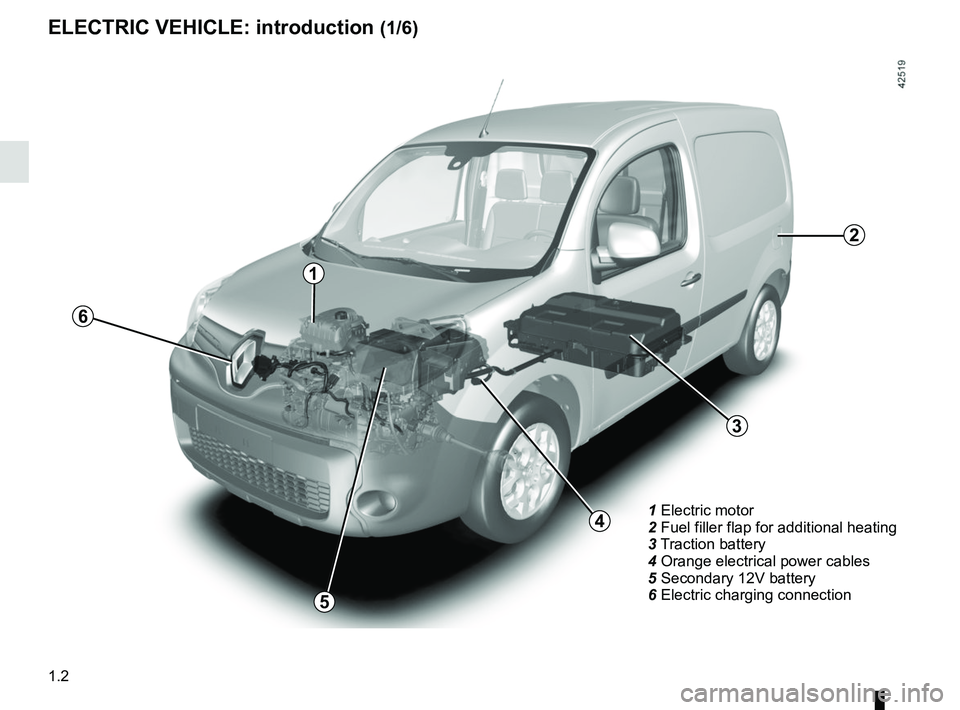
1.2
1 Electric motor
2 Fuel filler flap for additional heating
3 Traction battery
4 Orange electrical power cables
5 Secondary 12V battery
6 Electric charging connection
3
4
5
1
6
ELECTRIC VEHICLE: introduction (1/6)
2
Page 20 of 230
1.14
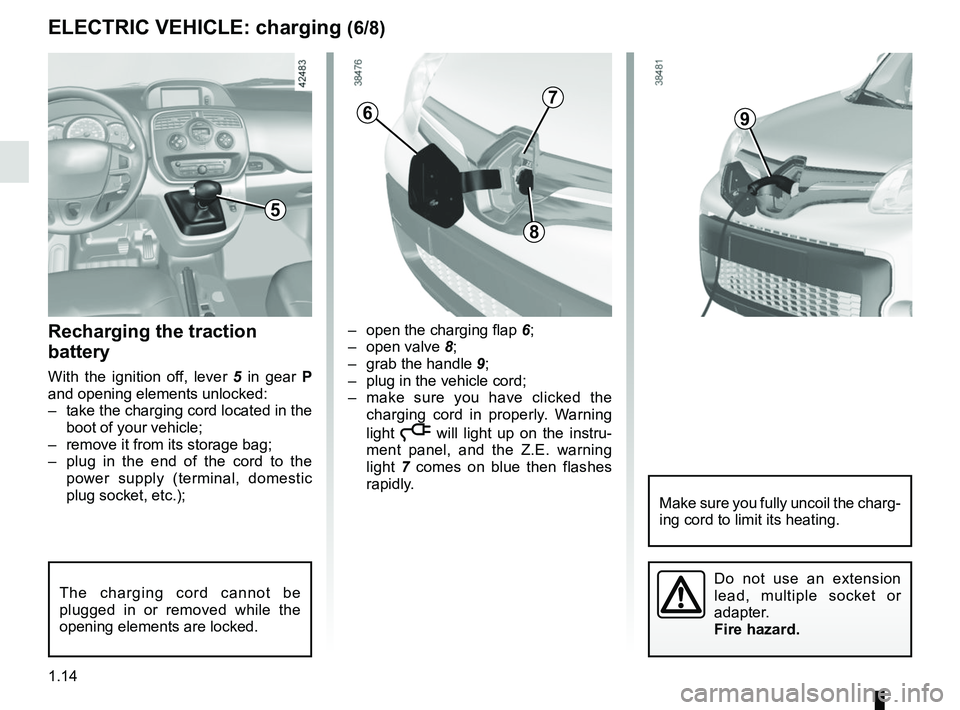
– open the charging flap 6;
– open valve 8;
– grab the handle 9;
– plug in the vehicle cord;
– make sure you have clicked the charging cord in properly. Warning
light
ṋ will light up on the instru-
ment panel, and the Z.E. warning
light 7 comes on blue then flashes
rapidly.
Recharging the traction
battery
With the ignition off, lever 5 in gear P
and opening elements unlocked:
– take the charging cord located in the boot of your vehicle;
– remove it from its storage bag;
– plug in the end of the cord to the power supply (terminal, domestic
plug socket, etc.);
ELECTRIC VEHICLE: charging (6/8)
6
8
The charging cord cannot be
plugged in or removed while the
opening elements are locked.
9
Make sure you fully uncoil the charg-
ing cord to limit its heating.
5
Do not use an extension
lead, multiple socket or
adapter.
Fire hazard.
7
Page 69 of 230
1.63
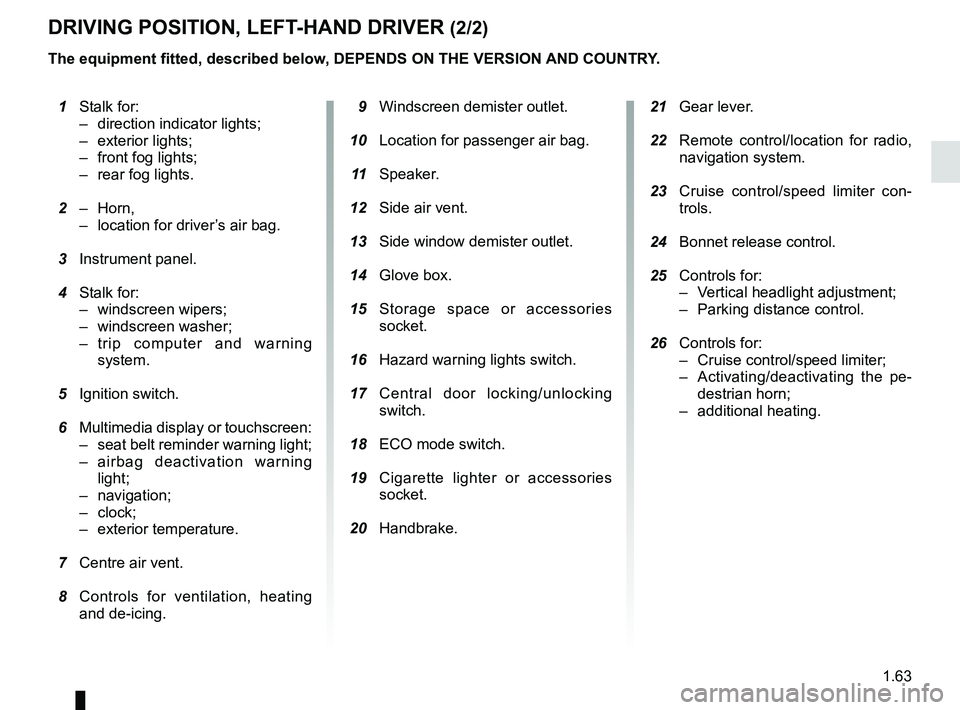
21 Gear lever.
22 Remote control/location for radio,
navigation system.
23 Cruise control/speed limiter con-
trols.
24 Bonnet release control.
25 Controls for:
– Vertical headlight adjustment;
– Parking distance control.
26 Controls for:
– Cruise control/speed limiter;
– Activating/deactivating the pe-destrian horn;
– additional heating.
1 Stalk for:
– direction indicator lights;
– exterior lights;
– front fog lights;
– rear fog lights.
2 – Horn,
– location for driver’s air bag.
3 Instrument panel.
4 Stalk for:
– windscreen wipers;
– windscreen washer;
– trip computer and warning system.
5 Ignition switch.
6 Multimedia display or touchscreen:
– seat belt reminder warning light;
– airbag deactivation warning light;
– navigation;
– clock;
– exterior temperature.
7 Centre air vent.
8 Controls for ventilation, heating
and de-icing. 9 Windscreen demister outlet.
10 Location for passenger air bag.
11 Speaker.
12 Side air vent.
13 Side window demister outlet.
14 Glove box.
15 Storage space or accessories
socket.
16 Hazard warning lights switch.
17 Central door locking/unlocking
switch.
18 ECO mode switch.
19 Cigarette lighter or accessories
socket.
20 Handbrake.
DRIVING POSITION, LEFT-HAND DRIVER (2/2)
The equipment fitted, described below, DEPENDS ON THE VERSION AND COUNTRY.
Page 71 of 230
1.65
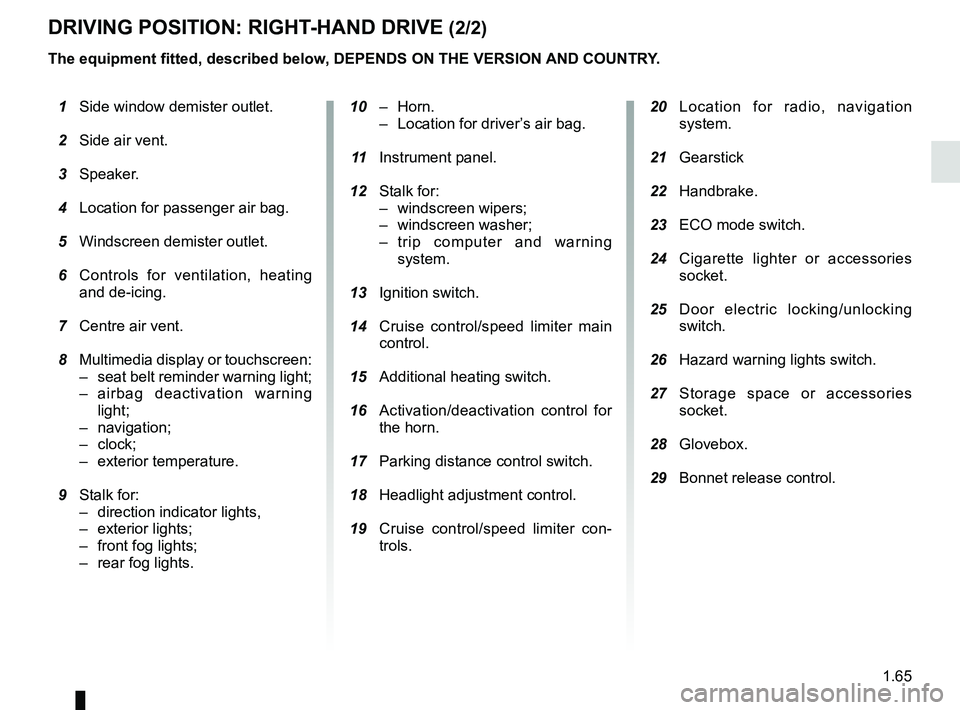
DRIVING POSITION: RIGHT-HAND DRIVE (2/2)
20 Location for radio, navigation
system.
21 Gearstick
22 Handbrake.
23 ECO mode switch.
24 Cigarette lighter or accessories
socket.
25 Door electric locking/unlocking
switch.
26 Hazard warning lights switch.
27 Storage space or accessories
socket.
28 Glovebox.
29 Bonnet release control.
10 – Horn.
– Location for driver’s air bag.
11 Instrument panel.
12 Stalk for:
– windscreen wipers;
– windscreen washer;
– trip computer and warning system.
13 Ignition switch.
14 Cruise control/speed limiter main
control.
15 Additional heating switch.
16 Activation/deactivation control for
the horn.
17 Parking distance control switch.
18 Headlight adjustment control.
19 Cruise control/speed limiter con-
trols.
1 Side window demister outlet.
2 Side air vent.
3 Speaker.
4 Location for passenger air bag.
5 Windscreen demister outlet.
6 Controls for ventilation, heating
and de-icing.
7 Centre air vent.
8 Multimedia display or touchscreen:
– seat belt reminder warning light;
– airbag deactivation warning light;
– navigation;
– clock;
– exterior temperature.
9 Stalk for:
– direction indicator lights,
– exterior lights;
– front fog lights;
–
rear fog lights.
The equipment fitted, described below, DEPENDS ON THE VERSION AND COUNTRY.
Page 73 of 230

The presence and operation of the warning lights DEPEND ON THE EQUIPMENT\
AND COUNTRY.
åIndicator lightAirbag
This comes on when the igni-
tion is switched on and goes out")
1.67
WARNING LIGHTS (2/3)
The presence and operation of the warning lights DEPEND ON THE EQUIPMENT\
AND COUNTRY.
åIndicator lightAirbag
This comes on when the igni-
tion is switched on and goes out after
a few seconds. If it does not come on
when the ignition is switched on or if it
flashes, there is a fault in the system.
Contact an approved Dealer as soon as
possible.
LLow fuel level or additional
heating warning light
This comes on when the ignition is
switched on and goes out after a few
seconds. If it comes on while driving,
accompanied by a beep, this means
the imminent end of fuel power for the
additional heating.
™Seat belt reminder light
Depending on the vehicle, it is
displayed on the instrument panel or on
the central display of the dashboard. It
remains on when the engine is started
if your seat belt is not fastened. A beep
sounds at a low volume for 30 seconds,
then at a high volume for 90 seconds.
DBrake circuit fault warning
light
If it comes on during braking and is ac-
companied by the
® warning light
and a beep, it indicates that the fluid
level in the circuit is low or that there is
a braking system fault. Stop as soon as
traffic conditions allow and contact an
approved Dealer.
© Warning light
This lights up when the ignition is
switched on and goes out as soon as
the engine is started. It can light up in
conjunction with other warning lights
and/or messages on the instrument
panel.
It means you should drive very care-
fully to an approved dealer as soon as
possible. If you fail to follow this recom-
mendation, you risk damaging your ve-
hicle.
Ð ÏCruise control and
speed limiter indica-
tor lights
Refer to the information on the “Speed
limiter” and “Cruise control” in Section
2.
® STOP light
This lights up when the ignition is
switched on and goes out as soon as
the engine is started. It comes on with
other warning lights and/or messages.
It requires you to stop immediately, for
your own safety, as soon as traffic con-
ditions allow. Switch off the engine and
do not restart it.
Contact an approved Dealer.
A
Page 74 of 230

The presence and operation of the warning lights DEPEND ON THE EQUIPMENT\
AND COUNTRY.
Electrotechnical system
warning light
When the blue warning light comes on,
this")
1.68
WARNING LIGHTS (3/3)
The presence and operation of the warning lights DEPEND ON THE EQUIPMENT\
AND COUNTRY.
Electrotechnical system
warning light
When the blue warning light comes on,
this indicates that the traction battery
temperature is too low.
When the orange warning light comes
on, this means the traction battery or
the motor temperature is too high.
If either of these warning lights come
on, this may lead to reduced vehicle
performance.
Opt for a calmer driving style.
xAnti-lock braking warning
light
This lights up when the ignition is
switched on and goes out after a few
seconds.
If it does not go out after the ignition is
switched on, or lights up when driving,
there is a fault with the ABS. Braking
will then be as normal, without the ABS
system.
Contact an approved Dealer as soon as
possible.
\bLow traction battery level
warning light
This comes on when the traction bat-
tery charge level has reached the re-
serve threshold. Please see the infor-
mation on “Displays and indicators” in
Section 1.
Electrotechnical system
warning light
If this comes on while driving, it indi-
cates an electrotechnical fault relating
to the “400V” electrical circuit. Please
contact an authorised dealer as soon
as possible.
A
LLow fuel level or additional
heating warning light
This comes on when the ignition is
switched on and goes out after a few
seconds. When driving, if it comes on
together with a beep, the minimum fuel
level has been reached.
Driving correction device
warning light
Please refer to the information on
“Driver correction devices and aids” in
Section 2.
Tyre pressure loss warning
Please refer to the information
on the “Tyre pressure loss warning” in
Section 2.
Page 84 of 230

1.78
Information messagesThese can help in the vehicle starting phase, or give information about \
a selection or a driving status.
Examples of information messages are given in the following pages.Examples of messages Interpretation of messages
“CHARGE REMAIN 02:10” Indicates the time remaining before a full charge.
“NO MESSAGE AVAILABLE” No warning is stored.
“BRAKE THE VEHICLE” Follow these instructions: risk of damage to the motor.
“BOILER STOPPED” Indicates a halt to the additional heating due to lack of fuel in the ta\
nk.
“PERFORMANCE LIMITED” Indicates deterioration of vehicle performance.
“BATT CHARGE IMPOSSIBLE” Indicates that the charging is prohibited by your battery rental organis\
ation. Rectify
the situation.
“AUTO LIGHTS DEACTIVATED” Indicates that the automatic lights function is deactivated.
TRIP COMPUTER AND WARNING SYSTEM: information messages
Page 97 of 230
1.91
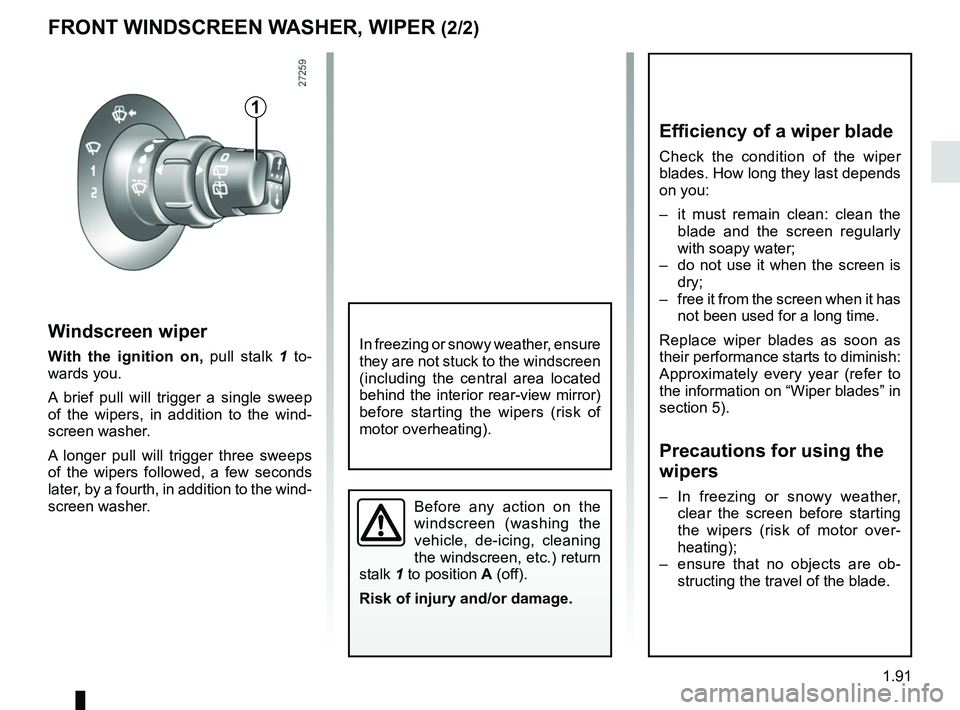
Windscreen wiper
With the ignition on, pull stalk 1 to-
wards you.
A brief pull will trigger a single sweep
of the wipers, in addition to the wind-
screen washer.
A longer pull will trigger three sweeps
of the wipers followed, a few seconds
later, by a fourth, in addition to the wind-
screen washer.
FRONT WINDSCREEN WASHER, WIPER (2/2)
1
Before any action on the
windscreen (washing the
vehicle, de-icing, cleaning
the windscreen, etc.) return
stalk 1 to position A (off).
Risk of injury and/or damage.
In freezing or snowy weather, ensure
they are not stuck to the windscreen
(including the central area located
behind the interior rear-view mirror)
before starting the wipers (risk of
motor overheating).
Efficiency of a wiper blade
Check the condition of the wiper
blades. How long they last depends
on you:
– it must remain clean: clean the blade and the screen regularly
with soapy water;
– do not use it when the screen is dry;
– free it from the screen when it has not been used for a long time.
Replace wiper blades as soon as
their performance starts to diminish:
Approximately every year (refer to
the information on “Wiper blades” in
section 5).
Precautions for using the
wipers
– In freezing or snowy weather, clear the screen before starting
the wipers (risk of motor over-
heating);
– ensure that no objects are ob- structing the travel of the blade.
Page 98 of 230
1.92
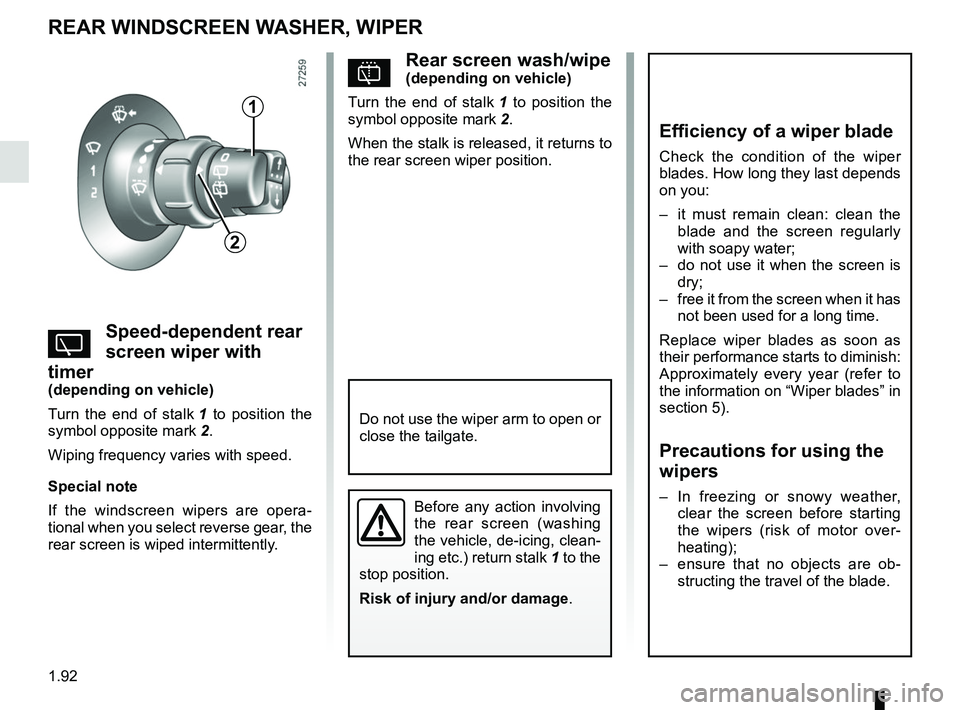
pRear screen wash/wipe(depending on vehicle)
Turn the end of stalk 1 to position the
symbol opposite mark 2.
When the stalk is released, it returns to
the rear screen wiper position.
YSpeed-dependent rear
screen wiper with
timer
(depending on vehicle)
Turn the end of stalk 1 to position the
symbol opposite mark 2.
Wiping frequency varies with speed.
Special note
If the windscreen wipers are opera-
tional when you select reverse gear, the
rear screen is wiped intermittently.
REAR WINDSCREEN WASHER, WIPER
1
2
Efficiency of a wiper blade
Check the condition of the wiper
blades. How long they last depends
on you:
– it must remain clean: clean the blade and the screen regularly
with soapy water;
– do not use it when the screen is dry;
– free it from the screen when it has not been used for a long time.
Replace wiper blades as soon as
their performance starts to diminish:
Approximately every year (refer to
the information on “Wiper blades” in
section 5).
Precautions for using the
wipers
– In freezing or snowy weather, clear the screen before starting
the wipers (risk of motor over-
heating);
– ensure that no objects are ob- structing the travel of the blade.Before any action involving
the rear screen (washing
the vehicle, de-icing, clean-
ing etc.) return stalk 1 to the
stop position.
Risk of injury and/or damage .
Do not use the wiper arm to open or
close the tailgate.