button RENAULT MEGANE RS 2012 X95 / 3.G Owner's Manual
[x] Cancel search | Manufacturer: RENAULT, Model Year: 2012, Model line: MEGANE RS, Model: RENAULT MEGANE RS 2012 X95 / 3.GPages: 239, PDF Size: 9.2 MB
Page 72 of 239
menu for customising the vehicle settings
(up to the end of the DU)
customising the vehicle settings ........... (up to the end of the DU)
customised vehicle settings .................. (up to the end of the DU)
1.66
ENG_UD11347_2
Menu de personnalisation des réglages du véhicule (X95 - B95 - D9\
5 - Renault)
ENG_NU_837-6_BDK95_Renault_1
vehicle settings customisation menu
vEHIcLE sETTINgs cUsTOmIsATION mENU
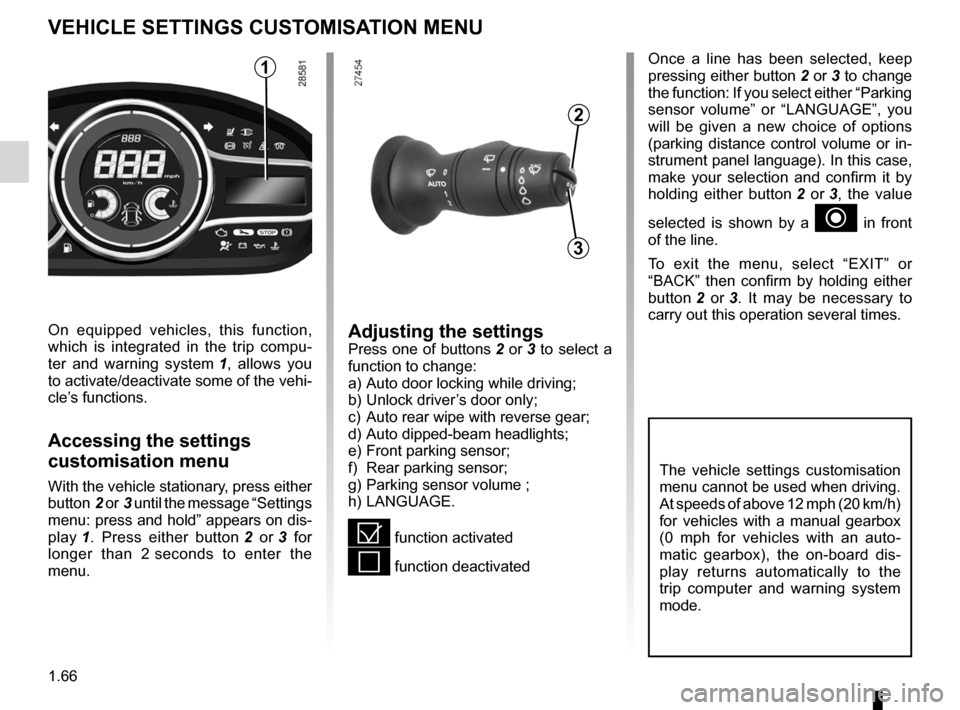
Adjusting the settingsPress one of buttons 2 or 3 to select a
function to change:
a) Auto door locking while driving ;
b) Unlock driver’s door only ;
c) Auto rear wipe with reverse gear ;
d) Auto dipped-beam headlights ;
e) Front parking sensor ;
f) Rear parking sensor ;
g) Parking sensor volume ;
h) LANGUAGE.
= function activated
< function deactivated
On equipped vehicles, this function,
which is integrated in the trip compu
-
ter and warning system 1 , allows you
to activate/deactivate some of the vehi-
cle’s functions.
Accessing the settings
customisation menu
With the vehicle stationary, press either
button 2 or 3 until the message “Settings
menu: press and hold ” appears on dis-
play 1 . Press either button 2 or 3 for
longer than 2 seconds to enter the
menu.
Once a line has been selected, keep
pressing either button 2 or 3 to change
the function: If you select either “Parking
sensor volume ” or “LANGUAGE ”, you
will be given a new choice of options
(parking distance control volume or in-
strument panel language). In this case,
make your selection and confirm it by
holding either button 2 or 3 , the value
selected is shown by a
~ in front
of the line.
To exit the menu, select “ EXIT” or
“ BACK ” then confirm by holding either
button 2 or 3 . It may be necessary to
carry out this operation several times.
2
3
1
The vehicle settings customisation
menu cannot be used when driving.
At speeds of above 12 mph (20 km/h)
for vehicles with a manual gearbox
(0 mph for vehicles with an auto -
matic gearbox), the on-board dis -
play returns automatically to the
trip computer and warning system
mode.
Page 74 of 239
clock ..................................................... (up to the end of the DU)
clock ..................................................... (up to the end of the DU)
external temperature ............................ (up to the end of the DU)
indicators: exterior temperature indicator .......................... (current page)
1.68
ENG_UD6287_1
Heure et température extérieure (X95 - B95 - D95 - Renault)
ENG_NU_837-6_BDK95_Renault_1
Clock and external temperature
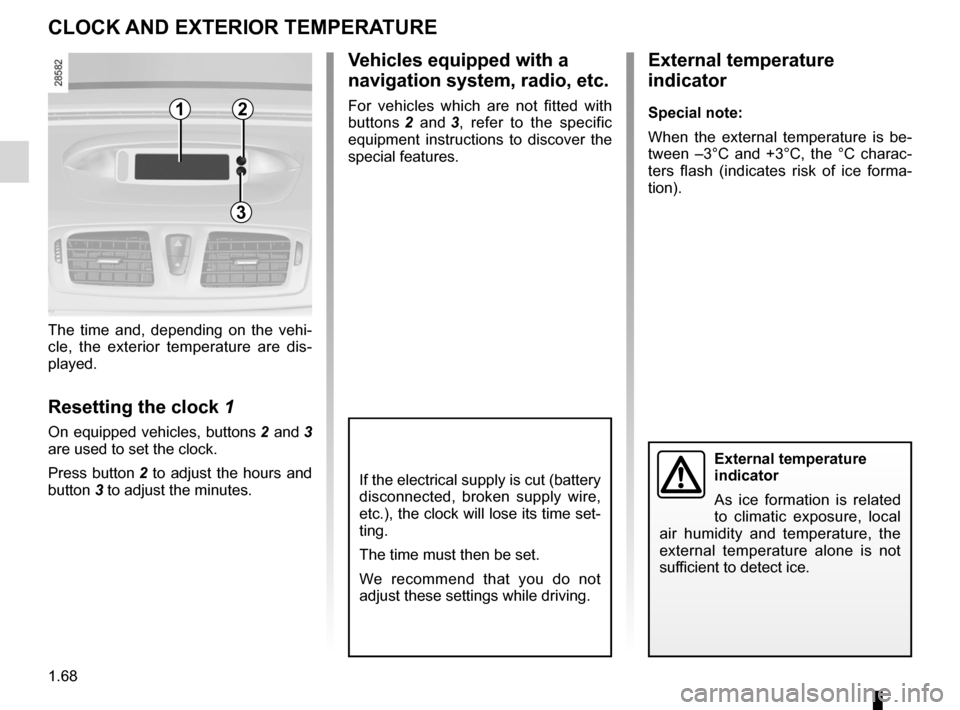
The time and, depending on the vehi -
cle, the exterior temperature are dis -
played.
Resetting the clock 1
On equipped vehicles, buttons 2 and 3
are used to set the clock.
Press button 2 to adjust the hours and
button 3 to adjust the minutes.
External temperature
indicator
As ice formation is related
to climatic exposure, local
air humidity and temperature, the
external temperature alone is not
sufficient to detect ice.
cLOcK ANd EXTERIOR TEmpERATURE
If the electrical supply is cut (battery
disconnected, broken supply wire,
etc.), the clock will lose its time set-
ting.
The time must then be set.
We recommend that you do not
adjust these settings while driving.
External temperature
indicator
special note:
When the external temperature is be -
tween –3°C and +3°C, the °C charac -
ters flash (indicates risk of ice forma -
tion).
v ehicles equipped with a
navigation system, radio, etc.
For vehicles which are not fitted with
buttons 2 and 3 , refer to the specific
equipment instructions to discover the
special features.12
3
Page 75 of 239
rear view mirrors ................................... (up to the end of the DU)
1.69
ENG_UD6288_1
Rétroviseurs (X95 - B95 - D95 - Renault)
ENG_NU_837-6_BDK95_Renault_1
Rear view mirrors
folding door mirrors
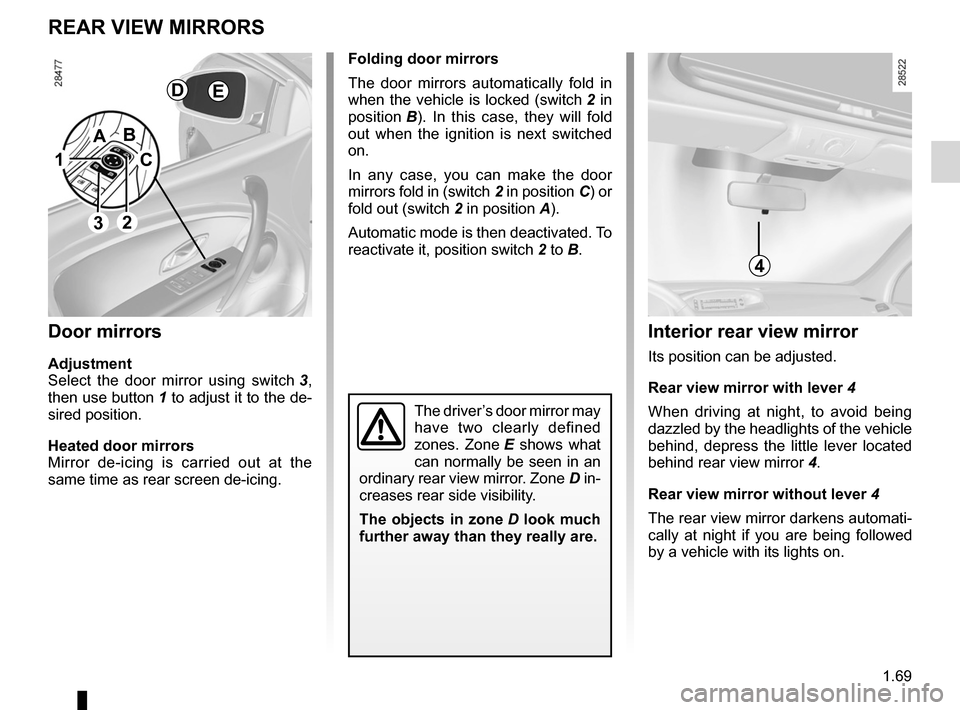
The door mirrors automatically fold in
when the vehicle is locked (switch 2 in
position B ). In this case, they will fold
out when the ignition is next switched
on.
In any case, you can make the door
mirrors fold in (switch 2 in position C) or
fold out (switch 2 in position A).
Automatic mode is then deactivated. To
reactivate it, position switch 2 to B.
REAR vIEW mIRRORs
door mirrors
Adjustment
Select the door mirror using switch 3 ,
then use button 1 to adjust it to the de-
sired position.
Heated door mirrors
Mirror de-icing is carried out at the
same time as rear screen de-icing.
The driver’s door mirror may
have two clearly defined
zones. Zone E shows what
can normally be seen in an
ordinary rear view mirror. Zone D in-
creases rear side visibility.
The objects in zone D look much
further away than they really are.
Interior rear view mirror
Its position can be adjusted.
Rear view mirror with lever 4
When driving at night, to avoid being
dazzled by the headlights of the vehicle
behind, depress the little lever located
behind rear view mirror 4.
Rear view mirror without lever 4
The rear view mirror darkens automati-
cally at night if you are being followed
by a vehicle with its lights on.
1
2
A
c
B
4
dE
3
Page 89 of 239
starting the engine ................................ (up to the end of the DU)
engine start/stop button ........................ (up to the end of the DU)
starting the engine ................................ (up to the end of the DU)
driving ................................................... (up to the end of the DU)
2.3
ENG_UD18932_3
Démarrage / Arrêt moteur avec carte RENAULT mains libres (X95 - B95 - D95 - Renault)
ENG_NU_837-6_BDK95_Renault_2
Starting the engine
STARTING THE ENGINE (1/2)
Remote control RENAULT
card
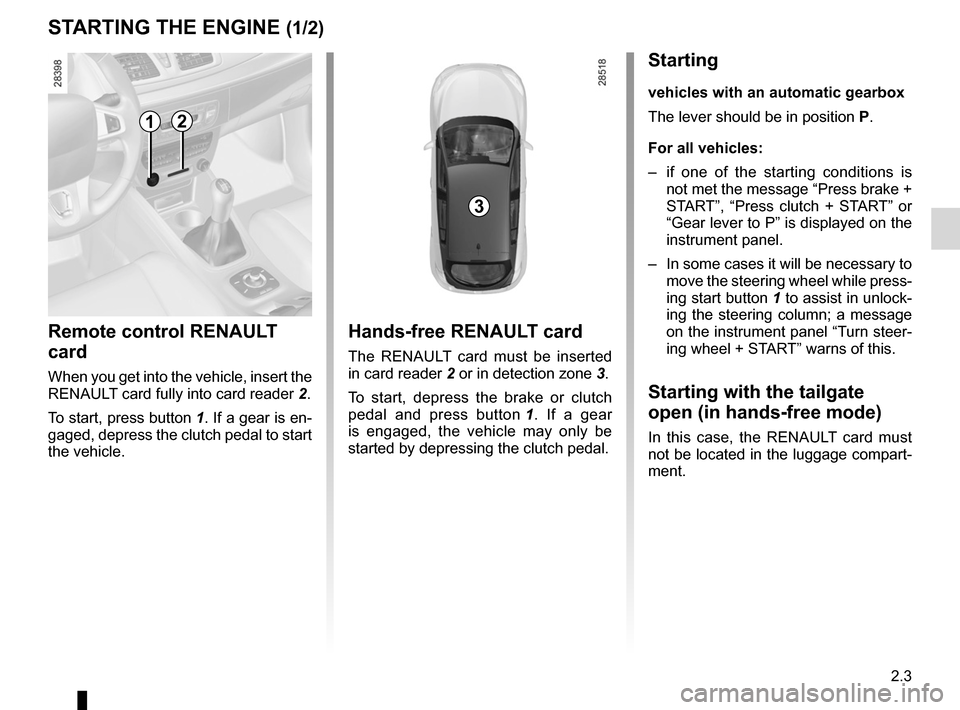
When you get into the vehicle, insert the
RENAULT card fully into card reader 2.
To start, press button 1. If a gear is en-
gaged, depress the clutch pedal to start
the vehicle.
Hands-free RENAULT card
The RENAULT card must be inserted
in card reader 2 or in detection zone 3.
To start, depress the brake or clutch
pedal and press button 1 . If a gear
is engaged, the vehicle may only be
started by depressing the clutch pedal.
Starting
vehicles with an automatic gearbox
The lever should be in position P.
For all vehicles:
– if one of the starting conditions is
not met the message “Press brake +
START”, “Press clutch + START” or
“Gear lever to P” is displayed on the
instrument panel.
– In some cases it will be necessary to
move the steering wheel while press-
ing start button 1 to assist in unlock-
ing the steering column; a message
on the instrument panel “Turn steer-
ing wheel + START” warns of this.
Starting with the tailgate
open (in hands-free mode)
In this case, the RENAULT card must
not be located in the luggage compart-
ment.
3
12
Page 90 of 239
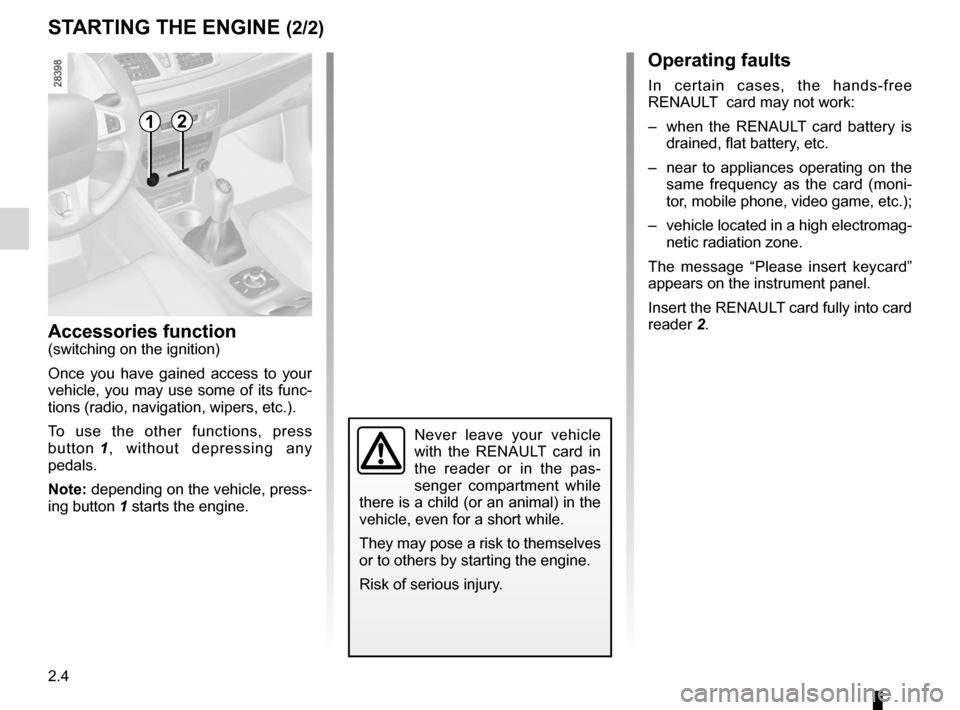
switching on the vehicle ignition ............................ (current page)
2.4
ENG_UD18932_3
Démarrage / Arrêt moteur avec carte RENAULT mains libres (X95 - B95 - D95 - Renault)
ENG_NU_837-6_BDK95_Renault_2
STARTING THE ENGINE (2/2)
Accessories function(switching on the ignition)
Once you have gained access to your
vehicle, you may use some of its func-
tions (radio, navigation, wipers, etc.).
To use the other functions, press
button 1 , without depressing any
pedals.
Note: depending on the vehicle, press-
ing button 1 starts the engine.
Operating faults
In certain cases, the hands-free
RENAULT card may not work:
– when the RENAULT card battery is
drained, flat battery, etc.
– near to appliances operating on the
same frequency as the card (moni -
tor, mobile phone, video game, etc.);
– vehicle located in a high electromag-
netic radiation zone.
The message “ Please insert keycard ”
appears on the instrument panel.
Insert the RENAULT card fully into card
reader 2.
Never leave your vehicle
with the RENAULT card in
the reader or in the pas -
senger compartment while
there is a child (or an animal) in the
vehicle, even for a short while.
They may pose a risk to themselves
or to others by starting the engine.
Risk of serious injury.
12
Page 91 of 239
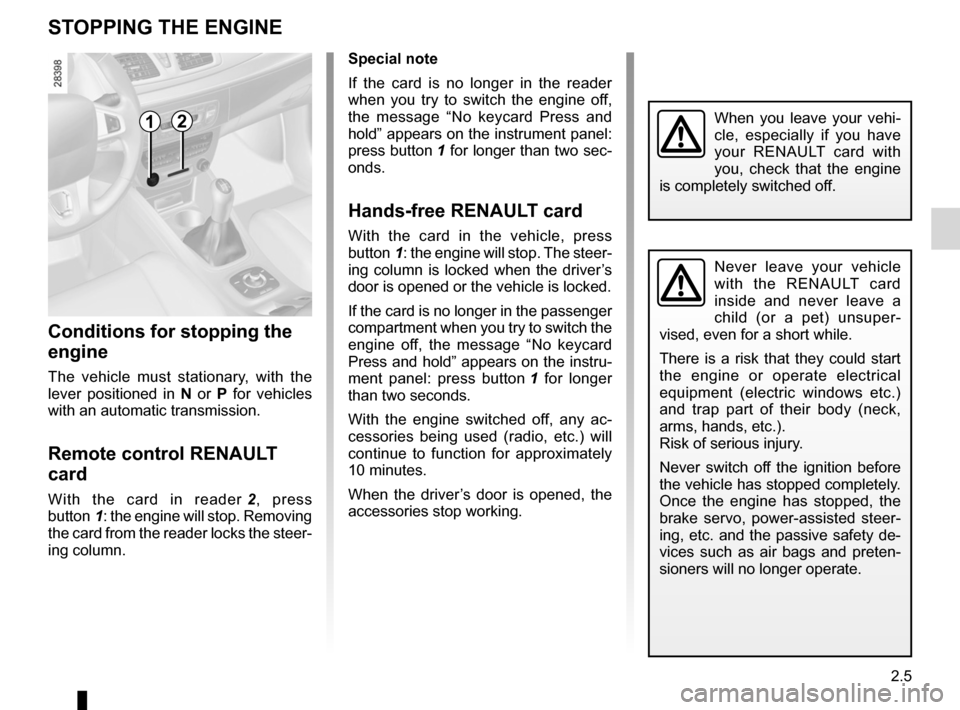
stopping the engine .............................. (up to the end of the DU)
engine start/stop button ........................ (up to the end of the DU)
2.5
ENG_UD18930_1
Arret du moteur (X95 - B95 - D95 - K95 - Renault)
ENG_NU_837-6_BDK95_Renault_2
Stopping the engine
STOPPING THE ENGINE
Never leave your vehicle
with the RENAULT card
inside and never leave a
child (or a pet) unsuper -
vised, even for a short while.
There is a risk that they could start
the engine or operate electrical
equipment (electric windows etc.)
and trap part of their body (neck,
arms, hands, etc.).
Risk of serious injury.
Never switch off the ignition before
the vehicle has stopped completely.
Once the engine has stopped, the
brake servo, power-assisted steer -
ing, etc. and the passive safety de-
vices such as air bags and preten -
sioners will no longer operate.
When you leave your vehi -
cle, especially if you have
your RENAULT card with
you, check that the engine
is completely switched off.
Special note
If the card is no longer in the reader
when you try to switch the engine off,
the message “ No keycard Press and
hold ” appears on the instrument panel:
press button 1 for longer than two sec-
onds.
Hands-free RENAULT card
With the card in the vehicle, press
button 1: the engine will stop. The steer-
ing column is locked when the driver’s
door is opened or the vehicle is locked.
If the card is no longer in the passenger
compartment when you try to switch the
engine off, the message “ No keycard
Press and hold ” appears on the instru-
ment panel: press button 1 for longer
than two seconds.
With the engine switched off, any ac -
cessories being used (radio, etc.) will
continue to function for approximately
10 minutes.
When the driver’s door is opened, the
accessories stop working.
Conditions for stopping the
engine
The vehicle must stationary, with the
lever positioned in N or P for vehicles
with an automatic transmission.
Remote control RENAULT
card
With the card in reader 2 , press
button 1: the engine will stop. Removing
the card from the reader locks the steer-
ing column.
12
Page 92 of 239
special features of petrol vehicles ........ (up to the end of the DU)
catalytic converter ................................. (up to the end of the DU)
driving ................................................... (up to the end of the DU)
catalytic converter ................................. (up to the end of the DU)
2.6
ENG_UD10553_1
Particularités des versions essence (X85 - B85 - C85 - S85 - K85 - R\
enault)
ENG_NU_837-6_BDK95_Renault_2
Special features of petrol versions
SPECIAL FEATURES OF PETROL VERSIONS
The following operating conditions:
– driving for long periods when the low
fuel level warning light is lit;
– using leaded petrol;
– using fuel or lubrication additives
which are not approved.
Or operating faults such as:
– faulty ignition system, running out of
fuel or disconnected spark plugs re-
sulting in the engine misfiring or cut-
ting out when driving;
– loss of power,
as they may cause the catalytic con -
verter to overheat and thus reduce its
efficiency, or damage it irreparably
and cause heat damage to the vehi-
cle. If you notice any of the above operating
faults, have the necessary repairs car-
ried out as soon as possible by an ap-
proved Dealer.
These faults may be avoided by regu
-
larly taking your vehicle to an approved
Dealer at the intervals specified in the
Maintenance Service Booklet.
Starting problems
To avoid damaging the catalytic con -
verter, do not keep trying to start the
engine (using the start button, or by
pushing or towing the vehicle) without
having identified and corrected the
starting fault.
If the fault cannot be identified, do not
keep trying to start the engine, but con-
tact an approved Dealer.
Do not park the vehicle or
run the engine in locations
where combustible sub -
stances or materials such as
grass or leaves can come into con-
tact with the hot exhaust system.
Page 94 of 239
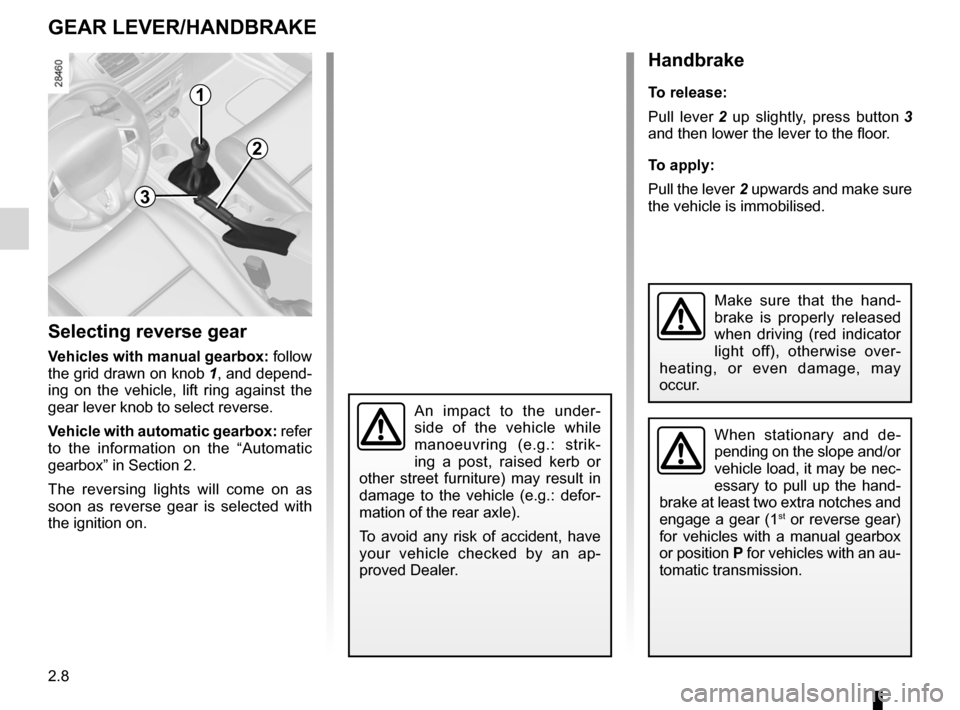
gear lever............................................................... (current page)
changing gear ....................................... (up to the end of the DU)
reverse gear selecting .......................................... (up to the end of the DU)
driving ................................................... (up to the end of the DU)
handbrake ............................................. (up to the end of the DU)
2.8
ENG_UD18933_3
Levier de vitesses (X76 - X95 - B95 - D95 - Renault)
ENG_NU_837-6_BDK95_Renault_2
Gear lever
Handbrake
GEAR LEVER/HANDbRAkE
Selecting reverse gear
Vehicles with manual gearbox: follow
the grid drawn on knob 1, and depend -
ing on the vehicle, lift ring against the
gear lever knob to select reverse.
Vehicle with automatic gearbox: refer
to the information on the “Automatic
gearbox” in Section 2.
The reversing lights will come on as
soon as reverse gear is selected with
the ignition on.
1
Handbrake
To release:
Pull lever 2 up slightly, press button 3
and then lower the lever to the floor.
To apply:
Pull the lever 2 upwards and make sure
the vehicle is immobilised.
When stationary and de -
pending on the slope and/or
vehicle load, it may be nec-
essary to pull up the hand -
brake at least two extra notches and
engage a gear (1
st or reverse gear)
for vehicles with a manual gearbox
or position P for vehicles with an au-
tomatic transmission.
3
2
An impact to the under -
side of the vehicle while
manoeuvring (e.g.: strik -
ing a post, raised kerb or
other street furniture) may result in
damage to the vehicle (e.g.: defor -
mation of the rear axle).
To avoid any risk of accident, have
your vehicle checked by an ap -
proved Dealer.
Make sure that the hand -
brake is properly released
when driving (red indicator
light off), otherwise over -
heating, or even damage, may
occur.
Page 95 of 239
driving ................................................... (up to the end of the DU)
electronic parking brake ....................... (up to the end of the DU)
2.9
ENG_UD11746_2
Frein de parking assisté (X95 - B95 - D95 - Renault)
ENG_NU_837-6_BDK95_Renault_2
Electronic parking brake
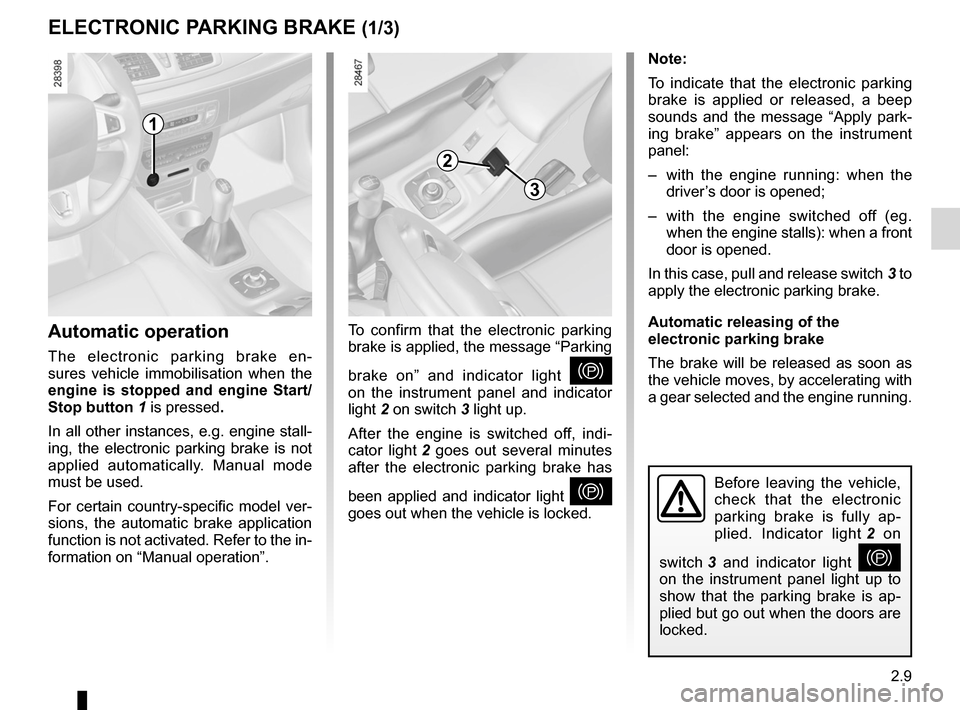
Before leaving the vehicle,
check that the electronic
parking brake is fully ap -
plied. Indicator light 2 on
switch 3 and indicator light
}
on the instrument panel light up to
show that the parking brake is ap -
plied but go out when the doors are
locked.
Note:
To indicate that the electronic parking
brake is applied or released, a beep
sounds and the message “ Apply park-
ing brake ” appears on the instrument
panel:
– with the engine running: when the
driver’s door is opened;
– with the engine switched off (eg.
when the engine stalls): when a front
door is opened.
In this case, pull and release switch 3 to
apply the electronic parking brake.
Automatic releasing of the
electronic parking brake
The brake will be released as soon as
the vehicle moves, by accelerating with
a gear selected and the engine running.
Automatic operation
The electronic parking brake en -
sures vehicle immobilisation when the
engine is stopped and engine Start/
Stop button 1 is pressed.
In all other instances, e.g. engine stall-
ing, the electronic parking brake is not
applied automatically. Manual mode
must be used.
For certain country-specific model ver-
sions, the automatic brake application
function is not activated. Refer to the in-
formation on “Manual operation”.
ELECTRONIC PARkING bRAkE (1/3)
To confirm that the electronic parking
brake is applied, the message “Parking
brake on ” and indicator light
}
on the instrument panel and indicator
light 2 on switch 3 light up.
After the engine is switched off, indi -
cator light 2 goes out several minutes
after the electronic parking brake has
been applied and indicator light
}
goes out when the vehicle is locked.
1
2
3
Page 96 of 239
2.10
ENG_UD11746_2
Frein de parking assisté (X95 - B95 - D95 - Renault)
ENG_NU_837-6_BDK95_Renault_2
Jaune NoirNoir texte
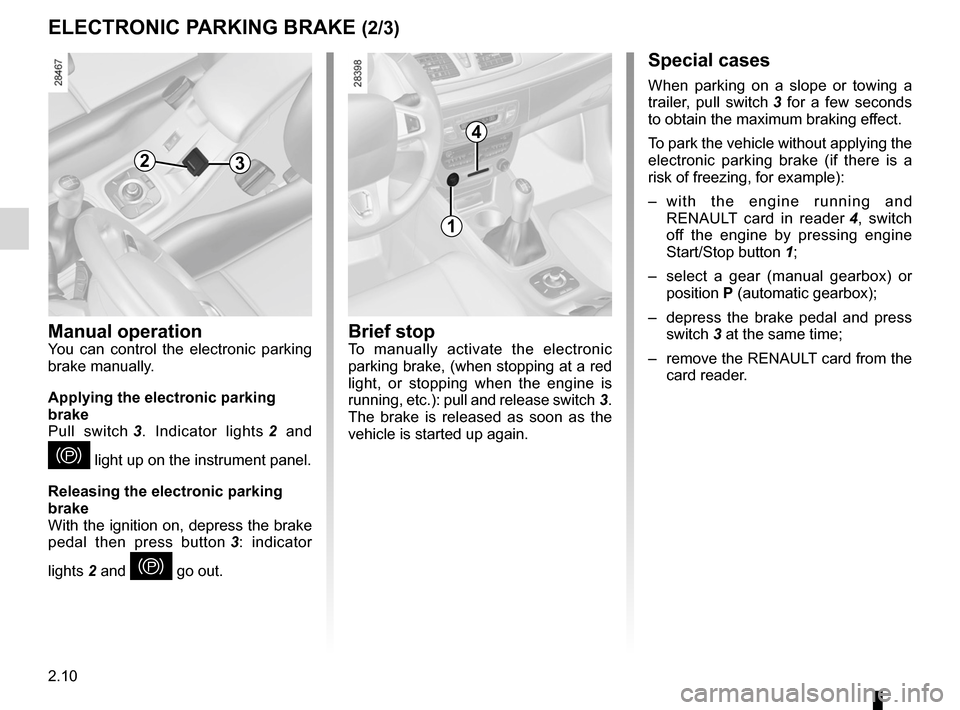
Special cases
When parking on a slope or towing a
trailer, pull switch 3 for a few seconds
to obtain the maximum braking effect.
To park the vehicle without applying the
electronic parking brake (if there is a
risk of freezing, for example):
– w i t h t h e e n g i n e r u n n i n g a n d
RENAULT card in reader 4 , switch
off the engine by pressing engine
Start/Stop button 1;
– select a gear (manual gearbox) or
position P (automatic gearbox);
– depress the brake pedal and press
switch 3 at the same time;
– remove the RENAULT card from the
card reader.
brief stopTo manually activate the electronic
parking brake, (when stopping at a red
light, or stopping when the engine is
running, etc.): pull and release switch 3.
The brake is released as soon as the
vehicle is started up again.
ELECTRONIC PARkING bRAkE (2/3)
4
1
3
Manual operationYou can control the electronic parking
brake manually.
Applying the electronic parking
brake
Pull switch 3 . Indicator lights 2 and
} light up on the instrument panel.
Releasing the electronic parking
brake
With the ignition on, depress the brake
pedal then press button 3 : indicator
lights 2 and
} go out.
2