light RENAULT SCENIC 2013 J95 / 3.G Electronic Parking Brake User Guide
[x] Cancel search | Manufacturer: RENAULT, Model Year: 2013, Model line: SCENIC, Model: RENAULT SCENIC 2013 J95 / 3.GPages: 115, PDF Size: 0.64 MB
Page 24 of 115
37B-24
MR-372-J84-37B000$504.mif
V11
ELECTRONIC PARKING BRAKE
Fault finding – Interpretation of faults
FPA
Vdiag No.: 0C, 04, 08,
0D, 11
37B
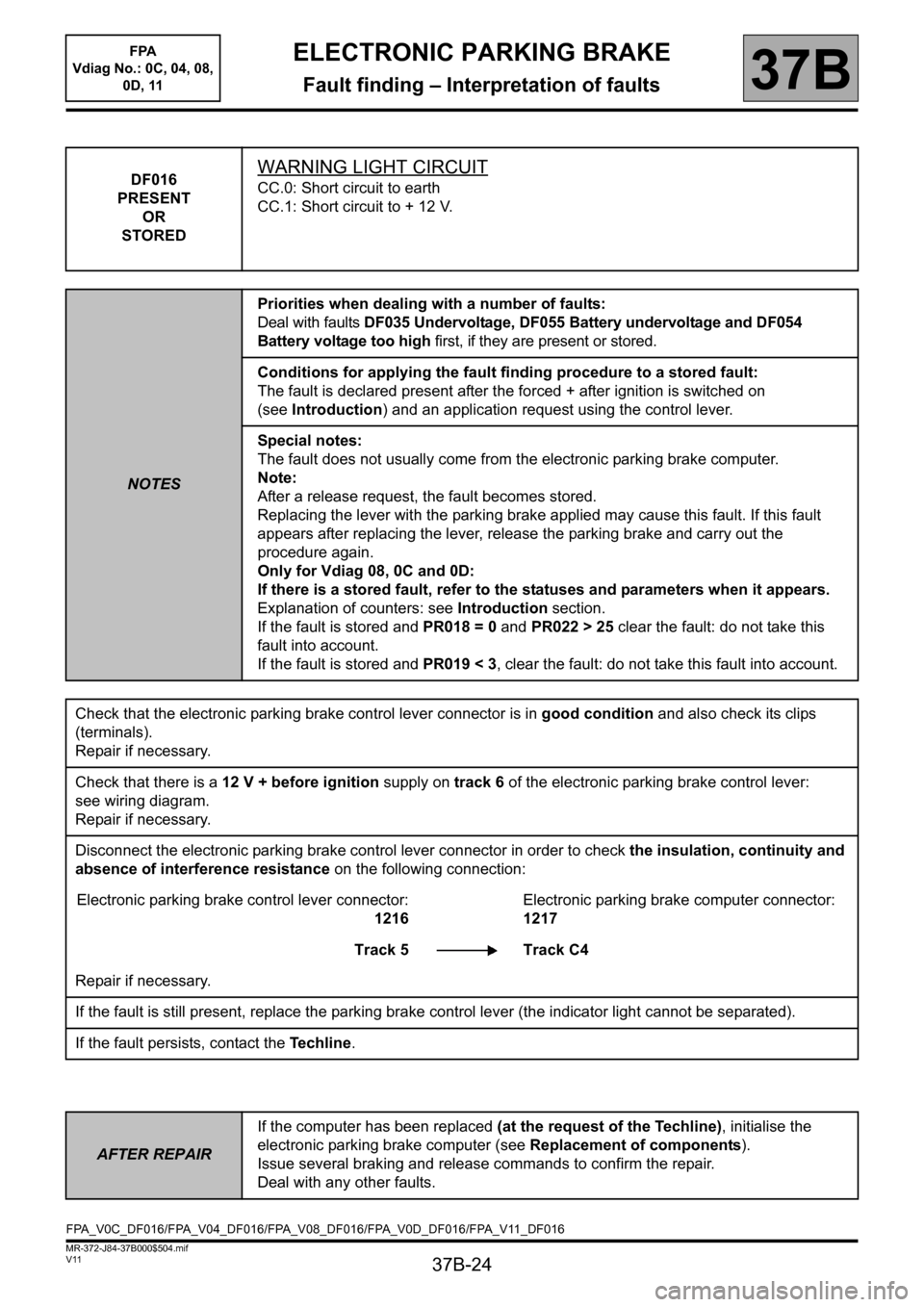
DF016
PRESENT
OR
STOREDWARNING LIGHT CIRCUIT
CC.0: Short circuit to earth
CC.1: Short circuit to + 12 V.
NOTESPriorities when dealing with a number of faults:
Deal with faults DF035 Undervoltage, DF055 Battery undervoltage and DF054
Battery voltage too high first, if they are present or stored.
Conditions for applying the fault finding procedure to a stored fault:
The fault is declared present after the forced + after ignition is switched on
(seeIntroduction) and an application request using the control lever.
Special notes:
The fault does not usually come from the electronic parking brake computer.
Note:
After a release request, the fault becomes stored.
Replacing the lever with the parking brake applied may cause this fault. If this fault
appears after replacing the lever, release the parking brake and carry out the
procedure again.
Only for Vdiag 08, 0C and 0D:
If there is a stored fault, refer to the statuses and parameters when it appears.
Explanation of counters: see Introduction section.
If the fault is stored and PR018 = 0 and PR022 > 25 clear the fault: do not take this
fault into account.
If the fault is stored and PR019 < 3, clear the fault: do not take this fault into account.
Check that the electronic parking brake control lever connector is in good condition and also check its clips
(terminals).
Repair if necessary.
Check that there is a 12 V + before ignition supply on track 6 of the electronic parking brake control lever:
see wiring diagram.
Repair if necessary.
Disconnect the electronic parking brake control lever connector in order to check the insulation, continuity and
absence of interference resistance on the following connection:
Electronic parking brake control lever connector:
1216Electronic parking brake computer connector:
1217
Track 5 Track C4
Repair if necessary.
If the fault is still present, replace the parking brake control lever (the indicator light cannot be separated).
If the fault persists, contact the Techline.
AFTER REPAIRIf the computer has been replaced (at the request of the Techline), initialise the
electronic parking brake computer (see Replacement of components).
Issue several braking and release commands to confirm the repair.
Deal with any other faults.
FPA_V0C_DF016/FPA_V04_DF016/FPA_V08_DF016/FPA_V0D_DF016/FPA_V11_DF016
Page 44 of 115
37B-44
MR-372-J84-37B000$504.mif
V11
ELECTRONIC PARKING BRAKE
Fault finding – Interpretation of faults
FPA
Vdiag No.: 0C, 04, 08,
0D, 11
37B
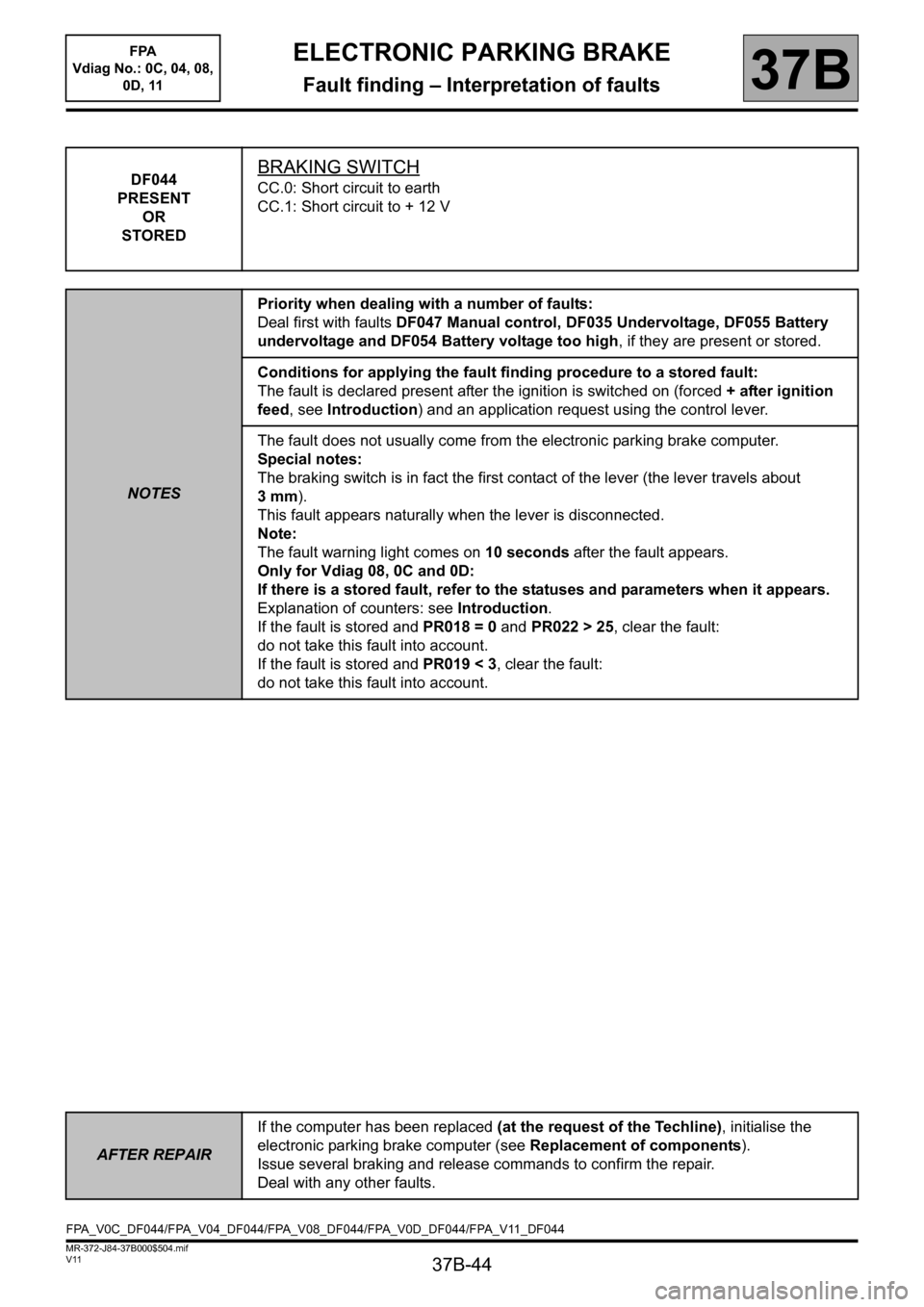
DF044
PRESENT
OR
STOREDBRAKING SWITCH
CC.0: Short circuit to earth
CC.1: Short circuit to + 12 V
NOTESPriority when dealing with a number of faults:
Deal first with faults DF047 Manual control, DF035 Undervoltage, DF055 Battery
undervoltage and DF054 Battery voltage too high, if they are present or stored.
Conditions for applying the fault finding procedure to a stored fault:
The fault is declared present after the ignition is switched on (forced + after ignition
feed, see Introduction) and an application request using the control lever.
The fault does not usually come from the electronic parking brake computer.
Special notes:
The braking switch is in fact the first contact of the lever (the lever travels about
3mm).
This fault appears naturally when the lever is disconnected.
Note:
The fault warning light comes on 10 seconds after the fault appears.
Only for Vdiag 08, 0C and 0D:
If there is a stored fault, refer to the statuses and parameters when it appears.
Explanation of counters: see Introduction.
If the fault is stored and PR018 = 0 and PR022 > 25, clear the fault:
do not take this fault into account.
If the fault is stored and PR019 < 3, clear the fault:
do not take this fault into account.
AFTER REPAIRIf the computer has been replaced (at the request of the Techline), initialise the
electronic parking brake computer (see Replacement of components).
Issue several braking and release commands to confirm the repair.
Deal with any other faults.
FPA_V0C_DF044/FPA_V04_DF044/FPA_V08_DF044/FPA_V0D_DF044/FPA_V11_DF044
Page 45 of 115
37B-45
MR-372-J84-37B000$504.mif
V11
ELECTRONIC PARKING BRAKE
Fault finding – Interpretation of faults
FPA
Vdiag No.: 0C, 04, 08,
0D, 11
37B
DF044
CONTINUED 1
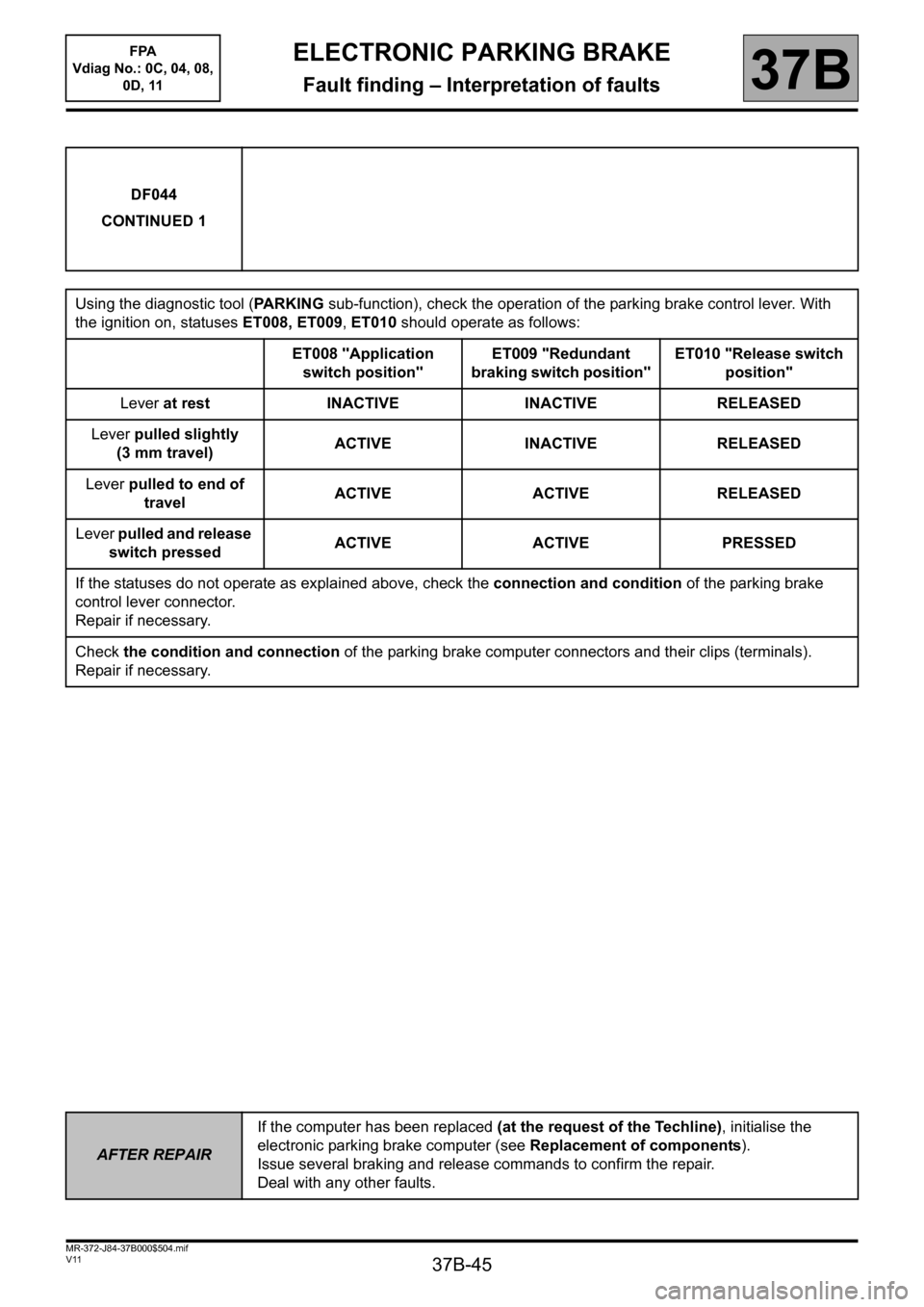
Using the diagnostic tool (PARKING sub-function), check the operation of the parking brake control lever. With
the ignition on, statuses ET008, ET009, ET010 should operate as follows:
ET008 "Application
switch position"ET009 "Redundant
braking switch position"ET010 "Release switch
position"
Lever at rest INACTIVE INACTIVE RELEASED
Lever pulled slightly
(3 mm travel)ACTIVE INACTIVE RELEASED
Lever pulled to end of
travelACTIVE ACTIVE RELEASED
Lever pulled and release
switch pressedACTIVE ACTIVE PRESSED
If the statuses do not operate as explained above, check the connection and condition of the parking brake
control lever connector.
Repair if necessary.
Check the condition and connection of the parking brake computer connectors and their clips (terminals).
Repair if necessary.
AFTER REPAIRIf the computer has been replaced (at the request of the Techline), initialise the
electronic parking brake computer (see Replacement of components).
Issue several braking and release commands to confirm the repair.
Deal with any other faults.
Page 47 of 115
37B-47
MR-372-J84-37B000$504.mif
V11
ELECTRONIC PARKING BRAKE
Fault finding – Interpretation of faults
FPA
Vdiag No.: 0C, 04, 08,
0D, 11
37B
DF045
PRESENT
OR
STOREDREDUNDANT BRAKE SWITCH
1. DEF: Signal inconsistency
NOTESPriority when dealing with a number of faults:
Deal first with faults DF047 Manual control, DF035 Undervoltage and DF055
Battery voltage too low, if they are present or stored.
Conditions for applying the fault finding procedure to a stored fault:
This fault must be dealt with first.
Special notes:
The fault does not usually come from the electronic parking brake computer.
The redundant brake switch is the second contact of the lever (maximum lever travel).
Only for Vdiag 08, 0C and 0D:
If there is a stored fault, refer to the statuses and parameters when it appears.
Explanation of counters: see Introduction.
If the fault is stored and PR018 = 0 and PR022 > 25 clear the fault: do not take this
fault into account.
If the fault is stored and PR019 < 3, clear the fault: do not take this fault into account.
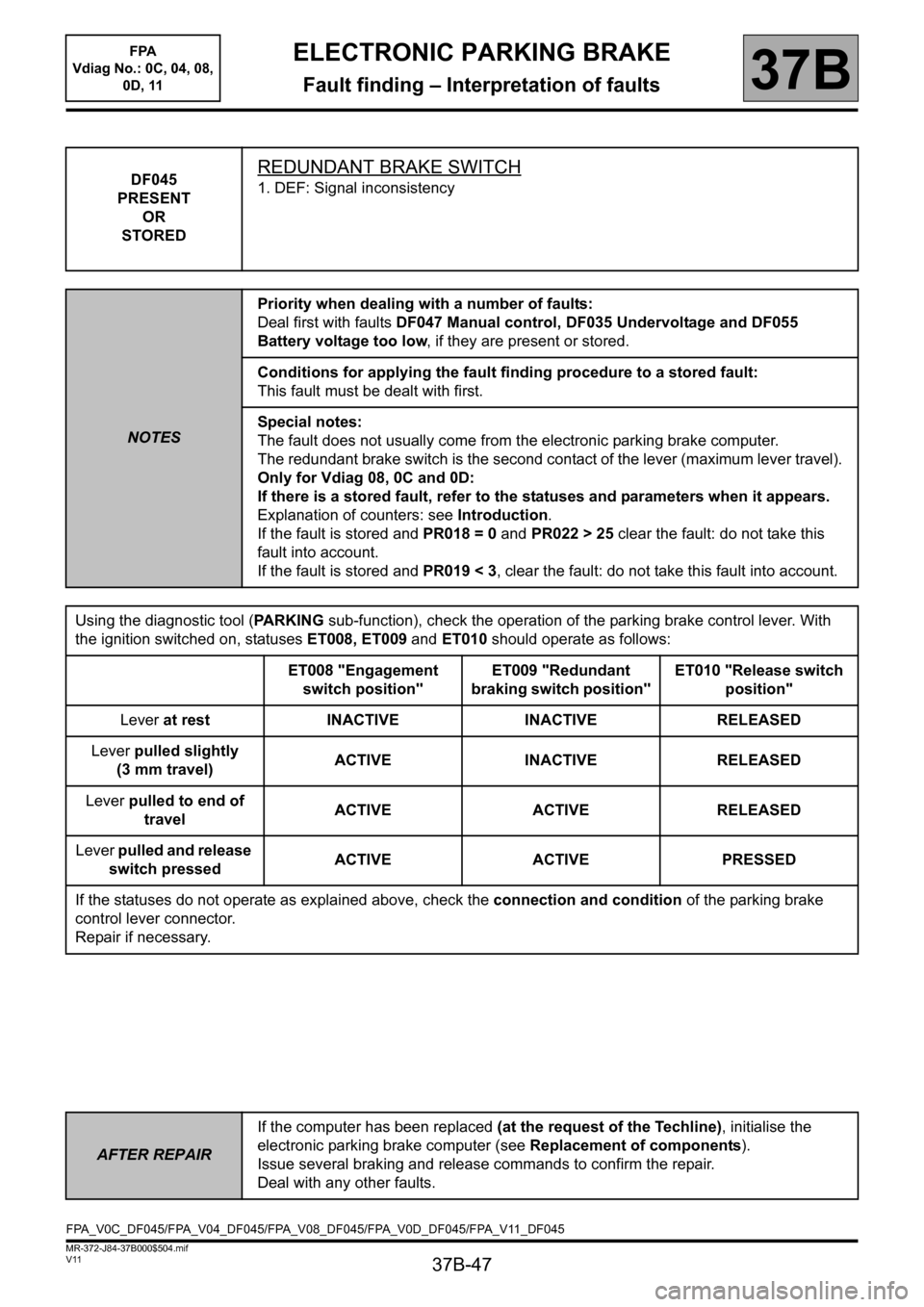
Using the diagnostic tool (PARKING sub-function), check the operation of the parking brake control lever. With
the ignition switched on, statuses ET008, ET009 and ET010 should operate as follows:
ET008 "Engagement
switch position"ET009 "Redundant
braking switch position"ET010 "Release switch
position"
Lever at rest INACTIVE INACTIVE RELEASED
Lever pulled slightly
(3 mm travel)ACTIVE INACTIVE RELEASED
Lever pulled to end of
travelACTIVE ACTIVE RELEASED
Lever pulled and release
switch pressedACTIVE ACTIVE PRESSED
If the statuses do not operate as explained above, check the connection and condition of the parking brake
control lever connector.
Repair if necessary.
AFTER REPAIRIf the computer has been replaced (at the request of the Techline), initialise the
electronic parking brake computer (see Replacement of components).
Issue several braking and release commands to confirm the repair.
Deal with any other faults.
FPA_V0C_DF045/FPA_V04_DF045/FPA_V08_DF045/FPA_V0D_DF045/FPA_V11_DF045
Page 50 of 115
37B-50
MR-372-J84-37B000$504.mif
V11
ELECTRONIC PARKING BRAKE
Fault finding – Interpretation of faults
FPA
Vdiag No.: 0C, 04, 08,
0D, 11
37B
DF047
PRESENT
OR
STOREDMANUAL CONTROL
1. DEF: No signal
2. DEF: Signal inconsistency
3. DEF: Short circuit
4. DEF: Lever fault
NOTESPriorities when dealing with a number of faults:
Deal with faults: DF035 Undervoltage, DF055 Battery undervoltage and DF054
Battery voltage too high first, if they are present or stored.
Note:
The fault does not usually come from the electronic parking brake computer.
The fault is only stored after the brakes have been applied 3 times with the control
level.
Conditions for applying the fault finding procedure to a stored fault:
Deal with the fault as if it were present.
Only for Vdiag 08, 0C and 0D:
If there is a stored fault, refer to the statuses and parameters when it appears.
Explanation of counters: see Introduction.
If the fault is stored and PR018 = 0 and PR022 > 25 clear the fault: do not take this
fault into account.
If the fault is stored and PR019 < 3, clear the fault: do not take this fault into account.
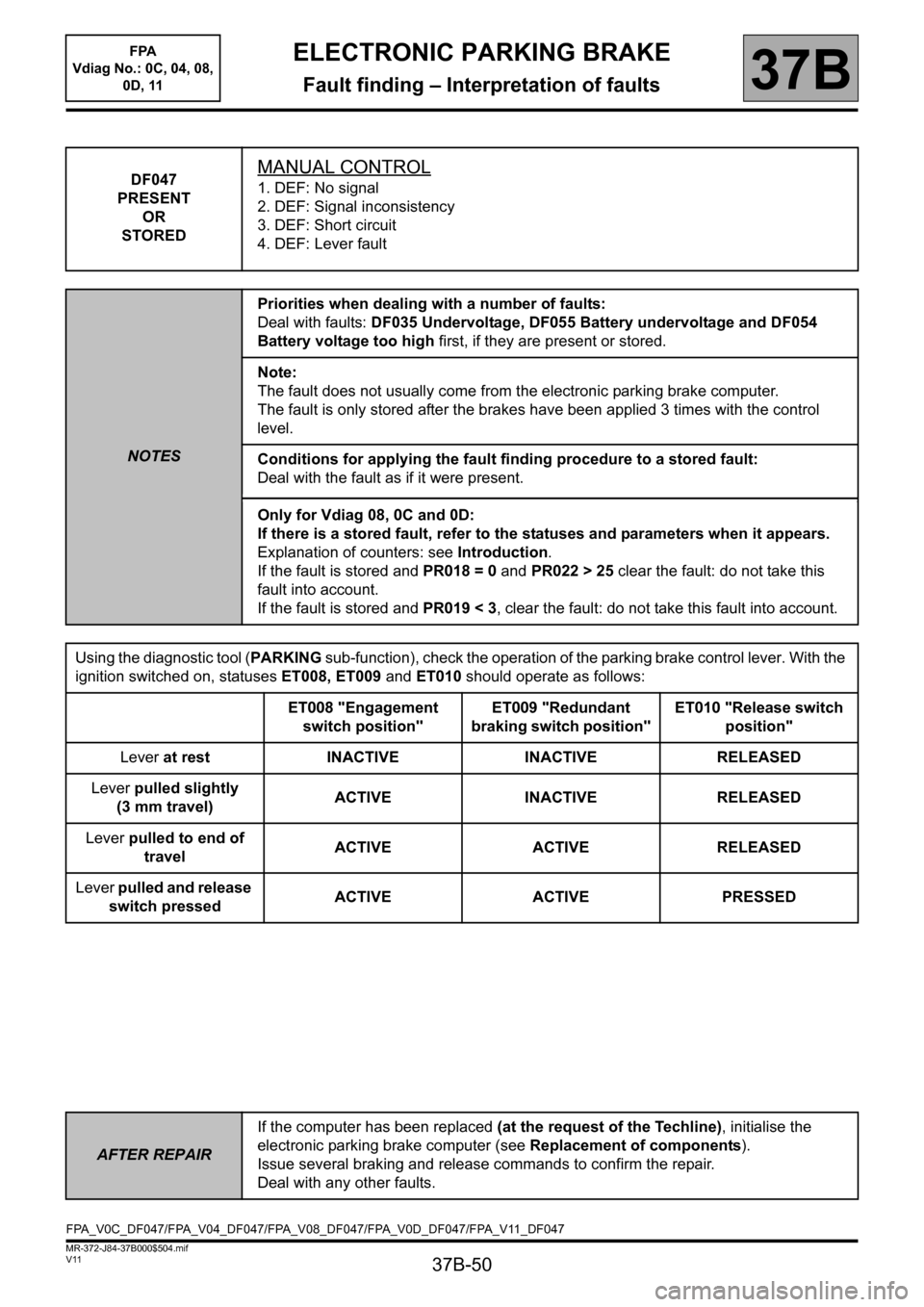
Using the diagnostic tool (PARKING sub-function), check the operation of the parking brake control lever. With the
ignition switched on, statuses ET008, ET009 and ET010 should operate as follows:
ET008 "Engagement
switch position"ET009 "Redundant
braking switch position"ET010 "Release switch
position"
Lever at rest INACTIVE INACTIVE RELEASED
Lever pulled slightly
(3 mm travel)ACTIVE INACTIVE RELEASED
Lever pulled to end of
travelACTIVE ACTIVE RELEASED
Lever pulled and release
switch pressedACTIVE ACTIVE PRESSED
AFTER REPAIRIf the computer has been replaced (at the request of the Techline), initialise the
electronic parking brake computer (see Replacement of components).
Issue several braking and release commands to confirm the repair.
Deal with any other faults.
FPA_V0C_DF047/FPA_V04_DF047/FPA_V08_DF047/FPA_V0D_DF047/FPA_V11_DF047
Page 52 of 115
37B-52
MR-372-J84-37B000$504.mif
V11
ELECTRONIC PARKING BRAKE
Fault finding – Interpretation of faults
FPA
Vdiag No.: 0C, 04, 08,
0D, 11
37B
DF048
PRESENT
OR
STOREDRELEASE SWITCH
1. DEF: Signal inconsistency
NOTESPriority when dealing with a number of faults:
Deal first with faults DF003, DF004, DF028, DF029, DF035, DF041, DF042, DF043,
DF047, DF050, DF054, DF055, DF057, DF058 and DF073 if they are present or
stored.
Conditions for applying the fault finding procedure to a stored fault:
The fault is declared present after the ignition is switched on (forced + after ignition
feed, see Introduction) and a brake release request using the control lever.
Special notes:
The fault does not usually come from the electronic parking brake computer.
8 applications (in 2 seconds) using the control lever without pressing the release
switch causes the fault to appear as present.
Only for Vdiag 08, 0C and 0D:
If there is a stored fault, refer to the statuses and parameters when it appears.
Explanation of counters: see Introduction.
If the fault is stored and PR018 = 0 and PR022 > 25 clear the fault: do not take this
fault into account.
If the fault is stored and PR019 < 3, clear the fault: do not take this fault into account.
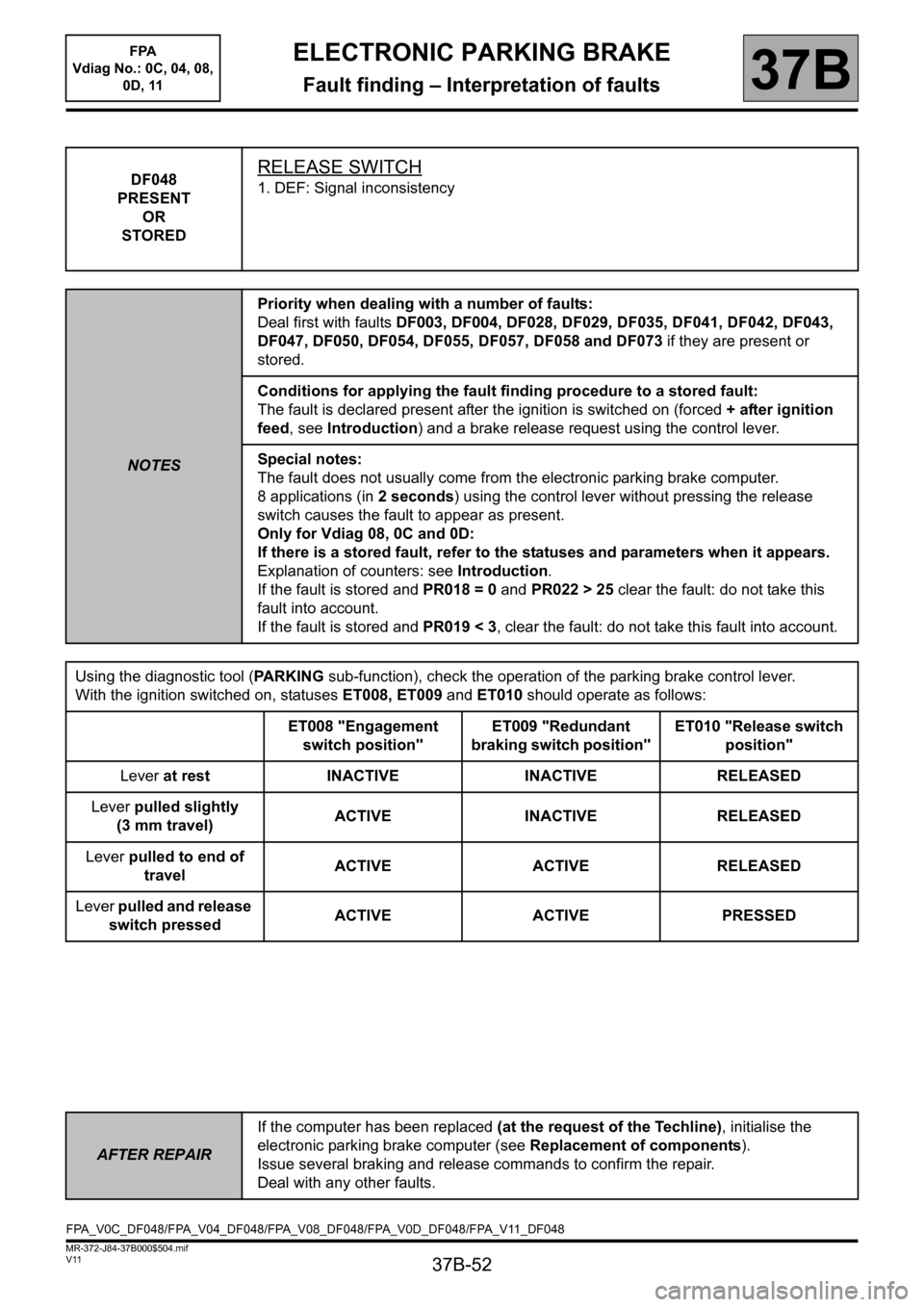
Using the diagnostic tool (PARKING sub-function), check the operation of the parking brake control lever.
With the ignition switched on, statuses ET008, ET009 and ET010 should operate as follows:
ET008 "Engagement
switch position"ET009 "Redundant
braking switch position"ET010 "Release switch
position"
Lever at rest INACTIVE INACTIVE RELEASED
Lever pulled slightly
(3 mm travel)ACTIVE INACTIVE RELEASED
Lever pulled to end of
travelACTIVE ACTIVE RELEASED
Lever pulled and release
switch pressedACTIVE ACTIVE PRESSED
AFTER REPAIRIf the computer has been replaced (at the request of the Techline), initialise the
electronic parking brake computer (see Replacement of components).
Issue several braking and release commands to confirm the repair.
Deal with any other faults.
FPA_V0C_DF048/FPA_V04_DF048/FPA_V08_DF048/FPA_V0D_DF048/FPA_V11_DF048
Page 59 of 115
37B-59
MR-372-J84-37B000$504.mif
V11
ELECTRONIC PARKING BRAKE
Fault finding – Interpretation of faults
FPA
Vdiag No.: 0C, 04, 08,
0D, 11
37B
DF051
PRESENT
OR
STOREDSYSTEM FAULT AFTER COMPUTER REPLACEMENT
NOTESSpecial notes:
This fault indicates a malfunction due to not following procedures correctly:
replacement or reconfiguration of the electronic parking brake computer was carried
out with a present fault.
Conditions for applying the fault finding procedure to a stored fault:
Deal with the fault as if it were present.
Using the diagnostic tool, run fault finding on the electronic parking brake computer.
Deal with other present or stored faults first.
Carry out any necessary repairs. Clear the fault.
If no fault is displayed on the diagnostic tool, carry out a conformity check to check the conformity of the
parking brake system.
If the conformity check and fault finding with the diagnostic tool have not enabled the fault to be solved
(seeIntroduction) for fault warning light management, to find out which components may be causing the
malfunction.
If the fault persists, contact the Techline.
AFTER REPAIRIf the computer has been replaced (at the request of the Techline), initialise the
electronic parking brake computer (see Replacement of components).
Issue several braking and release commands to confirm the repair.
Deal with any other faults.
FPA_V0C_DF051/FPA_V04_DF051/FPA_V08_DF051/FPA_V0D_DF051/FPA_V11_DF051
Page 70 of 115
37B-70
MR-372-J84-37B000$504.mif
V11
ELECTRONIC PARKING BRAKE
Fault finding – Interpretation of faults
FPA
Vdiag No.: 0C, 04, 08,
0D, 11
37B
DF073
PRESENT
OR
STOREDCOMPUTER
1. DEF: Internal electrical fault
NOTESPriority when dealing with a number of faults:
This fault must be dealt with first.
Conditions for applying the fault finding procedure to a stored fault:
Deal with this fault as if it were present.
Special notes:
The electronic parking brake computer has detected a fault during standby mode
(ignition off, vehicle doors and windows closed and lever warning light off)
Before replacing an electronic parking brake computer, save the data from the old
computer (for vehicles fitted with a manual gearbox).
For this operation, (see Replacement of components).
Contact the Techline, without clearing the fault.
AFTER REPAIRIf the computer has been replaced (at the request of the Techline), initialise the
electronic parking brake computer (see Replacement of components).
Issue several braking and release commands to confirm the repair.
Deal with any other faults.
FPA_V0C_DF073/FPA_V04_DF073/FPA_V08_DF073/FPA_V0D_DF073/FPA_V11_DF073
Page 95 of 115
37B-95
MR-372-J84-37B000$648.mif
V11
ELECTRONIC PARKING BRAKE
Fault finding – Interpretation of statuses
FPA
Vdiag No.: 0C, 04, 08,
0D, 11
37B
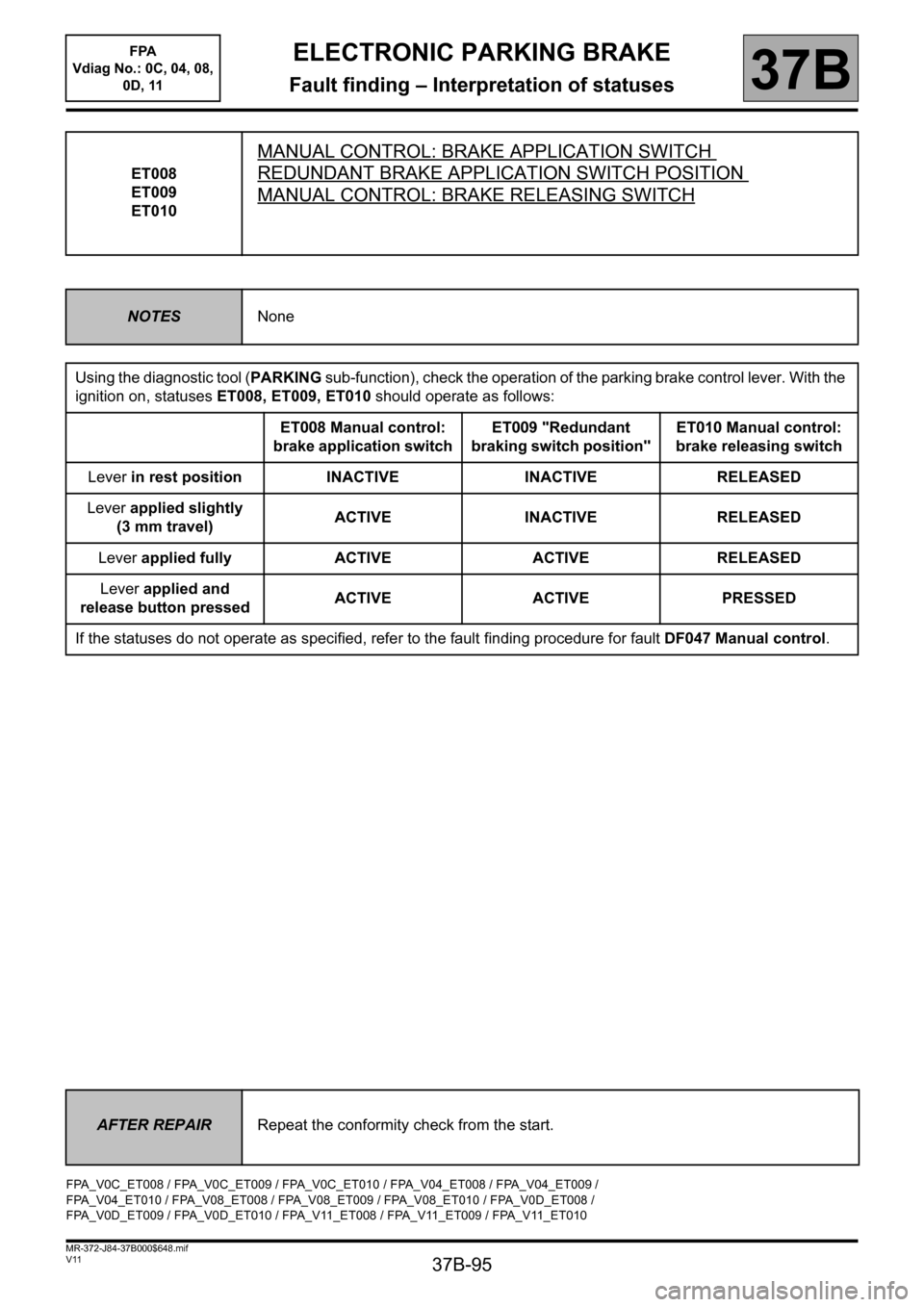
ET008
ET009
ET010
MANUAL CONTROL: BRAKE APPLICATION SWITCH
REDUNDANT BRAKE APPLICATION SWITCH POSITION
MANUAL CONTROL: BRAKE RELEASING SWITCH
NOTESNone
Using the diagnostic tool (PARKING sub-function), check the operation of the parking brake control lever. With the
ignition on, statuses ET008, ET009, ET010 should operate as follows:
ET008 Manual control:
brake application switchET009 "Redundant
braking switch position"ET010 Manual control:
brake releasing switch
Lever in rest position INACTIVE INACTIVE RELEASED
Lever applied slightly
(3 mm travel)ACTIVE INACTIVE RELEASED
Lever applied fully ACTIVE ACTIVE RELEASED
Lever applied and
release button pressedACTIVE ACTIVE PRESSED
If the statuses do not operate as specified, refer to the fault finding procedure for fault DF047 Manual control.
AFTER REPAIRRepeat the conformity check from the start.
FPA_V0C_ET008 / FPA_V0C_ET009 / FPA_V0C_ET010 / FPA_V04_ET008 / FPA_V04_ET009 /
FPA_V04_ET010 / FPA_V08_ET008 / FPA_V08_ET009 / FPA_V08_ET010 / FPA_V0D_ET008 /
FPA_V0D_ET009 / FPA_V0D_ET010 / FPA_V11_ET008 / FPA_V11_ET009 / FPA_V11_ET010
Page 106 of 115
37B-106
MR-372-J84-37B000$936.mif
V11
ELECTRONIC PARKING BRAKE
Fault finding – Fault finding chart
FPA
Vdiag No.: 0C, 04, 08,
0D, 11
37B
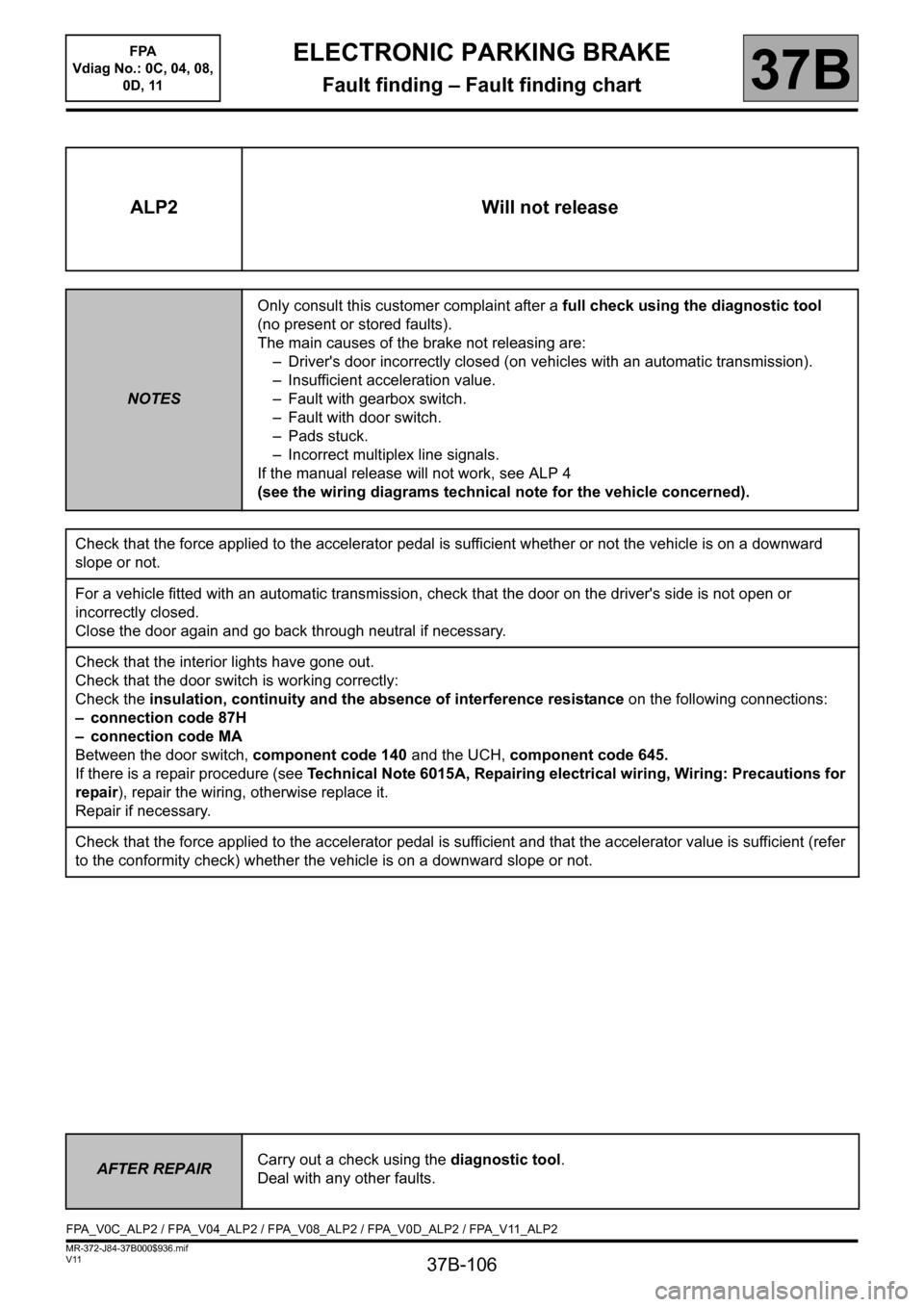
ALP2 Will not release
NOTESOnly consult this customer complaint after a full check using the diagnostic tool
(no present or stored faults).
The main causes of the brake not releasing are:
– Driver's door incorrectly closed (on vehicles with an automatic transmission).
– Insufficient acceleration value.
– Fault with gearbox switch.
– Fault with door switch.
– Pads stuck.
– Incorrect multiplex line signals.
If the manual release will not work, see ALP 4
(see the wiring diagrams technical note for the vehicle concerned).
Check that the force applied to the accelerator pedal is sufficient whether or not the vehicle is on a downward
slope or not.
For a vehicle fitted with an automatic transmission, check that the door on the driver's side is not open or
incorrectly closed.
Close the door again and go back through neutral if necessary.
Check that the interior lights have gone out.
Check that the door switch is working correctly:
Check the insulation, continuity and the absence of interference resistance on the following connections:
– connection code 87H
– connection code MA
Between the door switch, component code 140 and the UCH, component code 645.
If there is a repair procedure (see Technical Note 6015A, Repairing electrical wiring, Wiring: Precautions for
repair), repair the wiring, otherwise replace it.
Repair if necessary.
Check that the force applied to the accelerator pedal is sufficient and that the accelerator value is sufficient (refer
to the conformity check) whether the vehicle is on a downward slope or not.
AFTER REPAIRCarry out a check using the diagnostic tool.
Deal with any other faults.
FPA_V0C_ALP2 / FPA_V04_ALP2 / FPA_V08_ALP2 / FPA_V0D_ALP2 / FPA_V11_ALP2