trunk release SAAB 9-5 2005 Owners Manual
[x] Cancel search | Manufacturer: SAAB, Model Year: 2005, Model line: 9-5, Model: SAAB 9-5 2005Pages: 276, PDF Size: 16.72 MB
Page 6 of 276
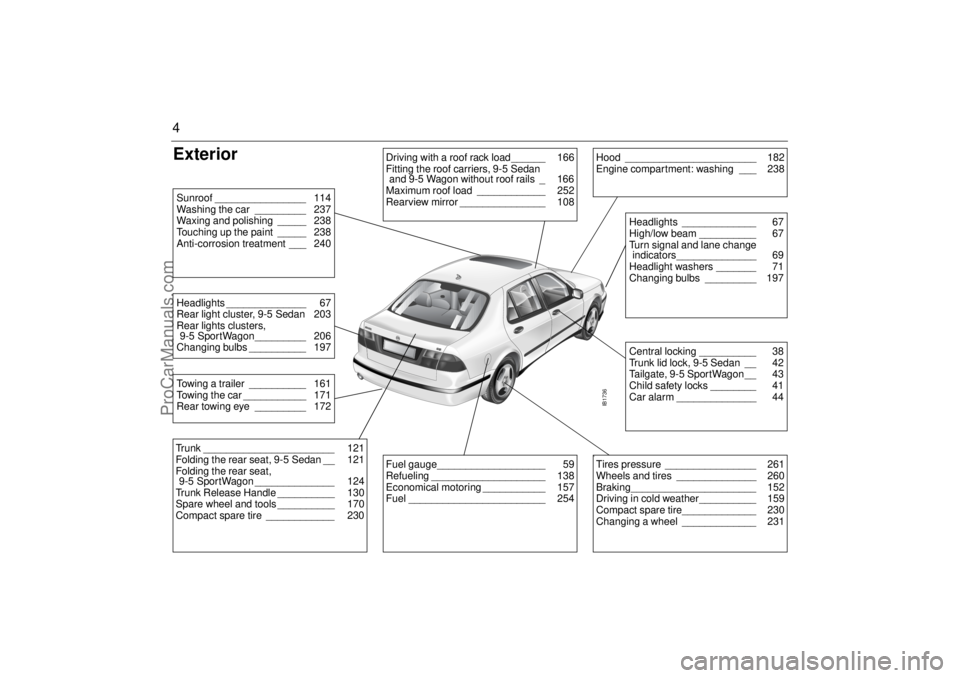
4Exterior
IB1736
Driving with a roof rack load______ 166
Fitting the roof carriers, 9-5 Sedan
and 9-5 Wagon without roof rails _ 166
Maximum roof load ____________ 252
Rearview mirror _______________ 108
Hood _______________________ 182
Engine compartment: washing ___ 238
Central locking __________ 38
Trunk lid lock, 9-5 Sedan __ 42
Tailgate, 9-5 SportWagon __ 43
Child safety locks ________ 41
Car alarm ______________ 44Headlights _____________ 67
High/low beam __________ 67
Turn signal and lane change
indicators______________ 69
Headlight washers _______ 71
Changing bulbs _________ 197
Fuel gauge___________________ 59
Refueling ____________________ 138
Economical motoring ___________ 157
Fuel ________________________ 254
b Tires pressure ________________ 261
Wheels and tires ______________ 260
Braking______________________ 152
Driving in cold weather__________ 159
Compact spare tire_____________ 230
Changing a wheel _____________ 231
Trunk _______________________ 121
Folding the rear seat, 9-5 Sedan __ 121
Folding the rear seat,
9-5 SportWagon ______________ 124
Trunk Release Handle __________ 130
Spare wheel and tools __________ 170
Compact spare tire ____________ 230Towing a trailer __________ 161
Towing the car ___________ 171
Rear towing eye _________ 172Headlights ______________ 67
Rear light cluster, 9-5 Sedan 203
Rear lights clusters,
9-5 SportWagon_________ 206
Changing bulbs __________ 197Sunroof ________________ 114
Washing the car _________ 237
Waxing and polishing _____ 238
Touching up the paint _____ 238
Anti-corrosion treatment ___ 240
ProCarManuals.com
Page 23 of 276
21 Safety
Child safety
Car safety tips
For Trunk Release Handle information see
page 42 and 130.
WARNING
Children must always be suitably res-
trained in the car.
DEATH or SERIOUS
INJURY can occur.
Children 12 and under or
shorter than 55 inches
(140 cm) can be killed by
the airbag.
The BACK SEAT is the SAFEST place
for children.
NEVER put a rear-facing child seat in
the front.
Sit as far back as possible from the air-
bag.
ALWAYS use SAFETY BELTS and
CHILD RESTRAINTS.
WARNING
Never leave children unattended in a
car, even for a short time.
– Children can suffer heat stroke – per-
haps die – in a matter of minutes.
– Children can put the car into gear and
hurt themselves or others.
At gas stations, take the keys from the
car while filling the tank.
Never allow children to climb on top of
– or under cars.
Always look for children before back-
ing your car out of a garage or drive-
way.
To avoid carbon monoxide poisoning,
never let a car idle in an enclosed
garage.
Supervise young children around
buckets of water while washing your
car. Small children can drown in a
short time in less than an inch of water.
WARNING
Protect children from getting
trapped in the trunk of a car Teach children not to play in or around
cars.
Watch children when loading or unlo-
ading the car so they don’t get locked
in by mistake.
Always lock the doors and trunk of
your car, and keep the keys out of
children´s sight and reach.
Keep the rear fold-down seats closed
to help prevent kids from getting into
the trunk from inside the car.
ProCarManuals.com
Page 41 of 276
39 Security
To check the number of keys that are pro-
grammed for the car; see page 48.
Locking/unlocking the carWhen the car is locked and unlocked the
theft alarm is also affected.
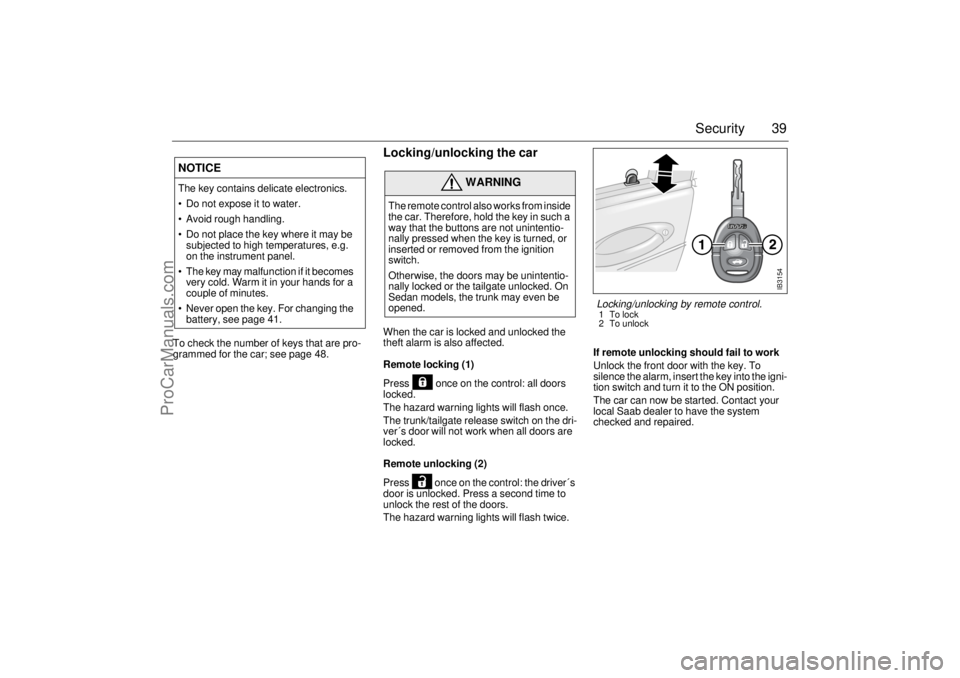
Remote locking (1)
Press once on the control: all doors
locked.
The hazard warning lights will flash once.
The trunk/tailgate release switch on the dri-
ver´s door will not work when all doors are
locked.
Remote unlocking (2)
Press once on the control: the driver´s
door is unlocked. Press a second time to
unlock the rest of the doors.
The hazard warning lights will flash twice.If remote unlocking should fail to work
Unlock the front door with the key. To
silence the alarm, insert the key into the igni-
tion switch and turn it to the ON position.
The car can now be started. Contact your
local Saab dealer to have the system
checked and repaired.
NOTICEThe key contains delicate electronics.
Do not expose it to water.
Avoid rough handling.
Do not place the key where it may be
subjected to high temperatures, e.g.
on the instrument panel.
The key may malfunction if it becomes
very cold. Warm it in your hands for a
couple of minutes.
Never open the key. For changing the
battery, see page 41.
WARNING
The remote control also works from inside
the car. Therefore, hold the key in such a
way that the buttons are not unintentio-
nally pressed when the key is turned, or
inserted or removed from the ignition
switch.
Otherwise, the doors may be unintentio-
nally locked or the tailgate unlocked. On
Sedan models, the trunk may even be
opened.
IB3154
Locking/unlocking by remote control.1To lock
2 To unlock
ProCarManuals.com
Page 42 of 276
40 SecurityLocking by key (1)
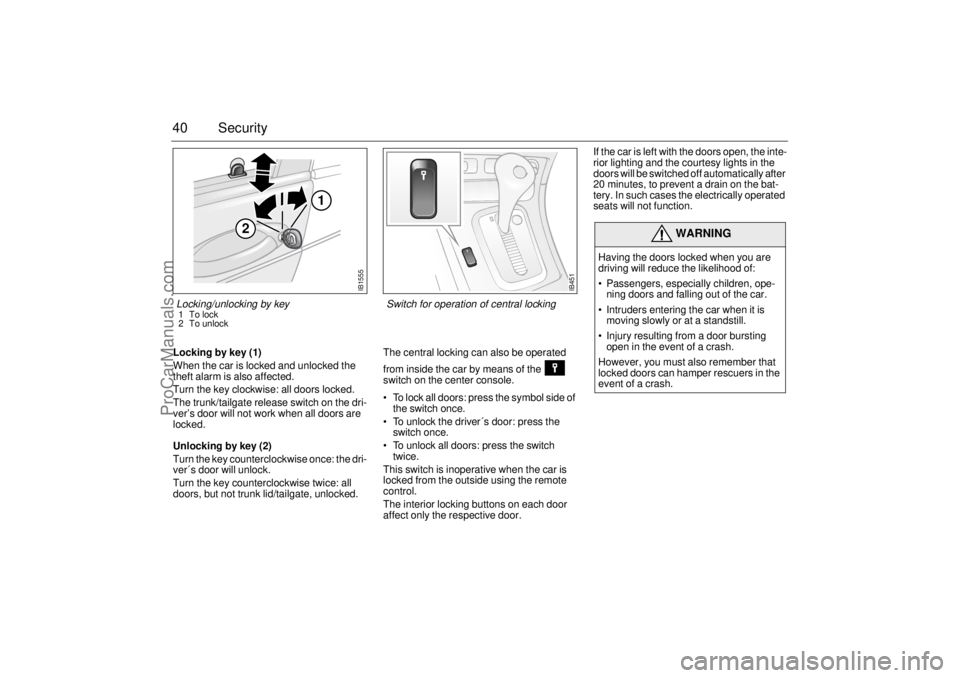
When the car is locked and unlocked the
theft alarm is also affected.
Turn the key clockwise: all doors locked.
The trunk/tailgate release switch on the dri-
ver’s door will not work when all doors are
locked.
Unlocking by key (2)
Turn the key counterclockwise once: the dri-
ver´s door will unlock.
Turn the key counterclockwise twice: all
doors, but not trunk lid/tailgate, unlocked. The central locking can also be operated
from inside the car by means of the
switch on the center console.
To lock all doors: press the symbol side of
the switch once.
To unlock the driver´s door: press the
switch once.
To unlock all doors: press the switch
twice.
This switch is inoperative when the car is
locked from the outside using the remote
control.
The interior locking buttons on each door
affect only the respective door.If the car is left with the doors open, the inte-
rior lighting and the courtesy lights in the
doors will be switched off automatically after
20 minutes, to prevent a drain on the bat-
tery. In such cases the electrically operated
seats will not function.
WARNING
Having the doors locked when you are
driving will reduce the likelihood of:
Passengers, especially children, ope-
ning doors and falling out of the car.
Intruders entering the car when it is
moving slowly or at a standstill.
Injury resulting from a door bursting
open in the event of a crash.
However, you must also remember that
locked doors can hamper rescuers in the
event of a crash.
IB451
Switch for operation of central locking
IB1555
2
1
Locking/unlocking by key1To lock
2 To unlock
ProCarManuals.com
Page 44 of 276
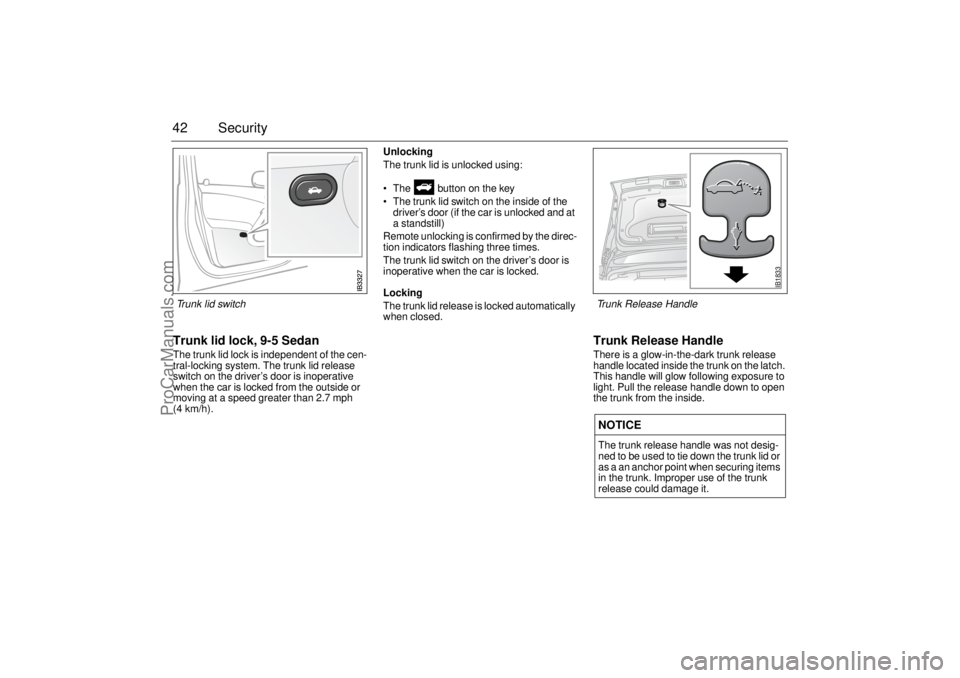
42 SecurityTrunk lid lock, 9-5 SedanThe trunk lid lock is independent of the cen-
tral-locking system. The trunk lid release
switch on the driver’s door is inoperative
when the car is locked from the outside or
moving at a speed greater than 2.7 mph
(4 km/h).Unlocking
The trunk lid is unlocked using:
The button on the key
The trunk lid switch on the inside of the
driver’s door (if the car is unlocked and at
a standstill)
Remote unlocking is confirmed by the direc-
tion indicators flashing three times.
The trunk lid switch on the driver’s door is
inoperative when the car is locked.
Locking
The trunk lid release is locked automatically
when closed.
Trunk Release HandleThere is a glow-in-the-dark trunk release
handle located inside the trunk on the latch.
This handle will glow following exposure to
light. Pull the release handle down to open
the trunk from the inside.NOTICEThe trunk release handle was not desig-
ned to be used to tie down the trunk lid or
as a an anchor point when securing items
in the trunk. Improper use of the trunk
release could damage it.
IB1833
Trunk Release Handle
Trunk lid switch
ProCarManuals.com
Page 111 of 276

109 Interior equipment and trunk
Preparations for first-time programmingBefore programming the garage opener for
the first time, you must delete any factory
codes.
Press and hold the two outer buttons until
the indicator light begins to flash-after
20 seconds. Release both buttons. Do not
hold for longer that 30 seconds. The garage
opener is now in the train (or learning) mode
and can be programmed at any time begin-
ning with "Programming" - step 2.ProgrammingThe garage opener can record and store the
frequencies of three different remote con-
trols.
The battery in the remote control should be
fairly new for programming to work well.Do not repeat "Programming" - step two
to train additional devices to a second or
third button. Begin with "Programming" -
step three.
1 Turn the ignition ON.
2 Press and hold the two outer buttons
(buttons one and three) - releasing only
when the indicator light begins to flash
(after 20 seconds).
Do not
hold the but-
tons for longer than 30 seconds and
do
not repeat step two
to program a
second and/or third hand-held transmit-
ter to the remaining two buttons.
3 Position the end of your hand-held trans-
mitter 1-3 inches (5-14 cm) away from
the button you wish to program while
keeping the indicator light in view. The transmitter should face the mirror from
below or left side of the mirror.
4 Simultaneously press and hold both the
chosen and hand-held transmitter but-
tons.
Do not release the buttons until
step 5 has been completed.
Note:
Some gate operators and garage
door openers may require you to replace
this Programming Step 4 with procedures
noted in the "Gate Operator / Canadian Pro-
gramming" section.
5 After the indicator light changes from a
slow to a rapidly blinking light, release
both the mirror and hand-held transmit-
ter buttons.
6 Press and hold the just-trained button
and observe the indicator light.
If the indicator light
stays on con-
stantly, programming is complete
and your device should activate when
the button is pressed and released.
Note:
To program the remaining two but-
tons, begin with "Programming" -
step
three. Do not repeat step two.
If the indicator light blinks
rapidly for two
seconds and then turns to a constant
light continue with "Programming"
steps 7-9
to complete the programming of
a rolling code equipped device (most com-
monly a garage door opener).
7 At the garage door opener receiver
(motor-head unit) in the garage, locate
the "learn" or "smart" button. This can
usually
be found where the hanging antenna wire is attached to the
motor-head unit.
8 Firmly press and release the "learn" or
"smart" button. (The name and color of
the button may vary by manufacturer.)
Note:
There are 30 seconds in which to ini-
tiate step nine.
9 Return to the vehicle and firmly
press,
hold for two seconds and release
the
programmed button. Repeat the
"press/hold/release"
sequence a
second time, and, depending on the
brand of the garage door opener (or
other rolling code equipped device),
repeat this sequence a third time to com-
plete the programming process.
The garage opener should now activate
your rolling code equipped device.
Note:
To program the remaining two but-
tons, begin with "Programming" -
step
three
. Do not repeat step two.
ProCarManuals.com
Page 112 of 276

110 Interior equipment and trunkGate Operator / Canadian ProgrammingCanadian radio-frequency laws require
transmitter signals to "time-out" (or quit)
after several seconds of transmission -
which may not be long enough for the
garage opener to pick up the signal during
programming. Similar to this Canadian law,
some U.S. gate operators are designed to
"time-out" in the same manner.
If you live in Canada or you are having diffi-
culties programming a gate operator by
using the "Programming" procedures
(regardless of where you live),
replace
"Programming " step 4
with the following:
Note:
If programming a garage door opener
or gate operator, it is advised to unplug the
device during the "cycling" process to pre-
vent possible overheating.
10 Continue to press and hold the button
while you
press and release - every
two seconds
("cycle") your hand-held
transmitter until the frequency signal
has successfully been accepted by the
garage opener. (The indicator light will
flash slowly and then rapidly.)
Proceed with "Programming" step five to
complete.
Reprogramming a single buttonTo program a device to the garage opener
using a button previously trained, follow
these steps:
1 Press and hold the desired button.
DO
NOT
release the button.
2 The indicator light will begin to flash after
20 seconds. Without releasing the but-
ton, proceed with "Programming" - step
3.
Erasing the three buttonsTo erase programming from the three but-
tons (individual buttons cannot be erased
but can be "reprogrammed" as outlined
below), follow the step noted:
Press and hold the two outer buttons until
the indicator light
begins to flash-after
20 seconds. Release both buttons. Do
not hold for longer that 30 seconds. The
garage opener is now in the train (or lear-
ning) mode
and can be programmed at
any time beginning with "Programming" -
step 3.
NOTICESwitch off the power supply to the garage
door or gate (or park the car beyond the
range of the remote control) while pro-
gramming using the "cycling" method to
prevent damaging the electrical motor.
ProCarManuals.com
Page 113 of 276

111 Interior equipment and trunk
Opening a garage doorTo operate, simply press and release the
programmed button. Activation will now
occur for the trained device (i.e. garage door
opener, gate operator, security system,
entry door lock, home/office lighting, etc.).
For convenience, the hand-held transmitter
of the device may also be used at any time.
Rearview auto-dimming mirrors(accessory)The autodimming is activated and deacti-
vated with a short push on button 2.
If the mirror is equipped with Garage Door
Opener (option) the letter 1 is displayed on
compass bearing display briefly when auto
dimming is activated. When deactivating
the letter 0 is displayed.
The interior rearview mirror has two sen-
sors, one forward-facing and one
rear-facing. They also activate and deacti-
vate the auto dimming feature on door mir-
rors.
The system is activated when the for-
ward-facing sensor detects that it is dark
outside and the rear-facing sensor detects.
For example, if the car following has not
dimmed its headlights. The rearview mirrors
are then darkened to prevent the strong light
source from dazzling the driver. This dar-
kening is stepless.
The mirrors return to their normal states
when the strong light source diminishes.
The auto dimming function can be turned
OFF with the switch on the lower edge of the
rear-view mirror.
NOTE
Towing a trailer can cause the system to
malfunction, as the rear-facing sensor may
sense light from the trailer.
NOTICESwitch off the power supply to the garage
door or gate (or park the car beyond the
range of the remote control) while pro-
gramming using the "cycling" method to
prevent damaging the electrical motor.
1 Forward-facing sensor
2 ON/OFF switch, auto dimming function
3 Rear-facing sensor
This device complies with Part 15 of the FCC Rules.
Operation is subject to the following two conditions: (1)
this device may not cause harmful interference, and (2)
must accept any interference received, including interfe-
rence that may cause undesired operation.
Changes or modifications not expressly approved by the
manufacturer could void the user’s authority to operate
the equipment.
Canada only:
This device complies with RSS-210 of Industry Canada.
Operation is subject to the following two conditions: (1)
this device may not cause interference, and (2) this
device must accept any interference, including interfe-
rence that may cause undesired operation of this device.
ProCarManuals.com
Page 114 of 276

112 Interior equipment and trunkCompass The compass is integrated in the rearview
mirror. The compass bearing is displayed in
the top right-hand corner of the mirror and is
updated every other second. The compass
displays the car’s direction of travel: N, NE,
E, etc.
Switch the compass display on and off by
pressing button 5 for 3 seconds.
Changing zonesThe earth’s magnetic fields vary depending
on one’s position on the globe. If you drive
your car from one magnetic zone to another
the compass setting will need to be changed
to ensure a correct bearing.
1 Study the illustrations to determine the
correct zone.
2 Press and hold button 5 until "ZONE" is
shown in the display on the mirror
(6 seconds). The zone number setting
now is also shown.
3 Press button 5 repeatedly to change the
zone number. There are 15 zones from
which to choose. Once the correct zone
is selected, release the button and wait
4 seconds. The compass will now dis-
play the bearing.
CalibrationCalibration is performed automatically
during travel. If an accessory, such as a
mobile phone, is fitted and it can be assu-
med that the compass is affected, the com-
pass may need to be calibrated manually.
1 Press and hold button 5 until "CAL" and
the compass bearing are displayed
(approx. 9 seconds).
2 Drive in circles (max. 5 mph/8 km/h) or
drive as normal until "CAL" is no longer
displayed.Compass zones in US Compass zones in Canada
ProCarManuals.com
Page 115 of 276
113 Interior equipment and trunk
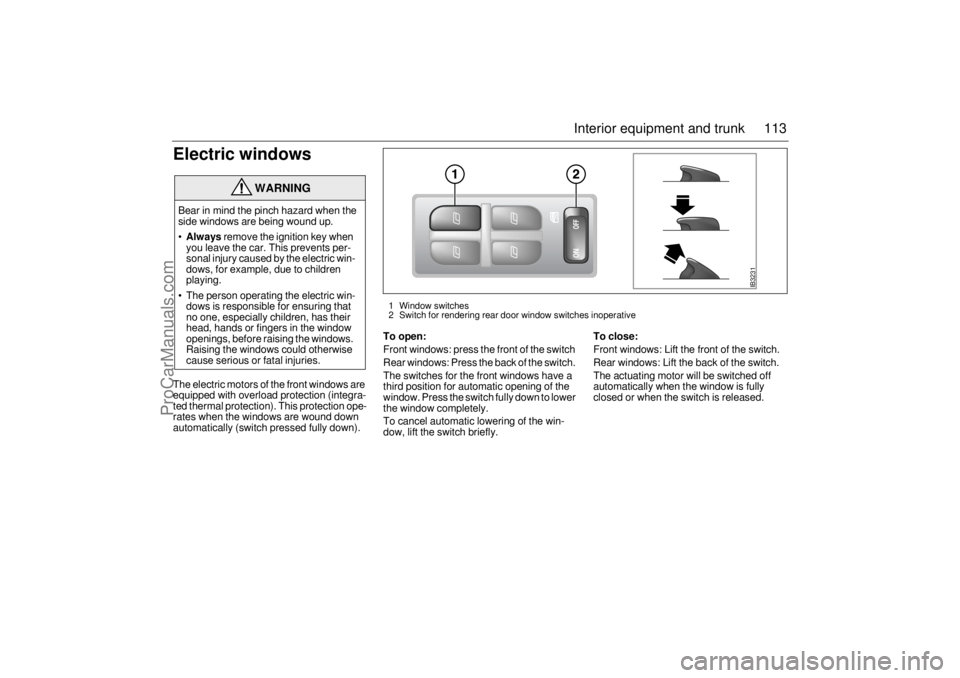
Electric windowsThe electric motors of the front windows are
equipped with overload protection (integra-
ted thermal protection). This protection ope-
rates when the windows are wound down
automatically (switch pressed fully down).
To open:Front windows: press the front of the switch
Rear windows: Press the back of the switch.
The switches for the front windows have a
third position for automatic opening of the
window. Press the switch fully down to lower
the window completely.
To cancel automatic lowering of the win-
dow, lift the switch briefly.
To close:Front windows: Lift the front of the switch.
Rear windows: Lift the back of the switch.
The actuating motor will be switched off
automatically when the window is fully
closed or when the switch is released.
WARNING
Bear in mind the pinch hazard when the
side windows are being wound up.
Always
remove the ignition key when
you leave the car. This prevents per-
sonal injury caused by the electric win-
dows, for example, due to children
playing.
The person operating the electric win-
dows is responsible for ensuring that
no one, especially children, has their
head, hands or fingers in the window
openings, before raising the windows.
Raising the windows could otherwise
cause serious or fatal injuries.
IB3231
1 Window switches
2 Switch for rendering rear door window switches inoperative
ProCarManuals.com