lock Seat Ateca 2016 Repair Manual
[x] Cancel search | Manufacturer: SEAT, Model Year: 2016, Model line: Ateca, Model: Seat Ateca 2016Pages: 328, PDF Size: 6.32 MB
Page 140 of 328
Operation
Interior and reading lights 1)
› › ›
table on page 2
Read the additional information carefully
››› page 24
Glove compartment and luggage compart-
ment lighting*
When opening and closing the glove com-
partment on the front passenger side and the
rear lid, the respective light will automatically
switch on and off.
Footwell lighting*
The lights in the footwell area below the dash
(driver and front passenger sides) will switch
on when the doors are opened and will de-
crease in intensity while driving. The intensity
of these lights can be adjusted using the ra-
dio menu (see Easy Connect > Light
Settings > Interior lighting
››› page 26).
Ambient light*
The ambient lighting in the door panels may
change colour. The intensity of these lights
can be adjusted using the radio menu (see Easy Connect > Light Settings >
Interior lighting
› ›
› page 26). Note
The reading lights switch off when the vehi-
c l
e is locked using a key or after several mi-
nutes if the key is removed from the ignition.
This prevents the battery from discharging. Visibility
S u
n visors Fig. 137
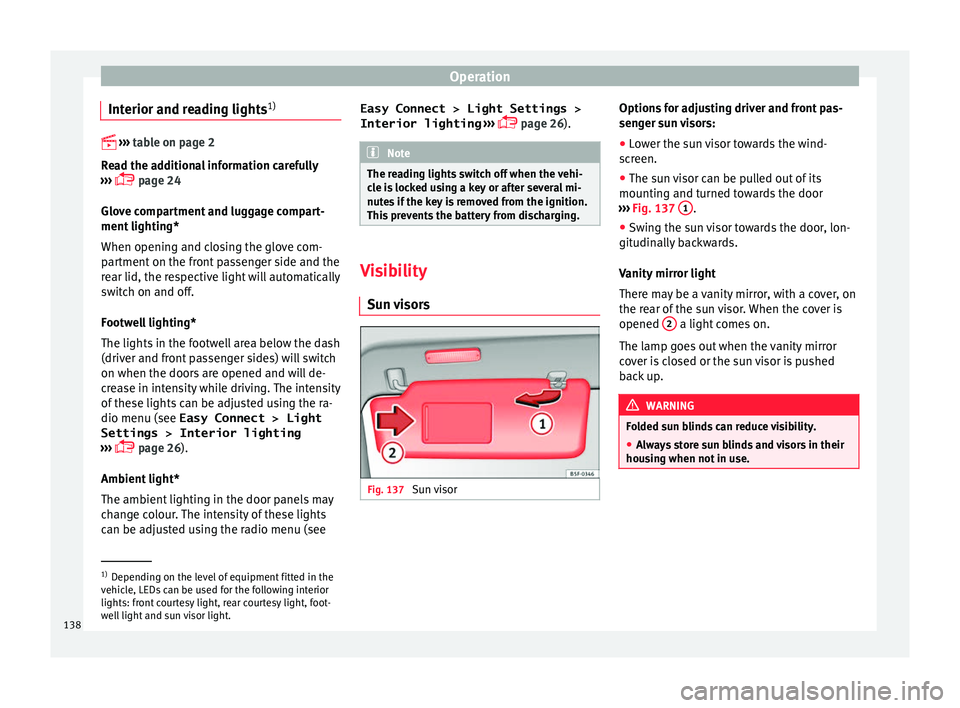
Sun visor Options for adjusting driver and front pas-
sen
g
er sun visors:
● Lower the sun visor towards the wind-
sc
reen.
● The sun visor can be pulled out of its
mountin
g and turned towards the door
››› Fig. 137 1 .
● Swing the sun visor towards the door, lon-
git udin
ally backwards.
Vanity mirror light
There may be a vanity mirror, with a cover, on
the rear of the sun visor. When the cover is
opened 2 a light comes on.
The l amp g
oes out when the vanity mirror
cover is closed or the sun visor is pushed
back up. WARNING
Folded sun blinds can reduce visibility.
● Always store sun blinds and visors in their
hou s
ing when not in use. 1)
Depending on the level of equipment fitted in the
v ehic
le, LEDs can be used for the following interior
lights: front courtesy light, rear courtesy light, foot-
well light and sun visor light.
138
Page 142 of 328
Operation
To ensure the headlight washers work cor-
r ectly
in winter, any snow which has got into
the bumper jet supports should be cleaned
away. If necessary, remove snow with an anti-
icing spray. Note
The wiper will try to wipe away any obstacles
th at
are on the windscreen. The wiper will
stop moving if the obstacle blocks its path.
Remove the obstacle and switch the wiper
back on again. Rain sensor*
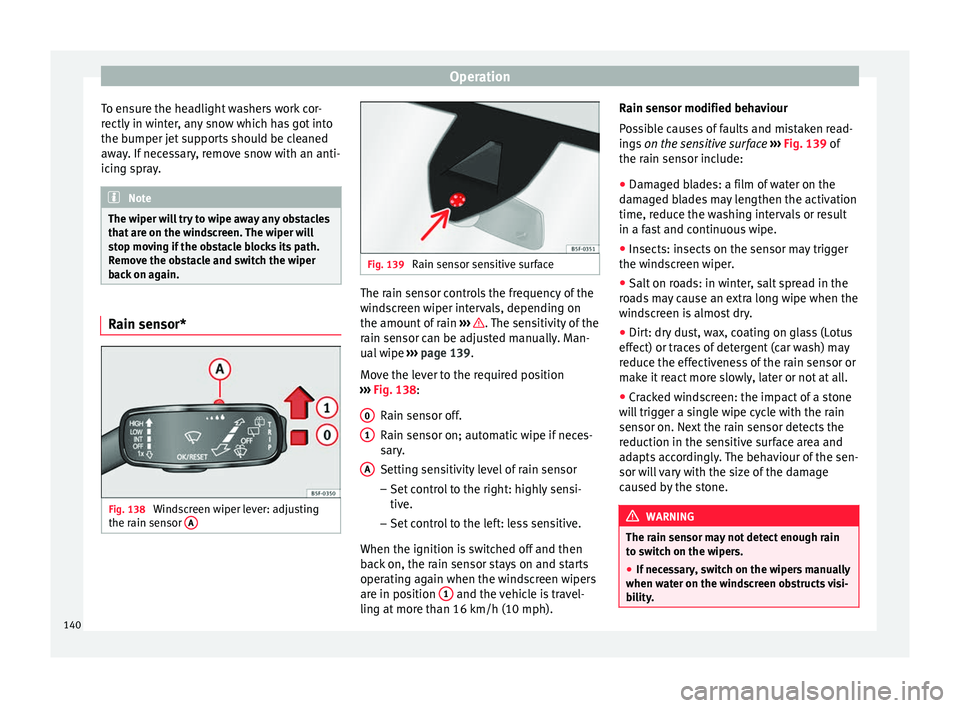
Fig. 138
Windscreen wiper lever: adjusting
the r ain sen
sor A Fig. 139
Rain sensor sensitive surface The rain sensor controls the frequency of the
w
ind
screen wiper intervals, depending on
the amount of rain ››› . The sensitivity of the
r ain sen
sor can be adjusted manually. Man-
ual wipe ››› page 139.
Move the lever to the required position
››› Fig. 138:
Rain sensor off.
Rain sensor on; automatic wipe if neces-
sary.
Setting sensitivity level of rain sensor
– Set control to the right: highly sensi-
tive.
– Set control to the left: less sensitive.
When the ignition is switched off and then
back on, the rain sensor stays on and starts
operating again when the windscreen wipers
are in position 1 and the vehicle is travel-
lin g at
more than 16 km/h (10 mph).
0 1
A Rain sensor modified behaviour
P
o
ssible causes of faults and mistaken read-
ings on the sensitive surface ››› Fig. 139 of
the rain sensor include:
● Damaged blades: a film of water on the
dam
aged blades may lengthen the activation
time, reduce the washing intervals or result
in a fast and continuous wipe.
● Insects: insects on the sensor may trigger
the wind
screen wiper.
● Salt on roads: in winter, salt spread in the
ro
ads may cause an extra long wipe when the
windscreen is almost dry.
● Dirt: dry dust, wax, coating on glass (Lotus
effect) or tr
aces of detergent (car wash) may
reduce the effectiveness of the rain sensor or
make it react more slowly, later or not at all.
● Cracked windscreen: the impact of a stone
wi
ll trigger a single wipe cycle with the rain
sensor on. Next the rain sensor detects the
reduction in the sensitive surface area and
adapts accordingly. The behaviour of the sen-
sor will vary with the size of the damage
caused by the stone. WARNING
The rain sensor may not detect enough rain
t o sw
itch on the wipers.
● If necessary, switch on the wipers manually
when wat
er on the windscreen obstructs visi-
bility. 140
Page 144 of 328
Operation
● If nec
essary the right exterior mirror adjust-
ment may need correcting. turn the control to
position R 1)
.
● In the Easy Connect system the exterior mir-
ror
s can be adjusted using the CAR button
and the f u
nction button SETUP .
Ti lt
function for front passenger exterior mir-
ror*
When parking backwards, and in order to be
able to see the kerb, the passenger side mir-
ror can be automatically tilted towards the
passenger to provide a better view of the
kerb. The control must be in the position R1)
for this feature to be operational.
The mirror returns to its original position as
soon as you drive forward at over 15 km/h
(9 mph) or switch off the ignition. It also re-
turns to its original position if the position of
the control is adjusted.
Storing the rear view mirror settings for the
tilt function
● Switch the ignition on.
● Access the Easy Connect system, Menu
CAR , function “Rear view mirrors and wind-
s c
reen wipers” and select “lower while re-
versing” ›››
page 108. ●
Select
the R1)
position on the control.
● Select reverse gear.
● Adjust the front passenger exterior mirror
so that
you can see, for example, the kerb
area well.
● Release the reverse gear.
● The adjusted position for the rear view mir-
ror i
s stored.
Fold in the exterior mirrors after parking
(convenience function)*
The Easy Connect system, Menu CAR , func-
tion “R e
ar view mirrors and windscreen wip-
ers” can be used to have the exterior mirrors
fold in when the vehicle is parked
››› page 108.
When the vehicle is locked with the remote
control, by pressing for more than approxi-
mately 1 second the exterior mirrors are fol-
ded in automatically. When the vehicle is
opened with the remote control, the exterior
mirrors are deployed automatically. WARNING
Convex or wide-angle* exterior mirrors give a
l ar
ger field of vision. However, they make ob-
jects look smaller and further away than they
really are. If you use these mirrors to esti- mate the distance to vehicles behind you
when c
h
anging lane, you could misjudge the
distance. Risk of accident! CAUTION
● If one of
the mirror housings is knocked out
of position (e.g. when parking), the mirrors
must first be fully retracted with the electric
control. Do not readjust the mirror housing by
hand, as this will interfere with the mirror ad-
juster function.
● Before washing the vehicle in an automatic
car w
ash, please make sure to retract the ex-
terior mirrors to prevent them from being
damaged. Electrically retractable exterior
mirrors must not be folded in or out by hand.
Always use the electrical power control. Note
If the electrical adjustment should fail to op-
er at
e, both of the mirrors can be adjusted by
hand by lightly pressing the edge of the mir-
ror glass. 1)
Regulation in right-hand drive vehicles is symmet-
ric al
.
142
Page 146 of 328
Operation
Adjusting the head restraints
– To set the head restraint higher, grasp the
side
s with both hands and move it up-
wards, until you see it engage.
– To set the head restraint lower down, press
the 1
› ››
Fig. 141
button and move it
downwards.
Removing the head restraint
To remove the head restraint, the correspond-
ing backrest must be partially folded forward. – Unlock the backrest ››
› page 146.
– Move the head restraint upwards until it ar-
rive
s to the top.
– Press button 1
› ›
›
Fig. 141, while simulta-
neously pressing on the security hole 2›››
Fig. 141 w ith a fl
at screwdriver a maxi-
mum of 5 mm wide, and remove the head
restraint.
– Move the backrest until it engages properly
› ›
› .
Fittin g the he
ad restraint
To mount the external head restraints, the
corresponding backrest must be partially fol-
ded forward.
– Unlock the backrest ››
› page 146.
– Insert the head restraint bars into the
guides
until they perceptibly engage. It should not be possible to remove the head
re
straint from the backrest.
– Move the backrest until it engages properly
››
› .
WARNING
● Ple
ase observe the general notes
››› page 66.
● Remove the rear head restraints only when
it i
s necessary for the placement of a child
seat ››› page 79. After removing a child seat,
remount the head restraint immediately.
Travelling with the head restraints removed
or improperly adjusted increases the risk of
severe injuries. Seat functions
Intr oduction WARNING
Inappropriate use of the seat functions can
c au
se severe injuries.
● Assume the proper sitting position before
your trip and r
emain in it throughout. This al-
so applies to the other occupants.
● Always keep hands, fingers, feet and other
par
ts of the body away from the operating ra-
dius and the adjustment of seats. Seat heating
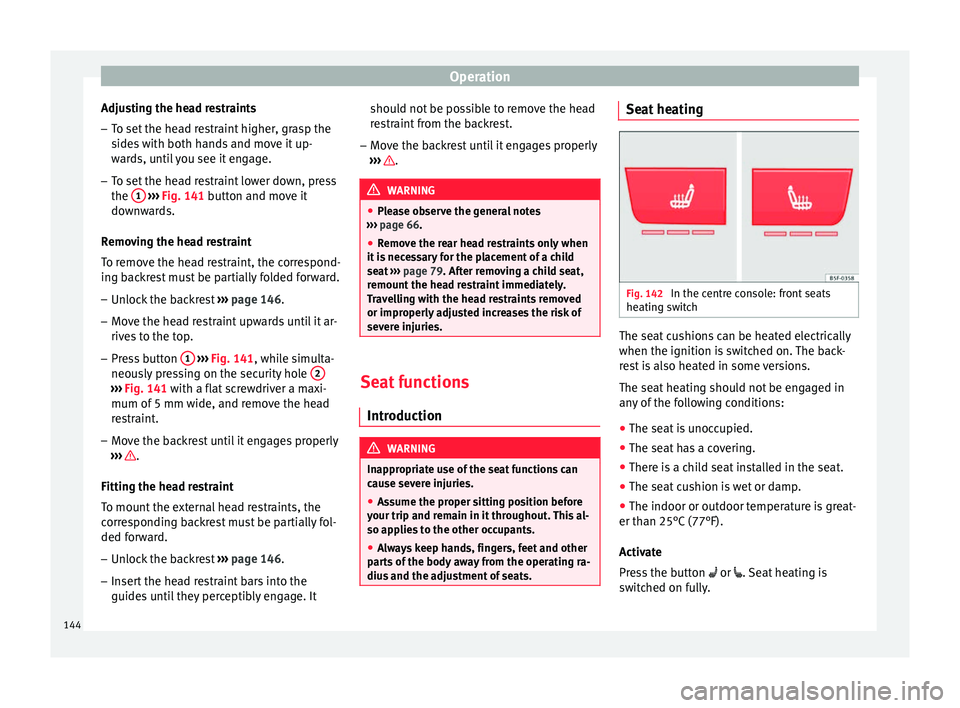
Fig. 142
In the centre console: front seats
he atin
g switch The seat cushions can be heated electrically
when the ignition i
s
switched on. The back-
rest is also heated in some versions.
The seat heating should not be engaged in
any of the following conditions:
● The seat is unoccupied.
● The seat has a covering.
● There is a child seat installed in the seat.
● The seat cushion is wet or damp.
● The indoor or outdoor temperature is great-
er than 25°C
(77°F).
Activate
Press the button or . Seat heating is
switched on fully.
144
Page 148 of 328
Operation
Folding down and lifting the rear seat
b ac
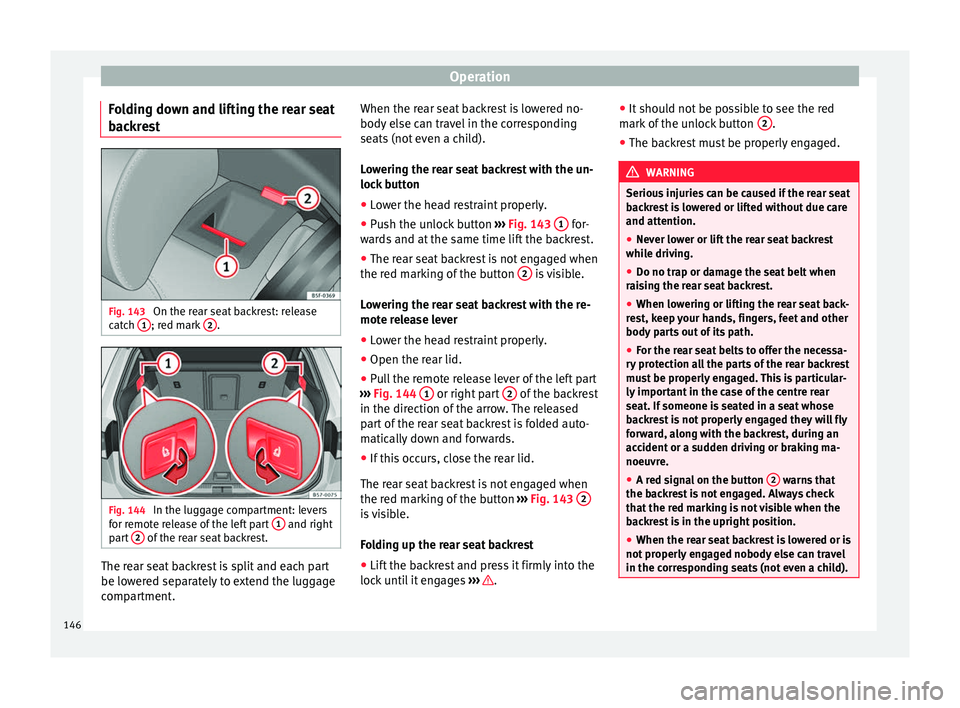
krest Fig. 143
On the rear seat backrest: release
c at
ch 1 ; red mark
2 .
Fig. 144
In the luggage compartment: levers
f or r
emote release of the left part 1 and right
p ar
t 2 of the rear seat backrest.
The rear seat backrest is split and each part
be lo
w
ered separately to extend the luggage
compartment. When the rear seat backrest is lowered no-
body el
se can travel in the corresponding
seats (not even a child).
Lowering the rear seat backrest with the un-
lock button
● Lower the head restraint properly.
● Push the unlock button ››
› Fig. 143 1 for-
w ar
ds and at the same time lift the backrest.
● The rear seat backrest is not engaged when
the red m
arking of the button 2 is visible.
L o
wering the rear seat backrest with the re-
mote release lever
● Lower the head restraint properly.
● Open the rear lid.
● Pull the remote release lever of the left part
››
› Fig. 144 1 or right part
2 of the backrest
in the dir ection of
the arrow. The released
part of the rear seat backrest is folded auto-
matically down and forwards.
● If this occurs, close the rear lid.
The re
ar seat backrest is not engaged when
the red marking of the button ››› Fig. 143 2 is visible.
F
o
lding up the rear seat backrest
● Lift the backrest and press it firmly into the
lock
until it engages ››› .●
It shou
ld not be possible to see the red
mark of the unlock button 2 .
● The backrest must be properly engaged. WARNING
Serious injuries can be caused if the rear seat
b ac
krest is lowered or lifted without due care
and attention.
● Never lower or lift the rear seat backrest
whil
e driving.
● Do no trap or damage the seat belt when
rai
sing the rear seat backrest.
● When lowering or lifting the rear seat back-
re
st, keep your hands, fingers, feet and other
body parts out of its path.
● For the rear seat belts to offer the necessa-
ry
protection all the parts of the rear backrest
must be properly engaged. This is particular-
ly important in the case of the centre rear
seat. If someone is seated in a seat whose
backrest is not properly engaged they will fly
forward, along with the backrest, during an
accident or a sudden driving or braking ma-
noeuvre.
● A red signal on the button 2 warns that
the b ac
krest is not engaged. Always check
that the red marking is not visible when the
backrest is in the upright position.
● When the rear seat backrest is lowered or is
not pr
operly engaged nobody else can travel
in the corresponding seats (not even a child). 146
Page 149 of 328
Transport and practical equipment
CAUTION
Serious damage can be caused to the vehicle
and other o b
jects if the rear seat backrest is
lowered or lifted without due care and atten-
tion.
● Before lowering the rear seat backrest, al-
wa
ys adjust the front seats so that neither
the head restraints nor the cushions of the
rear backrest can hit them. Transport and practical
equipment
St or
age compartments
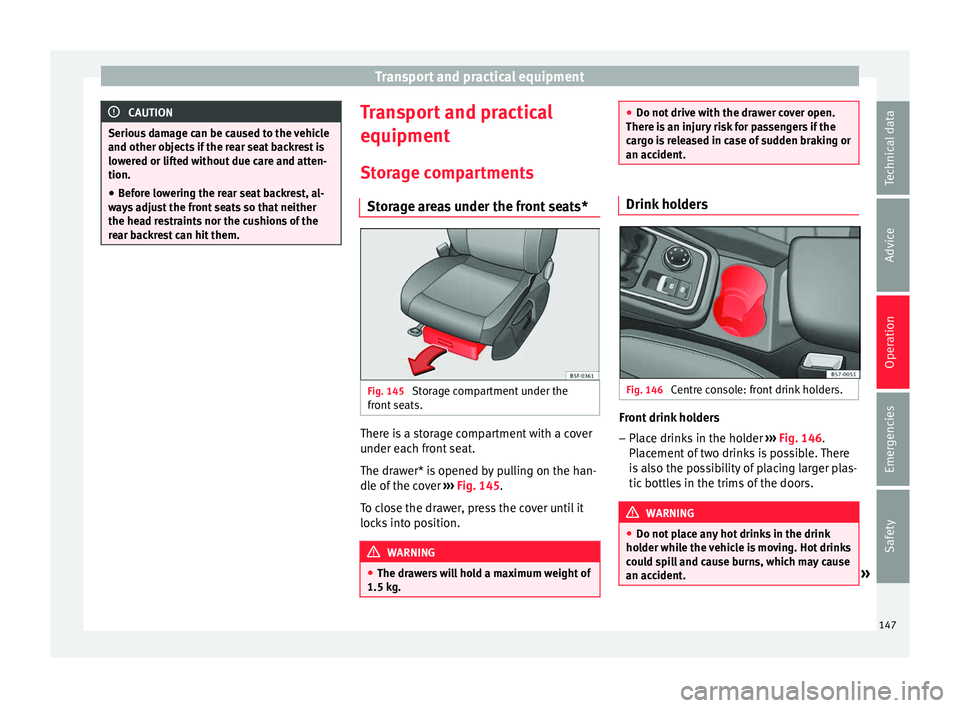
Storage areas under the front seats* Fig. 145
Storage compartment under the
fr ont
seats. There is a storage compartment with a cover
u
nder e
ach front seat.
The drawer* is opened by pulling on the han-
dle of the cover ››› Fig. 145.
To close the drawer, press the cover until it
locks into position. WARNING
● The dr a
wers will hold a maximum weight of
1.5 kg. ●
Do not driv
e with the drawer cover open.
There is an injury risk for passengers if the
cargo is released in case of sudden braking or
an accident. Drink holders
Fig. 146
Centre console: front drink holders. Front drink holders
– Place drinks in the holder ››
› Fig. 146.
Placement of two drinks is possible. There
is also the possibility of placing larger plas-
tic bottles in the trims of the doors. WARNING
● Do not p
lace any hot drinks in the drink
holder while the vehicle is moving. Hot drinks
could spill and cause burns, which may cause
an accident. » 147
Technical data
Advice
Operation
Emergencies
Safety
Page 151 of 328
Transport and practical equipment
Electrical equipment can be connected to the
12 v
olt power socket. The appliances connec-
ted to each power socket must not exceed a
power rating of 120 Watt. WARNING
The power socket works only when the igni-
tion i s
on. Improper use may cause serious
injury or even fire. Children should therefore
not be left in the vehicle unattended if the
button is also left behind. Otherwise there is
a possibility that they may be injured. CAUTION
Always use the correct type of plugs to avoid
d am
aging the sockets. Note
The use of electrical appliances with the en-
gine sw it
ched off will cause a battery dis-
charge. Storing objects
Lo
ading the luggage compartment All luggage and other loose objects must be
s
af
ely secured in the luggage compartment.
Unsecured objects which shift back and forth
could impair the driving safety or driving characteristics of the vehicle by shifting the
centr
e of gravity.
– Distribute the load evenly in the luggage
comp
artment.
– Place heavy objects as far forward as possi-
bl
e in the luggage compartment.
– Place the heavy objects first.
– Secure heavy objects to the fitted fastening
ring
s ››› page 151. WARNING
● Loo
se luggage and other objects in the lug-
gage compartment could cause serious inju-
ries.
● Always stow objects in the luggage com-
par
tment and secure them on the fastening
rings.
● Use suitable straps to secure heavy ob-
ject
s.
● During sudden manoeuvres or accidents,
loose o
bjects can be thrown forward, injuring
vehicle occupants or passers-by. This in-
creased risk of injury will be further increased
if a loose object is struck by an inflating air-
bag. If this happens, objects may shoot out-
ward like a missile. Risk of fatal injury.
● Please note that the centre of gravity may
shift
when transporting heavy objects; this
may affect vehicle handling and lead to an ac-
cident. Therefore, it is essential to adjust
your speed and driving style accordingly, to
avoid accidents. ●
Nev er e
xceed the allowed axle weights or
allowed maximum weight. If said weights are
exceeded, the driving characteristics of the
vehicle may change, leading to accidents, in-
juries and damage to the vehicle.
● Never leave your vehicle unattended, espe-
ci
ally when the rear lid is open. Children
could climb into the luggage compartment,
closing the door behind them; they will be
trapped and run the risk of death.
● Never allow children to play in or around
the v
ehicle. Close and lock all the doors and
rear lid when you leave the vehicle. Before
you lock the vehicle, make sure that there are
no adults or children in the vehicle. Note
● Air c ir
culation in the vehicle helps reduce
fogging of the windows. Used air escapes
through ventilation slits in the side trim of
the luggage compartment. Ensure that the
ventilation slots are never covered.
● Straps for securing the load to the fasten-
ing rin
gs are commercially available. 149
Technical data
Advice
Operation
Emergencies
Safety
Page 152 of 328
Operation
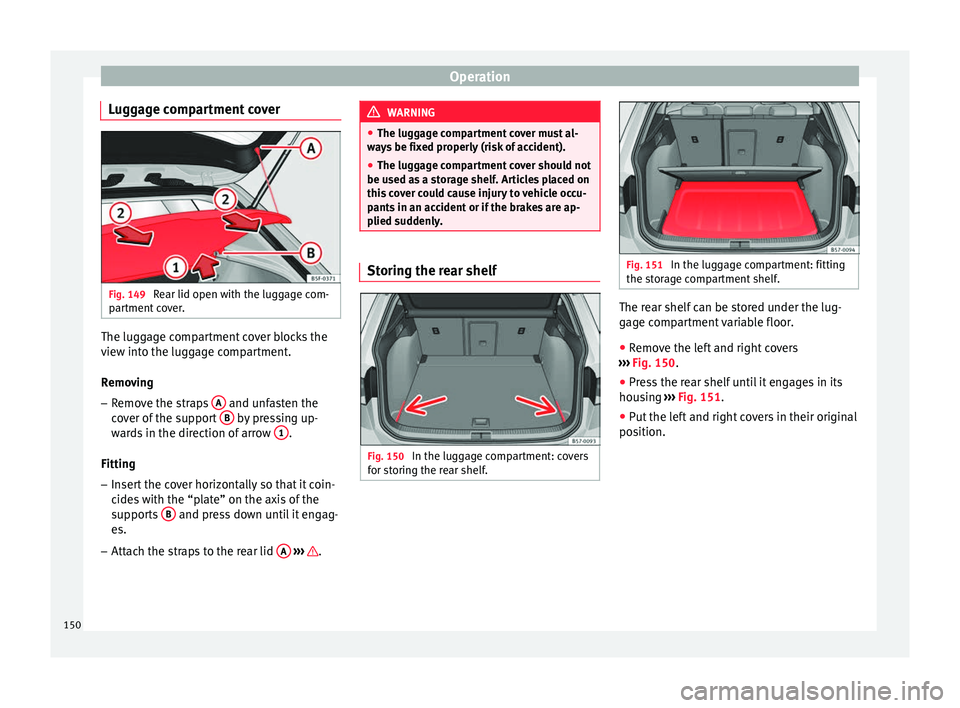
Luggage compartment cover Fig. 149
Rear lid open with the luggage com-
p ar
tment cover. The luggage compartment cover blocks the
v
iew int
o the luggage compartment.
Removing – Remove the straps A and unfasten the
c o
ver of the support B by pressing up-
w ar
ds in the direction of arrow 1 .
Fittin g
– In
sert the cover horizontally so that it coin-
cide
s with the “plate” on the axis of the
supports B and press down until it engag-
e s.
– Att
ach the straps to the rear lid A
› ›
› . WARNING
● The lug g
age compartment cover must al-
ways be fixed properly (risk of accident).
● The luggage compartment cover should not
be used a
s a storage shelf. Articles placed on
this cover could cause injury to vehicle occu-
pants in an accident or if the brakes are ap-
plied suddenly. Storing the rear shelf
Fig. 150
In the luggage compartment: covers
f or s
toring the rear shelf. Fig. 151
In the luggage compartment: fitting
the s t
orage compartment shelf. The rear shelf can be stored under the lug-
g
ag
e compartment variable floor.
● Remove the left and right covers
››
› Fig. 150.
● Press the rear shelf until it engages in its
hous
ing ››› Fig. 151.
● Put the left and right covers in their original
pos
ition.
150
Page 164 of 328
OperationSwitching the auxiliary heater off:
Automatically once the programmed departure
time has arrived or after the programmed oper-
ating time has elapsed
››› page 163.
Automatically when the control lamp (fuel
level indicator) ››› page 276 lights up.
Automatically when the 12-volt battery charge
is too low ››› page 289. Special feature
Onc
e sw
itched off, the auxiliary heater will
continue to operate for a short period of time
in order to burn the fuel remaining in the sys-
tem and also to expel the exhaust fumes.
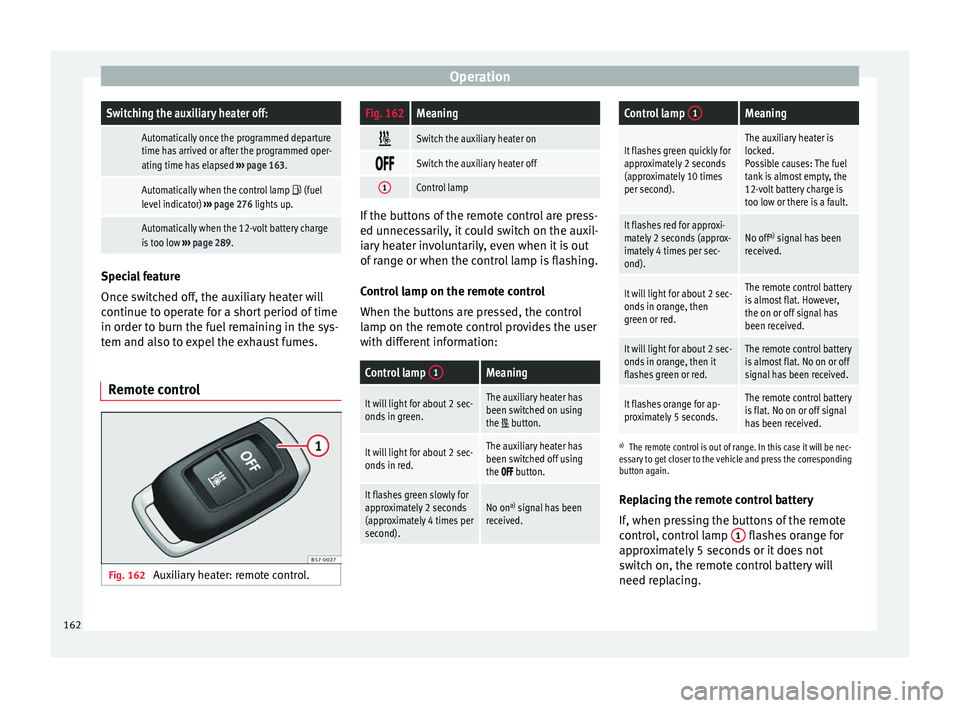
Remote control Fig. 162
Auxiliary heater: remote control.
Fig. 162Meaning
Switch the auxiliary heater on
Switch the auxiliary heater off
1Control lamp
If the buttons of the remote control are press-
ed u
nnec
essarily, it could switch on the auxil-
iary heater involuntarily, even when it is out
of range or when the control lamp is flashing.
Control lamp on the remote control
When the buttons are pressed, the control
lamp on the remote control provides the user
with different information:
Control lamp 1Meaning
It will light for about 2 sec-
onds in green.The auxiliary heater has
been switched on using
the
button.
It will light for about 2 sec-
onds in red.The auxiliary heater has
been switched off using
the
button.
It flashes green slowly for
approximately 2 seconds
(approximately 4 times per
second).No on a)
signal has been
received.
Control lamp 1Meaning
It flashes green quickly for
approximately 2 seconds
(approximately 10 times
per second).The auxiliary heater is
locked.
Possible causes: The fuel
tank is almost empty, the
12-volt battery charge is
too low or there is a fault.
It flashes red for approxi-
mately 2 seconds (approx-
imately 4 times per sec-
ond).No off a)
signal has been
received.
It will light for about 2 sec-
onds in orange, then
green or red.The remote control battery
is almost flat. However,
the on or off signal has
been received.
It will light for about 2 sec-
onds in orange, then it
flashes green or red.The remote control battery
is almost flat. No on or off
signal has been received.
It flashes orange for ap-
proximately 5 seconds.The remote control battery
is flat. No on or off signal
has been received.
a) The remote control is out of range. In this case it will be nec-
essary to get closer to the vehicle and press the corresponding
button again.
Replacing the remote control battery
If, when pressing the buttons of the remote
control, control lamp 1 flashes orange for
ap pr
oximately 5 seconds or it does not
switch on, the remote control battery will
need replacing.
162
Page 168 of 328
Operation
WARNING
● Nev er ru
n the engine in confined spaces, as
the exhaust gases are poisonous. CAUTION
Avoid high engine speeds, full throttle and
e xtr
eme load conditions until the engine has
reached its normal operating temperature,
otherwise this can damage the engine. For the sake of the environment
Do not warm up the engine by idling it. You
shou l
d drive off as soon as you start the en-
gine. This will help avoid unnecessary ex-
haust emissions. Note
● If it
is difficult to turn the ignition key to
the position 1 , turn the steering wheel to
both s ide
s to release the steering lock.
● When starting from cold, the engine may be
a little noi
sy for the first few seconds until oil
pressure has built up in the hydraulic valve
lifters. This is quite normal, and no cause for
concern.
● If the vehicle battery is disconnected and
rec
onnected, the key must remain in the posi-
tion 1 for around 5 seconds before starting
up .
● V
ehicles with automatic gearbox: after
swit
ching off the ignition, you can only re-
move the ignition key if the selector lever is in position “P” (parking lock). Next, the se-
l
ect
or lever is locked. Switching off the engine with the key
Switching off the engine
– Stop the vehicle.
– Turn the ignition key to position 1 ›››
Fig. 163.
En g
aging the steering wheel lock
In vehicles with automatic gearbox, the igni-
tion key can only be removed when the selec-
tor lever is in position P.
– Remove the key from the ignition in posi-
tion 1
› ›
›
Fig. 163 ››› .
– Turn the steering wheel until you hear it en-
gag
e.
Possible vehicle theft is prevented with the
steering lock engaged. WARNING
● Nev er sw
itch the engine off until the vehi-
cle is stationary. The brake servo and power
steering functions will not be completely cov-
ered under warranty. More force may also be
needed to turn the steering wheel or to brake.
As you cannot steer and brake in the normal
manner, there is a greater risk of accidents
and serious injury. ●
Nev er r
emove the key from the ignition if
the vehicle is in motion. Otherwise, the steer-
ing could suddenly lock, making it impossible
to steer the vehicle: risk of accident!
● Always take the key with you when you
le
ave the vehicle. This is particularly impor-
tant if there are children in the vehicle, as
they might otherwise be able to start the en-
gine or use power-operated equipment (e.g.
the electric windows), which could cause in-
juries. CAUTION
If the engine has been running under high
lo a
d for a long time, there is a risk of heat
building up in the engine compartment after
it has been switched off; this could cause en-
gine damage. For this reason, you should idle
the engine for approximately 2 minutes be-
fore you switch it off. Note
● Af t
er the engine is switched off the radiator
fan may run on for up to 10 minutes, even if
the ignition is switched off. It is also possible
that the fan turns itself on once more if the
coolant temperature increases due to the
heat accumulated in the engine compartment
or due to its prolonged exposure to solar ra-
diation.
● If the vehicle is stopped and the Start-Stop
sys
tem* switches off the engine, the ignition 166