ECO mode SKODA SUPERB 2008 2.G / (B6/3T) User Guide
[x] Cancel search | Manufacturer: SKODA, Model Year: 2008, Model line: SUPERB, Model: SKODA SUPERB 2008 2.G / (B6/3T)Pages: 272, PDF Size: 18.25 MB
Page 99 of 272

The air conditioning system
98
at least once a month for approximately 5 mi nutes at the highest blower stage - also
during the cold season of the year - in order to remove such odours. Also open a
window for a short time.•Please refer to the information regarding recirculated air mode ⇒page 99.
Set Climatic
Recommended settings of Climatic contro ls for the respective operating modes:
Set-upSetting of the control dialButtonAir outlet vents 2
Defrosting the windscreen and
side windowsrecommended
22°C3switched offdo not switch onopen and align with the side window
Free windscreen and side win-
dows from mistdesired tempera-
ture2switched ondo not switch onopen and align with the side window
The fastest heatingrecommended 22°C2switched offbriefly switched onopen
Comfortable heatingdesired tempera- ture2 or 3 or switched offdo not switch onopen
The fastest coolingrecommended
22°Cbriefly 4, then 2 or 3switched onbriefly switched onopen
Optimal coolingdesired tempera- ture1, 2 or 3switched ondo not switch onopen and align to the roof
Fresh air mode - ventilation up to the stop
towards the leftdesired positionswitched offdo not switch onopen
AAABACA1A4
NKO B6 20.book Page 98 Wednesday, March 26, 2008 3:15 PM
Page 101 of 272
The air conditioning system
100
Redirecting air flow
– The horizontal as well as the vertical direction of the air flow is set with
the handle in the middle of the air outlet vents.
You can set the air supply to the individual air outlet vents using the control dial
⇒ page 97, fig. 110 . The air outlet vents 2 , 3 ⇒ page 99, fig. 111 and 5 ⇒ page 99,
fig. 112 can also be closed and opened individually.
Unwarmed or cooled air will flow out of the air outlet vents according to the setting
of control dial ⇒page 97, fig. 110 and the atmosphe ric conditions.
Using the air conditioning system economically
The compressor on the air conditioning system uses power from the engine when
in cooling mode which will effect the fuel consumption.
It recommended to open the windows or th e doors of a vehicle for which the inte-
rior has been strongly heated through the ef fect of direct sunlight in order to allow
the heated air to escape.
The cooling system should not be switched on while travelling when the window is
open.
The desired interior temperature can also be achieved without switching in the
cooling system just by switching to fresh air mode.
For the sake of the environment
When you economize on fuel, you also reduce pollutant emissions.
Operational problems
If the cooling system does not operate at outside temperatures higher than +5 °C,
there is a problem in the system. The reasons for this may be:
•The fuse on the air conditioning system has blown. Check the fuse, replace it if
necessary ⇒page 241.
•The cooling system has switched off automatically for a short time because the
coolant temperature of the engine is too hot ⇒page 11.
If you are not able to rectify the operat ional problem yourself, or if the cooling
capacity decreases, switch the cooling sy stem off. Contact a specialist garage.
Climatronic* (automatic air conditioning)
Description
The Climatronic system is a combination of an automatic heating,
fresh air and cooling system which provides optimal comfort for the
occupants of the car.
The Climatronic maintains fully automatically a convenience temperature. This is
achieved by automatically varying the temper ature of the outflowing air, the blower
stages and the air distribution. The system also takes into account sunlight which
eliminates the need to alter the settings manually. The automatic mode
⇒ page 102 ensures maximum wellbeing of the occupants at all times of the year.
Description of Climatronic system
The cooling operates only if the following conditions are met:
•engine running,
•outside temperature above +2°C,
• switched on.
If the cooling system is switched on, the temperature and air humidity drops in the
vehicle. The wellbeing of the occupants of the car is enhanced as a result of this
particularly at high outside temperatures and a high air humidity. The system
prevents the windows misting up during the cold season of the year.
The heating effect is dependent upon th e coolant temperature, thus full heat
output only occurs when the engine has reached its operating temperature.
It is possible to briefly activate recirculated air mode in order to enhance the
cooling effect ⇒page 103.
AC
AA
AC
NKO B6 20.book Page 100 Wednesday, March 26, 2008 3:15 PM
Page 102 of 272

The air conditioning system101
Using the systemSafetyDriving TipsGeneral MaintenanceBreakdown assistanceTechnical Data
The air inlet in front of the windscreen must
be free of ice, snow or leaves in order
to ensure that the heating and cooling systems operate properly.
The AC compressor is switched off at a hi gh coolant temperature in order to provide
cooling at a high load of the engine.
After switching on the cooling Condensation from the evaporator of the air condi-
tioning may drip down and form a puddle below the vehicle. This is quite normal
and not an indication of a leak!
Recommended setting for al l periods of the year:
•Set the desired temperature, we recommend 22 °C.
•Press the button ⇒page 102, fig. 113 .
•Move the air outlet vents 2 and 3 so that the air flow is directed slightly upwards.
Aeration of the vehicle when ignition is switched off*
On models fitted with power sliding/tilting roof with sollar cells, the fresh air blower
is automatically switched over to “solar mode” if the sun ray's are sufficient after
switching off the ignition. The solar cells on the sliding/tilting roof deliver power for
the fresh air blower. This supplies the interior of the car with fresh air.
For an optimum ventilation, the air outlet vents 2 and 3 must be opened
⇒ page 105, fig. 114 .
The ventilation functions only when the sliding/tilting roof is closed.
WARNING
•For your own safety and that of other road users, ensure that all the
windows are free of ice, snow and mistin g. Please familiarize yourself about
how to correctly operate th e heating and ventilation systems, how to demist
and defrost the windows, as well as with the cooling mode.
•You should not leave recirculated air mode on over a longer period of
time, as “stale” air may result in fatigue in the driver and occupants, divert
your attention and also cause the windows to mist up. The risk of having an
accident increases. Switch recirculated air mode off as soon as the windows
begin misting up.
Note
•If the cooling system has not been switched on for a lengthy period, odours may
be produced at the evaporator because of deposits. Switch the cooling system on
at least once a month for approximately 5 mi nutes at the highest blower stage - also
during the cold season of the year - in order to remove such odours. Also open a
window for a short time.
•We recommend that you do not smoke in the vehicle when the recirculating air
mode is operating since the smoke which is drawn at the evaporator from the inte-
rior of the vehicle forms deposits in the ev aporator of the air conditioning system.
This produces a permanent odour when th e air conditioning system is operating
which can only be eliminated through co nsiderable effort and expense (replace-
ment of compressor).
•The used air streams out through the air removal openings in the luggage
compartment.
•On vehicles equi pped with a factory-fitted radio* or navigation*, the informa-
tion of the Climatronic is also shown on the display. You can switch off this function
for the Radio* - see operating instructio ns for radio. This function cannot be
switched off during Navigation*.
•Using the cooling economically ⇒page 100.
•Operational problems ⇒page 100.
AUTO
NKO B6 20.book Page 101 Wednesday, March 26, 2008 3:15 PM
Page 105 of 272

The air conditioning system
104
Automatic air distribution control*
When the automatic air distribution control is switched on, an air
quality sensor measures the concentration of pollutants in the drawn
in air.
If a considerable increase in concentr ation of pollutants is recognized by
the air quality sensor, the air distribution control will temporarily be
switched off. If the concentration of pollutants decreases to the normal
level, the air distribution control is au tomatically switched off so that fresh
air can be guided into the vehicle interior.
Switch on automatic air distribution control
– Press the button repeatedly * until the warning light on the right side of the button lights up.
Switch off automatic air distribution control temporarily
– If the air quality sensor does not switch on automatically when there is a nauseating smell, you can switch it on yourself by pressing the
button *. The warning light lights up in the button on the left side.
Switch on automatic air distribution control again
– Hold the button pressed * for more than 2 seconds and on the right side of the button the warning light lights up.
Switch off automatic air distribution control
– Press again the button * until the warning lights in the button go out.
WARNING
You should not leave recirculated air mode on over a longer period of time,
as “stale” air may result in fatigue in the driver and occupants, divert your
attention and also cause the windows to mist up. The risk of having an acci- dent increases. Switch recirculated air mode off as soon as the windows
begin misting up.
Note
•If the windscreen mists up, press the button
⇒page 102, fig. 113 .
After the windscreen has been demisted, press the button .
•The automatic air distribution control operates only if the outside temperature
is higher than approx. 2°C.
Controlling blower
There are a total of seven blower stages available.
The Climatronic system controls the bl ower stages automatically in line
with the interior temperature. You can also, however, adapt the blower
stages manually to suit your particular needs.
– Press again the button
on the left side (reduce blower speed) or on
the right side (increase blower speed).
If you switch off the blower, th e Climatronic is switched off.
The set blower speed is displayed above the button
when the respective
number of warning lights come on.
WARNING
•“Stale air” may result in fatigue in the driver and occupants, reduce
attention levels and also cause the windows to mist up. The risk of having an
accident increases.
•Do not switch the Climatronic syst em off for longer than necessary.
•Switch the Climatronic system on as soon as the windows mist up.
WARNING (continued)
A1AUTO
NKO B6 20.book Page 104 Wednesday, March 26, 2008 3:15 PM
Page 108 of 272

The air conditioning system107
Using the systemSafetyDriving TipsGeneral MaintenanceBreakdown assistanceTechnical Data
Using the system
So that the auxiliary heating (auxiliary heating and ventilation) func-
tions according to your expectations, it is necessary to carry out the
basic setting before its programming.
Basic setting
– In the information display, select from the menu Main menu the
Menu Setup (settings) .
– In the menu Settings select the menu Aux. heating.
– In the menu Aux. heating ⇒ fig. 116 select the menu Weekday and
set the current day.
– Return to a higher level by selecting the menu Back, i. e. in the menu
Aux. Heating .
– In the menu Aux. Heating select the menu Running time and set the
desired operating period in steps of 1 minute. The operating period
can be 5 to 60 minutes.
– Return to a higher level by selecting the menu Back in the menu
Aux. heating .
– In the menu Aux. heating select the menu Mode . – In the menu
Mode select the desired mode Heating or Ventilation .
Programming
For the programming of the auxiliary heating (auxiliary heating and ventilation) in
the menu Aux. heating there are three pre-set times:
•Pre-set time 1
•Pre-set time 2
•Pre-set time 3
In each pre-set time, the day (if necessary each day = daily) and the time (hour and
minute) can be set for the operating period of the auxiliary heating and/or ventila-
tion.
If you leave the pre-set menu by selecting menu Back or do not operate the display
for longer than 10 seconds, the set values are stored, but the pre-set time is not
active.
Both other pre-set times can be prog rammed and stored in the same way.
If you select the menu Activate after setting the desired values, Pre-set time
(weekday, hours, minute) activated! is displayed in the display and the set pre-
set time is active.
Only one programmed pre-set time can be active.
The last programmed pre-set time remains active.
The active pre-set time can be changed in the menu Aux. heating in the menu
Activation by selecting a pre-set time.
The prerequisite for the correct switching on of the auxiliary heating (auxiliary
heating and ventilation) according to th e programmed pre-set time is the correct
setting of the current time and the weekday ⇒page 107.
If the system is running, a warning light in the button for direct switching on/off of
the auxiliary heating lights up.
The running system deactivates after expiration of the operating period or is deac-
tivated earlier by pres sing the button for direct swit ching on/off of the auxiliary
heating ⇒page 109.
Fig. 116 Information
display: Aux. Heating (auxil-
iary heating)
NKO B6 20.book Page 107 Wednesday, March 26, 2008 3:15 PM
Page 116 of 272

Starting-off and Driving115
Using the systemSafetyDriving TipsGeneral MaintenanceBreakdown assistanceTechnical Data
Rear parking aid*
The parking aid provides a warning of obstacles behind the vehicle.
The audible parking aid determines the distance between the rear bumper and an
obstacle located behind the vehicle with the aid of ultrasound sensors. The tones
of the parking aid can be adapted in the menu of the information display*
⇒ page 23. The sensors are integrated in the rear bumper.
Range of sensors
The clearance warning begins at a distance of about 160 cm from the obstacle (area
⇒ fig. 124 ). The interval between the warning signals becomes shorter as the
clearance is reduced.
A continuous tone sounds from a clearanc e of just 30 cm (Bereich ) - danger
area. You should not reverse any further after this signal sounds! If the vehicle
is equipped with a factory-fi tted towing device*, the border of the danger area
starts - continuous tone - 5 cm further behind the vehicle. The vehicle can be
extended through an installe d detachable towing device.
On vehicles equipped with a factory-fitted radio* or navigation*, the distance to the
obstruction is shown graphically on the disp lay. On vehicles with a factory-fitted
towing device, the sensors are deactivated when towing a trailer. The driver is also
informed of the radio* or the navigation* by a graphic display (vehicle towing a
trailer) on the display. The radio* or navi gation*, which is factory-fitted, can be set
so that the play function volume decrea ses when activating the parking aid, see Owner's Manual radio* or navigation*. This
improves the audibility of the parking
aid.
Activating
The parking aid is activated automatically when reverse gear is engaged and the
ignition is turned on. This is conf irmed by a brief acknowledgement signal.
Deactivating
The parking aid is deactivated by removing the reverse gear.
WARNING
•The parking aid is not a substitute for the driver paying proper attention
and it is always the driver's responsibility to take care when parking the
vehicle or carrying ou t similar manoeuvres.
•You should therefore satisfy yourself, before reversing, that there is no
small obstacle, such as a rock, thin po st, trailer drawbar etc., behind your
vehicle. Such an obstacle might not be within the range detected by the
sensors.
•Under certain circumstances, surfaces of certain objects and types of
clothing cannot reflect the signal of the parking aid. Thus, these objects or
people who wear such clothing are not recognised by the sensors of the
parking aid.
Note
•The parking aid does not operate if you are towing a trailer (applies to models
which feature a factory-fi tted towing device*).
•If a warning signal sounds for about 3 seconds after switching the ignition on
and engaging reverse gear, and there is no obstacle close to your car, this indicates
a system fault. Have the fault rectified by a specialist workshop.
•The sensors must be kept clean and free of ice to enable the parking aid to
operate properly.
•If the parking aid is activated and the selector lever of the automatic gearbox is
in the position , warning signal indicates interruption (vehicle can no longer
move).
Fig. 124 Parking aid: Detec-
tion range of rear sensors
AA
AB
AP
NKO B6 20.book Page 115 Wednesday, March 26, 2008 3:15 PM
Page 118 of 272

Starting-off and Driving117
Using the systemSafetyDriving TipsGeneral MaintenanceBreakdown assistanceTechnical Data
people who wear such clothing are not recognised by the sensors of the
parking aid.
Note
•Only the front parking aid operates if you are towing a trailer (applies only to
models which feature a factory-fitted towing device*).
•If a warning signal sounds for about 3 seconds after activating the system and
there is no obstacle close to your car, th is indicates a system fault. The fault is
confirmed additionally when the symbol
flashes in the button ⇒page 116,
fig. 125 . Have the fault rectified by a specialist workshop.
•The sensors must be kept clean and free of ice to enable the parking aid to
operate properly.
•If the parking aid is activated and the se lector lever of the automatic gearbox is
in the position , warning signal indicates interruption (vehicle can no longer
move).
Park Assist*
Description and important information
The park assist assists you when parkin g in a suitable parallel parking place
between two vehicles or behind a vehicle.
The park assist automatically searches fo r suitable parking spaces after switching
on the ignition and when driving up to 30 km/h.
During the parking procedure the park assist only takes over the steering move-
ments, the pedals continue to be operated by the driver.
Function of the system is based on:
•Length and depth measurement of the parking spaces when driving
•Evaluation of the size of the parking space
•Definition of the correct position of the vehicle for parking
•Calculating the line on which the vehi cle drives backwards into the parking
place
•Actuation of the steering force assistance , automatic spinning of the wheels of
the front axle when parking.
WARNING
The park assist does not take away th e responsability from the driver when
parking.
•Pay particular attention to small chil dren and animals as they would not
be recognised by the sensors of the parking aid.
•Under certain circumstances, surfaces of certain objects and types of
clothing cannot reflect the signal of the park assist or the parking aid. Thus,
these objects or people who wear such clothing are not recognised by the
sensors of the parking aid.
•The external sound source of the park assist and the parking aid can be
disruptively influenced and under unfavourable conditions, objects or
people cannot be recognised by the sensors of the parking aid.
Caution
•If other vehicles are parked behind or on the kurb, th e park assist guides your
vehicle beyond the kurb or onto it. Make su re that the wheels or the wheel rims of
your vehicle are not damaged and if necessary intervene in time.
•You should satisfy yourself before parking that there is no small obstacle, such
as a rock, thin post, trailer drawbar etc., in front or behind your vehicle. Such an
obstacle might not be within the range detected by the sensors.
•Under certain circumstances, surfaces or structures of certain objects such as
wire mesh fences, powder snow etc..., cannot be recognised by the system.
•The evaluation of the parking place an d the parking procedure depends on the
circumference of the wheels. The system does not function correctly if your vehicle
is mounted with wheels of non-permissible size, snow chains or a temporary spare
wheel (in order to reach the nearest work shop). If the tyres other than those
excepted by the manufacturer are mounted, the resulting position of the vehicle in
WARNING (continued)
AP
NKO B6 20.book Page 117 Wednesday, March 26, 2008 3:15 PM
Page 127 of 272

Automatic gearbox DSG*
126
Kickdown function
The kickdown function provides you with maximum acceleration
power.
Depressing the accelerator pedal allows th e kickdown function to be activated in
the desired driving program. This function has precedence over the driving
programme and serves for maximum accelera tion of the vehicle when exploiting
the maximum power potential of the engi ne without taking into account the
current selector lever position ( D, S or Tiptronic ). The gearbox shifts down to one
or several gears in line with the driving state and the vehicle accelerates. The
gearbox does not shift up into the highes t gear until the engine has reached its
maximum revolutions for this gear range.
WARNING
Please note that using the kickdown fu nction can result in the driven wheels
spinning on a smooth or slippery road surface - risk of skidding!
Dynamic shift programme
The automatic gearbox of your vehicle is controlled electronically. Shifting up and
down through the gears is performed auto matically on the basis of pre-defined
driving programmes.
Adopting a moderate style of driving will cause the gearbox to select the most
economical driving programme. Shifting up into a higher gear as soon as possible
and shifting down as late as possible will have a favourable effect on your fuel
consumption.
Adopting a sporty style of driving with rapid movements of the accelerator pedal
combined with sharp acceleration and frequent changes in speed, exploiting the
top speed of the car or depressing the a ccelerator pedal (kickdown function), will
cause the gearbox to switch over to this style of driving and shift down earlier with
frequent changes in gears in comparison to the moderate style of driving.
Selecting the most appropriate driving programme for the particular style of driving
is a continuous process. Irrespective of this it is, however, possible to switch or shift down into a dynamic shift programme by
depressing the accelerator rapidly. The
gearbox shifts down into a lower gear matching the speed of the car and this allows
you to accelerate rapidly (e.g. when overtaking) without having to depress the
accelerator pedal fully into the kickdown range. The original programme will be
reactivated to match your particular style of driving once the gearbox has shifted up
again.
When driving in hilly regions, the gears are selected to match uphill and downhill
sections. This avoids the gearbox frequently shifting up and down when negotiating
an uphill stretch. When driving downhill, it is possible to shift down into the
Tiptronic position, in order to exploit the engine brake torque.
Tiptronic
The Tiptronic allows the driver to also shift gears manually.
Fig. 134 Selector lever:
Manual shifting of gears
NKO B6 20.book Page 126 Wednesday, March 26, 2008 3:15 PM
Page 129 of 272
Automatic gearbox DSG*
128
– If the rocker switches or are not pressed for some time, the manual shifting switches off. You can also switch off the temporary
switch over to manual shifting by pressing the right rocker switch
for more than 1 second.
Emergency programme
An emergency programme exists in the event of a fault in the system.
The gearbox operates in a corresponding emergency programme if there are func-
tional faults in the gearbox electronics. This is indicated by all of the segments in the
display lighting up or going out.
A functional fault can ha ve the following effect:
•The gearbox only shifts into certain gears.
•The reverse gear R cannot be used.
•The manual shift programme (Tiptronic) is switched off in the emergency mode.
If the gearbox has switched over to emergency mode, drive to the nearest
specialist garage in order to have the fault rectified.
Selector lever-emergency unlocking (DSG)
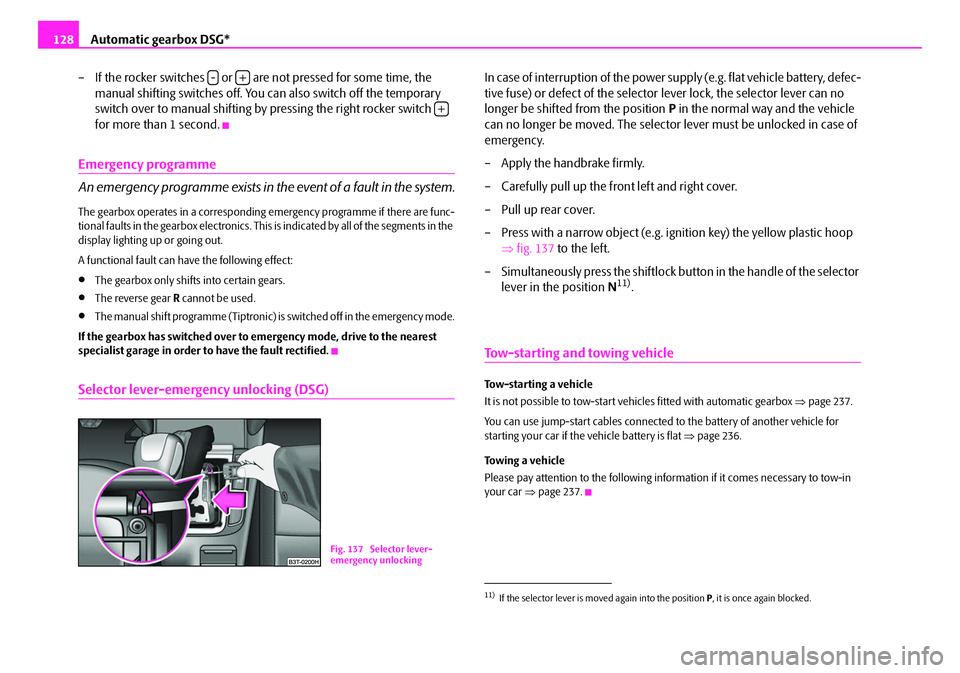
In case of interruption of the power supply (e.g. flat vehicle battery, defec-
tive fuse) or defect of the selector lever lock, the selector lever can no
longer be shifted from the position P in the normal way and the vehicle
can no longer be moved. The selector lever must be unlocked in case of
emergency.
– Apply the handbrake firmly.
– Carefully pull up the front left and right cover.
– Pull up rear cover.
– Press with a narrow object (e.g. ignition key) the yellow plastic hoop ⇒fig. 137 to the left.
– Simultaneously press the shiftlock bu tton in the handle of the selector
lever in the position N
11).
Tow-starting and towing vehicle
Tow-starting a vehicle
It is not possible to tow-start vehi cles fitted with automatic gearbox ⇒page 237.
You can use jump-start cabl es connected to the battery of another vehicle for
starting your car if the vehicle battery is flat ⇒page 236.
Towing a vehicle
Please pay attention to the following info rmation if it comes necessary to tow-in
your car ⇒page 237.
-+
+
Fig. 137 Selector lever-
emergency unlocking
11)If the selector lever is moved again into the position P, it is once again blocked.
NKO B6 20.book Page 128 Wednesday, March 26, 2008 3:15 PM
Page 136 of 272
Communication135
Using the systemSafetyDriving TipsGeneral MaintenanceBreakdown assistanceTechnical Data
Operate telephone call on the multifunction steering wheel
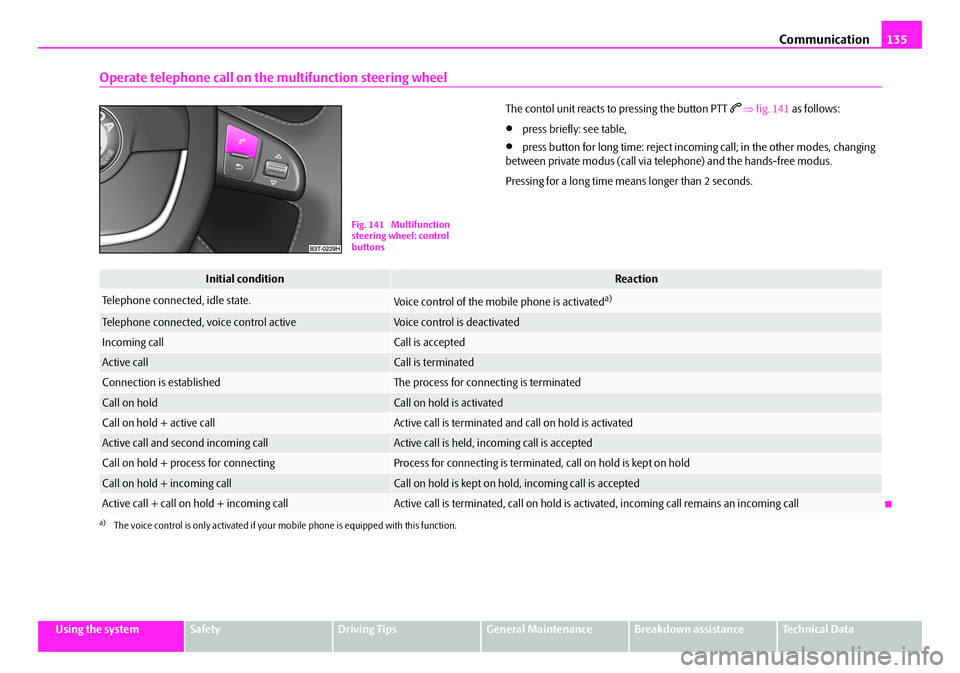
The contol unit reacts to pressing the button PTT ⇒ fig. 141 as follows:
•press briefly: see table,
•press button for long time: reject incomi ng call; in the other modes, changing
between private modus (call via telephone) and the hands-free modus.
Pressing for a long time means longer than 2 seconds.
Fig. 141 Multifunction
steering wheel: control
buttons
Initial conditionReaction
Telephone connected, idle state.Voice control of the mobile phone is activateda)
a)The voice control is only activated if your mo bile phone is equipped with this function.
Telephone connected, voice control activeVoice control is deactivated
Incoming callCall is accepted
Active callCall is terminated
Connection is establishedThe process for connecting is terminated
Call on holdCall on hold is activated
Call on hold + active callActive call is terminated and call on hold is activated
Active call and second incoming callActive call is held, incoming call is accepted
Call on hold + process for connectingProcess for connecting is terminated, call on hold is kept on hold
Call on hold + incoming callCall on hold is kept on hold, incoming call is accepted
Active call + call on hold + incoming callActive call is terminated, call on hold is activated, incoming call re mains an incoming call
NKO B6 20.book Page 135 Wednesday, March 26, 2008 3:15 PM