engine SUBARU FORESTER 2004 Service User Guide
[x] Cancel search | Manufacturer: SUBARU, Model Year: 2004, Model line: FORESTER, Model: SUBARU FORESTER 2004Pages: 2870, PDF Size: 38.67 MB
Page 52 of 2870

AC-50
HVAC SYSTEM (HEATER, VENTILATOR AND A/C)
General Diagnostics
25.General Diagnostics
A: INSPECTION
Symptom Repair order
Blower motorDoes not run.Fuse
Blower motor relay
Wiring harness
Blower motor
Blower motor resistor (Manual A/C model)
Blower switch
Noise Blower motor
CompressorDoes not run.Refrigerant
Fuse
A/C relay
Wiring harness
Magnet clutch
Compressor
Pressure switch
A/C switch
Blower switch
NoiseV- B e l t
Magnet clutch
Compressor
Condenser fanDoes not run.Fuse
Sub fan relay
Wiring harness
Noise Condenser fan motor
Cold air not emitted.Refrigerant
V- B e l t
Magnet clutch
Compressor
Pressure switch
Blower fan relay, Blower motor
A/C switch
Blower switch
Wiring harness
Heater duct
Heater vent duct
Control unit
Expansion valve
Evaporator
Air mix actuator (Auto A/C), Temperature control cable (Manual
A/C)
Warm air not emitted.Engine coolant
Aspirator hose
Blower switch
Air mix actuator (Auto A/C), Temperature control cable (Manual
A/C)
Heater core
Heater cock solenoid valve (Non-turbo model for EC/EK)
Page 59 of 2870
AC-3
HVAC SYSTEM (AUTO A/C)(DIAGNOSTIC)
General Description
2. General Description
A: CAUTION
1) Never connect the battery in reverse polarity.
Auto A/C control module may be destroyed instant-
ly.
2) Do not disconnect the battery terminals while the
engine is running.
A large counter electromotive force will be generat-
ed in the generator, and this voltage may damage
electronic parts such as auto A/C control module,
etc.
3) Before disconnecting the connectors of each
sensor and the auto A/C control module, be sure to
turn off the ignition switch.
Auto A/C control module may be damaged.
4) Every A/C-related part is a precision part. Do not
drop them.
5) Airbag system wiring harness is routed near the
A/C control panel (auto A/C control module) and
junction box.
CAUTION:
For airbag system, yellow-colored wiring har-
ness and connectors are all used. Do not use
the electrical test equipment on these circuits.
Be careful not to damage the airbag system
wiring harness when servicing the A/C control
panel (auto A/C control module) and junction
box.
B: INSPECTION
Before performing the diagnosis, check the follow-
ing items which might affect A/C system problems.
1. BATTERY
1) Measure battery voltage and specific gravity of
electrolyte.
Standard voltage: 12 V
Specific gravity: More than 1.260
2) Check the condition of the fuses for A/C system
power supply and other fuses.
3) Check the condition of harness and harness
connector connections.
2. ASPIRATOR HOSE
1) Turn the ignition switch to ON, and press the A/
C switch.
2) Turn the temperature control dial at maximum
hot position.
3) Press the defroster switch.
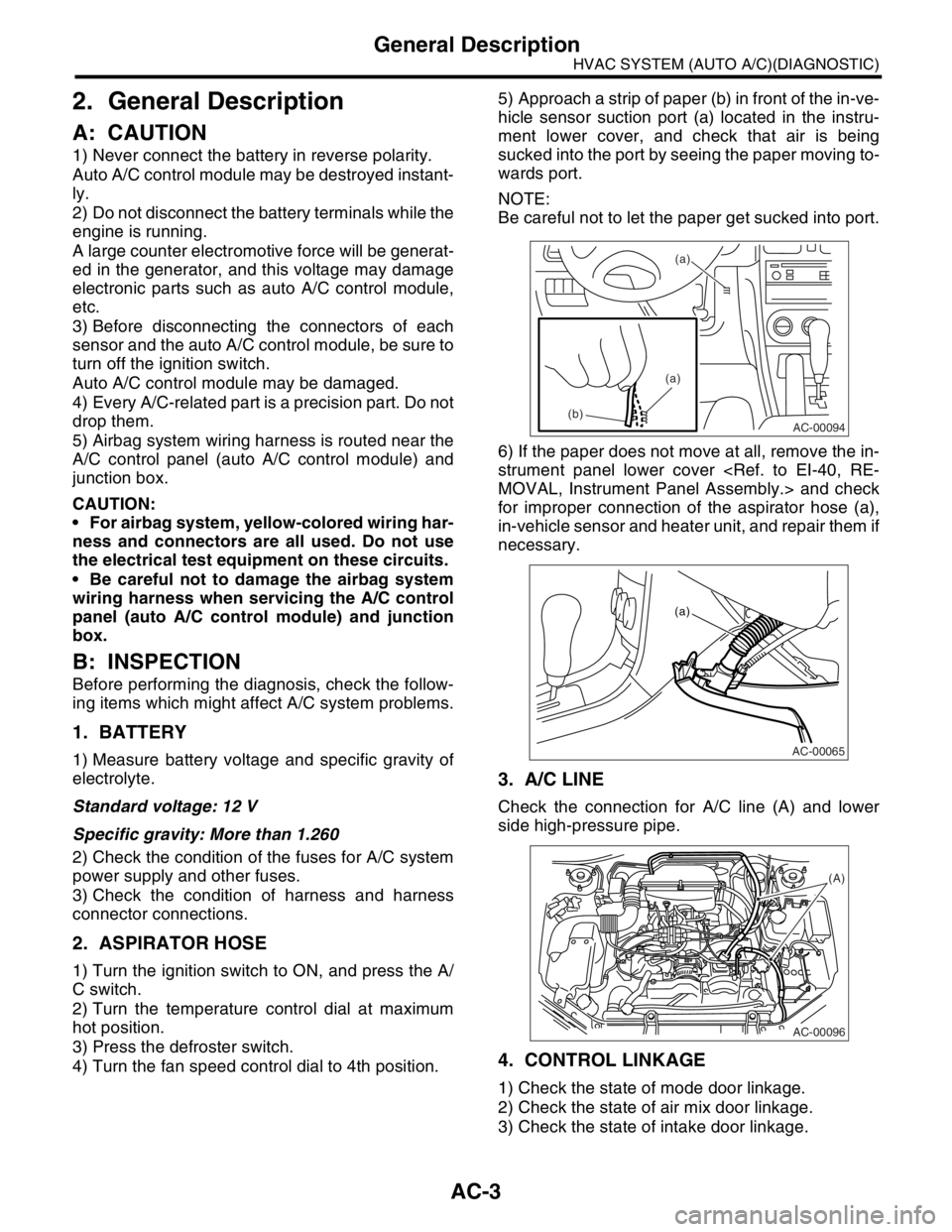
4) Turn the fan speed control dial to 4th position.5) Approach a strip of paper (b) in front of the in-ve-
hicle sensor suction port (a) located in the instru-
ment lower cover, and check that air is being
sucked into the port by seeing the paper moving to-
wards port.
NOTE:
Be careful not to let the paper get sucked into port.
6) If the paper does not move at all, remove the in-
strument panel lower cover
for improper connection of the aspirator hose (a),
in-vehicle sensor and heater unit, and repair them if
necessary.
3. A/C LINE
Check the connection for A/C line (A) and lower
side high-pressure pipe.
4. CONTROL LINKAGE
1) Check the state of mode door linkage.
2) Check the state of air mix door linkage.
3) Check the state of intake door linkage.
AC-00094
(a)
(a)
(b)
AC-00065
(a)
AC-00096
(A)
Page 60 of 2870

AC-4
HVAC SYSTEM (AUTO A/C)(DIAGNOSTIC)
General Description
5. CONTROL SWITCHES
Start and warm-up the engine completely.
1) Inspection using switches
2) Compressor operation inspection
3) Inspection of illumination control
No. Point to check Switch operation Judgment standard
1 Fan speed control dial Turn the fan speed control dial clockwise.Fan speed changes 1st → 2nd → 3rd → 4th
as dial turn.
2AUTO switch1) Press the AUTO switch.
2) Turn the temperature control dial to the left
fully, and set maximum cool position. Outlet air temperature: COOL
Fan speed: 4th
Outlet opening: VENT
Inlet opening: RECIRC
Compressor: AUTO
3) Turn the temperature control dial to the right
slowly, and change the setting from maximum
cool position to maximum hot position gradually. Outlet air temperature: COOL → HOT
Fan speed: AUTO
Outlet opening: AUTO
Inlet opening: AUTO
Compressor: AUTO
4) Turn the temperature control dial to the right
fully, and set maximum hot position. Outlet air temperature: HOT
Fan speed: 4th
Outlet opening: HEAT
Inlet opening: FRESH
Compressor: AUTO
3 Defroster switch Press the defroster switch. Outlet air temperature: AUTO
Fan speed: AUTO
Outlet opening: DEF
Inlet opening: FRESH
Compressor: ON
4FRESH/RECIRC
switchPress the FRESH/RECIRC switch.Inlet opening switches RECIRC → FRESH or
FRESH → RECIRC each time pressing the
switch.
5 Mode control dial Press the mode control dial.Outlet opening switches VENT → BI-LEVEL
→ HEAT → DEF/HEAT each time dialing
clockwise.
No. Point to check Switch operation Judgment standard
1 Compressor1) A/C switch is turned to ON.
2) Turn the fan speed control clockwise.Compressor: ON
No. Point to check Switch operation Judgment standard
1 Illumination1) Turn the lighting switch to ON. Illumination comes on.
2) Press the OFF switch one second or more. Illumination dimming is cancelled.
Page 61 of 2870
AC-5
HVAC SYSTEM (AUTO A/C)(DIAGNOSTIC)
Electrical Component Location
3. Electrical Component Location
A: LOCATION
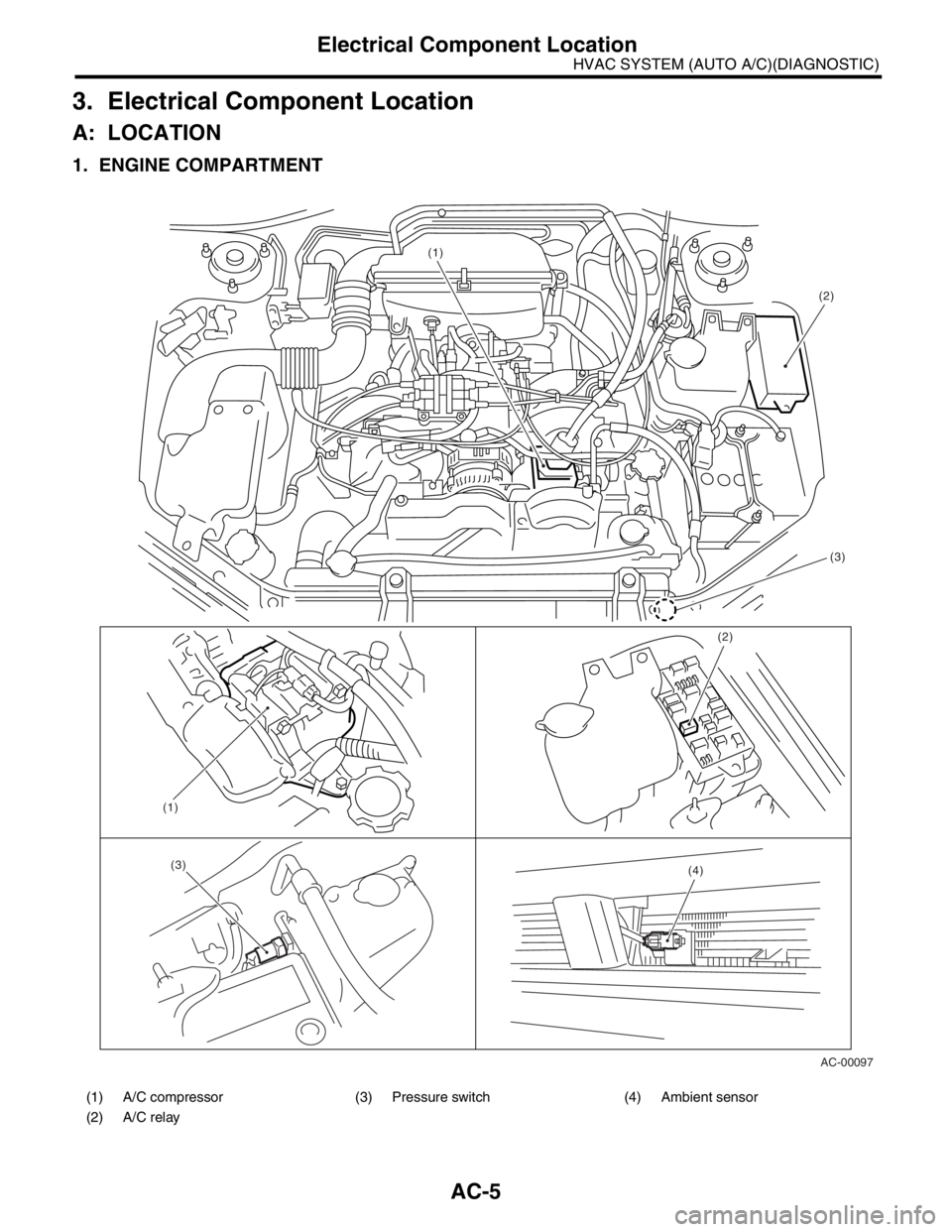
1. ENGINE COMPARTMENT
(1) A/C compressor (3) Pressure switch (4) Ambient sensor
(2) A/C relay
AC-00097 (1)
(2)
(4)
(1)
(3)
(2)
(3)
Page 63 of 2870
AC-7
HVAC SYSTEM (AUTO A/C)(DIAGNOSTIC)
Auto A/C Control Module I/O Signal
4. Auto A/C Control Module I/O Signal
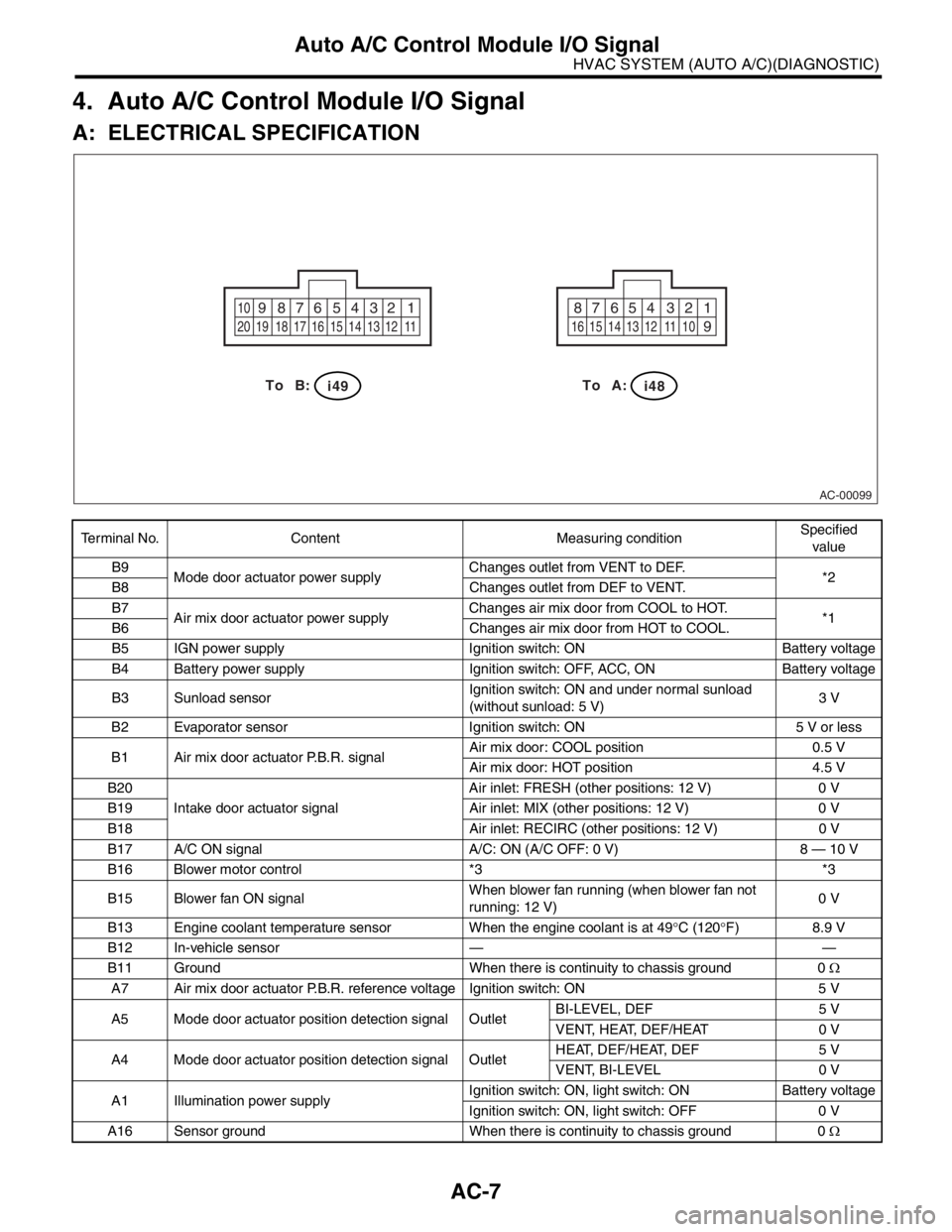
A: ELECTRICAL SPECIFICATION
Terminal No. Content Measuring conditionSpecified
value
B9
Mode door actuator power supplyChanges outlet from VENT to DEF.
*2
B8 Changes outlet from DEF to VENT.
B7
Air mix door actuator power supplyChanges air mix door from COOL to HOT.
*1
B6 Changes air mix door from HOT to COOL.
B5 IGN power supply Ignition switch: ON Battery voltage
B4 Battery power supply Ignition switch: OFF, ACC, ON Battery voltage
B3 Sunload sensorIgnition switch: ON and under normal sunload
(without sunload: 5 V)3 V
B2 Evaporator sensor Ignition switch: ON 5 V or less
B1 Air mix door actuator P.B.R. signalAir mix door: COOL position 0.5 V
Air mix door: HOT position 4.5 V
B20
Intake door actuator signalAir inlet: FRESH (other positions: 12 V) 0 V
B19 Air inlet: MIX (other positions: 12 V) 0 V
B18 Air inlet: RECIRC (other positions: 12 V) 0 V
B17 A/C ON signal A/C: ON (A/C OFF: 0 V) 8 — 10 V
B16 Blower motor control *3 *3
B15 Blower fan ON signalWhen blower fan running (when blower fan not
running: 12 V)0 V
B13 Engine coolant temperature sensor When the engine coolant is at 49°C (120°F) 8.9 V
B12 In-vehicle sensor — —
B11 Ground When there is continuity to chassis ground 0 Ω
A7 Air mix door actuator P.B.R. reference voltage Ignition switch: ON 5 V
A5 Mode door actuator position detection signal OutletBI-LEVEL, DEF 5 V
VENT, HEAT, DEF/HEAT 0 V
A4 Mode door actuator position detection signal OutletHEAT, DEF/HEAT, DEF 5 V
VENT, BI-LEVEL 0 V
A1 Illumination power supplyIgnition switch: ON, light switch: ON Battery voltage
Ignition switch: ON, light switch: OFF 0 V
A16 Sensor ground When there is continuity to chassis ground 0 Ω
AC-00099
1 2 3 4 5 6 7 8 910
11 12 13 14 15 16 17 18 19 201 2 3 4 5 6 7 8
9
10 11 12 13 14 15 16
i48B: To A:To
i49
Page 66 of 2870

AC-10
HVAC SYSTEM (AUTO A/C)(DIAGNOSTIC)
Diagnostic Chart for Self-Diagnosis
Step Check Yes No
1 SELECT CONTROL PANEL TO SELF-DIAG-
NOSIS MODE.
1) Turn the ignition switch to OFF.
2) Start the engine while pressing defroster
switch and A/C switch.
N
OTE:
Self-diagnosis can also be performed with the
ignition switch ON, but start the engine be-
cause telling the magnet clutch operation is dif-
ficult.
3) The LED in A/C control panel blinks.Does the self-diagnosis mode
operate?Go to step 2.
NOSIS SYS-
TEMS DO NOT
OPERATE, Diag-
nostics for A/C
System Malfunc-
tion.>
2 CHECK LED ILLUMINATION.
Make sure that three LED blink in turn on A/C
control panel (5 patterns are repeated 2 times).Do all LED blink? Go to step 3.Go to step 5.
3 CHECK SENSORS MALFUNCTION.
1) After completing the LED check or when
AUTO switch is pressed, the A/C switch LED
illuminates, and then the sensor check is
started.
2) Check the input signal of each sensor in
turn. If there are any trouble for each sensor,
DEF, MODE and fan speed LEDs are blinked.
Also check for each sensor is possible respec-
tively every time AUTO switch is pressed. (At
this time, the AUTO switch LED illuminates.)
3) If there is no trouble, DEF, MODE and fan
speed LEDs are turned off.
N
OTE:
Rear window defogger LED illuminates in case
of stored malfunction but does not illuminate in
case of present malfunction.Does each DEF, MODE and
fan speed LED turn off?Go to step 4.Confirm the com-
bination of illumi-
nating LEDs by
using Sensor
Check Table, and
identify the mal-
functioning sensor
before repairing.
TABLE, OPERA-
TION, Diagnostic
Chart for Self-
Diagnosis.>
4 CHECK OPERATION OF EACH ACTUATOR,
COMPRESSOR AND FAN MOTOR.
1) Press the FRESH/RECIRC switch
(FRESH/RECIRC switch LED illuminates at
this time.).
2) Refer to OPERATING MODE TABLE to
check the operation of each actuator, compres-
sor and fan motor.
Chart for Self-Diagnosis.>
Also check for each step is possible respec-
tively every time AUTO switch pressed. (At this
time, the AUTO switch LED illuminates.)Does each actuator, compres-
sor and fan motor operate
according to operating mode
table?Press the OFF
switch or turn the
ignition switch to
OFF and finish the
self-diagnosis
mode.Refer to each
diagnostics chart
for actuator, com-
pressor and fan
motor, and repair
the malfunctioning
par t as necessary.
C System Mal-
function.>
Procedure for
Actuators.>
5 CHECK POOR CONTACT.
Check the auto A/C control module connector
for poor contact.Is there a poor contact in con-
nector?Replace the auto
A/C control mod-
ule.Repair the con-
nector.
Page 74 of 2870

AC-18
HVAC SYSTEM (AUTO A/C)(DIAGNOSTIC)
Diagnostics for A/C System Malfunction
Step Check Yes No
1 CHECK FUSE.
1) Turn the ignition switch to OFF.
2) Remove the main fan fuse and sub fan fuse
in main fuse box.
3) Check the condition of fuse.Is the fuse blown out? Replace the fuse. Go to step 2.
2 CHECK THE POWER SUPPLY TO PRES-
SURE SWITCH.
1) Disconnect the connector from pressure
switch.
2) Turn the ignition switch to ON.
3) Measure the voltage between harness con-
nector and chassis ground.
Connector & terminal
(F79) No. 1 (+) — Chassis ground (
−):Is the voltage more than 10 V? Go to step 3.Repair the har-
ness for pressure
switch power sup-
ply circuit.
3 CHECK THE HARNESS BETWEEN PRES-
SURE SWITCH AND A/C RELAY HARNESS.
1) Turn the ignition switch to OFF.
2) Remove the A/C relay in the main fuse box.
3) Measure the resistance between A/C relay
and pressure switch connector.
Connector & terminal
(F27) No. 17 — (F79) No. 2:Is the resistance less than 1
Ω?Go to step 4.Repair the har-
ness between A/C
relay and pres-
sure switch.
4 CHECK THE PRESSURE SWITCH.
Measure the resistance between pressure
switch terminals.
Te r m i n a l s
No. 1 — No. 2:Is the resistance less than 1
Ω?Go to step 5.Replace the pres-
sure switch.
5 CHECK THE A/C CUT SIGNAL CIRCUIT.
1) Disconnect the connector from auto A/C
control module.
2) Measure the resistance between auto A/C
control module and pressure switch connector.
Connector & terminal
(i48) No. 10 — (F79) No. 2:Is the resistance less than 1
Ω?Go to step 6.Repair the har-
ness between auto
A/C control mod-
ule and pressure
switch.
6 CHECK THE A/C ON SIGNAL CIRCUIT.
1) Disconnect the connector from ECM.
2) Measure the resistance between ECM and
auto A/C control module connector.
Connector & terminal
Turbo model
(B137) No. 17 — (i49) No. 17:
Non-turbo model
(B136) No. 11 — (i49) No. 17:Is the resistance less than 1
Ω?Go to step 7.Repair the har-
ness between auto
A/C control mod-
ule and ECM.
7 CHECK A/C RELAY.
1) Remove the A/C relay in main fuse box.
2) Check the A/C relay.
OK?Go to step 8.Replace the A/C
relay.
8 CHECK POWER SUPPLY TO MAGNET
CLUTCH OF A/C COMPRESSOR.
1) Turn the ignition switch to OFF, and then
connect the A/C relay connector and all
removed connectors.
2) Start the engine, and turn A/C switch to
ON.
3) Set the temperature control dial to maxi-
mum cold position.
4) Measure the voltage between magnet
clutch harness connector and chassis ground.
Connector & terminal
(F24) No. 1 (+) — Chassis ground (
−):Is the voltage more than 10.5 V
(at normal temperature)?Go to step 9.Repair the har-
ness for power
supply line of A/C
compressor.
Page 75 of 2870

AC-19
HVAC SYSTEM (AUTO A/C)(DIAGNOSTIC)
Diagnostics for A/C System Malfunction
9 CHECK OPERATION OF MAIN FAN MOTOR.
1) Start the engine and turn the A/C switch to
ON.
2) Check the operation of main fan motor.Does the main fan motor oper-
ate normally?Go to step 14.Go to step 10.
10 CHECK POWER SUPPLY TO MAIN FAN MO-
TOR.
CAUTION:
Be careful not to overheat the engine during
repair.
1) Turn the ignition switch to OFF.
2) Disconnect the connector from main fan
motor.
3) Start the engine, and warm it up until
engine coolant temperature increases over
100°C (212°F).
4) Stop the engine and turn ignition switch to
ON.
5) Measure the voltage between main fan
motor harness connector and chassis ground.
Connector & terminal
Except turbo AT model:
(F17) No. 2 (+) — Chassis ground (
−):
Turbo AT model:
(F17) No. 1 (+) — Chassis ground (
−):Is the voltage more than 10 V? Go to step 11.Repair the har-
ness for main fan
motor power sup-
ply circuit.
11 CHECK GROUND CIRCUIT OF MAIN FAN
MOTOR.
Measure the resistance between main fan
motor harness connector and chassis ground.
Connector & terminal
Except turbo AT model:
(F17) No. 1 — Chassis ground:
Turbo AT model:
(F17) No. 2 — Chassis ground:Is the resistance less than 1
Ω?Go to step 12.Repair the har-
ness for main fan
motor ground cir-
cuit.
12 CHECK MAIN FAN MOTOR.
Connect the battery positive (+) terminal to ter-
minal No. 2, and ground (−) terminal to termi-
nal No. 1 of main fan motor connector to make
sure that main fan motor rotate.Does the main fan rotate? Go to step 13.Replace the main
fan motor.
13 CHECK POOR CONTACT IN MAIN FAN MO-
TOR CONNECTOR.
Check poor contact in main fan motor harness
connector.Is there poor contact in con-
nector?Go to step 14.Repair the poor
contact in main fan
motor connector.
14 CHECK OPERATION OF SUB FAN MOTOR.
1) Start the engine and turn the A/C switch to
ON.
2) Check the operation of sub fan motor.Does the sub fan motor oper-
ate normally?Go to step 19.Go to step 15. Step Check Yes No
Page 76 of 2870

AC-20
HVAC SYSTEM (AUTO A/C)(DIAGNOSTIC)
Diagnostics for A/C System Malfunction
15 CHECK POWER SUPPLY TO SUB FAN MO-
TOR.
CAUTION:
Be careful not to overheat the engine during
repair.
1) Turn the ignition switch to OFF.
2) Disconnect the connector from sub fan
motor.
3) Start the engine, and warm it up until
engine coolant temperature increases over
100°C (212°F).
4) Stop the engine and turn ignition switch to
ON.
5) Measure the voltage between sub fan
motor harness connector and chassis ground.
Connector & terminal
Except turbo AT model:
(F16) No. 2 (+) — Chassis ground (
−):
Turbo AT model:
(F16) No. 1 (+) — Chassis ground (
−):Is the voltage more than 10 V? Go to step 16.Repair the har-
ness for sub fan
motor power sup-
ply circuit.
16 CHECK GROUND CIRCUIT OF SUB FAN
MOTOR.
Measure the resistance between sub fan motor
harness connector and chassis ground.
Connector & terminal
Except turbo AT model:
(F16) No. 1 — Chassis ground:
Turbo AT model:
(F16) No. 2 — Chassis ground:Is the resistance less than 1
Ω?Go to step 17.Repair the har-
ness for sub fan
motor ground cir-
cuit.
17 CHECK SUB FAN MOTOR.
Connect the battery positive (+) terminal to ter-
minal No. 2, and ground (−) terminal to termi-
nal No. 1 of sub fan motor connector to make
sure that sub fan motor rotate.Does the sub fan motor rotate? Go to step 18.Replace the sub
fan motor.
18 CHECK POOR CONTACT IN SUB FAN MO-
TOR CONNECTOR.
Check poor contact in sub fan motor connec-
tor.Is there poor contact in con-
nector?Go to step 19.Repair the poor
contact in sub fan
motor connector.
19 CHECK POOR CONTACT IN AUTO A/C
CONTROL MODULE CONNECTOR.
Check poor contact in auto A/C control module
connector.Is there poor contact in con-
nector?Replace the auto
A/C control mod-
ule.Repair the con-
nector. Step Check Yes No
Page 140 of 2870
AB-8
AIRBAG SYSTEM (DIAGNOSTIC)
General Description
B: INSPECTION
Before diagnosing, check the following items that might be related to the engine problem:
1. BATTERY
Measure the battery voltage and specific gravity of electrolyte.
Standard voltage: 12 V
Specific gravity: Above 1.260
C: PREPARATION TOOL
1. SPECIAL TOOL
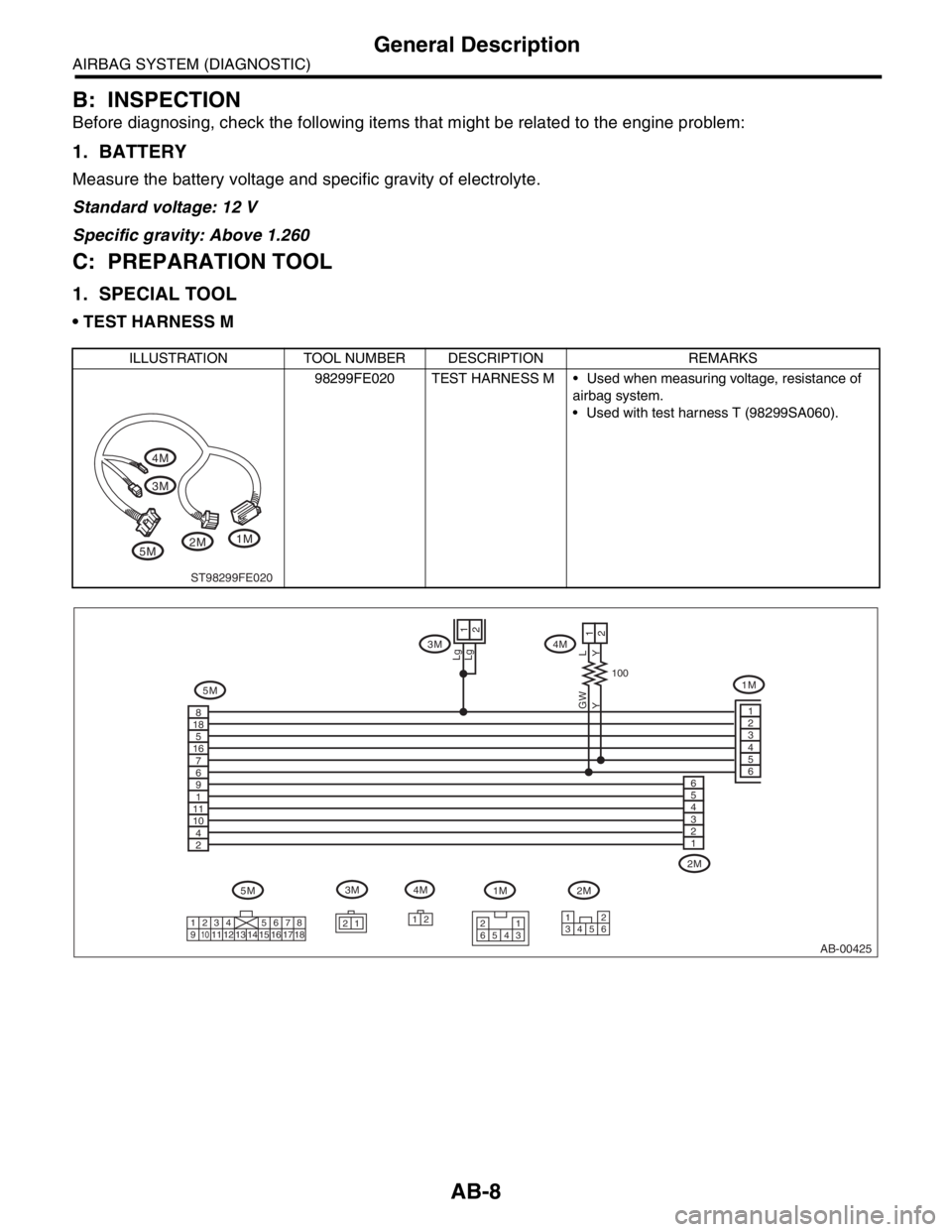
TEST HARNESS M
ILLUSTRATION TOOL NUMBER DESCRIPTION REMARKS
98299FE020 TEST HARNESS M Used when measuring voltage, resistance of
airbag system.
Used with test harness T (98299SA060).
5M3M 4M
1M
2M
ST98299FE020
AB-00425
5M
1
21
Lg
2
8
18
5
16
7
6
9
1
11
10
4
2
Lg
YL
Y
100
GW
3M 4M
1M
2M
12
65 21
4334 12
56 21 1
234 5678
91011
12 13 14 15 16 17 18
1
2
3
4
5
6
2M 1M 4M 3M
5M6
5
4
3
2
1