phone SUBARU FORESTER 2011 SH / 3.G Owners Manual
[x] Cancel search | Manufacturer: SUBARU, Model Year: 2011, Model line: FORESTER, Model: SUBARU FORESTER 2011 SH / 3.GPages: 446, PDF Size: 15.93 MB
Page 11 of 446
8
&Modification of your vehicle
CAUTION
Your vehicle should not be modified
other than with genuine SUBARU
parts and accessories. Other types
of modifications could affect its
performance, safety or durability,
and may even violate governmental
regulations. In addition, damage or
performance problems resulting
from modification may not be cov-
ered under warranties.
& Car phone/cell phone and driving
WARNING
Do not use a car phone/cell phone
while driving; it may distract your
attention from driving and can lead
to an accident. If you use a car
phone/cell phone, pull off the road
and park in a safe place before
using your phone. In some States/
Provinces, only hands-free phones
may legally be used while driving. &
Driving with pets
Unrestrained pets can interfere with your
driving and distract your attention from
driving. In a collision or sudden stop,
unrestrained pets or cages can be thrown
around inside the vehicle and hurt you or
your passengers. Besides, the pets can
be hurt under these situations. It is also for
their own safety that pets should be
properly restrained in your vehicle. Re-
strain a pet with a special traveling
harness which can be secured to the rear
seat with a seatbelt or use a pet carrier
which can be secured to the rear seat by
routing a seatbelt through the carrier ’s
handle. Never restrain pets or pet carriers
in the front passenger ’s seat. For further
information, consult your veterinarian,
local animal protection society or petshop. &
Tire pressures
Check and, if necessary, adjust the
pressure of each tire (including the spare)
at least once a month and before any long
journey.
Check the tire pressure when the tires are
cold. Use a pressure gauge to adjust the
tire pressures to the values shown on the
tire placard. For detailed information, referto “Tires and wheels ”F 11-30.
WARNING
Driving at high speeds with exces-
sively low tire pressures can cause
the tires to deform severely and to
rapidly become hot. A sharp in-
crease in temperature could cause
tread separation, and destruction of
the tires. The resulting loss of
vehicle control could lead to anaccident.
Page 71 of 446
1-46Seat, seatbelt and SRS airbags
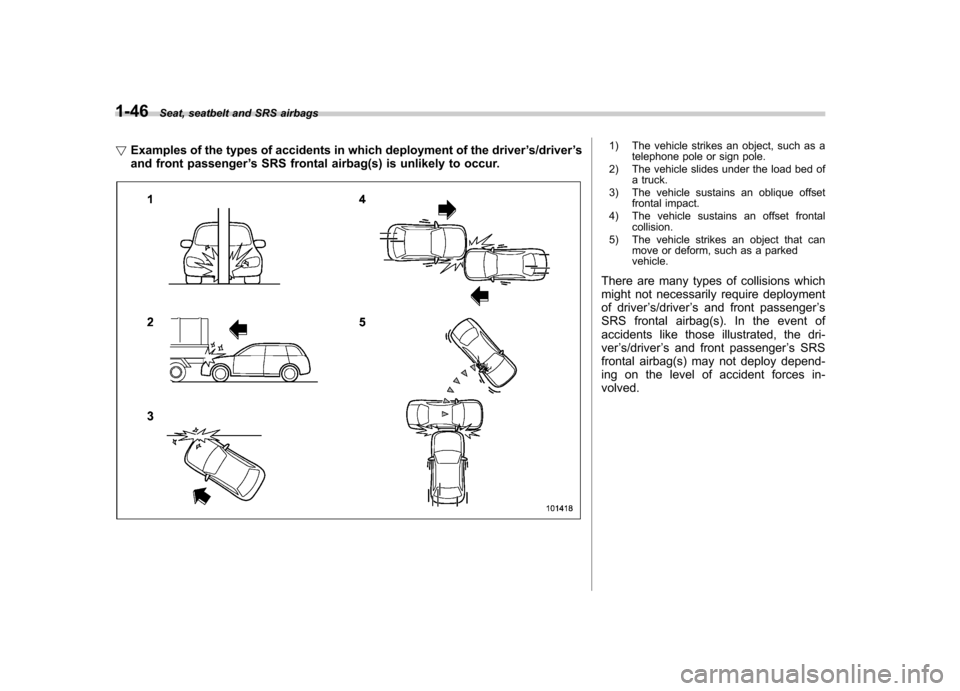
! Examples of the types of accidents in which deployment of the driver ’s/driver ’s
and front passenger ’s SRS frontal airbag(s) is unlikely to occur.
1) The vehicle strikes an object, such as a
telephone pole or sign pole.
2) The vehicle slides under the load bed of a truck.
3) The vehicle sustains an oblique offset frontal impact.
4) The vehicle sustains an offset frontal collision.
5) The vehicle strikes an object that can move or deform, such as a parked vehicle.
There are many types of collisions which
might not necessarily require deployment
of driver ’s/driver ’s and front passenger ’s
SRS frontal airbag(s). In the event of
accidents like those illustrated, the dri-ver ’s/driver ’s and front passenger ’s SRS
frontal airbag(s) may not deploy depend-
ing on the level of accident forces in-volved.
Page 74 of 446
WARNING
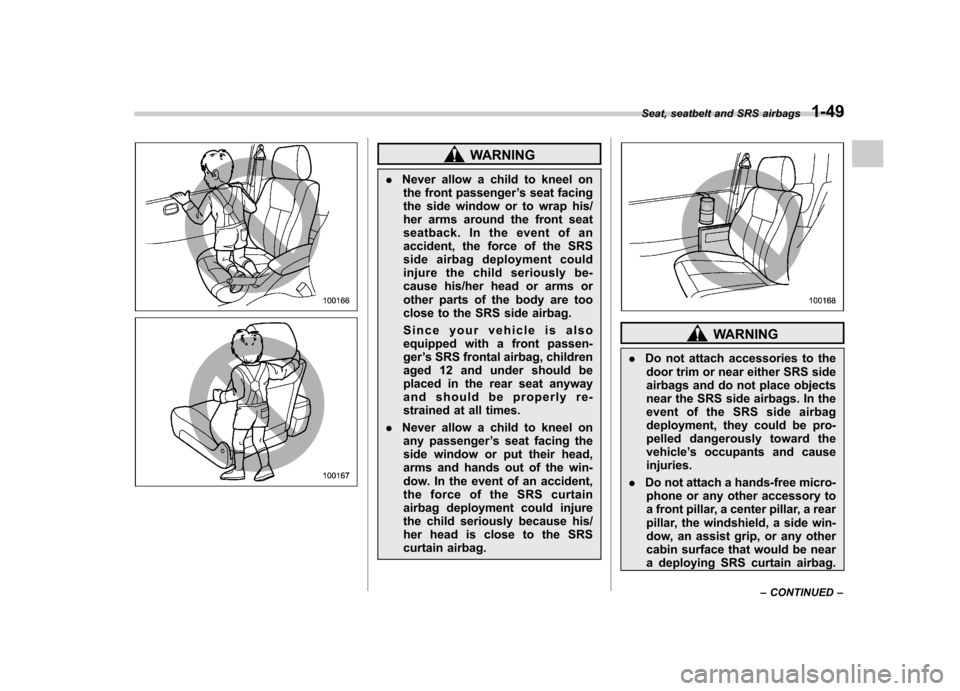
. Never allow a child to kneel on
the front passenger ’s seat facing
the side window or to wrap his/
her arms around the front seat
seatback. In the event of an
accident, the force of the SRS
side airbag deployment could
injure the child seriously be-
cause his/her head or arms or
other parts of the body are too
close to the SRS side airbag.
Since your vehicle is also
equipped with a front passen-ger ’s SRS frontal airbag, children
aged 12 and under should be
placed in the rear seat anyway
and should be properly re-
strained at all times.
. Never allow a child to kneel on
any passenger ’s seat facing the
side window or put their head,
arms and hands out of the win-
dow. In the event of an accident,
the force of the SRS curtain
airbag deployment could injure
the child seriously because his/
her head is close to the SRS
curtain airbag.
WARNING
. Do not attach accessories to the
door trim or near either SRS side
airbags and do not place objects
near the SRS side airbags. In the
event of the SRS side airbag
deployment, they could be pro-
pelled dangerously toward thevehicle ’s occupants and cause
injuries.
. Do not attach a hands-free micro-
phone or any other accessory to
a front pillar, a center pillar, a rear
pillar, the windshield, a side win-
dow, an assist grip, or any other
cabin surface that would be near
a deploying SRS curtain airbag.
Seat, seatbelt and SRS airbags
1-49
– CONTINUED –
Page 75 of 446
1-50Seat, seatbelt and SRS airbags
A hands-free microphone or
other accessory in such a loca-
tion could be propelled through
the cabin with great force by the
curtain airbag, or it could prevent
correct deployment of the curtain
airbag. In either case, the result
could be serious injuries.
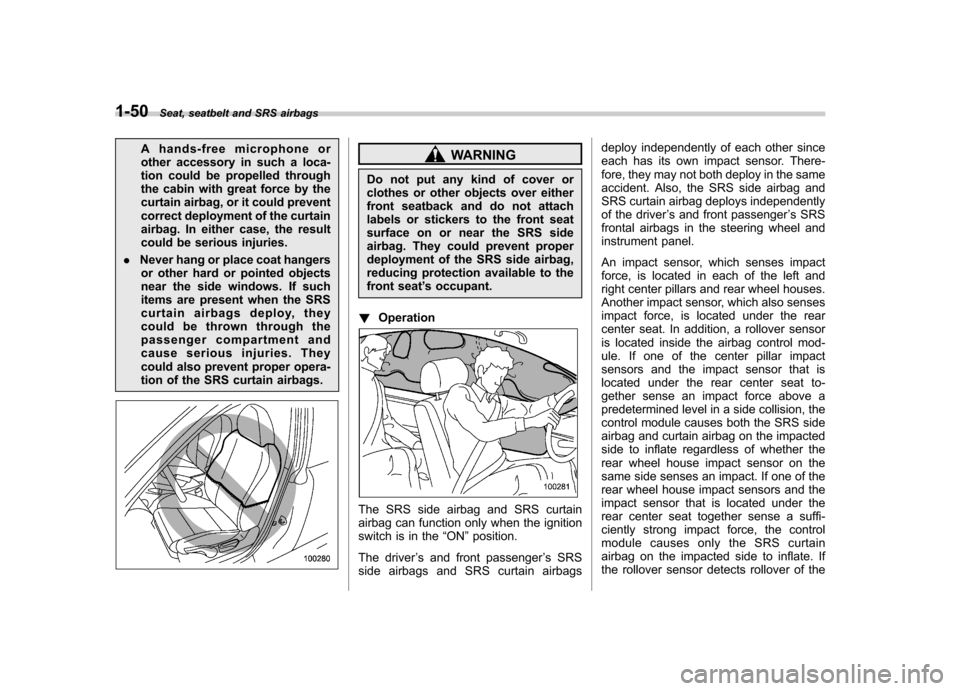
. Never hang or place coat hangers
or other hard or pointed objects
near the side windows. If such
items are present when the SRS
curtain airbags deploy, they
could be thrown through the
passenger compartment and
cause serious injuries. They
could also prevent proper opera-
tion of the SRS curtain airbags.WARNING
Do not put any kind of cover or
clothes or other objects over either
front seatback and do not attach
labels or stickers to the front seat
surface on or near the SRS side
airbag. They could prevent proper
deployment of the SRS side airbag,
reducing protection available to the
front seat ’s occupant.
! Operation
The SRS side airbag and SRS curtain
airbag can function only when the ignition
switch is in the “ON ”position.
The driver ’s and front passenger ’s SRS
side airbags and SRS curtain airbags deploy independently of each other since
each has its own impact sensor. There-
fore, they may not both deploy in the same
accident. Also, the SRS side airbag and
SRS curtain airbag deploys independently
of the driver
’s and front passenger ’s SRS
frontal airbags in the steering wheel and
instrument panel.
An impact sensor, which senses impact
force, is located in each of the left and
right center pillars and rear wheel houses.
Another impact sensor, which also senses
impact force, is located under the rear
center seat. In addition, a rollover sensor
is located inside the airbag control mod-
ule. If one of the center pillar impact
sensors and the impact sensor that is
located under the rear center seat to-
gether sense an impact force above a
predetermined level in a side collision, the
control module causes both the SRS side
airbag and curtain airbag on the impacted
side to inflate regardless of whether the
rear wheel house impact sensor on the
same side senses an impact. If one of the
rear wheel house impact sensors and the
impact sensor that is located under the
rear center seat together sense a suffi-
ciently strong impact force, the control
module causes only the SRS curtain
airbag on the impacted side to inflate. If
the rollover sensor detects rollover of the
Page 79 of 446

1-54Seat, seatbelt and SRS airbags
! Examples of the types of accidents in which the SRS side airbag is unlikely to
deploy.
1) The vehicle is involved in an oblique
side-on impact.
2) The vehicle is involved in a side-on impact in an area outside the vicinity of
the passenger compartment.
3) The vehicle strikes a telephone pole or similar object.
4) The vehicle is involved in a side-on impact from a motorcycle.
5) The vehicle rolls onto its side or roof.
There are many types of collisions which
might not necessarily require SRS side
airbag deployment. In the event of acci-
dents like those illustrated, the SRS side
airbag may not deploy depending on the
level of accident forces involved.
Page 84 of 446
&Precautions against vehicle modification
WARNING
To avoid accidental activation of the
system or rendering the system
inoperative, which may result in
serious injury, no modifications
should be made to any components
or wiring of the SRS airbag system.
This includes the following modifi- cations. . Installation of custom steering
wheels
. Attachment of additional trim
materials to the dashboard
. Installation of custom seats
. Replacement of seat fabric or
leather
. Installation of additional fabric or
leather on the front seat
. Attachment of a hands-free mi-
crophone or any other accessory
to a front pillar, a center pillar, a
rear pillar, the windshield, a side
window, an assist grip, or any
other cabin surface that would be
near a deploying SRS curtainairbag. .
Installation of additional electri-
cal/electronic equipment such as
a mobile two-way radio on or
near the SRS airbag system
components and/or wiring is not
advisable. This could interfere
with proper operation of the
SRS airbag system.
CAUTION
Do not perform any of the following
modifications. Such modifications
can interfere with proper operation
of the SRS airbag system. . Attachment of any equipment
(bush bar, winches, snow plow,
skid plate, etc.) other than genu-
ine SUBARU accessory parts to
the front end.
. Modification of the suspension
system or front end structure.
. Installation of a tire of different
size and construction from the
tires specified on the vehicle
placard attached to the driver ’s
door pillar or specified for indivi-
dual vehicle models in this Own-er ’s Manual.
. Attachment of any equipment
(side steps or side sill protectors, etc.) other than genuine SUBARU
accessory parts to the side body.
Always consult your SUBARU dealer if
you want to install any accessory parts on
your vehicle. Seat, seatbelt and SRS airbags
1-59
Page 183 of 446

5-4Audio
Installation of accessories
Always consult your SUBARU dealer
before installing a citizen band radio or
other transmitting device in your vehicle.
Such devices may cause the electronic
control system to malfunction if they are
incorrectly installed or if they are not
suited for the vehicle. Audio set
Your SUBARU may be equipped with one
of the following audio sets. Refer to the
pages indicated in this section for operat-
ing details. NOTE
If a cell phone is placed near the audio
set, it may cause the audio set to emit
noise when the phone receives calls.
This noise does not indicate an audio
set malfunction. Note that a cell phone
should be placed as far as possible
from the audio set.
Page 196 of 446

&Station preset
! How to preset stations
1. Press the “FM/AM ”button to select
FM1, FM2, FM3 (type A, B and C audio)/
FM-AS (type D audio), AM or AM-AS (type
D audio) reception.
2. Select the preferred station.
3. Press one of the preset buttons (from
to) for more than 1.5 seconds
to store the frequency. If the button is
pressed for less than 1.5 seconds, the
preceding selection will remain in memory. NOTE . Up to six FM1, FM2, FM3 (type A, B
and C audio)/FM-AS (type D audio), AM
and AM-AS (type D audio) stations
each may be preset.. If the connection between the radio
and battery is broken for any reason
such as vehicle maintenance or radio
removal, all stations stored in the
preset buttons are cleared. If this
occurs, it is necessary to reset the
preset buttons.. If a cell phone is placed near the
radio, it may cause the radio to emit
noise when it receives calls. This noise
does not indicate a radio malfunction. !
Selecting preset stations
1. Press the “FM/AM ”button to select
FM1, FM2, FM3 (type A, B and C audio)/
FM-AS (type D audio), AM or AM-AS (type
D audio) reception.
2. Press the preferred preset button (from
to) briefly.
! Auto-store (type D audio)
Using the Auto-store function, you can
automatically store 6 stations on the
current waveband (FM-AS or AM-AS) by
pressing the
button for 1.5 seconds
or longer. Use Auto-store to quickly find
the strongest stations, for example when
traveling through different reception areas. NOTE . When the HD Radio function is
turned on, Auto-store cannot be used
while receiving the broadcasting sta-
tion with SPS (Supplemental ProgramService).. When you use Auto-store, the new
stations replace any stations pre-
viously stored.. Interrupting Auto-store: If you acci-
dentally press the
(Auto-store)
button, you can cancel the Auto-store
function before it has been completed
as follows.
–switching to the other source mode –
pressing the
button
– switching to the other band
– turning the “TUNE/TRACK/CH ”
dial – pressing the “SCAN ”button
! Displaying and selecting preset
stations (type D audio)
1. Press the
button for 1.5 seconds
or longer during AM/FM reception to
display the radio screen.
2. Operate the “TUNE/TRACK/CH ”dial
to select the stations. Audio
5-17
Page 212 of 446

USB storage device / iPod®
operations (type C and D audio) &Play file
Refer to “Play file ”F 5-23.
& Connectable USB storage device
Mass storage class USB memory can be
connected. USB storage devices that can
be played back are accompanied by the
following restrictions. . Maximum directory layers: 8 layers
(including the ROOT). Maximum number of files in a folder:
255. Maximum number of folders: 512 (type
C audio)/255 (type D audio) (including the ROOT) . Maximum number of files in the device:
130,560 (type C audio)/2,500 (type D audio) NOTE . HUB class USB memory cannot be
played. . ATAPI subclass USB cannot be
played.. For type C audio, High Speed USB
2.0 cannot be played. .
A USB memory that is powered by a
source other than the USB power
supply (for example, an AC power
adapter, etc.) cannot be operated.. A USB memory that is connected to
the memory card reader or multi card
reader cannot be operated.. If the USB memory consists of two
drives or more, the system will recog-
nize only one of the drives after con-
necting the USB memory.. The contents stored in the USB
memory may not be played in the same
order as they appear on a personal
computer.. A personal computer cannot be
used even if it is connected to the
system using a USB cable.. If the USB memory has a security
function, the contents stored in the
USB memory cannot be played by thesystem.. A USB memory and an iPod
®cannot
be connected to the system at the
same time. &
Connectable iPod
®models
Type C audio:
Model Firmware version
iPod
®
5G 1.3
5.5G 1.3
classic 2.0.4
nano 2G 1.1.3
nano 3G 1.1.3
nano 4G 1.0.4
nano 5G 1.0.2
touch 1G 3.1.2
touch 2G 3.1.2
iPhone
®1G 3.1.2
3G 3.1.2
3G S 3.1.2Audio
5-33
– CONTINUED –
Page 213 of 446
5-34Audio
Type D audio:
Model Firmware version
iPod
®
5G 1.3
classic 2.0.4
nano 1.3.1
nano 2G 1.1.3
nano 3G 1.1.3
nano 4G 1.0.4
touch 3.1.3
touch 2G 3.1.3
iPhone
®1G 3.1.3
3G 3.1.3
3G S 3.1.3
CAUTION
Do not connect an iPod
®other than
the previously stated models. Doing
so may result in a malfunction or,
depending on conditions, cause afire.
NOTE . iPod
®is a registered trademark of
Apple Inc. . You are only permitted to personally
copy and play copyright-free material or material that is legally permitted to
be copied and played by using aniPod
®and iTunes. Copyright infringe-
ment is prohibited by law.. To check the firmware version of an
iPod
®, connect it to a computer and
check the device manager. For further
information, see the User ’s Guide that
comes with the iPod
®
. To update the firmware version of an
iPod®, visit the Apple Inc. website.
. Depending on the model and firm-
ware version of an iPod
®, it may not
work properly or not operate at all. & Connecting USB storage de-
vice / iPod
®
WARNING
Do not operate an iPod
®while
driving; it may distract your atten-
tion from driving and can lead to anaccident.
CAUTION
. If the data stored in an iPod
®is
deleted while it is connected to
the in-vehicle system, the data
cannot be recovered. .
Do not store an iPod
®in the
vehicle. If an iPod®is left in the
vehicle for a long period of time,
it may be deformed, discolored
or damaged by high temperature.
NOTE . Even if a USB storage device or
iPod
®is connected, it cannot be played
unless thebutton is pressed.
. A movie cannot be played while an
iPod
®is connected.
. While an iPod®is connected, the
iPod®cannot be operated using the
click wheel on the iPod®(except some
models). . When using an iPod
®by connecting
it to in-vehicle equipment, the order of
the list items displayed on the in-
vehicle equipment may be different
from that on the iPod
®. However, this
does not indicate a malfunction.. An iPod
®battery that is connected
to in-vehicle equipment will be charged
when the ignition switch is in the “ON ”
or “Acc ”position. However, activation
of the iPod
®may be delayed if the
battery charge of the iPod®is low.
. If an iPod®does not activate after
operation, disconnect the connection
cable from the iPod
®and reset it. For
the resetting procedure, see the User ’s