window SUBARU LEGACY 2010 5.G Owner's Guide
[x] Cancel search | Manufacturer: SUBARU, Model Year: 2010, Model line: LEGACY, Model: SUBARU LEGACY 2010 5.GPages: 448, PDF Size: 7.36 MB
Page 152 of 448
3-34Instruments and controls
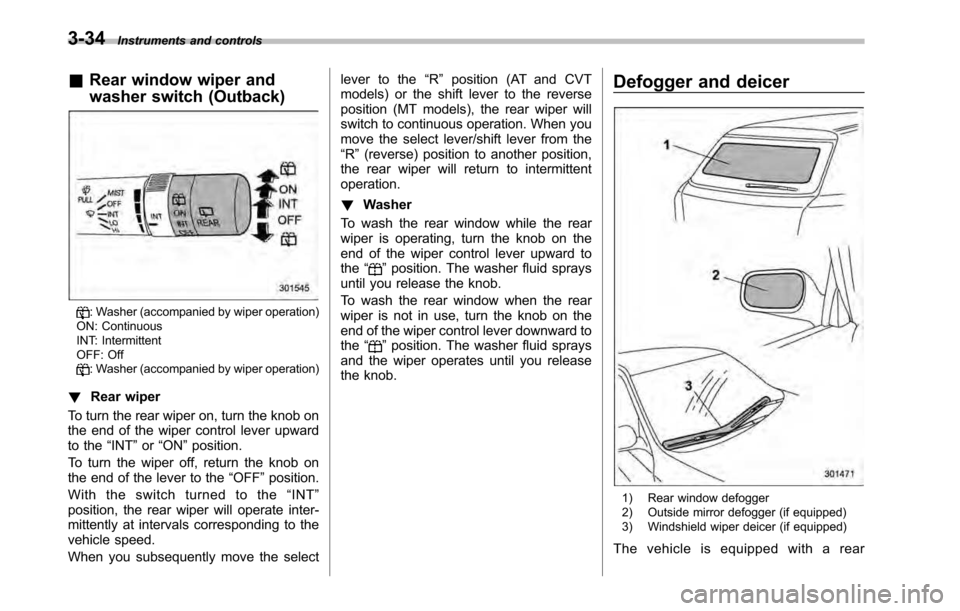
&Rear window wiper and
washer switch (Outback)
: Washer (accompanied by wiper operation)
ON: Continuous
INT: Intermittent
OFF: Off
: Washer (accompanied by wiper operation)
! Rear wiper
To turn the rear wiper on, turn the knob on
the end of the wiper control lever upward
to the “INT ”or “ON ”position.
To turn the wiper off, return the knob on
the end of the lever to the “OFF ”position.
With the switch turned to the “INT ”
position, the rear wiper will operate inter-
mittently at intervals corresponding to the
vehicle speed.
When you subsequently move the select lever to the
“R ” position (AT and CVT
models) or the shift lever to the reverse
position (MT models), the rear wiper will
switch to continuous operation. When you
move the select lever/shift lever from the“ R ”(reverse) position to another position,
the rear wiper will return to intermittentoperation. ! Washer
To wash the rear window while the rear
wiper is operating, turn the knob on the
end of the wiper control lever upward tothe “
”position. The washer fluid sprays
until you release the knob.
To wash the rear window when the rear
wiper is not in use, turn the knob on the
end of the wiper control lever downward tothe “
”position. The washer fluid sprays
and the wiper operates until you release
the knob. Defogger and deicer
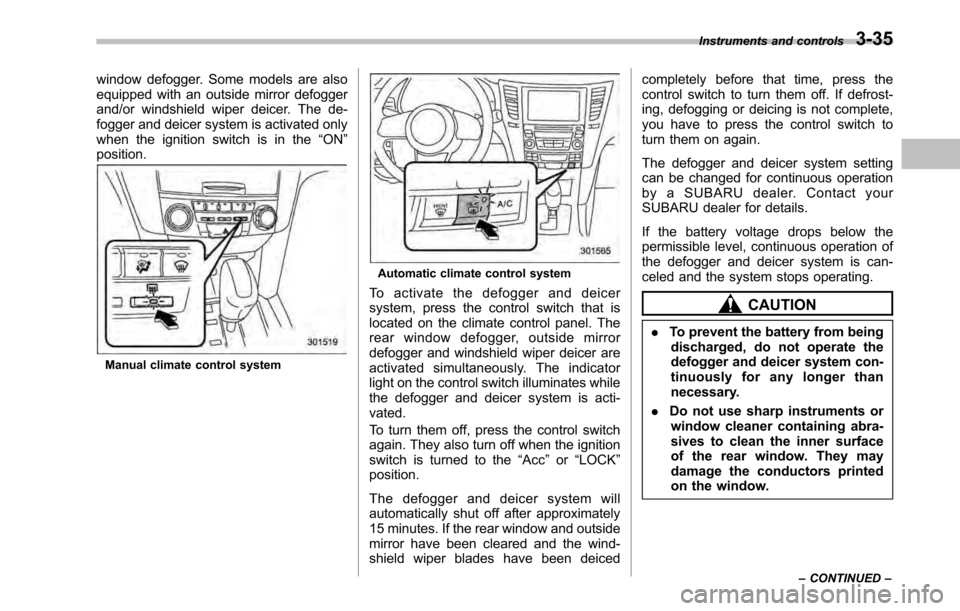
1) Rear window defogger
2) Outside mirror defogger (if equipped)
3) Windshield wiper deicer (if equipped)
The vehicle is equipped with a rear
Page 153 of 448
window defogger. Some models are also
equipped with an outside mirror defogger
and/or windshield wiper deicer. The de-
fogger and deicer system is activated only
when the ignition switch is in the“ON ”
position.
Manual climate control system
Automatic climate control system
To activate the defogger and deicer
system, press the control switch that is
located on the climate control panel. The
rear window defogger, outside mirror
defogger and windshield wiper deicer are
activated simultaneously. The indicator
light on the control switch illuminates while
the defogger and deicer system is acti-vated.
To turn them off, press the control switch
again. They also turn off when the ignition
switch is turned to the “Acc ”or “LOCK ”
position.
The defogger and deicer system will
automatically shut off after approximately
15 minutes. If the rear window and outside
mirror have been cleared and the wind-
shield wiper blades have been deiced completely before that time, press the
control switch to turn them off. If defrost-
ing, defogging or deicing is not complete,
you have to press the control switch to
turn them on again.
The defogger and deicer system setting
can be changed for continuous operation
by a SUBARU dealer. Contact your
SUBARU dealer for details.
If the battery voltage drops below the
permissible level, continuous operation of
the defogger and deicer system is can-
celed and the system stops operating.
CAUTION
. To prevent the battery from being
discharged, do not operate the
defogger and deicer system con-
tinuously for any longer than
necessary.
. Do not use sharp instruments or
window cleaner containing abra-
sives to clean the inner surface
of the rear window. They may
damage the conductors printed
on the window. Instruments and controls
3-35
– CONTINUED –
Page 154 of 448
3-36Instruments and controls
NOTE .Turn on the defogger and deicer
system if the wipers are frozen to the windshield.. If the windshield is covered with
snow, remove the snow so that the
windshield wiper deicer works effec-
tively.. While the defogger and deicer sys-
tem is in the continuous operation
mode, if the vehicle speed remains at
9mph(15km/h)orlowerfor15
minutes, the windshield wiper deicer
automatically stops operating, though
the rear window defogger and outside
mirror defogger maintain continuous
operation in this condition. Mirrors
Always check that the inside and outside
mirrors are properly adjusted before you
start driving. &
Inside mirror
The inside mirror has a day and night
position. Pull the tab at the bottom of the
mirror toward you for the night position.
Push it away for the day position. The
night position reduces glare from head-lights. &
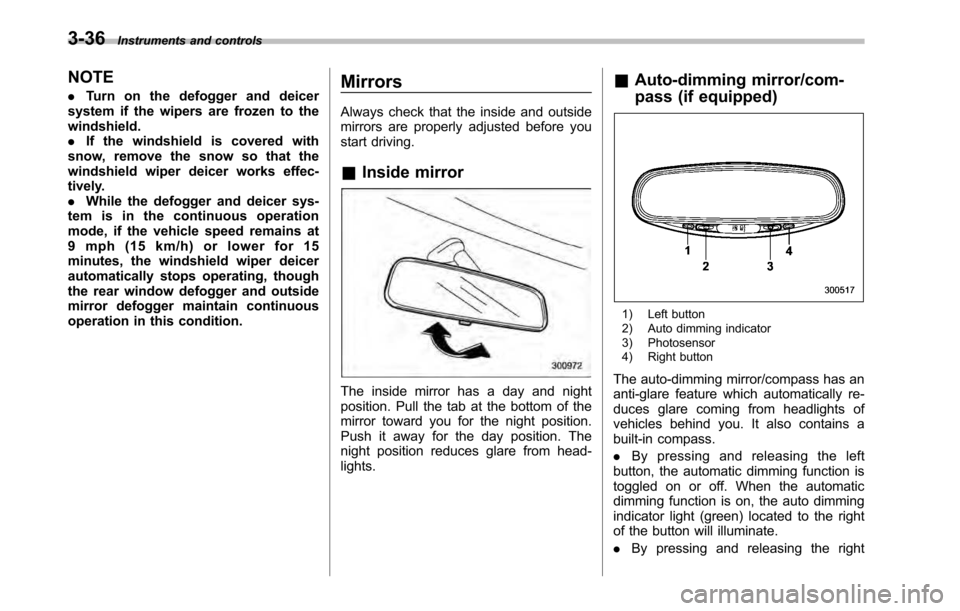
Auto-dimming mirror/com-
pass (if equipped)
1) Left button
2) Auto dimming indicator
3) Photosensor
4) Right button
The auto-dimming mirror/compass has an
anti-glare feature which automatically re-
duces glare coming from headlights of
vehicles behind you. It also contains a
built-in compass. . By pressing and releasing the left
button, the automatic dimming function is
toggled on or off. When the automatic
dimming function is on, the auto dimming
indicator light (green) located to the right
of the button will illuminate. . By pressing and releasing the right
Page 155 of 448

button, the compass display is toggled on
or off. When the compass is on, an
illuminated compass reading will appear
in the lower part of the mirror.
Even with the mirror in anti-glare mode,
the mirror surface turns bright if the
transmission is shifted into reverse. This
is to ensure good rearward visibility duringreversing. !Photosensors
The mirror has a photosensor attached on
both the front and back sides. If the glare
from the headlights of vehicles behind you
strikes the mirror, these sensors detect it
and make the reflection surface of the
mirror dimmer to help prevent you from
being blinded. For this reason, use care
not to cover the sensors with stickers, or other similar items. Periodically wipe the
sensors clean using a piece of dry soft
cotton cloth or an applicator. !
Compass calibration
1. For optimum calibration, switch off all
nonessential electrical accessories (rear
window defogger, heater/air conditioning
system, spotlight, etc.) and ensure all
doors are shut.
2. Drive to an open, level area away from
large metallic objects or structures and
make certain the ignition switch is in the“ ON ”position.
3. Press and hold the left button for 3
seconds then release, and the compass
will enter the calibration mode. “CAL ”and
direction will be displayed.
4. Drive slowly in a circle until “CAL ”
disappears from the display (approxi-
mately two or three circles). The compass
is now calibrated.
5. Further calibration may be necessary
should outside influences cause the mirror
to read inaccurately. You will know that
this has occurred if your compass begins
to read in only limited directions. Should
you encounter this situation, return to step
one of the above procedure and recali-
brate the mirror. !
Compass zone adjustment
1. The zone setting is factory preset to
Zone 8. Refer to the “Compass calibration
zone ”map attached to the end of this
manual to verify that the compass zone
setting is correct for your geographical location.
2. Press and hold the right button for 3
seconds then release, and the word“ ZONE ”will briefly appear and then the
zone number will be displayed.
3. Press the right-hand button repeatedly
to cycle the display through all possible
zone settings. Stop cycling when the
correct zone setting for your location isdisplayed.
4. Releasing the button for 3 seconds will
exit the zone setting mode. Instruments and controls
3-37
– CONTINUED –
Page 162 of 448

4-4Climate control
Manual climate control system (if equipped) &Control panel1) Fan speed control dial
2) Temperature control dial
3) Air flow control buttons
4) Air conditioner button
5) Air inlet selection button
6) Rear window defogger button (Refer to
“Defogger and deicer ”F 3-34.)
Page 164 of 448
4-6Climate control
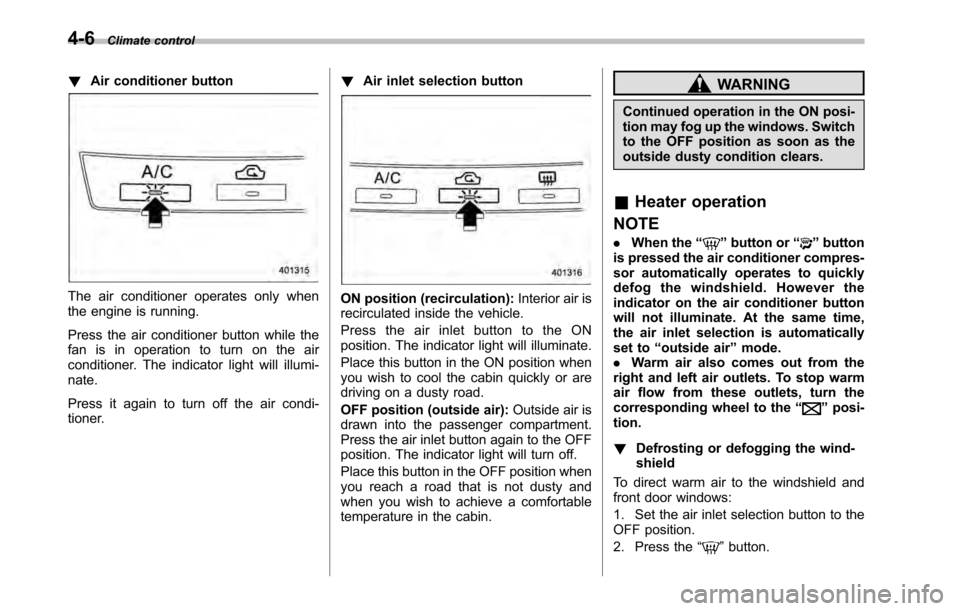
!Air conditioner button
The air conditioner operates only when
the engine is running.
Press the air conditioner button while the
fan is in operation to turn on the air
conditioner. The indicator light will illumi-nate.
Press it again to turn off the air condi-
tioner. !
Air inlet selection buttonON position (recirculation): Interior air is
recirculated inside the vehicle.
Press the air inlet button to the ON
position. The indicator light will illuminate.
Place this button in the ON position when
you wish to cool the cabin quickly or are
driving on a dusty road.
OFF position (outside air): Outside air is
drawn into the passenger compartment.
Press the air inlet button again to the OFF
position. The indicator light will turn off.
Place this button in the OFF position when
you reach a road that is not dusty and
when you wish to achieve a comfortable
temperature in the cabin.
WARNING
Continued operation in the ON posi-
tion may fog up the windows. Switch
to the OFF position as soon as the
outside dusty condition clears.
& Heater operation
NOTE . When the “
”button or “”button
is pressed the air conditioner compres-
sor automatically operates to quickly
defog the windshield. However the
indicator on the air conditioner button
will not illuminate. At the same time,
the air inlet selection is automatically
set to “outside air ”mode.
. Warm air also comes out from the
right and left air outlets. To stop warm
air flow from these outlets, turn the
corresponding wheel to the “
”posi-
tion. ! Defrosting or defogging the wind- shield
To direct warm air to the windshield and
front door windows:
1. Set the air inlet selection button to the
OFF position.
2. Press the “
”button.
Page 165 of 448

3. Turn the temperature control dial all
the way to the right.
4. Set the fan speed control dial to the
highest speed. !Heating and defrosting
To direct warm air toward the floor and the windshield:
1. Set the air inlet selection button to the
OFF position.
2. Press the “
”button.
3. Set the temperature control dial to the
most comfortable level.
4. Set the fan speed control dial to the
desired speed. ! Heating
To direct warm air toward the floor:
1. Set the air inlet selection button to the
OFF position.
2. Press the “
”button.
3. Set the temperature control dial to the
most comfortable level.
4. Set the fan speed control dial to the
desired speed. ! Bi-level heating
This setting allows you to direct air of
different temperatures from the instrument
panel and foot outlets. The air from the foot outlets is slightly warmer than from
the instrument panel outlets.
1. Set the air inlet selection button to the
OFF position.
2. Press the
“
”button.
3. Set the temperature control dial to the
desired temperature level.
4. Set the fan speed control dial to the
desired speed.
Setting the temperature control dial fully
turned to the red area or blue area
decreases the temperature difference
between the air from the instrument panel
outlets and the air from the foot outlets. ! Ventilation
To force outside air through the instrument
panel outlets:
1. Set the air inlet selection button to the
OFF position.
2. Press the “
”button.
3. Set the temperature control dial all the
way left.
4. Set the fan speed control dial to the
desired speed.
When driving on a dusty road, set the air
inlet control button to the ON position.
WARNING
Continued operation in the ON posi-
tion may fog up the windows. Switch
to the OFF position as soon as the
outside dusty condition clears.
& Air conditioner operation
! Cooling or dehumidifying
For cooling and dehumidification of the
passenger compartment, air flows through
the instrument panel outlets:
1. Set the air inlet selection button to the
OFF position.
2. Press the “
”button.
3. Set the air conditioner button to the “ ON ”position.
4. Set the temperature control dial to the
blue side.
5. Set the fan speed control dial at the
desired speed. ! Defrosting or defogging
To direct warm air to the windshield and
front door windows:
1. Press the “
”button.
2. Set the temperature control dial to the
red side.
3. Set the fan speed control dial at the
highest speed. Climate control
4-7
– CONTINUED –
Page 167 of 448

&Control panel1) Temperature control button (driver ’s side)
2) Dual mode button
3) Air flow mode selection button
4) Fan speed control button
5) Temperature control button (front pas- senger ’s side)
6) AUTO button
7) OFF button
8) Air inlet selection button
9) Defroster button
10) Rear window defogger button (Refer to “Defogger and deicer ”F 3-34.)
11) Air conditioner button Climate control
4-9
– CONTINUED –
Page 168 of 448
4-10Climate control
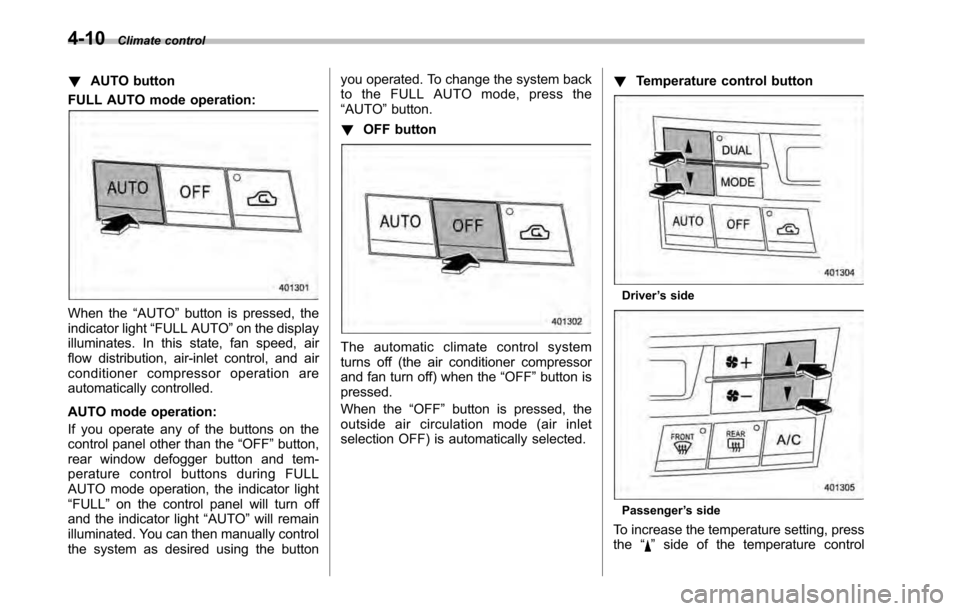
! AUTO button
FULL AUTO mode operation:
When the “AUTO ”button is pressed, the
indicator light “FULL AUTO ”on the display
illuminates. In this state, fan speed, air
flow distribution, air-inlet control, and air
conditioner compressor operation are
automatically controlled.
AUTO mode operation:
If you operate any of the buttons on the
control panel other than the “OFF ”button,
rear window defogger button and tem-
perature control buttons during FULL
AUTO mode operation, the indicator light“ FULL ”on the control panel will turn off
and the indicator light “AUTO ”will remain
illuminated. You can then manually control
the system as desired using the button you operated. To change the system back
to the FULL AUTO mode, press the“
AUTO ”button.
! OFF button
The automatic climate control system
turns off (the air conditioner compressor
and fan turn off) when the “OFF ”button is
pressed.
When the “OFF ”button is pressed, the
outside air circulation mode (air inlet
selection OFF) is automatically selected. !
Temperature control button
Driver ’s side
Passenger ’s side
To increase the temperature setting, press the “
”side of the temperature control
Page 169 of 448
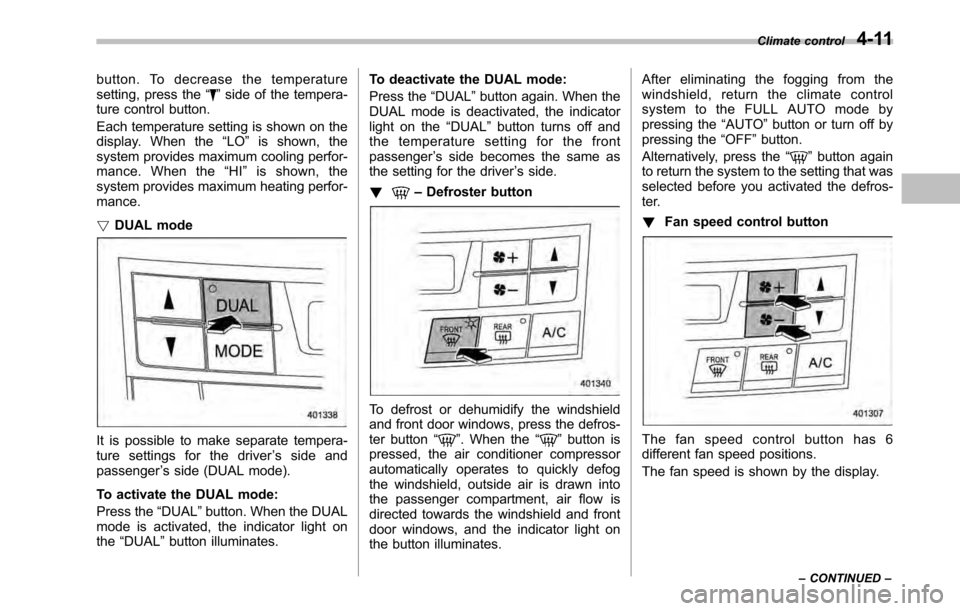
button. To decrease the temperature
setting, press the“”side of the tempera-
ture control button.
Each temperature setting is shown on the
display. When the “LO ”is shown, the
system provides maximum cooling perfor-
mance. When the “HI ” is shown, the
system provides maximum heating perfor-mance. ! DUAL mode
It is possible to make separate tempera-
ture settings for the driver ’s side and
passenger ’s side (DUAL mode).
To activate the DUAL mode:
Press the “DUAL ”button. When the DUAL
mode is activated, the indicator light on the “DUAL ”button illuminates. To deactivate the DUAL mode:
Press the
“DUAL ”button again. When the
DUAL mode is deactivated, the indicator
light on the “DUAL ”button turns off and
the temperature setting for the frontpassenger ’s side becomes the same as
the setting for the driver ’s side.
!
– Defroster button
To defrost or dehumidify the windshield
and front door windows, press the defros-
ter button “
”. When the “”button is
pressed, the air conditioner compressor
automatically operates to quickly defog
the windshield, outside air is drawn into
the passenger compartment, air flow is
directed towards the windshield and front
door windows, and the indicator light on
the button illuminates. After eliminating the fogging from the
windshield, return the climate control
systemtotheFULLAUTOmodeby
pressing the
“AUTO ”button or turn off by
pressing the “OFF ”button.
Alternatively, press the “
”button again
to return the system to the setting that was
selected before you activated the defros-
ter. ! Fan speed control button
The fan speed control button has 6
different fan speed positions.
The fan speed is shown by the display. Climate control
4-11
– CONTINUED –