monitor SUBARU TRIBECA 2009 1.G Service User Guide
[x] Cancel search | Manufacturer: SUBARU, Model Year: 2009, Model line: TRIBECA, Model: SUBARU TRIBECA 2009 1.GPages: 2453, PDF Size: 46.32 MB
Page 60 of 2453
AB(diag)-36
Read Diagnostic Trouble Code (DTC)
AIRBAG SYSTEM (DIAGNOSTICS)
8. Read Diagnostic Trouble
Code (DTC)
A: OPERATION
For details about reading of DTCs, refer to “Subaru
Select Monitor”.
Page 62 of 2453
AB(diag)-38
Clear Memory Mode
AIRBAG SYSTEM (DIAGNOSTICS)
10.Clear Memory Mode
A: OPERATION
Clear the memory in the following steps after the
malfunction is repaired.
For details concerning DTC clear operation, refer to
“Subaru Select Monitor”.
Page 65 of 2453
AB(diag)-41
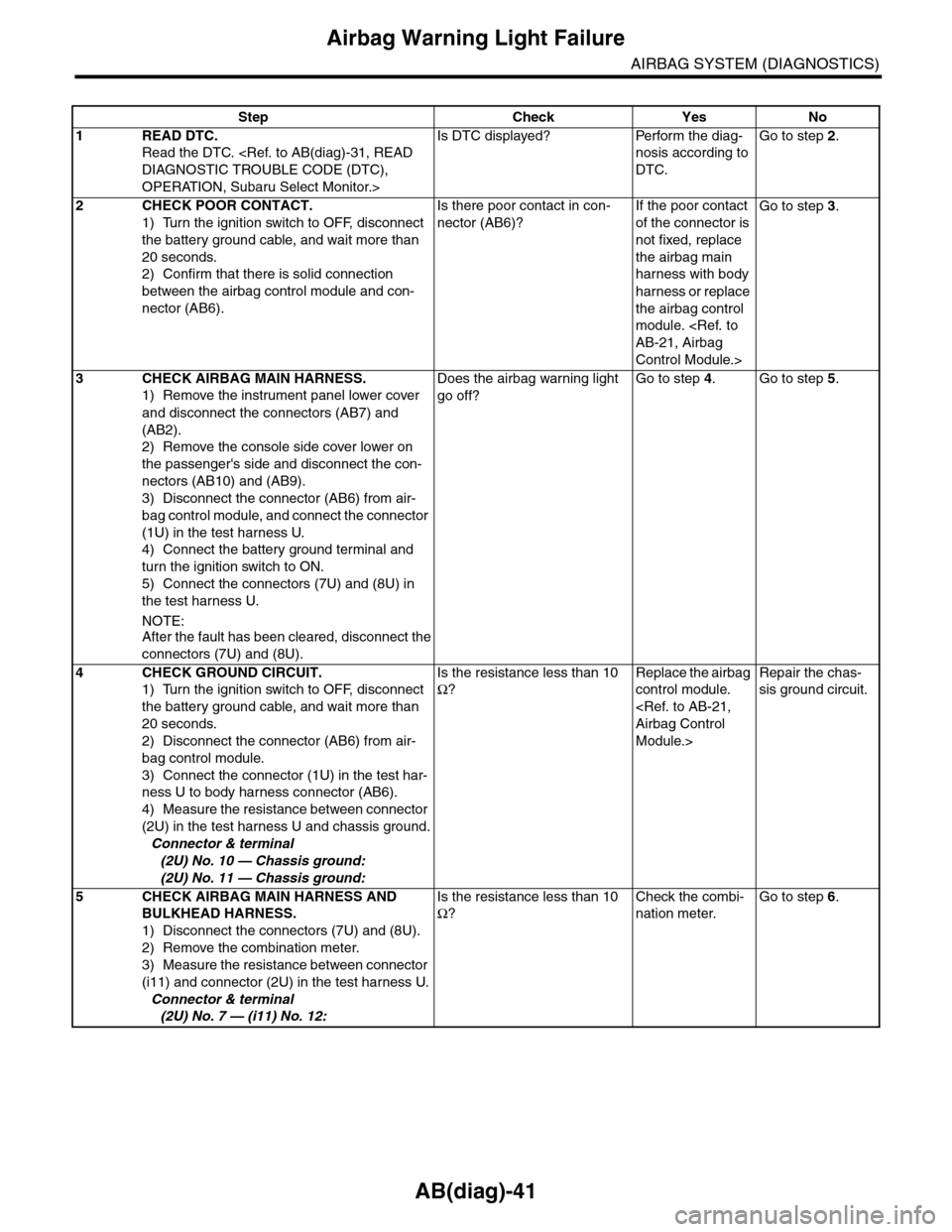
Airbag Warning Light Failure
AIRBAG SYSTEM (DIAGNOSTICS)
Step Check Yes No
1READ DTC.
Read the DTC.
OPERATION, Subaru Select Monitor.>
Is DTC displayed? Perform the diag-
nosis according to
DTC.
Go to step 2.
2CHECK POOR CONTACT.
1) Turn the ignition switch to OFF, disconnect
the battery ground cable, and wait more than
20 seconds.
2) Confirm that there is solid connection
between the airbag control module and con-
nector (AB6).
Is there poor contact in con-
nector (AB6)?
If the poor contact
of the connector is
not fixed, replace
the airbag main
harness with body
harness or replace
the airbag control
module.
Control Module.>
Go to step 3.
3CHECK AIRBAG MAIN HARNESS.
1) Remove the instrument panel lower cover
and disconnect the connectors (AB7) and
(AB2).
2) Remove the console side cover lower on
the passenger's side and disconnect the con-
nectors (AB10) and (AB9).
3) Disconnect the connector (AB6) from air-
bag control module, and connect the connector
(1U) in the test harness U.
4) Connect the battery ground terminal and
turn the ignition switch to ON.
5) Connect the connectors (7U) and (8U) in
the test harness U.
NOTE:After the fault has been cleared, disconnect the
connectors (7U) and (8U).
Does the airbag warning light
go off?
Go to step 4.Go to step 5.
4CHECK GROUND CIRCUIT.
1) Turn the ignition switch to OFF, disconnect
the battery ground cable, and wait more than
20 seconds.
2) Disconnect the connector (AB6) from air-
bag control module.
3) Connect the connector (1U) in the test har-
ness U to body harness connector (AB6).
4) Measure the resistance between connector
(2U) in the test harness U and chassis ground.
Connector & terminal
(2U) No. 10 — Chassis ground:
(2U) No. 11 — Chassis ground:
Is the resistance less than 10
Ω?
Replace the airbag
control module.
Module.>
Repair the chas-
sis ground circuit.
5CHECK AIRBAG MAIN HARNESS AND
BULKHEAD HARNESS.
1) Disconnect the connectors (7U) and (8U).
2) Remove the combination meter.
3) Measure the resistance between connector
(i11) and connector (2U) in the test harness U.
Connector & terminal
(2U) No. 7 — (i11) No. 12:
Is the resistance less than 10
Ω?
Check the combi-
nation meter.
Go to step 6.
Page 68 of 2453
AB(diag)-44
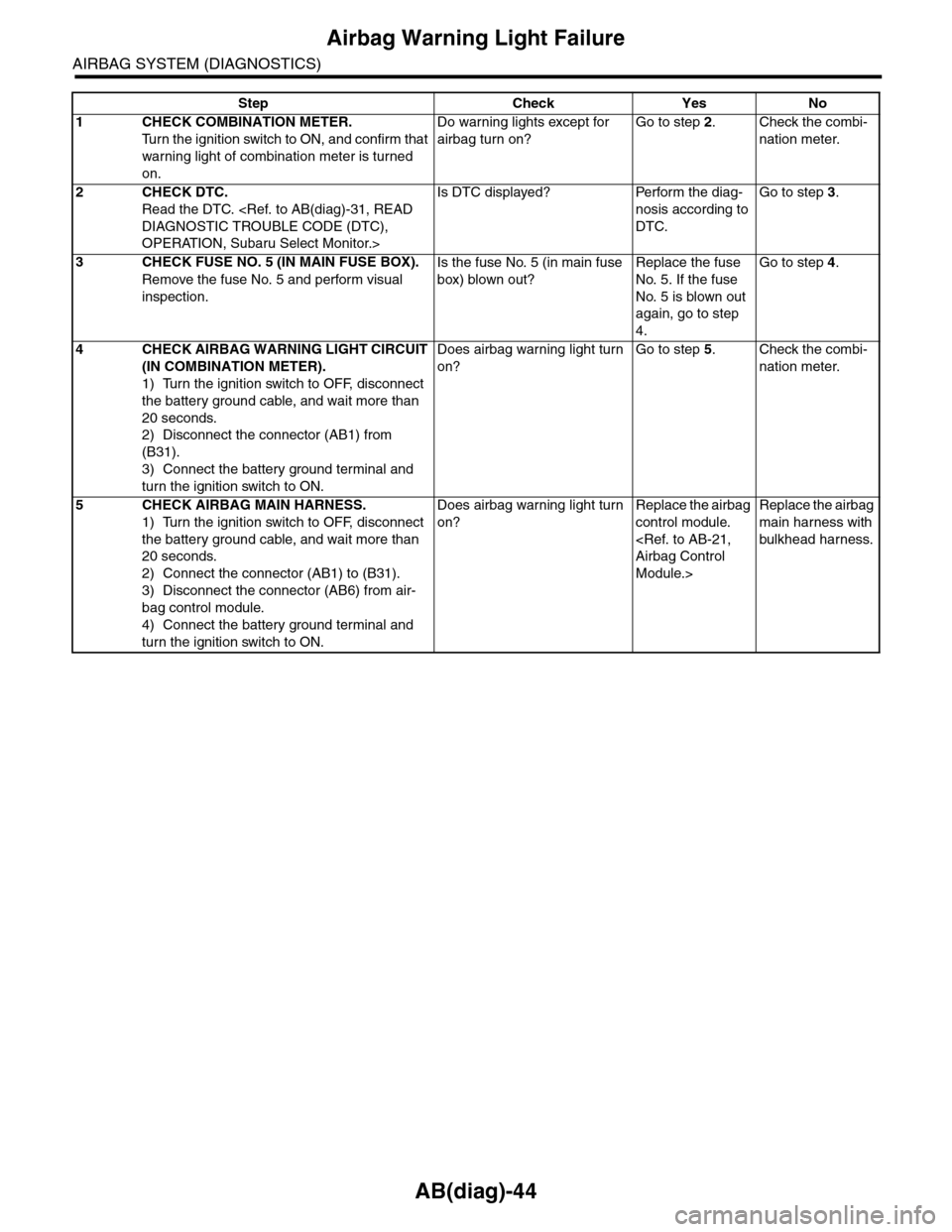
Airbag Warning Light Failure
AIRBAG SYSTEM (DIAGNOSTICS)
Step Check Yes No
1CHECK COMBINATION METER.
Tu r n t h e i g n i t i o n s w i t c h t o O N , a n d c o n f i r m t h a t
warning light of combination meter is turned
on.
Do warning lights except for
airbag turn on?
Go to step 2.Check the combi-
nation meter.
2CHECK DTC.
Read the DTC.
OPERATION, Subaru Select Monitor.>
Is DTC displayed? Perform the diag-
nosis according to
DTC.
Go to step 3.
3CHECK FUSE NO. 5 (IN MAIN FUSE BOX).
Remove the fuse No. 5 and perform visual
inspection.
Is the fuse No. 5 (in main fuse
box) blown out?
Replace the fuse
No. 5. If the fuse
No. 5 is blown out
again, go to step
4.
Go to step 4.
4CHECK AIRBAG WARNING LIGHT CIRCUIT
(IN COMBINATION METER).
1) Turn the ignition switch to OFF, disconnect
the battery ground cable, and wait more than
20 seconds.
2) Disconnect the connector (AB1) from
(B31).
3) Connect the battery ground terminal and
turn the ignition switch to ON.
Does airbag warning light turn
on?
Go to step 5.Check the combi-
nation meter.
5CHECK AIRBAG MAIN HARNESS.
1) Turn the ignition switch to OFF, disconnect
the battery ground cable, and wait more than
20 seconds.
2) Connect the connector (AB1) to (B31).
3) Disconnect the connector (AB6) from air-
bag control module.
4) Connect the battery ground terminal and
turn the ignition switch to ON.
Does airbag warning light turn
on?
Replace the airbag
control module.
Module.>
Replace the airbag
main harness with
bulkhead harness.
Page 85 of 2453
AB(diag)-61
Diagnostic Chart with Trouble Code
AIRBAG SYSTEM (DIAGNOSTICS)
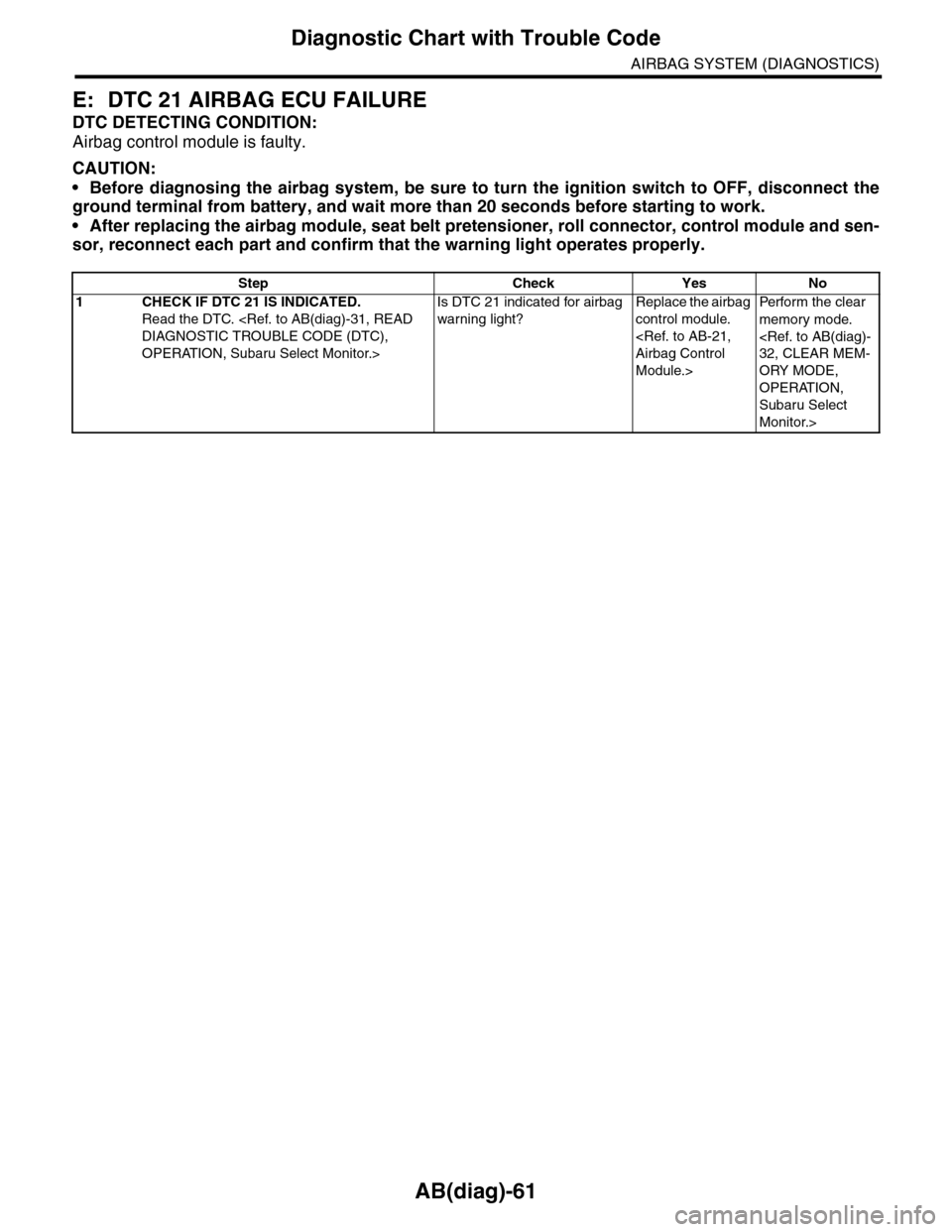
E: DTC 21 AIRBAG ECU FAILURE
DTC DETECTING CONDITION:
Airbag control module is faulty.
CAUTION:
•Before diagnosing the airbag system, be sure to turn the ignition switch to OFF, disconnect the
ground terminal from battery, and wait more than 20 seconds before starting to work.
•After replacing the airbag module, seat belt pretensioner, roll connector, control module and sen-
sor, reconnect each part and confirm that the warning light operates properly.
Step Check Yes No
1CHECK IF DTC 21 IS INDICATED.
Read the DTC.
OPERATION, Subaru Select Monitor.>
Is DTC 21 indicated for airbag
warning light?
Replace the airbag
control module.
Module.>
Per fo r m th e cl ea r
memory mode.
ORY MODE,
OPERATION,
Subaru Select
Monitor.>
Page 169 of 2453
CC(ETC)(diag)-2
Basic Diagnostic Procedure
CRUISE CONTROL SYSTEM (DIAGNOSTICS)
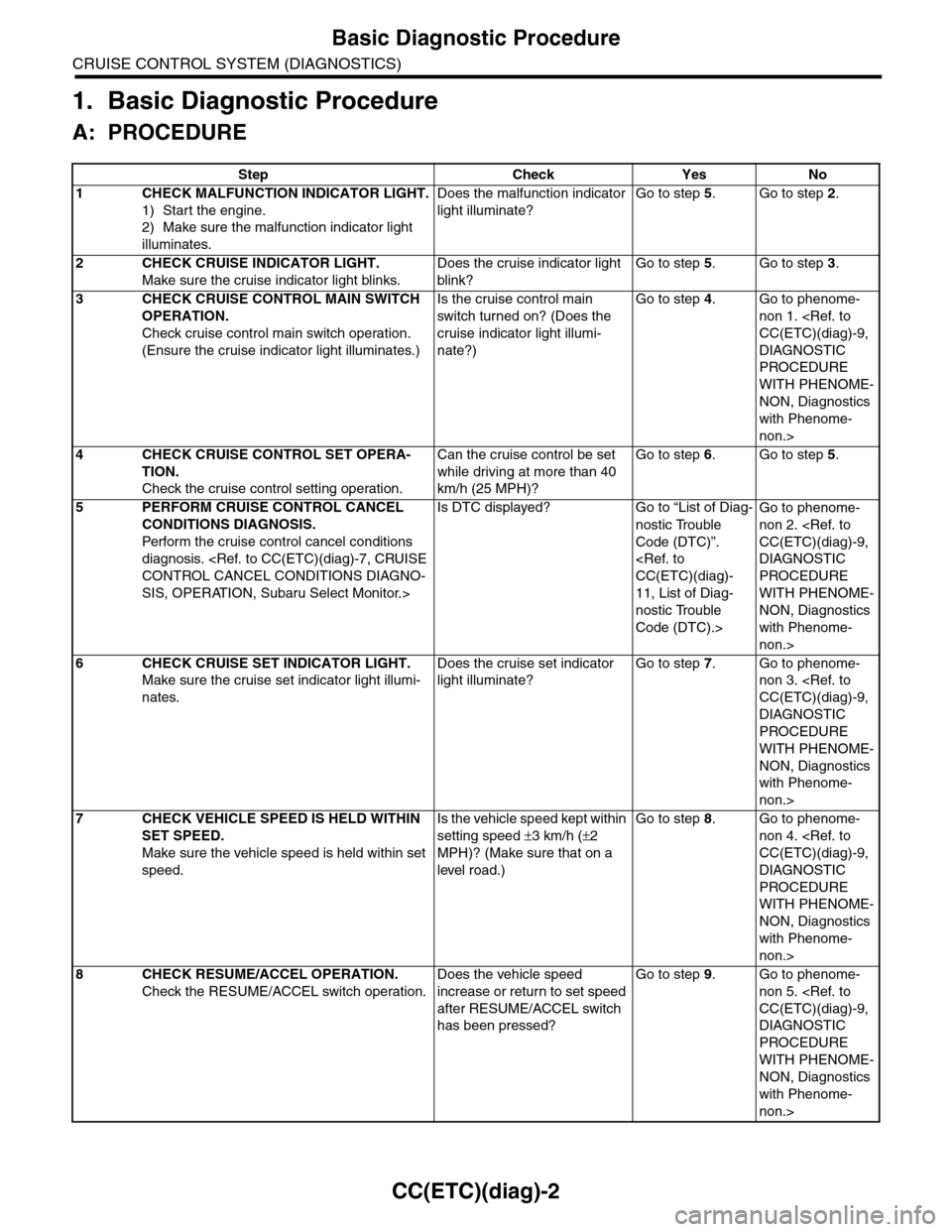
1. Basic Diagnostic Procedure
A: PROCEDURE
Step Check Yes No
1CHECK MALFUNCTION INDICATOR LIGHT.
1) Start the engine.
2) Make sure the malfunction indicator light
illuminates.
Does the malfunction indicator
light illuminate?
Go to step 5.Go to step 2.
2CHECK CRUISE INDICATOR LIGHT.
Make sure the cruise indicator light blinks.
Does the cruise indicator light
blink?
Go to step 5.Go to step 3.
3CHECK CRUISE CONTROL MAIN SWITCH
OPERATION.
Check cruise control main switch operation.
(Ensure the cruise indicator light illuminates.)
Is the cruise control main
switch tur ned on? (Does the
cruise indicator light illumi-
nate?)
Go to step 4.Go to phenome-
non 1.
DIAGNOSTIC
PROCEDURE
WITH PHENOME-
NON, Diagnostics
with Phenome-
non.>
4CHECK CRUISE CONTROL SET OPERA-
TION.
Check the cruise control setting operation.
Can the cruise control be set
while driving at more than 40
km/h (25 MPH)?
Go to step 6.Go to step 5.
5PERFORM CRUISE CONTROL CANCEL
CONDITIONS DIAGNOSIS.
Perfor m the cr uise control cancel conditions
diagnosis.
SIS, OPERATION, Subaru Select Monitor.>
Is DTC displayed? Go to “List of Diag-
nostic Trouble
Code (DTC)”.
11, List of Diag-
nostic Trouble
Code (DTC).>
Go to phenome-
non 2.
DIAGNOSTIC
PROCEDURE
WITH PHENOME-
NON, Diagnostics
with Phenome-
non.>
6CHECK CRUISE SET INDICATOR LIGHT.
Make sure the cruise set indicator light illumi-
nates.
Does the cruise set indicator
light illuminate?
Go to step 7.Go to phenome-
non 3.
DIAGNOSTIC
PROCEDURE
WITH PHENOME-
NON, Diagnostics
with Phenome-
non.>
7CHECK VEHICLE SPEED IS HELD WITHIN
SET SPEED.
Make sure the vehicle speed is held within set
speed.
Is the vehicle speed kept within
setting speed ±3 km/h (±2
MPH)? (Make sure that on a
level road.)
Go to step 8.Go to phenome-
non 4.
DIAGNOSTIC
PROCEDURE
WITH PHENOME-
NON, Diagnostics
with Phenome-
non.>
8CHECK RESUME/ACCEL OPERATION.
Check the RESUME/ACCEL switch operation.
Does the vehicle speed
increase or return to set speed
after RESUME/ACCEL switch
has been pressed?
Go to step 9.Go to phenome-
non 5.
DIAGNOSTIC
PROCEDURE
WITH PHENOME-
NON, Diagnostics
with Phenome-
non.>
Page 171 of 2453
CC(ETC)(diag)-4
General Description
CRUISE CONTROL SYSTEM (DIAGNOSTICS)
2. General Description
A: CAUTION
Airbag system wiring harness is routed near the cruise control command switch.
CAUTION:
•All airbag system wiring harnesses and connectors are colored yellow. Do not use electrical test
equipment on these circuits.
•Be careful not to damage the airbag system wiring harness when servicing the cruise control com-
mand switch.
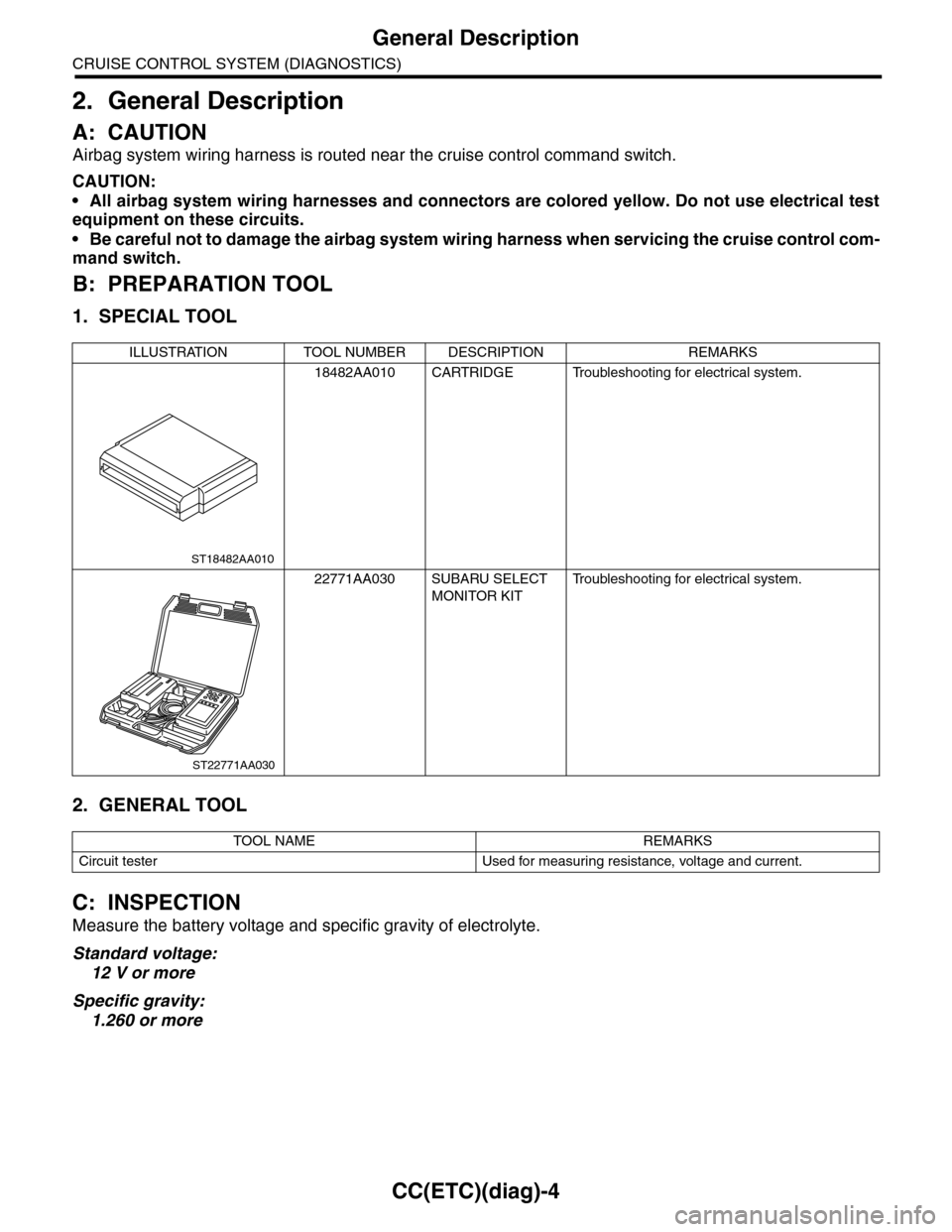
B: PREPARATION TOOL
1. SPECIAL TOOL
2. GENERAL TOOL
C: INSPECTION
Measure the battery voltage and specific gravity of electrolyte.
Standard voltage:
12 V or more
Specific gravity:
1.260 or more
ILLUSTRATION TOOL NUMBER DESCRIPTION REMARKS
18482AA010 CARTRIDGE Troubleshooting for electrical system.
22771AA030 SUBARU SELECT
MONITOR KIT
Tr o u b l e s h o o t i n g f o r e l e c t r i c a l s y s t e m .
TOOL NAME REMARKS
Circuit tester Used for measuring resistance, voltage and current.
ST18482AA010
ST22771AA030
Page 174 of 2453
CC(ETC)(diag)-7
Subaru Select Monitor
CRUISE CONTROL SYSTEM (DIAGNOSTICS)
5. Subaru Select Monitor
A: OPERATION
1. GENERAL DESCRIPTION
The on-board diagnosis function of the cruise con-
trol system uses Subaru Select Monitor.
The on-board diagnosis function operates in two
categories, which are used depending on the type
of problems;
1) Cruise Control Cancel Conditions Diagnosis:
(1) This category of diagnosis requires actual
vehicle driving in order to determine the cause,
as when cruise speed is cancelled during driv-
ing although cruise cancel condition is not en-
tered.
(2) Cruise control memory in ECM stores the
cancel condition (Code No.) which occurred
during driving. When there are multiple cancel
conditions (Code No.), they are shown on the
Subaru Select Monitor.
CAUTION:
•The cruise control memory stores not only
the cruise “cancel” which occurred (although
“cancel” operation is not entered by the driver),
but also the “cancel” condition input by the
driver.
•The content of memory is cleared when igni-
tion switch or cruise control main switch is
turned OFF.
2) Real-time Diagnosis:
Real-time diagnosis function is used to determine
whether or not the input signal system is in good or-
der, according to signal emitted from switches, sen-
sors, etc.
(1) Vehicle cannot be driven at cruise speed
when the problem occurs in the cruise control
system or relevant circuits.
(2) Monitor the signal conditions from switches
and sensors.
2. CRUISE CONTROL CANCEL CONDI-
TIONS DIAGNOSIS
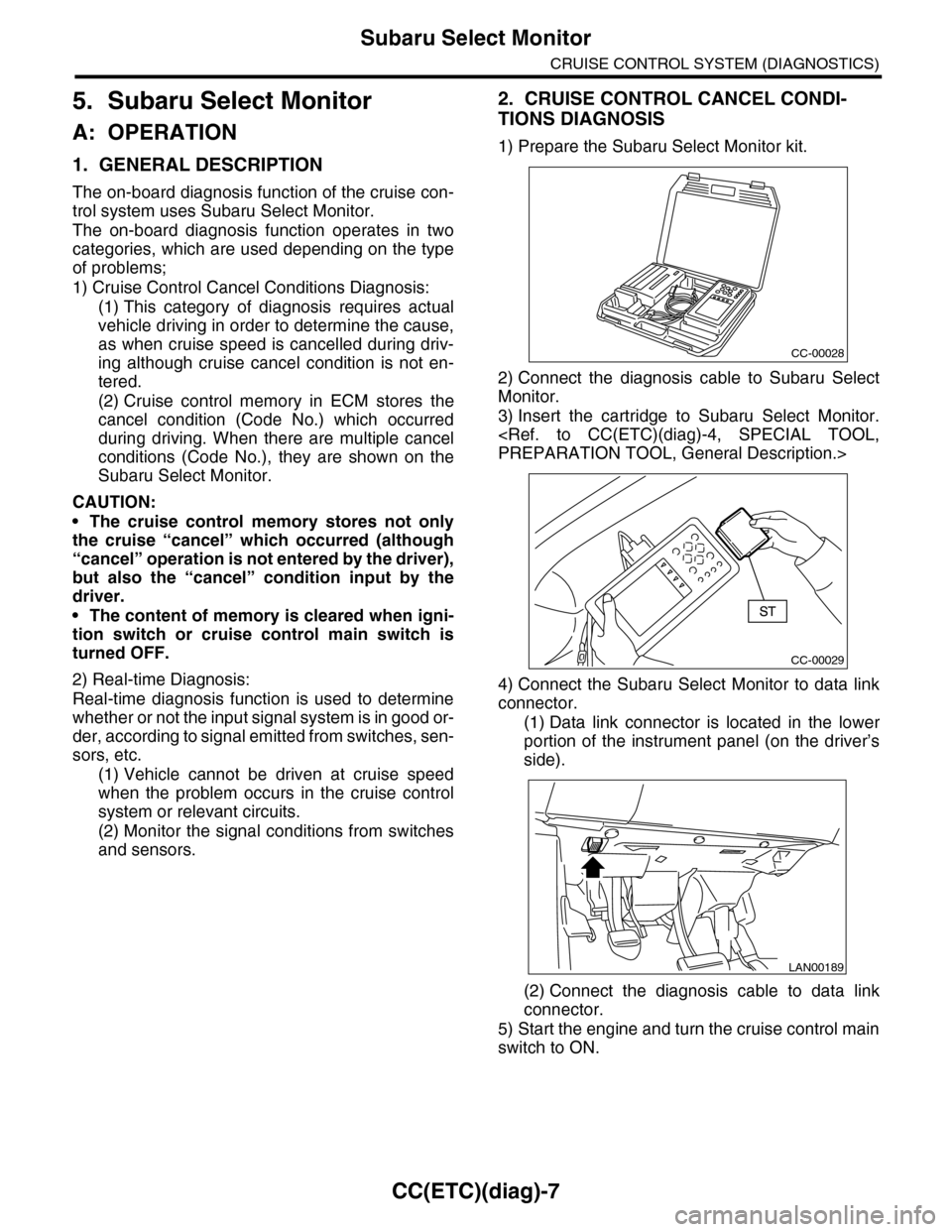
1) Prepare the Subaru Select Monitor kit.
2) Connect the diagnosis cable to Subaru Select
Monitor.
3) Insert the cartridge to Subaru Select Monitor.
4) Connect the Subaru Select Monitor to data link
connector.
(1) Data link connector is located in the lower
portion of the instrument panel (on the driver’s
side).
(2) Connect the diagnosis cable to data link
connector.
5) Start the engine and turn the cruise control main
switch to ON.
CC-00028
CC-00029
LAN00189
Page 175 of 2453
CC(ETC)(diag)-8
Subaru Select Monitor
CRUISE CONTROL SYSTEM (DIAGNOSTICS)
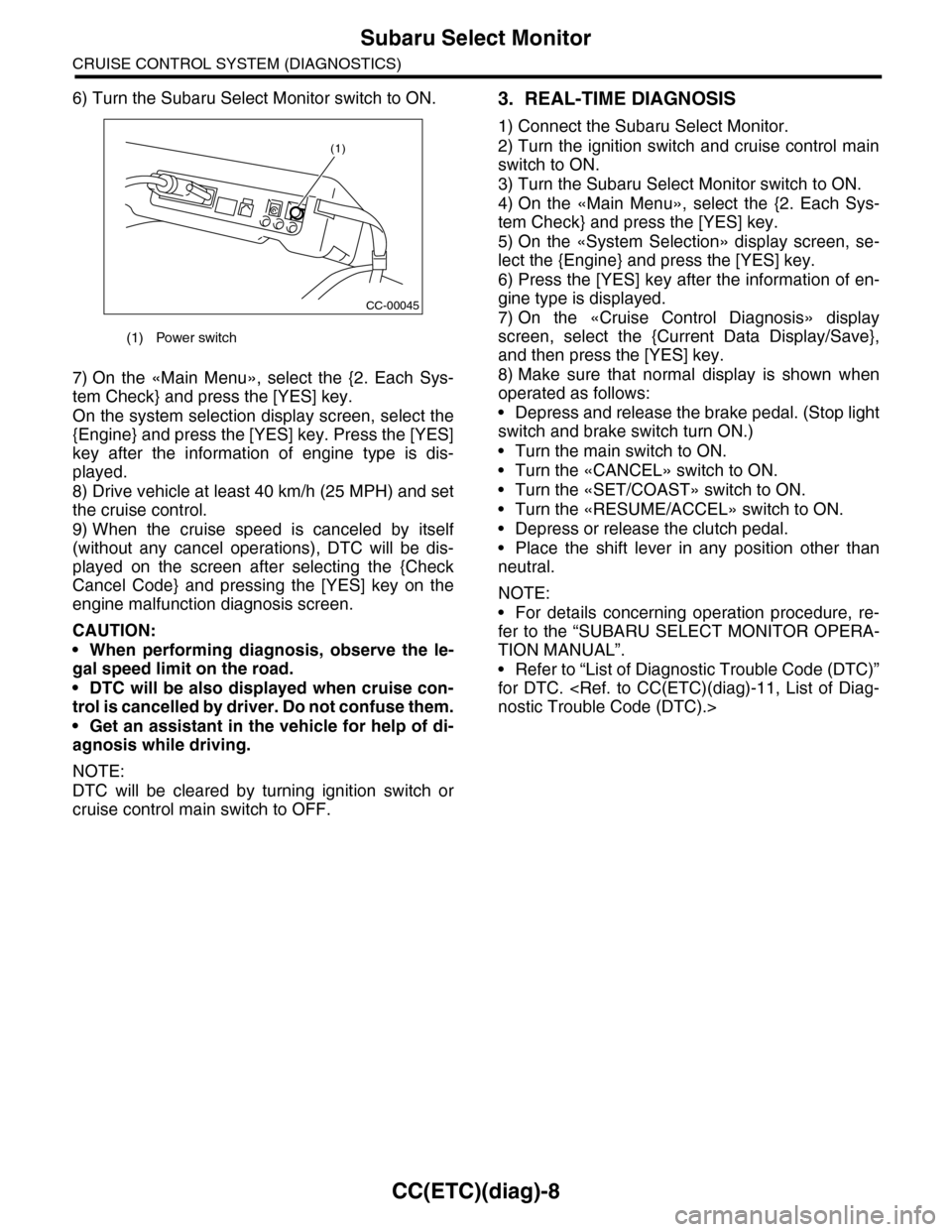
6) Turn the Subaru Select Monitor switch to ON.
7) On the «Main Menu», select the {2. Each Sys-
tem Check} and press the [YES] key.
On the system selection display screen, select the
{Engine} and press the [YES] key. Press the [YES]
key after the information of engine type is dis-
played.
8) Drive vehicle at least 40 km/h (25 MPH) and set
the cruise control.
9) When the cruise speed is canceled by itself
(without any cancel operations), DTC will be dis-
played on the screen after selecting the {Check
Cancel Code} and pressing the [YES] key on the
engine malfunction diagnosis screen.
CAUTION:
•When performing diagnosis, observe the le-
gal speed limit on the road.
•DTC will be also displayed when cruise con-
trol is cancelled by driver. Do not confuse them.
•Get an assistant in the vehicle for help of di-
agnosis while driving.
NOTE:
DTC will be cleared by turning ignition switch or
cruise control main switch to OFF.
3. REAL-TIME DIAGNOSIS
1) Connect the Subaru Select Monitor.
2) Turn the ignition switch and cruise control main
switch to ON.
3) Turn the Subaru Select Monitor switch to ON.
4) On the «Main Menu», select the {2. Each Sys-
tem Check} and press the [YES] key.
5) On the «System Selection» display screen, se-
lect the {Engine} and press the [YES] key.
6) Press the [YES] key after the information of en-
gine type is displayed.
7) On the «Cruise Control Diagnosis» display
screen, select the {Current Data Display/Save},
and then press the [YES] key.
8) Make sure that normal display is shown when
operated as follows:
•Depress and release the brake pedal. (Stop light
switch and brake switch turn ON.)
•Turn the main switch to ON.
•Turn the «CANCEL» switch to ON.
•Turn the «SET/COAST» switch to ON.
•Turn the «RESUME/ACCEL» switch to ON.
•Depress or release the clutch pedal.
•Place the shift lever in any position other than
neutral.
NOTE:
•For details concerning operation procedure, re-
fer to the “SUBARU SELECT MONITOR OPERA-
TION MANUAL”.
•Refer to “List of Diagnostic Trouble Code (DTC)”
for DTC.
(1) Power switch
CC-00045
(1)
Page 185 of 2453
CC(ETC)(diag)-18
Diagnostic Procedure with Diagnostic Trouble Code (DTC)
CRUISE CONTROL SYSTEM (DIAGNOSTICS)
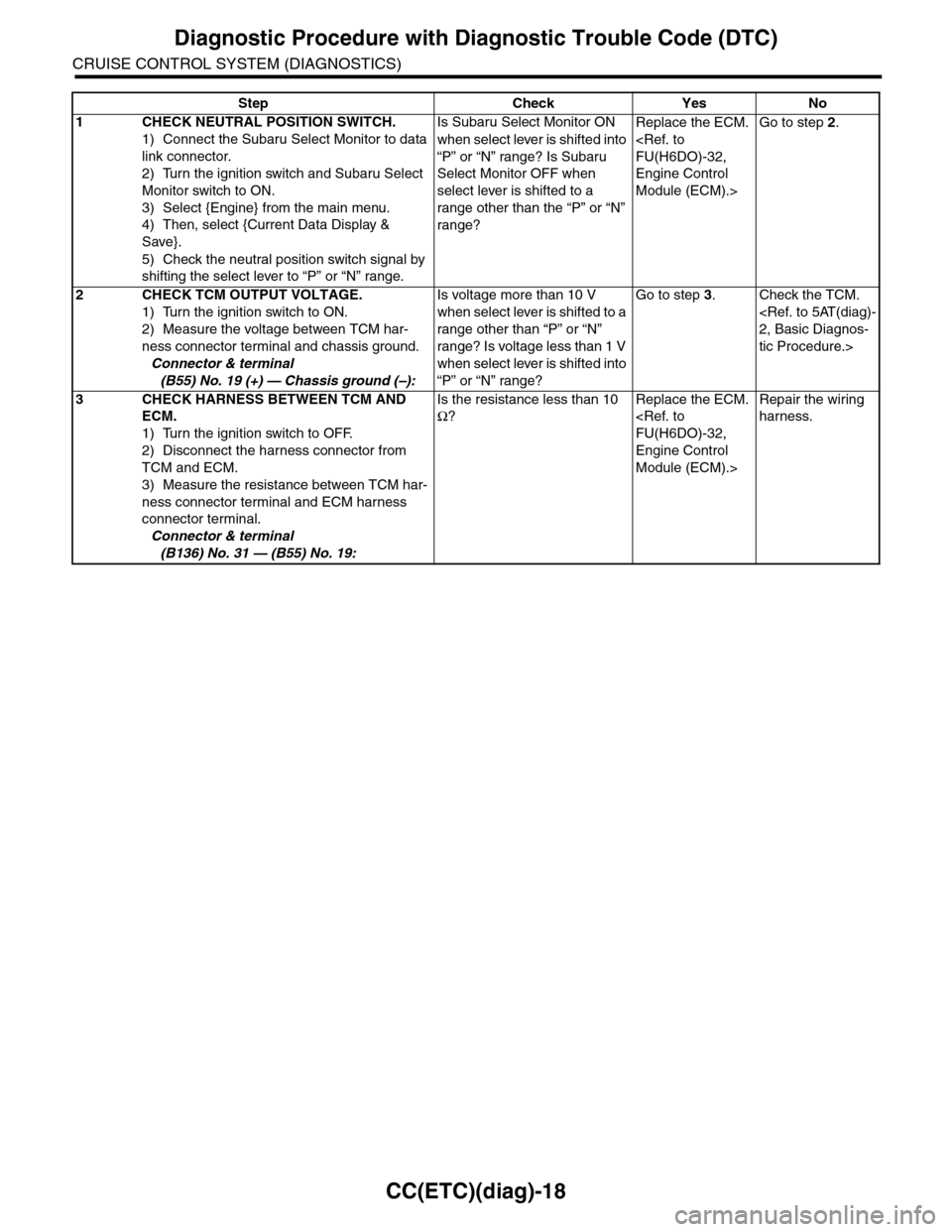
Step Check Yes No
1CHECK NEUTRAL POSITION SWITCH.
1) Connect the Subaru Select Monitor to data
link connector.
2) Turn the ignition switch and Subaru Select
Monitor switch to ON.
3) Select {Engine} from the main menu.
4) Then, select {Current Data Display &
Save}.
5) Check the neutral position switch signal by
shifting the select lever to “P” or “N” range.
Is Subaru Select Monitor ON
when select lever is shifted into
“P” or “N” range? Is Subaru
Select Monitor OFF when
select lever is shifted to a
range other than the “P” or “N”
range?
Replace the ECM.
Engine Control
Module (ECM).>
Go to step 2.
2CHECK TCM OUTPUT VOLTAGE.
1) Turn the ignition switch to ON.
2) Measure the voltage between TCM har-
ness connector terminal and chassis ground.
Connector & terminal
(B55) No. 19 (+) — Chassis ground (–):
Is voltage more than 10 V
when select lever is shifted to a
range other than “P” or “N”
range? Is voltage less than 1 V
when select lever is shifted into
“P” or “N” range?
Go to step 3.Check the TCM.
tic Procedure.>
3CHECK HARNESS BETWEEN TCM AND
ECM.
1) Turn the ignition switch to OFF.
2) Disconnect the harness connector from
TCM and ECM.
3) Measure the resistance between TCM har-
ness connector terminal and ECM harness
connector terminal.
Connector & terminal
(B136) No. 31 — (B55) No. 19:
Is the resistance less than 10
Ω?
Replace the ECM.
Engine Control
Module (ECM).>
Repair the wiring
harness.