maintenance TOYOTA 86 2022 Owners Manual
[x] Cancel search | Manufacturer: TOYOTA, Model Year: 2022, Model line: 86, Model: TOYOTA 86 2022Pages: 449, PDF Size: 8.5 MB
Page 1 of 449

GR 86_U
1
2
3
4
5
6
7
8
9
9
Pictorial indexSearch by illustration
For safety
and securityMake sure to read through them
(Main topics: Child seat, theft deterrent system)
Vehicle status
information and
indicatorsReading driving-related information
(Main topics: Meters, multi-information display)
Before driving
Opening and closing the doors and windows,
adjustment before driving
(Main topics: Keys, doors, seats)
Driving
Operations and advice which are necessary for
driving
(Main topics: Starting engine, refueling)
Interior featuresUsage of the interior features
(Main topics: Air conditioner, storage features)
Maintenance
and careCaring for your vehicle and maintenance
procedures
(Main topics: Interior and exterior, light bulbs)
When trouble
arisesWhat to do in case of malfunction and emergency
(Main topics: Battery discharge, flat tire)
Vehicle
specificationsVehicle specifications, customizable features
(Main topics: Fuel, oil, tire inflation pressure)
For ownersReporting safety defects for U.S. owners, and seat
belt, SRS airbag and headlight aim instructions for
Canadian owners
IndexSearch by symptom
Search alphabetically
Page 3 of 449

3TABLE OF CONTENTS
1
2
3
4
5
6
7
8
9
10
Pre-Collision Braking System......................................... 179
Adaptive Cruise Control ..... 190
Conventional Cruise Control ......................................... 207
Pre-Collision Throttle Manage- ment ................................. 215
Lane Departure Warning .... 219
Lane Sway Warning ........... 221
Lead Vehicle Start Alert ...... 223
List of alert/notification sounds ......................................... 225
EyeSight malfunction and tem- porary stop ....................... 227
4-6. Using other driving systems BSD/RCTA ......................... 231
Reverse Automatic Braking (RAB) system ................... 239
Rear view camera .............. 249
Conventional Cruise Control ......................................... 254
Driving mode select switch ......................................... 257
Hill-start assist control ........ 258
Driving assist systems........ 261
4-7. Driving tips Winter driving tips............... 265
5-1. Using the air conditioning system
Automatic air conditioning sys-
tem ................................... 270
Seat heaters ....................... 276
5-2. Using the interior lights Interior lights list ................. 277
5-3. Using the storage features List of storage features ...... 279
Trunk features .................... 2825-4. Using the other interior fea-
tures
Other interior features ........ 283
6-1. Maintenance and care Cleaning and protecting the vehicle exterior................. 288
Cleaning and protecting the vehicle interior.................. 291
Cleaning and protecting the
Ultrasuede
®area .............. 293
6-2. Maintenance Maintenance requirements......................................... 295
General maintenance......... 296
Emission inspection and mainte- nance (I/M) programs ...... 299
6-3. Do-it-yourself maintenance Do-it-yourself service precau-tions ................................. 300
Hood .................................. 302
Positioning a floor jack ....... 303
Engine compartment .......... 305
Tires ................................... 312
Replacing the tire ............... 319
Tire inflation pressure......... 324
Wheels ............................... 326
Air conditioning filter........... 327
Electronic key battery......... 329
Checking and replacing fuses ......................................... 331
Headlight aim ..................... 333
Light bulbs.......................... 334
7-1. Essential information Emergency flashers ........... 338
5Interior features
6Maintenance and care
7When trouble arises
Page 4 of 449

4TABLE OF CONTENTS
If your vehicle has to be stopped in an emergency .............. 338
If the vehicle is submerged or water on the road is rising......................................... 339
7-2. Steps to take in an emergency If your vehicle needs to be towed......................................... 341
If you think something is wrong ......................................... 346
Fuel pump shut off system ......................................... 347
If a warning light turns on or a warning buzzer sounds .... 348
If a warning message is dis- played .............................. 357
If you have a flat tire ........... 358
If the engine will not start ... 367
If you lose your keys .......... 368
If the fuel filler door cannot be opened ............................. 369
If the electronic key does not operate properly ............... 369
If the vehicle battery is dis- charged ............................ 371
If your vehicle overheats .... 374
If the vehicle becomes stuck ......................................... 376
8-1. Specifications Maintenance data (fuel, oil level, etc.) .................................. 380
Fuel information ................. 388
Tire information .................. 390
8-2. Customization Customizable features ....... 4009-1. For owners
Reporting safety defects for U.S. owners ............................. 408
Reporting safety defects for Canadian owners ............. 409
Seat belt instructions for Cana- dian owners (in French) ... 409
SRS airbag instructions for Canadian owners (in French)
......................................... 411
Headlight aim instructions for Canadian owners (in French)......................................... 422
What to do if... (Troubleshooting) ......................................... 426
Alphabetical Index.............. 429
8Vehicle specifications
9For owners
Index
Page 79 of 449
791-4. Theft deterrent system
1
For safety and security
1-4.Theft deterrent system
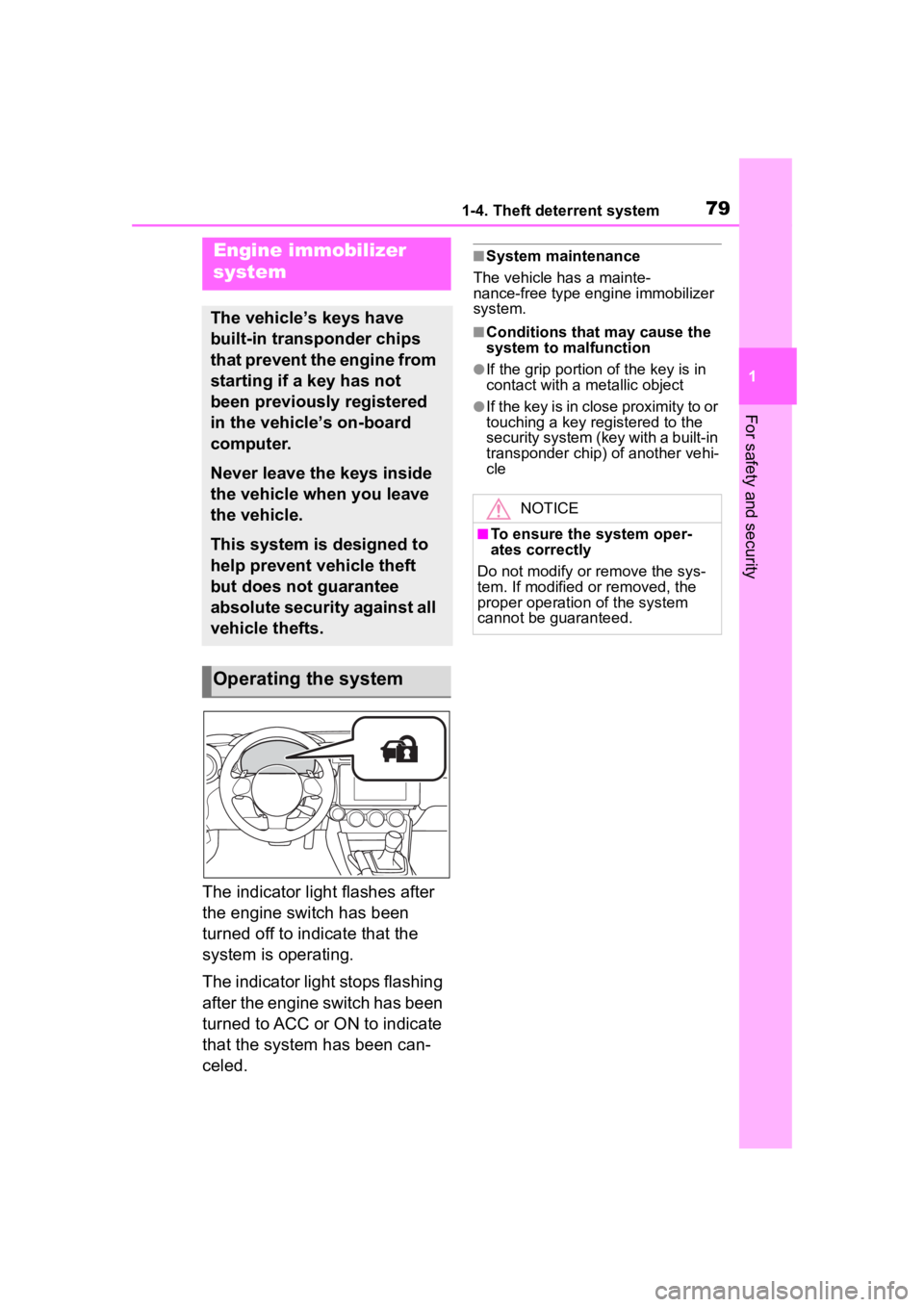
The indicator light flashes after
the engine switch has been
turned off to indicate that the
system is operating.
The indicator light stops flashing
after the engine switch has been
turned to ACC or ON to indicate
that the system has been can-
celed.
■System maintenance
The vehicle has a mainte-
nance-free type engine immobilizer
system.
■Conditions that may cause the
system to malfunction
●If the grip portion of the key is in
contact with a metallic object
●If the key is in close proximity to or
touching a key registered to the
security system (key with a built-in
transponder chip) of another vehi-
cle
Engine immobilizer
system
The vehicle’s keys have
built-in transponder chips
that prevent the engine from
starting if a key has not
been previously registered
in the vehicle’s on-board
computer.
Never leave the keys inside
the vehicle when you leave
the vehicle.
This system is designed to
help prevent vehicle theft
but does not guarantee
absolute security against all
vehicle thefts.
Operating the system
NOTICE
■To ensure the system oper-
ates correctly
Do not modify or remove the sys-
tem. If modified or removed, the
proper operation of the system
cannot be guaranteed.
Page 81 of 449
811-4. Theft deterrent system
1
For safety and security
mately 10 seconds after the
driver’s door has opened.
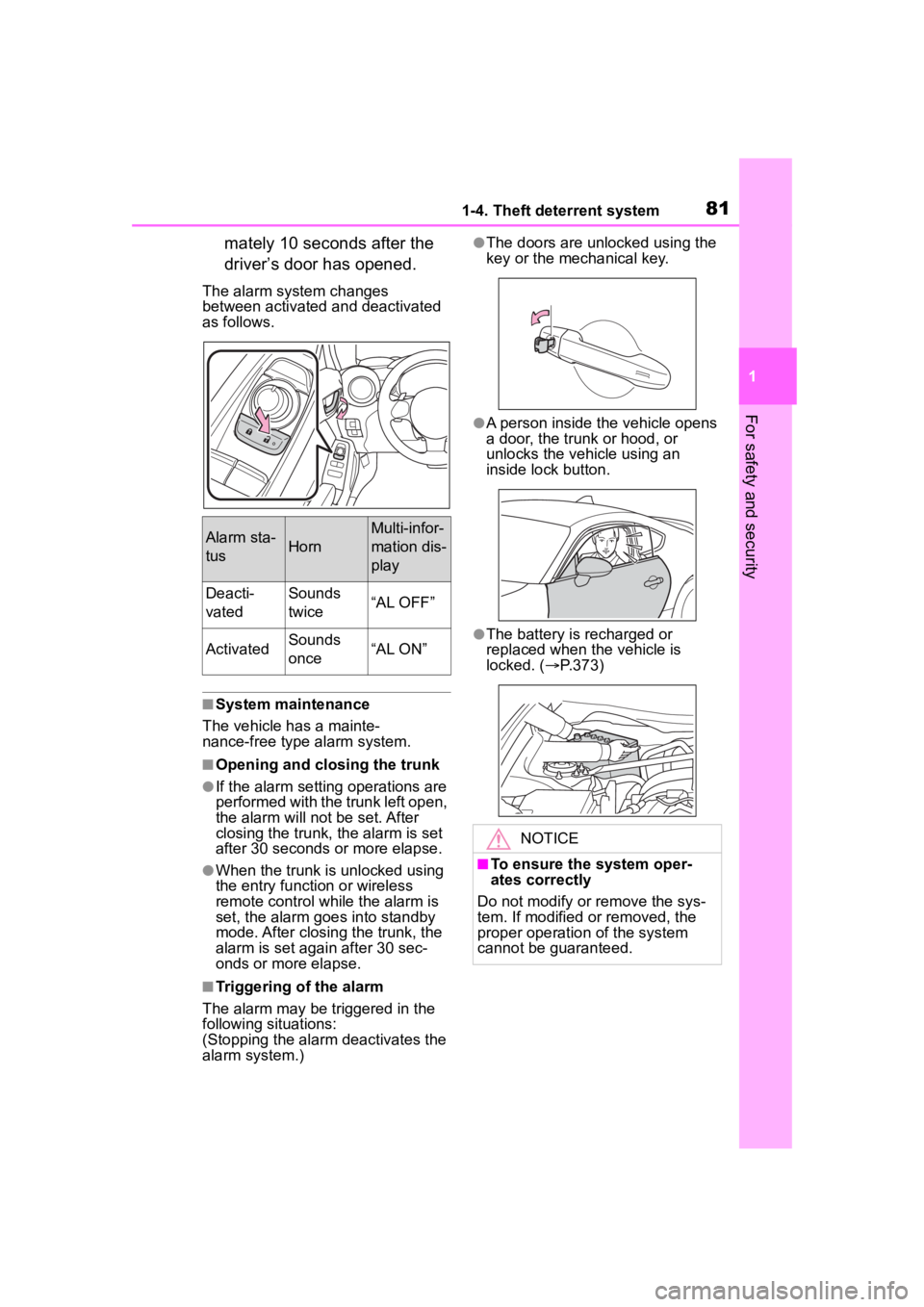
The alarm system changes
between activated and deactivated
as follows.
■System maintenance
The vehicle has a mainte-
nance-free type alarm system.
■Opening and closing the trunk
●If the alarm setting operations are
performed with the trunk left open,
the alarm will not be set. After
closing the trunk, the alarm is set
after 30 seconds or more elapse.
●When the trunk is unlocked using
the entry function or wireless
remote control while the alarm is
set, the alarm goes into standby
mode. After closing the trunk, the
alarm is set again after 30 sec-
onds or more elapse.
■Triggering of the alarm
The alarm may be triggered in the
following situations:
(Stopping the alarm deactivates the
alarm system.)
●The doors are unlocked using the
key or the mechanical key.
●A person inside the vehicle opens
a door, the trunk or hood, or
unlocks the vehicle using an
inside lock button.
●The battery is recharged or
replaced when the vehicle is
locked. ( P.373)
Alarm sta-
tusHorn
Multi-infor-
mation dis-
play
Deacti-
vatedSounds
twice“AL OFF”
ActivatedSounds
once“AL ON”
NOTICE
■To ensure the system oper-
ates correctly
Do not modify or remove the sys-
tem. If modified or removed, the
proper operation of the system
cannot be guaranteed.
Page 190 of 449
1904-5. EyeSight
*: If equipped
Adaptive Cruise Con-
trol*
Adaptive Cruise Control is a
driving support system
intended to allow more com-
fortable driving on express-
ways, freeways and
interstate highways. The
stereo camera detects vehi-
cles in front that are driving
in the same traffic lane, and
your vehicle follows the
vehicle in front (up to the
maximum speed of the set
vehicle speed). While fol-
lowing, your vehicle will
automatically maintain a fol-
lowing distance that corre-
sponds to the speed of the
vehicle in front. The vehicle
is capable of being con-
trolled at a speed between 0
mph (0 km/h) and approxi-
mately 90 mph (145 km/h).
Please remember that you
should not exceed posted
speed limits.
WARNING
●This system does not provide
the driver with an automatic
driving function that handles all
traffic conditions.
●Do not rely excessively on
Adaptive Cruise Control. This
system is not intended to assist
in driving when the driver is not
paying full attention to what is
ahead of him/her due to distrac-
tions or a lack of concentration
while driving, or under condi-
tions of poor visibility. It is not
intended to prevent rear-end
collisions.
Strive for safe driving at all
times. Always maintain a safe
following distance behind the
vehicle in front of you, pay
attention to your surroundings
and the driving conditions, and
operate the brake pedal and
take other actions as necessary.
●When using Adaptive Cruise
Control, always set the speed
according to the speed limit,
traffic flow, road conditions, and
other conditions.
●Before using t he system, per-
form a daily inspection and ver-
ify that there are no
malfunctions of the tires or
brakes.
Refer to the separate “Owner’s
Warranty Informat ion Booklet” or
“Owner’s Manual Supple-
ment/Scheduled Maintenance
Guide”.
●When you do not want to use
Adaptive Cruise Control, be
sure to turn it off by pressing the
“ON-OFF” switch. If the switch
is left on, cruise control may be
accidentally engaged, possibly
resulting in an accident.
●Before using Adaptive Cruise
Control, be sure to fully verify
the safety of the vehicle occu-
pants and the area around the
vehicle. Never operate the
cruise control from outside the
vehicle.
Page 195 of 449

1954-5. EyeSight
4
Driving
WARNING
●There are limits to the situation
judgment capabilities of the
Adaptive Cruise Control system.
Deceleration may not take place
in time in the following situa-
tions. Apply the brake pedal to
decelerate the vehicle if neces-
sary.
• The speed difference with the vehicle in front is too large or
the vehicle in front decelerates
unexpectedly.
• The decelerating vehicle in front unexpectedly sl ows down or
suddenly brakes.
●If the alert/notification sounds
frequently, do not use Adaptive
Cruise Control.
●Even when the following dis-
tance is short, the “Obstacle
Detected” warning may not acti-
vate in the following situations.
• The difference in speed with the vehicle in front is small. The two
vehicles are traveling at almost
the same speed.
• The vehicle in fr ont is traveling
faster than your vehicle. The fol-
lowing distance is gradually
increasing.
• Another vehicle cuts into your lane very close to your vehicle.
• The vehicle in front decelerates suddenly.
• There are repeated uphill and downhill grades.
*: The recognition status of the
lead vehicle using the stereo
camera can be confirmed by the
illumination status of the lead
vehicle indicator. (
P.196)
NOTICE
●After Adaptive Cruise Control
has started, it maintains control
continuously according to the
behavior of the veh icle in front.
When your vehicle comes to a
stop because the vehicle in front
has stopped, the automatic
braking function will be can-
celed immediately after stop-
ping and the veh icle will start
creeping forward gradually (at
the same time 3 intermittent
beeps, 1 short beep and 1 long
beep will sound). Be sure to
depress the brake pedal and
stop the vehicle completely.
Note that the v ehicle is not
maintained at a standstill posi-
tion and will not automatically
start moving from a standstill
position.
●Braking may not be sufficient
depending on the following con-
ditions. Depress the brake
pedal and decelerate as neces-
sary.
• Vehicle conditions (amount of load, number of occupants, etc.)
• Road conditions (grade, slip- periness, shape, bumps, etc.)
• Vehicle maintenance condition (brake systems, tire wear, air
pressure, temporary spare tire
is being used, etc.)
• The brakes are cold. (For exam- ple, just after the engine is
started or the outside tempera-
ture is low.)
• For a short period of time when driving after the engine is
started until the engine has
warmed-up
• The brakes are overheated on downhill grades (braking perfor-
mance may be reduced).
Page 287 of 449

287
6
6
Maintenance and care
Maintenance and care
.6-1. Maintenance and careCleaning and protecting the vehicle exterior .......... 288
Cleaning and protecting the vehicle interior ........... 291
Cleaning and protecting the Ultrasuede
®area ....... 293
6-2. Maintenance Maintenance requirements.................................. 295
General maintenance.. 296
Emission inspection and maintenance (I/M) pro-
grams ........................ 299
6-3. Do-it-yourself mainte- nance
Do-it-yourself service pre- cautions ..................... 300
Hood ........................... 302
Positioning a floor jack .................................. 303
Engine compartment ... 305
Tires ............................ 312
Replacing the tire ........ 319
Tire inflation pressure.. 324
Wheels ......... ...............326
Air conditioning filter .... 327
Electronic key battery.. 329
Checking and replacing fuses.......................... 331
Headlight aim .............. 333Light bulbs ...................
334
Page 288 of 449
2886-1. Maintenance and care
6-1.Maintenance and care
Working from top to bottom,
liberally apply water to the
vehicle body, wheel wells and
underside of the vehicle to
remove any dirt and dust.
Wash the vehicle body using
a sponge or soft cloth, such
as a chamois.
If very dirty, use a car wash
soap that does not contain
abrasives and then thor-
oughly rinse with water.
Wipe away any water.
Wax the vehicle when the
waterproof coating deterio-
rates.
If water does not bead on a clean
surface, apply wax when the vehi-
cle body is cool.
■Automatic car washes
●Fold the mirrors before washing
the vehicle. Start washing from the
front of the vehicle. Make sure to
extend the mirrors before driving.
●Brushes used in automatic car
washes may scratch the vehicle
surface, parts (wheel, etc.) and
harm your vehicle’s paint.
■High pressure car washes
As water may enter the cabin, do
not bring the nozzle tip near the
gaps around the doors or perimeter
of the windows, or spray these
areas continuously.
■When using a car wash
If the door handle becomes wet
while the electronic key is within the
effective range, the door may lock
and unlock repeatedly. In that case,
follow the following correction pro-
cedures to wash the vehicle:
●Place the key in a position 6 ft. (2
m) or more separate from the
vehicle while the vehicle is being
washed. (Take care to ensure that
the key is not stolen.)
●Set the electronic key to bat-
tery-saving mode to disable the
smart key system. ( P. 1 1 1 )
■Wheels and wheel ornaments
●Remove any dirt immediately by
using a neutral detergent.
●Wash detergent off with water
immediately after use.
●To protect the paint from damage,
make sure to obs erve the follow-
ing precautions.
• Do not use acidic, alkaline or abrasive detergent
• Do not use hard brushes
• Do not use detergent on the wheels when they are hot, such
as after driving or parking in hot
weather
■Wheels and wheel ornaments
(vehicles with matte painted
wheels)
As matte painted wheels require dif-
ferent cleaning methods than con-
ventional wheels, be sure to
observe the following. For details,
consult your Toyota dealer.
●Remove dirt using water. If the
wheels are excessively dirty, use
a sponge or soft cloth dampened
with a diluted neutral detergent to
remove the dirt.
Cleaning and protect-
ing the vehicle exte-
rior
Perform cleaning in a man-
ner appropriate to each
component and its material.
Cleaning instructions
Page 289 of 449
2896-1. Maintenance and care
6
Maintenance and care
●To protect the matte paint from
damage, make sure to observe
the following precautions.
• Do not scrub or polish the wheels using a brush or dry cloth
• Do not use any wheel coatings or
abrasive detergents
■Brake pads and calipers
Rust may form if the vehicle is
parked with wet brake pads or disc
rotors, causing them to stick. Before
parking the vehicle after it is
washed, drive slow ly and apply the
brakes several times to dry the
parts.
■Bumpers
Do not scrub with abrasive cleaners.
■Plated portions
If dirt cannot be removed, clean the
parts as follows:
●Use a soft cloth dampened with an
approximately 5% solution of neu-
tral detergent and water to clean
the dirt off.
●Wipe the surface with a dry, soft
cloth to remove any remaining
moisture.
●To remove oily deposits, use alco-
hol wet wipes or a similar product.
WARNING
■When washing the vehicle
Do not apply water to the inside of
the engine compartment. Doing
so may cause the electrical com-
ponents, etc. to catch fire.
■Precautions regarding the
exhaust pipes
Exhaust gasses cause the
exhaust pipes and rear bumper
diffusers to become quite hot.
When washing the vehicle, be
careful not to touch the pipes and
diffusers until they have cooled
sufficiently, as touching hot
exhaust pipes and rear bumper
diffusers can cause burns.
■Precaution regarding the rear
bumper
If the paint of th e rear bumper is
chipped or scratched, the follow-
ing systems may not function cor-
rectly. If this occurs, consult your
Toyota dealer.
●BSD/RCTA (if equipped)
●RAB (if equipped)
NOTICE
■To prevent paint deteriora-
tion and corrosion on the
body and components (alumi-
num wheels, etc.)
●Wash the vehicle immediately in
the following cases:
• After driving nea r the sea coast
• After driving on salted roads
• If coal tar or tree sap is present on the paint surface
• If dead insects, insect droppings or bird droppings are present on
the paint surface
• After driving in an area contami- nated with soot, oily smoke,
mine dust, iron powder or chem-
ical substances
• If the vehicle becomes heavily soiled with d ust or mud
• If liquids such as benzene and gasoline are spilled on the paint
surface
●If the paint is chipped or
scratched, have it repaired
immediately.
●To prevent the wheels from cor-
roding, remove any dirt and
store in a place with low humid-
ity when storing the wheels.